INTERACTIVE TECHNOLOGIES IN
LIBRARY INSTRUCTION:
USING TECHNOLOGY AND ACTIVE
LEARNING TO ENGAGE STUDENTS AND
PROMOTE INFORMATION LITERACY
OUTCOMES
                             Anthony Holderied
                            Reference Librarian
                   Alamance Community College
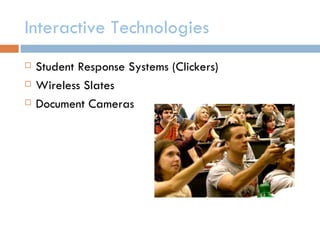
Interactive Technologies
   Student Response Systems (Clickers)
   Wireless Slates
   Document Cameras
Previous studies indicate:

   Clickers = increased engagement

   Technology alone does not increase learning

   Shift in pedagogy + technology = success (West,
    2005)

Technology and Library Instruction
What is Active Learning?
   Active Learning is a pedagogical approach to learning
    derived from Constructivism

   Can be referred to as problem-based learning,
    experiential learning, discovery learning, or cooperative
    learning

   Emphasis on students’ involvement in their own learning
    process (learner centered)

   Accommodates a variety of learning styles
What is Active Learning?
Active learning with clickers

            3 Key Active Learning Characteristics

   Actively engage students over the course of entire class
    period (anonymous participation)

   Gauge level of understanding for the content being
    presented

   Provide prompt feedback to student responses and
    questions
Clickers in our classroom…
                      ENG 1060 Research Experiment

   Aimed to determine any increase in learning outcomes

   Seven classes using clickers vs. eight classes using traditional teaching
    methods

   Learning outcomes gauged by pre-test/post-test

   Affective learning outcomes via open-ended/likert

   Results showed differences in both cognitive and affective learning
Clickers in our classroom…

                  Learning Objectives

ACRL Information Literacy Standards:
-1.2.b, 1.2.d
-2.1.d, 2.2.b, 2.2.d, 2.4.c, 2.5
-3.7, 3.7.a, 3.7.b, 3.7.c


Which essentially means…
Clickers in our classroom…

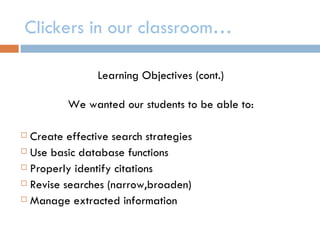
                Learning Objectives (cont.)

         We wanted our students to be able to:

 Create effective search strategies
 Use basic database functions

 Properly identify citations

 Revise searches (narrow,broaden)

 Manage extracted information
Clickers in our classroom…

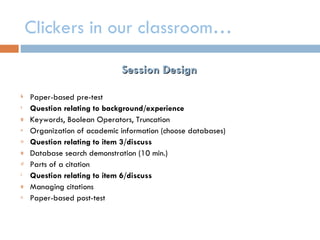
                             Session Design

k   Paper-based pre-test
t   Question relating to background/experience
g   Keywords, Boolean Operators, Truncation
n   Organization of academic information (choose databases)
a   Question relating to item 3/discuss
g   Database search demonstration (10 min.)
d   Parts of a citation
i   Question relating to item 6/discuss
g   Managing citations
n   Paper-based post-test
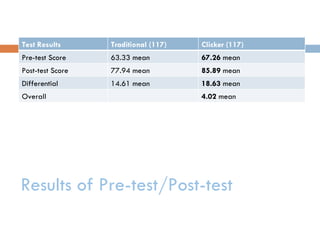
Test Results      Traditional (117)   Clicker (117)
Pre-test Score    63.33 mean          67.26 mean
Post-test Score   77.94 mean          85.89 mean
Differential      14.61 mean          18.63 mean
Overall                               4.02 mean


Results of Pre-test/Post-test
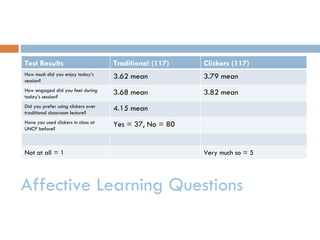
Test Results                         Traditional (117)   Clickers (117)
How much did you enjoy today’s
session?
                                     3.62 mean           3.79 mean
How engaged did you feel during
today’s session?
                                     3.68 mean           3.82 mean
Did you prefer using clickers over
traditional classroom lecture?
                                     4.15 mean
Have you used clickers in class at
UNCP before?
                                     Yes = 37, No = 80


Not at all = 1                                           Very much so = 5


Affective Learning Questions
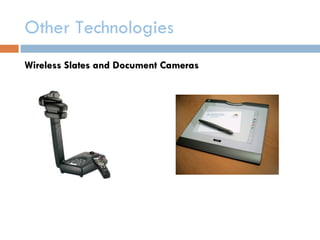
Other Technologies
Wireless Slates and Document Cameras
Use in the classroom
Management 3090

   Familiarize students with differences between
    trade/scholarly
   Promote in-class participation
   Stimulate group interaction
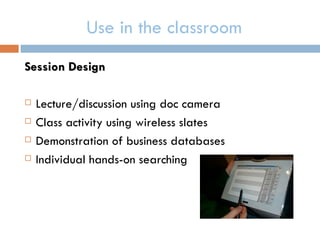
Use in the classroom
Session Design

   Lecture/discussion using doc camera
   Class activity using wireless slates
   Demonstration of business databases
   Individual hands-on searching
Use in the classroom (cont.)
Assessment

Five question survey
 Characteristics (92%)

 Audience (67%)

 Citation information (50%)

 Appropriate database (83%)

 Confidence (All but one)
Thank you!
Questions about…

Active learning?
Technologies?

Interactive Technologies in Library Instruction: Using Technology and Active Learning to Engage Students and Promote Information Literacy Outcomes

  • 1.
    INTERACTIVE TECHNOLOGIES IN LIBRARYINSTRUCTION: USING TECHNOLOGY AND ACTIVE LEARNING TO ENGAGE STUDENTS AND PROMOTE INFORMATION LITERACY OUTCOMES Anthony Holderied Reference Librarian Alamance Community College
  • 2.
    Interactive Technologies  Student Response Systems (Clickers)  Wireless Slates  Document Cameras
  • 3.
    Previous studies indicate:  Clickers = increased engagement  Technology alone does not increase learning  Shift in pedagogy + technology = success (West, 2005) Technology and Library Instruction
  • 4.
    What is ActiveLearning?  Active Learning is a pedagogical approach to learning derived from Constructivism  Can be referred to as problem-based learning, experiential learning, discovery learning, or cooperative learning  Emphasis on students’ involvement in their own learning process (learner centered)  Accommodates a variety of learning styles
  • 5.
    What is ActiveLearning?
  • 6.
    Active learning withclickers 3 Key Active Learning Characteristics  Actively engage students over the course of entire class period (anonymous participation)  Gauge level of understanding for the content being presented  Provide prompt feedback to student responses and questions
  • 7.
    Clickers in ourclassroom… ENG 1060 Research Experiment  Aimed to determine any increase in learning outcomes  Seven classes using clickers vs. eight classes using traditional teaching methods  Learning outcomes gauged by pre-test/post-test  Affective learning outcomes via open-ended/likert  Results showed differences in both cognitive and affective learning
  • 8.
    Clickers in ourclassroom… Learning Objectives ACRL Information Literacy Standards: -1.2.b, 1.2.d -2.1.d, 2.2.b, 2.2.d, 2.4.c, 2.5 -3.7, 3.7.a, 3.7.b, 3.7.c Which essentially means…
  • 9.
    Clickers in ourclassroom… Learning Objectives (cont.) We wanted our students to be able to:  Create effective search strategies  Use basic database functions  Properly identify citations  Revise searches (narrow,broaden)  Manage extracted information
  • 10.
    Clickers in ourclassroom… Session Design k Paper-based pre-test t Question relating to background/experience g Keywords, Boolean Operators, Truncation n Organization of academic information (choose databases) a Question relating to item 3/discuss g Database search demonstration (10 min.) d Parts of a citation i Question relating to item 6/discuss g Managing citations n Paper-based post-test
  • 11.
    Test Results Traditional (117) Clicker (117) Pre-test Score 63.33 mean 67.26 mean Post-test Score 77.94 mean 85.89 mean Differential 14.61 mean 18.63 mean Overall 4.02 mean Results of Pre-test/Post-test
  • 12.
    Test Results Traditional (117) Clickers (117) How much did you enjoy today’s session? 3.62 mean 3.79 mean How engaged did you feel during today’s session? 3.68 mean 3.82 mean Did you prefer using clickers over traditional classroom lecture? 4.15 mean Have you used clickers in class at UNCP before? Yes = 37, No = 80 Not at all = 1 Very much so = 5 Affective Learning Questions
  • 13.
  • 14.
    Use in theclassroom Management 3090  Familiarize students with differences between trade/scholarly  Promote in-class participation  Stimulate group interaction
  • 15.
    Use in theclassroom Session Design  Lecture/discussion using doc camera  Class activity using wireless slates  Demonstration of business databases  Individual hands-on searching
  • 24.
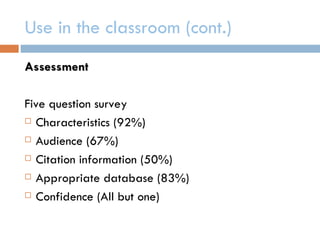
    Use in theclassroom (cont.) Assessment Five question survey  Characteristics (92%)  Audience (67%)  Citation information (50%)  Appropriate database (83%)  Confidence (All but one)
  • 25.
    Thank you! Questions about… Activelearning? Technologies?

Editor's Notes

  • #2 Thank you. The topic of this lightning talk centers around the use of instructional technology and in the context of information literacy instruction sessions and has the overly lengthy title of Interactive Technologies in library instruction: using technology and active learning to engage…This presentation stems from a series of experiments where instruction librarians at UNC-Pembroke decided to employ a variety of instructional technology into our information literacy sessions to see if we could not only engage students in what we were teaching, but also to see if we could possibly increase learning outcomes that we had designed for these sessions.
  • #3 So there were two specific experiments that we conducted using interactive technologies in both freshman and upper level courses. In the first scenario, we used clicker technology which has been around for a while and then in the second we combined the use of wireless slates and a document camera for projecting images.
  • #4 Before setting out do conduct these experiments, we had reviewed a lot of the literature regarding the use of technology and library instruction. What we found is that in almost all cases where clickers were used in the to find that just the use of technology alone layered on top of the typical library instruction session design such as lecture and demonstration does not do anything to improve learning achievement in these sessions. However, when the instructor implements a shift in pedagogy, in other words the way instruction is carried out, such as active learning, increases in learning outcomes may in fact be made. In a few different studies, it’s been shown that technology alone will not promote learning. Technology for the sake of technology will rarely produce learning outcomes. Conversley, West has said that only a combination of a change in pedagogy (such as active learning) with the implementation of the technology can provide any meaningful increase in learning outcomes. So this would actually be the focus of our study, if we could show that the teaming of active learning (class discussion) with interactive technologies (clickers) could actually lead to an increase in information literacy outcomes. A good percentage of the articles available on clicker research only cite the impact that the technology has on affective learning.Most of the research available provides only instances where the technology was either layered on top of traditional methods or the study did not compare clicker groups versus non-clicker groups.
  • #5 Facilitate class discussion, peer-to-peer learning where students teach each other what they have learned, group projects, etc.
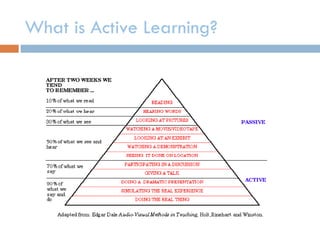
  • #6 This pyramid adopted from Dale’s Audio Visual Methods in Teaching describes many examples of passive versus active types of learning activities. You see that after two weeks since instruction students tend to remember….
  • #7 So one of the things that we decided to do was to incorporate the use of clickers into our instruction sessions for freshman english and to switch to an approach that more resembles an active learning pedagogy. This is a list of some of the active learning characteristics that clickers bring to the classroom.
  • #9 As part of our information literacy program, we designated a set of learning objectives for these freshman english instruction sessions that are derived from the ACRL’ Information Literacy Competency Standards
  • #14 And one of the other experiments that we did involved the use of wireless slates and a document camera. I’ll assume that most of you have knowledge of what document cameras do, but the wireless slates are kind of new. They’re basically like tablets that are wireless and can be circulated around the classroom where you can have students annotating screens, images, and videos projected on a SmartBoard.
  • #15 So what we did was incorporated these technologies into an upper classmen business management course. The three main objectives for the sessions was to familiarize students with the differences between scholarly and trade publications, which was the main focus for the business faculty member. But in addition, we wanted to make these sessions more engaging for the students by