Language and
    Technology
    ELT180e
    Istanbul Bilgi University
    Instructor C.M.Herrington, MAA, MAT


              Adapted from English for Language
1                  and Linguistics by A. Manning
2


Skills and Vocabulary Focus
 Identifying topic      Computer   jargon
  development            Abbreviations and
  within a paragraph
                          acronyms
 Using the internet
  effectively            Discourse and

 Evaluating internet
                          stance markers
  search results         Verb and noun
 Reporting research      suffixes
  findings
                            Adapted from English for Language and
                                          Linguistics by A. Manning
3


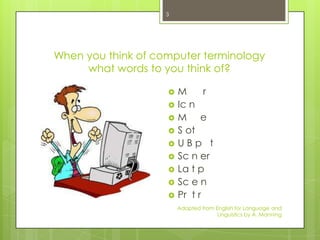
When you think of computer terminology
     what words to you think of?

                       M      r
                       Ic n
                       M e
                       S ot
                       UBp t
                       Sc n er
                       La t p
                       Sc e n
                       Pr t r
                        Adapted from English for Language and
                                      Linguistics by A. Manning
4


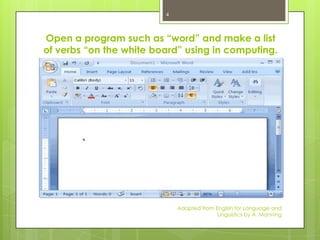
Open a program such as “word” and make a list
of verbs “on the white board” using in computing.


                             Adapted from English for Language and
                                           Linguistics by A. Manning
5


When you do research do you normally use the library
or the internet? What are the advantages and
disadvantages of both? List them on the white board.

Advantages +                Disadvantages -


                                Adapted from English for Language and
                                              Linguistics by A. Manning
6


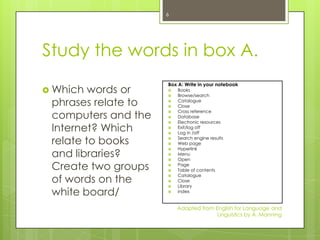
Study the words in box A.
                     Box A: Write in your notebook
 Which  words or    
                     
                         Books
                         Browse/search
 phrases relate to   
                     
                         Catalogue
                         Close

 computers and the
                        Cross reference
                        Database
                         Electronic resources
 Internet? Which
                     
                        Exit/log off
                        Log in /off

 relate to books     
                     
                         Search engine results
                         Web page
                         Hyperlink
 and libraries?
                     
                        Menu
                        Open
 Create two groups   
                     
                         Page
                         Table of contents

 of words on the
                        Catalogue
                        Close
                         Library
 white board/
                     
                        index


                         Adapted from English for Language and
                                       Linguistics by A. Manning
7


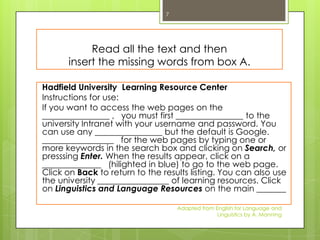
           Read all the text and then
      insert the missing words from box A.

Hadfield University Learning Resource Center
Instructions for use:
If you want to access the web pages on the
________________ , you must first ________________ to the
university Intranet with your username and password. You
can use any ________________ but the default is Google.
_________________ for the web pages by typing one or
more keywords in the search box and clicking on Search, or
presssing Enter. When the results appear, click on a
______________ (hilighted in blue) to go to the web page.
Click on Back to return to the results listing. You can also use
the university _________________ of learning resources. Click
on Linguistics and Language Resources on the main _______

                                    Adapted from English for Language and
                                                  Linguistics by A. Manning
8


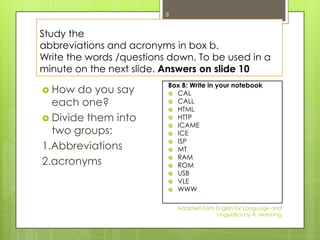
Study the
abbreviations and acronyms in box b.
Write the words /questions down. To be used in a
minute on the next slide. Answers on slide 10
                          Box B: Write in your notebook
 How  do you say          CAL

  each one?                CALL
                           HTML
 Divide them into         HTTP
                           ICAME
  two groups:              ICE
                           ISP
1.Abbreviations            MT
                           RAM
2.acronyms                 ROM
                           USB
                           VLE
                           WWW


                              Adapted from English for Language and
                                            Linguistics by A. Manning
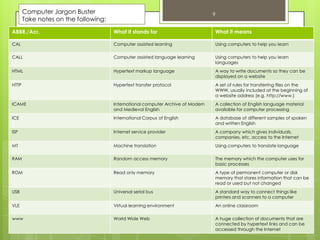
Computer Jargon Buster                                                     9
       Take notes on the following:
ABBR./Acr.                            What it stands for                           What it means

CAL                                   Computer assisted learning                   Using computers to help you learn

CALL                                  Computer assisted language learning          Using computers to help you learn
                                                                                   languages
HTML                                  Hypertext markup language                    A way to write documents so they can be
                                                                                   displayed on a website
HTTP                                  Hypertext transfer protocol                  A set of rules for transferring files on the
                                                                                   WWW, usually included at the beginning of
                                                                                   a website address (e.g. http://www.)
ICAME                                 International computer Archive of Modern     A collection of English language material
                                      and Medieval English                         available for computer processing
ICE                                   International Corpus of English              A database of different samples of spoken
                                                                                   and written English
ISP                                   Internet service provider                    A company which gives individuals,
                                                                                   companies, etc. access to the Internet
MT                                    Machine translation                          Using computers to translate language

RAM                                   Random access memory                         The memory which the computer uses for
                                                                                   basic processes
ROM                                   Read only memory                             A type of permanent computer or disk
                                                                                   memory that stores information that can be
                                                                                   read or used but not changed
USB                                   Universal serial bus                         A standard way to connect things like
                                                                                   printers and scanners to a computer
VLE                                   Virtual learning environment                 An online classroom
                                                                     Adapted from English for Language and
                                                                                   Linguistics by A. Manning
www                                   World Wide Web                               A huge collection of documents that are
                                                                                   connected by hypertext links and can be
                                                                                   accessed through the Internet
10


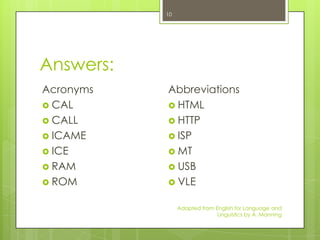
Answers:
Acronyms   Abbreviations
 CAL       HTML
 CALL      HTTP
 ICAME     ISP
 ICE       MT
 RAM       USB
 ROM       VLE


                Adapted from English for Language and
                              Linguistics by A. Manning
11


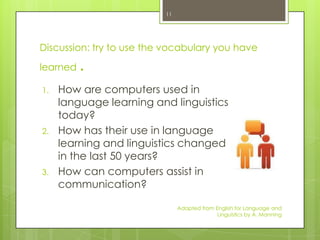
Discussion: try to use the vocabulary you have

learned   .
1.   How are computers used in
     language learning and linguistics
     today?
2.   How has their use in language
     learning and linguistics changed
     in the last 50 years?
3.   How can computers assist in
     communication?

                               Adapted from English for Language and
                                             Linguistics by A. Manning
12


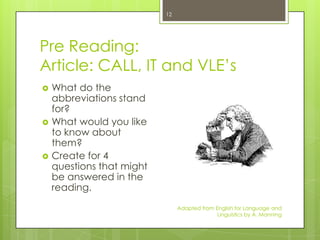
Pre Reading:
Article: CALL, IT and VLE’s
   What do the
    abbreviations stand
    for?
   What would you like
    to know about
    them?
   Create for 4
    questions that might
    be answered in the
    reading.
                                Adapted from English for Language and
                                              Linguistics by A. Manning
13


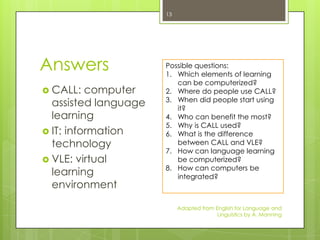
Answers               Possible questions:
                      1. Which elements of learning
                         can be computerized?
 CALL:   computer    2. Where do people use CALL?
                      3. When did people start using
  assisted language      it?
  learning            4. Who can benefit the most?
                      5. Why is CALL used?
 IT: information     6. What is the difference
  technology             between CALL and VLE?
                      7. How can language learning
 VLE: virtual           be computerized?
                      8. How can computers be
  learning               integrated?
  environment

                           Adapted from English for Language and
                                         Linguistics by A. Manning

Language and technology

  • 1.
    Language and Technology ELT180e Istanbul Bilgi University Instructor C.M.Herrington, MAA, MAT Adapted from English for Language 1 and Linguistics by A. Manning
  • 2.
    2 Skills and VocabularyFocus  Identifying topic  Computer jargon development  Abbreviations and within a paragraph acronyms  Using the internet effectively  Discourse and  Evaluating internet stance markers search results  Verb and noun  Reporting research suffixes findings Adapted from English for Language and Linguistics by A. Manning
  • 3.
    3 When you thinkof computer terminology what words to you think of?  M r  Ic n  M e  S ot  UBp t  Sc n er  La t p  Sc e n  Pr t r Adapted from English for Language and Linguistics by A. Manning
  • 4.
    4 Open a programsuch as “word” and make a list of verbs “on the white board” using in computing. Adapted from English for Language and Linguistics by A. Manning
  • 5.
    5 When you doresearch do you normally use the library or the internet? What are the advantages and disadvantages of both? List them on the white board. Advantages + Disadvantages - Adapted from English for Language and Linguistics by A. Manning
  • 6.
    6 Study the wordsin box A. Box A: Write in your notebook  Which words or   Books Browse/search phrases relate to   Catalogue Close computers and the  Cross reference  Database Electronic resources Internet? Which   Exit/log off  Log in /off relate to books   Search engine results Web page Hyperlink and libraries?   Menu  Open Create two groups   Page Table of contents of words on the  Catalogue  Close Library white board/   index Adapted from English for Language and Linguistics by A. Manning
  • 7.
    7 Read all the text and then insert the missing words from box A. Hadfield University Learning Resource Center Instructions for use: If you want to access the web pages on the ________________ , you must first ________________ to the university Intranet with your username and password. You can use any ________________ but the default is Google. _________________ for the web pages by typing one or more keywords in the search box and clicking on Search, or presssing Enter. When the results appear, click on a ______________ (hilighted in blue) to go to the web page. Click on Back to return to the results listing. You can also use the university _________________ of learning resources. Click on Linguistics and Language Resources on the main _______ Adapted from English for Language and Linguistics by A. Manning
  • 8.
    8 Study the abbreviations andacronyms in box b. Write the words /questions down. To be used in a minute on the next slide. Answers on slide 10 Box B: Write in your notebook  How do you say  CAL each one?  CALL  HTML  Divide them into  HTTP  ICAME two groups:  ICE  ISP 1.Abbreviations  MT  RAM 2.acronyms  ROM  USB  VLE  WWW Adapted from English for Language and Linguistics by A. Manning
  • 9.
    Computer Jargon Buster 9 Take notes on the following: ABBR./Acr. What it stands for What it means CAL Computer assisted learning Using computers to help you learn CALL Computer assisted language learning Using computers to help you learn languages HTML Hypertext markup language A way to write documents so they can be displayed on a website HTTP Hypertext transfer protocol A set of rules for transferring files on the WWW, usually included at the beginning of a website address (e.g. http://www.) ICAME International computer Archive of Modern A collection of English language material and Medieval English available for computer processing ICE International Corpus of English A database of different samples of spoken and written English ISP Internet service provider A company which gives individuals, companies, etc. access to the Internet MT Machine translation Using computers to translate language RAM Random access memory The memory which the computer uses for basic processes ROM Read only memory A type of permanent computer or disk memory that stores information that can be read or used but not changed USB Universal serial bus A standard way to connect things like printers and scanners to a computer VLE Virtual learning environment An online classroom Adapted from English for Language and Linguistics by A. Manning www World Wide Web A huge collection of documents that are connected by hypertext links and can be accessed through the Internet
  • 10.
    10 Answers: Acronyms Abbreviations  CAL  HTML  CALL  HTTP  ICAME  ISP  ICE  MT  RAM  USB  ROM  VLE Adapted from English for Language and Linguistics by A. Manning
  • 11.
    11 Discussion: try touse the vocabulary you have learned . 1. How are computers used in language learning and linguistics today? 2. How has their use in language learning and linguistics changed in the last 50 years? 3. How can computers assist in communication? Adapted from English for Language and Linguistics by A. Manning
  • 12.
    12 Pre Reading: Article: CALL,IT and VLE’s  What do the abbreviations stand for?  What would you like to know about them?  Create for 4 questions that might be answered in the reading. Adapted from English for Language and Linguistics by A. Manning
  • 13.
    13 Answers Possible questions: 1. Which elements of learning can be computerized?  CALL: computer 2. Where do people use CALL? 3. When did people start using assisted language it? learning 4. Who can benefit the most? 5. Why is CALL used?  IT: information 6. What is the difference technology between CALL and VLE? 7. How can language learning  VLE: virtual be computerized? 8. How can computers be learning integrated? environment Adapted from English for Language and Linguistics by A. Manning