Lab Streaming
Layer
Radha Kumari
PhD student
University of Glasgow
LSL GitHub
definition
• The lab streaming layer (LSL) is a system
for the unified collection of
measurement time series in research
experiments that handles both the
networking, time-synchronization,
(near-) real-time access as well as
optionally the centralized collection,
viewing and disk recording of the data.
Lab
Streaming
Layer
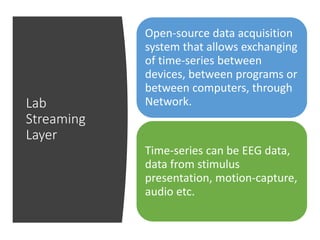
Open-source data acquisition
system that allows exchanging
of time-series between
devices, between programs or
between computers, through
Network.
Time-series can be EEG data,
data from stimulus
presentation, motion-capture,
audio etc.
Components
• Main library liblsl in C++, cross-platform
• Wrappers for various languages: C++
header, Python, Java, MATLAB
• Apps for acquiring data from various
devices and streaming on Network:
1. EEG : g.USBamp, Emotiv
2. Motion Capture: Kinect
3. Mouse, keyboard, eye-tracker etc
• Apps for recording LSL, visualizing LSL
Protocol: Providing data to LSL
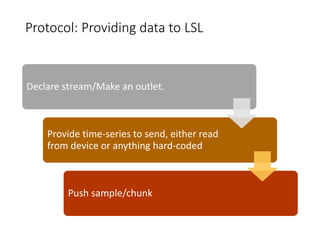
Declare stream/Make an outlet.
Provide time-series to send, either read
from device or anything hard-coded
Push sample/chunk
#include "lsl_cpp.h"
#include <stdlib.h>
using namespace lsl;
int main(int argc, char* argv[]) {
// make a new stream_info (128ch) and open an outlet with it
stream_info info("SimpleStream","EEG",128);
stream_outlet outlet(info);
// send data forever
float sample[128];
while(true) {
// generate random data
for (int c=0;c<128;c++)
sample[c] = (rand()%1500)/500.0-1.5;
// send it
outlet.push_sample(sample);
}
return 0;
}
Protocol : Receiving data from LSL
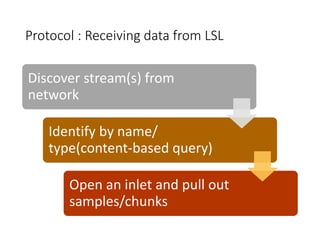
Discover stream(s) from
network
Identify by name/
type(content-based query)
Open an inlet and pull out
samples/chunks
#include "lsl_cpp.h"
int main(int argc, char* argv[]) {
using namespace lsl;
// resolve the stream of interest & make an inlet to get data from the first res
std::vector<stream_info> results = resolve_stream("name","SimpleStream");
stream_inlet inlet(results[0]);
// receive data & time stamps forever (not displaying them here)
float sample[128];
while (true)
double ts = inlet.pull_sample(&sample[0],128);
return 0;
}
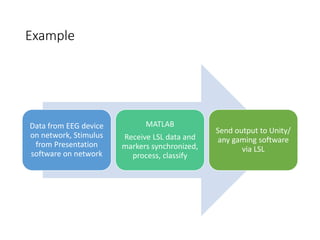
Example
Data from EEG device
on network, Stimulus
from Presentation
software on network
MATLAB
Receive LSL data and
markers synchronized,
process, classify
Send output to Unity/
any gaming software
via LSL
Time-synchronization?
• In-built and configurable methods for clock offset correction and
jitter correction
• Clock offset: time difference between two computers/ hardware and
computer
• Jitter: Gaussian noise in time-stamps because the time-stamping
usually does not happen exactly in regular intervals but on a
somewhat random schedule (dictated by the perils of the hardware,
the driver, and the operating system)
Latency?
• The data is buffered at both endpoints if there
are transmission delays anywhere (e.g.,
interrupted network connection) but otherwise
delivered as fast as the system allows.
• Latency under 0.1 milliseconds on a local
machine, unless a very large amount of data is
transmitted (megabytes per sample).
• Latency can be high as long as the throughput is
fast enough that data are pushed through as fast
as they are made available.
• Recording data : Latency doesn’t matter as such,
as long as accurate time-stamps for offline
processing
• Online processing: Depending on resolution of
the process, acceptable or not?
Drift
Drift is either the device is not sampling as
fast as it should, it's dropping samples, or
some other step is dropping the samples.
Can be hardware or implementation
related problem
LSL download
• Apps: Support for different acquisition device,
some already built, some need building but
codes available, drivers needed
• Library: for different programming languages
• Recording program: LabRecorder, can record
and put all streams together
• Viewing program: MATLAB Viewer to access
and view all streams
References
• Introduction to Modern Brain-Computer Interface Design - Christian
A. Kothe Swartz Center for Computational Neuroscience, University
of California San Diego
https://www.youtube.com/watch?v=Y1at7yrcFW0
• Github Lab Streaming Layer:
https://github.com/sccn/labstreaminglayer

Lab streaming layer

  • 1.
    Lab Streaming Layer Radha Kumari PhDstudent University of Glasgow
  • 2.
    LSL GitHub definition • Thelab streaming layer (LSL) is a system for the unified collection of measurement time series in research experiments that handles both the networking, time-synchronization, (near-) real-time access as well as optionally the centralized collection, viewing and disk recording of the data.
  • 4.
    Lab Streaming Layer Open-source data acquisition systemthat allows exchanging of time-series between devices, between programs or between computers, through Network. Time-series can be EEG data, data from stimulus presentation, motion-capture, audio etc.
  • 5.
    Components • Main libraryliblsl in C++, cross-platform • Wrappers for various languages: C++ header, Python, Java, MATLAB • Apps for acquiring data from various devices and streaming on Network: 1. EEG : g.USBamp, Emotiv 2. Motion Capture: Kinect 3. Mouse, keyboard, eye-tracker etc • Apps for recording LSL, visualizing LSL
  • 6.
    Protocol: Providing datato LSL Declare stream/Make an outlet. Provide time-series to send, either read from device or anything hard-coded Push sample/chunk
  • 7.
    #include "lsl_cpp.h" #include <stdlib.h> usingnamespace lsl; int main(int argc, char* argv[]) { // make a new stream_info (128ch) and open an outlet with it stream_info info("SimpleStream","EEG",128); stream_outlet outlet(info); // send data forever float sample[128]; while(true) { // generate random data for (int c=0;c<128;c++) sample[c] = (rand()%1500)/500.0-1.5; // send it outlet.push_sample(sample); } return 0; }
  • 8.
    Protocol : Receivingdata from LSL Discover stream(s) from network Identify by name/ type(content-based query) Open an inlet and pull out samples/chunks
  • 9.
    #include "lsl_cpp.h" int main(intargc, char* argv[]) { using namespace lsl; // resolve the stream of interest & make an inlet to get data from the first res std::vector<stream_info> results = resolve_stream("name","SimpleStream"); stream_inlet inlet(results[0]); // receive data & time stamps forever (not displaying them here) float sample[128]; while (true) double ts = inlet.pull_sample(&sample[0],128); return 0; }
  • 10.
    Example Data from EEGdevice on network, Stimulus from Presentation software on network MATLAB Receive LSL data and markers synchronized, process, classify Send output to Unity/ any gaming software via LSL
  • 11.
    Time-synchronization? • In-built andconfigurable methods for clock offset correction and jitter correction • Clock offset: time difference between two computers/ hardware and computer • Jitter: Gaussian noise in time-stamps because the time-stamping usually does not happen exactly in regular intervals but on a somewhat random schedule (dictated by the perils of the hardware, the driver, and the operating system)
  • 12.
    Latency? • The datais buffered at both endpoints if there are transmission delays anywhere (e.g., interrupted network connection) but otherwise delivered as fast as the system allows. • Latency under 0.1 milliseconds on a local machine, unless a very large amount of data is transmitted (megabytes per sample). • Latency can be high as long as the throughput is fast enough that data are pushed through as fast as they are made available. • Recording data : Latency doesn’t matter as such, as long as accurate time-stamps for offline processing • Online processing: Depending on resolution of the process, acceptable or not?
  • 13.
    Drift Drift is eitherthe device is not sampling as fast as it should, it's dropping samples, or some other step is dropping the samples. Can be hardware or implementation related problem
  • 14.
    LSL download • Apps:Support for different acquisition device, some already built, some need building but codes available, drivers needed • Library: for different programming languages • Recording program: LabRecorder, can record and put all streams together • Viewing program: MATLAB Viewer to access and view all streams
  • 15.
    References • Introduction toModern Brain-Computer Interface Design - Christian A. Kothe Swartz Center for Computational Neuroscience, University of California San Diego https://www.youtube.com/watch?v=Y1at7yrcFW0 • Github Lab Streaming Layer: https://github.com/sccn/labstreaminglayer