5. OOP
2 
Microsoft 
Objectives 
“Classes, objects and object-oriented programming (OOP) play a fundamental role in .NET. C# features full support for the object- oriented programming paradigm…” 
•Designing your own classes 
•Destroying objects and garbage collection 
•Inheritance 
•Interfaces
3 
Microsoft 
Part 1 
•Designing your own classes…
4 
Microsoft 
Motivation 
•.NET contains thousands of prebuilt classes in the FCL 
•So why design your own? 
–to model entities unique to your application domain… 
•Examples: 
–employees 
–customers 
–products 
–orders 
–documents 
–business units 
–etc.
5 
Microsoft 
Simple class members 
•C# supports standard fields, methods and constructors 
–with standard access control: public, private, protected 
public class Person { public string Name; // fields public int Age; public Person() // default constructor { this.Name = "?"; this.Age = -1; } public Person(string name, int age) // parameterized ctor { this.Name = name; this.Age = age; } public override string ToString() // method { return this.Name; } }//class
6 
Microsoft 
Basic design rules 
•Provide constructor(s) 
•Omit default constructor for parameterized initialization 
•Override ToString, Equals and GetHashCode 
•Data hiding: "hide as many details as you can" 
–enable access when necessary via accessors and mutators 
–.NET provides a cleaner mechanism via properties…
7 
Microsoft 
Properties 
•Goal: 
–to allow our class users to safely write code like this: 
–provides field-like access with method-like semantics… 
–… enabling access control, validation, data persistence, screen updating, etc. 
Person p; p = new Person("joe hummel", 40); p.Age = p.Age + 1;
8 
Microsoft 
Observation 
•Read of value ("Get") vs. Write of value ("Set") 
Person p; p = new Person("joe hummel", 40); p.Age = p.Age + 1; 
Get age 
Set age
9 
Microsoft 
Property implementation 
•Implementation options: 
–read-only 
–write-only 
–read-write 
public class Person { private string m_Name; private int m_Age; . . . public string Name { get { ... } } public int Age { get { ... } set { ... } } } 
read-only 
read-write
10 
Microsoft 
Example 
•Simplest implementation just reads / writes private field: 
public class Person { private string m_Name; private int m_Age; . . . public string Name // Name property { get { return this.m_Name; } } public int Age // Age property { get { return this.m_Age; } set { this.m_Age = value; } } }
11 
Microsoft 
Indexers 
•Enable array-like access with method-like semantics 
–great for data structure classes, collections, etc. 
People p; // collection of Person objects p = new People(); p[0] = new Person("joe hummel", 40); . . . age = p[0].Age; 
Set 
Get
12 
Microsoft 
Example 
•Implemented like properties, with Get and Set methods: 
public class People { private Person[] m_people; // underlying array . . . public Person this[int i] // int indexer { get { return this.m_people[i]; } set { this.m_people[i] = value; } } public Person this[string name] // string indexer { get { return ...; } } } 
read-only 
read-write
13 
Microsoft 
Part 2 
•Destroying objects and garbage collection…
14 
Microsoft 
Object creation and destruction 
•Objects are explicitly created via new 
•Objects are never explicitly destroyed! 
–.NET relies upon garbage collection to destroy objects 
–garbage collector runs unpredictably…
15 
Microsoft 
Finalization 
•Objects can be notified when they are garbage collected 
•Garbage collector (GC) will call object's finalizer 
public class Person 
{ 
. 
. 
. 
~Person() // finalizer 
{ 
... 
}
16 
Microsoft 
Should you rely upon finalization? 
•No! 
–it's unpredictable 
–it's expensive (.NET tracks object on special queue, etc.) 
•Alternatives? 
–design classes so that timely finalization is unnecessary 
–provide Close / Dispose method for class users to call 
** Warning ** As a .NET programmer, you are responsible for calling Dispose / Close. Rule of thumb: if you call Open, you need to call Close / Dispose for correct execution. Common examples are file I/O, database I/O, and XML processing.
17 
Microsoft 
Part 3 
•Inheritance…
18 
Microsoft 
Inheritance 
•Use in the small, when a derived class "is-a" base class 
–enables code reuse 
–enables design reuse & polymorphic programming 
•Example: 
–a Student is-a Person 
Undergraduate 
Person 
Student 
Employee 
Graduate 
Staff 
Faculty
19 
Microsoft 
Implementation 
•C# supports single inheritance 
–public inheritance only (C++ parlance) 
–base keyword gives you access to base class's members 
public class Student : Person { private int m_ID; public Student(string name, int age, int id) // constructor :base(name, age) { this.m_ID = id; } } 
Student 
Person
20 
Microsoft 
Binding 
•C# supports both static and dynamic binding 
–determined by absence or presence of virtual keyword 
–derived class must acknowledge with new or override 
public class Person { . . . // statically-bound public string HomeAddress() { … } // dynamically-bound public virtual decimal Salary() { … } } 
public class Student : Person { . . . public new string HomeAddress() { … } public override decimal Salary() { … } }
21 
Microsoft 
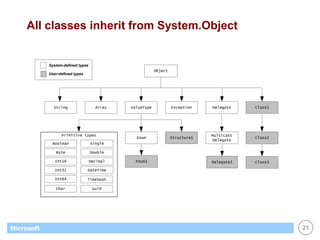
All classes inherit from System.Object 
StringArrayValueTypeExceptionDelegateClass1MulticastDelegateClass2Class3ObjectEnum1Structure1EnumPrimitive typesBooleanByteInt16Int32Int64CharSingleDoubleDecimalDateTimeSystem-defined typesUser-defined typesDelegate1TimeSpanGuid
22 
Microsoft 
Part 4 
•Interfaces…
23 
Microsoft 
Interfaces 
•An interface represents a design 
•Example: 
–the design of an object for iterating across a data structure 
–interface = method signatures only, no implementation details! 
–this is how foreach loop works… 
public interface IEnumerator { void Reset(); // reset iterator to beginning bool MoveNext(); // advance to next element object Current { get; } // retrieve current element }
24 
Microsoft 
Why use interfaces? 
•Formalize system design before implementation 
–especially helpful for PITL (programming in the large) 
•Design by contract 
–interface represents contract between client and object 
•Decoupling 
–interface specifies interaction between class A and B 
–by decoupling A from B, A can easily interact with C, D, …
25 
Microsoft 
.NET is heavily influenced by interfaces 
•IComparable 
•ICloneable 
•IDisposable 
•IEnumerable & IEnumerator 
•IList 
•ISerializable 
•IDBConnection, IDBCommand, IDataReader 
•etc.
26 
Microsoft 
Example 
•Sorting 
–FCL contains methods that sort for you 
–sort any kind of object 
–object must implement IComparable 
object[] students; students = new object[n]; students[0] = new Student(…); students[1] = new Student(…); . . . Array.Sort(students); 
public interface IComparable { int CompareTo(object obj); }
27 
Microsoft 
To be a sortable object… 
•Sortable objects must implement IComparable 
•Example: 
–Student objects sort by id 
public class Student : Person, IComparable { private int m_ID; . . . int IComparable.CompareTo(Object obj) { Student other; other = (Student) obj; return this.m_ID – other.m_ID; } } 
base class 
interface 
Student 
Person
28 
Microsoft 
Summary 
•Object-oriented programming is *the* paradigm of .NET 
•C# is a fully object-oriented programming language 
–fields, properties, indexers, methods, constructors 
–garbage collection 
–single inheritance 
–interfaces 
•Inheritance? 
–consider when class A "is-a" class B 
–but you only get single-inheritance, so make it count 
•Interfaces? 
–consider when class C interacts with classes D, E, F, … 
–a class can implement any number of interfaces
29 
Microsoft 
References 
•Books: 
–I. Pohl, "C# by Dissection" 
–S. Lippman, "C# Primer" 
–J. Mayo, "C# Unleashed"

L1

  • 1.
  • 2.
    2 Microsoft Objectives “Classes, objects and object-oriented programming (OOP) play a fundamental role in .NET. C# features full support for the object- oriented programming paradigm…” •Designing your own classes •Destroying objects and garbage collection •Inheritance •Interfaces
  • 3.
    3 Microsoft Part1 •Designing your own classes…
  • 4.
    4 Microsoft Motivation •.NET contains thousands of prebuilt classes in the FCL •So why design your own? –to model entities unique to your application domain… •Examples: –employees –customers –products –orders –documents –business units –etc.
  • 5.
    5 Microsoft Simpleclass members •C# supports standard fields, methods and constructors –with standard access control: public, private, protected public class Person { public string Name; // fields public int Age; public Person() // default constructor { this.Name = "?"; this.Age = -1; } public Person(string name, int age) // parameterized ctor { this.Name = name; this.Age = age; } public override string ToString() // method { return this.Name; } }//class
  • 6.
    6 Microsoft Basicdesign rules •Provide constructor(s) •Omit default constructor for parameterized initialization •Override ToString, Equals and GetHashCode •Data hiding: "hide as many details as you can" –enable access when necessary via accessors and mutators –.NET provides a cleaner mechanism via properties…
  • 7.
    7 Microsoft Properties •Goal: –to allow our class users to safely write code like this: –provides field-like access with method-like semantics… –… enabling access control, validation, data persistence, screen updating, etc. Person p; p = new Person("joe hummel", 40); p.Age = p.Age + 1;
  • 8.
    8 Microsoft Observation •Read of value ("Get") vs. Write of value ("Set") Person p; p = new Person("joe hummel", 40); p.Age = p.Age + 1; Get age Set age
  • 9.
    9 Microsoft Propertyimplementation •Implementation options: –read-only –write-only –read-write public class Person { private string m_Name; private int m_Age; . . . public string Name { get { ... } } public int Age { get { ... } set { ... } } } read-only read-write
  • 10.
    10 Microsoft Example •Simplest implementation just reads / writes private field: public class Person { private string m_Name; private int m_Age; . . . public string Name // Name property { get { return this.m_Name; } } public int Age // Age property { get { return this.m_Age; } set { this.m_Age = value; } } }
  • 11.
    11 Microsoft Indexers •Enable array-like access with method-like semantics –great for data structure classes, collections, etc. People p; // collection of Person objects p = new People(); p[0] = new Person("joe hummel", 40); . . . age = p[0].Age; Set Get
  • 12.
    12 Microsoft Example •Implemented like properties, with Get and Set methods: public class People { private Person[] m_people; // underlying array . . . public Person this[int i] // int indexer { get { return this.m_people[i]; } set { this.m_people[i] = value; } } public Person this[string name] // string indexer { get { return ...; } } } read-only read-write
  • 13.
    13 Microsoft Part2 •Destroying objects and garbage collection…
  • 14.
    14 Microsoft Objectcreation and destruction •Objects are explicitly created via new •Objects are never explicitly destroyed! –.NET relies upon garbage collection to destroy objects –garbage collector runs unpredictably…
  • 15.
    15 Microsoft Finalization •Objects can be notified when they are garbage collected •Garbage collector (GC) will call object's finalizer public class Person { . . . ~Person() // finalizer { ... }
  • 16.
    16 Microsoft Shouldyou rely upon finalization? •No! –it's unpredictable –it's expensive (.NET tracks object on special queue, etc.) •Alternatives? –design classes so that timely finalization is unnecessary –provide Close / Dispose method for class users to call ** Warning ** As a .NET programmer, you are responsible for calling Dispose / Close. Rule of thumb: if you call Open, you need to call Close / Dispose for correct execution. Common examples are file I/O, database I/O, and XML processing.
  • 17.
    17 Microsoft Part3 •Inheritance…
  • 18.
    18 Microsoft Inheritance •Use in the small, when a derived class "is-a" base class –enables code reuse –enables design reuse & polymorphic programming •Example: –a Student is-a Person Undergraduate Person Student Employee Graduate Staff Faculty
  • 19.
    19 Microsoft Implementation •C# supports single inheritance –public inheritance only (C++ parlance) –base keyword gives you access to base class's members public class Student : Person { private int m_ID; public Student(string name, int age, int id) // constructor :base(name, age) { this.m_ID = id; } } Student Person
  • 20.
    20 Microsoft Binding •C# supports both static and dynamic binding –determined by absence or presence of virtual keyword –derived class must acknowledge with new or override public class Person { . . . // statically-bound public string HomeAddress() { … } // dynamically-bound public virtual decimal Salary() { … } } public class Student : Person { . . . public new string HomeAddress() { … } public override decimal Salary() { … } }
  • 21.
    21 Microsoft Allclasses inherit from System.Object StringArrayValueTypeExceptionDelegateClass1MulticastDelegateClass2Class3ObjectEnum1Structure1EnumPrimitive typesBooleanByteInt16Int32Int64CharSingleDoubleDecimalDateTimeSystem-defined typesUser-defined typesDelegate1TimeSpanGuid
  • 22.
    22 Microsoft Part4 •Interfaces…
  • 23.
    23 Microsoft Interfaces •An interface represents a design •Example: –the design of an object for iterating across a data structure –interface = method signatures only, no implementation details! –this is how foreach loop works… public interface IEnumerator { void Reset(); // reset iterator to beginning bool MoveNext(); // advance to next element object Current { get; } // retrieve current element }
  • 24.
    24 Microsoft Whyuse interfaces? •Formalize system design before implementation –especially helpful for PITL (programming in the large) •Design by contract –interface represents contract between client and object •Decoupling –interface specifies interaction between class A and B –by decoupling A from B, A can easily interact with C, D, …
  • 25.
    25 Microsoft .NETis heavily influenced by interfaces •IComparable •ICloneable •IDisposable •IEnumerable & IEnumerator •IList •ISerializable •IDBConnection, IDBCommand, IDataReader •etc.
  • 26.
    26 Microsoft Example •Sorting –FCL contains methods that sort for you –sort any kind of object –object must implement IComparable object[] students; students = new object[n]; students[0] = new Student(…); students[1] = new Student(…); . . . Array.Sort(students); public interface IComparable { int CompareTo(object obj); }
  • 27.
    27 Microsoft Tobe a sortable object… •Sortable objects must implement IComparable •Example: –Student objects sort by id public class Student : Person, IComparable { private int m_ID; . . . int IComparable.CompareTo(Object obj) { Student other; other = (Student) obj; return this.m_ID – other.m_ID; } } base class interface Student Person
  • 28.
    28 Microsoft Summary •Object-oriented programming is *the* paradigm of .NET •C# is a fully object-oriented programming language –fields, properties, indexers, methods, constructors –garbage collection –single inheritance –interfaces •Inheritance? –consider when class A "is-a" class B –but you only get single-inheritance, so make it count •Interfaces? –consider when class C interacts with classes D, E, F, … –a class can implement any number of interfaces
  • 29.
    29 Microsoft References •Books: –I. Pohl, "C# by Dissection" –S. Lippman, "C# Primer" –J. Mayo, "C# Unleashed"