Kotlin in Action
A concise way to code Android Projects
in a smarter way
© 2016
What is Kotlin?
...it’s just another language…
● Created by Jetbrains
● Statically typed
● Lightweight
● Running on JVM
Old fashion Android Coding
● Android supports only Java6(ish)
● The verbosity of Java is annoying (i.e. a lot of boilerplate code)
● The Billion Dollar Mistake (aka Null Reference)
Why Kotlin?
● Concise: Reduce the boilerplate code, no ceremonies, no decorations
● Safe: It’s a Null Safety language
● Versatile: Write Android, Front end and Server Side applications
● Interoperable: Write Kotlin and Java code in the same project
Kotlin Language
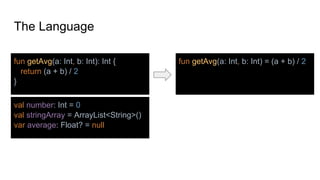
The Language
fun getAvg(a: Int, b: Int): Int {
return (a + b) / 2
}
fun getAvg(a: Int, b: Int) = (a + b) / 2
val number: Int = 0
val stringArray = ArrayList<String>()
var average: Float? = null
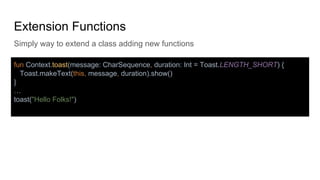
Extension Functions
Simply way to extend a class adding new functions
fun Context.toast(message: CharSequence, duration: Int = Toast.LENGTH_SHORT) {
Toast.makeText(this, message, duration).show()
}
…
toast("Hello Folks!")
Extension Functions
fun MutableList<Int>.swap(index1: Int, index2: Int) {
val tmp = this[index1] // 'this' corresponds to the list
this[index1] = this[index2]
this[index2] = tmp
}
fun <T> MutableList<T>.swap(index1: Int, index2: Int) {
val tmp = this[index1] // 'this' corresponds to the list
this[index1] = this[index2]
this[index2] = tmp
}
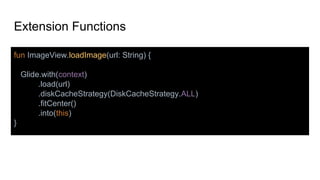
Extension Functions
fun ImageView.loadImage(url: String) {
Glide.with(context)
.load(url)
.diskCacheStrategy(DiskCacheStrategy.ALL)
.fitCenter()
.into(this)
}
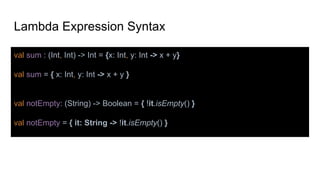
Lambda Expression Syntax
val sum : (Int, Int) -> Int = {x: Int, y: Int -> x + y}
val sum = { x: Int, y: Int -> x + y }
val notEmpty: (String) -> Boolean = { !it.isEmpty() }
val notEmpty = { it: String -> !it.isEmpty() }
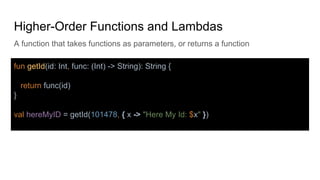
Higher-Order Functions and Lambdas
A function that takes functions as parameters, or returns a function
fun getId(id: Int, func: (Int) -> String): String {
return func(id)
}
val hereMyID = getId(101478, { x -> "Here My Id: $x" })
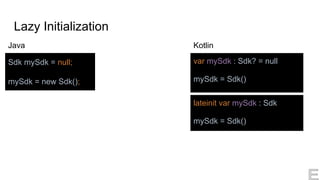
Lazy Initialization
var mySdk : Sdk? = null
mySdk = Sdk()
Sdk mySdk = null;
mySdk = new Sdk();
Java Kotlin
lateinit var mySdk : Sdk
mySdk = Sdk()
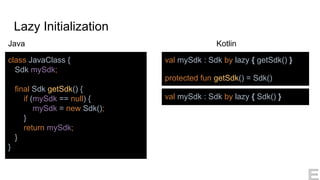
Lazy Initialization
Kotlin
class JavaClass {
Sdk mySdk;
final Sdk getSdk() {
if (mySdk == null) {
mySdk = new Sdk();
}
return mySdk;
}
}
val mySdk : Sdk by lazy { getSdk() }
protected fun getSdk() = Sdk()
Java
val mySdk : Sdk by lazy { Sdk() }
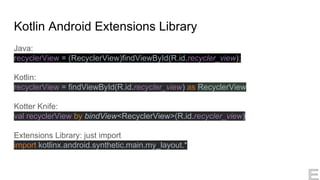
Kotlin Android Extensions Library
Java:
recyclerView = (RecyclerView)findViewById(R.id.recycler_view);
Kotlin:
recyclerView = findViewById(R.id.recycler_view) as RecyclerView
Kotter Knife:
val recyclerView by bindView<RecyclerView>(R.id.recycler_view)
Extensions Library: just import
import kotlinx.android.synthetic.main.my_layout.*
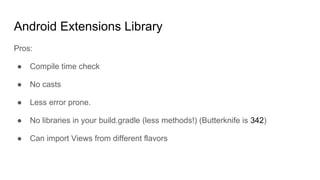
Android Extensions Library
Pros:
● Compile time check
● No casts
● Less error prone.
● No libraries in your build.gradle (less methods!) (Butterknife is 342)
● Can import Views from different flavors
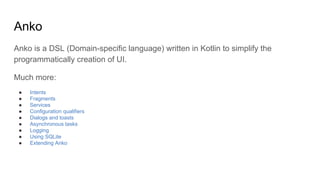
Anko
Anko is a DSL (Domain-specific language) written in Kotlin to simplify the
programmatically creation of UI.
Much more:
● Intents
● Fragments
● Services
● Configuration qualifiers
● Dialogs and toasts
● Asynchronous tasks
● Logging
● Using SQLite
● Extending Anko
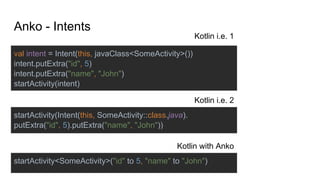
val intent = Intent(this, javaClass<SomeActivity>())
intent.putExtra("id", 5)
intent.putExtra("name", "John")
startActivity(intent)
startActivity(Intent(this, SomeActivity::class.java).
putExtra("id", 5).putExtra("name", "John"))
startActivity<SomeActivity>("id" to 5, "name" to "John")
Anko - Intents
Kotlin i.e. 1
Kotlin i.e. 2
Kotlin with Anko
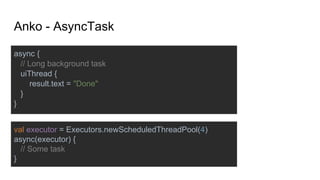
async {
// Long background task
uiThread {
result.text = "Done"
}
}
val executor = Executors.newScheduledThreadPool(4)
async(executor) {
// Some task
}
Anko - AsyncTask
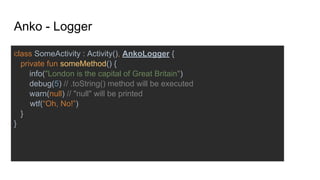
class SomeActivity : Activity(), AnkoLogger {
private fun someMethod() {
info("London is the capital of Great Britain")
debug(5) // .toString() method will be executed
warn(null) // "null" will be printed
wtf(“Oh, No!”)
}
}
Anko - Logger
Kotlin Configuration
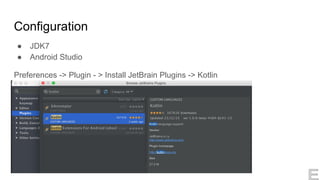
Configuration
● JDK7
● Android Studio
Preferences -> Plugin - > Install JetBrain Plugins -> Kotlin
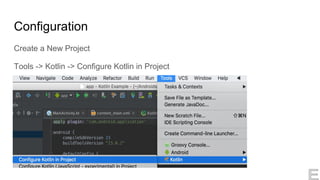
Configuration
Create a New Project
Tools -> Kotlin -> Configure Kotlin in Project
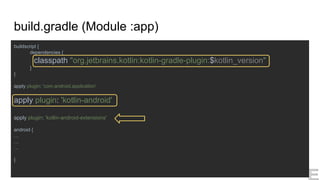
build.gradle (Module :app)
buildscript {
dependencies {
classpath "org.jetbrains.kotlin:kotlin-gradle-plugin:$kotlin_version"
}
}
apply plugin: 'com.android.application'
apply plugin: 'kotlin-android'
apply plugin: 'kotlin-android-extensions'
android {
…
…
…
}
Kotlin by Examples
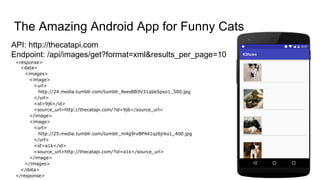
API: http://thecatapi.com
Endpoint: /api/images/get?format=xml&results_per_page=10
The Amazing Android App for Funny Cats
<response>
<data>
<images>
<image>
<url>
http://24.media.tumblr.com/tumblr_llees8B3V31qbe5pxo1_500.jpg
</url>
<id>9j6</id>
<source_url>http://thecatapi.com/?id=9j6</source_url>
</image>
<image>
<url>
http://25.media.tumblr.com/tumblr_m4g9rvBP441qz6jrko1_400.jpg
</url>
<id>a1k</id>
<source_url>http://thecatapi.com/?id=a1k</source_url>
</image>
</images>
</data>
</response>
Ciro Rizzo Enzo Belli
Senior Application Developer @QVC Senior Android Developer @YoYoWallet
@JackRix
http://www.cirorizzo.net/
@enzobelli
© 2016
https://kotlinlang.org/
https://github.com/cirorizzo/KShows
https://github.com/cirorizzo/JShows

Kotlin in action

  • 1.
    Kotlin in Action Aconcise way to code Android Projects in a smarter way © 2016
  • 2.
    What is Kotlin? ...it’sjust another language… ● Created by Jetbrains ● Statically typed ● Lightweight ● Running on JVM
  • 3.
    Old fashion AndroidCoding ● Android supports only Java6(ish) ● The verbosity of Java is annoying (i.e. a lot of boilerplate code) ● The Billion Dollar Mistake (aka Null Reference)
  • 4.
    Why Kotlin? ● Concise:Reduce the boilerplate code, no ceremonies, no decorations ● Safe: It’s a Null Safety language ● Versatile: Write Android, Front end and Server Side applications ● Interoperable: Write Kotlin and Java code in the same project
  • 5.
  • 6.
    The Language fun getAvg(a:Int, b: Int): Int { return (a + b) / 2 } fun getAvg(a: Int, b: Int) = (a + b) / 2 val number: Int = 0 val stringArray = ArrayList<String>() var average: Float? = null
  • 7.
    Extension Functions Simply wayto extend a class adding new functions fun Context.toast(message: CharSequence, duration: Int = Toast.LENGTH_SHORT) { Toast.makeText(this, message, duration).show() } … toast("Hello Folks!")
  • 8.
    Extension Functions fun MutableList<Int>.swap(index1:Int, index2: Int) { val tmp = this[index1] // 'this' corresponds to the list this[index1] = this[index2] this[index2] = tmp } fun <T> MutableList<T>.swap(index1: Int, index2: Int) { val tmp = this[index1] // 'this' corresponds to the list this[index1] = this[index2] this[index2] = tmp }
  • 9.
    Extension Functions fun ImageView.loadImage(url:String) { Glide.with(context) .load(url) .diskCacheStrategy(DiskCacheStrategy.ALL) .fitCenter() .into(this) }
  • 10.
    Lambda Expression Syntax valsum : (Int, Int) -> Int = {x: Int, y: Int -> x + y} val sum = { x: Int, y: Int -> x + y } val notEmpty: (String) -> Boolean = { !it.isEmpty() } val notEmpty = { it: String -> !it.isEmpty() }
  • 11.
    Higher-Order Functions andLambdas A function that takes functions as parameters, or returns a function fun getId(id: Int, func: (Int) -> String): String { return func(id) } val hereMyID = getId(101478, { x -> "Here My Id: $x" })
  • 12.
    Lazy Initialization var mySdk: Sdk? = null mySdk = Sdk() Sdk mySdk = null; mySdk = new Sdk(); Java Kotlin lateinit var mySdk : Sdk mySdk = Sdk()
  • 13.
    Lazy Initialization Kotlin class JavaClass{ Sdk mySdk; final Sdk getSdk() { if (mySdk == null) { mySdk = new Sdk(); } return mySdk; } } val mySdk : Sdk by lazy { getSdk() } protected fun getSdk() = Sdk() Java val mySdk : Sdk by lazy { Sdk() }
  • 14.
    Kotlin Android ExtensionsLibrary Java: recyclerView = (RecyclerView)findViewById(R.id.recycler_view); Kotlin: recyclerView = findViewById(R.id.recycler_view) as RecyclerView Kotter Knife: val recyclerView by bindView<RecyclerView>(R.id.recycler_view) Extensions Library: just import import kotlinx.android.synthetic.main.my_layout.*
  • 15.
    Android Extensions Library Pros: ●Compile time check ● No casts ● Less error prone. ● No libraries in your build.gradle (less methods!) (Butterknife is 342) ● Can import Views from different flavors
  • 16.
    Anko Anko is aDSL (Domain-specific language) written in Kotlin to simplify the programmatically creation of UI. Much more: ● Intents ● Fragments ● Services ● Configuration qualifiers ● Dialogs and toasts ● Asynchronous tasks ● Logging ● Using SQLite ● Extending Anko
  • 17.
    val intent =Intent(this, javaClass<SomeActivity>()) intent.putExtra("id", 5) intent.putExtra("name", "John") startActivity(intent) startActivity(Intent(this, SomeActivity::class.java). putExtra("id", 5).putExtra("name", "John")) startActivity<SomeActivity>("id" to 5, "name" to "John") Anko - Intents Kotlin i.e. 1 Kotlin i.e. 2 Kotlin with Anko
  • 18.
    async { // Longbackground task uiThread { result.text = "Done" } } val executor = Executors.newScheduledThreadPool(4) async(executor) { // Some task } Anko - AsyncTask
  • 19.
    class SomeActivity :Activity(), AnkoLogger { private fun someMethod() { info("London is the capital of Great Britain") debug(5) // .toString() method will be executed warn(null) // "null" will be printed wtf(“Oh, No!”) } } Anko - Logger
  • 20.
  • 21.
    Configuration ● JDK7 ● AndroidStudio Preferences -> Plugin - > Install JetBrain Plugins -> Kotlin
  • 22.
    Configuration Create a NewProject Tools -> Kotlin -> Configure Kotlin in Project
  • 23.
    build.gradle (Module :app) buildscript{ dependencies { classpath "org.jetbrains.kotlin:kotlin-gradle-plugin:$kotlin_version" } } apply plugin: 'com.android.application' apply plugin: 'kotlin-android' apply plugin: 'kotlin-android-extensions' android { … … … }
  • 24.
  • 25.
    API: http://thecatapi.com Endpoint: /api/images/get?format=xml&results_per_page=10 TheAmazing Android App for Funny Cats <response> <data> <images> <image> <url> http://24.media.tumblr.com/tumblr_llees8B3V31qbe5pxo1_500.jpg </url> <id>9j6</id> <source_url>http://thecatapi.com/?id=9j6</source_url> </image> <image> <url> http://25.media.tumblr.com/tumblr_m4g9rvBP441qz6jrko1_400.jpg </url> <id>a1k</id> <source_url>http://thecatapi.com/?id=a1k</source_url> </image> </images> </data> </response>
  • 26.
    Ciro Rizzo EnzoBelli Senior Application Developer @QVC Senior Android Developer @YoYoWallet @JackRix http://www.cirorizzo.net/ @enzobelli © 2016 https://kotlinlang.org/ https://github.com/cirorizzo/KShows https://github.com/cirorizzo/JShows