Kotlin Features
for Android Developers
What is Kotlin?
● Kotlin is not a platform (Xamarin, Cordova, etc.)
● It’s more like TypeScript or Swift
● Kotlin is a programing language built to run wherever Java runs
● It’s a pragmatic language, designed for developer productivity
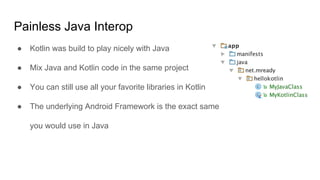
Painless Java Interop
● Kotlin was build to play nicely with Java
● Mix Java and Kotlin code in the same project
● You can still use all your favorite libraries in Kotlin
● The underlying Android Framework is the exact same
you would use in Java
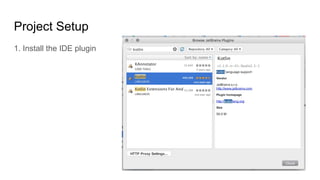
Project Setup
1. Install the IDE plugin
Project Setup
2. Add the dependencies
buildscript {
dependencies {
classpath "org.jetbrains.kotlin:kotlin-gradle-plugin:$kotlin_version"
}
}
apply plugin: 'kotlin-android'
dependencies {
compile "org.jetbrains.kotlin:kotlin-stdlib:$kotlin_version"
}
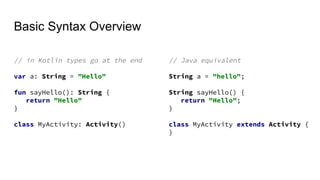
Basic Syntax Overview
// in Kotlin types go at the end
var a: String = "Hello"
fun sayHello(): String {
return "Hello"
}
class MyActivity: Activity()
// Java equivalent
String a = "hello";
String sayHello() {
return "Hello";
}
class MyActivity extends Activity {
}
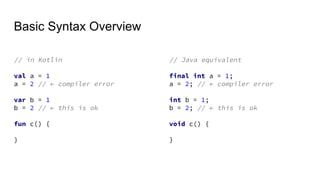
Basic Syntax Overview
// in Kotlin
val a = 1
a = 2 // ← compiler error
var b = 1
b = 2 // ← this is ok
fun c() {
}
// Java equivalent
final int a = 1;
a = 2; // ← compiler error
int b = 1;
b = 2; // ← this is ok
void c() {
}
Features you can use from day 1
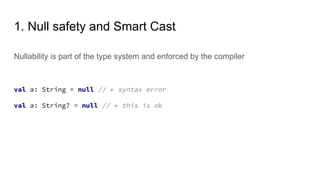
1. Null safety and Smart Cast
Nullability is part of the type system and enforced by the compiler
val a: String = null // ← syntax error
val a: String? = null // ← this is ok
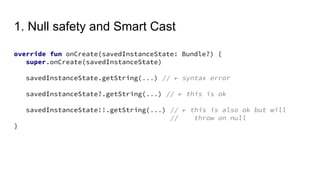
1. Null safety and Smart Cast
override fun onCreate(savedInstanceState: Bundle?) {
super.onCreate(savedInstanceState)
savedInstanceState.getString(...) // ← syntax error
savedInstanceState?.getString(...) // ← this is ok
savedInstanceState!!.getString(...) // ← this is also ok but will
// throw on null
}
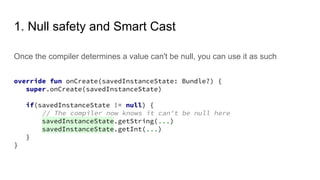
1. Null safety and Smart Cast
Once the compiler determines a value can't be null, you can use it as such
override fun onCreate(savedInstanceState: Bundle?) {
super.onCreate(savedInstanceState)
if(savedInstanceState != null) {
// The compiler now knows it can't be null here
savedInstanceState.getString(...)
savedInstanceState.getInt(...)
}
}
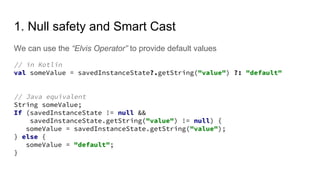
1. Null safety and Smart Cast
We can use the “Elvis Operator” to provide default values
// in Kotlin
val someValue = savedInstanceState?.getString("value") ?: "default"
// Java equivalent
String someValue;
If (savedInstanceState != null &&
savedInstanceState.getString("value") != null) {
someValue = savedInstanceState.getString("value");
} else {
someValue = "default";
}
2. Statements as expressions
In Kotlin statements like if and when can be used as expressions
override fun getItemViewType(position: Int): Int {
return when(items[position]) {
is Title -> TYPE_TITLE
is Description -> TYPE_DESCRIPTION
else -> TYPE_UNKNOWN
}
}
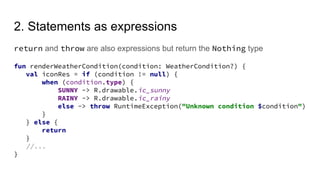
2. Statements as expressions
return and throw are also expressions but return the Nothing type
fun renderWeatherCondition(condition: WeatherCondition?) {
val iconRes = if (condition != null) {
when (condition.type) {
SUNNY -> R.drawable.ic_sunny
RAINY -> R.drawable.ic_rainy
else -> throw RuntimeException("Unknown condition $condition")
}
} else {
return
}
//...
}
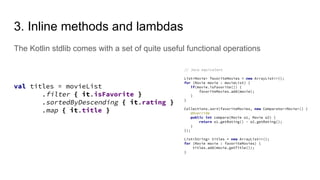
3. Inline methods and lambdas
The Kotlin stdlib comes with a set of quite useful functional operations
val titles = movieList
.filter { it.isFavorite }
.sortedByDescending { it.rating }
.map { it.title }
// Java equivalent
List<Movie> favoriteMovies = new ArrayList<>();
for (Movie movie : movieList) {
if(movie.isFavorite()) {
favoriteMovies.add(movie);
}
}
Collections.sort(favoriteMovies, new Comparator<Movie>() {
@Override
public int compare(Movie o1, Movie o2) {
return o1.getRating() - o2.getRating();
}
});
List<String> titles = new ArrayList<>();
for (Movie movie : favoriteMovies) {
titles.add(movie.getTitle());
}
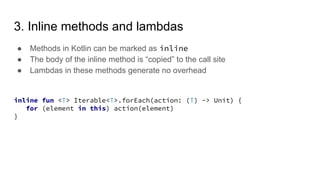
3. Inline methods and lambdas
● Methods in Kotlin can be marked as inline
● The body of the inline method is “copied” to the call site
● Lambdas in these methods generate no overhead
inline fun <T> Iterable<T>.forEach(action: (T) -> Unit) {
for (element in this) action(element)
}
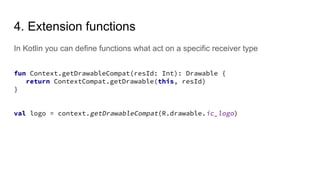
In Kotlin you can define functions what act on a specific receiver type
4. Extension functions
fun Context.getDrawableCompat(resId: Int): Drawable {
return ContextCompat.getDrawable(this, resId)
}
val logo = context.getDrawableCompat(R.drawable.ic_logo)
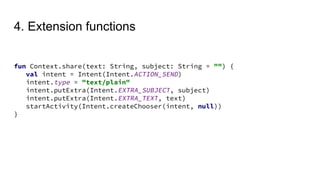
4. Extension functions
fun Context.share(text: String, subject: String = "") {
val intent = Intent(Intent.ACTION_SEND)
intent.type = "text/plain"
intent.putExtra(Intent.EXTRA_SUBJECT, subject)
intent.putExtra(Intent.EXTRA_TEXT, text)
startActivity(Intent.createChooser(intent, null))
}
Some more advanced features
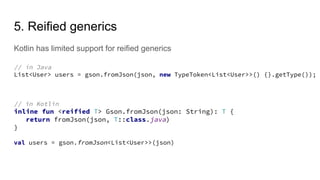
5. Reified generics
Kotlin has limited support for reified generics
// in Java
List<User> users = gson.fromJson(json, new TypeToken<List<User>>() {}.getType());
// in Kotlin
inline fun <reified T> Gson.fromJson(json: String): T {
return fromJson(json, T::class.java)
}
val users = gson.fromJson<List<User>>(json)
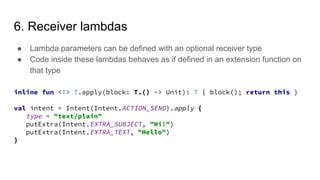
6. Receiver lambdas
● Lambda parameters can be defined with an optional receiver type
● Code inside these lambdas behaves as if defined in an extension function on
that type
inline fun <T> T.apply(block: T.() -> Unit): T { block(); return this }
val intent = Intent(Intent.ACTION_SEND).apply {
type = "text/plain"
putExtra(Intent.EXTRA_SUBJECT, "Hi!")
putExtra(Intent.EXTRA_TEXT, "Hello")
}
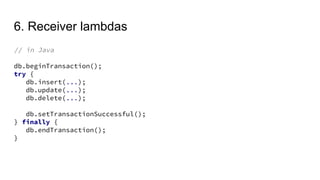
6. Receiver lambdas
// in Java
db.beginTransaction();
try {
db.insert(...);
db.update(...);
db.delete(...);
db.setTransactionSuccessful();
} finally {
db.endTransaction();
}
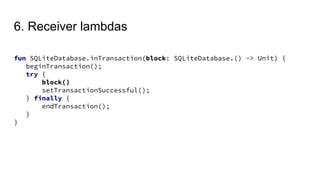
6. Receiver lambdas
fun SQLiteDatabase.inTransaction(block: SQLiteDatabase.() -> Unit) {
beginTransaction();
try {
block()
setTransactionSuccessful();
} finally {
endTransaction();
}
}
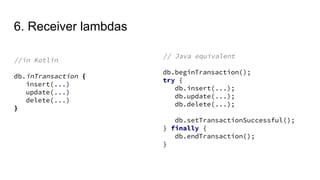
6. Receiver lambdas
//in Kotlin
db.inTransaction {
insert(...)
update(...)
delete(...)
}
// Java equivalent
db.beginTransaction();
try {
db.insert(...);
db.update(...);
db.delete(...);
db.setTransactionSuccessful();
} finally {
db.endTransaction();
}
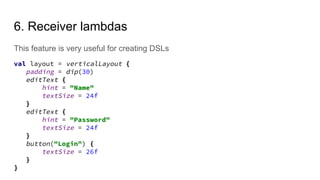
6. Receiver lambdas
This feature is very useful for creating DSLs
val layout = verticalLayout {
padding = dip(30)
editText {
hint = "Name"
textSize = 24f
}
editText {
hint = "Password"
textSize = 24f
}
button("Login") {
textSize = 26f
}
}
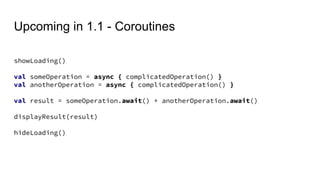
Upcoming in 1.1 - Coroutines
showLoading()
val someOperation = async { complicatedOperation() }
val anotherOperation = async { complicatedOperation() }
val result = someOperation.await() + anotherOperation.await()
displayResult(result)
hideLoading()
Much more that we didn’t cover
● Property delegation
● Data classes
● Sealed classes
● Type aliases
● Operator overloading
● Destructuring operators
● Infix functions
● Named parameters
● Class delegation
● … and more
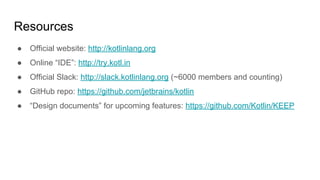
Resources
● Official website: http://kotlinlang.org
● Online “IDE”: http://try.kotl.in
● Official Slack: http://slack.kotlinlang.org (~6000 members and counting)
● GitHub repo: https://github.com/jetbrains/kotlin
● “Design documents” for upcoming features: https://github.com/Kotlin/KEEP

Kotlin for Android - Vali Iorgu - mRready

  • 1.
  • 2.
    What is Kotlin? ●Kotlin is not a platform (Xamarin, Cordova, etc.) ● It’s more like TypeScript or Swift ● Kotlin is a programing language built to run wherever Java runs ● It’s a pragmatic language, designed for developer productivity
  • 3.
    Painless Java Interop ●Kotlin was build to play nicely with Java ● Mix Java and Kotlin code in the same project ● You can still use all your favorite libraries in Kotlin ● The underlying Android Framework is the exact same you would use in Java
  • 4.
  • 5.
    Project Setup 2. Addthe dependencies buildscript { dependencies { classpath "org.jetbrains.kotlin:kotlin-gradle-plugin:$kotlin_version" } } apply plugin: 'kotlin-android' dependencies { compile "org.jetbrains.kotlin:kotlin-stdlib:$kotlin_version" }
  • 6.
    Basic Syntax Overview //in Kotlin types go at the end var a: String = "Hello" fun sayHello(): String { return "Hello" } class MyActivity: Activity() // Java equivalent String a = "hello"; String sayHello() { return "Hello"; } class MyActivity extends Activity { }
  • 7.
    Basic Syntax Overview //in Kotlin val a = 1 a = 2 // ← compiler error var b = 1 b = 2 // ← this is ok fun c() { } // Java equivalent final int a = 1; a = 2; // ← compiler error int b = 1; b = 2; // ← this is ok void c() { }
  • 8.
    Features you canuse from day 1
  • 9.
    1. Null safetyand Smart Cast Nullability is part of the type system and enforced by the compiler val a: String = null // ← syntax error val a: String? = null // ← this is ok
  • 10.
    1. Null safetyand Smart Cast override fun onCreate(savedInstanceState: Bundle?) { super.onCreate(savedInstanceState) savedInstanceState.getString(...) // ← syntax error savedInstanceState?.getString(...) // ← this is ok savedInstanceState!!.getString(...) // ← this is also ok but will // throw on null }
  • 11.
    1. Null safetyand Smart Cast Once the compiler determines a value can't be null, you can use it as such override fun onCreate(savedInstanceState: Bundle?) { super.onCreate(savedInstanceState) if(savedInstanceState != null) { // The compiler now knows it can't be null here savedInstanceState.getString(...) savedInstanceState.getInt(...) } }
  • 12.
    1. Null safetyand Smart Cast We can use the “Elvis Operator” to provide default values // in Kotlin val someValue = savedInstanceState?.getString("value") ?: "default" // Java equivalent String someValue; If (savedInstanceState != null && savedInstanceState.getString("value") != null) { someValue = savedInstanceState.getString("value"); } else { someValue = "default"; }
  • 13.
    2. Statements asexpressions In Kotlin statements like if and when can be used as expressions override fun getItemViewType(position: Int): Int { return when(items[position]) { is Title -> TYPE_TITLE is Description -> TYPE_DESCRIPTION else -> TYPE_UNKNOWN } }
  • 14.
    2. Statements asexpressions return and throw are also expressions but return the Nothing type fun renderWeatherCondition(condition: WeatherCondition?) { val iconRes = if (condition != null) { when (condition.type) { SUNNY -> R.drawable.ic_sunny RAINY -> R.drawable.ic_rainy else -> throw RuntimeException("Unknown condition $condition") } } else { return } //... }
  • 15.
    3. Inline methodsand lambdas The Kotlin stdlib comes with a set of quite useful functional operations val titles = movieList .filter { it.isFavorite } .sortedByDescending { it.rating } .map { it.title } // Java equivalent List<Movie> favoriteMovies = new ArrayList<>(); for (Movie movie : movieList) { if(movie.isFavorite()) { favoriteMovies.add(movie); } } Collections.sort(favoriteMovies, new Comparator<Movie>() { @Override public int compare(Movie o1, Movie o2) { return o1.getRating() - o2.getRating(); } }); List<String> titles = new ArrayList<>(); for (Movie movie : favoriteMovies) { titles.add(movie.getTitle()); }
  • 16.
    3. Inline methodsand lambdas ● Methods in Kotlin can be marked as inline ● The body of the inline method is “copied” to the call site ● Lambdas in these methods generate no overhead inline fun <T> Iterable<T>.forEach(action: (T) -> Unit) { for (element in this) action(element) }
  • 17.
    In Kotlin youcan define functions what act on a specific receiver type 4. Extension functions fun Context.getDrawableCompat(resId: Int): Drawable { return ContextCompat.getDrawable(this, resId) } val logo = context.getDrawableCompat(R.drawable.ic_logo)
  • 18.
    4. Extension functions funContext.share(text: String, subject: String = "") { val intent = Intent(Intent.ACTION_SEND) intent.type = "text/plain" intent.putExtra(Intent.EXTRA_SUBJECT, subject) intent.putExtra(Intent.EXTRA_TEXT, text) startActivity(Intent.createChooser(intent, null)) }
  • 19.
  • 20.
    5. Reified generics Kotlinhas limited support for reified generics // in Java List<User> users = gson.fromJson(json, new TypeToken<List<User>>() {}.getType()); // in Kotlin inline fun <reified T> Gson.fromJson(json: String): T { return fromJson(json, T::class.java) } val users = gson.fromJson<List<User>>(json)
  • 21.
    6. Receiver lambdas ●Lambda parameters can be defined with an optional receiver type ● Code inside these lambdas behaves as if defined in an extension function on that type inline fun <T> T.apply(block: T.() -> Unit): T { block(); return this } val intent = Intent(Intent.ACTION_SEND).apply { type = "text/plain" putExtra(Intent.EXTRA_SUBJECT, "Hi!") putExtra(Intent.EXTRA_TEXT, "Hello") }
  • 22.
    6. Receiver lambdas //in Java db.beginTransaction(); try { db.insert(...); db.update(...); db.delete(...); db.setTransactionSuccessful(); } finally { db.endTransaction(); }
  • 23.
    6. Receiver lambdas funSQLiteDatabase.inTransaction(block: SQLiteDatabase.() -> Unit) { beginTransaction(); try { block() setTransactionSuccessful(); } finally { endTransaction(); } }
  • 24.
    6. Receiver lambdas //inKotlin db.inTransaction { insert(...) update(...) delete(...) } // Java equivalent db.beginTransaction(); try { db.insert(...); db.update(...); db.delete(...); db.setTransactionSuccessful(); } finally { db.endTransaction(); }
  • 25.
    6. Receiver lambdas Thisfeature is very useful for creating DSLs val layout = verticalLayout { padding = dip(30) editText { hint = "Name" textSize = 24f } editText { hint = "Password" textSize = 24f } button("Login") { textSize = 26f } }
  • 26.
    Upcoming in 1.1- Coroutines showLoading() val someOperation = async { complicatedOperation() } val anotherOperation = async { complicatedOperation() } val result = someOperation.await() + anotherOperation.await() displayResult(result) hideLoading()
  • 27.
    Much more thatwe didn’t cover ● Property delegation ● Data classes ● Sealed classes ● Type aliases ● Operator overloading ● Destructuring operators ● Infix functions ● Named parameters ● Class delegation ● … and more
  • 28.
    Resources ● Official website:http://kotlinlang.org ● Online “IDE”: http://try.kotl.in ● Official Slack: http://slack.kotlinlang.org (~6000 members and counting) ● GitHub repo: https://github.com/jetbrains/kotlin ● “Design documents” for upcoming features: https://github.com/Kotlin/KEEP