Develop your next app with
Kotlin
@arnogiu
Work @ ekito
Core & Gear Maker
Mobile & CloudArnaud GIULIANI
« production ready »
15.02.2016
1.1.1 @ 15.03.2017
Yet another JVM
Language ?
The new « Swift »
for Android ?
https://goo.gl/W5g6Do - mid 2014
Limits of java
- Verbose
- Type inference
- No properties / Lazy / Delegate
- Checked exception
- NullPointerException
- Extensibility
- End of lines with ;
@
sdeleuze
But Java is great …
- Fast
- Optimized bytecode
- Static typing
- Simple to learn
- Amazing ecosystem
- Conciseness & Smarter API
- Null Safety & Immutability protection
- Type Inference, Static Typing & Smart Casts
- Open programming styles
- Java Interop
Why
Kotlin ?
What’s
Kotlin ?
- Fully open source (built by Jetbrains)
- Based on Java & run on Java 6+
- Modern language features
- 1st grade tooling
More About
Kotlin …
- String templates
- Properties
- Lambdas
- Data class
- Smart cast
- Null safety
- Lazy property
- Default values for function
parameters
- Extension Functions
- No more ;
- Single-expression
functions
- When expression
- let, apply, use, with
- Collections
- Android Extensions Plugin
Compare with
Same conciseness and expressive code, but
Kotlin static typing and null-safety make a big
difference.
"Some people say Kotlin has 80% the power of
Scala, with 20% of the features" * 

"Kotlin is a software engineering language in
contrast to Scala which is a computing science
language." *
Swift and Kotlin are VERY similar. Swift is LLVM
based and has C interop while Kotlin is JVM based
and has Java interop.
* Quotes from Kotlin:TheYing andYang of Programming Languages
@
sdeleuze
is Kotlin Android friendly ?
https://github.com/SidneyXu/AndroidDemoIn4Languages
Method counts by Language
Java 8 on
Android ?
https://android-developers.googleblog.com/2017/03/future-of-java-8-language-feature.html
KOTLIN is not just about writing
your app with lesser lines.
It’s all about writing
SAFER & BETTER APPS !
Kotlin clearly considered
by the Java community !
https://spring.io/blog/2017/01/04/introducing-kotlin-support-in-
spring-framework-5-0
http://www.javamagazine.mozaicreader.com/
#&pageSet=5&page=0&contentItem=0 (March/April
2017)
https://www.thoughtworks.com/radar/languages-and-frameworks/kotlin
Ready to use
Easy to run
Getting started with
gradle
buildscript {
ext.kotlin_version = '<version to use>'
dependencies {
classpath "org.jetbrains.kotlin:kotlin-gradle-plugin:$kotlin_version"
}
}
apply plugin: "kotlin"
dependencies {
compile "org.jetbrains.kotlin:kotlin-stdlib:$kotlin_version"
}
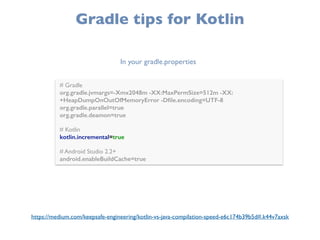
Gradle tips for Kotlin
# Gradle

org.gradle.jvmargs=-Xmx2048m -XX:MaxPermSize=512m -XX:
+HeapDumpOnOutOfMemoryError -Dfile.encoding=UTF-8

org.gradle.parallel=true
org.gradle.deamon=true


# Kotlin

kotlin.incremental=true


# Android Studio 2.2+

android.enableBuildCache=true
In your gradle.properties
https://medium.com/keepsafe-engineering/kotlin-vs-java-compilation-speed-e6c174b39b5d#.k44v7axsk
Let’s go !
Typing & Inference
val a: Int = 1

val b = 1 // `Int` type is inferred
var x = 5 // `Int` type is inferred

x += 1
Inferred values
Mutable values
val : constant value - IMMUTABLE
var : variable value - MUTABLE
USE VAL AS MUCH AS POSSIBLE !
Safety with Optionals
var stringA: String = "foo"

stringA = null //Compilation error - stringA is a String (non optional)


var stringB: String? = "bar" // stringB is an Optional String

stringB = null //ok
Optional value with ?
// set length default value manually

val length = if (stringB != null) stringB.length else -1

//or with the Elvis operator

val length = stringB?.length ?: -1
DefaultValue & Elvis Operator :?
val length = stringB.length // Compilation error - stringB can be null !

// use ? the safe call operator

val length = stringB?.length //Value or null - length is type Int?
val length = stringB!!.length //Value or explicit throw NPE - length is type Int
Safe call with ?. or Explicit call with !!.
Example
Working with optional values
Example
Null check safety & Smart cast
Securing with default values
Class
class User (

val userName: String,

val firstName: String,

val lastName: String,

var location: Point? = null

)
POJO +
- Getter
- Setter
- Constructors
Data Class
data class User (

val userName: String,

val firstName: String,

val lastName: String,

var location: Point? = null

)
POJO +
- Getter
- Setter
- Constructors
- toString
- hashcode
- equals
- copy
POJO ?
Kotlin
Java
Properties
// readonly property

val isEmpty: Boolean

get() = this.size == 0
Properties can be declared in constructor or in class
You can also handle getter & setter
lateinit var weatherWS :WeatherWS


@Test

fun testMyWeatherWS() {

weatherWS = Inject.get<WeatherWS>()

// ... 

}
class ApiKey(var weatherKey: String, var geocodeKey: String){

var debug : Boolean = false

}
Late & Lazy initialization
Example
data class User(val name: String = "", val age: Int = 0)
val jack = User(name = "Jack", age = 1) //no new keyword

val anotherJack = jack.copy(age = 2)
Data Class usage
A simple GSon Class
Object Class
// singleton

object Resource {

val name = "Name"

}
class StringCalculator{
// class helper

companion object{

val operators = arrayOf("+","-","x","/")

}

}
Singleton Class
Companion Object
When
when (s) {

1 -> print("x == 1")

2 -> print("x == 2")

else -> { // Note the block

print("x is neither 1 nor 2")

}

}
Flow Control (replace your switch and if-blocks)
when (x) {

in 1..10 -> print("x is in the range")

in validNumbers -> print("x is valid")

!in 10..20 -> print("x is outside the range")

else -> print("none of the above")

}
Pattern Matching
Example
Page Adapter
Menu Select
Collections
// immutable map

val map = mapOf("a" to 1, "b" to 2, "c" to 3)

for ((k, v) in map) {

println("$k -> $v")

}


map["a"] = "my value" // direct map access with array style
// range

for (i in 1..100) { //... }
// immutable list

val list = listOf("a", "b", "c","aa")

list.filter { it.startsWith("a") }
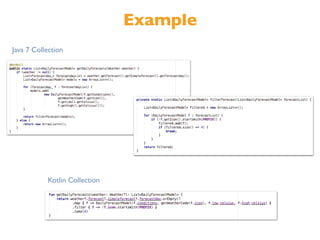
* collections operators : map, filter, take, flatMap, forEach, firstOrNull, last …
Example
Kotlin Collection
Java 7 Collection
Lambdas
val fab = findViewById(R.id.fab) as FloatingActionButton

fab.setOnClickListener { view -> popLocationDialog(view) }
A lambda expression or an anonymous function is a “function literal”, i.e. a function that is
not declared, but passed immediately as an expression
- A lambda expression is always surrounded by curly braces
- Its parameters (if any) are declared before -> (parameter types may be omitted),
- The body goes after -> (when present).
myNumber.split("n").flatMap { it.split(separator) }

.map(Integer::parseInt)

.map(::checkPositiveNumber)

.filter { it <= 1000 }

.sum()
* Method references are not surrounded by curly braces !
Functions
fun reformat(str: String,

normalizeCase: Boolean = true,

upperCaseFirstLetter: Boolean = true,

wordSeparator: Char = ' '): String {


}
Named Parameters & default values
reformat(str, true, true, '_') // old way to call

reformat(str, wordSeparator = '_') // using default values & named params
Extensions Functions
Extension declaration
Usage
Destructuring Declarations
In lambdas, Since Kotlin 1.1
map.mapValues { (key, value) -> "$value!" }
Destructured variables declaration
val person = Person("john",31) //data class Person(val name:String, val age : Int)

val (name,age) = person

println("I'm $name, my age is $age")
* Works with Map, Data Class, Pair,Triple …
=> you can return 2 values in function !
InterOp Kotlin/Java
Java
Kotlin
InterOp Java/Kotlin
object UserSingleton{

fun stringify(user : User) : String{

// …

}

}
fun WhatIsyourAge(user : User){

println("Your age is ${user.age}")

}
data class User (val name: String, val age : Int){

companion object{

fun sayHello(user : User){
//…

}

}

}
User u = new User("toto",42);

User.Companion.sayHello(u);
UserUtilsKt.WhatIsyourAge(u);
UserSingleton.INSTANCE.stringify(u)
Sweet stuffs for
Kotlin’s Android
Extensions
apply plugin: 'com.android.application'
apply plugin:‘kotlin-android’
apply plugin:‘kotlin-android-extensions’ // the kotlin-android extension !
In your build.gradle
Kotlin
Java
Reactive
Programming
Lamba expressions
Functional Programming
Reactive Streams
http://reactivex.io/documentation/operators.html
http://www.reactive-streams.org/
https://spring.io/blog/2016/06/07/notes-on-reactive-
programming-part-i-the-reactive-landscape
Example - Rx/Retrofit
Kotlin
Java 7
Example - Rx/Realm
Load first element & update UI
50
Ready to Go ?
51
Just another hype
JVM stuff ?
52
Production
ready ?
It’s always hard to start !
Our feedback
- Easy to start on existing project
- Great learning curve
- Good doc & tools support
- Don’t use anymore Butterknife, Dagger …
- T_T hard to come back to Java
https://www.ekito.fr/people/kotlin-in-production-one-year-later/
IF YOU DON'T LOOK AT
JAVA AND THINK, "THIS
COULD BE BETTER", DON'T
SWITCH.
@RunChristinaRun (Pinterest)
Try Kotlin online
http://try.kotlinlang.org/#/Examples/
Kotlin Reference
https://kotlinlang.org/docs/reference/
Kotlin Cheat Sheet (by ekito)
https://speakerdeck.com/agiuliani/kotlin-cheat-
sheet
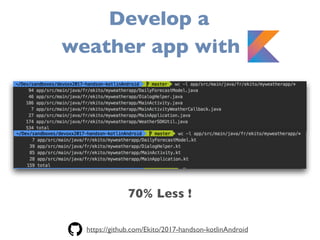
70% Less !
Develop a
weather app with K
https://github.com/Ekito/2017-handson-kotlinAndroid
Thank you :)

Develop your next app with kotlin @ AndroidMakersFr 2017

  • 1.
    Develop your nextapp with Kotlin
  • 2.
    @arnogiu Work @ ekito Core& Gear Maker Mobile & CloudArnaud GIULIANI
  • 3.
  • 4.
  • 5.
  • 6.
    The new « Swift » forAndroid ? https://goo.gl/W5g6Do - mid 2014
  • 7.
    Limits of java -Verbose - Type inference - No properties / Lazy / Delegate - Checked exception - NullPointerException - Extensibility - End of lines with ; @ sdeleuze
  • 8.
    But Java isgreat … - Fast - Optimized bytecode - Static typing - Simple to learn - Amazing ecosystem
  • 10.
    - Conciseness &Smarter API - Null Safety & Immutability protection - Type Inference, Static Typing & Smart Casts - Open programming styles - Java Interop Why Kotlin ?
  • 11.
    What’s Kotlin ? - Fullyopen source (built by Jetbrains) - Based on Java & run on Java 6+ - Modern language features - 1st grade tooling
  • 12.
    More About Kotlin … -String templates - Properties - Lambdas - Data class - Smart cast - Null safety - Lazy property - Default values for function parameters - Extension Functions - No more ; - Single-expression functions - When expression - let, apply, use, with - Collections - Android Extensions Plugin
  • 13.
    Compare with Same concisenessand expressive code, but Kotlin static typing and null-safety make a big difference. "Some people say Kotlin has 80% the power of Scala, with 20% of the features" * 
 "Kotlin is a software engineering language in contrast to Scala which is a computing science language." * Swift and Kotlin are VERY similar. Swift is LLVM based and has C interop while Kotlin is JVM based and has Java interop. * Quotes from Kotlin:TheYing andYang of Programming Languages @ sdeleuze
  • 14.
    is Kotlin Androidfriendly ? https://github.com/SidneyXu/AndroidDemoIn4Languages Method counts by Language
  • 15.
    Java 8 on Android? https://android-developers.googleblog.com/2017/03/future-of-java-8-language-feature.html
  • 16.
    KOTLIN is notjust about writing your app with lesser lines. It’s all about writing SAFER & BETTER APPS !
  • 17.
    Kotlin clearly considered bythe Java community ! https://spring.io/blog/2017/01/04/introducing-kotlin-support-in- spring-framework-5-0 http://www.javamagazine.mozaicreader.com/ #&pageSet=5&page=0&contentItem=0 (March/April 2017) https://www.thoughtworks.com/radar/languages-and-frameworks/kotlin
  • 18.
  • 19.
    Getting started with gradle buildscript{ ext.kotlin_version = '<version to use>' dependencies { classpath "org.jetbrains.kotlin:kotlin-gradle-plugin:$kotlin_version" } } apply plugin: "kotlin" dependencies { compile "org.jetbrains.kotlin:kotlin-stdlib:$kotlin_version" }
  • 20.
    Gradle tips forKotlin # Gradle
 org.gradle.jvmargs=-Xmx2048m -XX:MaxPermSize=512m -XX: +HeapDumpOnOutOfMemoryError -Dfile.encoding=UTF-8
 org.gradle.parallel=true org.gradle.deamon=true
 
 # Kotlin
 kotlin.incremental=true
 
 # Android Studio 2.2+
 android.enableBuildCache=true In your gradle.properties https://medium.com/keepsafe-engineering/kotlin-vs-java-compilation-speed-e6c174b39b5d#.k44v7axsk
  • 21.
  • 22.
    Typing & Inference vala: Int = 1
 val b = 1 // `Int` type is inferred var x = 5 // `Int` type is inferred
 x += 1 Inferred values Mutable values val : constant value - IMMUTABLE var : variable value - MUTABLE USE VAL AS MUCH AS POSSIBLE !
  • 23.
    Safety with Optionals varstringA: String = "foo"
 stringA = null //Compilation error - stringA is a String (non optional)
 
 var stringB: String? = "bar" // stringB is an Optional String
 stringB = null //ok Optional value with ?
  • 24.
    // set lengthdefault value manually
 val length = if (stringB != null) stringB.length else -1
 //or with the Elvis operator
 val length = stringB?.length ?: -1 DefaultValue & Elvis Operator :? val length = stringB.length // Compilation error - stringB can be null !
 // use ? the safe call operator
 val length = stringB?.length //Value or null - length is type Int? val length = stringB!!.length //Value or explicit throw NPE - length is type Int Safe call with ?. or Explicit call with !!.
  • 25.
  • 26.
    Example Null check safety& Smart cast Securing with default values
  • 27.
    Class class User (
 valuserName: String,
 val firstName: String,
 val lastName: String,
 var location: Point? = null
 ) POJO + - Getter - Setter - Constructors
  • 28.
    Data Class data classUser (
 val userName: String,
 val firstName: String,
 val lastName: String,
 var location: Point? = null
 ) POJO + - Getter - Setter - Constructors - toString - hashcode - equals - copy
  • 29.
  • 30.
    Properties // readonly property
 valisEmpty: Boolean
 get() = this.size == 0 Properties can be declared in constructor or in class You can also handle getter & setter lateinit var weatherWS :WeatherWS
 
 @Test
 fun testMyWeatherWS() {
 weatherWS = Inject.get<WeatherWS>()
 // ... 
 } class ApiKey(var weatherKey: String, var geocodeKey: String){
 var debug : Boolean = false
 } Late & Lazy initialization
  • 31.
    Example data class User(valname: String = "", val age: Int = 0) val jack = User(name = "Jack", age = 1) //no new keyword
 val anotherJack = jack.copy(age = 2) Data Class usage A simple GSon Class
  • 32.
    Object Class // singleton
 objectResource {
 val name = "Name"
 } class StringCalculator{ // class helper
 companion object{
 val operators = arrayOf("+","-","x","/")
 }
 } Singleton Class Companion Object
  • 33.
    When when (s) {
 1-> print("x == 1")
 2 -> print("x == 2")
 else -> { // Note the block
 print("x is neither 1 nor 2")
 }
 } Flow Control (replace your switch and if-blocks) when (x) {
 in 1..10 -> print("x is in the range")
 in validNumbers -> print("x is valid")
 !in 10..20 -> print("x is outside the range")
 else -> print("none of the above")
 } Pattern Matching
  • 34.
  • 35.
    Collections // immutable map
 valmap = mapOf("a" to 1, "b" to 2, "c" to 3)
 for ((k, v) in map) {
 println("$k -> $v")
 } 
 map["a"] = "my value" // direct map access with array style // range
 for (i in 1..100) { //... } // immutable list
 val list = listOf("a", "b", "c","aa")
 list.filter { it.startsWith("a") } * collections operators : map, filter, take, flatMap, forEach, firstOrNull, last …
  • 36.
  • 37.
    Lambdas val fab =findViewById(R.id.fab) as FloatingActionButton
 fab.setOnClickListener { view -> popLocationDialog(view) } A lambda expression or an anonymous function is a “function literal”, i.e. a function that is not declared, but passed immediately as an expression - A lambda expression is always surrounded by curly braces - Its parameters (if any) are declared before -> (parameter types may be omitted), - The body goes after -> (when present). myNumber.split("n").flatMap { it.split(separator) }
 .map(Integer::parseInt)
 .map(::checkPositiveNumber)
 .filter { it <= 1000 }
 .sum() * Method references are not surrounded by curly braces !
  • 38.
    Functions fun reformat(str: String,
 normalizeCase:Boolean = true,
 upperCaseFirstLetter: Boolean = true,
 wordSeparator: Char = ' '): String {
 
 } Named Parameters & default values reformat(str, true, true, '_') // old way to call
 reformat(str, wordSeparator = '_') // using default values & named params
  • 39.
  • 40.
    Destructuring Declarations In lambdas,Since Kotlin 1.1 map.mapValues { (key, value) -> "$value!" } Destructured variables declaration val person = Person("john",31) //data class Person(val name:String, val age : Int)
 val (name,age) = person
 println("I'm $name, my age is $age") * Works with Map, Data Class, Pair,Triple … => you can return 2 values in function !
  • 41.
  • 42.
    InterOp Java/Kotlin object UserSingleton{
 funstringify(user : User) : String{
 // …
 }
 } fun WhatIsyourAge(user : User){
 println("Your age is ${user.age}")
 } data class User (val name: String, val age : Int){
 companion object{
 fun sayHello(user : User){ //…
 }
 }
 } User u = new User("toto",42);
 User.Companion.sayHello(u); UserUtilsKt.WhatIsyourAge(u); UserSingleton.INSTANCE.stringify(u)
  • 43.
  • 44.
    Kotlin’s Android Extensions apply plugin:'com.android.application' apply plugin:‘kotlin-android’ apply plugin:‘kotlin-android-extensions’ // the kotlin-android extension ! In your build.gradle
  • 45.
  • 46.
  • 47.
    Lamba expressions Functional Programming ReactiveStreams http://reactivex.io/documentation/operators.html http://www.reactive-streams.org/ https://spring.io/blog/2016/06/07/notes-on-reactive- programming-part-i-the-reactive-landscape
  • 48.
  • 49.
    Example - Rx/Realm Loadfirst element & update UI
  • 50.
  • 51.
  • 52.
  • 53.
  • 54.
    Our feedback - Easyto start on existing project - Great learning curve - Good doc & tools support - Don’t use anymore Butterknife, Dagger … - T_T hard to come back to Java https://www.ekito.fr/people/kotlin-in-production-one-year-later/
  • 55.
    IF YOU DON'TLOOK AT JAVA AND THINK, "THIS COULD BE BETTER", DON'T SWITCH. @RunChristinaRun (Pinterest)
  • 57.
    Try Kotlin online http://try.kotlinlang.org/#/Examples/ KotlinReference https://kotlinlang.org/docs/reference/ Kotlin Cheat Sheet (by ekito) https://speakerdeck.com/agiuliani/kotlin-cheat- sheet
  • 58.
    70% Less ! Developa weather app with K https://github.com/Ekito/2017-handson-kotlinAndroid
  • 59.