KLAVIYO RSVP BUTTON
From Calendarsnack
Using your
Calendar Client
NO CODE
https://calendarsnack.com
May 27, 2023
STEP 1- Copy us off
Your Calendar Client
Using
create@calendarsnack.com
to generate a calendarsnack
My
Calendar Client
Used to create
the calendar Snack.
Using the
create@calendersnack.com
Email Address.
Use a Outlook
Or Google
Calendar Client
To CREATE a
Calendarsnack.
We SEND you
back to your email
address used
In the Calendar
Client a Calendar
Snack containing
The URLS
For Landing Pages
And CODES
For RSVP
Buttons.
greghanchin@outlook.com – address in my Calendar Client.
COPY US @ - create@calendarsnack.com to
create calendarsnack
in your calendar client…..
The Calendarsnack is sent to the email
address used in the Calendar Client.
greghanchin@outlook.com
This took
10 Seconds.
You can
UPDATE your
Calendar Invite
In your Client
and we will
UPDATE the
Calendar
Invites SENT with
RSVP Buttons or
Landing Pages.
STEP 2- Get the RSVP
BUTTON CODE
For KLAVIYO
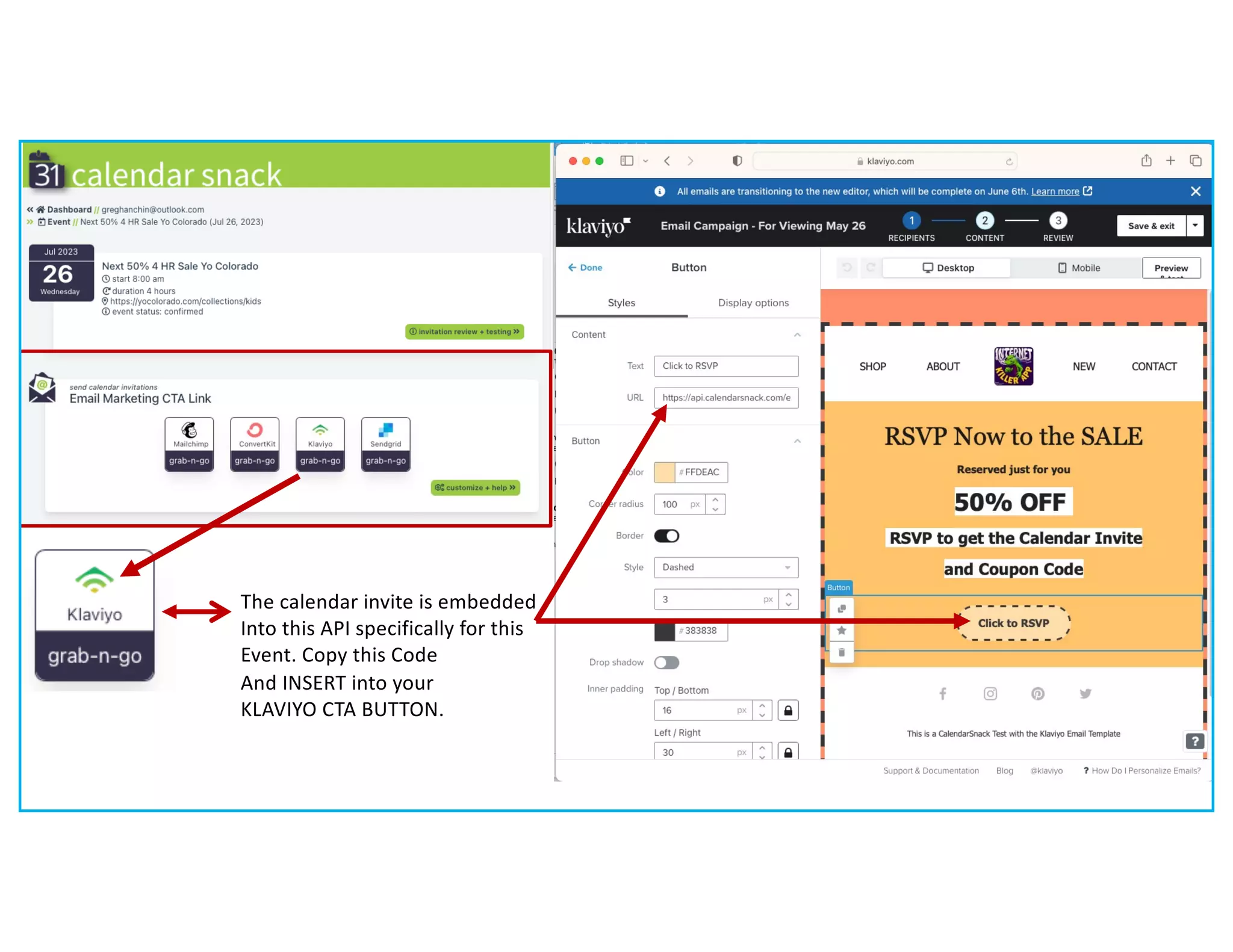
The calendar invite is embedded
Into this API specifically for this
Event. Copy this Code
And INSERT into your
KLAVIYO CTA BUTTON.
We Auto
Generate
A Landing Page from
Your Calendar Invite
Data and send
A real calendar
Invite at the same
time
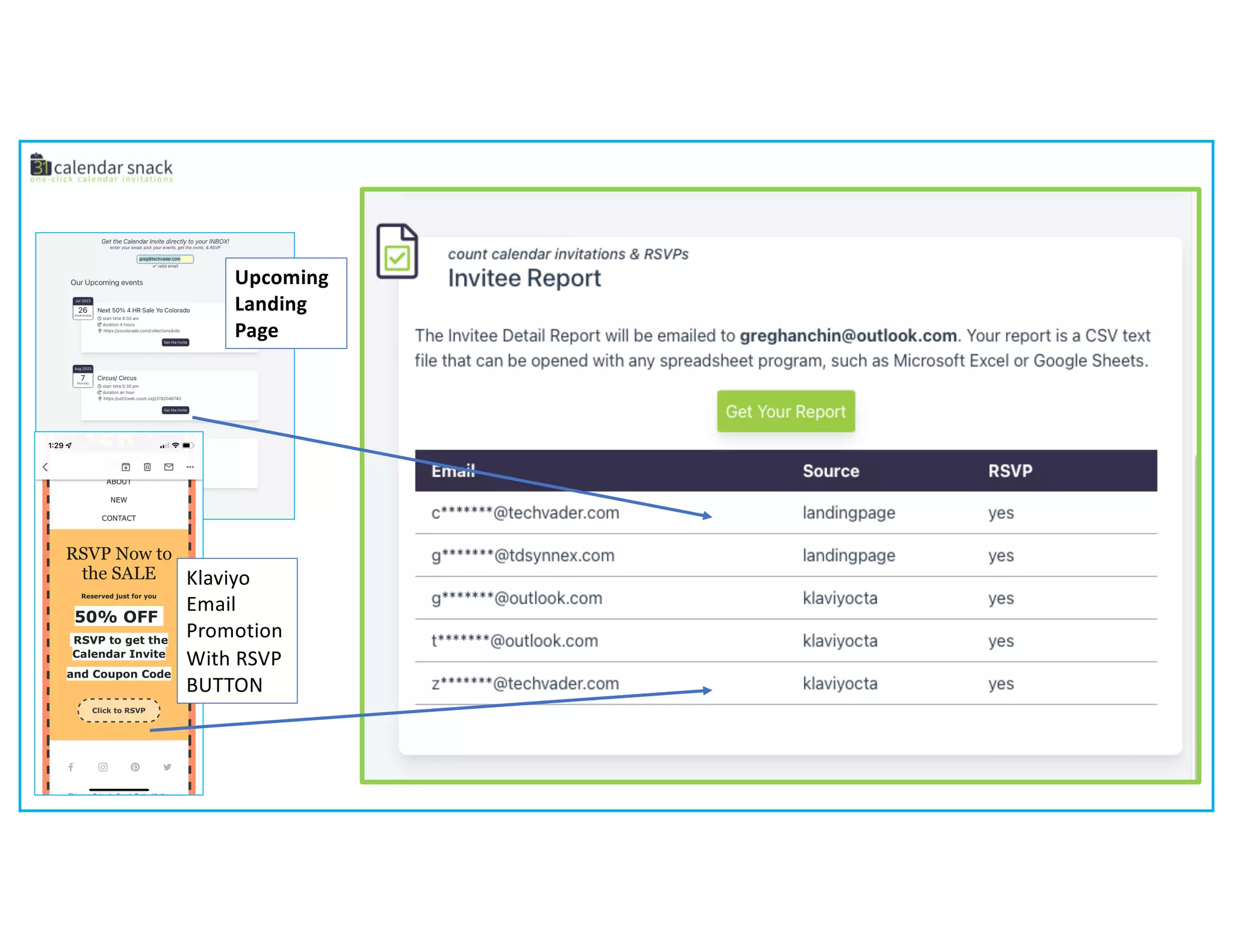
Klaviyo
Email
Promotion
With RSVP
BUTTON
Upcoming
Landing
Page
Option 2 – Deploy the Upcoming Landing Page
Klaviyo RSVP BUTTON.pdf

Klaviyo RSVP BUTTON.pdf

  • 1.
    KLAVIYO RSVP BUTTON FromCalendarsnack Using your Calendar Client NO CODE https://calendarsnack.com May 27, 2023
  • 3.
    STEP 1- Copyus off Your Calendar Client Using create@calendarsnack.com to generate a calendarsnack
  • 4.
    My Calendar Client Used tocreate the calendar Snack. Using the create@calendersnack.com Email Address. Use a Outlook Or Google Calendar Client To CREATE a Calendarsnack. We SEND you back to your email address used In the Calendar Client a Calendar Snack containing The URLS For Landing Pages And CODES For RSVP Buttons. greghanchin@outlook.com – address in my Calendar Client.
  • 5.
    greghanchin@outlook.com – addressin my Calendar Client. COPY US @ - create@calendarsnack.com to create calendarsnack in your calendar client….. The Calendarsnack is sent to the email address used in the Calendar Client. greghanchin@outlook.com
  • 6.
    This took 10 Seconds. Youcan UPDATE your Calendar Invite In your Client and we will UPDATE the Calendar Invites SENT with RSVP Buttons or Landing Pages.
  • 7.
    STEP 2- Getthe RSVP BUTTON CODE For KLAVIYO
  • 8.
    The calendar inviteis embedded Into this API specifically for this Event. Copy this Code And INSERT into your KLAVIYO CTA BUTTON.
  • 10.
    We Auto Generate A LandingPage from Your Calendar Invite Data and send A real calendar Invite at the same time
  • 11.
  • 12.
    Option 2 –Deploy the Upcoming Landing Page