Rob Davarnia

@robdvr - robdvr@gmail.com - robdvr.com
About me
Senior Full Stack Developer at GigaSavvy
Passionate about Ruby on Rails, Node.js, and Angular
Agenda
Explore MEAN Stack technologies


Deploy a sample application with authentication to heroku
MEAN
What’s MEAN Stack?
MEAN Stack is a full-stack JavaScript solution that helps you
build fast, robust and maintainable production web
applications using MongoDB, Express, AngularJS, and Node.js.
What’s a Framework?
structure that includes libraries of code


1. Code and File Organization

2. Libraries & Extensions

3. Faster Development

4. Community

5. Updates

What’s a dev Stack?
LAMP - Linux, Apache, MySQL, PHP
.net - Windows, IIS, C#, MSSQL Server
Java - Tomcat, Java, JSP, Oracle
What’s MongoDB?
MongoDB is a NoSQL document-store database
What’s express?
Express is a web application framework built on
node.js which comes with a set of features for building
single-page, multi-page, and hybrid web apps.
What’s AngularJS?
AngularJS is an application framework that lets you
extend HTML and teach it new tricks. The code is
expressive, readable, and quick to develop.
What’s node.js?
Open source
Server side JavaScript
Executed by the V8- a JavaScript engine developed by
Google which is used in Chrome
Comes with built-in library to act as a web server, like
Apache.
Why MEAN Stack?
All of these components use JavaScript / JSON.
One language, same context
Consistent
Scalability
Asynchronous
Who is using MEAN?
MEAN Stack recap
MongoDB - Database
ExpressJS - Web Application Framework
AngularJS - Frontend Framework
NodeJS - Web Server
Overview
Let’s talk about node.js!
Package Management
NodeJS module package manager (NPM)
There’s a module for almost anything you can imagine
Simple to use
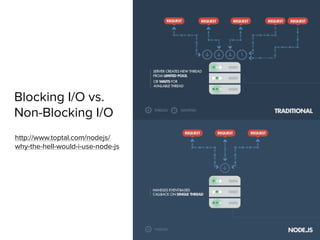
Blocking I/O vs.
Non-Blocking I/O
http://www.toptal.com/nodejs/
why-the-hell-would-i-use-node-js
I/O Bound vs. CPU Bound Applications
CPU Intensive vs. IO Intensive
node.js is a good solution for IO intensive apps
web applications are usually IO intensive
Background jobs for processing CPU intensive workload
Event Loop in Node

(Reactor Pattern - Single Thread)
JavaScript runtime contains a message queue which stores a list of
messages to be processed and their associated callback functions.
These messages are queued in response to external events (such
as a mouse being clicked or receiving the response to an HTTP
request) given a callback function has been provided. If, for
example a user were to click a button and no callback function was
provided – no message would have been enqueued…
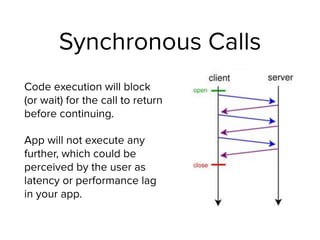
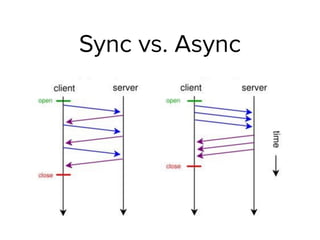
Synchronous Calls
Code execution will block
(or wait) for the call to return
before continuing.
App will not execute any
further, which could be
perceived by the user as
latency or performance lag
in your app.
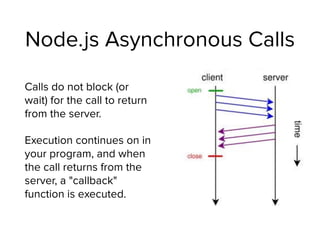
Node.js Asynchronous Calls
Calls do not block (or
wait) for the call to return
from the server.
Execution continues on in
your program, and when
the call returns from the
server, a "callback"
function is executed.
Sync vs. Async
Hello World! (1)
Create a file called app.js
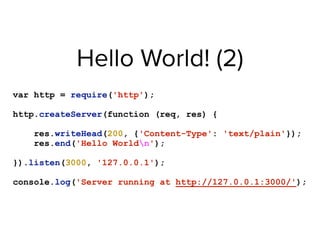
Hello World! (2)
var http = require('http');
http.createServer(function (req, res) {
res.writeHead(200, {'Content-Type': 'text/plain'});
res.end('Hello Worldn');
}).listen(3000, '127.0.0.1');
console.log('Server running at http://127.0.0.1:3000/');
Hello World! (3)
$ node app.js 


(run the above command to start)
Lab1
1. Create the Hello World Application
2. Run the app
3. Check your browser
Let’s talk about express!
What was express again?
Web application framework


(like Ruby on Rails, asp.net, Sinatra, django, and etc.)
Why use express.js?
- Ability to use CSS Preprocessors like Sass/Less/Stylus
- Light weight/Fast
- Better Code Structure with
- Model View Controller (MVC)
- Routing
- Template flexibility (hogan, ejs, jade)
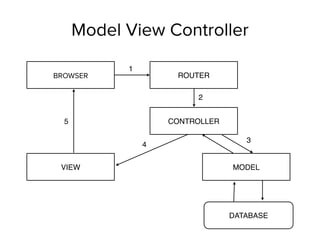
Model View Controller
CONTROLLER
VIEW MODEL
DATABASE
BROWSER ROUTER
1
2
3
4
5
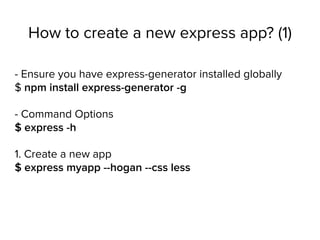
How to create a new express app? (1)
- Ensure you have express-generator installed globally

$ npm install express-generator -g
- Command Options

$ express -h
1. Create a new app

$ express myapp --hogan --css less
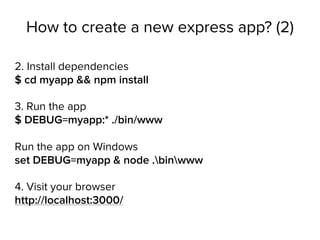
How to create a new express app? (2)
2. Install dependencies

$ cd myapp && npm install
3. Run the app

$ DEBUG=myapp:* ./bin/www


Run the app on Windows

set DEBUG=myapp & node .binwww
4. Visit your browser

http://localhost:3000/
Lab2
1. Create the Hello World Express Application
2. Run the app
3. Check your browser
Hands on: anatomy of a
basic express app
Lab3
1. Create a new route
2. Edit the content displayed & Save
3. Check your browser
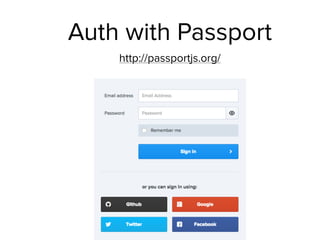
Auth with Passport
http://passportjs.org/
Let’s talk about MongoDB!
What’s a document store?
Document stores provide an alternative to relational
databases (ex. mysql, postgres), not a replacement.
Each has its place.
CAP Theorem (1)
Consistency: All the data change can be seen by all
nodes.
Availability: Reads and Writes are guaranteed to have a
response.
Partition Tolerance: the system will continue working even
if any number of messages sent between nodes is lost.
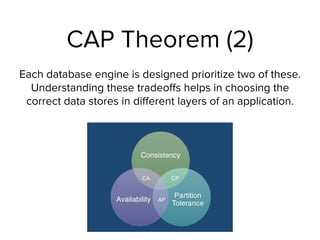
CAP Theorem (2)
Each database engine is designed prioritize two of these.
Understanding these tradeoffs helps in choosing the
correct data stores in different layers of an application.
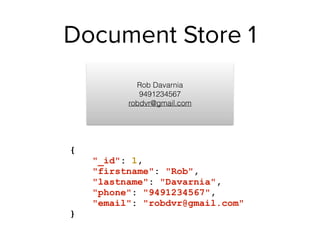
Document Store 1
{
"_id": 1,
"firstname": "Rob",
"lastname": "Davarnia",
"phone": "9491234567",
"email": "robdvr@gmail.com"
}
Rob Davarnia
9491234567

robdvr@gmail.com
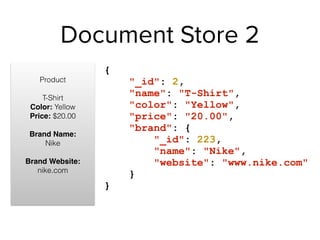
Document Store 2
Product


T-Shirt

Color: Yellow

Price: $20.00


Brand Name: 

Nike


Brand Website:
nike.com


{
"_id": 2,
"name": "T-Shirt",
"color": "Yellow",
"price": "20.00",
"brand": {
"_id": 223,
"name": "Nike",
"website": "www.nike.com"
}
}
MongoDB Pros & Cons
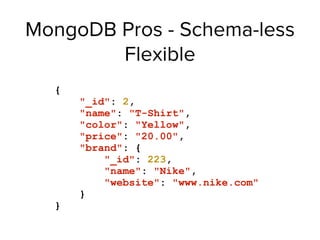
MongoDB Pros - Schema-less
Flexible
{
"_id": 2,
"name": "T-Shirt",
"color": "Yellow",
"price": "20.00",
"brand": {
"_id": 223,
"name": "Nike",
"website": "www.nike.com"
}
}
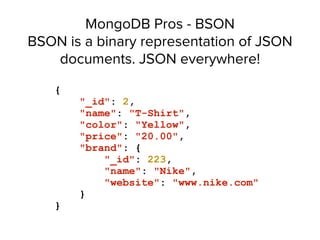
MongoDB Pros - BSON

BSON is a binary representation of JSON
documents. JSON everywhere!
{
"_id": 2,
"name": "T-Shirt",
"color": "Yellow",
"price": "20.00",
"brand": {
"_id": 223,
"name": "Nike",
"website": "www.nike.com"
}
}
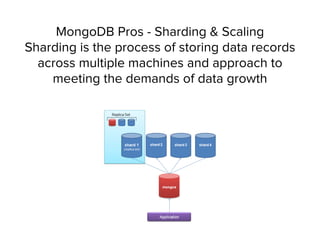
MongoDB Pros - Sharding & Scaling

Sharding is the process of storing data records
across multiple machines and approach to
meeting the demands of data growth
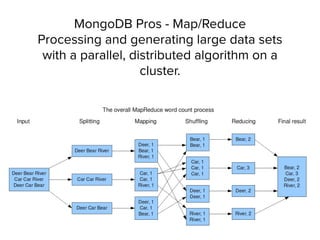
MongoDB Pros - Map/Reduce

Processing and generating large data sets
with a parallel, distributed algorithm on a
cluster.

MongoDB Cons - Data size
Typically higher data size because of the repeated
field names stored
MongoDB Cons - Less Flexible
Less flexibility for querying (no joins!!)
MongoDB Cons - Transactions
No support for transactions. Some atomic operations
are supported.
MongoDB Cons - Maturity
Still not as mature as Relational Databases
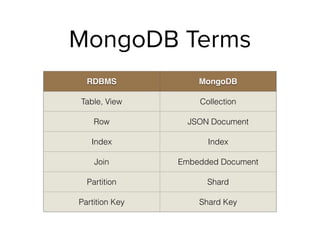
MongoDB Terms
RDBMS MongoDB
Table, View Collection
Row JSON Document
Index Index
Join Embedded Document
Partition Shard
Partition Key Shard Key
Mongoose
Object Modeling for MongoDB
http://mongoosejs.com/
Let’s talk about AngularJS!
What is AngularJS?
Javascript Framework maintained by Google.


Model-View-Controller (MVC or MV*)


Makes development and testing easier


Teaches HTML new tricks!
Model-View-Controller (MVC)
Model: handles your data
View: presentation of data to user


Controller: handles interaction/business logic
Quick Web History
1996 - Microsoft introduces the iframe in IE
1999 - Microsoft introduces the XMLHTTP ActiveX control
2004 - Gmail & Kayak, two heavily ajax’ed apps
2005 - Jesse James Garrett’s article coins the phrase AJAX
2006 - jQuery introduced
*Slide by Troy Miles - http://therockncoder.blogspot.com/
How can Angular help?
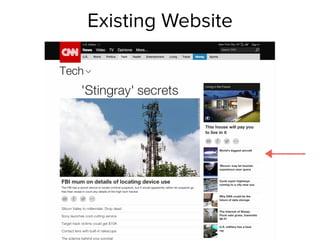
Integrate in parts of your existing website
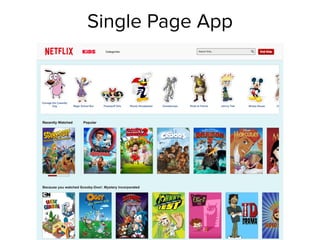
Single Page Applications (SPA)
How can Angular help?
Integrate in parts of your existing website
Single Page Applications (SPA)
Existing Website
Single Page App
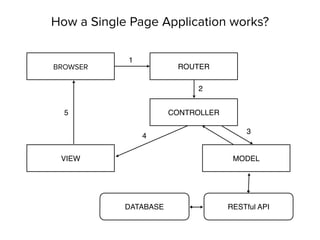
How a Single Page Application works?
CONTROLLER
VIEW MODEL
RESTful API
BROWSER ROUTER
1
2
3
4
5
DATABASE
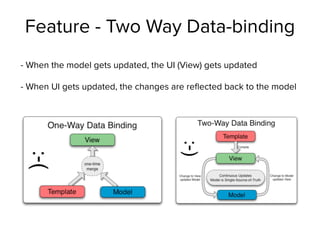
Feature - Two Way Data-binding
- When the model gets updated, the UI (View) gets updated
- When UI gets updated, the changes are reflected back to the model
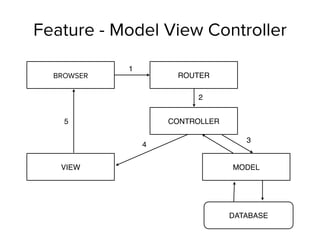
Feature - Model View Controller
CONTROLLER
VIEW MODEL
DATABASE
BROWSER ROUTER
1
2
3
4
5
Feature - Deep Linking
- Deep linking allows AngularJS to get back to the state it
was depending on the URL
- Using the “back” button is okay!


- Hyperlinks won’t break things
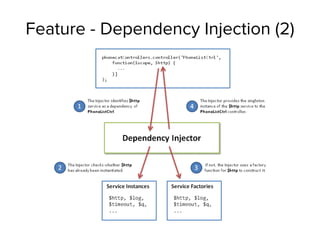
Feature - Dependency Injection
- Design pattern that implements inversion of control for libraries
- Dependency passed into one or multiple objects
- Easier to test
- Harder to break apps
- If any underlying code changes in your dependency, the object
using it doesn’t care about implantation
Feature - Dependency Injection (2)
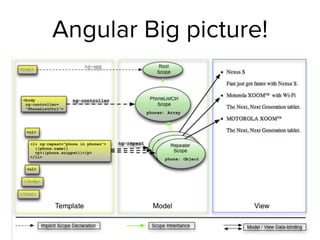
Angular Big picture!
How Angular works?
• Browser loads the HTML and parses into DOM
• Browser loads angular.js script
• Angular waits for DOMContentLoaded event
• Angular looks for ng-app directive, which designates the app boundary
• The module specified in ng-app is used to configure $injector
• The $injector is used to create the $compile service as well as the $rootScope
• $compile service is used to compile the DOM and link it with $rootScope
• The ng-init directive assigns World to the name property on the scope
• {{ name }} interpolates the expression to “Hello World!”
Angular Terms - Controller
Interacts with Model
Sets up what’s needed for presentation (View)
Constructs model and pass it along to view along with
callbacks
Angular Terms - Model
Data which gets combined with the template
to produce the view
Angular Terms - View
What user sees.
Starts as a template, and then it is merged
with the model, and finally rendered into the
browser DOM
Angular Terms - $scope
The scope is responsible for detecting changes to
the model and provides the execution for
expressions.


Also represents the application model.
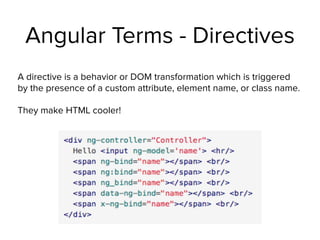
Angular Terms - Directives
A directive is a behavior or DOM transformation which is triggered
by the presence of a custom attribute, element name, or class name.
They make HTML cooler!
Angular Terms - Filters
Format and transform data. 

example: make text uppercase
Angular Directives (1)
• ng-app

Declares an element as a root element of the application allowing behavior
to be modified through custom HTML tags.
• ng-bind

Automatically changes the text of a HTML element to the value of a given
expression.
• ng-model

Similar to ng-bind, but allows two-way data binding between the view and
the scope.
• ng-class

Allows class attributes to be dynamically loaded.
• ng-controller

Specifies a JavaScript controller class that evaluates HTML expressions.
Angular Directives (2)
• ng-repeat

Instantiate an element once per item from a collection.
• ng-show & ng-hide

Conditionally show or hide an element, depending on the value of a boolean
expression.
• ng-switch

Conditionally instantiate one template from a set of choices, depending on the
value of a selection expression.
• ng-view

The base directive responsible for handling routes that resolve JSON before
rendering templates driven by specified controllers.
• ng-if

Basic if statement directive which allow to show the following element if the
conditions are true.
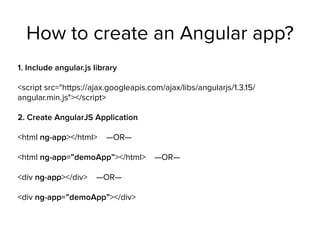
How to create an Angular app?
1. Include angular.js library
<script src="https://ajax.googleapis.com/ajax/libs/angularjs/1.3.15/
angular.min.js"></script>
2. Create AngularJS Application
<html ng-app></html> —OR—


<html ng-app=”demoApp”></html> —OR—


<div ng-app></div> —OR—


<div ng-app=”demoApp”></div>
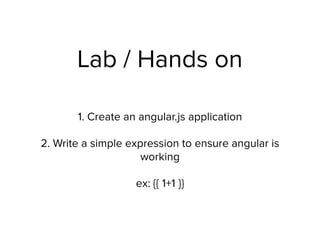
Lab / Hands on
1. Create an angular.js application
2. Write a simple expression to ensure angular is
working
ex: {{ 1+1 }}
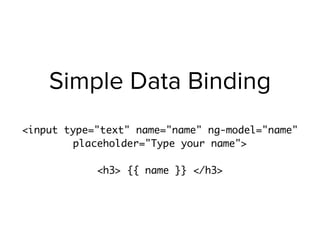
Simple Data Binding
<input type="text" name="name" ng-model="name"
placeholder="Type your name">
<h3> {{ name }} </h3>
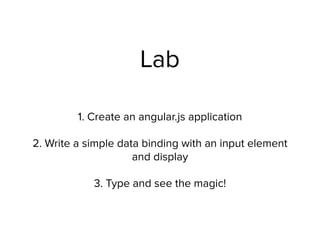
Lab
1. Create an angular.js application
2. Write a simple data binding with an input element
and display
3. Type and see the magic!
Creating Controllers
var app = angular.module('myApp', []);
app.controller('MyController', ['$scope', function($scope){
$scope.name = "hello";
}]);
<div ng-controller="MyController">
{{ name }}
</div>
app.js
index.html
Lab
1. Create an angular.js application
2. Create an additional script (app.js)
3. Include your script
4. Declare your module name
5. Create a controller
6. Add a model to $scope
7. Interpolate the model variable in your view
Creating Controllers + Two Way Data Binding
var app = angular.module('myApp', []);
app.controller('MyController', ['$scope', function($scope){
$scope.name = "hello";
}]);
<div ng-controller="MyController">
{{ name }}


<input type="text" name="name" value="" ng-model="name"
placeholder="Type your name">
</div>
app.js
index.html
Lab
1. Create an angular.js application
2. Create an additional script (app.js)
3. Include your script
4. Declare your module name
5. Create a controller
6. Add a model to $scope
7. Interpolate the model variable in your view


8. Add an input text field with the same model name


9. Change the text and see what happens
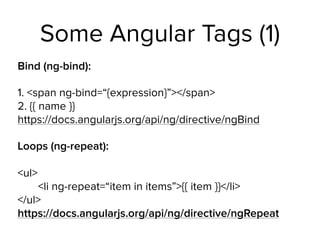
Some Angular Tags (1)
Bind (ng-bind):
1. <span ng-bind=“{expression}”></span>

2. {{ name }}

https://docs.angularjs.org/api/ng/directive/ngBind
Loops (ng-repeat):


<ul>

<li ng-repeat=“item in items”>{{ item }}</li>

</ul>

https://docs.angularjs.org/api/ng/directive/ngRepeat
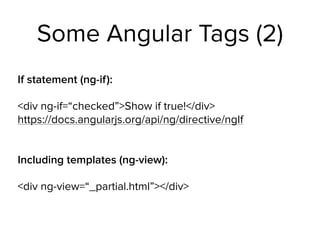
Some Angular Tags (2)
If statement (ng-if):
<div ng-if=“checked”>Show if true!</div>

https://docs.angularjs.org/api/ng/directive/ngIf


Including templates (ng-view):
<div ng-view=“_partial.html”></div>

Some Angular Tags (3)
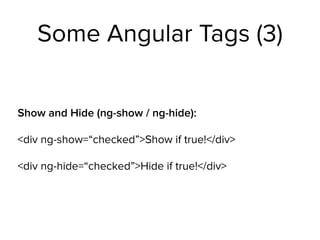
Show and Hide (ng-show / ng-hide):
<div ng-show=“checked”>Show if true!</div>
<div ng-hide=“checked”>Hide if true!</div>
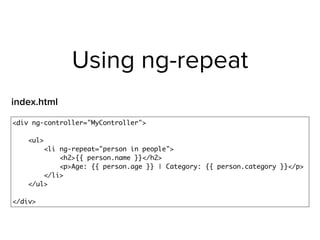
Using ng-repeat
<div ng-controller="MyController">
<ul>
<li ng-repeat="person in people">
<h2>{{ person.name }}</h2>
<p>Age: {{ person.age }} | Category: {{ person.category }}</p>
</li>
</ul>
</div>
index.html
Lab
1. Create an angular.js application
2. Create an additional script (app.js)
3. Include your script
4. Declare your module name
5. Create a controller
6. Copy the list of people and add it to $scope


7. Use ng-repeat to display your data
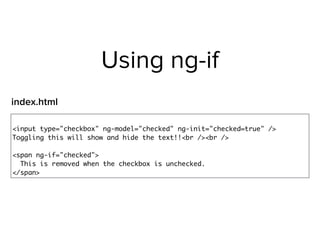
Using ng-if
<input type="checkbox" ng-model="checked" ng-init="checked=true" />
Toggling this will show and hide the text!!<br /><br />
<span ng-if="checked">
This is removed when the checkbox is unchecked.
</span>
index.html
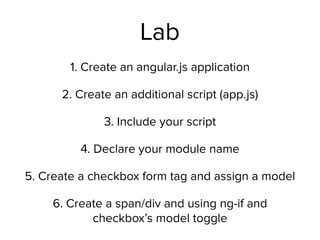
Lab
1. Create an angular.js application
2. Create an additional script (app.js)
3. Include your script
4. Declare your module name
5. Create a checkbox form tag and assign a model
6. Create a span/div and using ng-if and
checkbox’s model toggle
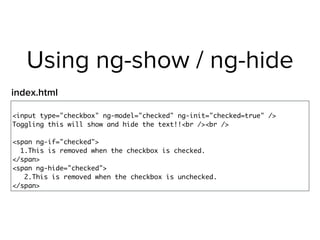
Using ng-show / ng-hide
<input type="checkbox" ng-model="checked" ng-init="checked=true" />
Toggling this will show and hide the text!!<br /><br />
<span ng-if="checked">
1.This is removed when the checkbox is checked.
</span>
<span ng-hide="checked">
2.This is removed when the checkbox is unchecked.
</span>
index.html
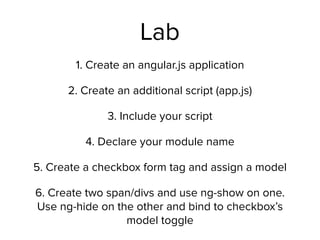
Lab
1. Create an angular.js application
2. Create an additional script (app.js)
3. Include your script
4. Declare your module name
5. Create a checkbox form tag and assign a model
6. Create two span/divs and use ng-show on one.
Use ng-hide on the other and bind to checkbox’s
model toggle
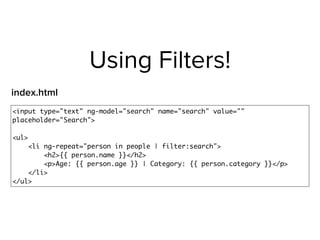
Using Filters!
<input type="text" ng-model="search" name="search" value=""
placeholder="Search">
<ul>
<li ng-repeat="person in people | filter:search">
<h2>{{ person.name }}</h2>
<p>Age: {{ person.age }} | Category: {{ person.category }}</p>
</li>
</ul>
index.html
Lab
1. Copy your ng-repeat application
2. Add an input field with a model
3. Add the input field model as a filter to your
ng-repeat
4. Start typing and see what happens!
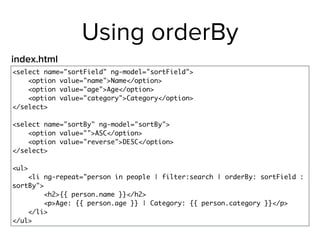
Using orderBy
<select name="sortField" ng-model="sortField">
<option value="name">Name</option>
<option value="age">Age</option>
<option value="category">Category</option>
</select>
<select name="sortBy" ng-model="sortBy">
<option value="">ASC</option>
<option value="reverse">DESC</option>
</select>
<ul>
<li ng-repeat="person in people | filter:search | orderBy: sortField :
sortBy">
<h2>{{ person.name }}</h2>
<p>Age: {{ person.age }} | Category: {{ person.category }}</p>
</li>
</ul>
index.html
Lab
1. Continue with your existing search application
2. Add a select option with a model
3. Add two options to your select with the following
values “”,”reverse”
4. Create another select option
5. Add your categories within the new select option
6. Use “orderBy” filter
Using ng-click
var app = angular.module('myApp', []);
app.controller('MyController', ['$scope', function($scope){
$scope.showAlert = function() {
alert("Show Alert!");
};
}]);
<div ng-controller="MyController">
<a href="" ng-click="showAlert()">Show Alert!</a>
</div>
app.js
index.html
Lab
1. Create a blank angular application
2. Add a custom controller
3. Add a function to your controller’s scope, and
within that function make an alert or log to
console
4. Create a link with ng-click linked to the
function you made
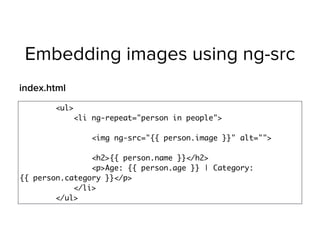
Embedding images using ng-src
<ul>
<li ng-repeat="person in people">

<img ng-src="{{ person.image }}" alt="">

<h2>{{ person.name }}</h2>
<p>Age: {{ person.age }} | Category:
{{ person.category }}</p>
</li>
</ul>
index.html
Lab
1. Copy the ng-repeat application
2. Add images to your people scope model
3. Add an image tag (img) to your index.html’s
ng-repeat
4. Use ng-src to link to the person’s image
source
AJAX using $http service
app.controller('MyController', ['$scope', '$http', function ($scope, $http)
{
$http.get('people.json').success(function(data){
$scope.people = data;
});
}]);
app.js
https://docs.angularjs.org/api/ng/service/$http
Lab
1. Copy your ng-repeat application
2. Create a file named people.json that includes
your data.
3. Add $http service dependency to your
controller
4. Use plnkr.co or a web server to run the app and
see the results. (You won’t be able to make the
XHR request if you aren’t running a web server)
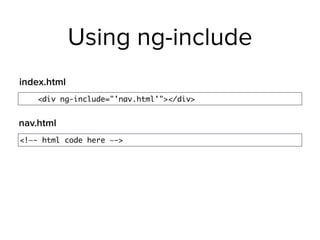
Using ng-include
<div ng-include="'nav.html'"></div>
index.html
<!—- html code here —->
nav.html
Lab
1. Create a blank angular application
2. Add a custom controller
3. Add a function to your controller’s scope, and
within that function make an alert or log to
console
4. Create a link with ng-click linked to the
function you made
How to make angular routes?
1. Include angular-route.js
library
2. Inject ‘ngRoute’ to app
module
3. Inject ‘$routeProvider’
to your app as a config


4. define your routes!
app.config(['$routeProvider',
function( $routeProvider ) {
$routeProvider.when('/', {
templateUrl: 'homepage.html',
controller: 'HomeController'
});
}
]);
How to make angular routes? (2)
- Nest other routes by
appending ‘.when()’
- the fallback route is
defined “otherwise”
app.config(['$routeProvider',
function( $routeProvider ) {
$routeProvider.when('/', {
templateUrl: 'homepage.html',
controller: 'HomeController'
}).
when('/about',{
templateUrl: 'about.html',
controller: 'AboutController'
}).
otherwise({
redirectTo: '/'
});
}
]);
How to make link to other routes?
<a ng-href="#/" href>Home</a>
<a ng-href="#/about" href>About</a>
Lab
1. Create a blank angular application
2. Include angular-route library and inject the appropriate
dependencies
3. Make a 2 custom controllers
3. Make 2 custom views for each controller
5. Create 2 routes
6. Declare ng-view on a div element in your index.html
7. Using ng-href create to hyperlinks to the different views
How to make angular routes? (3)
app.config(
['$routeProvider', function($routeProvider){
$routeProvider.when('/people', {
templateUrl: 'people.html',
controller: 'PeopleController'
}).
when('/person/:id', {
templateUrl: 'single_person.html',
controller: 'PersonDetailController'
}).
otherwise({
redirectTo: '/people'
});
}]
);
Forms & Validation
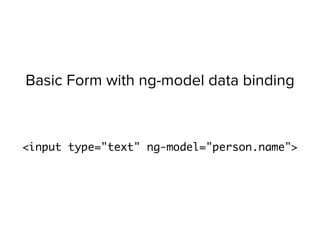
Basic Form with ng-model data binding
<input type="text" ng-model="person.name">
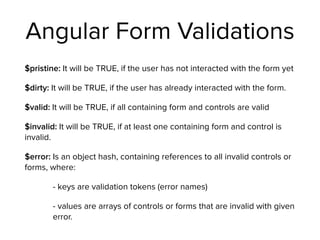
Angular Form Validations
$pristine: It will be TRUE, if the user has not interacted with the form yet
$dirty: It will be TRUE, if the user has already interacted with the form.
$valid: It will be TRUE, if all containing form and controls are valid
$invalid: It will be TRUE, if at least one containing form and control is
invalid.
$error: Is an object hash, containing references to all invalid controls or
forms, where:
- keys are validation tokens (error names)
- values are arrays of controls or forms that are invalid with given
error.
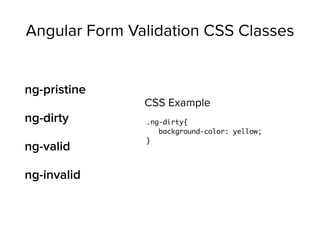
Angular Form Validation CSS Classes
ng-pristine
ng-dirty
ng-valid
ng-invalid
.ng-dirty{
background-color: yellow;
}
CSS Example
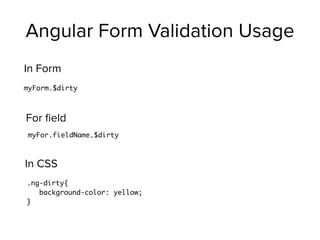
Angular Form Validation Usage
myForm.$dirty
In Form
myFor.fieldName.$dirty
For field
.ng-dirty{
background-color: yellow;
}
In CSS
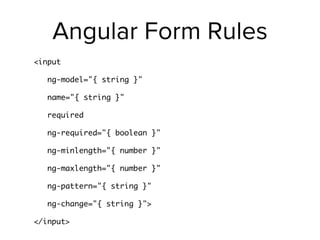
Angular Form Rules
<input
ng-model="{ string }"
name="{ string }"
required
ng-required="{ boolean }"
ng-minlength="{ number }"
ng-maxlength="{ number }"
ng-pattern="{ string }"
ng-change="{ string }">
</input>
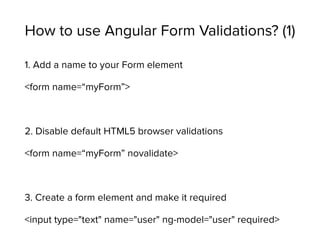
How to use Angular Form Validations? (1)
1. Add a name to your Form element
<form name=“myForm”>
2. Disable default HTML5 browser validations
<form name=“myForm” novalidate>
3. Create a form element and make it required
<input type="text" name="user" ng-model="user" required>
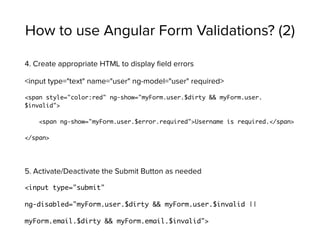
How to use Angular Form Validations? (2)
4. Create appropriate HTML to display field errors
<input type="text" name="user" ng-model="user" required>
<span style="color:red" ng-show="myForm.user.$dirty && myForm.user.
$invalid">
<span ng-show="myForm.user.$error.required">Username is required.</span>
</span>
5. Activate/Deactivate the Submit Button as needed
<input type="submit"
ng-disabled="myForm.user.$dirty && myForm.user.$invalid ||
myForm.email.$dirty && myForm.email.$invalid">
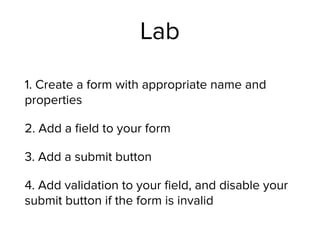
Lab
1. Create a form with appropriate name and
properties
2. Add a field to your form
3. Add a submit button
4. Add validation to your field, and disable your
submit button if the form is invalid
Unit Testing
Unit Testing
Separation of Concerns
Testing your application in small units to make
sure they are doing the right thing
Unit Testing Tools
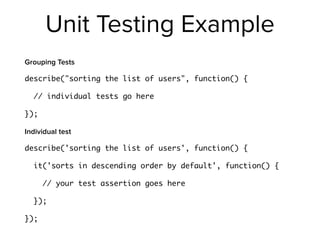
Unit Testing Example
Grouping Tests
describe("sorting the list of users", function() {
// individual tests go here
});
Individual test
describe('sorting the list of users', function() {
it('sorts in descending order by default', function() {
// your test assertion goes here
});
});
Unit Testing
Further reading
https://docs.angularjs.org/guide/unit-testing
MEAN.js (Yeoman)
Generator for Yeoman to quickly create
MEAN applications
Comes with Grunt, Bower, and Passport
What’s Grunt?
A JavaScript-based task runner to perform repetitive tasks.
Grunt helps us run the web server and compile CSS/JS.
How does Grunt work?
Grunt runs with what’s needed using Gruntfile.js which
includes all the settings for grunt
What’s Bower?
Package manager for anything you need to build your frontend
How does Bower work?
bower install <package> -- save


Bower manages front-end packages and tracks them in
bower.js file
Creating your first application
yo meanjs
Run it!
grunt
you should be able to pull the site in a browser

http://localhost:3000
Lab
1. Create your first MEAN.js application
2. Make sure Mongodb is running
3. Start your application
4. Navigate to http://localhost:3000
CRUD (Database Operations)
CREATE
READ
UPDATE
DELETE
Deploying to Heroku
Why use Heroku?
Heroku is a PaaS (Platform as a Service)
You don’t need to manage servers!
You can focus on building your app and making
your users happy!
Heroku has addons.
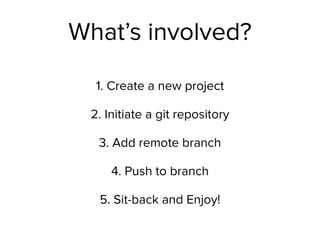
What’s involved?
1. Create a new project
2. Initiate a git repository
3. Add remote branch
4. Push to branch
5. Sit-back and Enjoy!
Furthur Heroku Help
https://devcenter.heroku.com/articles/getting-
started-with-nodejs#set-up
https://devcenter.heroku.com/articles/deploying-
nodejs
https://devcenter.heroku.com/articles/nodejs-
support
Rob Davarnia

@robdvr - robdvr@gmail.com - robdvr.com
Thank you for coming!

Beginning MEAN Stack

  • 1.
    Rob Davarnia
 @robdvr -robdvr@gmail.com - robdvr.com
  • 2.
    About me Senior FullStack Developer at GigaSavvy Passionate about Ruby on Rails, Node.js, and Angular
  • 3.
    Agenda Explore MEAN Stacktechnologies
 
 Deploy a sample application with authentication to heroku
  • 4.
  • 5.
    What’s MEAN Stack? MEANStack is a full-stack JavaScript solution that helps you build fast, robust and maintainable production web applications using MongoDB, Express, AngularJS, and Node.js.
  • 6.
    What’s a Framework? structurethat includes libraries of code
 
 1. Code and File Organization
 2. Libraries & Extensions
 3. Faster Development
 4. Community
 5. Updates

  • 7.
    What’s a devStack? LAMP - Linux, Apache, MySQL, PHP .net - Windows, IIS, C#, MSSQL Server Java - Tomcat, Java, JSP, Oracle
  • 8.
    What’s MongoDB? MongoDB isa NoSQL document-store database
  • 9.
    What’s express? Express isa web application framework built on node.js which comes with a set of features for building single-page, multi-page, and hybrid web apps.
  • 10.
    What’s AngularJS? AngularJS isan application framework that lets you extend HTML and teach it new tricks. The code is expressive, readable, and quick to develop.
  • 11.
    What’s node.js? Open source Serverside JavaScript Executed by the V8- a JavaScript engine developed by Google which is used in Chrome Comes with built-in library to act as a web server, like Apache.
  • 12.
    Why MEAN Stack? Allof these components use JavaScript / JSON. One language, same context Consistent Scalability Asynchronous
  • 13.
  • 14.
    MEAN Stack recap MongoDB- Database ExpressJS - Web Application Framework AngularJS - Frontend Framework NodeJS - Web Server
  • 15.
  • 16.
  • 17.
    Package Management NodeJS modulepackage manager (NPM) There’s a module for almost anything you can imagine Simple to use
  • 18.
    Blocking I/O vs. Non-BlockingI/O http://www.toptal.com/nodejs/ why-the-hell-would-i-use-node-js
  • 19.
    I/O Bound vs.CPU Bound Applications CPU Intensive vs. IO Intensive node.js is a good solution for IO intensive apps web applications are usually IO intensive Background jobs for processing CPU intensive workload
  • 20.
    Event Loop inNode
 (Reactor Pattern - Single Thread) JavaScript runtime contains a message queue which stores a list of messages to be processed and their associated callback functions. These messages are queued in response to external events (such as a mouse being clicked or receiving the response to an HTTP request) given a callback function has been provided. If, for example a user were to click a button and no callback function was provided – no message would have been enqueued…
  • 21.
    Synchronous Calls Code executionwill block (or wait) for the call to return before continuing. App will not execute any further, which could be perceived by the user as latency or performance lag in your app.
  • 22.
    Node.js Asynchronous Calls Callsdo not block (or wait) for the call to return from the server. Execution continues on in your program, and when the call returns from the server, a "callback" function is executed.
  • 23.
  • 24.
    Hello World! (1) Createa file called app.js
  • 25.
    Hello World! (2) varhttp = require('http'); http.createServer(function (req, res) { res.writeHead(200, {'Content-Type': 'text/plain'}); res.end('Hello Worldn'); }).listen(3000, '127.0.0.1'); console.log('Server running at http://127.0.0.1:3000/');
  • 26.
    Hello World! (3) $node app.js 
 
 (run the above command to start)
  • 27.
    Lab1 1. Create theHello World Application 2. Run the app 3. Check your browser
  • 28.
  • 29.
    What was expressagain? Web application framework
 
 (like Ruby on Rails, asp.net, Sinatra, django, and etc.)
  • 30.
    Why use express.js? -Ability to use CSS Preprocessors like Sass/Less/Stylus - Light weight/Fast - Better Code Structure with - Model View Controller (MVC) - Routing - Template flexibility (hogan, ejs, jade)
  • 31.
    Model View Controller CONTROLLER VIEWMODEL DATABASE BROWSER ROUTER 1 2 3 4 5
  • 32.
    How to createa new express app? (1) - Ensure you have express-generator installed globally
 $ npm install express-generator -g - Command Options
 $ express -h 1. Create a new app
 $ express myapp --hogan --css less
  • 33.
    How to createa new express app? (2) 2. Install dependencies
 $ cd myapp && npm install 3. Run the app
 $ DEBUG=myapp:* ./bin/www
 
 Run the app on Windows
 set DEBUG=myapp & node .binwww 4. Visit your browser
 http://localhost:3000/
  • 34.
    Lab2 1. Create theHello World Express Application 2. Run the app 3. Check your browser
  • 35.
    Hands on: anatomyof a basic express app
  • 36.
    Lab3 1. Create anew route 2. Edit the content displayed & Save 3. Check your browser
  • 37.
  • 38.
  • 39.
    What’s a documentstore? Document stores provide an alternative to relational databases (ex. mysql, postgres), not a replacement. Each has its place.
  • 40.
    CAP Theorem (1) Consistency:All the data change can be seen by all nodes. Availability: Reads and Writes are guaranteed to have a response. Partition Tolerance: the system will continue working even if any number of messages sent between nodes is lost.
  • 41.
    CAP Theorem (2) Eachdatabase engine is designed prioritize two of these. Understanding these tradeoffs helps in choosing the correct data stores in different layers of an application.
  • 42.
    Document Store 1 { "_id":1, "firstname": "Rob", "lastname": "Davarnia", "phone": "9491234567", "email": "robdvr@gmail.com" } Rob Davarnia 9491234567
 robdvr@gmail.com
  • 43.
    Document Store 2 Product
 
 T-Shirt
 Color:Yellow
 Price: $20.00
 
 Brand Name: 
 Nike
 
 Brand Website: nike.com
 
 { "_id": 2, "name": "T-Shirt", "color": "Yellow", "price": "20.00", "brand": { "_id": 223, "name": "Nike", "website": "www.nike.com" } }
  • 44.
  • 45.
    MongoDB Pros -Schema-less Flexible { "_id": 2, "name": "T-Shirt", "color": "Yellow", "price": "20.00", "brand": { "_id": 223, "name": "Nike", "website": "www.nike.com" } }
  • 46.
    MongoDB Pros -BSON
 BSON is a binary representation of JSON documents. JSON everywhere! { "_id": 2, "name": "T-Shirt", "color": "Yellow", "price": "20.00", "brand": { "_id": 223, "name": "Nike", "website": "www.nike.com" } }
  • 47.
    MongoDB Pros -Sharding & Scaling
 Sharding is the process of storing data records across multiple machines and approach to meeting the demands of data growth
  • 48.
    MongoDB Pros -Map/Reduce
 Processing and generating large data sets with a parallel, distributed algorithm on a cluster.

  • 49.
    MongoDB Cons -Data size Typically higher data size because of the repeated field names stored
  • 50.
    MongoDB Cons -Less Flexible Less flexibility for querying (no joins!!)
  • 51.
    MongoDB Cons -Transactions No support for transactions. Some atomic operations are supported.
  • 52.
    MongoDB Cons -Maturity Still not as mature as Relational Databases
  • 53.
    MongoDB Terms RDBMS MongoDB Table,View Collection Row JSON Document Index Index Join Embedded Document Partition Shard Partition Key Shard Key
  • 54.
    Mongoose Object Modeling forMongoDB http://mongoosejs.com/
  • 55.
  • 56.
    What is AngularJS? JavascriptFramework maintained by Google.
 
 Model-View-Controller (MVC or MV*)
 
 Makes development and testing easier
 
 Teaches HTML new tricks!
  • 57.
    Model-View-Controller (MVC) Model: handlesyour data View: presentation of data to user
 
 Controller: handles interaction/business logic
  • 58.
    Quick Web History 1996- Microsoft introduces the iframe in IE 1999 - Microsoft introduces the XMLHTTP ActiveX control 2004 - Gmail & Kayak, two heavily ajax’ed apps 2005 - Jesse James Garrett’s article coins the phrase AJAX 2006 - jQuery introduced *Slide by Troy Miles - http://therockncoder.blogspot.com/
  • 59.
    How can Angularhelp? Integrate in parts of your existing website Single Page Applications (SPA)
  • 60.
    How can Angularhelp? Integrate in parts of your existing website Single Page Applications (SPA)
  • 61.
  • 62.
  • 63.
    How a SinglePage Application works? CONTROLLER VIEW MODEL RESTful API BROWSER ROUTER 1 2 3 4 5 DATABASE
  • 64.
    Feature - TwoWay Data-binding - When the model gets updated, the UI (View) gets updated - When UI gets updated, the changes are reflected back to the model
  • 65.
    Feature - ModelView Controller CONTROLLER VIEW MODEL DATABASE BROWSER ROUTER 1 2 3 4 5
  • 66.
    Feature - DeepLinking - Deep linking allows AngularJS to get back to the state it was depending on the URL - Using the “back” button is okay!
 
 - Hyperlinks won’t break things
  • 67.
    Feature - DependencyInjection - Design pattern that implements inversion of control for libraries - Dependency passed into one or multiple objects - Easier to test - Harder to break apps - If any underlying code changes in your dependency, the object using it doesn’t care about implantation
  • 68.
    Feature - DependencyInjection (2)
  • 69.
  • 70.
    How Angular works? •Browser loads the HTML and parses into DOM • Browser loads angular.js script • Angular waits for DOMContentLoaded event • Angular looks for ng-app directive, which designates the app boundary • The module specified in ng-app is used to configure $injector • The $injector is used to create the $compile service as well as the $rootScope • $compile service is used to compile the DOM and link it with $rootScope • The ng-init directive assigns World to the name property on the scope • {{ name }} interpolates the expression to “Hello World!”
  • 71.
    Angular Terms -Controller Interacts with Model Sets up what’s needed for presentation (View) Constructs model and pass it along to view along with callbacks
  • 72.
    Angular Terms -Model Data which gets combined with the template to produce the view
  • 73.
    Angular Terms -View What user sees. Starts as a template, and then it is merged with the model, and finally rendered into the browser DOM
  • 74.
    Angular Terms -$scope The scope is responsible for detecting changes to the model and provides the execution for expressions.
 
 Also represents the application model.
  • 75.
    Angular Terms -Directives A directive is a behavior or DOM transformation which is triggered by the presence of a custom attribute, element name, or class name. They make HTML cooler!
  • 76.
    Angular Terms -Filters Format and transform data. 
 example: make text uppercase
  • 77.
    Angular Directives (1) •ng-app
 Declares an element as a root element of the application allowing behavior to be modified through custom HTML tags. • ng-bind
 Automatically changes the text of a HTML element to the value of a given expression. • ng-model
 Similar to ng-bind, but allows two-way data binding between the view and the scope. • ng-class
 Allows class attributes to be dynamically loaded. • ng-controller
 Specifies a JavaScript controller class that evaluates HTML expressions.
  • 78.
    Angular Directives (2) •ng-repeat
 Instantiate an element once per item from a collection. • ng-show & ng-hide
 Conditionally show or hide an element, depending on the value of a boolean expression. • ng-switch
 Conditionally instantiate one template from a set of choices, depending on the value of a selection expression. • ng-view
 The base directive responsible for handling routes that resolve JSON before rendering templates driven by specified controllers. • ng-if
 Basic if statement directive which allow to show the following element if the conditions are true.
  • 79.
    How to createan Angular app? 1. Include angular.js library <script src="https://ajax.googleapis.com/ajax/libs/angularjs/1.3.15/ angular.min.js"></script> 2. Create AngularJS Application <html ng-app></html> —OR—
 
 <html ng-app=”demoApp”></html> —OR—
 
 <div ng-app></div> —OR—
 
 <div ng-app=”demoApp”></div>
  • 80.
    Lab / Handson 1. Create an angular.js application 2. Write a simple expression to ensure angular is working ex: {{ 1+1 }}
  • 81.
    Simple Data Binding <inputtype="text" name="name" ng-model="name" placeholder="Type your name"> <h3> {{ name }} </h3>
  • 82.
    Lab 1. Create anangular.js application 2. Write a simple data binding with an input element and display 3. Type and see the magic!
  • 83.
    Creating Controllers var app= angular.module('myApp', []); app.controller('MyController', ['$scope', function($scope){ $scope.name = "hello"; }]); <div ng-controller="MyController"> {{ name }} </div> app.js index.html
  • 84.
    Lab 1. Create anangular.js application 2. Create an additional script (app.js) 3. Include your script 4. Declare your module name 5. Create a controller 6. Add a model to $scope 7. Interpolate the model variable in your view
  • 85.
    Creating Controllers +Two Way Data Binding var app = angular.module('myApp', []); app.controller('MyController', ['$scope', function($scope){ $scope.name = "hello"; }]); <div ng-controller="MyController"> {{ name }}
 
 <input type="text" name="name" value="" ng-model="name" placeholder="Type your name"> </div> app.js index.html
  • 86.
    Lab 1. Create anangular.js application 2. Create an additional script (app.js) 3. Include your script 4. Declare your module name 5. Create a controller 6. Add a model to $scope 7. Interpolate the model variable in your view
 
 8. Add an input text field with the same model name
 
 9. Change the text and see what happens
  • 87.
    Some Angular Tags(1) Bind (ng-bind): 1. <span ng-bind=“{expression}”></span>
 2. {{ name }}
 https://docs.angularjs.org/api/ng/directive/ngBind Loops (ng-repeat):
 
 <ul>
 <li ng-repeat=“item in items”>{{ item }}</li>
 </ul>
 https://docs.angularjs.org/api/ng/directive/ngRepeat
  • 88.
    Some Angular Tags(2) If statement (ng-if): <div ng-if=“checked”>Show if true!</div>
 https://docs.angularjs.org/api/ng/directive/ngIf
 
 
 Including templates (ng-view): <div ng-view=“_partial.html”></div>

  • 89.
    Some Angular Tags(3) Show and Hide (ng-show / ng-hide): <div ng-show=“checked”>Show if true!</div> <div ng-hide=“checked”>Hide if true!</div>
  • 90.
    Using ng-repeat <div ng-controller="MyController"> <ul> <ling-repeat="person in people"> <h2>{{ person.name }}</h2> <p>Age: {{ person.age }} | Category: {{ person.category }}</p> </li> </ul> </div> index.html
  • 91.
    Lab 1. Create anangular.js application 2. Create an additional script (app.js) 3. Include your script 4. Declare your module name 5. Create a controller 6. Copy the list of people and add it to $scope
 
 7. Use ng-repeat to display your data
  • 92.
    Using ng-if <input type="checkbox"ng-model="checked" ng-init="checked=true" /> Toggling this will show and hide the text!!<br /><br /> <span ng-if="checked"> This is removed when the checkbox is unchecked. </span> index.html
  • 93.
    Lab 1. Create anangular.js application 2. Create an additional script (app.js) 3. Include your script 4. Declare your module name 5. Create a checkbox form tag and assign a model 6. Create a span/div and using ng-if and checkbox’s model toggle
  • 94.
    Using ng-show /ng-hide <input type="checkbox" ng-model="checked" ng-init="checked=true" /> Toggling this will show and hide the text!!<br /><br /> <span ng-if="checked"> 1.This is removed when the checkbox is checked. </span> <span ng-hide="checked"> 2.This is removed when the checkbox is unchecked. </span> index.html
  • 95.
    Lab 1. Create anangular.js application 2. Create an additional script (app.js) 3. Include your script 4. Declare your module name 5. Create a checkbox form tag and assign a model 6. Create two span/divs and use ng-show on one. Use ng-hide on the other and bind to checkbox’s model toggle
  • 96.
    Using Filters! <input type="text"ng-model="search" name="search" value="" placeholder="Search"> <ul> <li ng-repeat="person in people | filter:search"> <h2>{{ person.name }}</h2> <p>Age: {{ person.age }} | Category: {{ person.category }}</p> </li> </ul> index.html
  • 97.
    Lab 1. Copy yourng-repeat application 2. Add an input field with a model 3. Add the input field model as a filter to your ng-repeat 4. Start typing and see what happens!
  • 98.
    Using orderBy <select name="sortField"ng-model="sortField"> <option value="name">Name</option> <option value="age">Age</option> <option value="category">Category</option> </select> <select name="sortBy" ng-model="sortBy"> <option value="">ASC</option> <option value="reverse">DESC</option> </select> <ul> <li ng-repeat="person in people | filter:search | orderBy: sortField : sortBy"> <h2>{{ person.name }}</h2> <p>Age: {{ person.age }} | Category: {{ person.category }}</p> </li> </ul> index.html
  • 99.
    Lab 1. Continue withyour existing search application 2. Add a select option with a model 3. Add two options to your select with the following values “”,”reverse” 4. Create another select option 5. Add your categories within the new select option 6. Use “orderBy” filter
  • 100.
    Using ng-click var app= angular.module('myApp', []); app.controller('MyController', ['$scope', function($scope){ $scope.showAlert = function() { alert("Show Alert!"); }; }]); <div ng-controller="MyController"> <a href="" ng-click="showAlert()">Show Alert!</a> </div> app.js index.html
  • 101.
    Lab 1. Create ablank angular application 2. Add a custom controller 3. Add a function to your controller’s scope, and within that function make an alert or log to console 4. Create a link with ng-click linked to the function you made
  • 102.
    Embedding images usingng-src <ul> <li ng-repeat="person in people">
 <img ng-src="{{ person.image }}" alt="">
 <h2>{{ person.name }}</h2> <p>Age: {{ person.age }} | Category: {{ person.category }}</p> </li> </ul> index.html
  • 103.
    Lab 1. Copy theng-repeat application 2. Add images to your people scope model 3. Add an image tag (img) to your index.html’s ng-repeat 4. Use ng-src to link to the person’s image source
  • 104.
    AJAX using $httpservice app.controller('MyController', ['$scope', '$http', function ($scope, $http) { $http.get('people.json').success(function(data){ $scope.people = data; }); }]); app.js https://docs.angularjs.org/api/ng/service/$http
  • 105.
    Lab 1. Copy yourng-repeat application 2. Create a file named people.json that includes your data. 3. Add $http service dependency to your controller 4. Use plnkr.co or a web server to run the app and see the results. (You won’t be able to make the XHR request if you aren’t running a web server)
  • 106.
  • 107.
    Lab 1. Create ablank angular application 2. Add a custom controller 3. Add a function to your controller’s scope, and within that function make an alert or log to console 4. Create a link with ng-click linked to the function you made
  • 108.
    How to makeangular routes? 1. Include angular-route.js library 2. Inject ‘ngRoute’ to app module 3. Inject ‘$routeProvider’ to your app as a config
 
 4. define your routes! app.config(['$routeProvider', function( $routeProvider ) { $routeProvider.when('/', { templateUrl: 'homepage.html', controller: 'HomeController' }); } ]);
  • 109.
    How to makeangular routes? (2) - Nest other routes by appending ‘.when()’ - the fallback route is defined “otherwise” app.config(['$routeProvider', function( $routeProvider ) { $routeProvider.when('/', { templateUrl: 'homepage.html', controller: 'HomeController' }). when('/about',{ templateUrl: 'about.html', controller: 'AboutController' }). otherwise({ redirectTo: '/' }); } ]);
  • 110.
    How to makelink to other routes? <a ng-href="#/" href>Home</a> <a ng-href="#/about" href>About</a>
  • 111.
    Lab 1. Create ablank angular application 2. Include angular-route library and inject the appropriate dependencies 3. Make a 2 custom controllers 3. Make 2 custom views for each controller 5. Create 2 routes 6. Declare ng-view on a div element in your index.html 7. Using ng-href create to hyperlinks to the different views
  • 112.
    How to makeangular routes? (3) app.config( ['$routeProvider', function($routeProvider){ $routeProvider.when('/people', { templateUrl: 'people.html', controller: 'PeopleController' }). when('/person/:id', { templateUrl: 'single_person.html', controller: 'PersonDetailController' }). otherwise({ redirectTo: '/people' }); }] );
  • 113.
  • 114.
    Basic Form withng-model data binding <input type="text" ng-model="person.name">
  • 115.
    Angular Form Validations $pristine:It will be TRUE, if the user has not interacted with the form yet $dirty: It will be TRUE, if the user has already interacted with the form. $valid: It will be TRUE, if all containing form and controls are valid $invalid: It will be TRUE, if at least one containing form and control is invalid. $error: Is an object hash, containing references to all invalid controls or forms, where: - keys are validation tokens (error names) - values are arrays of controls or forms that are invalid with given error.
  • 116.
    Angular Form ValidationCSS Classes ng-pristine ng-dirty ng-valid ng-invalid .ng-dirty{ background-color: yellow; } CSS Example
  • 117.
    Angular Form ValidationUsage myForm.$dirty In Form myFor.fieldName.$dirty For field .ng-dirty{ background-color: yellow; } In CSS
  • 118.
    Angular Form Rules <input ng-model="{string }" name="{ string }" required ng-required="{ boolean }" ng-minlength="{ number }" ng-maxlength="{ number }" ng-pattern="{ string }" ng-change="{ string }"> </input>
  • 119.
    How to useAngular Form Validations? (1) 1. Add a name to your Form element <form name=“myForm”> 2. Disable default HTML5 browser validations <form name=“myForm” novalidate> 3. Create a form element and make it required <input type="text" name="user" ng-model="user" required>
  • 120.
    How to useAngular Form Validations? (2) 4. Create appropriate HTML to display field errors <input type="text" name="user" ng-model="user" required> <span style="color:red" ng-show="myForm.user.$dirty && myForm.user. $invalid"> <span ng-show="myForm.user.$error.required">Username is required.</span> </span> 5. Activate/Deactivate the Submit Button as needed <input type="submit" ng-disabled="myForm.user.$dirty && myForm.user.$invalid || myForm.email.$dirty && myForm.email.$invalid">
  • 121.
    Lab 1. Create aform with appropriate name and properties 2. Add a field to your form 3. Add a submit button 4. Add validation to your field, and disable your submit button if the form is invalid
  • 122.
  • 123.
    Unit Testing Separation ofConcerns Testing your application in small units to make sure they are doing the right thing
  • 124.
  • 125.
    Unit Testing Example GroupingTests describe("sorting the list of users", function() { // individual tests go here }); Individual test describe('sorting the list of users', function() { it('sorts in descending order by default', function() { // your test assertion goes here }); });
  • 126.
  • 128.
    MEAN.js (Yeoman) Generator forYeoman to quickly create MEAN applications Comes with Grunt, Bower, and Passport
  • 129.
    What’s Grunt? A JavaScript-basedtask runner to perform repetitive tasks. Grunt helps us run the web server and compile CSS/JS.
  • 130.
    How does Gruntwork? Grunt runs with what’s needed using Gruntfile.js which includes all the settings for grunt
  • 131.
    What’s Bower? Package managerfor anything you need to build your frontend
  • 132.
    How does Bowerwork? bower install <package> -- save
 
 Bower manages front-end packages and tracks them in bower.js file
  • 133.
    Creating your firstapplication yo meanjs
  • 134.
    Run it! grunt you shouldbe able to pull the site in a browser
 http://localhost:3000
  • 135.
    Lab 1. Create yourfirst MEAN.js application 2. Make sure Mongodb is running 3. Start your application 4. Navigate to http://localhost:3000
  • 136.
  • 137.
  • 138.
    Why use Heroku? Herokuis a PaaS (Platform as a Service) You don’t need to manage servers! You can focus on building your app and making your users happy! Heroku has addons.
  • 139.
    What’s involved? 1. Createa new project 2. Initiate a git repository 3. Add remote branch 4. Push to branch 5. Sit-back and Enjoy!
  • 140.
  • 141.
    Rob Davarnia
 @robdvr -robdvr@gmail.com - robdvr.com Thank you for coming!