Download free for 30 days
Sign in
Upload
Language (EN)
Support
Business
Mobile
Social Media
Marketing
Technology
Art & Photos
Career
Design
Education
Presentations & Public Speaking
Government & Nonprofit
Healthcare
Internet
Law
Leadership & Management
Automotive
Engineering
Software
Recruiting & HR
Retail
Sales
Services
Science
Small Business & Entrepreneurship
Food
Environment
Economy & Finance
Data & Analytics
Investor Relations
Sports
Spiritual
News & Politics
Travel
Self Improvement
Real Estate
Entertainment & Humor
Health & Medicine
Devices & Hardware
Lifestyle
Change Language
Language
English
Español
Português
Français
Deutsche
Cancel
Save
EN
Uploaded by
irgaly
PDF, PPTX
5,670 views
iOS の動画アプリ開発に Xamarin を使ってみた @JXUG #2 East
2014/11/22 第2回 Japan Xamarin User Group Conference 東日本編 で発表したスライドです。 https://atnd.org/events/57246
Technology
◦
Read more
4
Save
Share
Embed
Embed presentation
Download
Download as PDF, PPTX
1
/ 50
2
/ 50
3
/ 50
4
/ 50
5
/ 50
6
/ 50
7
/ 50
8
/ 50
9
/ 50
10
/ 50
11
/ 50
12
/ 50
13
/ 50
14
/ 50
15
/ 50
16
/ 50
17
/ 50
18
/ 50
19
/ 50
20
/ 50
21
/ 50
22
/ 50
23
/ 50
24
/ 50
25
/ 50
26
/ 50
27
/ 50
28
/ 50
29
/ 50
30
/ 50
31
/ 50
32
/ 50
33
/ 50
34
/ 50
35
/ 50
36
/ 50
37
/ 50
38
/ 50
39
/ 50
40
/ 50
41
/ 50
42
/ 50
43
/ 50
44
/ 50
45
/ 50
46
/ 50
47
/ 50
48
/ 50
49
/ 50
50
/ 50
More Related Content
PDF
Xamarin.Mac をこれからはじめるあなたへ
by
Tsubasa Hirano
PPTX
Xamarin.formsでのmvvm利用のコツ
by
Masuda Tomoaki
PDF
Xamarin で今日から始めるクロスプラットフォーム開発
by
友太 渡辺
PDF
Xamarin de:code セッション:Windows Phone / iOS / Android アプリ同時開発のススメ
by
Yoshito Tabuchi
PPTX
Xamarin ~ iOS/Android/Windows アプリを C# で作ろう~
by
Fujio Kojima
PDF
Visual Studio + xamarin で始めるモバイル アプリ開発
by
インフラジスティックス・ジャパン株式会社
PPTX
Xamarin+MVVMCross のあれこれ
by
ShinichiAoyagi
PPTX
Xamarin Overview
by
Madoka Chiyoda
Xamarin.Mac をこれからはじめるあなたへ
by
Tsubasa Hirano
Xamarin.formsでのmvvm利用のコツ
by
Masuda Tomoaki
Xamarin で今日から始めるクロスプラットフォーム開発
by
友太 渡辺
Xamarin de:code セッション:Windows Phone / iOS / Android アプリ同時開発のススメ
by
Yoshito Tabuchi
Xamarin ~ iOS/Android/Windows アプリを C# で作ろう~
by
Fujio Kojima
Visual Studio + xamarin で始めるモバイル アプリ開発
by
インフラジスティックス・ジャパン株式会社
Xamarin+MVVMCross のあれこれ
by
ShinichiAoyagi
Xamarin Overview
by
Madoka Chiyoda
What's hot
PPTX
Xamarin 101 ~環境構築からビルド・テストまで~
by
Masaki Takeda
PPT
“なめらか”なメトロスタイルアプリを作るために ~WinRT の非同期性を活用したアプリ開発~
by
ShinichiAoyagi
PPTX
Xamarin で Prism を使いたい! ~「正式対応」 まで待てない人のための Prism 利用 Tips~
by
Tatsuji Kuroyanagi
PPTX
Visual Studio 2015 + Xamarin
by
ShinichiAoyagi
PDF
Xamarin によるクロスプラットフォームモバイルアプリ開発
by
Hironov OKUYAMA
PPTX
Windows アプリケーション開発 はじめに ~ Windows アプリケーション開発初学者の方向け Visual Studio を使ったアプリケーショ...
by
Fujio Kojima
PPTX
いまさら学ぶMVVMパターン
by
Yuta Matsumura
PDF
Prism + ReactiveProperty入門
by
一希 大田
PDF
Xamarin 概要 2015年5月版
by
Yoshito Tabuchi
PDF
C#でのクロスプラットフォーム モバイル開発環境 Xamarin のご紹介
by
Yoshito Tabuchi
PDF
モバイル向けクロスプラットフォーム開発ツール Xamarin の概要とその利点
by
Yoshito Tabuchi
PDF
20171202 Xamarinの歩き方
by
Yoshito Tabuchi
KEY
塹壕よりLivetとMVVM
by
Hiroshi Maekawa
PPTX
C++からC#まで Visual Studio 縛り (で死ぬ実験)
by
Takashi Kawasaki
PDF
Xamarin + Visual Studio によるマルチプラットフォーム対応アプリ開発 - iOS, Android, Windows に対応しよう
by
Akira Onishi
PPTX
ゆるふわ Xamarin Tips
by
Daiki Kawanuma
PDF
Xamarin概要+最新情報
by
Yoshito Tabuchi
PPTX
かけ算で使いこなす Xamarin
by
Tatsuji Kuroyanagi
PPTX
MVVM入門
by
Kazutoshi Urabe
PPTX
Visual studio 2013 Overview
by
一希 大田
Xamarin 101 ~環境構築からビルド・テストまで~
by
Masaki Takeda
“なめらか”なメトロスタイルアプリを作るために ~WinRT の非同期性を活用したアプリ開発~
by
ShinichiAoyagi
Xamarin で Prism を使いたい! ~「正式対応」 まで待てない人のための Prism 利用 Tips~
by
Tatsuji Kuroyanagi
Visual Studio 2015 + Xamarin
by
ShinichiAoyagi
Xamarin によるクロスプラットフォームモバイルアプリ開発
by
Hironov OKUYAMA
Windows アプリケーション開発 はじめに ~ Windows アプリケーション開発初学者の方向け Visual Studio を使ったアプリケーショ...
by
Fujio Kojima
いまさら学ぶMVVMパターン
by
Yuta Matsumura
Prism + ReactiveProperty入門
by
一希 大田
Xamarin 概要 2015年5月版
by
Yoshito Tabuchi
C#でのクロスプラットフォーム モバイル開発環境 Xamarin のご紹介
by
Yoshito Tabuchi
モバイル向けクロスプラットフォーム開発ツール Xamarin の概要とその利点
by
Yoshito Tabuchi
20171202 Xamarinの歩き方
by
Yoshito Tabuchi
塹壕よりLivetとMVVM
by
Hiroshi Maekawa
C++からC#まで Visual Studio 縛り (で死ぬ実験)
by
Takashi Kawasaki
Xamarin + Visual Studio によるマルチプラットフォーム対応アプリ開発 - iOS, Android, Windows に対応しよう
by
Akira Onishi
ゆるふわ Xamarin Tips
by
Daiki Kawanuma
Xamarin概要+最新情報
by
Yoshito Tabuchi
かけ算で使いこなす Xamarin
by
Tatsuji Kuroyanagi
MVVM入門
by
Kazutoshi Urabe
Visual studio 2013 Overview
by
一希 大田
Viewers also liked
PDF
AVFoundationを使った無音カメラアプリの作り方
by
Takashi Ohtsuka
PDF
Xamarin バッドノウハウ大全
by
Yoshito Tabuchi
PDF
Xamarin 概要 @ 「Xamarin」って何? Wエバンジェリストによる特濃「Xamarin」勉強会 Rev2
by
Yoshito Tabuchi
PDF
この辺でXamarin導入による 効果と限界をしっかり把握してみよう MVP Community Camp 2015
by
Shinichi Hirauchi
PDF
Xamarin 基礎講座
by
Yoshito Tabuchi
PDF
iPhoneカメラアプリ開発入門(第1回)
by
Takashi Ohtsuka
PPTX
Sansan における Android アプリ自動テスト導入事例
by
Kenichi Tatsuhama
PPTX
iOSアプリ開発のCI環境 - Jenkins編 -
by
Toshiyuki Hirata
PPTX
Xamarin & Google Maps SDKでクロスプラットフォーム地図アプリ
by
Kohei Otsuka
PDF
Xamarin で ReactiveUI を使ってみた
by
Hironov OKUYAMA
PDF
続Xamarinはじめました
by
Yuya Yamaki
PDF
Jxugc#22 lt古川
by
F. Syam
PPTX
Xamarinは辛いよ
by
Takkiiii
PDF
Xamarin.Forms概要
by
Hironov OKUYAMA
PPTX
Xamarin.Formsで鉄道模型を制御してみた
by
ayasehiro
PPTX
Enterpriseから見たXamarinの可能性
by
Atsushi Nakamura
PDF
カメラアプリ開発入門3
by
Takashi Ohtsuka
PDF
JXUGC 13 東京 はじめに
by
Yoshito Tabuchi
PPTX
Xamarin開発環境の選択
by
Miho Kurosawa
PDF
Xamarinはじめました
by
Yuya Yamaki
AVFoundationを使った無音カメラアプリの作り方
by
Takashi Ohtsuka
Xamarin バッドノウハウ大全
by
Yoshito Tabuchi
Xamarin 概要 @ 「Xamarin」って何? Wエバンジェリストによる特濃「Xamarin」勉強会 Rev2
by
Yoshito Tabuchi
この辺でXamarin導入による 効果と限界をしっかり把握してみよう MVP Community Camp 2015
by
Shinichi Hirauchi
Xamarin 基礎講座
by
Yoshito Tabuchi
iPhoneカメラアプリ開発入門(第1回)
by
Takashi Ohtsuka
Sansan における Android アプリ自動テスト導入事例
by
Kenichi Tatsuhama
iOSアプリ開発のCI環境 - Jenkins編 -
by
Toshiyuki Hirata
Xamarin & Google Maps SDKでクロスプラットフォーム地図アプリ
by
Kohei Otsuka
Xamarin で ReactiveUI を使ってみた
by
Hironov OKUYAMA
続Xamarinはじめました
by
Yuya Yamaki
Jxugc#22 lt古川
by
F. Syam
Xamarinは辛いよ
by
Takkiiii
Xamarin.Forms概要
by
Hironov OKUYAMA
Xamarin.Formsで鉄道模型を制御してみた
by
ayasehiro
Enterpriseから見たXamarinの可能性
by
Atsushi Nakamura
カメラアプリ開発入門3
by
Takashi Ohtsuka
JXUGC 13 東京 はじめに
by
Yoshito Tabuchi
Xamarin開発環境の選択
by
Miho Kurosawa
Xamarinはじめました
by
Yuya Yamaki
Similar to iOS の動画アプリ開発に Xamarin を使ってみた @JXUG #2 East
PDF
Xamarin.iOS
by
Kosuke Usami
PDF
JXUG Conference 2 West
by
Kosuke Usami
PDF
マスコットアプリ─ キャラアプリ─ 開発 with Xamarin
by
jz5 MATSUE
PDF
C# を使い倒す!クロス プラットフォーム アプリ開発とクラウド連携の新潮流 - Xamarin セッション
by
Yoshito Tabuchi
PPTX
Xamarin.iOS/android+F#で作る関数型アプリ
by
Masuda Tomoaki
PPTX
【18-C-5】C# で iOS/Androidアプリ開発 - Visual Studio 2015 + Xamarin + MVVMCross -
by
ShinichiAoyagi
PDF
XamarinStudio勉強会 2014/09/08
by
孝文 田村
PDF
Xamarin 20141212 モバイルカフェスペシャル 「C#で作るiOS/Androidのクロスプラットフォームスマホアプリ開発」
by
Yoshito Tabuchi
PDF
iPhoneとAndroidのアプリ開発最新潮流
by
Rakuten Group, Inc.
PDF
Xamarin 概要 2014年08月版
by
Yoshito Tabuchi
PDF
Xamarin 概要 @ 2014/10/18 わんくま同盟 東京勉強会 #92
by
Yoshito Tabuchi
PPTX
Xamarin Overview
by
まどか 千代田
PPTX
Macで始めるxamarin(続編)
by
Kouzou Takahashi
PDF
もう怖くないモバイルアプリ開発!
by
Toshiki Iga
PPTX
2012 05-19第44回cocoa勉強会発表資料
by
OCHI Shuji
PPTX
iPhoneアプリ開発の歩き方〜Swift編〜
by
Yusuke SAITO
PPTX
Xamarin.iOS の仕組みを理解しよう!
by
Tomohiro Suzuki
PDF
flasherがはじめてiOS開発をしてみて
by
佐藤 俊太郎
PDF
Xamarinの概要
by
Developer Solutions事業部 メシウス株式会社 (旧グレープシティ株式会社)
PDF
MvvmCross 入門
by
jz5 MATSUE
Xamarin.iOS
by
Kosuke Usami
JXUG Conference 2 West
by
Kosuke Usami
マスコットアプリ─ キャラアプリ─ 開発 with Xamarin
by
jz5 MATSUE
C# を使い倒す!クロス プラットフォーム アプリ開発とクラウド連携の新潮流 - Xamarin セッション
by
Yoshito Tabuchi
Xamarin.iOS/android+F#で作る関数型アプリ
by
Masuda Tomoaki
【18-C-5】C# で iOS/Androidアプリ開発 - Visual Studio 2015 + Xamarin + MVVMCross -
by
ShinichiAoyagi
XamarinStudio勉強会 2014/09/08
by
孝文 田村
Xamarin 20141212 モバイルカフェスペシャル 「C#で作るiOS/Androidのクロスプラットフォームスマホアプリ開発」
by
Yoshito Tabuchi
iPhoneとAndroidのアプリ開発最新潮流
by
Rakuten Group, Inc.
Xamarin 概要 2014年08月版
by
Yoshito Tabuchi
Xamarin 概要 @ 2014/10/18 わんくま同盟 東京勉強会 #92
by
Yoshito Tabuchi
Xamarin Overview
by
まどか 千代田
Macで始めるxamarin(続編)
by
Kouzou Takahashi
もう怖くないモバイルアプリ開発!
by
Toshiki Iga
2012 05-19第44回cocoa勉強会発表資料
by
OCHI Shuji
iPhoneアプリ開発の歩き方〜Swift編〜
by
Yusuke SAITO
Xamarin.iOS の仕組みを理解しよう!
by
Tomohiro Suzuki
flasherがはじめてiOS開発をしてみて
by
佐藤 俊太郎
Xamarinの概要
by
Developer Solutions事業部 メシウス株式会社 (旧グレープシティ株式会社)
MvvmCross 入門
by
jz5 MATSUE
iOS の動画アプリ開発に Xamarin を使ってみた @JXUG #2 East
1.
iOS の動画アプリ開発に Xamarin
を使ってみた @irgaly Japan Xamarin User Group JXUG Conference (East) #2 2014/11/22 @日本マイクロソフト 品川本社 セミナールームA
2.
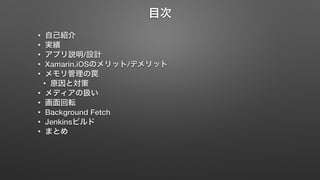
目次 • 自己紹介
• 実績 • アプリ説明/設計 • Xamarin.iOSのメリット/デメリット • メモリ管理の罠 • 原因と対策 • メディアの扱い • 画面回転 • Background Fetch • Jenkinsビルド • まとめ
3.
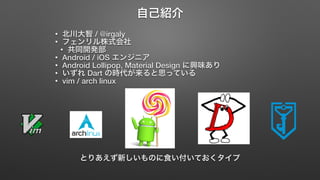
自己紹介 • 北川大智
/ @irgaly • フェンリル株式会社 • 共同開発部 • Android / iOS エンジニア • Android Lollipop, Material Design に興味あり • いずれ Dart の時代が来ると思っている • vim / arch linux とりあえず新しいものに食い付いておくタイプ
4.
実績
5.
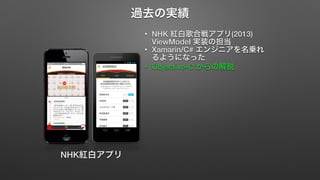
過去の実績 • NHK
紅白歌合戦アプリ(2013) ViewModel 実装の担当 • Xamarin/C# エンジニアを名乗れ るようになった • Objective-C からの解脱 NHK紅白アプリ
6.
業務に使ってみて
7.
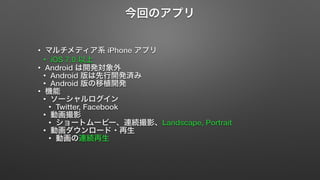
今回のアプリ • マルチメディア系
iPhone アプリ • iOS 7.0 以上 • Android は開発対象外 • Android 版は先行開発済み • Android 版の移植開発 • 機能 • ソーシャルログイン • Twitter, Facebook • 動画撮影 • ショートムービー、連続撮影、Landscape, Portrait • 動画ダウンロード・再生 • 動画の連続再生
8.
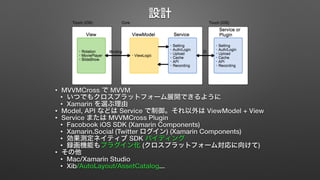
設計 • MVVMCross
で MVVM • いつでもクロスプラットフォーム展開できるように • Xamarin を選ぶ理由 • Model, API などは Service で制御。それ以外は ViewModel + View • Service または MVVMCross Plugin • Facobook iOS SDK (Xamarin Components) • Xamarin.Social (Twitter ログイン) (Xamarin Components) • 効果測定ネイティブ SDK バイディング • 録画機能もプラグイン化 (クロスプラットフォーム対応に向けて) • その他 • Mac/Xamarin Studio • Xib/AutoLayout/AssetCatalog...
9.
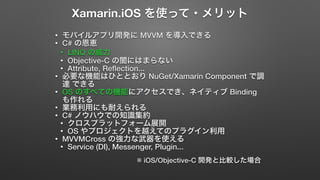
Xamarin.iOS を使って・メリット •
モバイルアプリ開発に MVVM を導入できる • C# の恩恵 • LINQ の威力 • Objective-C の闇にはまらない • Attribute, Reflection... • 必要な機能はひととおり NuGet/Xamarin Component で調 達 できる • OS のすべての機能にアクセスでき、ネイティブ Binding も作れる • 業務利用にも耐えられる • C# ノウハウでの知識集約 • クロスプラットフォーム展開 • OS やプロジェクトを越えてのプラグイン利用 • MVVMCross の強力な武器を使える • Service (DI), Messenger, Plugin... ※ iOS/Objective-C 開発と比較した場合
10.
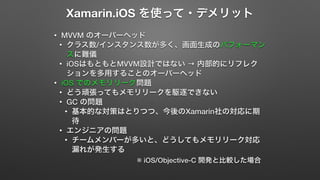
Xamarin.iOS を使って・デメリット •
MVVM のオーバーヘッド • クラス数/インスタンス数が多く、画面生成のパフォーマン スに難儀 • iOSはもともとMVVM設計ではない → 内部的にリフレク ションを多用することのオーバーヘッド • iOS でのメモリリーク問題 • どう頑張ってもメモリリークを駆逐できない • GC の問題 • 基本的な対策はとりつつ、今後のXamarin社の対応に期 待 • エンジニアの問題 • チームメンバーが多いと、どうしてもメモリリーク対応 漏れが発生する ※ iOS/Objective-C 開発と比較した場合
11.
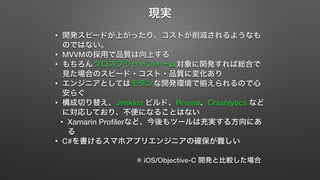
現実 • 開発スピードが上がったり、コストが削減されるようなも
のではない。 • MVVMの採用で品質は向上する • もちろんクロスプラットフォーム対象に開発すれば総合で 見た場合のスピード・コスト・品質に変化あり • エンジニアとしてはモダンな開発環境で揃えられるので心 安らぐ • 構成切り替え、Jenkins ビルド、Reveal、Crashlytics など に対応しており、不便になることはない • Xamarin Profilerなど、今後もツールは充実する方向にあ る • C#を書けるスマホアプリエンジニアの確保が難しい ※ iOS/Objective-C 開発と比較した場合
12.
メモリ管理の罠
13.
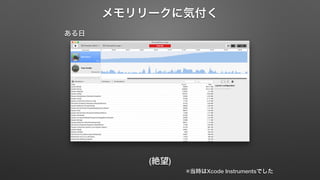
メモリリークに気付く ある日 (絶望)
※当時はXcode Instrumentsでした
14.
調べる • c#
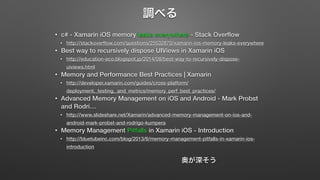
- Xamarin iOS memory leaks everywhere - Stack Overflow • http://stackoverflow.com/questions/25532870/xamarin-ios-memory-leaks-everywhere • Best way to recursively dispose UIViews in Xamarin iOS • http://education-eco.blogspot.jp/2014/08/best-way-to-recursively-dispose-uiviews. html • Memory and Performance Best Practices | Xamarin • http://developer.xamarin.com/guides/cross-platform/ deployment,_testing,_and_metrics/memory_perf_best_practices/ • Advanced Memory Management on iOS and Android - Mark Probst and Rodri… • http://www.slideshare.net/Xamarin/advanced-memory-management-on-ios-and-android- mark-probst-and-rodrigo-kumpera • Memory Management Pitfalls in Xamarin iOS - Introduction • http://bluetubeinc.com/blog/2013/6/memory-management-pitfalls-in-xamarin-ios-introduction 奥が深そう
15.
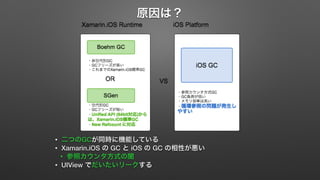
原因は? • 二つのGCが同時に機能している
• Xamarin.iOS の GC と iOS の GC の相性が悪い • 参照カウンタ方式の闇 • UIView でだいたいリークする
16.
原因と発生パターン • ネイティブオブジェクト間での循環参照
• サブクラス化と EventHandler • アンマネージリソースを Dispose していない
17.
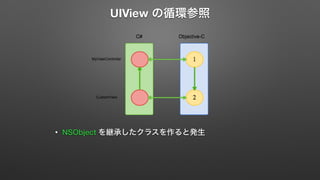
UIView の循環参照 •
NSObject を継承したクラスを作ると発生
18.
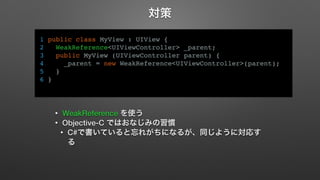
対策 1 public
class MyView : UIView { 2 WeakReference<UIViewController> _parent; 3 public MyView (UIViewController parent) { 4 _parent = new WeakReference<UIViewController>(parent); 5 } 6 } • WeakReference を使う • Objective-C ではおなじみの習慣 • C#で書いていると忘れがちになるが、同じように対応す る
19.
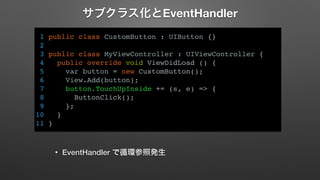
サブクラス化とEventHandler 1 public
class CustomButton : UIButton {} 2 3 public class MyViewController : UIViewController { 4 public override void ViewDidLoad () { 5 var button = new CustomButton(); 6 View.Add(button); 7 button.TouchUpInside += (s, e) => { 8 ButtonClick(); 9 }; 10 } 11 } • EventHandler で循環参照発生
20.
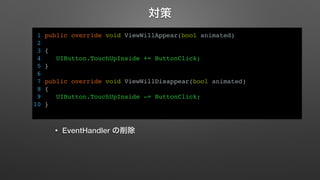
対策 1 public
override void ViewWillAppear(bool animated) 2 3 { 4 UIButton.TouchUpInside += ButtonClick; 5 } 6 7 public override void ViewWillDisappear(bool animated) 8 { 9 UIButton.TouchUpInside -= ButtonClick; 10 } • EventHandler の削除
21.
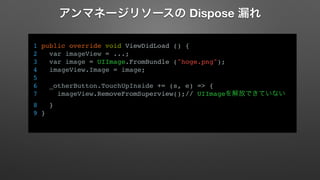
アンマネージリソースの Dispose 漏れ
1 public override void ViewDidLoad () { 2 var imageView = ...; 3 var image = UIImage.FromBundle ("hoge.png"); 4 imageView.Image = image; 5 6 _otherButton.TouchUpInside += (s, e) => { 7 imageView.RemoveFromSuperview();// UIImageを解放できていない 8 } 9 }
22.
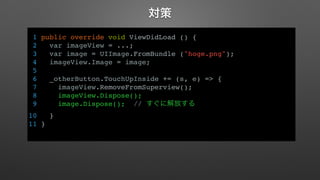
対策 1 public
override void ViewDidLoad () { 2 var imageView = ...; 3 var image = UIImage.FromBundle ("hoge.png"); 4 imageView.Image = image; 5 6 _otherButton.TouchUpInside += (s, e) => { 7 imageView.RemoveFromSuperview(); 8 imageView.Dispose(); 9 image.Dispose(); // すぐに解放する 10 } 11 }
23.
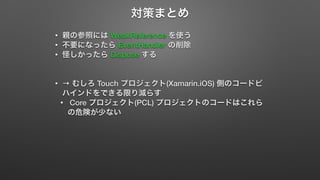
対策まとめ • 親の参照には
WeakReference を使う • 不要になったら EventHandler の削除 • 怪しかったら Dispose する • → むしろ Touch プロジェクト(Xamarin.iOS) 側のコードビ ハインドをできる限り減らす • Core プロジェクト(PCL) プロジェクトのコードはこれら の危険が少ない
24.
メディアの扱い
25.
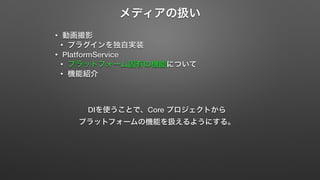
メディアの扱い • 動画撮影
• プラグインを独自実装 • PlatformService • プラットフォーム固有の機能について • 機能紹介 DIを使うことで、Core プロジェクトから プラットフォームの機能を扱えるようにする。
26.
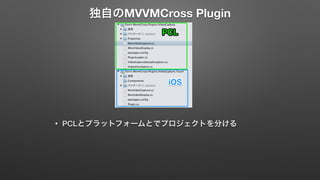
独自のMVVMCross Plugin •
PCLとプラットフォームとでプロジェクトを分ける
27.
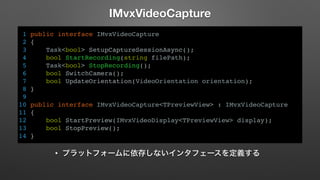
IMvxVideoCapture 1 public
interface IMvxVideoCapture 2 { 3 Task<bool> SetupCaptureSessionAsync(); 4 bool StartRecording(string filePath); 5 Task<bool> StopRecording(); 6 bool SwitchCamera(); 7 bool UpdateOrientation(VideoOrientation orientation); 8 } 9 10 public interface IMvxVideoCapture<TPreviewView> : IMvxVideoCapture 11 { 12 bool StartPreview(IMvxVideoDisplay<TPreviewView> display); 13 bool StopPreview(); 14 } • プラットフォームに依存しないインタフェースを定義する
28.
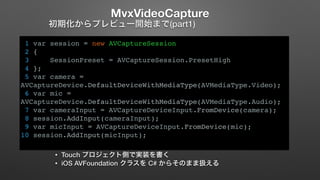
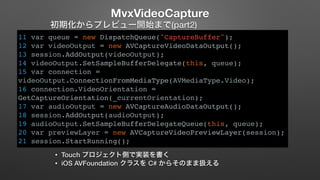
MvxVideoCapture 初期化からプレビュー開始まで(part1) 1
var session = new AVCaptureSession 2 { 3 SessionPreset = AVCaptureSession.PresetHigh 4 }; 5 var camera = AVCaptureDevice.DefaultDeviceWithMediaType(AVMediaType.Video); 6 var mic = AVCaptureDevice.DefaultDeviceWithMediaType(AVMediaType.Audio); 7 var cameraInput = AVCaptureDeviceInput.FromDevice(camera); 8 session.AddInput(cameraInput); 9 var micInput = AVCaptureDeviceInput.FromDevice(mic); 10 session.AddInput(micInput); • Touch プロジェクト側で実装を書く • iOS AVFoundation クラスを C# からそのまま扱える
29.
MvxVideoCapture 初期化からプレビュー開始まで(part2) 11
var queue = new DispatchQueue("CaptureBuffer"); 12 var videoOutput = new AVCaptureVideoDataOutput(); 13 session.AddOutput(videoOutput); 14 videoOutput.SetSampleBufferDelegate(this, queue); 15 var connection = videoOutput.ConnectionFromMediaType(AVMediaType.Video); 16 connection.VideoOrientation = GetCaptureOrientation(_currentOrientation); 17 var audioOutput = new AVCaptureAudioDataOutput(); 18 session.AddOutput(audioOutput); 19 audioOutput.SetSampleBufferDelegateQueue(this, queue); 20 var previewLayer = new AVCaptureVideoPreviewLayer(session); 21 session.StartRunning(); • Touch プロジェクト側で実装を書く • iOS AVFoundation クラスを C# からそのまま扱える
30.
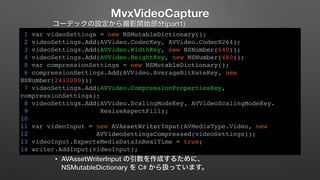
MvxVideoCapture コーデックの設定から撮影開始部分(part1) 1
var videoSettings = new NSMutableDictionary(); 2 videoSettings.Add(AVVideo.CodecKey, AVVideo.CodecH264); 3 videoSettings.Add(AVVideo.WidthKey, new NSNumber(640)); 4 videoSettings.Add(AVVideo.HeightKey, new NSNumber(480)); 5 var compressionSettings = new NSMutableDictionary(); 6 compressionSettings.Add(AVVideo.AverageBitRateKey, new NSNumber(2413000)); 7 videoSettings.Add(AVVideo.CompressionPropertiesKey, compressionSettings); 8 videoSettings.Add(AVVideo.ScalingModeKey, AVVideoScalingModeKey. 9 ResizeAspectFill); 10 11 var videoInput = new AVAssetWriterInput(AVMediaType.Video, new 12 AVVideoSettingsCompressed(videoSettings)); 13 videoInput.ExpectsMediaDataInRealTime = true; 14 writer.AddInput(videoInput); • AVAssetWriterInput の引数を作成するために、 NSMutableDictionary を C# から扱っています。
31.
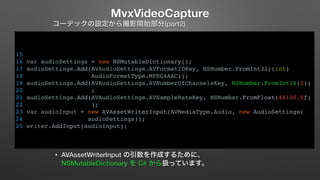
MvxVideoCapture コーデックの設定から撮影開始部分(part2) 15
16 var audioSettings = new NSMutableDictionary(); 17 audioSettings.Add(AVAudioSettings.AVFormatIDKey, NSNumber.FromInt32((int) 18 AudioFormatType.MPEG4AAC)); 19 audioSettings.Add(AVAudioSettings.AVNumberOfChannelsKey, NSNumber.FromInt16(2)) 20 ; 21 audioSettings.Add(AVAudioSettings.AVSampleRateKey, NSNumber.FromFloat(44100.0f) 22 ); 23 var audioInput = new AVAssetWriterInput(AVMediaType.Audio, new AudioSettings( 24 audioSettings)); 25 writer.AddInput(audioInput); • AVAssetWriterInput の引数を作成するために、 NSMutableDictionary を C# から扱っています。
32.
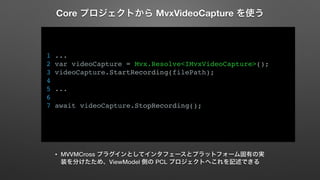
Core プロジェクトから MvxVideoCapture
を使う 1 ... 2 var videoCapture = Mvx.Resolve<IMvxVideoCapture>(); 3 videoCapture.StartRecording(filePath); 4 5 ... 6 7 await videoCapture.StopRecording(); • MVVMCross プラグインとしてインタフェースとプラットフォーム固有の実 装を分けたため、ViewModel 側の PCL プロジェクトへこれを記述できる
33.
PlatformService 1 public
class TouchPlatformService : IPlatformService 2 { 3 public IMediaFile GetMediaFile(string path) 4 { 5 return new TouchMediaFile(path); 6 } 7 8 public async Task Share(string shareText) 9 { 10 var items = new NSObject[] { 11 new NSString(shareText) 12 }; 13 var activity = new UIActivityViewController(items, null); 14 var vc = ...; 15 ... 16 await vc.PresentViewControllerAsync(activity, true); 17 } 18 19 public string VersionName() 20 { 21 return NSBundle.MainBundle.ObjectForInfoDictionary("CFBundleVersion"). 22 ToString(); 23 } 24 25 ... • プラットフォーム固有の機能を呼び出すユーティリティサービ ス
34.
画面回転
35.
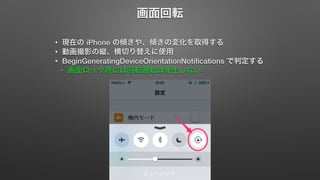
画面回転 • 現在の
iPhone の傾きや、傾きの変化を取得する • 動画撮影の縦、横切り替えに使用 • BeginGeneratingDeviceOrientationNotifications で判定する • 画面ロック時には回転通知は発生しない
36.
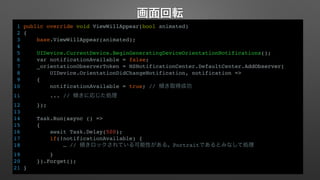
画面回転 1 public
override void ViewWillAppear(bool animated) 2 { 3 base.ViewWillAppear(animated); 4 5 UIDevice.CurrentDevice.BeginGeneratingDeviceOrientationNotifications(); 6 var notificationAvailable = false; 7 _orientationObserverToken = NSNotificationCenter.DefaultCenter.AddObserver( 8 UIDevice.OrientationDidChangeNotification, notification => 9 { 10 notificationAvailable = true; // 傾き取得成功 11 ... // 傾きに応じた処理 12 }); 13 14 Task.Run(async () => 15 { 16 await Task.Delay(500); 17 if(!notificationAvailable) { 18 … // 傾きロックされている可能性がある。Portraitであるとみなして処理 19 } 20 }).Forget(); 21 }
37.
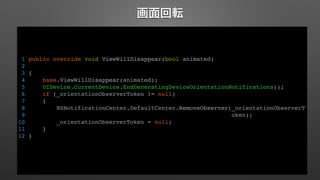
画面回転 1 public
override void ViewWillDisappear(bool animated) 2 3 { 4 base.ViewWillDisappear(animated); 5 UIDevice.CurrentDevice.EndGeneratingDeviceOrientationNotifications(); 6 if (_orientationObserverToken != null) 7 { 8 NSNotificationCenter.DefaultCenter.RemoveObserver(_orientationObserverT 9 oken); 10 _orientationObserverToken = null; 11 } 12 }
38.
Background Fetch
39.
Background Fetch •
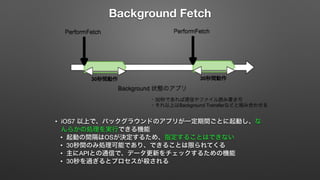
iOS7 以上で、バックグラウンドのアプリが一定期間ごとに起動し、な んらかの処理を実行できる機能 • 起動の間隔はOSが決定するため、指定することはできない • 30秒間のみ処理可能であり、できることは限られてくる • 主にAPIとの通信で、データ更新をチェックするための機能 • 30秒を過ぎるとプロセスが殺される
40.
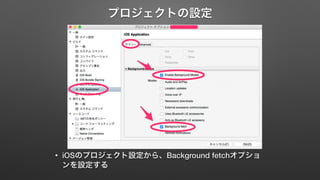
プロジェクトの設定 • iOSのプロジェクト設定から、Background
fetchオプショ ンを設定する
41.
Background Fetch 1
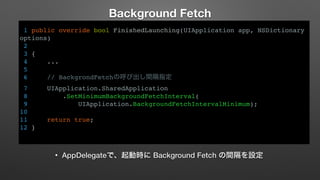
public override bool FinishedLaunching(UIApplication app, NSDictionary options) 2 3 { 4 ... 5 6 // BackgrondFetchの呼び出し間隔指定 7 UIApplication.SharedApplication 8 .SetMinimumBackgroundFetchInterval( 9 UIApplication.BackgroundFetchIntervalMinimum); 10 11 return true; 12 } • AppDelegateで、起動時に Background Fetch の間隔を設定
42.
PerformFetchの実装 1 public
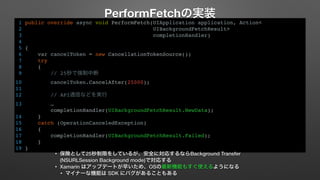
override async void PerformFetch(UIApplication application, Action< 2 UIBackgroundFetchResult> 3 completionHandler) 4 5 { 6 var cancelToken = new CancellationTokenSource(); 7 try 8 { 9 // 25秒で強制中断 10 cancelToken.CancelAfter(25000); 11 12 // API通信などを実行 13 … completionHandler(UIBackgroundFetchResult.NewData); 14 } 15 catch (OperationCanceledException) 16 { 17 completionHandler(UIBackgroundFetchResult.Failed); 18 } 19 } • 保険として25秒制限をしているが、安全に対応するならBackground Transfer (NSURLSession Background mode)で対応する • Xamarin はアップデートが早いため、OSの最新機能もすぐ使えるようになる • マイナーな機能は SDK にバグがあることもある
43.
Jenkins ビルド
44.
Jenkins ビルド •
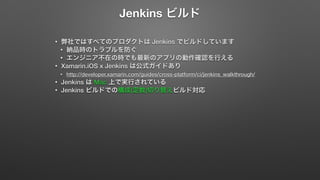
弊社ではすべてのプロダクトは Jenkins でビルドしています • 納品時のトラブルを防ぐ • エンジニア不在の時でも最新のアプリの動作確認を行える • Xamarin.iOS x Jenkins は公式ガイドあり • http://developer.xamarin.com/guides/cross-platform/ci/jenkins_walkthrough/ • Jenkins は Mac 上で実行されている • Jenkins ビルドでの構成(定数)切り替えビルド対応
45.
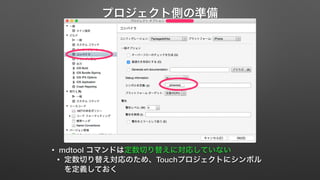
プロジェクト側の準備 • mdtool
コマンドは定数切り替えに対応していない • 定数切り替え対応のため、Touchプロジェクトにシンボル を定義しておく
46.
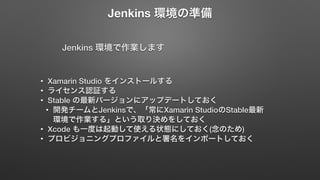
Jenkins 環境の準備 Jenkins
環境で作業します • Xamarin Studio をインストールする • ライセンス認証する • Stable の最新バージョンにアップデートしておく • 開発チームとJenkinsで、「常にXamarin StudioのStable最新 環境で作業する」という取り決めをしておく • Xcode も一度は起動して使える状態にしておく(念のため) • プロビジョニングプロファイルと署名をインポートしておく
47.
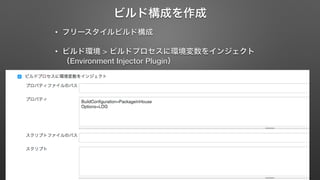
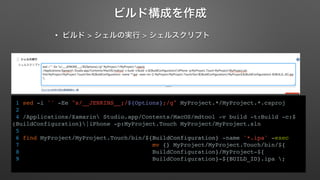
ビルド構成を作成 • フリースタイルビルド構成
• ビルド環境 > ビルドプロセスに環境変数をインジェクト (Environment Injector Plugin)
48.
ビルド構成を作成 • ビルド
> シェルの実行 > シェルスクリプト 1 sed -i '' -Ee "s/__JENKINS__;/${Options};/g" MyProject.*/MyProject.*.csproj 2 4 /Applications/Xamarin Studio.app/Contents/MacOS/mdtool -v build -t:Build -c:$ (BuildConfiguration}|iPhone -p:MyProject.Touch MyProject/MyProject.sln 5 6 find MyProject/MyProject.Touch/bin/${BuildConfiguration} -name '*.ipa' -exec 7 mv {} MyProject/MyProject.Touch/bin/${ 8 BuildConfiguration}/MyProject-${ 9 BuildConfiguration}-${BUILD_ID}.ipa ;
49.
まとめ
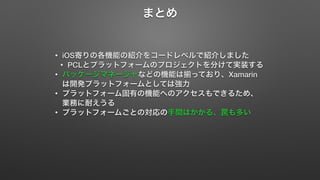
50.
まとめ • iOS寄りの各機能の紹介をコードレベルで紹介しました
• PCLとプラットフォームのプロジェクトを分けて実装する • パッケージマネージャなどの機能は揃っており、Xamarin は開発プラットフォームとしては強力 • プラットフォーム固有の機能へのアクセスもできるため、 業務に耐えうる • プラットフォームごとの対応の手間はかかる、罠も多い
Download



![PlatformService
1 public class TouchPlatformService : IPlatformService
2 {
3 public IMediaFile GetMediaFile(string path)
4 {
5 return new TouchMediaFile(path);
6 }
7
8 public async Task Share(string shareText)
9 {
10 var items = new NSObject[] {
11 new NSString(shareText)
12 };
13 var activity = new UIActivityViewController(items, null);
14 var vc = ...;
15 ...
16 await vc.PresentViewControllerAsync(activity, true);
17 }
18
19 public string VersionName()
20 {
21 return NSBundle.MainBundle.ObjectForInfoDictionary("CFBundleVersion").
22 ToString();
23 }
24
25 ...
• プラットフォーム固有の機能を呼び出すユーティリティサービ
ス](https://image.slidesharecdn.com/jxug2iosappwithxamarin20141122-141123022654-conversion-gate02/85/iOS-Xamarin-JXUG-2-East-33-320.jpg)