Download free for 30 days
Sign in
Upload
Language (EN)
Support
Business
Mobile
Social Media
Marketing
Technology
Art & Photos
Career
Design
Education
Presentations & Public Speaking
Government & Nonprofit
Healthcare
Internet
Law
Leadership & Management
Automotive
Engineering
Software
Recruiting & HR
Retail
Sales
Services
Science
Small Business & Entrepreneurship
Food
Environment
Economy & Finance
Data & Analytics
Investor Relations
Sports
Spiritual
News & Politics
Travel
Self Improvement
Real Estate
Entertainment & Humor
Health & Medicine
Devices & Hardware
Lifestyle
Change Language
Language
English
Español
Português
Français
Deutsche
Cancel
Save
EN
TK
Uploaded by
Takashi Kawasaki
PPTX, PDF
6,014 views
C++からC#まで Visual Studio 縛り (で死ぬ実験)
Visual Studio だけで C++/C# を使ってマルチプラットフォーム開発する!実験。
Engineering
◦
Read more
1
Save
Share
Embed
Embed presentation
Download
Downloaded 11 times
1
/ 19
2
/ 19
3
/ 19
4
/ 19
5
/ 19
6
/ 19
7
/ 19
8
/ 19
9
/ 19
10
/ 19
11
/ 19
12
/ 19
13
/ 19
14
/ 19
15
/ 19
16
/ 19
17
/ 19
18
/ 19
19
/ 19
More Related Content
PDF
Xamarin バッドノウハウ大全
by
Yoshito Tabuchi
PPTX
Win/Mac/Android/iOS向け クロスプラットフォーム開発にXamarinが うまくハマりそうだった話
by
Takuya Kikuchi
PDF
Visual Studio + xamarin で始めるモバイル アプリ開発
by
インフラジスティックス・ジャパン株式会社
PDF
C#でのクロスプラットフォーム モバイル開発環境 Xamarin のご紹介
by
Yoshito Tabuchi
PPTX
Xamarin開発環境の選択
by
Miho Kurosawa
PPTX
Developers.io.札幌 xamarinってどうよ
by
Shinichi Hirauchi
PPTX
Xamarin の救世主 Unity !
by
Tatsuji Kuroyanagi
PDF
わんくま名古屋 #38 (20160521) Xamarin入門
by
Yasuhiko Yamamoto
Xamarin バッドノウハウ大全
by
Yoshito Tabuchi
Win/Mac/Android/iOS向け クロスプラットフォーム開発にXamarinが うまくハマりそうだった話
by
Takuya Kikuchi
Visual Studio + xamarin で始めるモバイル アプリ開発
by
インフラジスティックス・ジャパン株式会社
C#でのクロスプラットフォーム モバイル開発環境 Xamarin のご紹介
by
Yoshito Tabuchi
Xamarin開発環境の選択
by
Miho Kurosawa
Developers.io.札幌 xamarinってどうよ
by
Shinichi Hirauchi
Xamarin の救世主 Unity !
by
Tatsuji Kuroyanagi
わんくま名古屋 #38 (20160521) Xamarin入門
by
Yasuhiko Yamamoto
What's hot
PDF
Xamarin から使う Azure
by
Yoshito Tabuchi
PDF
Realm Mobile Platform 概要
by
Yoshito Tabuchi
PDF
NET Standard と Xamarin
by
Yoshito Tabuchi
PDF
Xamarinの歩き方
by
Yoshito Tabuchi
PDF
20171202 Xamarinの歩き方
by
Yoshito Tabuchi
PDF
Prism.Formsについて
by
一希 大田
PDF
Xamarin 概要~Windows Embedded の業務用端末から Android へのシームレスな移行~
by
Yoshito Tabuchi
PDF
続Xamarinはじめました
by
Yuya Yamaki
PDF
Xamarin.Forms アプリケーション 設計パターン
by
一希 大田
PDF
Xamarin の特徴と開発手法概要
by
Yoshito Tabuchi
PDF
Xamarin 20141212 モバイルカフェスペシャル 「C#で作るiOS/Androidのクロスプラットフォームスマホアプリ開発」
by
Yoshito Tabuchi
PPTX
ゆるふわ Xamarin Tips
by
Daiki Kawanuma
PPTX
Xamarin 101 ~環境構築からビルド・テストまで~
by
Masaki Takeda
PDF
ちょっとエモい話
by
Yoshito Tabuchi
PDF
Xamarin + Visual Studio によるマルチプラットフォーム対応アプリ開発 - iOS, Android, Windows に対応しよう
by
Akira Onishi
PDF
Xamarin概要と活用方法
by
Yoshito Tabuchi
PDF
Xamarin で今日から始めるクロスプラットフォーム開発
by
友太 渡辺
PDF
この辺でXamarin導入による 効果と限界をしっかり把握してみよう MVP Community Camp 2015
by
Shinichi Hirauchi
PDF
Xamarin.Forms概要
by
Hironov OKUYAMA
PDF
インフラジスティックスおよび Xamarin.Forms コントロールのご紹介
by
インフラジスティックス・ジャパン株式会社
Xamarin から使う Azure
by
Yoshito Tabuchi
Realm Mobile Platform 概要
by
Yoshito Tabuchi
NET Standard と Xamarin
by
Yoshito Tabuchi
Xamarinの歩き方
by
Yoshito Tabuchi
20171202 Xamarinの歩き方
by
Yoshito Tabuchi
Prism.Formsについて
by
一希 大田
Xamarin 概要~Windows Embedded の業務用端末から Android へのシームレスな移行~
by
Yoshito Tabuchi
続Xamarinはじめました
by
Yuya Yamaki
Xamarin.Forms アプリケーション 設計パターン
by
一希 大田
Xamarin の特徴と開発手法概要
by
Yoshito Tabuchi
Xamarin 20141212 モバイルカフェスペシャル 「C#で作るiOS/Androidのクロスプラットフォームスマホアプリ開発」
by
Yoshito Tabuchi
ゆるふわ Xamarin Tips
by
Daiki Kawanuma
Xamarin 101 ~環境構築からビルド・テストまで~
by
Masaki Takeda
ちょっとエモい話
by
Yoshito Tabuchi
Xamarin + Visual Studio によるマルチプラットフォーム対応アプリ開発 - iOS, Android, Windows に対応しよう
by
Akira Onishi
Xamarin概要と活用方法
by
Yoshito Tabuchi
Xamarin で今日から始めるクロスプラットフォーム開発
by
友太 渡辺
この辺でXamarin導入による 効果と限界をしっかり把握してみよう MVP Community Camp 2015
by
Shinichi Hirauchi
Xamarin.Forms概要
by
Hironov OKUYAMA
インフラジスティックスおよび Xamarin.Forms コントロールのご紹介
by
インフラジスティックス・ジャパン株式会社
Similar to C++からC#まで Visual Studio 縛り (で死ぬ実験)
PDF
Xamarin によるクロスプラットフォームモバイルアプリ開発(2014.06)
by
Hironov OKUYAMA
PDF
Xamarin によるクロスプラットフォームモバイルアプリ開発
by
Hironov OKUYAMA
PPTX
【18-C-5】C# で iOS/Androidアプリ開発 - Visual Studio 2015 + Xamarin + MVVMCross -
by
ShinichiAoyagi
PDF
Xamarin.iOS
by
Kosuke Usami
PDF
C# を使い倒す!クロス プラットフォーム アプリ開発とクラウド連携の新潮流 - Xamarin セッション
by
Yoshito Tabuchi
PDF
iOS の動画アプリ開発に Xamarin を使ってみた @JXUG #2 East
by
irgaly
KEY
Objc lambda
by
matuura_core
PDF
Xamarin 概要 @ 2014/10/18 わんくま同盟 東京勉強会 #92
by
Yoshito Tabuchi
PDF
モバイルアプリ開発体験ハンズオン Android 編
by
Masaki Takeda
PPTX
CMake multiplatform build-tool
by
Naruto TAKAHASHI
Xamarin によるクロスプラットフォームモバイルアプリ開発(2014.06)
by
Hironov OKUYAMA
Xamarin によるクロスプラットフォームモバイルアプリ開発
by
Hironov OKUYAMA
【18-C-5】C# で iOS/Androidアプリ開発 - Visual Studio 2015 + Xamarin + MVVMCross -
by
ShinichiAoyagi
Xamarin.iOS
by
Kosuke Usami
C# を使い倒す!クロス プラットフォーム アプリ開発とクラウド連携の新潮流 - Xamarin セッション
by
Yoshito Tabuchi
iOS の動画アプリ開発に Xamarin を使ってみた @JXUG #2 East
by
irgaly
Objc lambda
by
matuura_core
Xamarin 概要 @ 2014/10/18 わんくま同盟 東京勉強会 #92
by
Yoshito Tabuchi
モバイルアプリ開発体験ハンズオン Android 編
by
Masaki Takeda
CMake multiplatform build-tool
by
Naruto TAKAHASHI
C++からC#まで Visual Studio 縛り (で死ぬ実験)
1.
C++からC#まで Visual Studio 縛り (で死ぬ実験) 川崎
高志 @espresso3389 2016/5/7
2.
自己紹介 川崎 高志 Twitter: @espresso3389 Blog:
http://espresso3389.hatenablog.com/ クミナス株式会社 代表取締役社長 画像圧縮技術, PDF関連技術, セキュリティ関連技術
3.
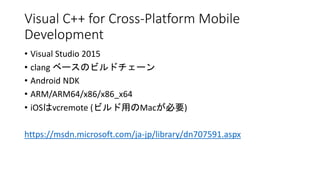
Visual C++ for
Cross-Platform Mobile Development • Visual Studio 2015 • clang ベースのビルドチェーン • Android NDK • ARM/ARM64/x86/x86_x64 • iOSはvcremote (ビルド用のMacが必要) https://msdn.microsoft.com/ja-jp/library/dn707591.aspx
4.
vcremote@Mac • インストール • PIN生成 •
起動 sudo npm install -g npm@2.6.0 sudo npm install -g --unsafe-perm vcremote vcremote generateClientCert … Host Name: minipresso.local Port: 3030 Secure: [x] Pin: 107453 Cross Platform > C++ > iOS > Pairing vcremote https://msdn.microsoft.com/en-us/library/mt147405(v=vs.140).aspx
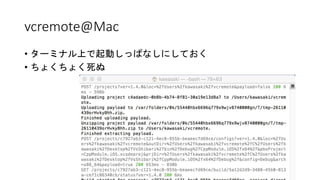
5.
vcremote@Mac • ターミナル上で起動しっぱなしにしておく • ちょくちょく死ぬ
6.
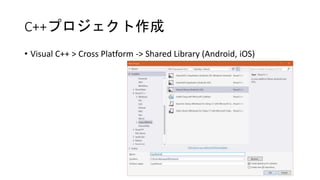
C++プロジェクト作成 • Visual C++
> Cross Platform -> Shared Library (Android, iOS)
7.
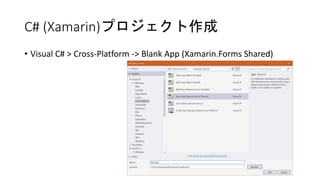
C# (Xamarin)プロジェクト作成 • Visual
C# > Cross-Platform -> Blank App (Xamarin.Forms Shared)
8.
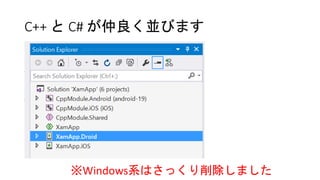
C++ と C#
が仲良く並びます ※Windows系はさっくり削除しました
9.
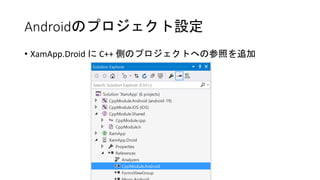
Androidのプロジェクト設定 • XamApp.Droid に
C++ 側のプロジェクトへの参照を追加
10.
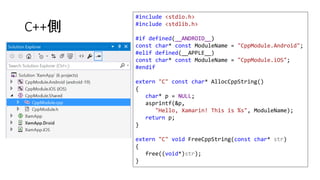
C++側 #include <stdio.h> #include <stdlib.h> #if
defined(__ANDROID__) const char* const ModuleName = "CppModule.Android"; #elif defined(__APPLE__) const char* const ModuleName = "CppModule.iOS"; #endif extern "C" const char* AllocCppString() { char* p = NULL; asprintf(&p, "Hello, Xamarin! This is %s", ModuleName); return p; } extern "C" void FreeCppString(const char* str) { free((void*)str); }
11.
C#側 public App () { MainPage
= new ContentPage { Content = new StackLayout { VerticalOptions = LayoutOptions.Center, Children = { new Label { XAlign = TextAlignment.Center, Text = GetCppString() } } } }; } public class App : Application { #if __IOS__ public const string CPPMODULENAME = "__Internal"; #elif __ANDROID__ public const string CPPMODULENAME = "libCppModule.so"; #endif [DllImport(CPPMODULENAME)] static extern IntPtr AllocCppString(); [DllImport(CPPMODULENAME)] static extern void FreeCppString(IntPtr str); static string GetCppString() { var p = AllocCppString(); var s = Marshal.PtrToStringAnsi(p); FreeCppString(p); return s; } ...
12.
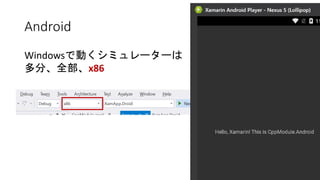
Android Windowsで動くシミュレーターは 多分、全部、x86
13.
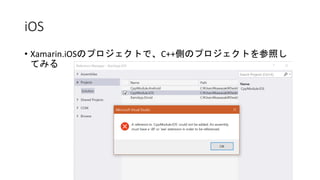
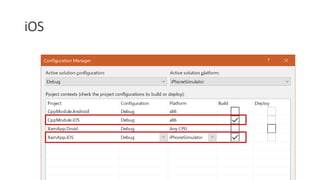
iOS • Xamarin.iOSのプロジェクトで、C++側のプロジェクトを参照し てみる
14.
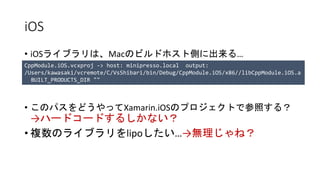
iOS • iOSライブラリは、Macのビルドホスト側に出来る… • このパスをどうやってXamarin.iOSのプロジェクトで参照する? →ハードコードするしかない? •
複数のライブラリをlipoしたい…→無理じゃね? CppModule.iOS.vcxproj -> host: minipresso.local output: /Users/kawasaki/vcremote/C/VsShibari/bin/Debug/CppModule.iOS/x86//libCppModule.iOS.a BUILT_PRODUCTS_DIR ""
15.
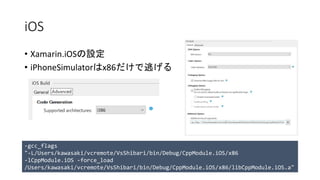
iOS • Xamarin.iOSの設定 • iPhoneSimulatorはx86だけで逃げる -gcc_flags "-L/Users/kawasaki/vcremote/VsShibari/bin/Debug/CppModule.iOS/x86 -lCppModule.iOS
-force_load /Users/kawasaki/vcremote/VsShibari/bin/Debug/CppModule.iOS/x86/libCppModule.iOS.a"
16.
iOS
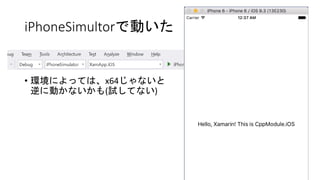
17.
iPhoneSimultorで動いた • 環境によっては、x64じゃないと 逆に動かないかも(試してない)
18.
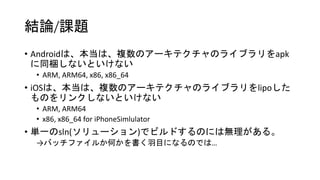
結論/課題 • Androidは、本当は、複数のアーキテクチャのライブラリをapk に同梱しないといけない • ARM,
ARM64, x86, x86_64 • iOSは、本当は、複数のアーキテクチャのライブラリをlipoした ものをリンクしないといけない • ARM, ARM64 • x86, x86_64 for iPhoneSimlulator • 単一のsln(ソリューション)でビルドするのには無理がある。 →バッチファイルか何かを書く羽目になるのでは…
19.
コード • GitHub https://github.com/espresso3389/VsShibari
Download

![vcremote@Mac
• インストール
• PIN生成
• 起動
sudo npm install -g npm@2.6.0
sudo npm install -g --unsafe-perm vcremote
vcremote generateClientCert
…
Host Name: minipresso.local
Port: 3030
Secure: [x]
Pin: 107453
Cross Platform > C++ > iOS > Pairing
vcremote
https://msdn.microsoft.com/en-us/library/mt147405(v=vs.140).aspx](https://image.slidesharecdn.com/espresso3389-vs-160507092604/85/C-C-Visual-Studio-4-320.jpg)
![C#側
public App ()
{
MainPage = new ContentPage {
Content = new StackLayout {
VerticalOptions = LayoutOptions.Center,
Children = {
new Label {
XAlign = TextAlignment.Center,
Text = GetCppString()
}
}
}
};
}
public class App : Application
{
#if __IOS__
public const string CPPMODULENAME = "__Internal";
#elif __ANDROID__
public const string CPPMODULENAME = "libCppModule.so";
#endif
[DllImport(CPPMODULENAME)]
static extern IntPtr AllocCppString();
[DllImport(CPPMODULENAME)]
static extern void FreeCppString(IntPtr str);
static string GetCppString()
{
var p = AllocCppString();
var s = Marshal.PtrToStringAnsi(p);
FreeCppString(p);
return s;
}
...](https://image.slidesharecdn.com/espresso3389-vs-160507092604/85/C-C-Visual-Studio-11-320.jpg)