Xamarin.Formsでの 
MVVM利用のコツ 
Microsoft MVP C# 
増田智明 
Moonmile Solutions
自己紹介 
 増田智明masdua@moonmile.net 
 執筆業&プログラマ 
 C#によるiOS, Android, Windowsアプリケーション開発入門 
 逆引き大全Visual C# 2013, Visual Basic 2013 
 逆引き大全iPhone/iPad アプリ開発 
 作って覚えるiPhone/iPad アプリ入門
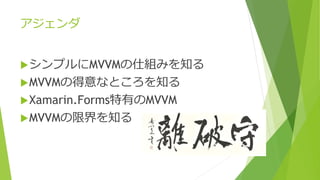
アジェンダ 
シンプルにMVVMの仕組みを知る 
MVVMの得意なところを知る 
Xamarin.Forms特有のMVVM 
MVVMの限界を知る
シンプルにMVVMの仕組みを理解 
必要な時にを必要なものだけを使う
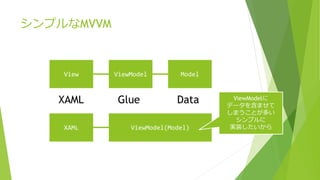
シンプルなMVVM 
View ViewModel Model 
XAML Glue Data 
XAML ViewModel(Model) 
ViewModelに 
データを含ませて 
しまうことが多い 
シンプルに 
実装したいから
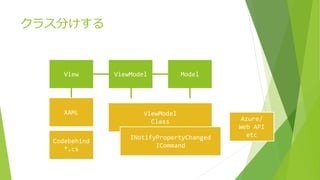
クラス分けする 
View ViewModel Model 
XAML ViewModel 
Class 
Codebehind 
*.cs 
INotifyPropertyChanged 
ICommand 
Azure/ 
Web API 
etc
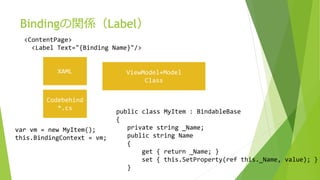
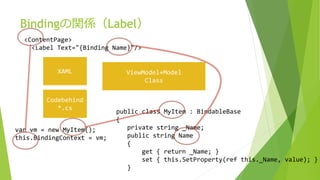
Bindingの関係(Label) 
<ContentPage> 
<Label Text="{Binding Name}"/> 
XAML ViewModel+Model 
Class 
Codebehind 
*.cs 
public class MyItem : BindableBase 
{ 
private string _Name; 
public string Name 
{ 
get { return _Name; } 
set { this.SetProperty(ref this._Name, value); } 
} 
var vm = new MyItem(); 
this.BindingContext = vm;
Bindingの関係(Label) 
<ContentPage> 
<Label Text="{Binding Name}"/> 
XAML ViewModel+Model 
Class 
Codebehind 
*.cs 
public class MyItem : BindableBase 
{ 
private string _Name; 
public string Name 
{ 
get { return _Name; } 
set { this.SetProperty(ref this._Name, value); } 
} 
var vm = new MyItem(); 
this.BindingContext = vm;
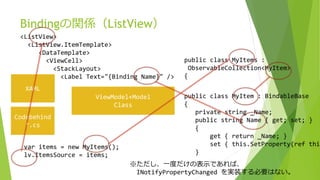
Bindingの関係(ListView) 
<ListView> 
<ListView.ItemTemplate> 
<DataTemplate> 
XAML 
ViewModel+Model 
Class 
Codebehind 
*.cs 
<ViewCell> 
<StackLayout> 
<Label Text="{Binding Name}" /> 
public class MyItems : 
ObservableCollection<MyItem> 
{ 
var items = new MyItems(); 
lv.ItemsSource = items; 
public class MyItem : BindableBase 
{ 
private string _Name; 
public string Name { get; set; } 
{ 
get { return _Name; } 
set { this.SetProperty(ref this._} 
※ただし、一度だけの表示であれば、 
INotifyPropertyChanged を実装する必要はない。
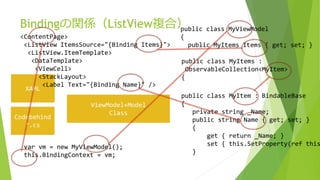
Bindingの関係(ListView複合) 
<ContentPage> 
<ListView ItemsSource="{Binding Items}"> 
<ListView.ItemTemplate> 
<DataTemplate> 
<ViewCell> 
<StackLayout> 
XAML 
ViewModel+Model 
Class 
Codebehind 
*.cs 
<Label Text="{Binding Name}" /> 
public class MyViewModel 
{ 
public MyItems Items { get; set; } 
public class MyItems : 
ObservableCollection<MyItem> 
{ 
var vm = new MyViewModel(); 
this.BindingContext = vm; 
public class MyItem : BindableBase 
{ 
private string _Name; 
public string Name { get; set; } 
{ 
get { return _Name; } 
set { this.SetProperty(ref this._}
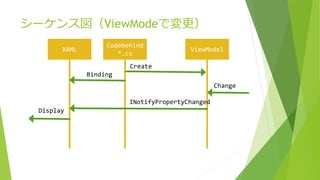
シーケンス図(ViewModeで変更) 
Codebehind 
XAML ViewModel 
*.cs 
Binding 
INotifyPropertyChanged 
Change 
Display 
Create
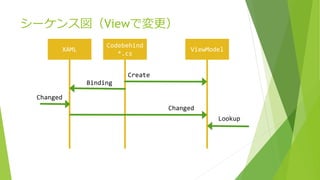
シーケンス図(Viewで変更) 
Codebehind 
XAML ViewModel 
*.cs 
Binding 
Changed 
Lookup 
Changed 
Create
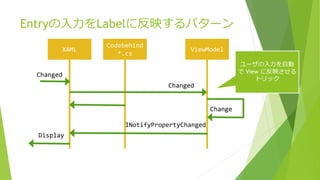
Entryの入力をLabelに反映するパターン 
Codebehind 
XAML ViewModel 
*.cs 
Changed 
Changed 
INotifyPropertyChanged 
Change 
Display 
ユーザの入力を自動 
でView に反映させる 
トリック
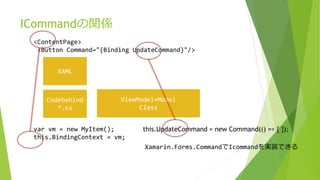
ICommandの関係 
<ContentPage> 
<Button Command="{Binding UpdateCommand}"/> 
XAML 
ViewModel+Model 
Class 
Codebehind 
*.cs 
var vm = new MyItem(); 
this.BindingContext = vm; 
this.UpdateCommand = new Command(() => { }); 
Xamarin.Forms.CommandでIcommandを実装できる
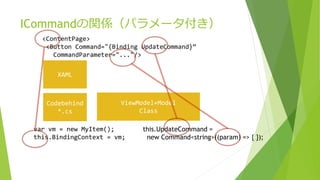
ICommandの関係(パラメータ付き) 
<ContentPage> 
<Button Command="{Binding UpdateCommand}“ 
CommandParameter="..."/> 
XAML 
ViewModel+Model 
Class 
Codebehind 
*.cs 
var vm = new MyItem(); 
this.BindingContext = vm; 
this.UpdateCommand = 
new Command<string>((param) => { });
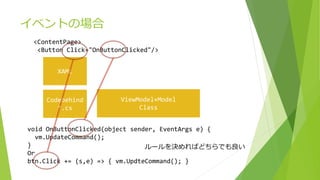
イベントの場合 
<ContentPage> 
<Button Click="OnButtonClicked"/> 
XAML 
ViewModel+Model 
Class 
Codebehind 
*.cs 
void OnButtonClicked(object sender, EventArgs e) { 
vm.UpdateCommand(); 
} 
Or 
btn.Click += (s,e) => { vm.UpdteCommand(); } 
ルールを決めればどちらでも良い
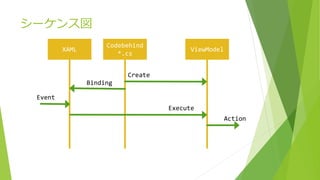
シーケンス図 
Codebehind 
XAML ViewModel 
*.cs 
Binding 
Execute 
Event 
Create 
Action
MVVMの得意なところ 
汎用ではない道具は何に特化しているのか?
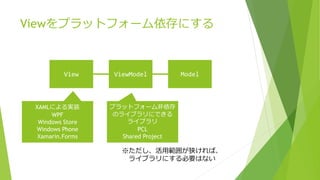
Viewをプラットフォーム依存にする 
View ViewModel Model 
XAMLによる実装 
WPF 
Windows Store 
Windows Phone 
Xamarin.Forms 
プラットフォーム非依存 
のライブラリにできる 
ライブラリ 
PCL 
Shared Project 
※ただし、活用範囲が狭ければ、 
ライブラリにする必要はない
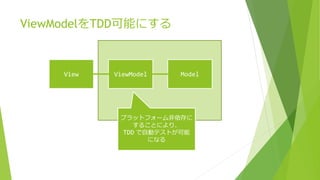
ViewModelをTDD可能にする 
View ViewModel Model 
プラットフォーム非依存に 
することにより、 
TDD で自動テストが可能 
になる
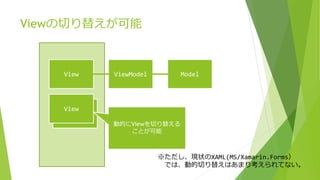
Viewの切り替えが可能 
View ViewModel Model 
View 
View 
動的にViewを切り替える 
ことが可能 
※ただし、現状のXAML(MS/Xamarin.Forms) 
では、動的切り替えはあまり考えられてない。
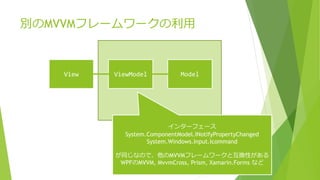
別のMVVMフレームワークの利用 
View ViewModel Model 
インターフェース 
System.ComponentModel.INotifyPropertyChanged 
System.Windows.Input.Icommand 
が同じなので、他のMVVMフレームワークと互換性がある 
WPFのMVVM, MvvmCross, Prism, Xamarin.Forms など
ViewModelのコツ 
 プラットフォーム非依存にする 
Viewを呼ばない 
プラットフォーム固有の機能を使わない 
同時にデメリットでもある
Xamarin.Forms特有のMVVM 
てこの原理を使って効果を最大化する
Xamarin.FormsのMVVM 
WPF/Windows Store AppのXAMLと同じよ 
うに作れる 
INotifyPropertyChanged、ICommand のイ 
ンターフェースがある 
デザインビューがないので直打ち 
Try&Errorがやり辛い
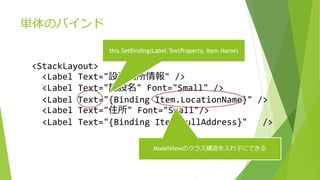
単体のバインド 
<StackLayout> 
this.SetBinding(Label.TextProperty, Item.Name) 
<Label Text="設置場所情報" /> 
<Label Text="施設名" Font="Small" /> 
<Label Text="{Binding Item.LocationName}" /> 
<Label Text="住所" Font="Small"/> 
<Label Text="{Binding Item.FullAddress}" /> 
ModelViewのクラス構造を入れ子にできる
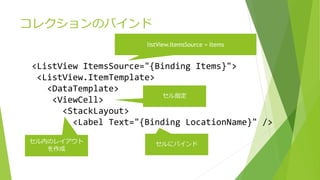
コレクションのバインド 
listView.ItemsSource = Items 
<ListView ItemsSource="{Binding Items}"> 
<ListView.ItemTemplate> 
<DataTemplate> 
<ViewCell> 
<StackLayout> 
セル指定 
<Label Text="{Binding LocationName}" /> 
セル内のレイアウト 
を作成 
セルにバインド
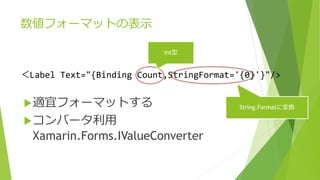
数値フォーマットの表示 
int型 
<Label Text="{Binding Count,StringFormat='{0}'}"/> 
String.Formatに変換 
適宜フォーマットする 
コンバータ利用 
Xamarin.Forms.IValueConverter
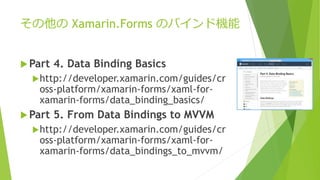
その他のXamarin.Forms のバインド機能 
Part 4. Data Binding Basics 
http://developer.xamarin.com/guides/cr 
oss-platform/xamarin-forms/xaml-for-xamarin- 
forms/data_binding_basics/ 
Part 5. From Data Bindings to MVVM 
http://developer.xamarin.com/guides/cr 
oss-platform/xamarin-forms/xaml-for-xamarin- 
forms/data_bindings_to_mvvm/

AEDSearch によるデモ
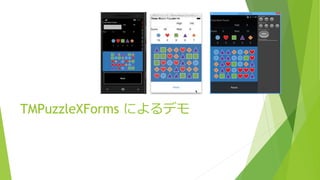
TMPuzzleXForms によるデモ
MVVMの限界 
限界があるからこそ、最大限の利用が可能。それ以後は場を変える。
画面遷移の不都合 
ViewModelがプラットフォーム非依存 
のため、View(プラットフォーム依 
存)ができない/やりにくい。 
this.Navigation.PushAsync 
素直にViewのイベントを使う
複雑なイベント処理がICommandではや 
りづらい 
ICommandでは静的なパラメータのみ 
利用可能 
<Button Command=“…” 
CommandParameter=“…” /> 
素直にイベントを利用 
コードビハイドからViewModelへ渡す
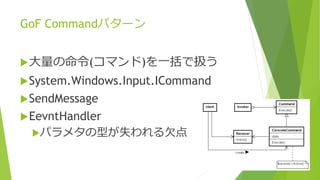
GoF Commandパターン 
大量の命令(コマンド)を一括で扱う 
System.Windows.Input.ICommand 
SendMessage 
EevntHandler 
パラメタの型が失われる欠点
その他の欠点 
 プロパティ伝播が過敏 
非同期(async/await)が使えない 
Viewでの不意な重たい処理に弱い 
 コレクションの変更に過敏 
 プラットフォーム依存データが扱いにくい
と云う限界を知ってMVVM を使う 
XAML+イベントの使い分け 
Rxの利用 
C++, F# でパイプの利用 
動的XAMLロード
参考文献 
 Cross-Platform User Interfaces with Xamarin.Forms 
http://developer.xamarin.com/guides/cross-platform/xamarin-forms/ 
 MvvmCross 
https://github.com/MvvmCross 
 Prism 5.0 for .NET 4.5 
http://compositewpf.codeplex.com/releases/view/117297 
 Reactive Alliance 
http://www.reactivealliance.com/ 

 AED Opendata Search Sample 
http://code.msdn.microsoft.com/AED-Opendata-Search-Sample-117dfafc 
 moonmile/TMPuzzleXForms 
https://github.com/moonmile/TMPuzzleXForms 
 moonmile/XFormsPreviewer 
https://github.com/moonmile/XFormsPreviewer

Xamarin.formsでのmvvm利用のコツ