Welcome to DC
Python Meetup
Wifi Name: SPACES
Email address
I am Visitor Reservation #: 91408398
JSON Web Tokens
(JWT) with Flask
Alan Swenson
Portfolio: alanswenson.dev
Email: alan@alanswenson.dev
Twitter: @AlanSwenson
What is JWT?
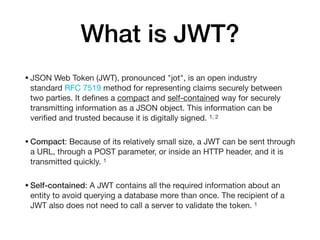
•JSON Web Token (JWT), pronounced "jot", is an open industry
standard RFC 7519 method for representing claims securely between
two parties. It defines a compact and self-contained way for securely
transmitting information as a JSON object. This information can be
verified and trusted because it is digitally signed. 1, 2

•Compact: Because of its relatively small size, a JWT can be sent through
a URL, through a POST parameter, or inside an HTTP header, and it is
transmitted quickly. 1

•Self-contained: A JWT contains all the required information about an
entity to avoid querying a database more than once. The recipient of a
JWT also does not need to call a server to validate the token. 1
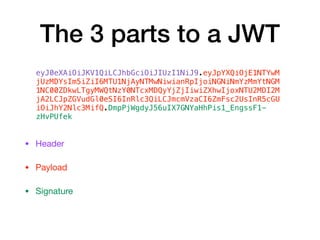
The 3 parts to a JWT
• Header 

• Payload

• Signature
eyJ0eXAiOiJKV1QiLCJhbGciOiJIUzI1NiJ9.eyJpYXQiOjE1NTYwM
jUzMDYsIm5iZiI6MTU1NjAyNTMwNiwianRpIjoiNGNiNmYzMmYtNGM
1NC00ZDkwLTgyMWQtNzY0NTcxMDQyYjZjIiwiZXhwIjoxNTU2MDI2M
jA2LCJpZGVudGl0eSI6InRlc3QiLCJmcmVzaCI6ZmFsc2UsInR5cGU
iOiJhY2Nlc3MifQ.DmpPjWgdyJ56uIX7GNYaHhPis1_EngssF1-
zHvPUfek
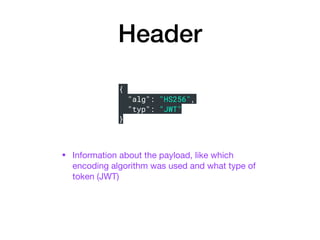
Header
• Information about the payload, like which
encoding algorithm was used and what type of
token (JWT)
{
"alg": "HS256",
"typ": "JWT"
}
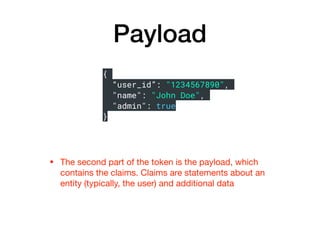
Payload
• The second part of the token is the payload, which
contains the claims. Claims are statements about an
entity (typically, the user) and additional data
{
“user_id”: "1234567890",
"name": "John Doe",
"admin": true
}
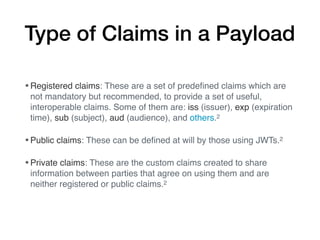
Type of Claims in a Payload
•Registered claims: These are a set of predefined claims which are
not mandatory but recommended, to provide a set of useful,
interoperable claims. Some of them are: iss (issuer), exp (expiration
time), sub (subject), aud (audience), and others.2
•Public claims: These can be defined at will by those using JWTs.2
•Private claims: These are the custom claims created to share
information between parties that agree on using them and are
neither registered or public claims.2
Signature
• To create the signature part you have to take the encoded
header, the encoded payload, a secret, the algorithm
specified in the header, and sign that. If payload is
changed the signature will no longer match and the token
will be invalid
Why use JWT?
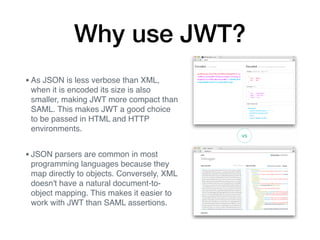
•As JSON is less verbose than XML,
when it is encoded its size is also
smaller, making JWT more compact than
SAML. This makes JWT a good choice
to be passed in HTML and HTTP
environments.
•JSON parsers are common in most
programming languages because they
map directly to objects. Conversely, XML
doesn't have a natural document-to-
object mapping. This makes it easier to
work with JWT than SAML assertions.
Why I like JWT
• Since the tokens are stateless you do not need to have
sessions and this allows me to use serverless (AWS
Lambda) for my flask website and check users validity
and it doesn’t matter if the spun up server closes and
another one opens up the tokens will still be valid.
How to use JWT in Flask:
Available Python Modules
• PyJWT (https://github.com/jpadilla/pyjwt/)

• AuthLib (https://github.com/lepture/authlib)

• Flask-JWT-Extended (https://github.com/vimalloc/flask-
jwt-extended)
JWT in a Flask API
from flask import Flask, jsonify, request
from flask_jwt_extended import (
JWTManager,
jwt_required,
create_access_token,
get_jwt_identity,
)
app = Flask(__name__)
# Setup the Flask-JWT-Extended extension
app.config["JWT_SECRET_KEY"] = "super-secret" # Change
this!
jwt = JWTManager(app)
Imports and Setup
JWT in a Flask API
# Provide a method to create access tokens. The create_access_token()
# function is used to actually generate the token, and you can return
# it to the caller however you choose.
@app.route("/login", methods=["POST"])
def login():
if not request.is_json:
return jsonify({"msg": "Missing JSON in request"}), 400
username = request.json.get("username", None)
password = request.json.get("password", None)
if not username:
return jsonify({"msg": "Missing username parameter"}), 400
if not password:
return jsonify({"msg": "Missing password parameter"}), 400
if username != "test" or password != "test":
return jsonify({"msg": "Bad username or password"}), 401
# Identity can be any data that is json serializable
access_token = create_access_token(identity=username)
return jsonify(access_token=access_token), 200
Login Route
JWT in a Flask API
# Protect a view with jwt_required, which requires a
# valid access token
# in the request to access.
@app.route("/protected", methods=["GET"])
@jwt_required
def protected():
# Access the identity of the current user with
# get_jwt_identity
current_user = get_jwt_identity()
return jsonify(logged_in_as=current_user), 200
if __name__ == "__main__":
app.run()
Protected Route
Access and Refresh Tokens
•Access tokens are tokens that give those who have them access to protected
resources. These tokens are usually short-lived and may have an expiration
date embedded in them. They may also carry or be associated with additional
information (for instance, an access token may carry the IP address from
which requests are allowed). This additional data is implementation defined.
•Refresh tokens, on the other hand, allow clients to request new access
tokens. For instance, after an access token has expired, a client may perform
a request for a new access token to the authorization server. For this request
to be satisfied, a refresh token is required. In contrast to access tokens,
refresh tokens are usually long-lived.
Revoking Tokens
Since use of JWT is stateless, we need a way to revoke
“valid” tokens before they expire in the case they have been
compromised. This is generally done with a Blacklist
Database that is checked against before the token is
declared valid.
Sources
1.https://auth0.com/docs/jwt
2.https://jwt.io
JSON Web Tokens
(JWT) with Flask
Alan Swenson
Portfolio: alanswenson.dev
Email: alan@alanswenson.dev
Twitter: @AlanSwenson

Jwt with flask slide deck - alan swenson

  • 1.
    Welcome to DC PythonMeetup Wifi Name: SPACES Email address I am Visitor Reservation #: 91408398
  • 2.
    JSON Web Tokens (JWT)with Flask Alan Swenson Portfolio: alanswenson.dev Email: alan@alanswenson.dev Twitter: @AlanSwenson
  • 3.
    What is JWT? •JSONWeb Token (JWT), pronounced "jot", is an open industry standard RFC 7519 method for representing claims securely between two parties. It defines a compact and self-contained way for securely transmitting information as a JSON object. This information can be verified and trusted because it is digitally signed. 1, 2 •Compact: Because of its relatively small size, a JWT can be sent through a URL, through a POST parameter, or inside an HTTP header, and it is transmitted quickly. 1 •Self-contained: A JWT contains all the required information about an entity to avoid querying a database more than once. The recipient of a JWT also does not need to call a server to validate the token. 1
  • 4.
    The 3 partsto a JWT • Header • Payload • Signature eyJ0eXAiOiJKV1QiLCJhbGciOiJIUzI1NiJ9.eyJpYXQiOjE1NTYwM jUzMDYsIm5iZiI6MTU1NjAyNTMwNiwianRpIjoiNGNiNmYzMmYtNGM 1NC00ZDkwLTgyMWQtNzY0NTcxMDQyYjZjIiwiZXhwIjoxNTU2MDI2M jA2LCJpZGVudGl0eSI6InRlc3QiLCJmcmVzaCI6ZmFsc2UsInR5cGU iOiJhY2Nlc3MifQ.DmpPjWgdyJ56uIX7GNYaHhPis1_EngssF1- zHvPUfek
  • 5.
    Header • Information aboutthe payload, like which encoding algorithm was used and what type of token (JWT) { "alg": "HS256", "typ": "JWT" }
  • 6.
    Payload • The secondpart of the token is the payload, which contains the claims. Claims are statements about an entity (typically, the user) and additional data { “user_id”: "1234567890", "name": "John Doe", "admin": true }
  • 7.
    Type of Claimsin a Payload •Registered claims: These are a set of predefined claims which are not mandatory but recommended, to provide a set of useful, interoperable claims. Some of them are: iss (issuer), exp (expiration time), sub (subject), aud (audience), and others.2 •Public claims: These can be defined at will by those using JWTs.2 •Private claims: These are the custom claims created to share information between parties that agree on using them and are neither registered or public claims.2
  • 8.
    Signature • To createthe signature part you have to take the encoded header, the encoded payload, a secret, the algorithm specified in the header, and sign that. If payload is changed the signature will no longer match and the token will be invalid
  • 9.
    Why use JWT? •AsJSON is less verbose than XML, when it is encoded its size is also smaller, making JWT more compact than SAML. This makes JWT a good choice to be passed in HTML and HTTP environments. •JSON parsers are common in most programming languages because they map directly to objects. Conversely, XML doesn't have a natural document-to- object mapping. This makes it easier to work with JWT than SAML assertions.
  • 10.
    Why I likeJWT • Since the tokens are stateless you do not need to have sessions and this allows me to use serverless (AWS Lambda) for my flask website and check users validity and it doesn’t matter if the spun up server closes and another one opens up the tokens will still be valid.
  • 11.
    How to useJWT in Flask: Available Python Modules • PyJWT (https://github.com/jpadilla/pyjwt/) • AuthLib (https://github.com/lepture/authlib) • Flask-JWT-Extended (https://github.com/vimalloc/flask- jwt-extended)
  • 12.
    JWT in aFlask API from flask import Flask, jsonify, request from flask_jwt_extended import ( JWTManager, jwt_required, create_access_token, get_jwt_identity, ) app = Flask(__name__) # Setup the Flask-JWT-Extended extension app.config["JWT_SECRET_KEY"] = "super-secret" # Change this! jwt = JWTManager(app) Imports and Setup
  • 13.
    JWT in aFlask API # Provide a method to create access tokens. The create_access_token() # function is used to actually generate the token, and you can return # it to the caller however you choose. @app.route("/login", methods=["POST"]) def login(): if not request.is_json: return jsonify({"msg": "Missing JSON in request"}), 400 username = request.json.get("username", None) password = request.json.get("password", None) if not username: return jsonify({"msg": "Missing username parameter"}), 400 if not password: return jsonify({"msg": "Missing password parameter"}), 400 if username != "test" or password != "test": return jsonify({"msg": "Bad username or password"}), 401 # Identity can be any data that is json serializable access_token = create_access_token(identity=username) return jsonify(access_token=access_token), 200 Login Route
  • 14.
    JWT in aFlask API # Protect a view with jwt_required, which requires a # valid access token # in the request to access. @app.route("/protected", methods=["GET"]) @jwt_required def protected(): # Access the identity of the current user with # get_jwt_identity current_user = get_jwt_identity() return jsonify(logged_in_as=current_user), 200 if __name__ == "__main__": app.run() Protected Route
  • 15.
    Access and RefreshTokens •Access tokens are tokens that give those who have them access to protected resources. These tokens are usually short-lived and may have an expiration date embedded in them. They may also carry or be associated with additional information (for instance, an access token may carry the IP address from which requests are allowed). This additional data is implementation defined. •Refresh tokens, on the other hand, allow clients to request new access tokens. For instance, after an access token has expired, a client may perform a request for a new access token to the authorization server. For this request to be satisfied, a refresh token is required. In contrast to access tokens, refresh tokens are usually long-lived.
  • 16.
    Revoking Tokens Since useof JWT is stateless, we need a way to revoke “valid” tokens before they expire in the case they have been compromised. This is generally done with a Blacklist Database that is checked against before the token is declared valid.
  • 17.
  • 18.
    JSON Web Tokens (JWT)with Flask Alan Swenson Portfolio: alanswenson.dev Email: alan@alanswenson.dev Twitter: @AlanSwenson