Engaging Digital Landscapes
Dr Andrew Thomas, Technical Developer, DHH
A Technical Developers Perspective
A time far, far ago
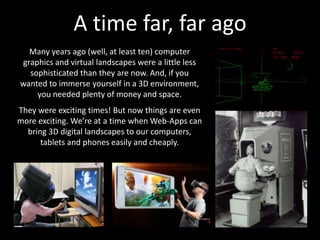
Many years ago (well, at least ten) computer
graphics and virtual landscapes were a little less
sophisticated than they are now. And, if you
wanted to immerse yourself in a 3D environment,
you needed plenty of money and space.
They were exciting times! But now things are even
more exciting. We’re at a time when Web-Apps can
bring 3D digital landscapes to our computers,
tablets and phones easily and cheaply.
Digital landscapes and the Hub
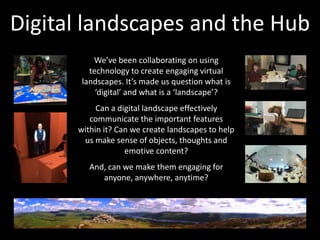
We’ve been collaborating on using
technology to create engaging virtual
landscapes. It’s made us question what is
‘digital’ and what is a ‘landscape’?
Can a digital landscape effectively
communicate the important features
within it? Can we create landscapes to help
us make sense of objects, thoughts and
emotive content?
And, can we make them engaging for
anyone, anywhere, anytime?
Harnessing the power of Web
What makes us think the modern web is so exciting as a platform
for creating engaging digital landscapes:
 Javascript is now amazingly fast, even on mobile.
 WebGL allows simple coding of 3D content.
 Lots of libraries help us code some amazing effects.
 We can run our code on almost any computer.
 And, of course, it’s fun and anyone can access it 
But, most importantly, it makes it easy to
create digital landscapes that anyone,
anywhere, anytime can share with us!
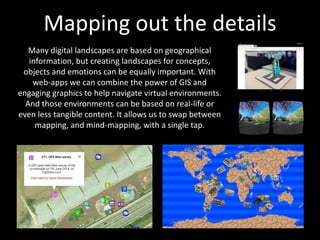
Mapping out the details
Many digital landscapes are based on geographical
information, but creating landscapes for concepts,
objects and emotions can be equally important. With
web-apps we can combine the power of GIS and
engaging graphics to help navigate virtual environments.
And those environments can be based on real-life or
even less tangible content. It allows us to swap between
mapping, and mind-mapping, with a single tap.
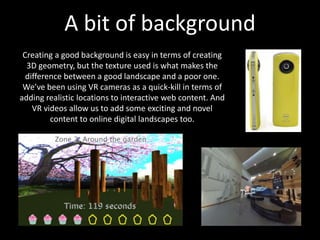
A bit of background
Creating a good background is easy in terms of creating
3D geometry, but the texture used is what makes the
difference between a good landscape and a poor one.
We’ve been using VR cameras as a quick-kill in terms of
adding realistic locations to interactive web content. And
VR videos allow us to add some exciting and novel
content to online digital landscapes too.
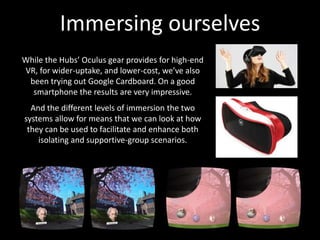
Immersing ourselves
While the Hubs’ Oculus gear provides for high-end
VR, for wider-uptake, and lower-cost, we’ve also
been trying out Google Cardboard. On a good
smartphone the results are very impressive.
And the different levels of immersion the two
systems allow for means that we can look at how
they can be used to facilitate and enhance both
isolating and supportive-group scenarios.
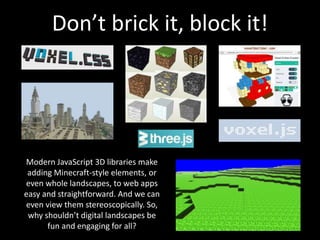
Don’t brick it, block it!
Modern JavaScript 3D libraries make
adding Minecraft-style elements, or
even whole landscapes, to web apps
easy and straightforward. And we can
even view them stereoscopically. So,
why shouldn’t digital landscapes be
fun and engaging for all?
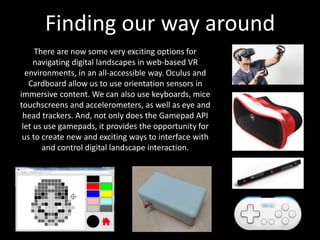
Finding our way around
There are now some very exciting options for
navigating digital landscapes in web-based VR
environments, in an all-accessible way. Oculus and
Cardboard allow us to use orientation sensors in
immersive content. We can also use keyboards, mice
touchscreens and accelerometers, as well as eye and
head trackers. And, not only does the Gamepad API
let us use gamepads, it provides the opportunity for
us to create new and exciting ways to interface with
and control digital landscape interaction.
That’s all folks 
Thanks for listening.
Thank
you
While you’re here, why not try out our
online digital landscape? It’s called ‘virtual
memories’ and you can download it open-
source at GitHub.
https://github.com/digitalhumanitieshub/virtual_landscape

June 2016 Digital Humanities Hub CAKE slides

  • 1.
    Engaging Digital Landscapes DrAndrew Thomas, Technical Developer, DHH A Technical Developers Perspective
  • 2.
    A time far,far ago Many years ago (well, at least ten) computer graphics and virtual landscapes were a little less sophisticated than they are now. And, if you wanted to immerse yourself in a 3D environment, you needed plenty of money and space. They were exciting times! But now things are even more exciting. We’re at a time when Web-Apps can bring 3D digital landscapes to our computers, tablets and phones easily and cheaply.
  • 3.
    Digital landscapes andthe Hub We’ve been collaborating on using technology to create engaging virtual landscapes. It’s made us question what is ‘digital’ and what is a ‘landscape’? Can a digital landscape effectively communicate the important features within it? Can we create landscapes to help us make sense of objects, thoughts and emotive content? And, can we make them engaging for anyone, anywhere, anytime?
  • 4.
    Harnessing the powerof Web What makes us think the modern web is so exciting as a platform for creating engaging digital landscapes:  Javascript is now amazingly fast, even on mobile.  WebGL allows simple coding of 3D content.  Lots of libraries help us code some amazing effects.  We can run our code on almost any computer.  And, of course, it’s fun and anyone can access it  But, most importantly, it makes it easy to create digital landscapes that anyone, anywhere, anytime can share with us!
  • 5.
    Mapping out thedetails Many digital landscapes are based on geographical information, but creating landscapes for concepts, objects and emotions can be equally important. With web-apps we can combine the power of GIS and engaging graphics to help navigate virtual environments. And those environments can be based on real-life or even less tangible content. It allows us to swap between mapping, and mind-mapping, with a single tap.
  • 6.
    A bit ofbackground Creating a good background is easy in terms of creating 3D geometry, but the texture used is what makes the difference between a good landscape and a poor one. We’ve been using VR cameras as a quick-kill in terms of adding realistic locations to interactive web content. And VR videos allow us to add some exciting and novel content to online digital landscapes too.
  • 7.
    Immersing ourselves While theHubs’ Oculus gear provides for high-end VR, for wider-uptake, and lower-cost, we’ve also been trying out Google Cardboard. On a good smartphone the results are very impressive. And the different levels of immersion the two systems allow for means that we can look at how they can be used to facilitate and enhance both isolating and supportive-group scenarios.
  • 8.
    Don’t brick it,block it! Modern JavaScript 3D libraries make adding Minecraft-style elements, or even whole landscapes, to web apps easy and straightforward. And we can even view them stereoscopically. So, why shouldn’t digital landscapes be fun and engaging for all?
  • 9.
    Finding our wayaround There are now some very exciting options for navigating digital landscapes in web-based VR environments, in an all-accessible way. Oculus and Cardboard allow us to use orientation sensors in immersive content. We can also use keyboards, mice touchscreens and accelerometers, as well as eye and head trackers. And, not only does the Gamepad API let us use gamepads, it provides the opportunity for us to create new and exciting ways to interface with and control digital landscape interaction.
  • 10.
    That’s all folks Thanks for listening. Thank you While you’re here, why not try out our online digital landscape? It’s called ‘virtual memories’ and you can download it open- source at GitHub. https://github.com/digitalhumanitieshub/virtual_landscape