Jump into React-
Native 2/6
Waqqas Jabbar
27th June 2018
What you learned previously
1. Setting up the development environment
2. Create a new project
3. Run the project
4. Add project in Git
5. Basics of React.js and React-Native
a. Component’s State
b. Component’s Props
c. React.js Life-cycle methods
d. Flow JS
What you will learn today
1. Organise your project source-code
2. React Navigation
3. Redux
4. Setting App Icons
What you will do today
● Push code to Github Repo
● Add basic application directories
● Add Todo List Screen
● Link screen with navigation
● Add an action to add a new task
● Link component to redux to get the task
● Use Flow for type checking
● Set App Icons
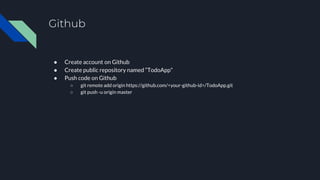
Github
● Create account on Github
● Create public repository named “TodoApp”
● Push code on Github
○ git remote add origin https://github.com/<your-github-id>/TodoApp.git
○ git push -u origin master
Adding packages and directory structure
● yarn add redux react-redux redux-persist reduxsauce seamless-immutable immutability-
helper react-navigation styled-components
● yarn add --dev flow-bin@^0.67.0
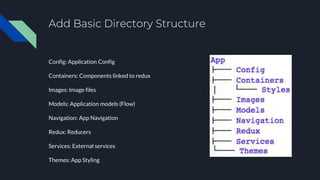
Add Basic Directory Structure
Config: Application Config
Containers: Components linked to redux
Images: Image files
Models: Application models (Flow)
Navigation: App Navigation
Redux: Reducers
Services: External services
Themes: App Styling
Directory Structure Walkthrough
● Config
● Containers
● Navigation
● Themes
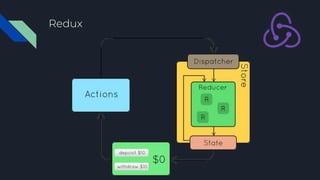
Redux
Principles
● Single source of truth
● State is read-only
● Changes in state is made through pure
function (reducers)
Concepts
● Action
● Action Creator
● Reducer
● Redux State
Tasks
● Setting up store
● Combining Reducers
● Mapping redux state to component’s
props
● Mapping action creator to
component’s props
Redux
Tasks Redux
● Adding Tasks Redux
● Adding AddTask action
● Handling Action in Redux
Set App Icon
Prerequisites: RN-Toolbox installed
● yo rn-toolbox:assets --icon /path/to/square/png/file.png
Reading
Redux
● https://redux.js.org/basics
React Navigation
● https://reactnavigation.org/docs/en/stack-navigator.html
Flow
● https://flow.org/en/docs/types/
Reference
● https://redux.js.org/
● https://github.com/kolodny/immutability-helper
● https://github.com/rtfeldman/seamless-immutable
● https://reactnavigation.org/

Jump into React-Native (Class 2/6)

  • 1.
    Jump into React- Native2/6 Waqqas Jabbar 27th June 2018
  • 2.
    What you learnedpreviously 1. Setting up the development environment 2. Create a new project 3. Run the project 4. Add project in Git 5. Basics of React.js and React-Native a. Component’s State b. Component’s Props c. React.js Life-cycle methods d. Flow JS
  • 3.
    What you willlearn today 1. Organise your project source-code 2. React Navigation 3. Redux 4. Setting App Icons
  • 4.
    What you willdo today ● Push code to Github Repo ● Add basic application directories ● Add Todo List Screen ● Link screen with navigation ● Add an action to add a new task ● Link component to redux to get the task ● Use Flow for type checking ● Set App Icons
  • 5.
    Github ● Create accounton Github ● Create public repository named “TodoApp” ● Push code on Github ○ git remote add origin https://github.com/<your-github-id>/TodoApp.git ○ git push -u origin master
  • 6.
    Adding packages anddirectory structure ● yarn add redux react-redux redux-persist reduxsauce seamless-immutable immutability- helper react-navigation styled-components ● yarn add --dev flow-bin@^0.67.0
  • 7.
    Add Basic DirectoryStructure Config: Application Config Containers: Components linked to redux Images: Image files Models: Application models (Flow) Navigation: App Navigation Redux: Reducers Services: External services Themes: App Styling
  • 8.
    Directory Structure Walkthrough ●Config ● Containers ● Navigation ● Themes
  • 9.
    Redux Principles ● Single sourceof truth ● State is read-only ● Changes in state is made through pure function (reducers) Concepts ● Action ● Action Creator ● Reducer ● Redux State Tasks ● Setting up store ● Combining Reducers ● Mapping redux state to component’s props ● Mapping action creator to component’s props
  • 10.
  • 11.
    Tasks Redux ● AddingTasks Redux ● Adding AddTask action ● Handling Action in Redux
  • 12.
    Set App Icon Prerequisites:RN-Toolbox installed ● yo rn-toolbox:assets --icon /path/to/square/png/file.png
  • 13.
    Reading Redux ● https://redux.js.org/basics React Navigation ●https://reactnavigation.org/docs/en/stack-navigator.html Flow ● https://flow.org/en/docs/types/
  • 14.
    Reference ● https://redux.js.org/ ● https://github.com/kolodny/immutability-helper ●https://github.com/rtfeldman/seamless-immutable ● https://reactnavigation.org/