Introduction to JSP
JSP and Servlets / Session 5 / 2 of 24
Objectives
Explain JSP
Identify the advantages of using JSP
Describe various elements of JSP
Describe the JSP Life Cycle
Develop JSP using Java Studio Enterprise 8
JSP and Servlets / Session 5 / 3 of 24
Introduction to JSP
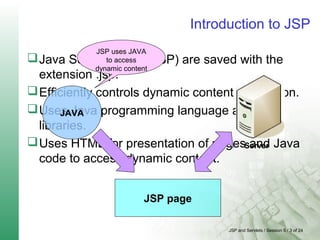
Java Server Pages (JSP) are saved with the
extension .jsp.
Efficiently controls dynamic content generation.
Uses Java programming language and class
libraries.
Uses HTML for presentation of pages and Java
code to access dynamic content.
JSP page
JAVA
Server
JSP uses JAVA
to access
dynamic content
JSP and Servlets / Session 5 / 4 of 24
Benefits of JSP 3-1
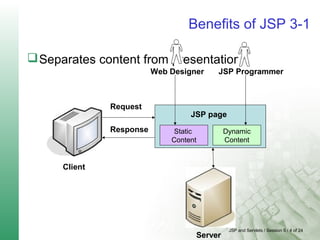
Separates content from presentation
Request
Response
JSP page
Static
Content
Dynamic
Content
Server
Client
Web Designer JSP Programmer
JSP and Servlets / Session 5 / 5 of 24
Benefits of JSP 3-2
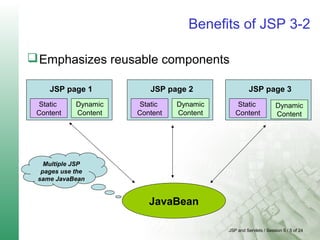
Emphasizes reusable components
JSP page 1
Static
Content
Dynamic
Content
JSP page 2
Static
Content
Dynamic
Content
JSP page 3
Static
Content
Dynamic
Content
JavaBean
Multiple JSP
pages use the
same JavaBean
JSP and Servlets / Session 5 / 6 of 24
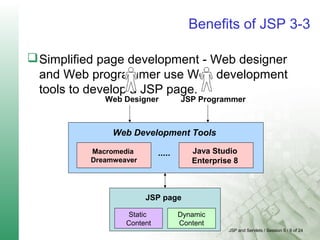
Benefits of JSP 3-3
Simplified page development - Web designer
and Web programmer use Web development
tools to develop a JSP page.
JSP page
Static
Content
Dynamic
Content
Web Designer JSP Programmer
Web Development Tools
Macromedia
Dreamweaver
Java Studio
Enterprise 8
.....
JSP and Servlets / Session 5 / 7 of 24
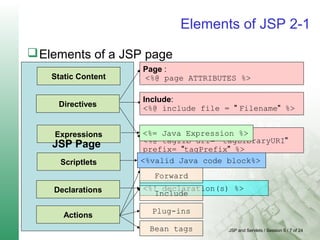
Elements of JSP 2-1
Elements of a JSP page
Static Content
Directives
Expressions
Scriptlets
JSP Page
Taglib:
<%@ taglib uri= "tagLibraryURI"
prefix= "tagPrefix" %>
<%valid Java code block%>
<%= Java Expression %>
Page :
<%@ page ATTRIBUTES %>
Include:
<%@ include file = " Filename" %>
Declarations
Actions
<%! declaration(s) %>
Forward
Include
Plug-ins
Bean tags
JSP and Servlets / Session 5 / 8 of 24
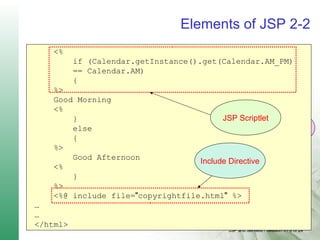
Elements of JSP 2-2
<%@ page language="java" %>
<html>
…
…
<h1>Elements of JSP</h1>
<p>Today is </p>
<page id="clock" class=
"calendar.jspCalendar" />
<ul>
<li>Day: <%=clock.getDayOfMonth() %>
<li>Year: <%=clock.getYear() %>
</ul>
Page Directive
JSP ExpressionStatic Content
<%
if (Calendar.getInstance().get(Calendar.AM_PM)
== Calendar.AM)
{
%>
Good Morning
<%
}
else
{
%>
Good Afternoon
<%
}
%>
<%@ include file="copyrightfile.html" %>
…
…
</html>
JSP Scriptlet
Include Directive
JSP and Servlets / Session 5 / 9 of 24
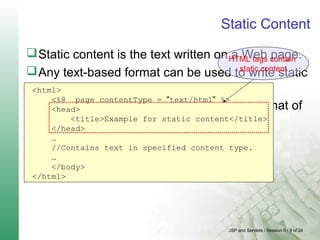
Static Content
Static content is the text written on a Web page.
Any text-based format can be used to write static
content.
A page directive is used to specify the format of
content.
<html>
<%@ page contentType = "text/html" %>
<head>
<title>Example for static content</title>
</head>
…
//Contains text in specified content type.
…
</body>
</html>
HTML tags contain
static content
JSP and Servlets / Session 5 / 10 of 24
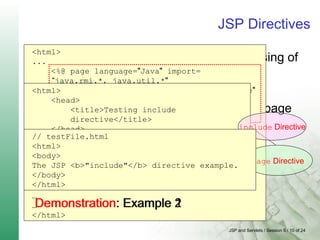
JSP Directives
JSP container uses directives for processing of
JSP page.
Controls the structure of the Servlet
Provides global information about a JSP page
Scope of directives is the entire JSP file
<html>
...
<%@ page language="Java" import=
“java.rmi.*, java.util.*"
session="true" buffer="12kb" autoFlush="true"
info="PageDirective" errorPage="error.jsp"
isErrorPage="false"
isThreadSafe="true" %>
<head>
<title>Testing Page Directive</title>
</head>
<body>
<h1>Testing Page Directive</h1>
This page is testing Page Directive.
</body >
…
…
</html>
page Directive
Demonstration: Example 1
<html>
<head>
<title>Testing include
directive</title>
</head>
<body>
<h1> Example of directives</h1>
<%@ include file ="testFile.html" %>
</body>
</html>
include Directive
// testFile.html
<html>
<body>
The JSP <b>"include"</b> directive example.
</body>
</html>
Demonstration: Example 2
JSP and Servlets / Session 5 / 11 of 24
JSP Expression
Contains a Java statement
Value of Java Statement will be evaluated and
inserted into generated Web page.
Displays individual variables, or the result of
some calculation.
<html>
<head>
<title>Testing Expression directive</title>
</head>
<body>
<h1> Testing Expression directive </h1>
<% int i = 2, j=3;%>
<% i++;%>
<% j=j+i; %>
…
</body>
</html>
JSP Expression
JSP and Servlets / Session 5 / 12 of 24
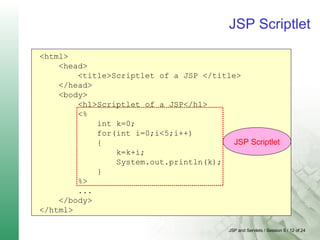
JSP Scriptlet
Block of Java code that performs functions
which are not supported by tags.
Executed during run time
<html>
<head>
<title>Scriptlet of a JSP </title>
</head>
<body>
<h1>Scriptlet of a JSP</h1>
<%
int k=0;
for(int i=0;i<5;i++)
{
k=k+i;
System.out.println(k);
}
%>
...
</body>
</html>
JSP Scriptlet
JSP and Servlets / Session 5 / 13 of 24
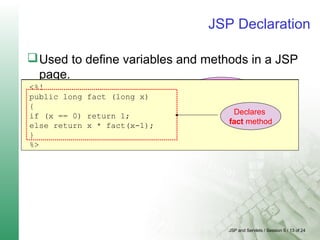
JSP Declaration
Used to define variables and methods in a JSP
page.
Declared variables and methods can then be
referenced by other scripting elements on the
same page.
Used to define single or multiple variables
<%!
int x = 0, y = 0;
private String units = "ft";
%>
Declares x and y as
integer variables
Declares units as
a String variable
<%!
public long fact (long x)
{
if (x == 0) return 1;
else return x * fact(x-1);
}
%>
Declares
fact method
JSP and Servlets / Session 5 / 14 of 24
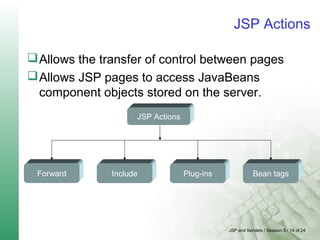
JSP Actions
Allows the transfer of control between pages
Allows JSP pages to access JavaBeans
component objects stored on the server.
JSP Actions
Forward Include Plug-ins Bean tags
JSP and Servlets / Session 5 / 15 of 24
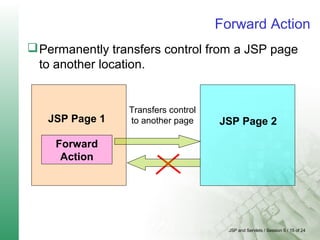
Forward Action
Permanently transfers control from a JSP page
to another location.
JSP Page 1
Forward
Action
JSP Page 2
Transfers control
to another page
JSP and Servlets / Session 5 / 16 of 24
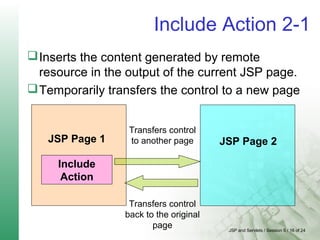
Include Action 2-1
Inserts the content generated by remote
resource in the output of the current JSP page.
Temporarily transfers the control to a new page
JSP Page 1
Include
Action
JSP Page 2
Transfers control
to another page
Transfers control
back to the original
page
JSP and Servlets / Session 5 / 17 of 24
Include Action 2-2
<%@page contentType="text/html"%>
<%@page pageEncoding="UTF-8"%>
<html>
<head>
<meta http-equiv="Content-Type"
content="text/html; charset=UTF-8">
<title>jspactionexample</title>
</head>
<body bgcolor="#ffffff">
<h1>Jsp actions and declarations</h1>
<jsp:include flush="true"
page="JspExample.jsp">
<jsp:param name="stringeg" value="String
passed using forward directive"/>
</jsp:include>
</body>
</html>
Include Action
Demonstration: Example 3
<%@page contentType="text/html"%>
<%@page pageEncoding="UTF-8"%>
<%@page language="java" %>
<html>
<head>
<meta http-equiv="Content-Type" content="text/html;
charset=UTF-8">
<title>Declaration, Expression and Actions</title>
<%=request.getParameter("stringeg")%>
<%! static private char[] vowels ={ 'a', 'e', 'i', 'o',
'u', 'A', 'E', 'I', 'O', 'U'};
String word;
public boolean startsWithVowel(String word) {
this.word=word;
char first = word.charAt(0);
for (int i = 0; i < vowels.length; ++i) {
if (first == vowels[i])
return true;
}
return false;
}
JSP Declarations
static private String[] articles = { "a ", "an " };
public String withArticle(String noun) {
if (startsWithVowel(noun)) return
articles[1] + noun;
else return articles[0] + noun;
}
%>
</head>
<body bgcolor="#ffffff">
<br />
<b>Starts with a vowel: </b>
<%=startsWithVowel("I am a very good Programmer")%>
<br/>
<b>String entered is: </b>
<%=word%>
<br />
<b>Article:</b>
<%=withArticle("apple")%> <br />
</body>
</html>
JSP Declarations
Demonstration: Example 4
JSP and Servlets / Session 5 / 18 of 24
JSP Plug-ins and Bean Tags
JSP Plug-ins - Used to generate browser-specific
HTML.
JSP Bean Tags – Used to interact with
JavaBeans stored on the server.
JSP and Servlets / Session 5 / 19 of 24
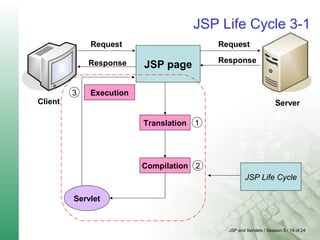
JSP Life Cycle 3-1
Client
JSP page
3 Execution
2
Translation
Compilation
1
Servlet
Request
Server
Request
ResponseResponse
JSP Life Cycle
JSP and Servlets / Session 5 / 20 of 24
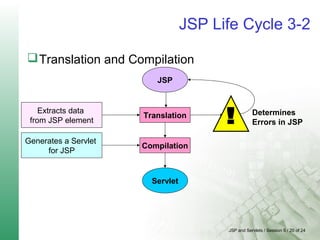
JSP Life Cycle 3-2
Translation and Compilation
Translation
Compilation
Servlet
JSP
Determines
Errors in JSP
Extracts data
from JSP element
Generates a Servlet
for JSP
JSP and Servlets / Session 5 / 21 of 24
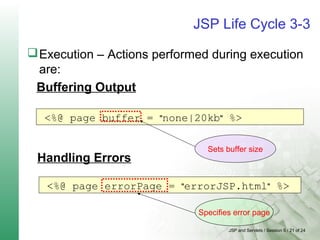
JSP Life Cycle 3-3
Execution – Actions performed during execution
are:
<%@ page buffer = "none|20kb" %>
<%@ page errorPage = "errorJSP.html" %>
Handling Errors
Sets buffer size
Specifies error page
Buffering Output
JSP and Servlets / Session 5 / 22 of 24
Demonstration: Example 5
<%@page contentType="text/html"%>
<%@page pageEncoding="UTF-8"%>
<%!
double radius=6.0;
private double getRadius(){
return radius;
}
private double getDiameter(){
return (radius * 2);
}
private double getArea(){
return (3.1415 * radius);
}
private double getCircumference(){
return(3.1415 *(radius * 2));
}
%>
JSP declarations
JSP Application in Java Studio Enterprise 8
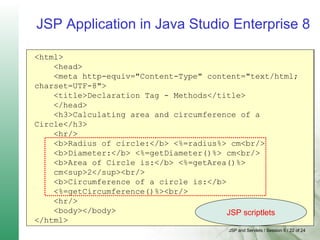
<html>
<head>
<meta http-equiv="Content-Type" content="text/html;
charset=UTF-8">
<title>Declaration Tag - Methods</title>
</head>
<h3>Calculating area and circumference of a
Circle</h3>
<hr/>
<b>Radius of circle:</b> <%=radius%> cm<br/>
<b>Diameter:</b> <%=getDiameter()%> cm<br/>
<b>Area of Circle is:</b> <%=getArea()%>
cm<sup>2</sup><br/>
<b>Circumference of a circle is:</b>
<%=getCircumference()%><br/>
<hr/>
<body></body>
</html>
JSP scriptlets
JSP and Servlets / Session 5 / 23 of 24
Summary
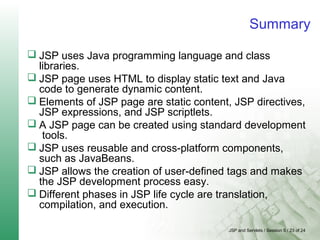
 JSP uses Java programming language and class
libraries.
 JSP page uses HTML to display static text and Java
code to generate dynamic content.
 Elements of JSP page are static content, JSP directives,
JSP expressions, and JSP scriptlets.
 A JSP page can be created using standard development
tools.
 JSP uses reusable and cross-platform components,
such as JavaBeans.
 JSP allows the creation of user-defined tags and makes
the JSP development process easy.
 Different phases in JSP life cycle are translation,
compilation, and execution.

Introduction to jsp

  • 1.
  • 2.
    JSP and Servlets/ Session 5 / 2 of 24 Objectives Explain JSP Identify the advantages of using JSP Describe various elements of JSP Describe the JSP Life Cycle Develop JSP using Java Studio Enterprise 8
  • 3.
    JSP and Servlets/ Session 5 / 3 of 24 Introduction to JSP Java Server Pages (JSP) are saved with the extension .jsp. Efficiently controls dynamic content generation. Uses Java programming language and class libraries. Uses HTML for presentation of pages and Java code to access dynamic content. JSP page JAVA Server JSP uses JAVA to access dynamic content
  • 4.
    JSP and Servlets/ Session 5 / 4 of 24 Benefits of JSP 3-1 Separates content from presentation Request Response JSP page Static Content Dynamic Content Server Client Web Designer JSP Programmer
  • 5.
    JSP and Servlets/ Session 5 / 5 of 24 Benefits of JSP 3-2 Emphasizes reusable components JSP page 1 Static Content Dynamic Content JSP page 2 Static Content Dynamic Content JSP page 3 Static Content Dynamic Content JavaBean Multiple JSP pages use the same JavaBean
  • 6.
    JSP and Servlets/ Session 5 / 6 of 24 Benefits of JSP 3-3 Simplified page development - Web designer and Web programmer use Web development tools to develop a JSP page. JSP page Static Content Dynamic Content Web Designer JSP Programmer Web Development Tools Macromedia Dreamweaver Java Studio Enterprise 8 .....
  • 7.
    JSP and Servlets/ Session 5 / 7 of 24 Elements of JSP 2-1 Elements of a JSP page Static Content Directives Expressions Scriptlets JSP Page Taglib: <%@ taglib uri= "tagLibraryURI" prefix= "tagPrefix" %> <%valid Java code block%> <%= Java Expression %> Page : <%@ page ATTRIBUTES %> Include: <%@ include file = " Filename" %> Declarations Actions <%! declaration(s) %> Forward Include Plug-ins Bean tags
  • 8.
    JSP and Servlets/ Session 5 / 8 of 24 Elements of JSP 2-2 <%@ page language="java" %> <html> … … <h1>Elements of JSP</h1> <p>Today is </p> <page id="clock" class= "calendar.jspCalendar" /> <ul> <li>Day: <%=clock.getDayOfMonth() %> <li>Year: <%=clock.getYear() %> </ul> Page Directive JSP ExpressionStatic Content <% if (Calendar.getInstance().get(Calendar.AM_PM) == Calendar.AM) { %> Good Morning <% } else { %> Good Afternoon <% } %> <%@ include file="copyrightfile.html" %> … … </html> JSP Scriptlet Include Directive
  • 9.
    JSP and Servlets/ Session 5 / 9 of 24 Static Content Static content is the text written on a Web page. Any text-based format can be used to write static content. A page directive is used to specify the format of content. <html> <%@ page contentType = "text/html" %> <head> <title>Example for static content</title> </head> … //Contains text in specified content type. … </body> </html> HTML tags contain static content
  • 10.
    JSP and Servlets/ Session 5 / 10 of 24 JSP Directives JSP container uses directives for processing of JSP page. Controls the structure of the Servlet Provides global information about a JSP page Scope of directives is the entire JSP file <html> ... <%@ page language="Java" import= “java.rmi.*, java.util.*" session="true" buffer="12kb" autoFlush="true" info="PageDirective" errorPage="error.jsp" isErrorPage="false" isThreadSafe="true" %> <head> <title>Testing Page Directive</title> </head> <body> <h1>Testing Page Directive</h1> This page is testing Page Directive. </body > … … </html> page Directive Demonstration: Example 1 <html> <head> <title>Testing include directive</title> </head> <body> <h1> Example of directives</h1> <%@ include file ="testFile.html" %> </body> </html> include Directive // testFile.html <html> <body> The JSP <b>"include"</b> directive example. </body> </html> Demonstration: Example 2
  • 11.
    JSP and Servlets/ Session 5 / 11 of 24 JSP Expression Contains a Java statement Value of Java Statement will be evaluated and inserted into generated Web page. Displays individual variables, or the result of some calculation. <html> <head> <title>Testing Expression directive</title> </head> <body> <h1> Testing Expression directive </h1> <% int i = 2, j=3;%> <% i++;%> <% j=j+i; %> … </body> </html> JSP Expression
  • 12.
    JSP and Servlets/ Session 5 / 12 of 24 JSP Scriptlet Block of Java code that performs functions which are not supported by tags. Executed during run time <html> <head> <title>Scriptlet of a JSP </title> </head> <body> <h1>Scriptlet of a JSP</h1> <% int k=0; for(int i=0;i<5;i++) { k=k+i; System.out.println(k); } %> ... </body> </html> JSP Scriptlet
  • 13.
    JSP and Servlets/ Session 5 / 13 of 24 JSP Declaration Used to define variables and methods in a JSP page. Declared variables and methods can then be referenced by other scripting elements on the same page. Used to define single or multiple variables <%! int x = 0, y = 0; private String units = "ft"; %> Declares x and y as integer variables Declares units as a String variable <%! public long fact (long x) { if (x == 0) return 1; else return x * fact(x-1); } %> Declares fact method
  • 14.
    JSP and Servlets/ Session 5 / 14 of 24 JSP Actions Allows the transfer of control between pages Allows JSP pages to access JavaBeans component objects stored on the server. JSP Actions Forward Include Plug-ins Bean tags
  • 15.
    JSP and Servlets/ Session 5 / 15 of 24 Forward Action Permanently transfers control from a JSP page to another location. JSP Page 1 Forward Action JSP Page 2 Transfers control to another page
  • 16.
    JSP and Servlets/ Session 5 / 16 of 24 Include Action 2-1 Inserts the content generated by remote resource in the output of the current JSP page. Temporarily transfers the control to a new page JSP Page 1 Include Action JSP Page 2 Transfers control to another page Transfers control back to the original page
  • 17.
    JSP and Servlets/ Session 5 / 17 of 24 Include Action 2-2 <%@page contentType="text/html"%> <%@page pageEncoding="UTF-8"%> <html> <head> <meta http-equiv="Content-Type" content="text/html; charset=UTF-8"> <title>jspactionexample</title> </head> <body bgcolor="#ffffff"> <h1>Jsp actions and declarations</h1> <jsp:include flush="true" page="JspExample.jsp"> <jsp:param name="stringeg" value="String passed using forward directive"/> </jsp:include> </body> </html> Include Action Demonstration: Example 3 <%@page contentType="text/html"%> <%@page pageEncoding="UTF-8"%> <%@page language="java" %> <html> <head> <meta http-equiv="Content-Type" content="text/html; charset=UTF-8"> <title>Declaration, Expression and Actions</title> <%=request.getParameter("stringeg")%> <%! static private char[] vowels ={ 'a', 'e', 'i', 'o', 'u', 'A', 'E', 'I', 'O', 'U'}; String word; public boolean startsWithVowel(String word) { this.word=word; char first = word.charAt(0); for (int i = 0; i < vowels.length; ++i) { if (first == vowels[i]) return true; } return false; } JSP Declarations static private String[] articles = { "a ", "an " }; public String withArticle(String noun) { if (startsWithVowel(noun)) return articles[1] + noun; else return articles[0] + noun; } %> </head> <body bgcolor="#ffffff"> <br /> <b>Starts with a vowel: </b> <%=startsWithVowel("I am a very good Programmer")%> <br/> <b>String entered is: </b> <%=word%> <br /> <b>Article:</b> <%=withArticle("apple")%> <br /> </body> </html> JSP Declarations Demonstration: Example 4
  • 18.
    JSP and Servlets/ Session 5 / 18 of 24 JSP Plug-ins and Bean Tags JSP Plug-ins - Used to generate browser-specific HTML. JSP Bean Tags – Used to interact with JavaBeans stored on the server.
  • 19.
    JSP and Servlets/ Session 5 / 19 of 24 JSP Life Cycle 3-1 Client JSP page 3 Execution 2 Translation Compilation 1 Servlet Request Server Request ResponseResponse JSP Life Cycle
  • 20.
    JSP and Servlets/ Session 5 / 20 of 24 JSP Life Cycle 3-2 Translation and Compilation Translation Compilation Servlet JSP Determines Errors in JSP Extracts data from JSP element Generates a Servlet for JSP
  • 21.
    JSP and Servlets/ Session 5 / 21 of 24 JSP Life Cycle 3-3 Execution – Actions performed during execution are: <%@ page buffer = "none|20kb" %> <%@ page errorPage = "errorJSP.html" %> Handling Errors Sets buffer size Specifies error page Buffering Output
  • 22.
    JSP and Servlets/ Session 5 / 22 of 24 Demonstration: Example 5 <%@page contentType="text/html"%> <%@page pageEncoding="UTF-8"%> <%! double radius=6.0; private double getRadius(){ return radius; } private double getDiameter(){ return (radius * 2); } private double getArea(){ return (3.1415 * radius); } private double getCircumference(){ return(3.1415 *(radius * 2)); } %> JSP declarations JSP Application in Java Studio Enterprise 8 <html> <head> <meta http-equiv="Content-Type" content="text/html; charset=UTF-8"> <title>Declaration Tag - Methods</title> </head> <h3>Calculating area and circumference of a Circle</h3> <hr/> <b>Radius of circle:</b> <%=radius%> cm<br/> <b>Diameter:</b> <%=getDiameter()%> cm<br/> <b>Area of Circle is:</b> <%=getArea()%> cm<sup>2</sup><br/> <b>Circumference of a circle is:</b> <%=getCircumference()%><br/> <hr/> <body></body> </html> JSP scriptlets
  • 23.
    JSP and Servlets/ Session 5 / 23 of 24 Summary  JSP uses Java programming language and class libraries.  JSP page uses HTML to display static text and Java code to generate dynamic content.  Elements of JSP page are static content, JSP directives, JSP expressions, and JSP scriptlets.  A JSP page can be created using standard development tools.  JSP uses reusable and cross-platform components, such as JavaBeans.  JSP allows the creation of user-defined tags and makes the JSP development process easy.  Different phases in JSP life cycle are translation, compilation, and execution.