ACCESSIBLE HIGH THROUGHPUT COMPUTING

JIP - PIPELINE SYSTEM
S E R I O U S LY

WHY?
• Job Management
• Implementation
• Batch job handling
• Reusable and…
• … documented tools
P L E A S E TA K E A L O O K

L O C AT I O N S
• Documentation 


http://pyjip.rtfd.org

• Source Code


https://github.com/thasso/pyjip

• Examples


https://github.com/thasso/pyjip/tree/master/examples
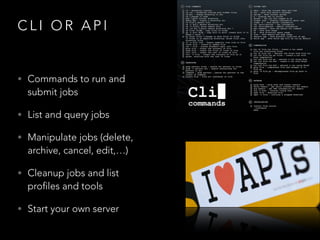
CLI OR API

• Commands to run and

submit jobs

• List and query jobs
• Manipulate jobs (delete,

archive, cancel, edit,…)

• Cleanup jobs and list

profiles and tools

• Start your own server
C
L
I
O
R
A
P
I

Commands
========
run
submit
bash

!

Locally run a jip script
submit a jip script to a remote cluster
Run or submit a bash command

List and query jobs
===================
jobs
list and update jobs from the job database

!

Manipulate jobs
===============
delete
delete the selected jobs
archive archive the selected jobs
cancel
cancel selected and running jobs
hold
put selected jobs on hold
restart restart selected jobs
logs
show log files of jobs
edit
edit job commands for a given job
show
show job options and command for jobs

!

Miscellaneous
=============
tools
profiles
clean
check
server

list all tools available through the search paths
list all available profiles
remove job logs
check job status
start the jip grid server
Lets get started
HELLO WORLD
HELLO WORLD
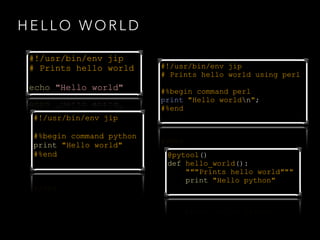
#!/usr/bin/env jip
# Prints hello world
!

echo "Hello world"
#!/usr/bin/env jip
!
#%begin command python
print "Hello world"
#%end

#!/usr/bin/env jip
# Prints hello world using perl
!
#%begin command perl
print "Hello worldn";
#%end

@pytool()
def hello_world():
"""Prints hello world"""
print "Hello python"
#%begin command [perl|RScript|…]

• command block to run scripts
• specify an interpreter (default bash)
• use templates to access options and variables

#%end
O P T I O N S A N D D O C U M E N TAT I O N

• Options are specified in your documentation
• Specify Inputs, Outputs, and other Options
• Options are available as ${variables}
O P T I O N S A N D D O C U M E N TAT I O N
#!/usr/bin/env jip
#
# BWA/Samtools pileup
#
# Usage:
#
pileup.jip -i <input> -r <reference> -o <output>
#
# Inputs:
#
-i, --input <input>
The input file
#
-r, --reference <reference> The genomic reference
#
# Outputs:
#
-o, --output <output>
The .bcf output file
#
# Options:
#
—-fast
Enable fast mode
T E M P L AT E S A N D V A R I A B L E S
• Access variables and options ${variable}
• Apply filters:
• arg — ${bool|arg} ${file|arg(“>”)}
• pre / suf — ${input|suf(“.txt”)}
• name, ext, and, abs — ${input|name|ext}
SINGLE TOOLS
• Inputs, Outputs, Options
• Phases:
• init — initialise the tool and its options
• setup — perform setup using option (values)
• validate — check input files and options
• execute — execute through interpreter
EXECUTION
• Check all inputs (dependency aware)
• Update the DB and run the command block

SUCCESS
• Update DB

FA I L U R E
• Remove output
• Update DB
GEM TO BED
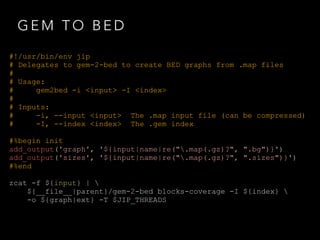
#!/usr/bin/env jip
# Delegates to gem-2-bed to create BED graphs from .map files
#
# Usage:
#
gem2bed -i <input> D O C U M E N TAT I O N
-I <index>
#
# Inputs:
#
-i, --input <input> The .map input file (can be compressed)
#
-I, --index <index> The .gem index
!
#%begin init
add_output('graph', '${input|name|re(".map(.gz)?", ".bg")}')
I N I T I A L I S AT I O N
add_output('sizes', '${input|name|re(".map(.gz)?", ".sizes")}')
#%end
!
zcat -f ${input} | 
${__file__|parent}/gem-2-bed U T I O N
E X E C blocks-coverage -I ${index} 
-o ${graph|ext} -T $JIP_THREADS
BED 2 BIGWIG
#!/usr/bin/env jip
# Delegates to gem-2-bed to create BED graphs from .map files
#
# Usage:
#
bed2wig -g <graph> -s <sizes> [-o <output>]
#
# Inputs:
#
-g, --graph <graph> The graph file generated with gem-2-bed
#
-s, --sizes <sizes> The sizes file generated with gem-2-wig
#
# Outputs:
#
-o, --output <output> The output file name
#
[default: ${graph|ext}.bw]

!

#%begin init
add_output('output', '${graph|name|ext}.bw')
#%end

!

#%begin setup
profile.threads = 1
#%end

!

${__file__|parent}/bedGraphToBigWig ${graph} ${sizes} ${output}
PIPELINES

• Inputs, Outputs, Options
• Phases
• init, setup, validate
• create pipeline
GEM 2 BIGWIG

#!/usr/bin/env jip
# Creates a bed graph from a .map file and converts it to wig
#
# Usage:
#
gem2wig -i <input> -I <index>
#
# Inputs:
#
-i, --input <input> The .map input file (can be compressed)
#
-I, --index <index> The .gem index
!
#%begin pipeline
bed = job(temp=True).run('gem2bed', input=input, index=index)
run('bed2wig', graph=bed.graph, sizes=bed.sizes)
GEM 2 BIGWIG

#!/usr/bin/env jip
# Creates a bed graph from a .map file and converts it to wig
#
# Usage:
#
gem2wig -i <input> D O C U M E N TAT I O N
-I <index>
#
# Inputs:
#
-i, --input <input> The .map input file (can be compressed)
#
-I, --index <index> The .gem index
!
#%begin pipeline
bed = job(temp=True).run('gem2bed', N E
P I P E L I input=input, index=index)
run('bed2wig', graph=bed.graph, sizes=bed.sizes)
#%begin pipeline

bed = job(temp=True).run('gem2bed',
input=input, index=index)

#%end
#%begin pipeline

bed = job(temp=True).run('gem2bed',
input=input, index=index)
run('bed2wig', graph=bed.graph,
sizes=bed.sizes)

#%end
DEMO
STREAMS

M U LT I P L E X I N G
M U LT I P L E X I N G A N D S T R E A M S
BA

echo "Hello World" | 
SH
(tee > producer_out.txt | (tee >(wc -w) | wc -l))

bash('echo "Hello World"'), output='producer_out.txt') 
| (bash('wc -l') + bash('wc -w'))

producer =
word_count
line_count
producer |

JIP

JIP

bash('echo "Hello World"', output='producer_out.txt')
= bash("wc -w", input=producer)
= bash("wc -l", input=producer)
(word_count + line_count)
Common Questions
SUBMIT SINGLE COMMANDS
• The jip bash command wraps single executions
• You can run or submit
• Dry runs and multiplexing are supported

DEMO
S U B M I T F O R M U LT I P L E F I L E S
• Fan-Out operations work for all tools
• Define a single input option
• Specify multiple values
• Works also for the jip bash command

DEMO
W H AT W A S T H E C O M M A N D

• jip show shows job properties and the command
• jip edit loads the job command in an editor

DEMO
R E S TA R T I N G A N D M O V I N G

• jip restart resubmits jobs after failure
• jip restart can also move jobs and pipelines to

other queues/partitions

DEMO
CUSTOMISE LOG FILES

• The job profile covers stdout and stderr log files
• jip logs finds and shows log files for jobs

DEMO
Thank You

QUESTIONS?

JIP Pipeline System Introduction

  • 1.
    ACCESSIBLE HIGH THROUGHPUTCOMPUTING JIP - PIPELINE SYSTEM
  • 2.
    S E RI O U S LY WHY? • Job Management • Implementation • Batch job handling • Reusable and… • … documented tools
  • 3.
    P L EA S E TA K E A L O O K L O C AT I O N S • Documentation 
 http://pyjip.rtfd.org • Source Code
 https://github.com/thasso/pyjip • Examples
 https://github.com/thasso/pyjip/tree/master/examples
  • 4.
    CLI OR API •Commands to run and submit jobs • List and query jobs • Manipulate jobs (delete, archive, cancel, edit,…) • Cleanup jobs and list profiles and tools • Start your own server
  • 5.
    C L I O R A P I Commands ======== run submit bash ! Locally run ajip script submit a jip script to a remote cluster Run or submit a bash command List and query jobs =================== jobs list and update jobs from the job database ! Manipulate jobs =============== delete delete the selected jobs archive archive the selected jobs cancel cancel selected and running jobs hold put selected jobs on hold restart restart selected jobs logs show log files of jobs edit edit job commands for a given job show show job options and command for jobs ! Miscellaneous ============= tools profiles clean check server list all tools available through the search paths list all available profiles remove job logs check job status start the jip grid server
  • 6.
  • 7.
    HELLO WORLD #!/usr/bin/env jip #Prints hello world ! echo "Hello world" #!/usr/bin/env jip ! #%begin command python print "Hello world" #%end #!/usr/bin/env jip # Prints hello world using perl ! #%begin command perl print "Hello worldn"; #%end @pytool() def hello_world(): """Prints hello world""" print "Hello python"
  • 8.
    #%begin command [perl|RScript|…] •command block to run scripts • specify an interpreter (default bash) • use templates to access options and variables #%end
  • 9.
    O P TI O N S A N D D O C U M E N TAT I O N • Options are specified in your documentation • Specify Inputs, Outputs, and other Options • Options are available as ${variables}
  • 10.
    O P TI O N S A N D D O C U M E N TAT I O N #!/usr/bin/env jip # # BWA/Samtools pileup # # Usage: # pileup.jip -i <input> -r <reference> -o <output> # # Inputs: # -i, --input <input> The input file # -r, --reference <reference> The genomic reference # # Outputs: # -o, --output <output> The .bcf output file # # Options: # —-fast Enable fast mode
  • 11.
    T E MP L AT E S A N D V A R I A B L E S • Access variables and options ${variable} • Apply filters: • arg — ${bool|arg} ${file|arg(“>”)} • pre / suf — ${input|suf(“.txt”)} • name, ext, and, abs — ${input|name|ext}
  • 12.
    SINGLE TOOLS • Inputs,Outputs, Options • Phases: • init — initialise the tool and its options • setup — perform setup using option (values) • validate — check input files and options • execute — execute through interpreter
  • 13.
    EXECUTION • Check allinputs (dependency aware) • Update the DB and run the command block SUCCESS • Update DB FA I L U R E • Remove output • Update DB
  • 14.
    GEM TO BED #!/usr/bin/envjip # Delegates to gem-2-bed to create BED graphs from .map files # # Usage: # gem2bed -i <input> D O C U M E N TAT I O N -I <index> # # Inputs: # -i, --input <input> The .map input file (can be compressed) # -I, --index <index> The .gem index ! #%begin init add_output('graph', '${input|name|re(".map(.gz)?", ".bg")}') I N I T I A L I S AT I O N add_output('sizes', '${input|name|re(".map(.gz)?", ".sizes")}') #%end ! zcat -f ${input} | ${__file__|parent}/gem-2-bed U T I O N E X E C blocks-coverage -I ${index} -o ${graph|ext} -T $JIP_THREADS
  • 15.
    BED 2 BIGWIG #!/usr/bin/envjip # Delegates to gem-2-bed to create BED graphs from .map files # # Usage: # bed2wig -g <graph> -s <sizes> [-o <output>] # # Inputs: # -g, --graph <graph> The graph file generated with gem-2-bed # -s, --sizes <sizes> The sizes file generated with gem-2-wig # # Outputs: # -o, --output <output> The output file name # [default: ${graph|ext}.bw] ! #%begin init add_output('output', '${graph|name|ext}.bw') #%end ! #%begin setup profile.threads = 1 #%end ! ${__file__|parent}/bedGraphToBigWig ${graph} ${sizes} ${output}
  • 16.
    PIPELINES • Inputs, Outputs,Options • Phases • init, setup, validate • create pipeline
  • 17.
    GEM 2 BIGWIG #!/usr/bin/envjip # Creates a bed graph from a .map file and converts it to wig # # Usage: # gem2wig -i <input> -I <index> # # Inputs: # -i, --input <input> The .map input file (can be compressed) # -I, --index <index> The .gem index ! #%begin pipeline bed = job(temp=True).run('gem2bed', input=input, index=index) run('bed2wig', graph=bed.graph, sizes=bed.sizes)
  • 18.
    GEM 2 BIGWIG #!/usr/bin/envjip # Creates a bed graph from a .map file and converts it to wig # # Usage: # gem2wig -i <input> D O C U M E N TAT I O N -I <index> # # Inputs: # -i, --input <input> The .map input file (can be compressed) # -I, --index <index> The .gem index ! #%begin pipeline bed = job(temp=True).run('gem2bed', N E P I P E L I input=input, index=index) run('bed2wig', graph=bed.graph, sizes=bed.sizes)
  • 19.
    #%begin pipeline bed =job(temp=True).run('gem2bed', input=input, index=index) #%end
  • 20.
    #%begin pipeline bed =job(temp=True).run('gem2bed', input=input, index=index) run('bed2wig', graph=bed.graph, sizes=bed.sizes) #%end
  • 21.
  • 22.
    STREAMS M U LTI P L E X I N G
  • 23.
    M U LTI P L E X I N G A N D S T R E A M S BA echo "Hello World" | SH (tee > producer_out.txt | (tee >(wc -w) | wc -l)) bash('echo "Hello World"'), output='producer_out.txt') | (bash('wc -l') + bash('wc -w')) producer = word_count line_count producer | JIP JIP bash('echo "Hello World"', output='producer_out.txt') = bash("wc -w", input=producer) = bash("wc -l", input=producer) (word_count + line_count)
  • 24.
  • 25.
    SUBMIT SINGLE COMMANDS •The jip bash command wraps single executions • You can run or submit • Dry runs and multiplexing are supported DEMO
  • 26.
    S U BM I T F O R M U LT I P L E F I L E S • Fan-Out operations work for all tools • Define a single input option • Specify multiple values • Works also for the jip bash command DEMO
  • 27.
    W H ATW A S T H E C O M M A N D • jip show shows job properties and the command • jip edit loads the job command in an editor DEMO
  • 28.
    R E STA R T I N G A N D M O V I N G • jip restart resubmits jobs after failure • jip restart can also move jobs and pipelines to other queues/partitions DEMO
  • 29.
    CUSTOMISE LOG FILES •The job profile covers stdout and stderr log files • jip logs finds and shows log files for jobs DEMO
  • 30.