Module 08 - JEE Enterprise
Application Deployment
Danairat T.
Line ID: Danairat
FB: Danairat Thanabodithammachari
+668-1559-1446
JEE and Web Application Development
The Course Outline
Module 01 - Introduction to JEE
Module 02 - The JEE Containers
Module 03 - The Model-View-Controller Design Pattern
Module 04 - Java Servlets
Module 05 - Java Server Pages in MVC
Module 06 - JEE Web Application Deployment
Module 07 - Enterprise JavaBeans
Module 08 - JEE Enterprise Application Deployment
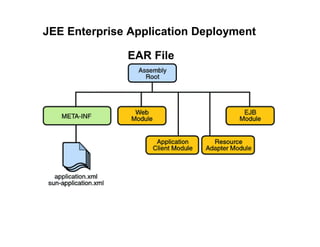
JEE Enterprise Application Deployment
EAR File
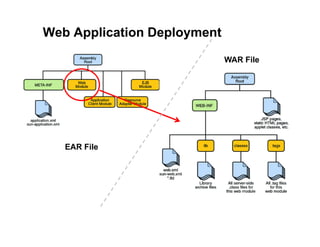
Web Application Deployment
EAR File
WAR File
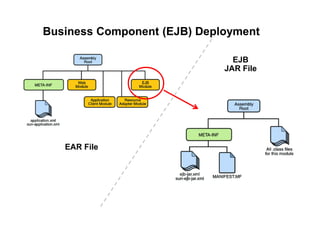
Business Component (EJB) Deployment
EAR File
EJB
JAR File
Hands-on Lab: Packaging and
Deploying the Enterprise Application
(EJB, Data Object, Servlet, JSP)
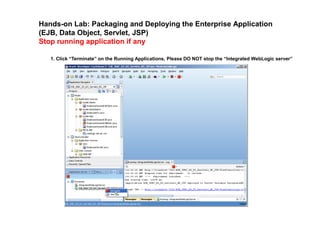
Hands-on Lab: Packaging and Deploying the Enterprise Application
(EJB, Data Object, Servlet, JSP)
Stop running application if any
1. Click “Terminate” on the Running Applications, Please DO NOT stop the “Integrated WebLogic server”
Hands-on Lab: Packaging and Deploying the Enterprise Application
(EJB, Data Object, Servlet, JSP)
Creating Enterprise Application (EAR file)
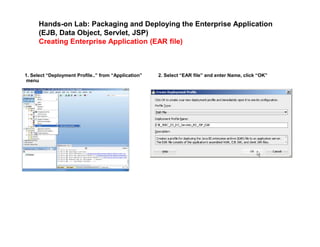
1. Select “Deployment Profile..” from “Application”
menu
2. Select “EAR file” and enter Name, click “OK”
Hands-on Lab: Packaging and Deploying the Enterprise Application
(EJB, Data Object, Servlet, JSP)
Creating Enterprise Application (EAR file)
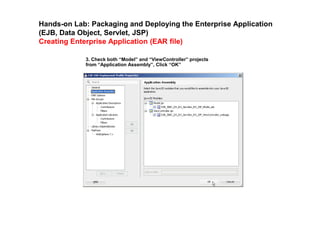
3. Check both “Model” and “ViewController” projects
from “Application Assembly”, Click “OK”
Hands-on Lab: Packaging and Deploying the Enterprise Application
(EJB, Data Object, Servlet, JSP)
Creating Enterprise Application (EAR file)
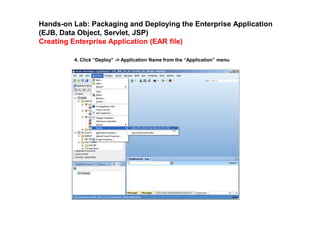
4. Click “Deploy” -> Application Name from the “Application” menu
Hands-on Lab: Packaging and Deploying the Enterprise Application
(EJB, Data Object, Servlet, JSP)
Creating Enterprise Application (EAR file)
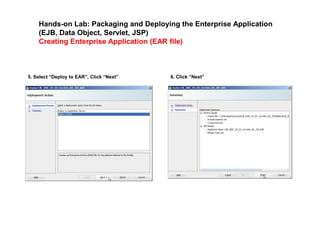
5. Select “Deploy to EAR”, Click “Next” 6. Click “Next”
Hands-on Lab: Packaging and Deploying the Enterprise Application
(EJB, Data Object, Servlet, JSP)
Creating Enterprise Application (EAR file)
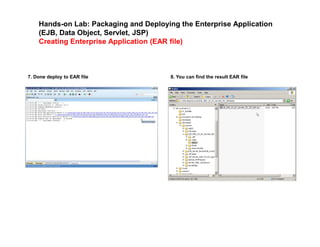
7. Done deploy to EAR file 8. You can find the result EAR file
Hands-on Lab: Packaging and Deploying the Enterprise Application
(EJB, Data Object, Servlet, JSP)
Creating Enterprise Application (EAR file)
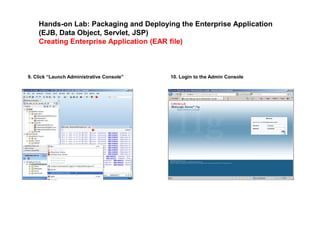
9. Click “Launch Administrative Console” 10. Login to the Admin Console
Hands-on Lab: Packaging and Deploying the Enterprise Application
(EJB, Data Object, Servlet, JSP)
Creating Enterprise Application (EAR file)
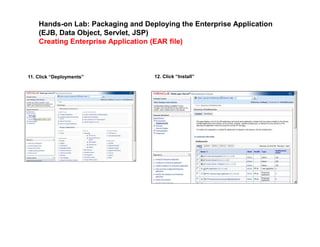
11. Click “Deployments” 12. Click “Install”
Hands-on Lab: Packaging and Deploying the Enterprise Application
(EJB, Data Object, Servlet, JSP)
Creating Enterprise Application (EAR file)
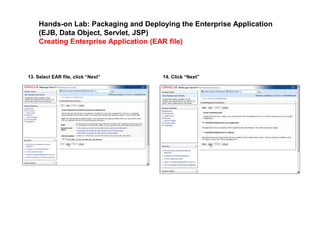
13. Select EAR file, click “Next” 14. Click “Next”
Hands-on Lab: Packaging and Deploying the Enterprise Application
(EJB, Data Object, Servlet, JSP)
Creating Enterprise Application (EAR file)
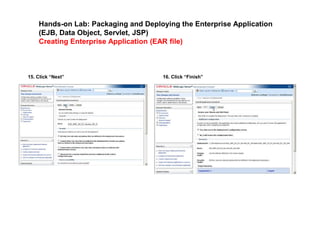
15. Click “Next” 16. Click “Finish”
Hands-on Lab: Packaging and Deploying the Enterprise Application
(EJB, Data Object, Servlet, JSP)
Testing Enterprise Application (EAR file)
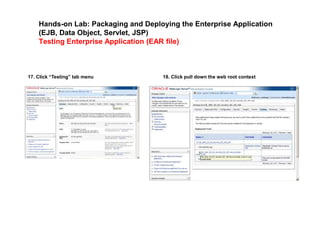
17. Click “Testing” tab menu 18. Click pull down the web root context
Hands-on Lab: Packaging and Deploying the Enterprise Application
(EJB, Data Object, Servlet, JSP)
Testing Enterprise Application (EAR file)
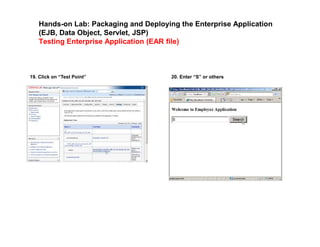
19. Click on “Test Point” 20. Enter “S” or others
Hands-on Lab: Packaging and Deploying the Enterprise Application
(EJB, Data Object, Servlet, JSP)
Testing Enterprise Application (EAR file)
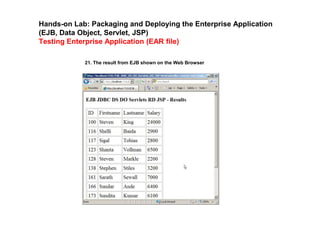
21. The result from EJB shown on the Web Browser
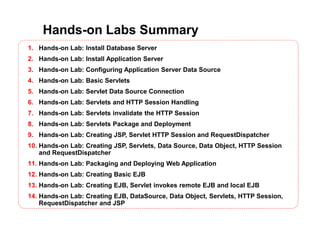
Hands-on Labs Summary
1. Hands-on Lab: Install Database Server
2. Hands-on Lab: Install Application Server
3. Hands-on Lab: Configuring Application Server Data Source
4. Hands-on Lab: Basic Servlets
5. Hands-on Lab: Servlet Data Source Connection
6. Hands-on Lab: Servlets and HTTP Session Handling
7. Hands-on Lab: Servlets invalidate the HTTP Session
8. Hands-on Lab: Servlets Package and Deployment
9. Hands-on Lab: Creating JSP, Servlet HTTP Session and RequestDispatcher
10. Hands-on Lab: Creating JSP, Servlets, Data Source, Data Object, HTTP Session
and RequestDispatcher
11. Hands-on Lab: Packaging and Deploying Web Application
12. Hands-on Lab: Creating Basic EJB
13. Hands-on Lab: Creating EJB, Servlet invokes remote EJB and local EJB
14. Hands-on Lab: Creating EJB, DataSource, Data Object, Servlets, HTTP Session,
RequestDispatcher and JSP
Danairat T.
Line ID: Danairat
FB: Danairat Thanabodithammachari
+668-1559-1446
Thank you

JEE Programming - 08 Enterprise Application Deployment

  • 1.
    Module 08 -JEE Enterprise Application Deployment Danairat T. Line ID: Danairat FB: Danairat Thanabodithammachari +668-1559-1446
  • 2.
    JEE and WebApplication Development The Course Outline Module 01 - Introduction to JEE Module 02 - The JEE Containers Module 03 - The Model-View-Controller Design Pattern Module 04 - Java Servlets Module 05 - Java Server Pages in MVC Module 06 - JEE Web Application Deployment Module 07 - Enterprise JavaBeans Module 08 - JEE Enterprise Application Deployment
  • 3.
    JEE Enterprise ApplicationDeployment EAR File
  • 4.
  • 5.
    Business Component (EJB)Deployment EAR File EJB JAR File
  • 6.
    Hands-on Lab: Packagingand Deploying the Enterprise Application (EJB, Data Object, Servlet, JSP)
  • 7.
    Hands-on Lab: Packagingand Deploying the Enterprise Application (EJB, Data Object, Servlet, JSP) Stop running application if any 1. Click “Terminate” on the Running Applications, Please DO NOT stop the “Integrated WebLogic server”
  • 8.
    Hands-on Lab: Packagingand Deploying the Enterprise Application (EJB, Data Object, Servlet, JSP) Creating Enterprise Application (EAR file) 1. Select “Deployment Profile..” from “Application” menu 2. Select “EAR file” and enter Name, click “OK”
  • 9.
    Hands-on Lab: Packagingand Deploying the Enterprise Application (EJB, Data Object, Servlet, JSP) Creating Enterprise Application (EAR file) 3. Check both “Model” and “ViewController” projects from “Application Assembly”, Click “OK”
  • 10.
    Hands-on Lab: Packagingand Deploying the Enterprise Application (EJB, Data Object, Servlet, JSP) Creating Enterprise Application (EAR file) 4. Click “Deploy” -> Application Name from the “Application” menu
  • 11.
    Hands-on Lab: Packagingand Deploying the Enterprise Application (EJB, Data Object, Servlet, JSP) Creating Enterprise Application (EAR file) 5. Select “Deploy to EAR”, Click “Next” 6. Click “Next”
  • 12.
    Hands-on Lab: Packagingand Deploying the Enterprise Application (EJB, Data Object, Servlet, JSP) Creating Enterprise Application (EAR file) 7. Done deploy to EAR file 8. You can find the result EAR file
  • 13.
    Hands-on Lab: Packagingand Deploying the Enterprise Application (EJB, Data Object, Servlet, JSP) Creating Enterprise Application (EAR file) 9. Click “Launch Administrative Console” 10. Login to the Admin Console
  • 14.
    Hands-on Lab: Packagingand Deploying the Enterprise Application (EJB, Data Object, Servlet, JSP) Creating Enterprise Application (EAR file) 11. Click “Deployments” 12. Click “Install”
  • 15.
    Hands-on Lab: Packagingand Deploying the Enterprise Application (EJB, Data Object, Servlet, JSP) Creating Enterprise Application (EAR file) 13. Select EAR file, click “Next” 14. Click “Next”
  • 16.
    Hands-on Lab: Packagingand Deploying the Enterprise Application (EJB, Data Object, Servlet, JSP) Creating Enterprise Application (EAR file) 15. Click “Next” 16. Click “Finish”
  • 17.
    Hands-on Lab: Packagingand Deploying the Enterprise Application (EJB, Data Object, Servlet, JSP) Testing Enterprise Application (EAR file) 17. Click “Testing” tab menu 18. Click pull down the web root context
  • 18.
    Hands-on Lab: Packagingand Deploying the Enterprise Application (EJB, Data Object, Servlet, JSP) Testing Enterprise Application (EAR file) 19. Click on “Test Point” 20. Enter “S” or others
  • 19.
    Hands-on Lab: Packagingand Deploying the Enterprise Application (EJB, Data Object, Servlet, JSP) Testing Enterprise Application (EAR file) 21. The result from EJB shown on the Web Browser
  • 20.
    Hands-on Labs Summary 1.Hands-on Lab: Install Database Server 2. Hands-on Lab: Install Application Server 3. Hands-on Lab: Configuring Application Server Data Source 4. Hands-on Lab: Basic Servlets 5. Hands-on Lab: Servlet Data Source Connection 6. Hands-on Lab: Servlets and HTTP Session Handling 7. Hands-on Lab: Servlets invalidate the HTTP Session 8. Hands-on Lab: Servlets Package and Deployment 9. Hands-on Lab: Creating JSP, Servlet HTTP Session and RequestDispatcher 10. Hands-on Lab: Creating JSP, Servlets, Data Source, Data Object, HTTP Session and RequestDispatcher 11. Hands-on Lab: Packaging and Deploying Web Application 12. Hands-on Lab: Creating Basic EJB 13. Hands-on Lab: Creating EJB, Servlet invokes remote EJB and local EJB 14. Hands-on Lab: Creating EJB, DataSource, Data Object, Servlets, HTTP Session, RequestDispatcher and JSP
  • 21.
    Danairat T. Line ID:Danairat FB: Danairat Thanabodithammachari +668-1559-1446 Thank you