By Rajan Shrivastava
           Wipro 1
•API for Java which defines how program can
access a DB.
•JDBC(TM) - developed by Sun Microsystems
• Exploited an existing interface library (ODBC)
• ODBC - Open Database Connectivity (C library)—
standard Application Programming Interface for
connecting to db; independent of programming
languages, db systems, OS
• ODBC - C programmers DB interface, early 1990's
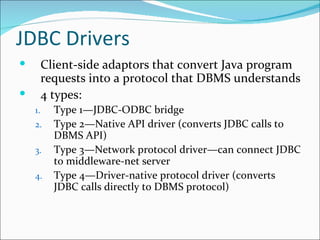
JDBC Drivers
        Client-side adaptors that convert Java program
         requests into a protocol that DBMS understands
        4 types:
    1.     Type 1—JDBC-ODBC bridge
    2.     Type 2—Native API driver (converts JDBC calls to
           DBMS API)
    3.     Type 3—Network protocol driver—can connect JDBC
           to middleware-net server
    4.     Type 4—Driver-native protocol driver (converts
           JDBC calls directly to DBMS protocol)
Loading a DriverManager
 DriverManager provides DB interface methods & defines objects
  which can connect Java app to driver; it manages set of drivers
  program can use to connect to db; finds driver & runs it to connect to
  db
 Most Java programs use import to load a class
 With JDBC, usually load driver class at runtime:
      import java.lang.*;
      public static void main (String args[]) {
      try { // this loads & initialises the driver
      Class.forName("sun.jdbc.odbc.JdbcOdbcDriver");
      // now connect to DB ...
         } catch (ClassNotFoundException e) {
                      System.err.println(e.getMessage());
                      e.printStackTrace();
                      System.exit(1);
         }
      }
Making a JDBC-ODBC
                 Database Connection
     import java.sql.*;
     Connection con;
     String URL = "jdbc:odbc:DataSource";
     String Username = "";
     String Password = "";
     con = DriverManager.getConnection(URL,Username, Password);
     // make more calls to JDBC methods here...
     con.close();


 ‘DataSource’ is a ‘logical name’ (not a real filename)
 Need to set DataSource = MyDatabase.mdb elsewhere
 Use ODBC Data Source Administrator for this...
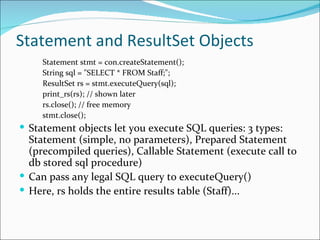
Statement and ResultSet Objects
     Statement stmt = con.createStatement();
     String sql = "SELECT * FROM Staff;";
     ResultSet rs = stmt.executeQuery(sql);
     print_rs(rs); // shown later
     rs.close(); // free memory
     stmt.close();
 Statement objects let you execute SQL queries: 3 types:
  Statement (simple, no parameters), Prepared Statement
  (precompiled queries), Callable Statement (execute call to
  db stored sql procedure)
 Can pass any legal SQL query to executeQuery()
 Here, rs holds the entire results table (Staff)...
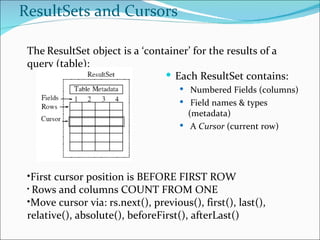
ResultSets and Cursors

 The ResultSet object is a ‘container’ for the results of a
 query (table):
                                 Each ResultSet contains:
                                      Numbered Fields (columns)
                                      Field names & types
                                       (metadata)
                                      A Cursor (current row)


 •First cursor position is BEFORE FIRST ROW
 • Rows and columns COUNT FROM ONE
 •Move cursor via: rs.next(), previous(), first(), last(),
 relative(), absolute(), beforeFirst(), afterLast()
Type I Drivers
 Use bridging technology
 Requires installation/configuration on client
  machines
 Not good for Web
 e.g. ODBC Bridge


                     Copyright © 1997 Alex Chaffee
Type II Drivers
 Native API drivers
 Requires installation/configuration on client
    machines
   Used to leverage existing CLI libraries
   Usually not thread-safe
   Mostly obsolete now
   e.g. Intersolv Oracle Driver, WebLogic drivers


                       Copyright © 1997 Alex Chaffee
Type III Drivers
 Calls middleware server, usually on database host
 Very flexible -- allows access to multiple databases
  using one driver
 Only need to download one driver
 But it’s another server application to install and
  maintain
 e.g. Symantec DBAnywhere
Type IV Drivers
 100% Pure Java -- the Holy Grail
 Use Java networking libraries to talk directly to
  database engines
 Only disadvantage: need to download a new driver
  for each database engine
 e.g. Oracle, mSQL
Jdbc ppt

Jdbc ppt

  • 1.
  • 2.
    •API for Javawhich defines how program can access a DB. •JDBC(TM) - developed by Sun Microsystems • Exploited an existing interface library (ODBC) • ODBC - Open Database Connectivity (C library)— standard Application Programming Interface for connecting to db; independent of programming languages, db systems, OS • ODBC - C programmers DB interface, early 1990's
  • 3.
    JDBC Drivers  Client-side adaptors that convert Java program requests into a protocol that DBMS understands  4 types: 1. Type 1—JDBC-ODBC bridge 2. Type 2—Native API driver (converts JDBC calls to DBMS API) 3. Type 3—Network protocol driver—can connect JDBC to middleware-net server 4. Type 4—Driver-native protocol driver (converts JDBC calls directly to DBMS protocol)
  • 4.
    Loading a DriverManager DriverManager provides DB interface methods & defines objects which can connect Java app to driver; it manages set of drivers program can use to connect to db; finds driver & runs it to connect to db  Most Java programs use import to load a class  With JDBC, usually load driver class at runtime: import java.lang.*; public static void main (String args[]) { try { // this loads & initialises the driver Class.forName("sun.jdbc.odbc.JdbcOdbcDriver"); // now connect to DB ... } catch (ClassNotFoundException e) { System.err.println(e.getMessage()); e.printStackTrace(); System.exit(1); } }
  • 5.
    Making a JDBC-ODBC Database Connection import java.sql.*; Connection con; String URL = "jdbc:odbc:DataSource"; String Username = ""; String Password = ""; con = DriverManager.getConnection(URL,Username, Password); // make more calls to JDBC methods here... con.close();  ‘DataSource’ is a ‘logical name’ (not a real filename)  Need to set DataSource = MyDatabase.mdb elsewhere  Use ODBC Data Source Administrator for this...
  • 6.
    Statement and ResultSetObjects Statement stmt = con.createStatement(); String sql = "SELECT * FROM Staff;"; ResultSet rs = stmt.executeQuery(sql); print_rs(rs); // shown later rs.close(); // free memory stmt.close();  Statement objects let you execute SQL queries: 3 types: Statement (simple, no parameters), Prepared Statement (precompiled queries), Callable Statement (execute call to db stored sql procedure)  Can pass any legal SQL query to executeQuery()  Here, rs holds the entire results table (Staff)...
  • 7.
    ResultSets and Cursors The ResultSet object is a ‘container’ for the results of a query (table):  Each ResultSet contains:  Numbered Fields (columns)  Field names & types (metadata)  A Cursor (current row) •First cursor position is BEFORE FIRST ROW • Rows and columns COUNT FROM ONE •Move cursor via: rs.next(), previous(), first(), last(), relative(), absolute(), beforeFirst(), afterLast()
  • 8.
    Type I Drivers Use bridging technology  Requires installation/configuration on client machines  Not good for Web  e.g. ODBC Bridge Copyright © 1997 Alex Chaffee
  • 9.
    Type II Drivers Native API drivers  Requires installation/configuration on client machines  Used to leverage existing CLI libraries  Usually not thread-safe  Mostly obsolete now  e.g. Intersolv Oracle Driver, WebLogic drivers Copyright © 1997 Alex Chaffee
  • 10.
    Type III Drivers Calls middleware server, usually on database host  Very flexible -- allows access to multiple databases using one driver  Only need to download one driver  But it’s another server application to install and maintain  e.g. Symantec DBAnywhere
  • 11.
    Type IV Drivers 100% Pure Java -- the Holy Grail  Use Java networking libraries to talk directly to database engines  Only disadvantage: need to download a new driver for each database engine  e.g. Oracle, mSQL

Editor's Notes

  • #9 Copyright © 1997 Alex Chaffee
  • #10 Copyright © 1997 Alex Chaffee