JDBC
SAMRAT ASHOK TECHNOLOGICAL
INSTITUTE VIDISHA (M.P.)
SUBMITTED TO:-
MR. GAGAN VISHWAKARMA
(Assistant professor)
SUBMITTED BY:-
SUMIT KUSHWAH
(0108CS131054)
ALBEL SINGH BHARGAV
(0108CS131005)
Introduction to JDBC
http://www.java2all.com
JDBC - Java Database Connectivity.
 The term JDBC unofficially stand for java
database connectivity
 JDBC provides API or Protocol to interact
with different databases.
 It is an API(Application programmiing
interface).
 Class for an specific pupose is called an
API
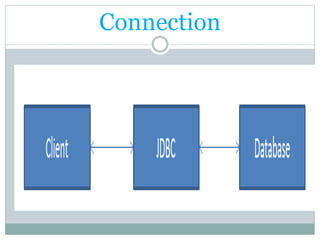
Connection
http://www.java2all.com
JDBC have so many classes and interfaces
that allow a java application to send request
made by user to any specific DBMS(Data Base
Management System).
JDBC is a bridge between java application and
database
Jdbc is developed by java soft
DEFINITION
JDBC Specification
 Different version of JDBC has different
specification as under.
 JDBC 1.0 - it provides basic functionality of
JDBC.
 JDBC 2.0 - JDBC 3.0 - JDBC 4.0
- it provides so many extra features like Auto
loading of the driver interface.
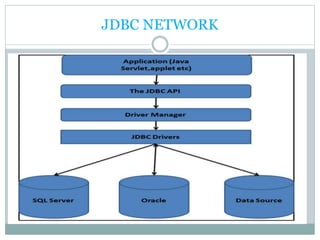
JDBC Architecture:
 As we all know now that driver is required to
communicate with database.
 JDBC API provides classes and interfaces to
handle request made by user and response made by
database.
 Some of the important JDBC API are as under.
 DriverManager Driver
 Connection Statement
 PreparedStatement CallableStatement
 ResultSet DatabaseMetaData
 ResultSetMetaData
JDBC NETWORK
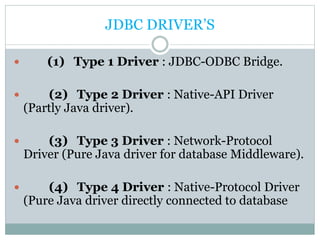
JDBC DRIVER’S
 (1) Type 1 Driver : JDBC-ODBC Bridge.
 (2) Type 2 Driver : Native-API Driver
(Partly Java driver).
 (3) Type 3 Driver : Network-Protocol
Driver (Pure Java driver for database Middleware).
 (4) Type 4 Driver : Native-Protocol Driver
(Pure Java driver directly connected to database
Type 1 Driver: JDBC-ODBC Bridge :-
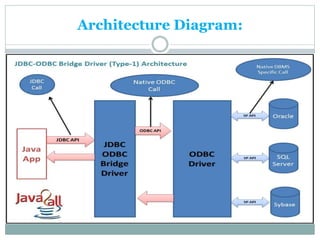
 The JDBC type 1 driver which is also known as a
JDBC-ODBC Bridge is a convert JDBC methods
into ODBC function calls.
 Sun provides a JDBC-ODBC Bridge driver by
“sun.jdbc.odbc.JdbcOdbcDriver”.
Architecture Diagram:
Type 4 Driver: Native-Protocol Driver
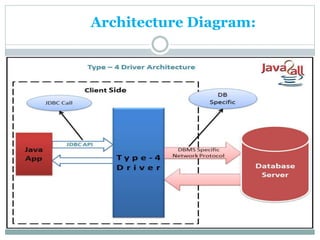
 The JDBC type 4 driver converts JDBC method
calls directly into the vendor specific database
protocol and in between do not need to be
converted any other formatted system so this is the
fastest way to communicate quires to DBMS and it
is completely written in JAVA because of that this
is also known as the “direct to database Pure JAVA
driver”.
 Approx 56 company have 128 driver
Architecture Diagram:
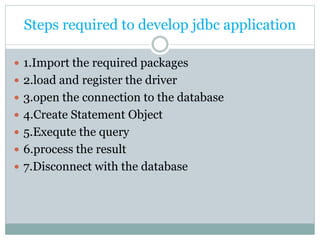
Steps required to develop jdbc application
 1.Import the required packages
 2.load and register the driver
 3.open the connection to the database
 4.Create Statement Object
 5.Exequte the query
 6.process the result
 7.Disconnect with the database
1.Import packages
 The fisrt step in jdbc programming is to import the
packages to be used by our application for
communicating with the database. Java provide us 2
packages for jdbc
 1.java.sql (Connected Architecture)
 2.javax.sql (Disonnected Architecture)
2.Load and Register the driver
 1.The second and one of the most important step in
jdbc is to tell jvm which driver we want to use for
our application connectivity to the database this
step is called loading and registring the driver
 2.static class forname() .
 3. prototype :-
Public static class forname(String)throws
ClassNotFoundException
3. Opening the Connection to the database
 1.The third step in communicating with the database
is to obtain the connection and this is done by using
the method getConnection belonging to
driverManager class
 2.prototype:-
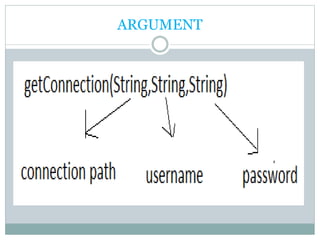
public static Connection
getConnection(String,String,String)throws
SQLException
ARGUMENT
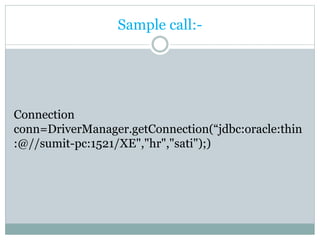
Sample call:-
Connection
conn=DriverManager.getConnection(“jdbc:oracle:thin
:@//sumit-pc:1521/XE","hr","sati");)
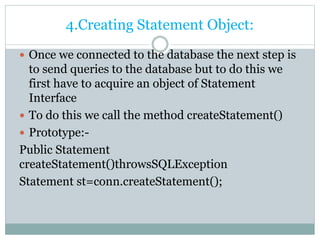
4.Creating Statement Object:
 Once we connected to the database the next step is
to send queries to the database but to do this we
first have to acquire an object of Statement
Interface
 To do this we call the method createStatement()
 Prototype:-
Public Statement
createStatement()throwsSQLException
Statement st=conn.createStatement();
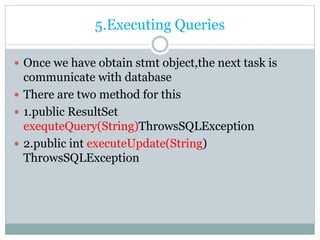
5.Executing Queries
 Once we have obtain stmt object,the next task is
communicate with database
 There are two method for this
 1.public ResultSet
exequteQuery(String)ThrowsSQLException
 2.public int executeUpdate(String)
ThrowsSQLException
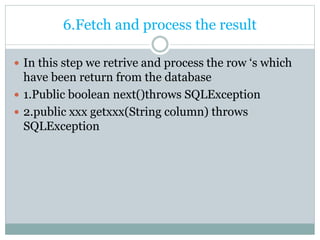
6.Fetch and process the result
 In this step we retrive and process the row ‘s which
have been return from the database
 1.Public boolean next()throws SQLException
 2.public xxx getxxx(String column) throws
SQLException
7.Disconnect with the database
 1.public void close() throws SQLException
Sample program
25
import java.sql.*;
class MyJdbcCode1
{ public static void main(String []args)
{ try
{ Class.forName("oracle.jdbc.OracleDriver");
System.out.println("Driver loadedd");
Connection conn=DriverManager.getConnection("jdbc:oracle:thin:@//sumit-
pc:1521/XE","hr","sati");
System.out.println("connected to the data base");
Statement st=conn.createStatement();
ResultSet rs=st.executeQuery("select FIRST_NAME,LAST_NAME from
EMPLOYEES");
while(rs.next())
{
String name1=rs.getString("FIRST_NAME");
String name2=rs.getString("LAST_NAME");
System.out.println(name1+"t"+name2);
}
Sample program(cont)
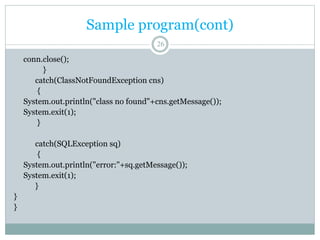
26
conn.close();
}
catch(ClassNotFoundException cns)
{
System.out.println("class no found"+cns.getMessage());
System.exit(1);
}
catch(SQLException sq)
{
System.out.println("error:"+sq.getMessage());
System.exit(1);
}
}
}
Comment’s and Query
 If any-

Jdbc new

  • 1.
  • 2.
    SAMRAT ASHOK TECHNOLOGICAL INSTITUTEVIDISHA (M.P.) SUBMITTED TO:- MR. GAGAN VISHWAKARMA (Assistant professor) SUBMITTED BY:- SUMIT KUSHWAH (0108CS131054) ALBEL SINGH BHARGAV (0108CS131005)
  • 3.
  • 4.
    JDBC - JavaDatabase Connectivity.  The term JDBC unofficially stand for java database connectivity  JDBC provides API or Protocol to interact with different databases.  It is an API(Application programmiing interface).  Class for an specific pupose is called an API
  • 5.
  • 6.
    http://www.java2all.com JDBC have somany classes and interfaces that allow a java application to send request made by user to any specific DBMS(Data Base Management System). JDBC is a bridge between java application and database Jdbc is developed by java soft DEFINITION
  • 7.
    JDBC Specification  Differentversion of JDBC has different specification as under.  JDBC 1.0 - it provides basic functionality of JDBC.  JDBC 2.0 - JDBC 3.0 - JDBC 4.0 - it provides so many extra features like Auto loading of the driver interface.
  • 8.
    JDBC Architecture:  Aswe all know now that driver is required to communicate with database.  JDBC API provides classes and interfaces to handle request made by user and response made by database.  Some of the important JDBC API are as under.  DriverManager Driver  Connection Statement  PreparedStatement CallableStatement  ResultSet DatabaseMetaData  ResultSetMetaData
  • 9.
  • 10.
    JDBC DRIVER’S  (1)Type 1 Driver : JDBC-ODBC Bridge.  (2) Type 2 Driver : Native-API Driver (Partly Java driver).  (3) Type 3 Driver : Network-Protocol Driver (Pure Java driver for database Middleware).  (4) Type 4 Driver : Native-Protocol Driver (Pure Java driver directly connected to database
  • 11.
    Type 1 Driver:JDBC-ODBC Bridge :-  The JDBC type 1 driver which is also known as a JDBC-ODBC Bridge is a convert JDBC methods into ODBC function calls.  Sun provides a JDBC-ODBC Bridge driver by “sun.jdbc.odbc.JdbcOdbcDriver”.
  • 12.
  • 13.
    Type 4 Driver:Native-Protocol Driver  The JDBC type 4 driver converts JDBC method calls directly into the vendor specific database protocol and in between do not need to be converted any other formatted system so this is the fastest way to communicate quires to DBMS and it is completely written in JAVA because of that this is also known as the “direct to database Pure JAVA driver”.  Approx 56 company have 128 driver
  • 14.
  • 15.
    Steps required todevelop jdbc application  1.Import the required packages  2.load and register the driver  3.open the connection to the database  4.Create Statement Object  5.Exequte the query  6.process the result  7.Disconnect with the database
  • 16.
    1.Import packages  Thefisrt step in jdbc programming is to import the packages to be used by our application for communicating with the database. Java provide us 2 packages for jdbc  1.java.sql (Connected Architecture)  2.javax.sql (Disonnected Architecture)
  • 17.
    2.Load and Registerthe driver  1.The second and one of the most important step in jdbc is to tell jvm which driver we want to use for our application connectivity to the database this step is called loading and registring the driver  2.static class forname() .  3. prototype :- Public static class forname(String)throws ClassNotFoundException
  • 18.
    3. Opening theConnection to the database  1.The third step in communicating with the database is to obtain the connection and this is done by using the method getConnection belonging to driverManager class  2.prototype:- public static Connection getConnection(String,String,String)throws SQLException
  • 19.
  • 20.
  • 21.
    4.Creating Statement Object: Once we connected to the database the next step is to send queries to the database but to do this we first have to acquire an object of Statement Interface  To do this we call the method createStatement()  Prototype:- Public Statement createStatement()throwsSQLException Statement st=conn.createStatement();
  • 22.
    5.Executing Queries  Oncewe have obtain stmt object,the next task is communicate with database  There are two method for this  1.public ResultSet exequteQuery(String)ThrowsSQLException  2.public int executeUpdate(String) ThrowsSQLException
  • 23.
    6.Fetch and processthe result  In this step we retrive and process the row ‘s which have been return from the database  1.Public boolean next()throws SQLException  2.public xxx getxxx(String column) throws SQLException
  • 24.
    7.Disconnect with thedatabase  1.public void close() throws SQLException
  • 25.
    Sample program 25 import java.sql.*; classMyJdbcCode1 { public static void main(String []args) { try { Class.forName("oracle.jdbc.OracleDriver"); System.out.println("Driver loadedd"); Connection conn=DriverManager.getConnection("jdbc:oracle:thin:@//sumit- pc:1521/XE","hr","sati"); System.out.println("connected to the data base"); Statement st=conn.createStatement(); ResultSet rs=st.executeQuery("select FIRST_NAME,LAST_NAME from EMPLOYEES"); while(rs.next()) { String name1=rs.getString("FIRST_NAME"); String name2=rs.getString("LAST_NAME"); System.out.println(name1+"t"+name2); }
  • 26.
    Sample program(cont) 26 conn.close(); } catch(ClassNotFoundException cns) { System.out.println("classno found"+cns.getMessage()); System.exit(1); } catch(SQLException sq) { System.out.println("error:"+sq.getMessage()); System.exit(1); } } }
  • 27.