Random Creating simple games with Java Methods and Parameters
Agenda In this lecture, we will see that a  program  is a set of classes, a  class  is a set of methods and a  method  is a collection of  statements . We will discover how a message expression  invokes  a particular  method .
Outline Program Classes Kinds of Java Methods Invoking instance methods Passing values by parameter
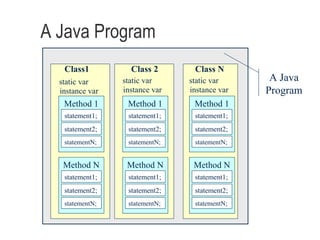
The Structure of a Java Program   There are four major structural components of Java programs: the program itself classes methods statements
A Java Program Class1 Class 2 Class N A Java Program static var   instance var static var   instance var static var   instance var Method 1 statement1; statement2; statementN; Method N statement1; statement2; statementN; Method 1 statement1; statement2; statementN; Method N statement1; statement2; statementN; Method 1 statement1; statement2; statementN; Method N statement1; statement2; statementN;
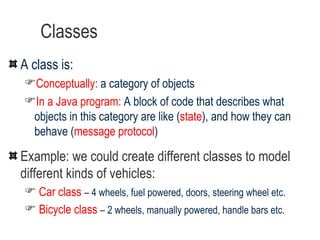
Classes A class is: Conceptually:  a category of objects In a Java program:   A block of code that describes what objects in this category are like ( state ), and how they can behave ( message protocol ) Example: we could create different classes to model different kinds of vehicles: Car class   – 4 wheels, fuel powered, doors, steering wheel etc. Bicycle class   – 2 wheels, manually powered, handle bars etc.
A Java Program - a Set of Classes A Java program consists of one or more  classes A class  is like a blueprint that describes what objects of that class are like We can use these classes to create the objects that our program manipulates
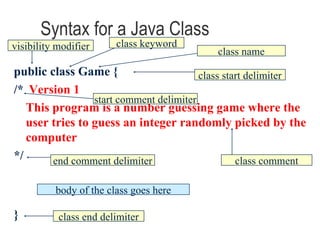
Syntax for a Java Class public class Game { /*   Version 1 This program is a number guessing game where the user tries to guess an integer randomly picked by the computer */ } class end delimiter class name class start delimiter class comment body of the class goes here start comment delimiter end comment delimiter visibility modifier class keyword
A Java Class - a Set of Methods The body of each Java class includes a set of  methods A  method  is some code that performs a  single, well defined  task. One Java Class A Java Method A Java Method A Java Method A Java Method
Two Kinds of Java Methods An  instance method  implements a message that is sent to an instance of the class. A  static method  implements a task that is independent of any particular object.  In either case, some code is run and (optionally) a result is returned We will learn about static methods in a later lecture
Syntax for a Java Method public static void main(String args[]) { /* Starting point for a program. */ } method end delimiter method name method start delimiter method comment visibility modifier static keyword return type parameter list body of the method goes here
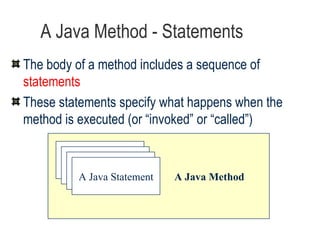
A Java Method - Statements The body of a method includes a sequence of  statements These statements specify what happens when the method is executed (or “invoked” or “called”) A Java Method A Java Statement A Java Statement A Java Statement A Java Statement
Java Statements There are many kinds of Java statements We can use many different kinds of statements: variable declarations message expressions assignment statements imports  (we don’t put import statements inside methods) Each statement ends with a semi-colon  ;
Invoking an instance method When we execute a piece of code that sends a message to a receiver, the  class  of the  receiver object  is searched for an  instance method  with the  same signature  as the  message expression Once located, the method starts to  execute  (we say that the method has been “ called ” or “ invoked ”) When the method is invoked, any parameters declared in the method signature get created This is sometimes called “ method dispatch ”
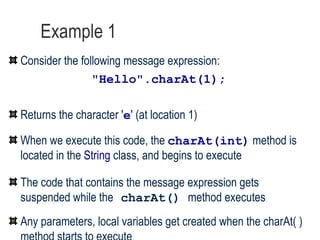
Example 1 Consider the following message expression: " Hello " .charAt(1); Returns the character  ' e '  (at location 1) When we execute this code, the  charAt(int)  method is located in the  String  class, and begins to execute  The code that contains the message expression gets suspended while the   charAt()   method executes Any parameters, local variables get created when the charAt( ) method starts to execute
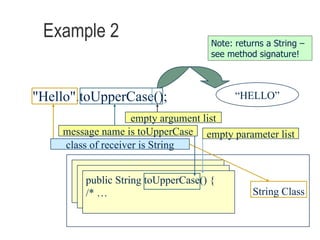
Example 2 "Hello".toUpperCase(); String Class public String toUpperCase() { /* … class of receiver is String empty argument list empty parameter list “ HELLO” Note: returns a String – see method signature! message name is toUpperCase
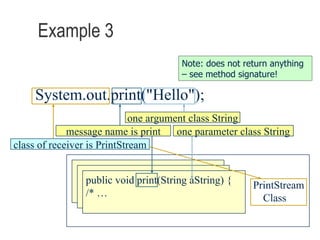
Example 3 System.out.print("Hello"); Note: does not return anything – see method signature! PrintStream Class public void print(String aString) {  /* … class of receiver is PrintStream message name is print one argument class String one parameter class String
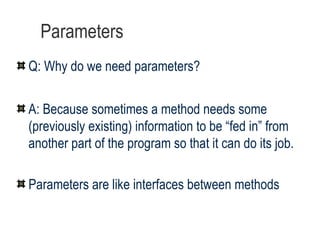
Parameters Q: Why do we need parameters? A: Because sometimes a method needs some (previously existing) information to be “fed in” from another part of the program so that it can do its job.  Parameters are like interfaces between methods
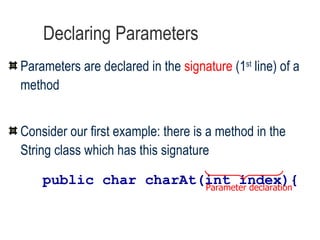
Declaring Parameters Parameters are declared in the  signature  (1 st  line) of a method   Consider our first example: there is a method in the String class which has this signature public char charAt(int index){ Parameter declaration
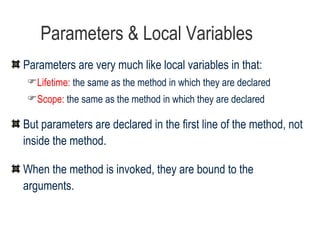
Parameters & Local Variables Parameters are very much like local variables in that: Lifetime:  the same as the method in which they are declared Scope:  the same as the method in which they are declared But parameters are declared in the first line of the method, not inside the method. When the method is invoked, they are bound to the arguments.
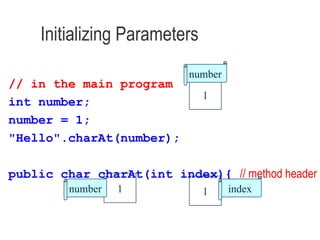
Initializing Parameters // in the main program int number; number = 1; " Hello " .charAt(number); public char charAt(int index){   // method header 1 index 1 number 1 number
An Example  using Primitive Data Types public class Example { public Example ( ) { } private void aMethod( int param) { param = 1;  // notice param is re-bound System.out.println(param); } public static void main(String args[ ] ) { int  argument;  Example anObj; anObj = new Example( ); argument = 6; anObj.aMethod(argument); System.out.print(argument);  …
Summary Methods Parameters (formal and actual) Local variables Return values vs. void Overloading
“ Real Programmers always confuse Christmas and Halloween because Oct31 == Dec25” --Andrew Rutherford

Java

  • 1.
    Random Creating simplegames with Java Methods and Parameters
  • 2.
    Agenda In thislecture, we will see that a program is a set of classes, a class is a set of methods and a method is a collection of statements . We will discover how a message expression invokes a particular method .
  • 3.
    Outline Program ClassesKinds of Java Methods Invoking instance methods Passing values by parameter
  • 4.
    The Structure ofa Java Program There are four major structural components of Java programs: the program itself classes methods statements
  • 5.
    A Java ProgramClass1 Class 2 Class N A Java Program static var instance var static var instance var static var instance var Method 1 statement1; statement2; statementN; Method N statement1; statement2; statementN; Method 1 statement1; statement2; statementN; Method N statement1; statement2; statementN; Method 1 statement1; statement2; statementN; Method N statement1; statement2; statementN;
  • 6.
    Classes A classis: Conceptually: a category of objects In a Java program: A block of code that describes what objects in this category are like ( state ), and how they can behave ( message protocol ) Example: we could create different classes to model different kinds of vehicles: Car class – 4 wheels, fuel powered, doors, steering wheel etc. Bicycle class – 2 wheels, manually powered, handle bars etc.
  • 7.
    A Java Program- a Set of Classes A Java program consists of one or more classes A class is like a blueprint that describes what objects of that class are like We can use these classes to create the objects that our program manipulates
  • 8.
    Syntax for aJava Class public class Game { /* Version 1 This program is a number guessing game where the user tries to guess an integer randomly picked by the computer */ } class end delimiter class name class start delimiter class comment body of the class goes here start comment delimiter end comment delimiter visibility modifier class keyword
  • 9.
    A Java Class- a Set of Methods The body of each Java class includes a set of methods A method is some code that performs a single, well defined task. One Java Class A Java Method A Java Method A Java Method A Java Method
  • 10.
    Two Kinds ofJava Methods An instance method implements a message that is sent to an instance of the class. A static method implements a task that is independent of any particular object. In either case, some code is run and (optionally) a result is returned We will learn about static methods in a later lecture
  • 11.
    Syntax for aJava Method public static void main(String args[]) { /* Starting point for a program. */ } method end delimiter method name method start delimiter method comment visibility modifier static keyword return type parameter list body of the method goes here
  • 12.
    A Java Method- Statements The body of a method includes a sequence of statements These statements specify what happens when the method is executed (or “invoked” or “called”) A Java Method A Java Statement A Java Statement A Java Statement A Java Statement
  • 13.
    Java Statements Thereare many kinds of Java statements We can use many different kinds of statements: variable declarations message expressions assignment statements imports (we don’t put import statements inside methods) Each statement ends with a semi-colon ;
  • 14.
    Invoking an instancemethod When we execute a piece of code that sends a message to a receiver, the class of the receiver object is searched for an instance method with the same signature as the message expression Once located, the method starts to execute (we say that the method has been “ called ” or “ invoked ”) When the method is invoked, any parameters declared in the method signature get created This is sometimes called “ method dispatch ”
  • 15.
    Example 1 Considerthe following message expression: " Hello " .charAt(1); Returns the character ' e ' (at location 1) When we execute this code, the charAt(int) method is located in the String class, and begins to execute The code that contains the message expression gets suspended while the charAt() method executes Any parameters, local variables get created when the charAt( ) method starts to execute
  • 16.
    Example 2 "Hello".toUpperCase();String Class public String toUpperCase() { /* … class of receiver is String empty argument list empty parameter list “ HELLO” Note: returns a String – see method signature! message name is toUpperCase
  • 17.
    Example 3 System.out.print("Hello");Note: does not return anything – see method signature! PrintStream Class public void print(String aString) { /* … class of receiver is PrintStream message name is print one argument class String one parameter class String
  • 18.
    Parameters Q: Whydo we need parameters? A: Because sometimes a method needs some (previously existing) information to be “fed in” from another part of the program so that it can do its job. Parameters are like interfaces between methods
  • 19.
    Declaring Parameters Parametersare declared in the signature (1 st line) of a method Consider our first example: there is a method in the String class which has this signature public char charAt(int index){ Parameter declaration
  • 20.
    Parameters & LocalVariables Parameters are very much like local variables in that: Lifetime: the same as the method in which they are declared Scope: the same as the method in which they are declared But parameters are declared in the first line of the method, not inside the method. When the method is invoked, they are bound to the arguments.
  • 21.
    Initializing Parameters //in the main program int number; number = 1; " Hello " .charAt(number); public char charAt(int index){ // method header 1 index 1 number 1 number
  • 22.
    An Example using Primitive Data Types public class Example { public Example ( ) { } private void aMethod( int param) { param = 1; // notice param is re-bound System.out.println(param); } public static void main(String args[ ] ) { int argument; Example anObj; anObj = new Example( ); argument = 6; anObj.aMethod(argument); System.out.print(argument); …
  • 23.
    Summary Methods Parameters(formal and actual) Local variables Return values vs. void Overloading
  • 24.
    “ Real Programmersalways confuse Christmas and Halloween because Oct31 == Dec25” --Andrew Rutherford