Semester:1st
Lecture:1st
Prepare by:M.NaeemShinwari
JahanUniversity
ViceChancelloroffice
Computer Sciencefaculty
ISDepartment
Subject name: Introduction to
Computing
2
Outline
• The Computer Defined
• How Computer Works: 3 Basic
Concepts
• Role of Software
3
The Computer Defined
• “Electronic device for storing and processing data,
making calculations, or controlling machinery.” (The P
Oxford Dictionary)
• “An electronic device that processes data, convertin
into information that is useful to people.” (Peter Norton)
• “A programmable, multiuse machine that accepts da
raw facts and figures – and processes, or manipulat
into information we can use.” (Williams and Sawyer)
• What makes computer different from
other machines is that:
4
What’s so special about computer?
Computer
runs program!
By changing the
program
(instructions), the
same computer
can be used to
perform different
function
5
How Computers Work – Concept # 1
The purpose of computer is to
process data into information
Data
The raw facts and figures
that are processed into
information
Information
Data that has been
summarized or otherwise
manipulated for use in
decision making
6
How Computers Work – Concept # 2
Computers consist of
hardware and software
Hardware
• All the machinery and
equipment in a
computer system
• Mechanical devices in
the computer
• Anything that can be
touched
Software
• All the instructions that tell
the computer how to perform
a task
• Tell the computer what to do
• Also called a program
• Thousands of programs exis
7
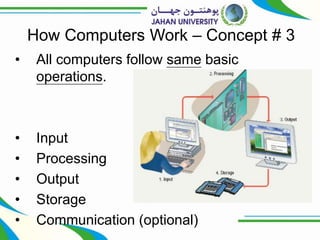
How Computers Work – Concept # 3
• All computers follow same basic
operations.
• Input
• Processing
• Output
• Storage
• Communication (optional)
8
How Computers Work – Concept # 3
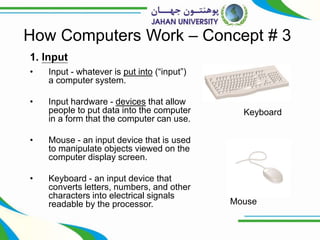
1. Input
• Input - whatever is put into (“input”)
a computer system.
• Input hardware - devices that allow
people to put data into the computer
in a form that the computer can use.
• Mouse - an input device that is used
to manipulate objects viewed on the
computer display screen.
• Keyboard - an input device that
converts letters, numbers, and other
characters into electrical signals
readable by the processor.
Keyboard
Mouse
9
How Computers Work – Concept # 3
2. Processing
• Processing - the
manipulation a computer
does to transform data into
information.
• Case or system cabinet -
the box that houses the
processor chip (CPU), the
memory chips, and the
motherboard with power
supply, as well as some
secondary storage devices.
Case or system cabinet
10
How Computers Work – Concept # 3
2. Processing
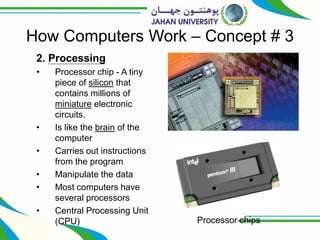
• Processor chip - A tiny
piece of silicon that
contains millions of
miniature electronic
circuits.
• Is like the brain of the
computer
• Carries out instructions
from the program
• Manipulate the data
• Most computers have
several processors
• Central Processing Unit
(CPU) Processor chips
11
How Computers Work – Concept # 3
Memory chips
2. Processing
Memory chips
• Also known as RAM (Random
Access Memory).
• Represent primary storage or
temporary storage.
• Hold data before processing
and information after
processing.
• Also stores program instructions
• Volatile
• More RAM results in a faster
system
12
How Computers Work – Concept # 3
Motherboard
2. Processing
• Motherboard - the main
circuit board in the
computer.
• Everything else attaches to
the motherboard through
connections called ports.
• Expansion slots - “plugs” on
the motherboard for
expanding the PC’s
capabilities via additional
circuit boards.
13
How Computers Work – Concept # 3
3. Storage
• Primary storage
(memory) - RAM
• Computer circuitry that
temporarily holds data
waiting to be
processed
•Secondary storage (storage) -
•The area in the computer
where data or information is
held permanently
vs.
Storage capacity is represented in:
1 byte - 1 character of data.
1 kilobyte - 1,024 characters.
1 megabyte - 1,048,576 characters.
1 gigabyte - more than 1 billion characters.
1 terabyte - more than 1 trillion characters.
14
How Computers Work – Concept # 3
Zip disk
Floppy disk
3. Storage
• Floppy-disk drive -
a storage device
that stores data on
removable 3.5-
inch-diameter
diskettes.
• Zip-disk drive - a
storage device
that stores data on
floppy-disk
cartridges with 70-
170 times the
capacity of the
standard floppy.
15
How Computers Work – Concept # 3
Hard-disk drive
3. Storage
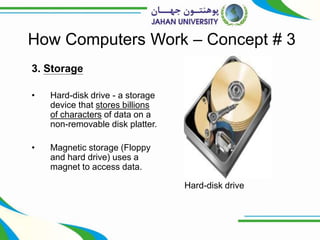
• Hard-disk drive - a storage
device that stores billions
of characters of data on a
non-removable disk platter.
• Magnetic storage (Floppy
and hard drive) uses a
magnet to access data.
16
How Computers Work – Concept # 3
CD drive
3. Storage
• CD (Compact Disk)
drive or DVD (Digital
Video Disk) drive - a
storage device that
uses laser
technology to read
data from optical
disks.
• Optical storage
17
How Computers Work – Concept # 3
Flash Memory
and USB Drive
3. Storage
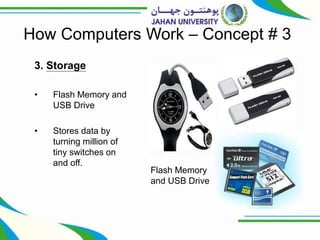
• Flash Memory and
USB Drive
• Stores data by
turning million of
tiny switches on
and off.
18
How Computers Work – Concept # 3
Sound card
4. Output
• Output hardware - devices which
translate info processed by the
computer into a form that
humans can understand.
• Peripheral device - any
component or piece of equipment
that expands a computer’s input,
storage, and output capabilities.
• Sound card - enhances the
computer’s sound-generating
capabilities by allowing sound to
be output through speakers.
19
How Computers Work – Concept # 3
Speakers
4. Output
• Speakers - the
devices that play
sounds transmitted
as electrical signals
from the sound card.
20
How Computers Work – Concept # 3
4. Output
• Video card -
converts the
processor’s output
information into a
video signal that can
be sent through a
cable to the monitor.
21
How Computers Work – Concept # 3
Monitor
4. Output
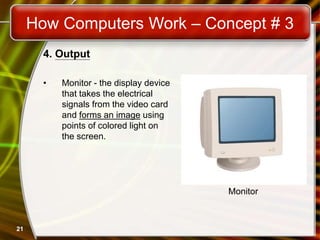
• Monitor - the display device
that takes the electrical
signals from the video card
and forms an image using
points of colored light on
the screen.
22
How Computers Work – Concept # 3
Printer
4. Output
• Printer - an output
device that
produces text and
graphics on paper.
23
How Computers Work – Concept # 3
5. Communications
• Modem - a device
that sends and
receives data over
telephone lines to
and from computers.
24
Put all the hardware together and…
25
Do we need anything else?
• We still need the
Software!
26
Software Runs The Machine
• The majority of people who purchase
computers, do so, because of software.
• They want to email, or type letters.
• Nearly every reason given to purchase a
computer is based on software needs.
• Software tells the computer what to do
• Two types
– System software
– Application software
27
Software Runs The Machine
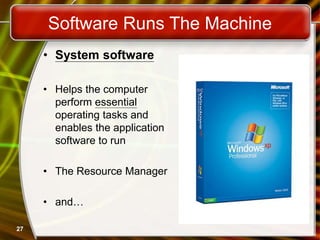
• System software
• Helps the computer
perform essential
operating tasks and
enables the application
software to run
• The Resource Manager
• and…
28
Software Runs The Machine
• Application software
• Enables you to perform
specific tasks. e.g:
• Word Processing
• Photo Editing
• Creating web pages
• Computer Games…

ITC Lecture01.pptx

  • 1.
  • 2.
    2 Outline • The ComputerDefined • How Computer Works: 3 Basic Concepts • Role of Software
  • 3.
    3 The Computer Defined •“Electronic device for storing and processing data, making calculations, or controlling machinery.” (The P Oxford Dictionary) • “An electronic device that processes data, convertin into information that is useful to people.” (Peter Norton) • “A programmable, multiuse machine that accepts da raw facts and figures – and processes, or manipulat into information we can use.” (Williams and Sawyer)
  • 4.
    • What makescomputer different from other machines is that: 4 What’s so special about computer? Computer runs program! By changing the program (instructions), the same computer can be used to perform different function
  • 5.
    5 How Computers Work– Concept # 1 The purpose of computer is to process data into information Data The raw facts and figures that are processed into information Information Data that has been summarized or otherwise manipulated for use in decision making
  • 6.
    6 How Computers Work– Concept # 2 Computers consist of hardware and software Hardware • All the machinery and equipment in a computer system • Mechanical devices in the computer • Anything that can be touched Software • All the instructions that tell the computer how to perform a task • Tell the computer what to do • Also called a program • Thousands of programs exis
  • 7.
    7 How Computers Work– Concept # 3 • All computers follow same basic operations. • Input • Processing • Output • Storage • Communication (optional)
  • 8.
    8 How Computers Work– Concept # 3 1. Input • Input - whatever is put into (“input”) a computer system. • Input hardware - devices that allow people to put data into the computer in a form that the computer can use. • Mouse - an input device that is used to manipulate objects viewed on the computer display screen. • Keyboard - an input device that converts letters, numbers, and other characters into electrical signals readable by the processor. Keyboard Mouse
  • 9.
    9 How Computers Work– Concept # 3 2. Processing • Processing - the manipulation a computer does to transform data into information. • Case or system cabinet - the box that houses the processor chip (CPU), the memory chips, and the motherboard with power supply, as well as some secondary storage devices. Case or system cabinet
  • 10.
    10 How Computers Work– Concept # 3 2. Processing • Processor chip - A tiny piece of silicon that contains millions of miniature electronic circuits. • Is like the brain of the computer • Carries out instructions from the program • Manipulate the data • Most computers have several processors • Central Processing Unit (CPU) Processor chips
  • 11.
    11 How Computers Work– Concept # 3 Memory chips 2. Processing Memory chips • Also known as RAM (Random Access Memory). • Represent primary storage or temporary storage. • Hold data before processing and information after processing. • Also stores program instructions • Volatile • More RAM results in a faster system
  • 12.
    12 How Computers Work– Concept # 3 Motherboard 2. Processing • Motherboard - the main circuit board in the computer. • Everything else attaches to the motherboard through connections called ports. • Expansion slots - “plugs” on the motherboard for expanding the PC’s capabilities via additional circuit boards.
  • 13.
    13 How Computers Work– Concept # 3 3. Storage • Primary storage (memory) - RAM • Computer circuitry that temporarily holds data waiting to be processed •Secondary storage (storage) - •The area in the computer where data or information is held permanently vs. Storage capacity is represented in: 1 byte - 1 character of data. 1 kilobyte - 1,024 characters. 1 megabyte - 1,048,576 characters. 1 gigabyte - more than 1 billion characters. 1 terabyte - more than 1 trillion characters.
  • 14.
    14 How Computers Work– Concept # 3 Zip disk Floppy disk 3. Storage • Floppy-disk drive - a storage device that stores data on removable 3.5- inch-diameter diskettes. • Zip-disk drive - a storage device that stores data on floppy-disk cartridges with 70- 170 times the capacity of the standard floppy.
  • 15.
    15 How Computers Work– Concept # 3 Hard-disk drive 3. Storage • Hard-disk drive - a storage device that stores billions of characters of data on a non-removable disk platter. • Magnetic storage (Floppy and hard drive) uses a magnet to access data.
  • 16.
    16 How Computers Work– Concept # 3 CD drive 3. Storage • CD (Compact Disk) drive or DVD (Digital Video Disk) drive - a storage device that uses laser technology to read data from optical disks. • Optical storage
  • 17.
    17 How Computers Work– Concept # 3 Flash Memory and USB Drive 3. Storage • Flash Memory and USB Drive • Stores data by turning million of tiny switches on and off.
  • 18.
    18 How Computers Work– Concept # 3 Sound card 4. Output • Output hardware - devices which translate info processed by the computer into a form that humans can understand. • Peripheral device - any component or piece of equipment that expands a computer’s input, storage, and output capabilities. • Sound card - enhances the computer’s sound-generating capabilities by allowing sound to be output through speakers.
  • 19.
    19 How Computers Work– Concept # 3 Speakers 4. Output • Speakers - the devices that play sounds transmitted as electrical signals from the sound card.
  • 20.
    20 How Computers Work– Concept # 3 4. Output • Video card - converts the processor’s output information into a video signal that can be sent through a cable to the monitor.
  • 21.
    21 How Computers Work– Concept # 3 Monitor 4. Output • Monitor - the display device that takes the electrical signals from the video card and forms an image using points of colored light on the screen.
  • 22.
    22 How Computers Work– Concept # 3 Printer 4. Output • Printer - an output device that produces text and graphics on paper.
  • 23.
    23 How Computers Work– Concept # 3 5. Communications • Modem - a device that sends and receives data over telephone lines to and from computers.
  • 24.
    24 Put all thehardware together and…
  • 25.
    25 Do we needanything else? • We still need the Software!
  • 26.
    26 Software Runs TheMachine • The majority of people who purchase computers, do so, because of software. • They want to email, or type letters. • Nearly every reason given to purchase a computer is based on software needs. • Software tells the computer what to do • Two types – System software – Application software
  • 27.
    27 Software Runs TheMachine • System software • Helps the computer perform essential operating tasks and enables the application software to run • The Resource Manager • and…
  • 28.
    28 Software Runs TheMachine • Application software • Enables you to perform specific tasks. e.g: • Word Processing • Photo Editing • Creating web pages • Computer Games…