IT System &
Security Audit
JBIMS MIM SEM V 2015-2018
MUFADDAL NULLWALA – 15-I-131
Contents
1. Defining an IT Auditor
2. IT Auditor Certifications & ISACA
3. IT Audit Phases
4. Preparing to be Audited
5. How IT auditor audits an Applications
6. Auditing technology for Information System
IT Auditor
 An IT auditor identify ways in which an organization's
computer systems meets its needs, review configuration of
hardware and software programs designed for new
systems and check if the system controls are adequate.
 CISA, CISM, Networking, Hardware, Software, Information
quality Assurance, Cryptography Experts etc.
 IT Audits are done in Teams
ISACA
 www.isaca.org - ISACA is an international professional
association focused on IT governance.
 Originated in United States in 1967
 Certifications
Certified Information Systems Auditor (CISA)
Certified Information Security Manager (CISM)
Certified in the Governance of Enterprise IT (CGEIT)
Control Objectives for Information and Related Technology
(COBIT) 5
Certified in Risk and Information Systems Control (CRISC)
Cybersecurity Nexus Practitioner (CSX-P)
CISA
 The CISA (Certified Information Systems Auditor)
certification is renowned all across the globe as a standard
for Business Systems and Information technology
professionals who audit, monitor, access, and control data.
 Min. of 5 years of IS auditing, control or security work
experience
 Code of professional ethics
 Adhering to IS auditing standards
CISM
CISM – Certified Information Security Manager
Specialization
Information Security Governance
Risk Management
Information Security Program Management
Information Security Management
Response Management
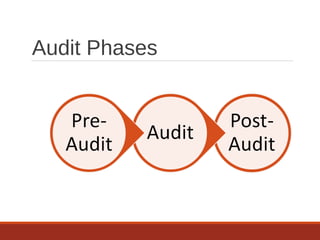
Audit Phases
Pre-Audit
 Define Scope & Objectives
 Set Audit Intent
 Past Audit
 Review current Policies
 Audit Plan
 Checklists
 Site Survey (if required in some cases)
Audit
 Site Survey
 Meet Site Managers - What data, How & when it will be
collected
 Data Collection
 Interview Staff
 Access Control Assessments
 Vulnerability Assessments
 Exit meeting - Immediate problems, Questions & answer
for site managers, Preliminary findings
Post – Audit (Reporting)
 Preparation of detailed audit report
 Report contains
Introduction
Audit findings presented in separate sections
Auditors overall conclusion & opinion
Auditors reservations with respect to the audit
Detailed Audit findings & recommendations
Documents & references used
Materiality of Findings
Preparing To Be Audited
Audits are not for Confrontation
Auditees should participate & make themselves available
during the Audit
Auditees should make themselves aware of
 Intent/scope & objectives of the Audit
 What type of data will be collected
 What data should not be collected
 Auditors should also know that what data shouldn’t be
collected
Application Audit
 An assessment whose scope focuses on Business Critical
Processes or Application
 Any application or software running in the company to
carry out business
E.g. Payroll process that may span across several different
servers, databases, operating systems, applications, etc.
The level of controls is dependent on the degree of risk
involved in the incorrect or unauthorized processing of
data
Application Audit (cont.)
 Administration
 Inputs, Processing, Outputs
 Logical Security
 Disaster Recovery Plan
 Change Management
 User Support
 Third Party Services
 General Controls
Application Audit -
Administration
 The most important area of the audit, because this area
focuses on the overall ownership and accountability of the
application
 Roles & Responsibilities - development, change approval,
access authorization
Legal and Regulatory compliance issues
Application Audit - Inputs,
Processing, Outputs
 Looking for evidence of data preparation procedures,
reconciliation processes, handling requirements, etc.
 Run test transactions against the application
 Includes who can enter input and see output
 Retention of output and its destruction
Application Audit - Logical
Security
Looking at user creation and authorization as governed by
the application its self
User ID linked to a real person
Number of allowable unsuccessful log-on attempts
Minimum password length
Password expiration
Application Audit - Disaster
Recovery Plan
Looking for an adequate and performable disaster
recovery plan that will allow the application to be
recovered in a reasonable amount of time after a disaster
Backup guidelines, process documentation, offsite storage
guidelines, SLA’s with offsite storage vendors, etc.
Application Audit - Change
Control
 Examines the process changes to an application go
through
 Process is documented, adequate and followed
 Who is allowed to make a request a change, approve a
change and make the change
 Change is tested to check if it doesn’t break compliance
(determined in Administration) before being placed in to
production
Application Audit - User
Support
 One of the most overlooked aspects of an application
 User documentation (manuals, online help, etc.) - available
& up to date
 User training - productivity, proper use, security
 Process for user improvement requests
Application Audit - General
Controls
Examining the environment the application exists within
that affect the application
System administration / operations
Organizational logical security
Physical security
Organizational disaster recovery plans
Organizational change control process
License control processes
Virus control procedures
II. Auditing Technology for
Information Systems
 Review of Systems Documentation
 Test Data
 Integrated-Test-Facility (ITF) Approach
 Parallel Simulation
 Audit Software
 Embedded Audit Routines
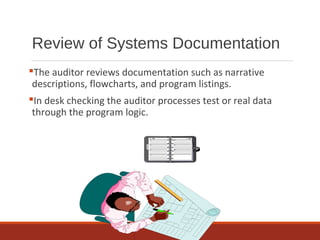
Review of Systems Documentation
The auditor reviews documentation such as narrative
descriptions, flowcharts, and program listings.
In desk checking the auditor processes test or real data
through the program logic.
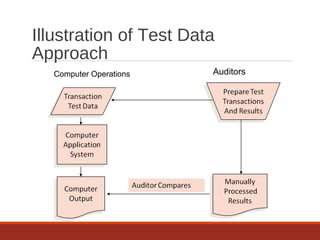
Test Data
The auditor prepares input containing both valid and
invalid data. Prior to processing the test data, the input is
manually processed to determine what the output should
look like.
The auditor then compares the computer-processed output
with the manually processed results.
Illustration of Test Data
Approach
Computer Operations Auditors
Integrated Test Facility (ITF)
Approach
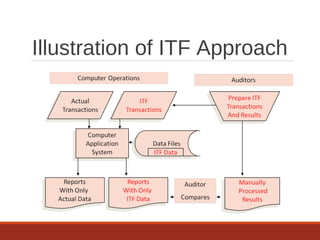
A common form of an ITF is as follows:
 A dummy ITF center is created for the auditors.
 Auditors create transactions for controls they want to
test.
 Working papers are created to show expected results
from manually processed information.
 Auditor transactions are run with actual transactions.
 Auditors compare ITF results to working papers.
Illustration of ITF Approach
Parallel Simulation
The test data and ITF methods both process test data
through real programs. With parallel simulation, the
auditor processes real client data on an audit program
similar to some aspect of the client’s program.
The auditor compares the results of this processing with
the results of the processing done by the client’s program.
Audit Software
 Computer programs that permit computers to be used as
auditing tools include:
 Generalized audit software
Perform tasks such as selecting sample data from file,
checking computations, and searching files for unusual
items.
 P.C. Software
Allows auditors to analyze data from notebook computers
in the field.
Embedded Audit Routines
 In-line Code – Application program performs
Audit data collection while it processes data for normal
production purposes.
 System Control Audit
Review File (SCARF)– Edit tests for audit transaction
analysis are included in program. Exceptions are written to
a file for audit review.

IT System & Security Audit

  • 1.
    IT System & SecurityAudit JBIMS MIM SEM V 2015-2018 MUFADDAL NULLWALA – 15-I-131
  • 2.
    Contents 1. Defining anIT Auditor 2. IT Auditor Certifications & ISACA 3. IT Audit Phases 4. Preparing to be Audited 5. How IT auditor audits an Applications 6. Auditing technology for Information System
  • 3.
    IT Auditor  AnIT auditor identify ways in which an organization's computer systems meets its needs, review configuration of hardware and software programs designed for new systems and check if the system controls are adequate.  CISA, CISM, Networking, Hardware, Software, Information quality Assurance, Cryptography Experts etc.  IT Audits are done in Teams
  • 4.
    ISACA  www.isaca.org -ISACA is an international professional association focused on IT governance.  Originated in United States in 1967  Certifications Certified Information Systems Auditor (CISA) Certified Information Security Manager (CISM) Certified in the Governance of Enterprise IT (CGEIT) Control Objectives for Information and Related Technology (COBIT) 5 Certified in Risk and Information Systems Control (CRISC) Cybersecurity Nexus Practitioner (CSX-P)
  • 5.
    CISA  The CISA(Certified Information Systems Auditor) certification is renowned all across the globe as a standard for Business Systems and Information technology professionals who audit, monitor, access, and control data.  Min. of 5 years of IS auditing, control or security work experience  Code of professional ethics  Adhering to IS auditing standards
  • 6.
    CISM CISM – CertifiedInformation Security Manager Specialization Information Security Governance Risk Management Information Security Program Management Information Security Management Response Management
  • 7.
  • 8.
    Pre-Audit  Define Scope& Objectives  Set Audit Intent  Past Audit  Review current Policies  Audit Plan  Checklists  Site Survey (if required in some cases)
  • 9.
    Audit  Site Survey Meet Site Managers - What data, How & when it will be collected  Data Collection  Interview Staff  Access Control Assessments  Vulnerability Assessments  Exit meeting - Immediate problems, Questions & answer for site managers, Preliminary findings
  • 10.
    Post – Audit(Reporting)  Preparation of detailed audit report  Report contains Introduction Audit findings presented in separate sections Auditors overall conclusion & opinion Auditors reservations with respect to the audit Detailed Audit findings & recommendations Documents & references used Materiality of Findings
  • 11.
    Preparing To BeAudited Audits are not for Confrontation Auditees should participate & make themselves available during the Audit Auditees should make themselves aware of  Intent/scope & objectives of the Audit  What type of data will be collected  What data should not be collected  Auditors should also know that what data shouldn’t be collected
  • 12.
    Application Audit  Anassessment whose scope focuses on Business Critical Processes or Application  Any application or software running in the company to carry out business E.g. Payroll process that may span across several different servers, databases, operating systems, applications, etc. The level of controls is dependent on the degree of risk involved in the incorrect or unauthorized processing of data
  • 13.
    Application Audit (cont.) Administration  Inputs, Processing, Outputs  Logical Security  Disaster Recovery Plan  Change Management  User Support  Third Party Services  General Controls
  • 14.
    Application Audit - Administration The most important area of the audit, because this area focuses on the overall ownership and accountability of the application  Roles & Responsibilities - development, change approval, access authorization Legal and Regulatory compliance issues
  • 15.
    Application Audit -Inputs, Processing, Outputs  Looking for evidence of data preparation procedures, reconciliation processes, handling requirements, etc.  Run test transactions against the application  Includes who can enter input and see output  Retention of output and its destruction
  • 16.
    Application Audit -Logical Security Looking at user creation and authorization as governed by the application its self User ID linked to a real person Number of allowable unsuccessful log-on attempts Minimum password length Password expiration
  • 17.
    Application Audit -Disaster Recovery Plan Looking for an adequate and performable disaster recovery plan that will allow the application to be recovered in a reasonable amount of time after a disaster Backup guidelines, process documentation, offsite storage guidelines, SLA’s with offsite storage vendors, etc.
  • 18.
    Application Audit -Change Control  Examines the process changes to an application go through  Process is documented, adequate and followed  Who is allowed to make a request a change, approve a change and make the change  Change is tested to check if it doesn’t break compliance (determined in Administration) before being placed in to production
  • 19.
    Application Audit -User Support  One of the most overlooked aspects of an application  User documentation (manuals, online help, etc.) - available & up to date  User training - productivity, proper use, security  Process for user improvement requests
  • 20.
    Application Audit -General Controls Examining the environment the application exists within that affect the application System administration / operations Organizational logical security Physical security Organizational disaster recovery plans Organizational change control process License control processes Virus control procedures
  • 21.
    II. Auditing Technologyfor Information Systems  Review of Systems Documentation  Test Data  Integrated-Test-Facility (ITF) Approach  Parallel Simulation  Audit Software  Embedded Audit Routines
  • 22.
    Review of SystemsDocumentation The auditor reviews documentation such as narrative descriptions, flowcharts, and program listings. In desk checking the auditor processes test or real data through the program logic.
  • 23.
    Test Data The auditorprepares input containing both valid and invalid data. Prior to processing the test data, the input is manually processed to determine what the output should look like. The auditor then compares the computer-processed output with the manually processed results.
  • 24.
    Illustration of TestData Approach Computer Operations Auditors
  • 25.
    Integrated Test Facility(ITF) Approach A common form of an ITF is as follows:  A dummy ITF center is created for the auditors.  Auditors create transactions for controls they want to test.  Working papers are created to show expected results from manually processed information.  Auditor transactions are run with actual transactions.  Auditors compare ITF results to working papers.
  • 26.
  • 27.
    Parallel Simulation The testdata and ITF methods both process test data through real programs. With parallel simulation, the auditor processes real client data on an audit program similar to some aspect of the client’s program. The auditor compares the results of this processing with the results of the processing done by the client’s program.
  • 28.
    Audit Software  Computerprograms that permit computers to be used as auditing tools include:  Generalized audit software Perform tasks such as selecting sample data from file, checking computations, and searching files for unusual items.  P.C. Software Allows auditors to analyze data from notebook computers in the field.
  • 29.
    Embedded Audit Routines In-line Code – Application program performs Audit data collection while it processes data for normal production purposes.  System Control Audit Review File (SCARF)– Edit tests for audit transaction analysis are included in program. Exceptions are written to a file for audit review.