IPv6 Implementation
for End Users (RA)
On RouterOS Device
About Me
System Engineer
Profile: keybase.io/dewangga
[hokage@networksninja.net] 0xA028CD70
Transition Problems
• IPv6 subnetting ?
• Hardware or firmware support ?
• We are afraid to deploy new technology ? :-)
Why IPv6?
• IPv4 NAT issue on approximately thousand(s)
device(s) connected at the same time -- no CGN :-)
• Utilize bandwidth usage both IPv4 and IPv6 at the
same time.
• End-to-end encryption and low-risk man-in-the-middle
attack(s)
Limitations
• Deployment using RouterOS (MikroTik)
• SME (Small-Medium Enterprise) Infrastructure
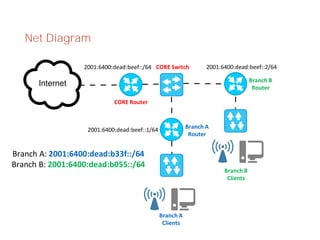
Net Diagram
Branch A
Router
Branch B
Router
Branch A
Clients
Branch B
Clients
CORE Router
CORE Switch2001:6400:dead:beef::/64 2001:6400:dead:beef::2/64
2001:6400:dead:beef::1/64
Branch A: 2001:6400:dead:b33f::/64
Branch B: 2001:6400:dead:b055::/64
Configurations – Core Router
[dewangga@core.networksninja.net] > /ipv6 addr
add interface=ether2 address=2001:6400:dead:beef::/64
advertise=no
[dewangga@core.networksninja.net] > /ipv6 rou
add dst-address=2001:6400:dead:b33f::/64 
gateway=2001:6400:dead:beef::1 check-gateway=ping
add dst-address=2001:6400:dead:b055::/64 
gateway=2001:6400:dead:beef::2 check-gateway=ping
Configurations – Router Branch A
[dewangga@a.networksninja.net] > /ipv6 addr
add interface=ether1 
address=2001:6400:dead:beef::1/64 advertise=no
add interface=ether2 
address=2001:6400:dead:b33f::/64 advertise=no
[dewangga@a.networksninja.net] > /ipv6 rou
add dst-address=::/0 
gateway=fe80::e68d:8cff:fe3f:6732%ether1 
check-gateway=ping
Configurations – Router Branch B
[dewangga@b.networksninja.net] > /ipv6 addr
add interface=ether1 
address=2001:6400:dead:beef::2/64 advertise=no
add interface=ether2 
address=2001:6400:dead:b055::/64 advertise=no
[dewangga@b.networksninja.net] > /ipv6 rou
add dst-address=::/0 
gateway=fe80::e68d:8cff:fe3f:6732%ether1 
check-gateway=ping
Configurations – Router Advertisement (A & B)
[dewangga@a.networksninja.net] > /ipv6 nd
set [ find default=yes ] disabled=yes
add advertise-mac-address=no interface=ether2 
managed-address-configuration=yes mtu=1500 
other-configuration=yes reachable-time=10s 
retransmit-interval=5s
[dewangga@a.networksninja.net] > /ipv6 nd prefix
add interface=ether2 prefix=2001:6400:dead:b33f::/64
[dewangga@a.networksninja.net] > /ipv6 nd prefix 
default set autonomous=no
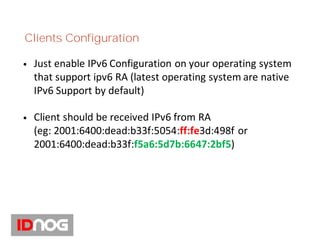
Clients Configuration
• Just enable IPv6 Configuration on your operating system
that support ipv6 RA (latest operating system are native
IPv6 Support by default)
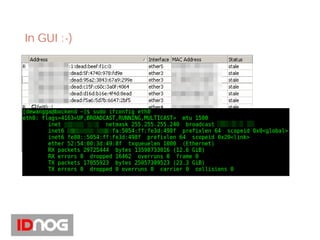
• Client should be received IPv6 from RA
(eg: 2001:6400:dead:b33f:5054:ff:fe3d:498f or
2001:6400:dead:b33f:f5a6:5d7b:6647:2bf5)
In GUI :-)
Conclusion
• Do NOT do any deployment if you aren't ready yet.
Don't leave any vulnerable system exposed to the
world wide.
• By enabling IPv6 to end user(s), we are helping the
operators to reduce usage of CGN and Router CPU
Resource because of NAT.
• Ensure the scalability, reachability and connectability
for end user(s).
Thanks

IPv6 implementation for end users

  • 1.
    IPv6 Implementation for EndUsers (RA) On RouterOS Device
  • 2.
    About Me System Engineer Profile:keybase.io/dewangga [hokage@networksninja.net] 0xA028CD70
  • 3.
    Transition Problems • IPv6subnetting ? • Hardware or firmware support ? • We are afraid to deploy new technology ? :-)
  • 4.
    Why IPv6? • IPv4NAT issue on approximately thousand(s) device(s) connected at the same time -- no CGN :-) • Utilize bandwidth usage both IPv4 and IPv6 at the same time. • End-to-end encryption and low-risk man-in-the-middle attack(s)
  • 5.
    Limitations • Deployment usingRouterOS (MikroTik) • SME (Small-Medium Enterprise) Infrastructure
  • 6.
    Net Diagram Branch A Router BranchB Router Branch A Clients Branch B Clients CORE Router CORE Switch2001:6400:dead:beef::/64 2001:6400:dead:beef::2/64 2001:6400:dead:beef::1/64 Branch A: 2001:6400:dead:b33f::/64 Branch B: 2001:6400:dead:b055::/64
  • 7.
    Configurations – CoreRouter [dewangga@core.networksninja.net] > /ipv6 addr add interface=ether2 address=2001:6400:dead:beef::/64 advertise=no [dewangga@core.networksninja.net] > /ipv6 rou add dst-address=2001:6400:dead:b33f::/64 gateway=2001:6400:dead:beef::1 check-gateway=ping add dst-address=2001:6400:dead:b055::/64 gateway=2001:6400:dead:beef::2 check-gateway=ping
  • 8.
    Configurations – RouterBranch A [dewangga@a.networksninja.net] > /ipv6 addr add interface=ether1 address=2001:6400:dead:beef::1/64 advertise=no add interface=ether2 address=2001:6400:dead:b33f::/64 advertise=no [dewangga@a.networksninja.net] > /ipv6 rou add dst-address=::/0 gateway=fe80::e68d:8cff:fe3f:6732%ether1 check-gateway=ping
  • 9.
    Configurations – RouterBranch B [dewangga@b.networksninja.net] > /ipv6 addr add interface=ether1 address=2001:6400:dead:beef::2/64 advertise=no add interface=ether2 address=2001:6400:dead:b055::/64 advertise=no [dewangga@b.networksninja.net] > /ipv6 rou add dst-address=::/0 gateway=fe80::e68d:8cff:fe3f:6732%ether1 check-gateway=ping
  • 10.
    Configurations – RouterAdvertisement (A & B) [dewangga@a.networksninja.net] > /ipv6 nd set [ find default=yes ] disabled=yes add advertise-mac-address=no interface=ether2 managed-address-configuration=yes mtu=1500 other-configuration=yes reachable-time=10s retransmit-interval=5s [dewangga@a.networksninja.net] > /ipv6 nd prefix add interface=ether2 prefix=2001:6400:dead:b33f::/64 [dewangga@a.networksninja.net] > /ipv6 nd prefix default set autonomous=no
  • 11.
    Clients Configuration • Justenable IPv6 Configuration on your operating system that support ipv6 RA (latest operating system are native IPv6 Support by default) • Client should be received IPv6 from RA (eg: 2001:6400:dead:b33f:5054:ff:fe3d:498f or 2001:6400:dead:b33f:f5a6:5d7b:6647:2bf5)
  • 12.
  • 13.
    Conclusion • Do NOTdo any deployment if you aren't ready yet. Don't leave any vulnerable system exposed to the world wide. • By enabling IPv6 to end user(s), we are helping the operators to reduce usage of CGN and Router CPU Resource because of NAT. • Ensure the scalability, reachability and connectability for end user(s).
  • 14.