Activity 6.7.3: IPv4 Address Subnetting Part 1
Learning Objectives
Upon completion of this activity, you will be able to determine network information for a given IP address
and network mask.
Background
This activity is designed to teach how to compute network IP address information from a given IP
address.
Scenario
When given an IP address and network mask, you will be able to determine other information about the
IP address such as:
• Network address
• Network broadcast address
• Total number of host bits
• Number of hosts
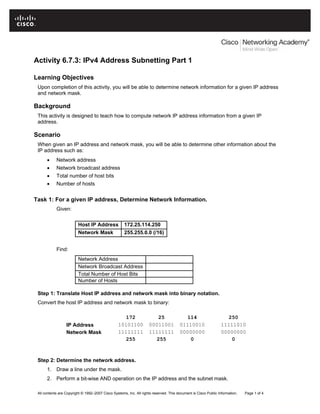
Task 1: For a given IP address, Determine Network Information.
Given:
Host IP Address 172.25.114.250
Network Mask 255.255.0.0 (/16)
Find:
Network Address
Network Broadcast Address
Total Number of Host Bits
Number of Hosts
Step 1: Translate Host IP address and network mask into binary notation.
Convert the host IP address and network mask to binary:
172 25 114 250
IP Address 10101100 00011001 01110010 11111010
Network Mask 11111111 11111111 00000000 00000000
255 255 0 0
Step 2: Determine the network address.
1. Draw a line under the mask.
2. Perform a bit-wise AND operation on the IP address and the subnet mask.
All contents are Copyright © 1992–2007 Cisco Systems, Inc. All rights reserved. This document is Cisco Public Information. Page 1 of 4
CCNA Exploration
Network Fundamentals:
Addressing the Network - IPv4 Activity 6.7.3: IPv4 Address Subnetting Part 1
Note: 1 AND 1 results in a 1; 0 AND anything results in a 0.
3. Express the result in dotted decimal notation.
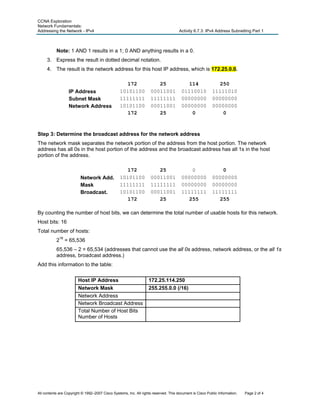
4. The result is the network address for this host IP address, which is 172.25.0.0.
172 25 114 250
IP Address 10101100 00011001 01110010 11111010
Subnet Mask 11111111 11111111 00000000 00000000
Network Address 10101100 00011001 00000000 00000000
172 25 0 0
Step 3: Determine the broadcast address for the network address
The network mask separates the network portion of the address from the host portion. The network
address has all 0s in the host portion of the address and the broadcast address has all 1s in the host
portion of the address.
172 25 0 0
Network Add. 10101100 00011001 00000000 00000000
Mask 11111111 11111111 00000000 00000000
Broadcast. 10101100 00011001 11111111 11111111
172 25 255 255
By counting the number of host bits, we can determine the total number of usable hosts for this network.
Host bits: 16
Total number of hosts:
216
= 65,536
65,536 – 2 = 65,534 (addresses that cannot use the all 0s address, network address, or the all 1s
address, broadcast address.)
Add this information to the table:
Host IP Address 172.25.114.250
Network Mask 255.255.0.0 (/16)
Network Address
Network Broadcast Address
Total Number of Host Bits
Number of Hosts
All contents are Copyright © 1992–2007 Cisco Systems, Inc. All rights reserved. This document is Cisco Public Information. Page 2 of 4
CCNA Exploration
Network Fundamentals:
Addressing the Network - IPv4 Activity 6.7.3: IPv4 Address Subnetting Part 1
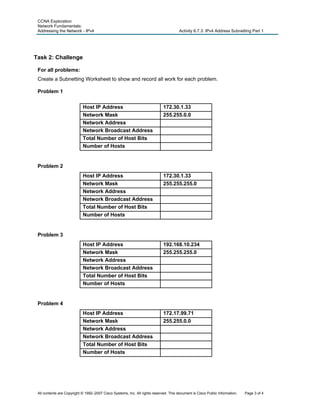
Task 2: Challenge
For all problems:
Create a Subnetting Worksheet to show and record all work for each problem.
Problem 1
Host IP Address 172.30.1.33
Network Mask 255.255.0.0
Network Address
Network Broadcast Address
Total Number of Host Bits
Number of Hosts
Problem 2
Host IP Address 172.30.1.33
Network Mask 255.255.255.0
Network Address
Network Broadcast Address
Total Number of Host Bits
Number of Hosts
Problem 3
Host IP Address 192.168.10.234
Network Mask 255.255.255.0
Network Address
Network Broadcast Address
Total Number of Host Bits
Number of Hosts
Problem 4
Host IP Address 172.17.99.71
Network Mask 255.255.0.0
Network Address
Network Broadcast Address
Total Number of Host Bits
Number of Hosts
All contents are Copyright © 1992–2007 Cisco Systems, Inc. All rights reserved. This document is Cisco Public Information. Page 3 of 4
CCNA Exploration
Network Fundamentals:
Addressing the Network - IPv4 Activity 6.7.3: IPv4 Address Subnetting Part 1
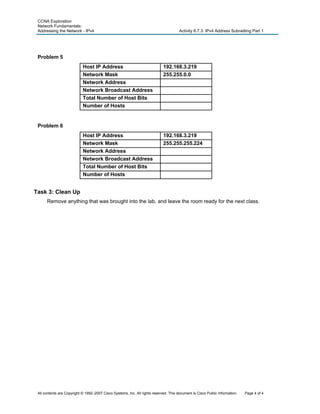
Problem 5
Host IP Address 192.168.3.219
Network Mask 255.255.0.0
Network Address
Network Broadcast Address
Total Number of Host Bits
Number of Hosts
Problem 6
Host IP Address 192.168.3.219
Network Mask 255.255.255.224
Network Address
Network Broadcast Address
Total Number of Host Bits
Number of Hosts
Task 3: Clean Up
Remove anything that was brought into the lab, and leave the room ready for the next class.
All contents are Copyright © 1992–2007 Cisco Systems, Inc. All rights reserved. This document is Cisco Public Information. Page 4 of 4

Ip subnetting

  • 1.
    Activity 6.7.3: IPv4Address Subnetting Part 1 Learning Objectives Upon completion of this activity, you will be able to determine network information for a given IP address and network mask. Background This activity is designed to teach how to compute network IP address information from a given IP address. Scenario When given an IP address and network mask, you will be able to determine other information about the IP address such as: • Network address • Network broadcast address • Total number of host bits • Number of hosts Task 1: For a given IP address, Determine Network Information. Given: Host IP Address 172.25.114.250 Network Mask 255.255.0.0 (/16) Find: Network Address Network Broadcast Address Total Number of Host Bits Number of Hosts Step 1: Translate Host IP address and network mask into binary notation. Convert the host IP address and network mask to binary: 172 25 114 250 IP Address 10101100 00011001 01110010 11111010 Network Mask 11111111 11111111 00000000 00000000 255 255 0 0 Step 2: Determine the network address. 1. Draw a line under the mask. 2. Perform a bit-wise AND operation on the IP address and the subnet mask. All contents are Copyright © 1992–2007 Cisco Systems, Inc. All rights reserved. This document is Cisco Public Information. Page 1 of 4
  • 2.
    CCNA Exploration Network Fundamentals: Addressingthe Network - IPv4 Activity 6.7.3: IPv4 Address Subnetting Part 1 Note: 1 AND 1 results in a 1; 0 AND anything results in a 0. 3. Express the result in dotted decimal notation. 4. The result is the network address for this host IP address, which is 172.25.0.0. 172 25 114 250 IP Address 10101100 00011001 01110010 11111010 Subnet Mask 11111111 11111111 00000000 00000000 Network Address 10101100 00011001 00000000 00000000 172 25 0 0 Step 3: Determine the broadcast address for the network address The network mask separates the network portion of the address from the host portion. The network address has all 0s in the host portion of the address and the broadcast address has all 1s in the host portion of the address. 172 25 0 0 Network Add. 10101100 00011001 00000000 00000000 Mask 11111111 11111111 00000000 00000000 Broadcast. 10101100 00011001 11111111 11111111 172 25 255 255 By counting the number of host bits, we can determine the total number of usable hosts for this network. Host bits: 16 Total number of hosts: 216 = 65,536 65,536 – 2 = 65,534 (addresses that cannot use the all 0s address, network address, or the all 1s address, broadcast address.) Add this information to the table: Host IP Address 172.25.114.250 Network Mask 255.255.0.0 (/16) Network Address Network Broadcast Address Total Number of Host Bits Number of Hosts All contents are Copyright © 1992–2007 Cisco Systems, Inc. All rights reserved. This document is Cisco Public Information. Page 2 of 4
  • 3.
    CCNA Exploration Network Fundamentals: Addressingthe Network - IPv4 Activity 6.7.3: IPv4 Address Subnetting Part 1 Task 2: Challenge For all problems: Create a Subnetting Worksheet to show and record all work for each problem. Problem 1 Host IP Address 172.30.1.33 Network Mask 255.255.0.0 Network Address Network Broadcast Address Total Number of Host Bits Number of Hosts Problem 2 Host IP Address 172.30.1.33 Network Mask 255.255.255.0 Network Address Network Broadcast Address Total Number of Host Bits Number of Hosts Problem 3 Host IP Address 192.168.10.234 Network Mask 255.255.255.0 Network Address Network Broadcast Address Total Number of Host Bits Number of Hosts Problem 4 Host IP Address 172.17.99.71 Network Mask 255.255.0.0 Network Address Network Broadcast Address Total Number of Host Bits Number of Hosts All contents are Copyright © 1992–2007 Cisco Systems, Inc. All rights reserved. This document is Cisco Public Information. Page 3 of 4
  • 4.
    CCNA Exploration Network Fundamentals: Addressingthe Network - IPv4 Activity 6.7.3: IPv4 Address Subnetting Part 1 Problem 5 Host IP Address 192.168.3.219 Network Mask 255.255.0.0 Network Address Network Broadcast Address Total Number of Host Bits Number of Hosts Problem 6 Host IP Address 192.168.3.219 Network Mask 255.255.255.224 Network Address Network Broadcast Address Total Number of Host Bits Number of Hosts Task 3: Clean Up Remove anything that was brought into the lab, and leave the room ready for the next class. All contents are Copyright © 1992–2007 Cisco Systems, Inc. All rights reserved. This document is Cisco Public Information. Page 4 of 4