Introduction to Web Development Web Basics & HTML Tags
1.
Introduction to WebDevelopment:
Web Basics & HTML Tags
By
By
VEERANAN VEERANAN
M.Sc. Computer Science., Dip.in.Yoga.,
2.
INTRODUCTION TO WEBBASICS
INTRODUCTION TO WEB BASICS
What is the Internet?
The Internet is a global network of interconnected
computers that communicate using standardized protocols. It
allows users to access and share information from anywhere in
the world through services like email, file sharing, and
especially the World Wide Web.
3.
INTRODUCTION TO WEBBASICS
INTRODUCTION TO WEB BASICS
What is a Web Browser?
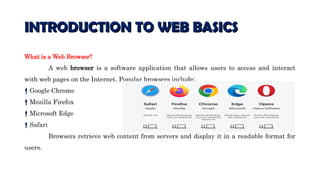
A web browser is a software application that allows users to access and interact
with web pages on the Internet. Popular browsers include:
Google Chrome
Mozilla Firefox
Microsoft Edge
Safari
Browsers retrieve web content from servers and display it in a readable format for
users.
4.
INTRODUCTION TO WEBBASICS
INTRODUCTION TO WEB BASICS
What is a Web Page?
A web page is a document on the World Wide Web. It is
typically written in HTML (HyperText Markup Language) and
can include text, images, links, videos, and other media. A
collection of web pages under the same domain is called a
website.
5.
HTML Basics
HTML Basics
UnderstandingTags
HTML (HyperText Markup Language) uses tags to define elements
in a web page. Tags are enclosed in angle brackets, for example:
<p>This is a paragraph.</p>
<p> is the opening tag
</p> is the closing tag
Everything in between is the content
6.
HTML Basics
HTML Basics
CommonHTML tags:
<h1> to <h6> : Headings
<p> : Paragraph
<a> : Hyperlink
<img> : Image
<div> : Division or section
Tags can also have attributes to provide additional information. Example:
<a href="https://example.com">Visit Example</a>
href is an attribute specifying the link's destination.
7.
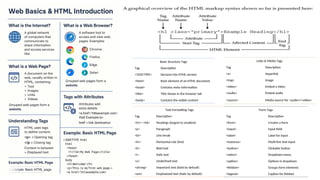
Basic Structure Tags
TagDescription
<!DOCTYPE> Declares the HTML version
<html> Root element of an HTML document
<head> Contains meta-information
<title> Title shown in the browser tab
<body> Contains the visible content
Text Formatting Tags
Tag Description
<h1>–<h6> Headings (largest to smallest)
<p> Paragraph
<br> Line break
<hr> Horizontal rule (line)
<b> Bold text
<i> Italic text
<u> Underlined text
<strong> Important text (bold by default)
<em> Emphasized text (italic by default)
Links & Media Tags
Tag Description
<a> Hyperlink
<img> Image
<video> Embed a video
<audio> Embed audio
<source> Media source for <audio>/<video>
Form Tags
Tag Description
<form> Creates a form
<input> Input field
<label> Label for input
<textarea> Multi-line text input
<button> Clickable button
<select> Dropdown menu
<option> Options in dropdown
<fieldset> Groups form elements
<legend> Caption for fieldset