1
P R E S E N T E D B Y T M A X S O F T
Introduction to T-Up
The best way to migrate your DBMS
2
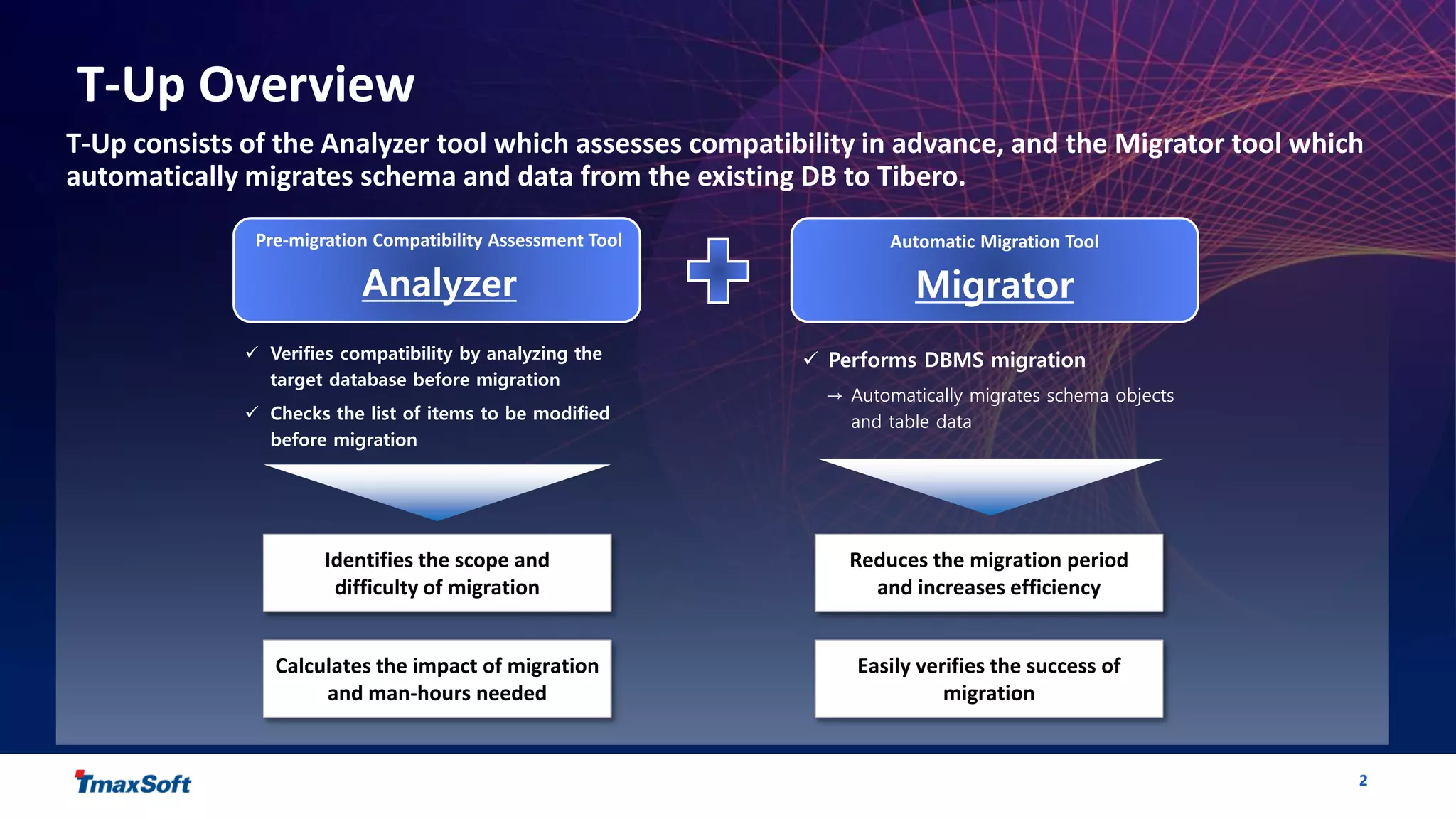
T-Up Overview
T-Up consists of the Analyzer tool which assesses compatibility in advance, and the Migrator tool which
automatically migrates schema and data from the existing DB to Tibero.
 Verifies compatibility by analyzing the
target database before migration
 Checks the list of items to be modified
before migration
 Performs DBMS migration
→ Automatically migrates schema objects
and table data
Pre-migration Compatibility Assessment Tool
Analyzer
Automatic Migration Tool
Migrator
Identifies the scope and
difficulty of migration
Calculates the impact of migration
and man-hours needed
Reduces the migration period
and increases efficiency
Easily verifies the success of
migration
3
T-Up Analyzer : Pre-migration Assessment
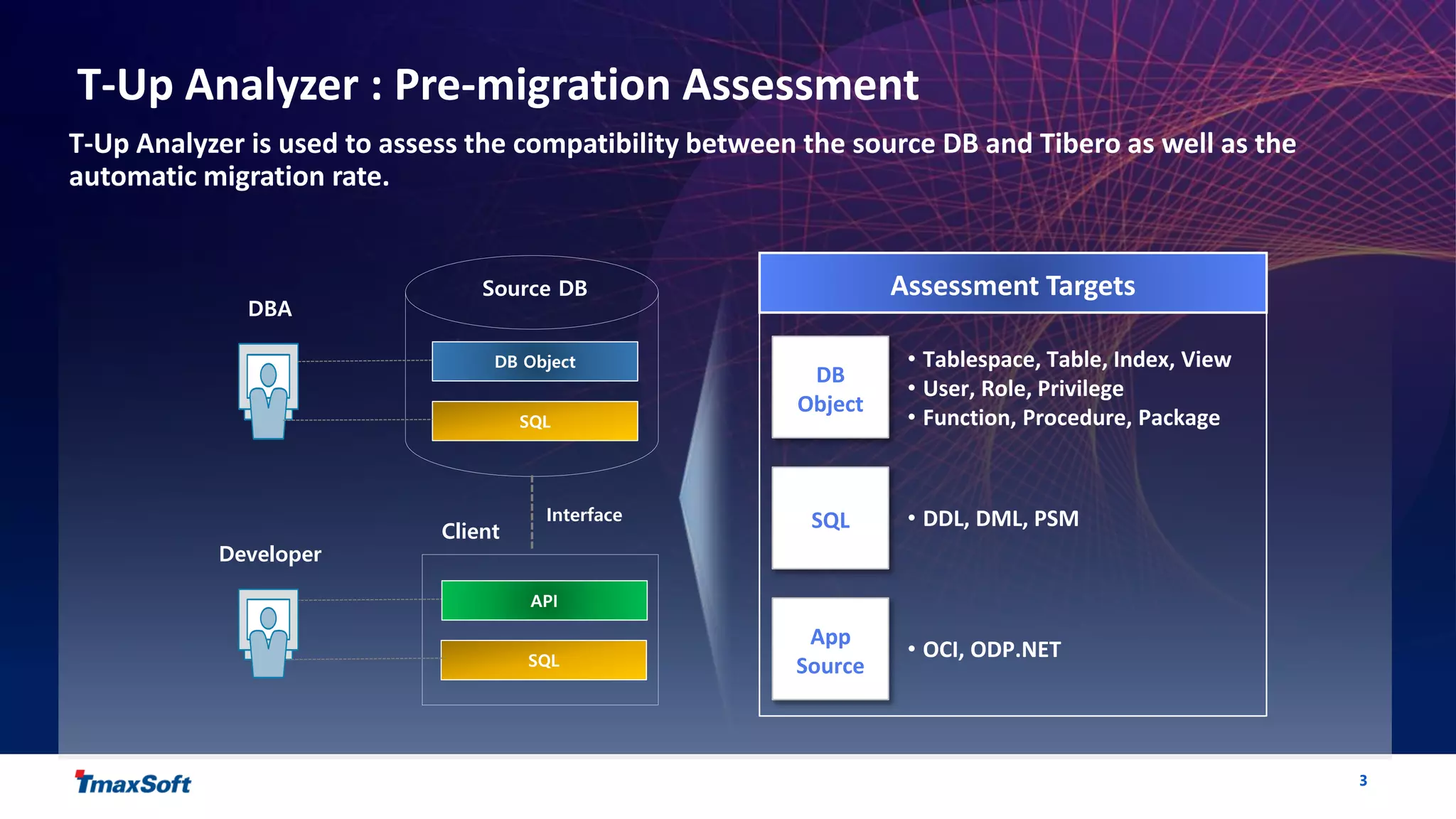
T-Up Analyzer is used to assess the compatibility between the source DB and Tibero as well as the
automatic migration rate.
DBA
Source DB
DB Object
SQL
API
SQL
Interface
Assessment Targets
DB
Object
SQL
App
Source
• Tablespace, Table, Index, View
• User, Role, Privilege
• Function, Procedure, Package
• DDL, DML, PSM
• OCI, ODP.NET
Client
Developer
4
T-Up Analyzer : Pre-migration Assessment
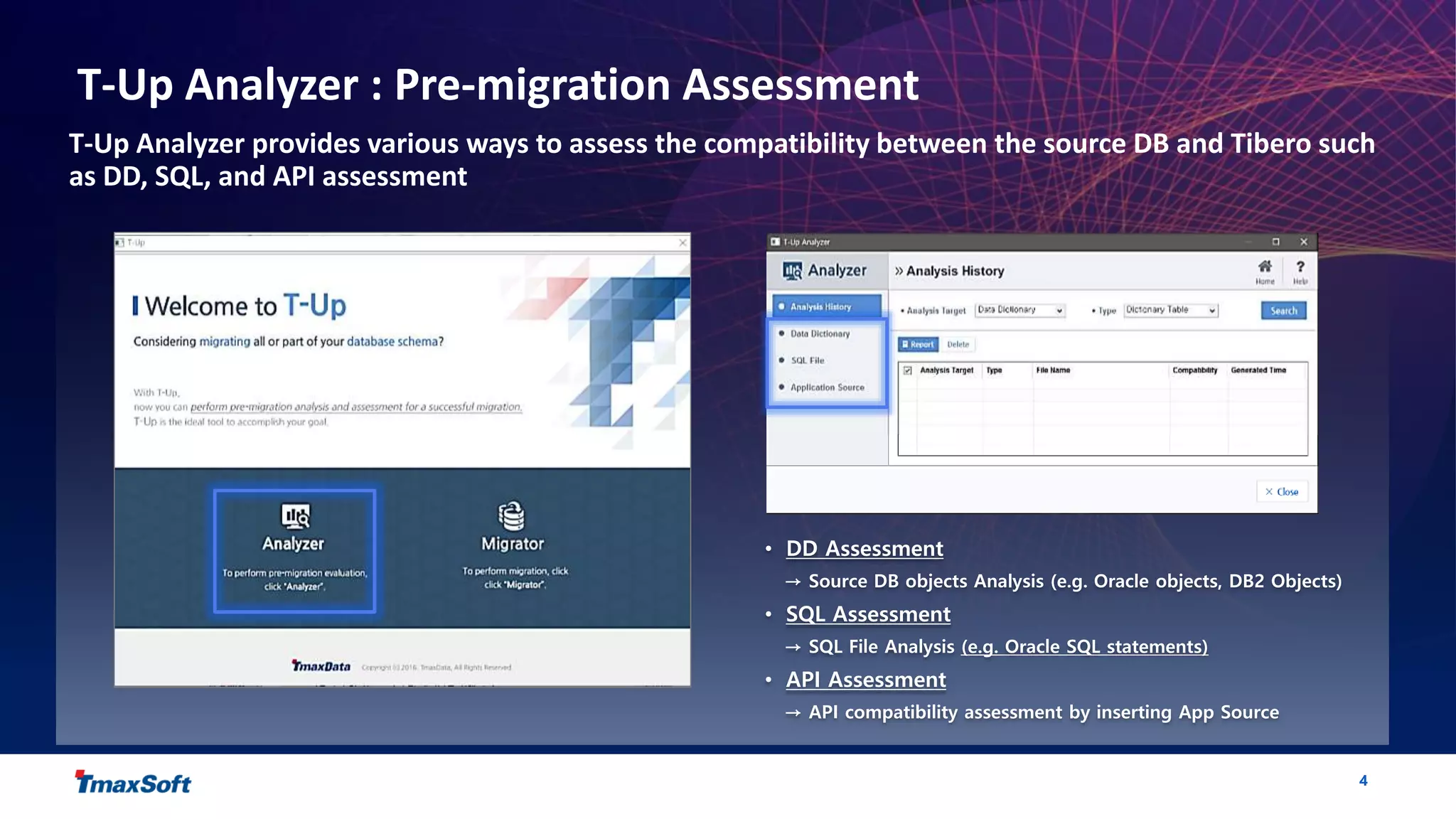
T-Up Analyzer provides various ways to assess the compatibility between the source DB and Tibero such
as DD, SQL, and API assessment
• DD Assessment
→ Source DB objects Analysis (e.g. Oracle objects, DB2 Objects)
• SQL Assessment
→ SQL File Analysis (e.g. Oracle SQL statements)
• API Assessment
→ API compatibility assessment by inserting App Source
5
T-Up Analyzer : Pre-migration Assessment
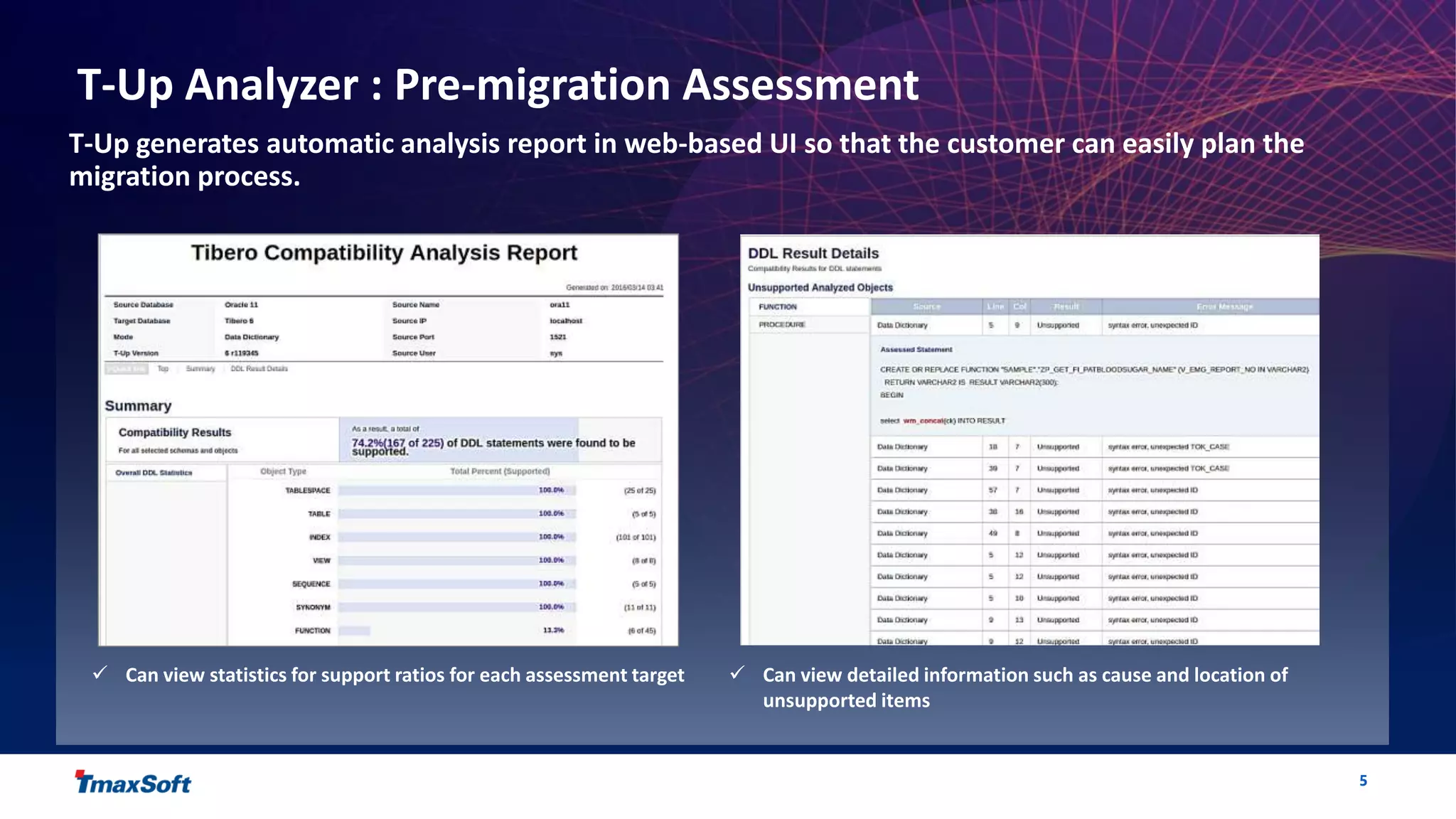
T-Up generates automatic analysis report in web-based UI so that the customer can easily plan the
migration process.
 Can view statistics for support ratios for each assessment target  Can view detailed information such as cause and location of
unsupported items
6
T-Up Migrator : Automatic Migration
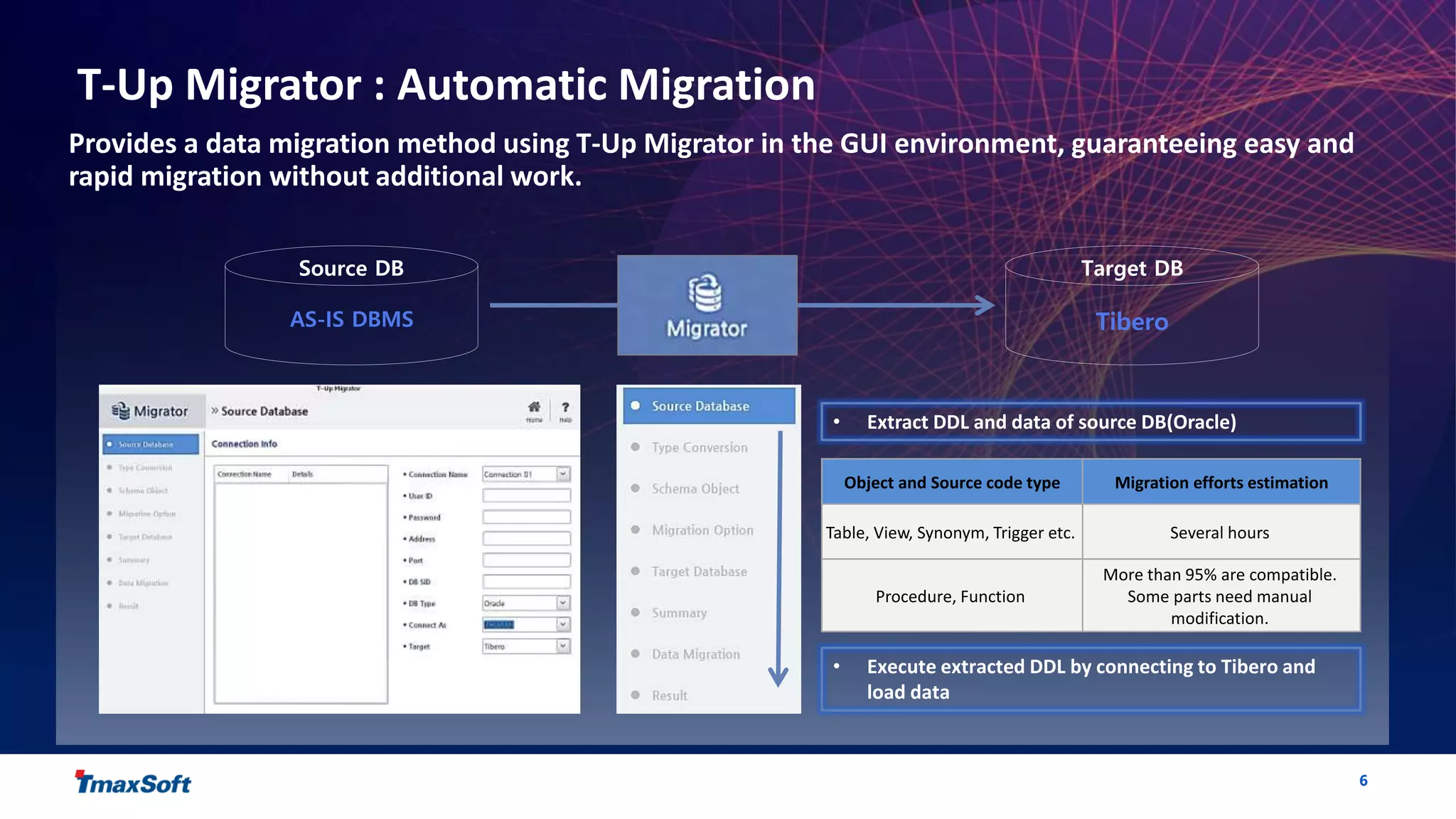
Provides a data migration method using T-Up Migrator in the GUI environment, guaranteeing easy and
rapid migration without additional work.
Source DB Target DB
TiberoAS-IS DBMS
• Extract DDL and data of source DB(Oracle)
• Execute extracted DDL by connecting to Tibero and
load data
Object and Source code type Migration efforts estimation
Table, View, Synonym, Trigger etc. Several hours
Procedure, Function
More than 95% are compatible.
Some parts need manual
modification.
7
P R E S E N T E D B Y T M A X S O F T
Thank you

Introduction to T-up auto migration

  • 1.
    1 P R ES E N T E D B Y T M A X S O F T Introduction to T-Up The best way to migrate your DBMS
  • 2.
    2 T-Up Overview T-Up consistsof the Analyzer tool which assesses compatibility in advance, and the Migrator tool which automatically migrates schema and data from the existing DB to Tibero.  Verifies compatibility by analyzing the target database before migration  Checks the list of items to be modified before migration  Performs DBMS migration → Automatically migrates schema objects and table data Pre-migration Compatibility Assessment Tool Analyzer Automatic Migration Tool Migrator Identifies the scope and difficulty of migration Calculates the impact of migration and man-hours needed Reduces the migration period and increases efficiency Easily verifies the success of migration
  • 3.
    3 T-Up Analyzer :Pre-migration Assessment T-Up Analyzer is used to assess the compatibility between the source DB and Tibero as well as the automatic migration rate. DBA Source DB DB Object SQL API SQL Interface Assessment Targets DB Object SQL App Source • Tablespace, Table, Index, View • User, Role, Privilege • Function, Procedure, Package • DDL, DML, PSM • OCI, ODP.NET Client Developer
  • 4.
    4 T-Up Analyzer :Pre-migration Assessment T-Up Analyzer provides various ways to assess the compatibility between the source DB and Tibero such as DD, SQL, and API assessment • DD Assessment → Source DB objects Analysis (e.g. Oracle objects, DB2 Objects) • SQL Assessment → SQL File Analysis (e.g. Oracle SQL statements) • API Assessment → API compatibility assessment by inserting App Source
  • 5.
    5 T-Up Analyzer :Pre-migration Assessment T-Up generates automatic analysis report in web-based UI so that the customer can easily plan the migration process.  Can view statistics for support ratios for each assessment target  Can view detailed information such as cause and location of unsupported items
  • 6.
    6 T-Up Migrator :Automatic Migration Provides a data migration method using T-Up Migrator in the GUI environment, guaranteeing easy and rapid migration without additional work. Source DB Target DB TiberoAS-IS DBMS • Extract DDL and data of source DB(Oracle) • Execute extracted DDL by connecting to Tibero and load data Object and Source code type Migration efforts estimation Table, View, Synonym, Trigger etc. Several hours Procedure, Function More than 95% are compatible. Some parts need manual modification.
  • 7.
    7 P R ES E N T E D B Y T M A X S O F T Thank you