<Insert Picture Here>
Exadata MAA Best Practices
Migrating Oracle Databases
Doug Utzig
Exadata and MAA Best Practices
August 2012
2
<Insert Picture Here>
Key Points
3
Migrating to Exadata
1. Migration Preparation is Essential
2. Pick the Right Migration Method
3. Fast Network Reduces Migration Time
4
Key Point #1
Migration Preparation is Essential
Simplify and Optimize during migration leads
to the best performance and highest
availability on Exadata.
5
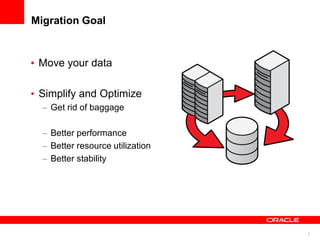
Migration Goal
• Move your data
• Simplify and Optimize
– Get rid of baggage
– Better performance
– Better resource utilization
– Better stability
6
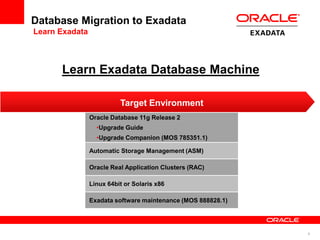
Database Migration to Exadata
Learn Exadata
Oracle Database 11g Release 2
•Upgrade Guide
•Upgrade Companion (MOS 785351.1)
Automatic Storage Management (ASM)
Oracle Real Application Clusters (RAC)
Linux 64bit or Solaris x86
Exadata software maintenance (MOS 888828.1)
Target Environment
Learn Exadata Database Machine
7
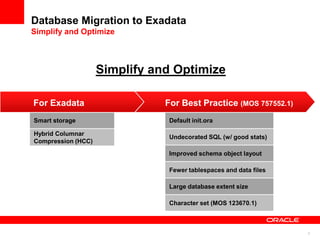
Database Migration to Exadata
Simplify and Optimize
Default init.ora
Undecorated SQL (w/ good stats)
Improved schema object layout
Fewer tablespaces and data files
Large database extent size
Character set (MOS 123670.1)
Smart storage
Hybrid Columnar
Compression (HCC)
For Exadata For Best Practice (MOS 757552.1)
Simplify and Optimize
8
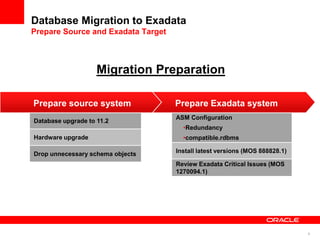
Database Migration to Exadata
Prepare Source and Exadata Target
ASM Configuration
•Redundancy
•compatible.rdbms
Install latest versions (MOS 888828.1)
Review Exadata Critical Issues (MOS
1270094.1)
Database upgrade to 11.2
Hardware upgrade
Drop unnecessary schema objects
Prepare source system Prepare Exadata system
Migration Preparation
9
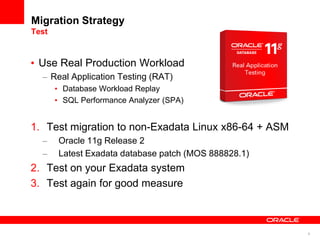
Migration Strategy
Test
• Use Real Production Workload
– Real Application Testing (RAT)
• Database Workload Replay
• SQL Performance Analyzer (SPA)
1. Test migration to non-Exadata Linux x86-64 + ASM
– Oracle 11g Release 2
– Latest Exadata database patch (MOS 888828.1)
2. Test on your Exadata system
3. Test again for good measure
10
Key Point #2
Pick the Right Migration Method
There are many ways to migrate to Exadata
- the “best” way depends on your
environment and goals.
11
Migration Methods
Migration Method Downtime factor
Physical
•Block for block copy
•Whole tablespace or database
•Typically best for OLTP
Data Guard
Physical Standby
Switchover (11.2)
Change rate + upgrade (11.1)
Transportable Tablespaces Data size
Transportable Database Data size
Logical
•Unload, reload with SQL
•Easy to subset
•Typically best for DW
Data Pump Data size
Insert as Select Data size
HA Options
•Use in conjunction with other
method to reduce downtime
GoldenGate Client reconnect
Cross Platform Incremental
Backups (w/ TTS)
Change rate + metadata size
Data Guard Transient
Logical Standby
Client reconnect
12
High Availability Options
• Cross Platform Incremental Backups
– Reduce downtime for Transportable Tablespaces
• Oracle GoldenGate
– Reduce downtime for any method
– Zero data loss fallback
– Phased migration
• Data Guard Transient Logical Standby
– Reduce upgrade downtime coming from 11.1 for Physical
Standby
13
Reduce Migration Downtime
XTTS + Cross Platform Incremental Backups (MOS 1389592.1)
Tablespaces
READ ONLY
Transfer and Convert
Datafiles
Export,
Import
Metadata
Tablespaces
READ
WRITE
Traditional XTTS
Tablespaces
READ ONLY
Create and
Apply
Incremental
Transfer and Convert
Backup
Create and
Apply
Incremental
XTTS w/ Incrementals
Export,
Import
Metadata
Tablespaces
READ
WRITE
Downtime
Key
Uptime
• Standard XTTS but most data moved while source online
• Reduce Downtime f(change rate + metadata size)
15
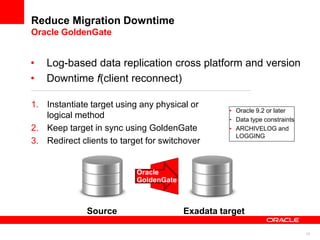
Reduce Migration Downtime
Oracle GoldenGate
1. Instantiate target using any physical or
logical method
2. Keep target in sync using GoldenGate
3. Redirect clients to target for switchover
• Oracle 9.2 or later
• Data type constraints
• ARCHIVELOG and
LOGGING
Oracle
GoldenGate
Source Exadata target
• Log-based data replication cross platform and version
• Downtime f(client reconnect)
16
Zero Data Loss Fallback and Phased Migration
Oracle GoldenGate
• Zero data loss fallback
– After migration, switch
replication direction
– Redirect clients to source
for fallback
• Phased migration
– Bi-directional replication
Source Exadata target
Pre-migration
Post-migration
Source Exadata target
17
Which One?
• Your best approach
– Application-specific requirements?
• Oracle E-Business Suite (MOS 1133355.1)
– Are you Simplified and Optimized?
– Will you Simplify and Optimize?
• HCC? During migration or after?
– Source platform and source version?
– Database size?
– How much downtime?
– Experience level?
– Other business requirements?
Best may not be fastest
18
Scenario 1
From Existing Exadata Database Machine (V1 or X2)
• Simplified and Optimized already (?)
– HCC released in 11gR2
Option When to Use
1 Data Guard
Physical Standby
•First choice
2 Data Guard
Transient Logical Standby
•Reduce upgrade downtime from 11.1
19
Scenario 2
From Little Endian (Non-Exadata)
• Example: Windows -> Exadata
Option When to Use
1 Data Guard
Physical Standby
•No need to Simplify and Optimize
2 Data Guard
Transient Logical Standby
•Reduce upgrade downtime from 11.1
3 Data Pump •Simplify and Optimize
•Full data type support
•Cross platform support
4 GoldenGate •Reduce downtime
•Zero data loss fallback
•Phased migration
20
Scenario 3
From Big Endian
• Example: AIX / HP-UX / SPARC -> Exadata
Option When to Use
1 Transportable Tablespaces •No need to Simplify and Optimize
2 Transportable Tablespaces + Cross
Platform Incremental Backups
•No need to Simplify and Optimize
•Reduce downtime
3 Data Pump •Simplify and Optimize
4 GoldenGate •Reduce downtime
•Zero data loss fallback
•Phased migration
21
Key Point #3
Fast Network Reduces Migration Time
Having a fast network is important for quick
migration, but watch out for bottlenecks in
other areas.
22
Networks for Moving Data
• Best Practice
– Large MTU
• IPoIB connected mode
– Use all database servers
– Active/active bonding on Ethernet
• Requires customer switch support
• Do not change InfiniBand to active/active
• 3 network choices
– No fibre channel
Network Ports (Full Rack)
10 Gb/s Ethernet 16
40 Gb/s InfiniBand 8
1 Gb/s Ethernet 24 (14 in X2-8)
23
Bottleneck Not Always the Network
• Non-network bottlenecks
– Slow source system I/O
– CPU to send and receive
– Small I/O
• scp(1) 4KB I/O
# scp 1GB_file 192.168.20.139:/tmp
1GB_file 100% 1060MB 66.3MB/s 00:16
Slow
CPU max
IB network
24
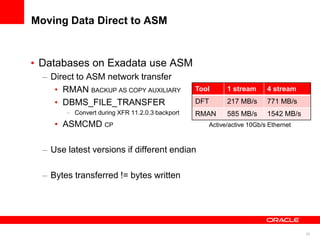
Moving Data Direct to ASM
• Databases on Exadata use ASM
– Direct to ASM network transfer
• RMAN BACKUP AS COPY AUXILIARY
• DBMS_FILE_TRANSFER
– Convert during XFR 11.2.0.3 backport
• ASMCMD CP
– Use latest versions if different endian
– Bytes transferred != bytes written
Tool 1 stream 4 stream
DFT 217 MB/s 771 MB/s
RMAN 585 MB/s 1542 MB/s
Active/active 10Gb/s Ethernet
25
Staging Data
• Staging space
– DBFS
• Recommended for best performance
• MOS 1054431.1
– NFS
– NOT local disk
26
Key Points and
Business Takeaways
27
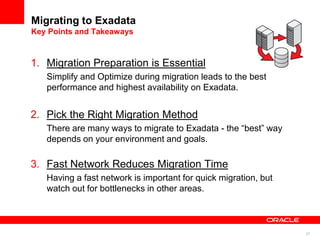
Migrating to Exadata
Key Points and Takeaways
1. Migration Preparation is Essential
Simplify and Optimize during migration leads to the best
performance and highest availability on Exadata.
2. Pick the Right Migration Method
There are many ways to migrate to Exadata - the “best” way
depends on your environment and goals.
3. Fast Network Reduces Migration Time
Having a fast network is important for quick migration, but
watch out for bottlenecks in other areas.
29
Migrating to Exadata
Resources and References
• Planning
– Latest Exadata Software (MOS 888828.1)
– Upgrade Companion (MOS 785351.1)
• Methods
– Physical
• MAA on OTN
• MOS 1055938.1, 413484.1, 1133355.1
– Logical
• MAA on OTN
• MOS 737460.1, 1055938.1, 1085687.1
– High Availability Options
• MOS 1389592.1
• Oracle GoldenGate on OTN
• Network and Staging
– DBFS (MOS 1054431.1)
30
31

Exadata MAA Best Practices

  • 1.
    <Insert Picture Here> ExadataMAA Best Practices Migrating Oracle Databases Doug Utzig Exadata and MAA Best Practices August 2012
  • 2.
  • 3.
    3 Migrating to Exadata 1.Migration Preparation is Essential 2. Pick the Right Migration Method 3. Fast Network Reduces Migration Time
  • 4.
    4 Key Point #1 MigrationPreparation is Essential Simplify and Optimize during migration leads to the best performance and highest availability on Exadata.
  • 5.
    5 Migration Goal • Moveyour data • Simplify and Optimize – Get rid of baggage – Better performance – Better resource utilization – Better stability
  • 6.
    6 Database Migration toExadata Learn Exadata Oracle Database 11g Release 2 •Upgrade Guide •Upgrade Companion (MOS 785351.1) Automatic Storage Management (ASM) Oracle Real Application Clusters (RAC) Linux 64bit or Solaris x86 Exadata software maintenance (MOS 888828.1) Target Environment Learn Exadata Database Machine
  • 7.
    7 Database Migration toExadata Simplify and Optimize Default init.ora Undecorated SQL (w/ good stats) Improved schema object layout Fewer tablespaces and data files Large database extent size Character set (MOS 123670.1) Smart storage Hybrid Columnar Compression (HCC) For Exadata For Best Practice (MOS 757552.1) Simplify and Optimize
  • 8.
    8 Database Migration toExadata Prepare Source and Exadata Target ASM Configuration •Redundancy •compatible.rdbms Install latest versions (MOS 888828.1) Review Exadata Critical Issues (MOS 1270094.1) Database upgrade to 11.2 Hardware upgrade Drop unnecessary schema objects Prepare source system Prepare Exadata system Migration Preparation
  • 9.
    9 Migration Strategy Test • UseReal Production Workload – Real Application Testing (RAT) • Database Workload Replay • SQL Performance Analyzer (SPA) 1. Test migration to non-Exadata Linux x86-64 + ASM – Oracle 11g Release 2 – Latest Exadata database patch (MOS 888828.1) 2. Test on your Exadata system 3. Test again for good measure
  • 10.
    10 Key Point #2 Pickthe Right Migration Method There are many ways to migrate to Exadata - the “best” way depends on your environment and goals.
  • 11.
    11 Migration Methods Migration MethodDowntime factor Physical •Block for block copy •Whole tablespace or database •Typically best for OLTP Data Guard Physical Standby Switchover (11.2) Change rate + upgrade (11.1) Transportable Tablespaces Data size Transportable Database Data size Logical •Unload, reload with SQL •Easy to subset •Typically best for DW Data Pump Data size Insert as Select Data size HA Options •Use in conjunction with other method to reduce downtime GoldenGate Client reconnect Cross Platform Incremental Backups (w/ TTS) Change rate + metadata size Data Guard Transient Logical Standby Client reconnect
  • 12.
    12 High Availability Options •Cross Platform Incremental Backups – Reduce downtime for Transportable Tablespaces • Oracle GoldenGate – Reduce downtime for any method – Zero data loss fallback – Phased migration • Data Guard Transient Logical Standby – Reduce upgrade downtime coming from 11.1 for Physical Standby
  • 13.
    13 Reduce Migration Downtime XTTS+ Cross Platform Incremental Backups (MOS 1389592.1) Tablespaces READ ONLY Transfer and Convert Datafiles Export, Import Metadata Tablespaces READ WRITE Traditional XTTS Tablespaces READ ONLY Create and Apply Incremental Transfer and Convert Backup Create and Apply Incremental XTTS w/ Incrementals Export, Import Metadata Tablespaces READ WRITE Downtime Key Uptime • Standard XTTS but most data moved while source online • Reduce Downtime f(change rate + metadata size)
  • 14.
    15 Reduce Migration Downtime OracleGoldenGate 1. Instantiate target using any physical or logical method 2. Keep target in sync using GoldenGate 3. Redirect clients to target for switchover • Oracle 9.2 or later • Data type constraints • ARCHIVELOG and LOGGING Oracle GoldenGate Source Exadata target • Log-based data replication cross platform and version • Downtime f(client reconnect)
  • 15.
    16 Zero Data LossFallback and Phased Migration Oracle GoldenGate • Zero data loss fallback – After migration, switch replication direction – Redirect clients to source for fallback • Phased migration – Bi-directional replication Source Exadata target Pre-migration Post-migration Source Exadata target Source Exadata target
  • 16.
    17 Which One? • Yourbest approach – Application-specific requirements? • Oracle E-Business Suite (MOS 1133355.1) – Are you Simplified and Optimized? – Will you Simplify and Optimize? • HCC? During migration or after? – Source platform and source version? – Database size? – How much downtime? – Experience level? – Other business requirements? Best may not be fastest
  • 17.
    18 Scenario 1 From ExistingExadata Database Machine (V1 or X2) • Simplified and Optimized already (?) – HCC released in 11gR2 Option When to Use 1 Data Guard Physical Standby •First choice 2 Data Guard Transient Logical Standby •Reduce upgrade downtime from 11.1
  • 18.
    19 Scenario 2 From LittleEndian (Non-Exadata) • Example: Windows -> Exadata Option When to Use 1 Data Guard Physical Standby •No need to Simplify and Optimize 2 Data Guard Transient Logical Standby •Reduce upgrade downtime from 11.1 3 Data Pump •Simplify and Optimize •Full data type support •Cross platform support 4 GoldenGate •Reduce downtime •Zero data loss fallback •Phased migration
  • 19.
    20 Scenario 3 From BigEndian • Example: AIX / HP-UX / SPARC -> Exadata Option When to Use 1 Transportable Tablespaces •No need to Simplify and Optimize 2 Transportable Tablespaces + Cross Platform Incremental Backups •No need to Simplify and Optimize •Reduce downtime 3 Data Pump •Simplify and Optimize 4 GoldenGate •Reduce downtime •Zero data loss fallback •Phased migration
  • 20.
    21 Key Point #3 FastNetwork Reduces Migration Time Having a fast network is important for quick migration, but watch out for bottlenecks in other areas.
  • 21.
    22 Networks for MovingData • Best Practice – Large MTU • IPoIB connected mode – Use all database servers – Active/active bonding on Ethernet • Requires customer switch support • Do not change InfiniBand to active/active • 3 network choices – No fibre channel Network Ports (Full Rack) 10 Gb/s Ethernet 16 40 Gb/s InfiniBand 8 1 Gb/s Ethernet 24 (14 in X2-8)
  • 22.
    23 Bottleneck Not Alwaysthe Network • Non-network bottlenecks – Slow source system I/O – CPU to send and receive – Small I/O • scp(1) 4KB I/O # scp 1GB_file 192.168.20.139:/tmp 1GB_file 100% 1060MB 66.3MB/s 00:16 Slow CPU max IB network
  • 23.
    24 Moving Data Directto ASM • Databases on Exadata use ASM – Direct to ASM network transfer • RMAN BACKUP AS COPY AUXILIARY • DBMS_FILE_TRANSFER – Convert during XFR 11.2.0.3 backport • ASMCMD CP – Use latest versions if different endian – Bytes transferred != bytes written Tool 1 stream 4 stream DFT 217 MB/s 771 MB/s RMAN 585 MB/s 1542 MB/s Active/active 10Gb/s Ethernet
  • 24.
    25 Staging Data • Stagingspace – DBFS • Recommended for best performance • MOS 1054431.1 – NFS – NOT local disk
  • 25.
  • 26.
    27 Migrating to Exadata KeyPoints and Takeaways 1. Migration Preparation is Essential Simplify and Optimize during migration leads to the best performance and highest availability on Exadata. 2. Pick the Right Migration Method There are many ways to migrate to Exadata - the “best” way depends on your environment and goals. 3. Fast Network Reduces Migration Time Having a fast network is important for quick migration, but watch out for bottlenecks in other areas.
  • 27.
    29 Migrating to Exadata Resourcesand References • Planning – Latest Exadata Software (MOS 888828.1) – Upgrade Companion (MOS 785351.1) • Methods – Physical • MAA on OTN • MOS 1055938.1, 413484.1, 1133355.1 – Logical • MAA on OTN • MOS 737460.1, 1055938.1, 1085687.1 – High Availability Options • MOS 1389592.1 • Oracle GoldenGate on OTN • Network and Staging – DBFS (MOS 1054431.1)
  • 28.
  • 29.