TO DO APP USING STREAMLIT PYTHON
INTRODUCTION
• ToDo List App is a kind of app that generally used to maintain
our day-to-day tasks or list everything that we have to do, with
the most important tasks at the top of the list, and the least
important tasks at the bottom.
• It is helpful in planning our daily schedules.
SOFTWARE
Programming language:
Python,SQL(Structure Query Language)
PYTHON LIBRARIES REQUIRED:
 streamlit
 pandas
 mysql.connector/pymysql
 plotly
PYTHON LIBRARIES REQUIRED:
 Streamlit is an open source app framework in Python language. It helps us create
web apps in a short time. It is compatible with major Python libraries.
 A Python API which Streamlit client apps use to instantiate the frontend and
communicate with it.
 Streamlit is a framework for creating simple and elegant web
applications in pure Python.
 This is the library that allows us to build frontend for apps by writing all
the code in Python.
PYTHON LIBRARIES REQUIRED:
 Pandas is an open-source library in Python that is made mainly for working
with relational or labeled data both easily and automatically.
 Pandas is a data manipulation package in Python for tabular data.That is, data in
the form of rows and columns, also known as DataFrames. Intuitively, you can
think of a DataFrame as an Excel sheet.
 Columns can be inserted and deleted from DataFrame and higher dimensional
objects.
PYTHON LIBRARIES REQUIRED:
 The MySQL Connector/Python module is the official Oracle-supported driver
to connect MySQL through Python.The connector is entirely Python.
 The PyMySQL package is another connector you can use to connect Python to
MySQL. It’s a good option if you’re looking for speed, as it’s faster than mysql-
connector-python.
COMMAND FOR LIBRAIES INSTALLATION
 pip install streamlit
 pip install pandas
 pip install mysql.connector.python /pip install pymysql
 pip install plotly
STRUCTURE OF PROJECT
We have two files:
• webapp.py:
This file is used to build frontend for our todo list app.
• dbfun.py:
This file is used to manage backend database.
DESCRIPTION
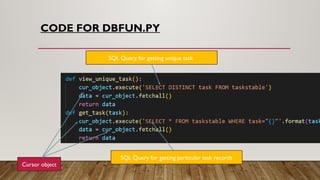
 dbfun.py : Here we are going to manage our application database.
 Write functions for create table,add task ,delete task,update task,get unique
task,view all tasks in python.
 Write sql query inside a function e.g. create_table function (create table query),add
task(insert query),view all tasks(select query) etc.
DESCRIPTION
webapp.py :This file is used to build frontend for our todo list app.
• In this file we create four section :create,read,update and delete.
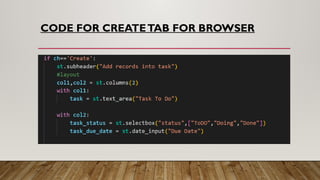
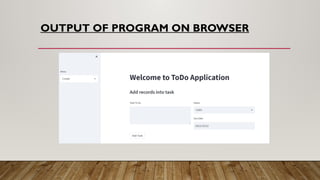
• Create section : It is used to make entries from user side.
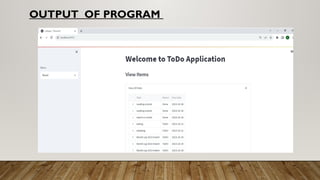
• Read section: It is used to see all records in tabular form and graphical visualization of task or
task_status in the form of pie graph.
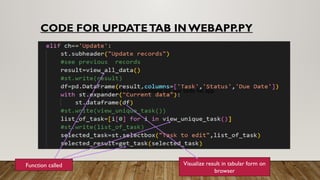
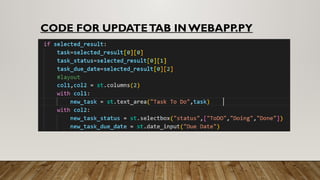
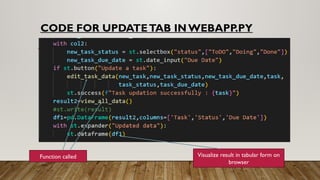
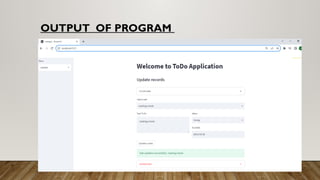
• Update section:It is used to update record of table from user side.User can see current and
updated record in the form of table.
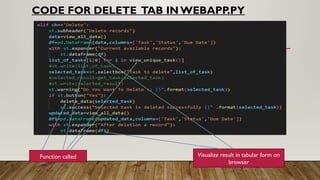
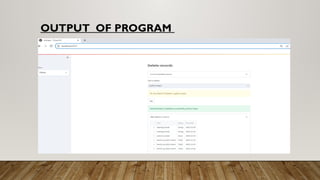
• Delete section: It is used to delete a record from user side and user can see again current
data and after deletion of records in the form table.
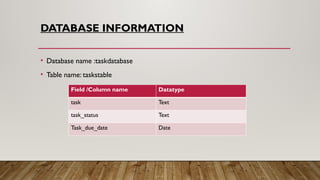
DATABASE INFORMATION
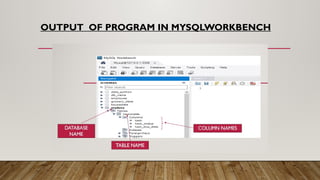
• Database name :taskdatabase
• Table name: taskstable
Field /Column name Datatype
task Text
task_status Text
Task_due_date Date
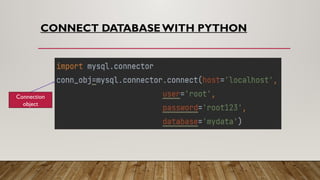
CONNECT DATABASEWITH PYTHON
Connection
object
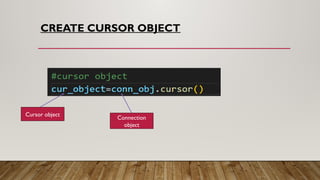
CREATE CURSOR OBJECT
Cursor object
Connection
object
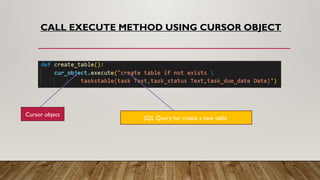
CALL EXECUTE METHOD USING CURSOR OBJECT
Cursor object
SQL Query for create a new table
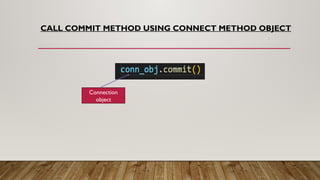
CALL COMMIT METHOD USING CONNECT METHOD OBJECT
Connection
object
Create section
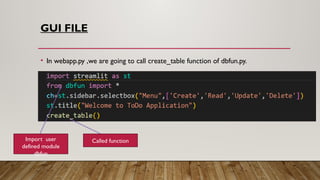
GUI FILE
• In webapp.py ,we are going to call create_table function of dbfun.py.
Import user
defined module
dbfun
Called function
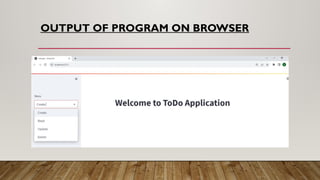
OUTPUT OF PROGRAM ON BROWSER
OUTPUT OF PROGRAM IN MYSQLWORKBENCH
CODE FOR CREATETAB FOR BROWSER
OUTPUT OF PROGRAM ON BROWSER
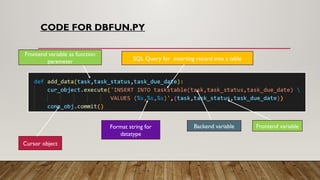
CODE FOR DBFUN.PY
Cursor object
SQL Query for inserting record into a table
Frontend variable
Backend variable
Format string for
datatype
Frontend variable as function
parameter
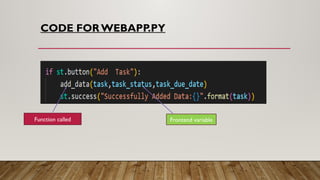
CODE FOR WEBAPP.PY
Function called Frontend variable
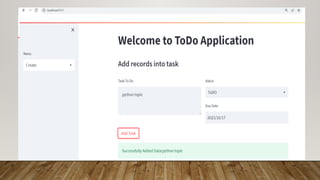
OUTPUT OF PROGRAM
After code completion ,both files dbfun.py and webapp.py,
We are going to add records into a front end and automatically
changes made into database.
Read section
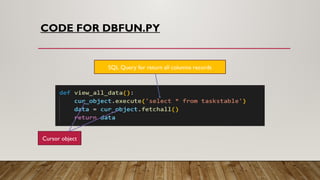
CODE FOR DBFUN.PY
SQL Query for return all columns records
Cursor object
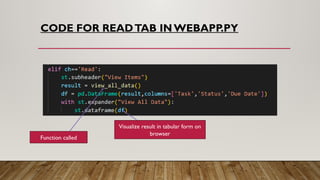
CODE FOR READTAB INWEBAPP.PY
Function called
Visualize result in tabular form on
browser
OUTPUT OF PROGRAM
Update section
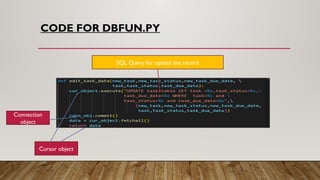
CODE FOR DBFUN.PY
SQL Query for update the record
Cursor object
Connection
object
CODE FOR DBFUN.PY
SQL Query for getting unique task
Cursor object
SQL Query for getting particular task records
CODE FOR UPDATETAB INWEBAPP.PY
This file is used to build frontend for our todo list app.
Function called Visualize result in tabular form on
browser
CODE FOR UPDATETAB INWEBAPP.PY
Function called Visualize result in tabular form on
browser
OUTPUT OF PROGRAM
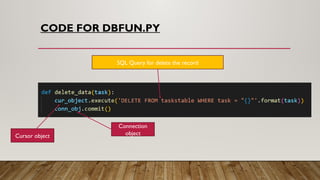
Delete section
CODE FOR DBFUN.PY
SQL Query for delete the record
Cursor object
Connection
object
CODE FOR DELETE TAB IN WEBAPP.PY
Function called Visualize result in tabular form on
browser
OUTPUT OF PROGRAM
CONCLUSION
• To-Do app using streamlit python project is an application specially built to keep track of tasks that need to
be done.This application will be like a task keeper where the user would be able to enter the tasks that they
need to do. Once they are done with their tasks they can also remove them from the list.
• One of the most important reasons you should use a to do app using streamlit python is that it will help you
stay organised.When you write all your tasks in a list, they seem more manageable.When you've got a clear
outline of the tasks you've got to do and those you've completed, it helps you stay focused.

TO DO APP USING STREAMLIT PYTHON PROJECT

  • 1.
    TO DO APPUSING STREAMLIT PYTHON
  • 2.
    INTRODUCTION • ToDo ListApp is a kind of app that generally used to maintain our day-to-day tasks or list everything that we have to do, with the most important tasks at the top of the list, and the least important tasks at the bottom. • It is helpful in planning our daily schedules.
  • 3.
  • 4.
    PYTHON LIBRARIES REQUIRED: streamlit  pandas  mysql.connector/pymysql  plotly
  • 5.
    PYTHON LIBRARIES REQUIRED: Streamlit is an open source app framework in Python language. It helps us create web apps in a short time. It is compatible with major Python libraries.  A Python API which Streamlit client apps use to instantiate the frontend and communicate with it.  Streamlit is a framework for creating simple and elegant web applications in pure Python.  This is the library that allows us to build frontend for apps by writing all the code in Python.
  • 6.
    PYTHON LIBRARIES REQUIRED: Pandas is an open-source library in Python that is made mainly for working with relational or labeled data both easily and automatically.  Pandas is a data manipulation package in Python for tabular data.That is, data in the form of rows and columns, also known as DataFrames. Intuitively, you can think of a DataFrame as an Excel sheet.  Columns can be inserted and deleted from DataFrame and higher dimensional objects.
  • 7.
    PYTHON LIBRARIES REQUIRED: The MySQL Connector/Python module is the official Oracle-supported driver to connect MySQL through Python.The connector is entirely Python.  The PyMySQL package is another connector you can use to connect Python to MySQL. It’s a good option if you’re looking for speed, as it’s faster than mysql- connector-python.
  • 8.
    COMMAND FOR LIBRAIESINSTALLATION  pip install streamlit  pip install pandas  pip install mysql.connector.python /pip install pymysql  pip install plotly
  • 9.
    STRUCTURE OF PROJECT Wehave two files: • webapp.py: This file is used to build frontend for our todo list app. • dbfun.py: This file is used to manage backend database.
  • 10.
    DESCRIPTION  dbfun.py :Here we are going to manage our application database.  Write functions for create table,add task ,delete task,update task,get unique task,view all tasks in python.  Write sql query inside a function e.g. create_table function (create table query),add task(insert query),view all tasks(select query) etc.
  • 11.
    DESCRIPTION webapp.py :This fileis used to build frontend for our todo list app. • In this file we create four section :create,read,update and delete. • Create section : It is used to make entries from user side. • Read section: It is used to see all records in tabular form and graphical visualization of task or task_status in the form of pie graph. • Update section:It is used to update record of table from user side.User can see current and updated record in the form of table. • Delete section: It is used to delete a record from user side and user can see again current data and after deletion of records in the form table.
  • 12.
    DATABASE INFORMATION • Databasename :taskdatabase • Table name: taskstable Field /Column name Datatype task Text task_status Text Task_due_date Date
  • 13.
  • 14.
    CREATE CURSOR OBJECT Cursorobject Connection object
  • 15.
    CALL EXECUTE METHODUSING CURSOR OBJECT Cursor object SQL Query for create a new table
  • 16.
    CALL COMMIT METHODUSING CONNECT METHOD OBJECT Connection object
  • 17.
  • 18.
    GUI FILE • Inwebapp.py ,we are going to call create_table function of dbfun.py. Import user defined module dbfun Called function
  • 19.
  • 20.
    OUTPUT OF PROGRAMIN MYSQLWORKBENCH
  • 21.
    CODE FOR CREATETABFOR BROWSER
  • 22.
  • 23.
    CODE FOR DBFUN.PY Cursorobject SQL Query for inserting record into a table Frontend variable Backend variable Format string for datatype Frontend variable as function parameter
  • 24.
    CODE FOR WEBAPP.PY Functioncalled Frontend variable
  • 25.
    OUTPUT OF PROGRAM Aftercode completion ,both files dbfun.py and webapp.py, We are going to add records into a front end and automatically changes made into database.
  • 27.
  • 28.
    CODE FOR DBFUN.PY SQLQuery for return all columns records Cursor object
  • 29.
    CODE FOR READTABINWEBAPP.PY Function called Visualize result in tabular form on browser
  • 30.
  • 31.
  • 32.
    CODE FOR DBFUN.PY SQLQuery for update the record Cursor object Connection object
  • 33.
    CODE FOR DBFUN.PY SQLQuery for getting unique task Cursor object SQL Query for getting particular task records
  • 34.
    CODE FOR UPDATETABINWEBAPP.PY This file is used to build frontend for our todo list app. Function called Visualize result in tabular form on browser
  • 35.
    CODE FOR UPDATETABINWEBAPP.PY
  • 36.
    CODE FOR UPDATETABINWEBAPP.PY Function called Visualize result in tabular form on browser
  • 37.
  • 38.
  • 39.
    CODE FOR DBFUN.PY SQLQuery for delete the record Cursor object Connection object
  • 40.
    CODE FOR DELETETAB IN WEBAPP.PY Function called Visualize result in tabular form on browser
  • 41.
  • 42.
    CONCLUSION • To-Do appusing streamlit python project is an application specially built to keep track of tasks that need to be done.This application will be like a task keeper where the user would be able to enter the tasks that they need to do. Once they are done with their tasks they can also remove them from the list. • One of the most important reasons you should use a to do app using streamlit python is that it will help you stay organised.When you write all your tasks in a list, they seem more manageable.When you've got a clear outline of the tasks you've got to do and those you've completed, it helps you stay focused.