Promitor
Scraping metrics at-scale with automatic resource discovery
• Azure Architect, R&D Manager at Codit
• Microsoft Azure MVP, GitHub Star & CNCF Ambassador
• Member of Azure UG (AZUG)
• Maintainer of KEDA, Promitor, Kubernetes Event Grid Bridge, …
• Lives in Belgium near Bruges
• blog.tomkerkhove.be
@TomKerkhov
e
tomkerkhove
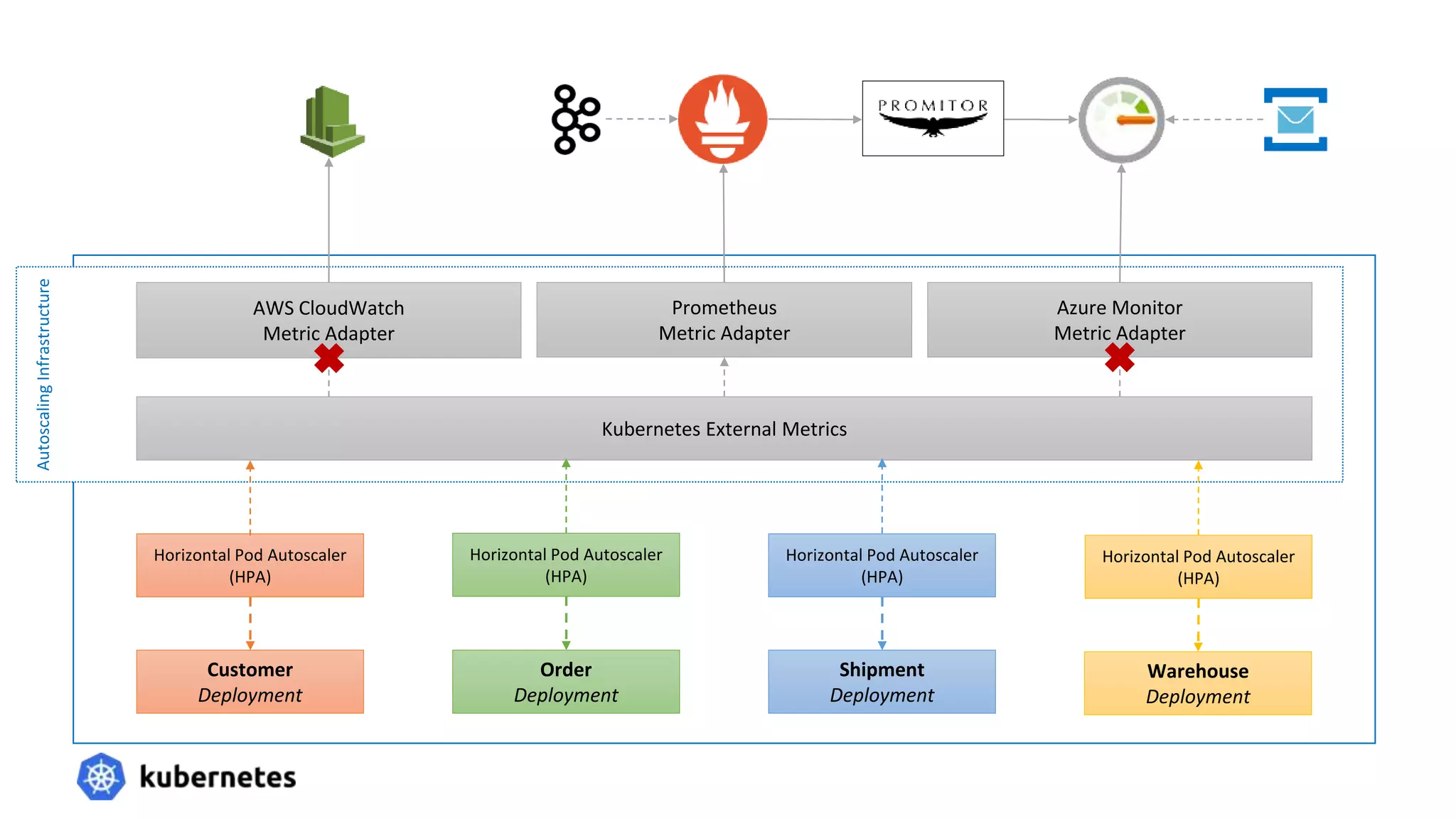
Autoscaling
Infrastructure
Shipment
Deployment
Customer
Deployment
Order
Deployment
Warehouse
Deployment
Horizontal Pod Autoscaler
(HPA)
Horizontal Pod Autoscaler
(HPA)
Horizontal Pod Autoscaler
(HPA)
Horizontal Pod Autoscaler
(HPA)
Kubernetes External Metrics
AWS CloudWatch
Metric Adapter
Prometheus
Metric Adapter
Azure Monitor
Metric Adapter
What is Promitor? ☁
• An Azure Monitor scraper that brings Azure Monitor metrics where
you need them.
• Currently we support metric systems such as Atlassian Statuspage,
Prometheus and StatsD
• Geneva can be supported, if I can have a way to test it (thanks Matan!)
• Scrape any Azure resource on any Azure cloud, across various
subscription & resource groups
• Easy to declare metrics to scrape via metrics-as-code
• Easy to install through Helm
• Support for Linux & Windows
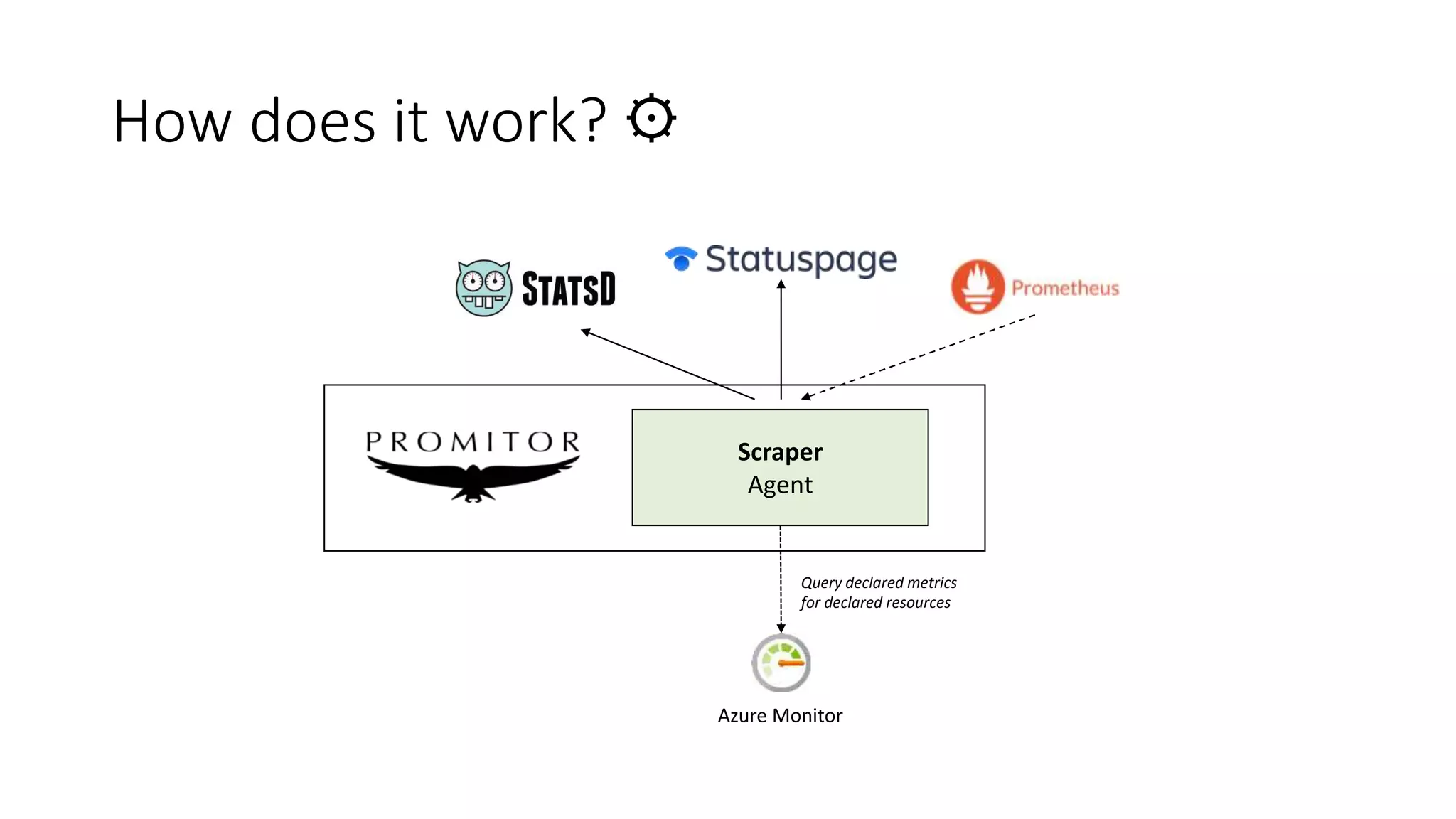
How does it work? ⚙
Scraper
Agent
Azure Monitor
Query declared metrics
for declared resources
How does it work? ⚙
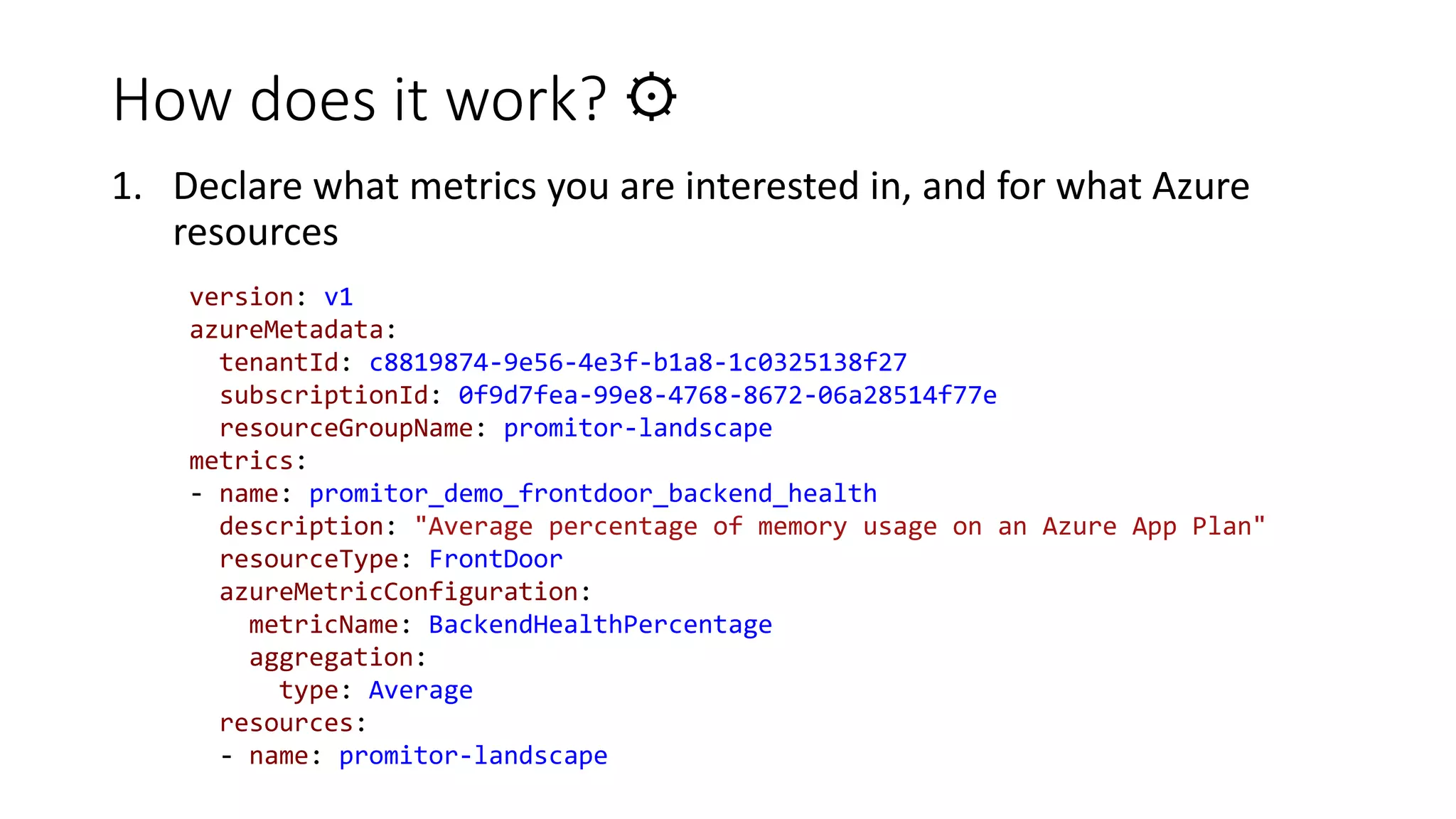
1. Declare what metrics you are interested in, and for what Azure
resources
version: v1
azureMetadata:
tenantId: c8819874-9e56-4e3f-b1a8-1c0325138f27
subscriptionId: 0f9d7fea-99e8-4768-8672-06a28514f77e
resourceGroupName: promitor-landscape
metrics:
- name: promitor_demo_frontdoor_backend_health
description: "Average percentage of memory usage on an Azure App Plan"
resourceType: FrontDoor
azureMetricConfiguration:
metricName: BackendHealthPercentage
aggregation:
type: Average
resources:
- name: promitor-landscape
How does it work? ⚙
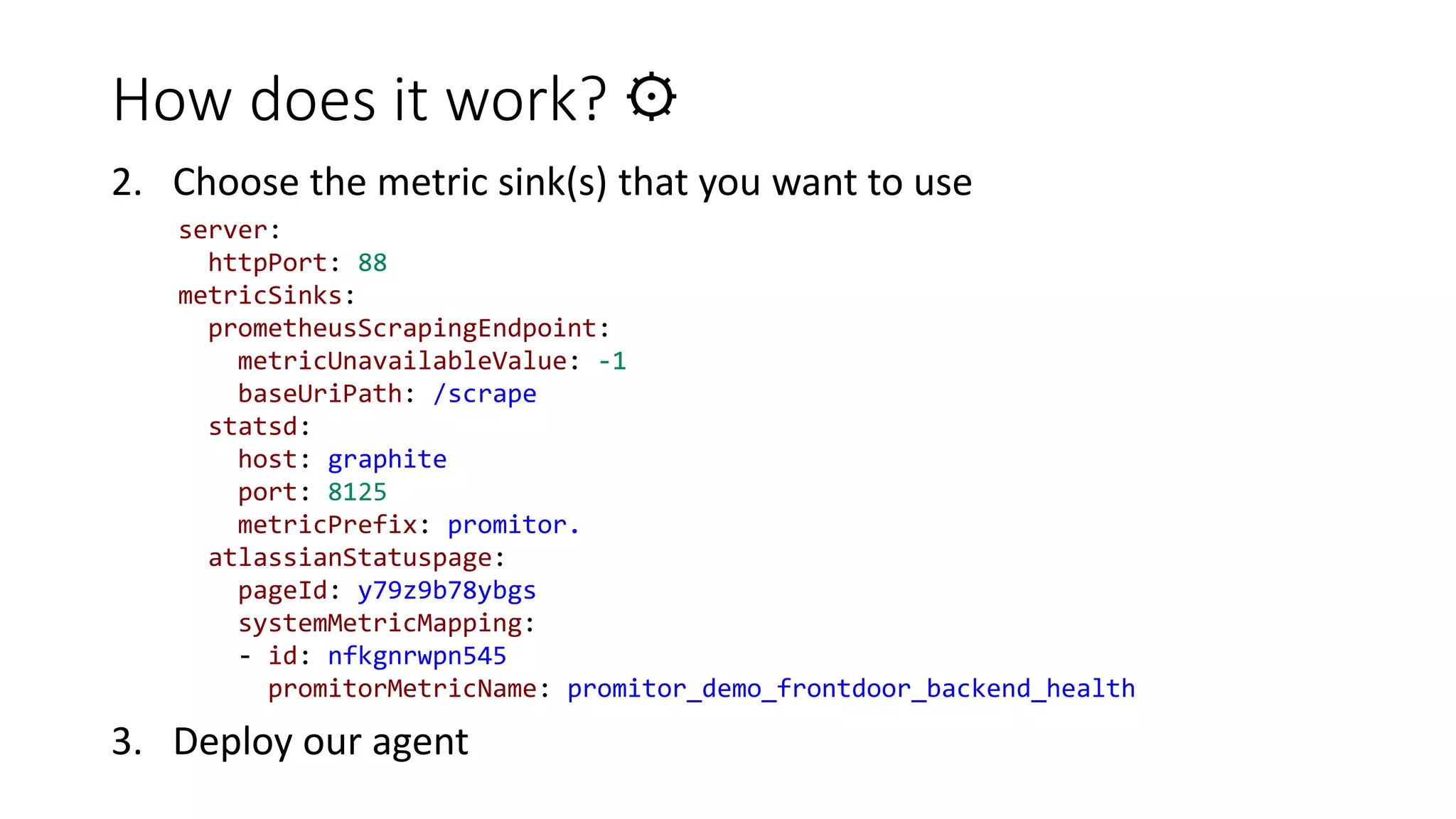
2. Choose the metric sink(s) that you want to use
3. Deploy our agent
server:
httpPort: 88
metricSinks:
prometheusScrapingEndpoint:
metricUnavailableValue: -1
baseUriPath: /scrape
statsd:
host: graphite
port: 8125
metricPrefix: promitor.
atlassianStatuspage:
pageId: y79z9b78ybgs
systemMetricMapping:
- id: nfkgnrwpn545
promitorMetricName: promitor_demo_frontdoor_backend_health
Declaritive metrics are great,
until you have hundreds or even
thousands of resources.
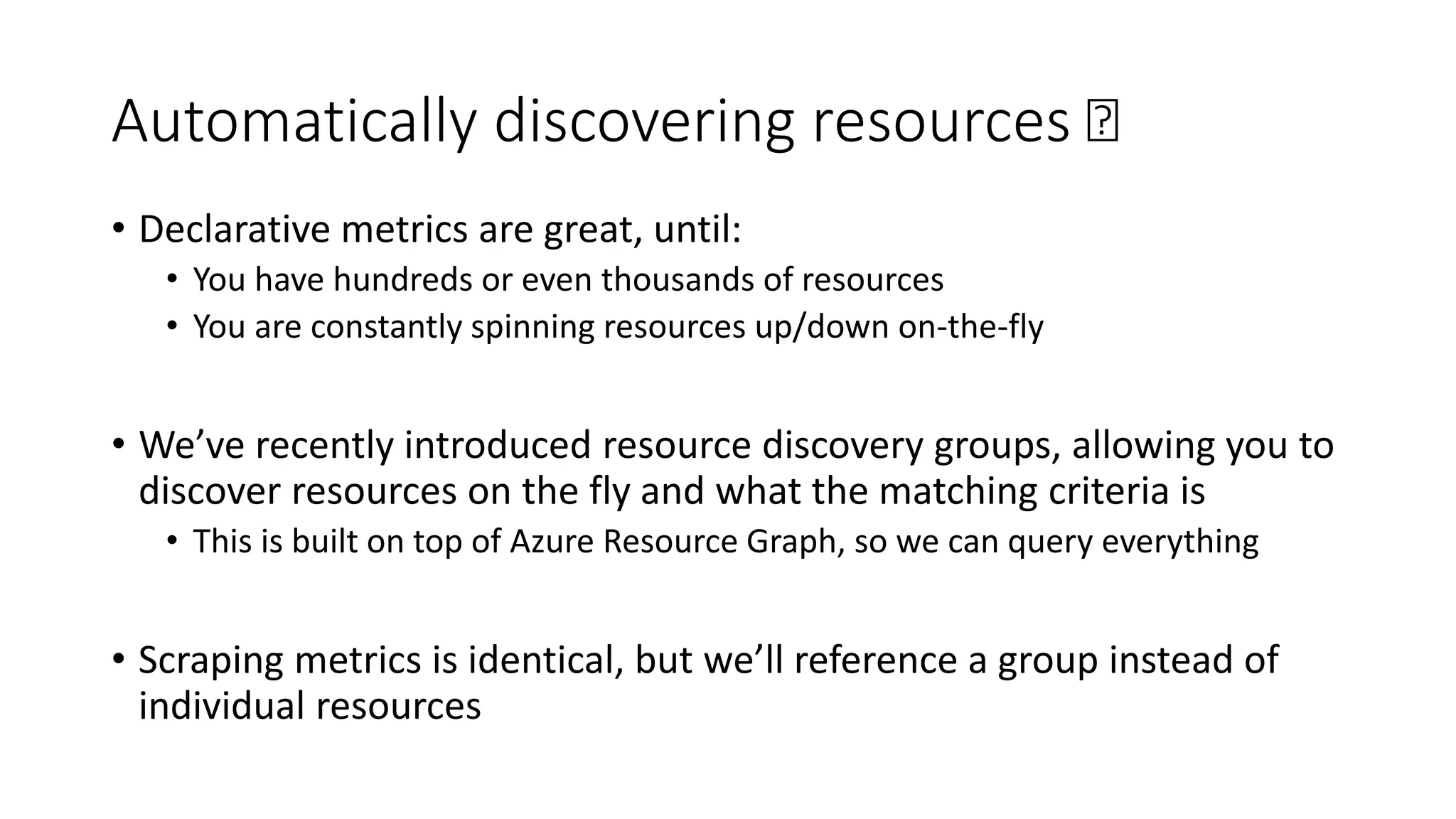
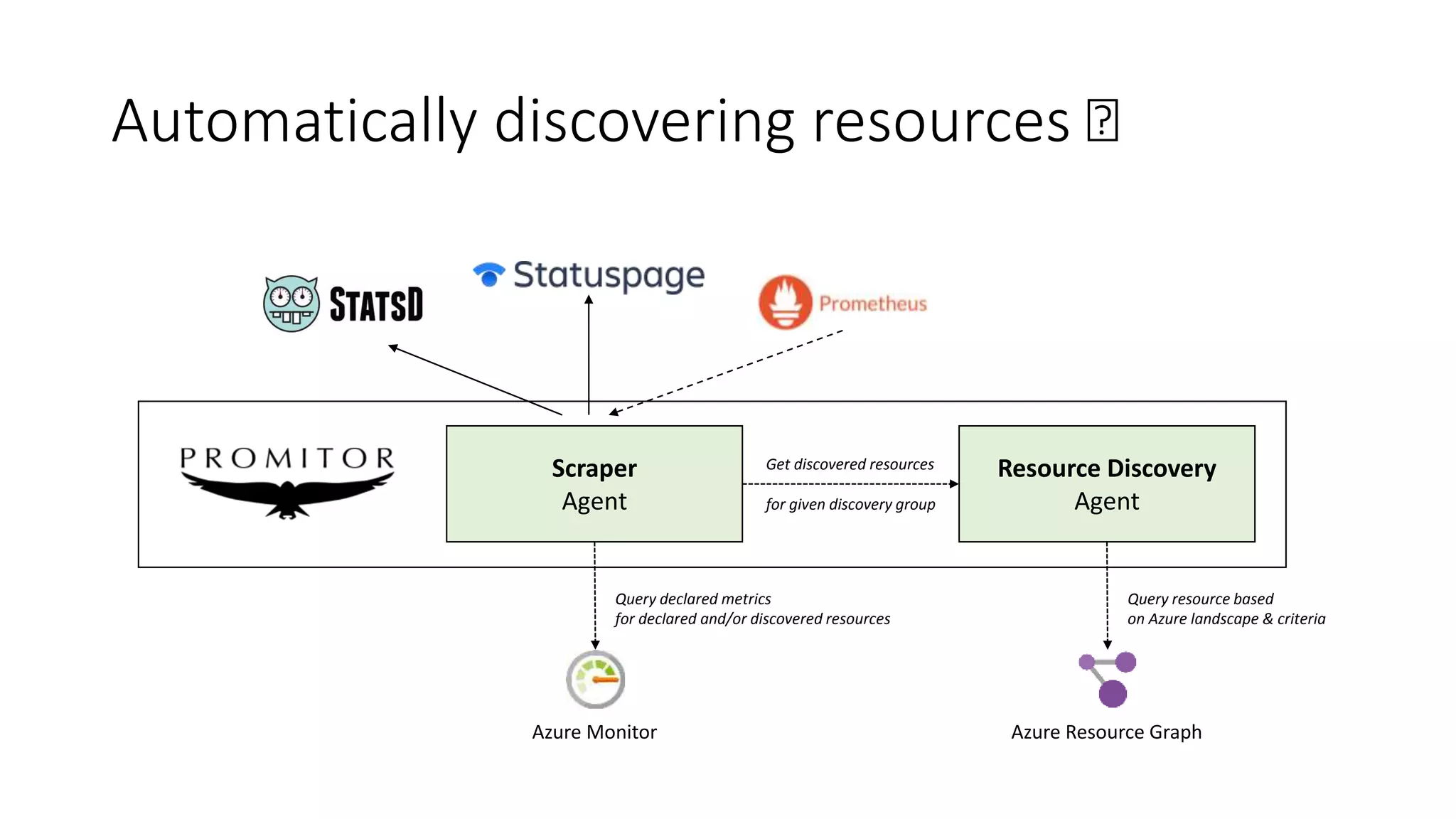
Automatically discovering resources 🛰
• Declarative metrics are great, until:
• You have hundreds or even thousands of resources
• You are constantly spinning resources up/down on-the-fly
• We’ve recently introduced resource discovery groups, allowing you to
discover resources on the fly and what the matching criteria is
• This is built on top of Azure Resource Graph, so we can query everything
• Scraping metrics is identical, but we’ll reference a group instead of
individual resources
Automatically discovering resources 🛰
Scraper
Agent
Resource Discovery
Agent
Azure Monitor Azure Resource Graph
Query declared metrics
for declared and/or discovered resources
Query resource based
on Azure landscape & criteria
Get discovered resources
for given discovery group
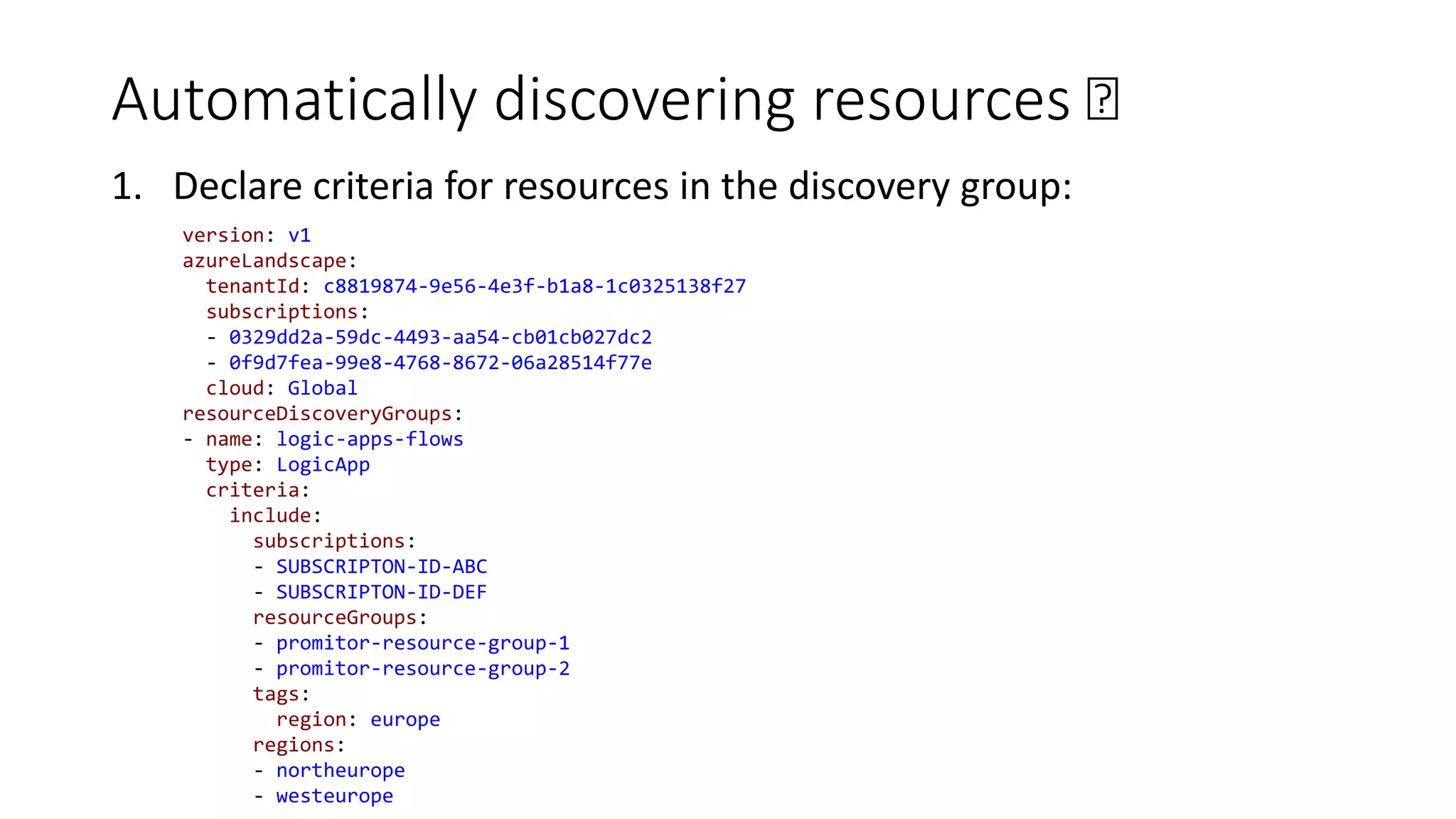
Automatically discovering resources 🛰
1. Declare criteria for resources in the discovery group:
version: v1
azureLandscape:
tenantId: c8819874-9e56-4e3f-b1a8-1c0325138f27
subscriptions:
- 0329dd2a-59dc-4493-aa54-cb01cb027dc2
- 0f9d7fea-99e8-4768-8672-06a28514f77e
cloud: Global
resourceDiscoveryGroups:
- name: logic-apps-flows
type: LogicApp
criteria:
include:
subscriptions:
- SUBSCRIPTON-ID-ABC
- SUBSCRIPTON-ID-DEF
resourceGroups:
- promitor-resource-group-1
- promitor-resource-group-2
tags:
region: europe
regions:
- northeurope
- westeurope
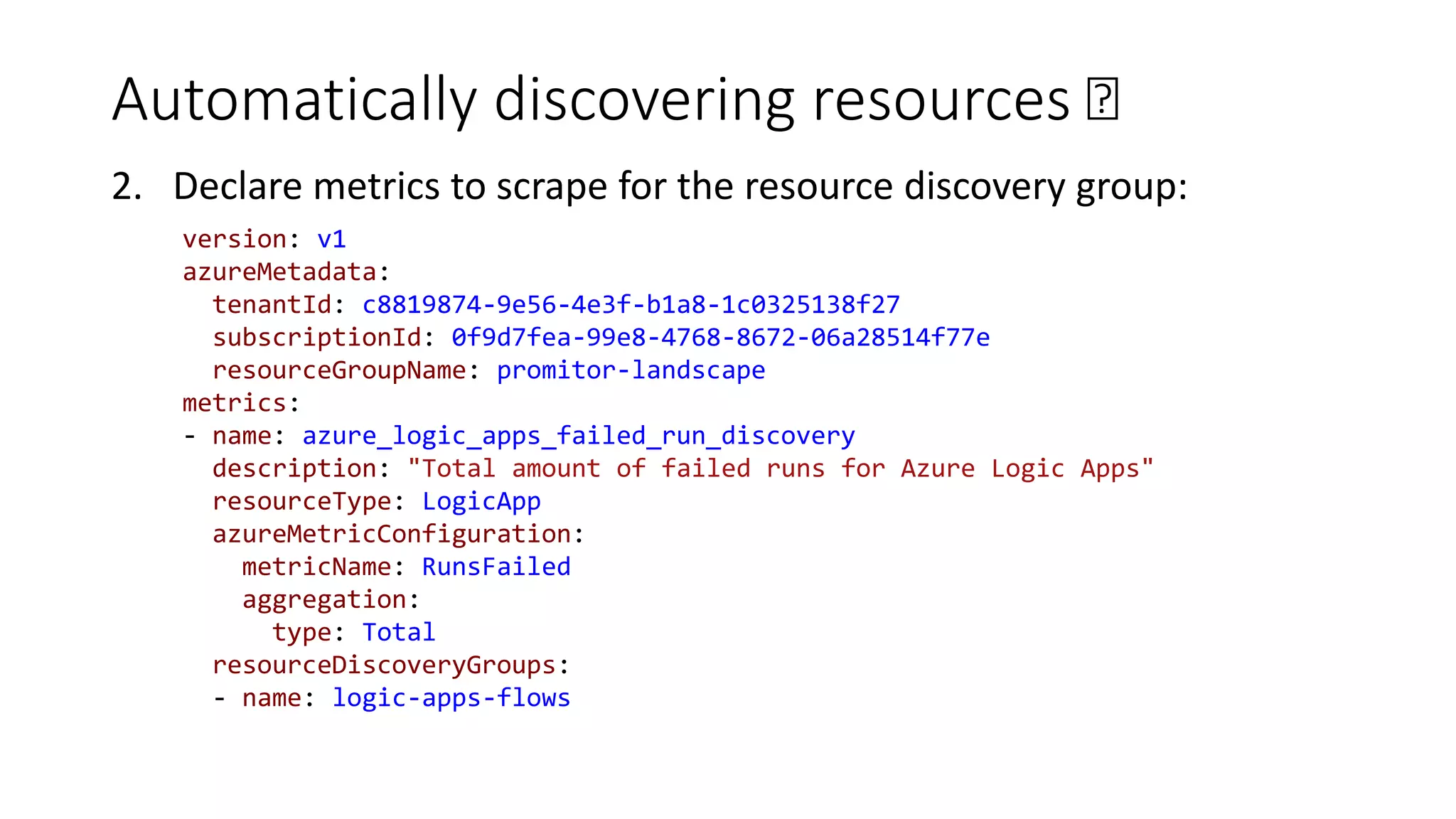
Automatically discovering resources 🛰
2. Declare metrics to scrape for the resource discovery group:
version: v1
azureMetadata:
tenantId: c8819874-9e56-4e3f-b1a8-1c0325138f27
subscriptionId: 0f9d7fea-99e8-4768-8672-06a28514f77e
resourceGroupName: promitor-landscape
metrics:
- name: azure_logic_apps_failed_run_discovery
description: "Total amount of failed runs for Azure Logic Apps"
resourceType: LogicApp
azureMetricConfiguration:
metricName: RunsFailed
aggregation:
type: Total
resourceDiscoveryGroups:
- name: logic-apps-flows
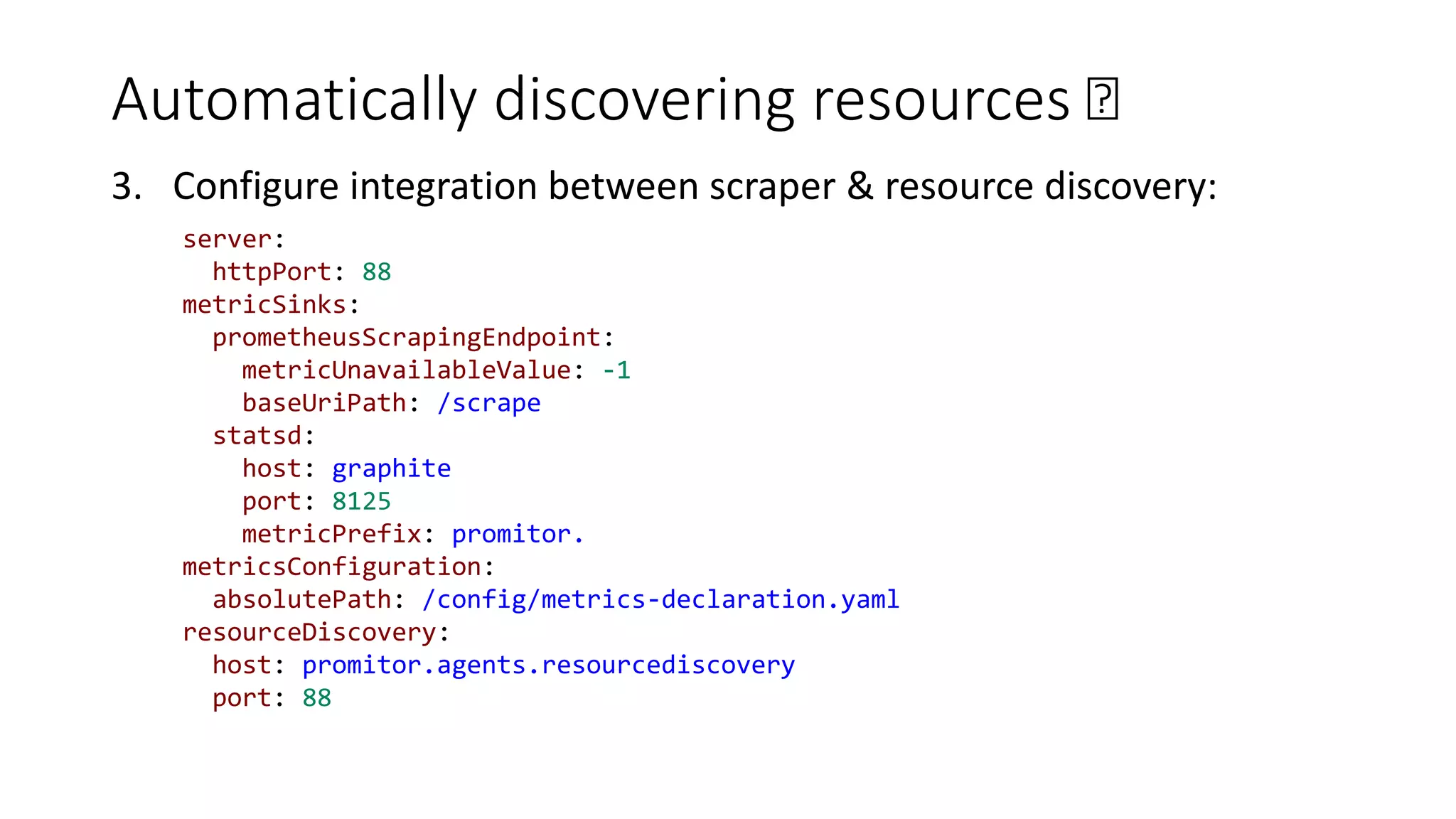
Automatically discovering resources 🛰
3. Configure integration between scraper & resource discovery:
server:
httpPort: 88
metricSinks:
prometheusScrapingEndpoint:
metricUnavailableValue: -1
baseUriPath: /scrape
statsd:
host: graphite
port: 8125
metricPrefix: promitor.
metricsConfiguration:
absolutePath: /config/metrics-declaration.yaml
resourceDiscovery:
host: promitor.agents.resourcediscovery
port: 88
Scraping metrics and
exploring them in
Prometheus & Graphite
Demo
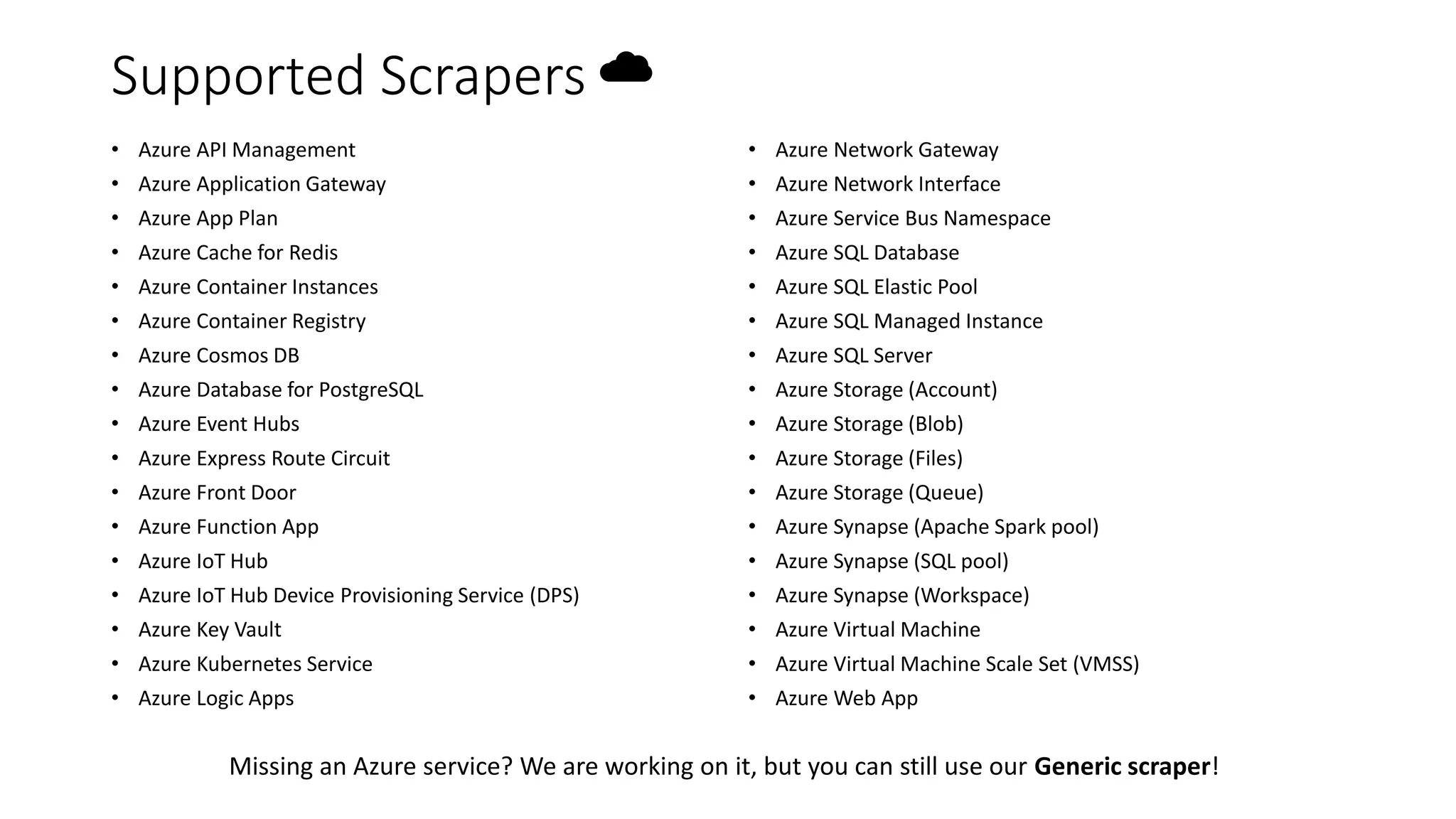
Supported Scrapers ☁
• Azure API Management
• Azure Application Gateway
• Azure App Plan
• Azure Cache for Redis
• Azure Container Instances
• Azure Container Registry
• Azure Cosmos DB
• Azure Database for PostgreSQL
• Azure Event Hubs
• Azure Express Route Circuit
• Azure Front Door
• Azure Function App
• Azure IoT Hub
• Azure IoT Hub Device Provisioning Service (DPS)
• Azure Key Vault
• Azure Kubernetes Service
• Azure Logic Apps
• Azure Network Gateway
• Azure Network Interface
• Azure Service Bus Namespace
• Azure SQL Database
• Azure SQL Elastic Pool
• Azure SQL Managed Instance
• Azure SQL Server
• Azure Storage (Account)
• Azure Storage (Blob)
• Azure Storage (Files)
• Azure Storage (Queue)
• Azure Synapse (Apache Spark pool)
• Azure Synapse (SQL pool)
• Azure Synapse (Workspace)
• Azure Virtual Machine
• Azure Virtual Machine Scale Set (VMSS)
• Azure Web App
Missing an Azure service? We are working on it, but you can still use our Generic scraper!
By The Numbers 📊
Community
• 140 GitHub Stars
• 35+ contributors
Adoption
• 3.5M downloads in last ~ 2
months
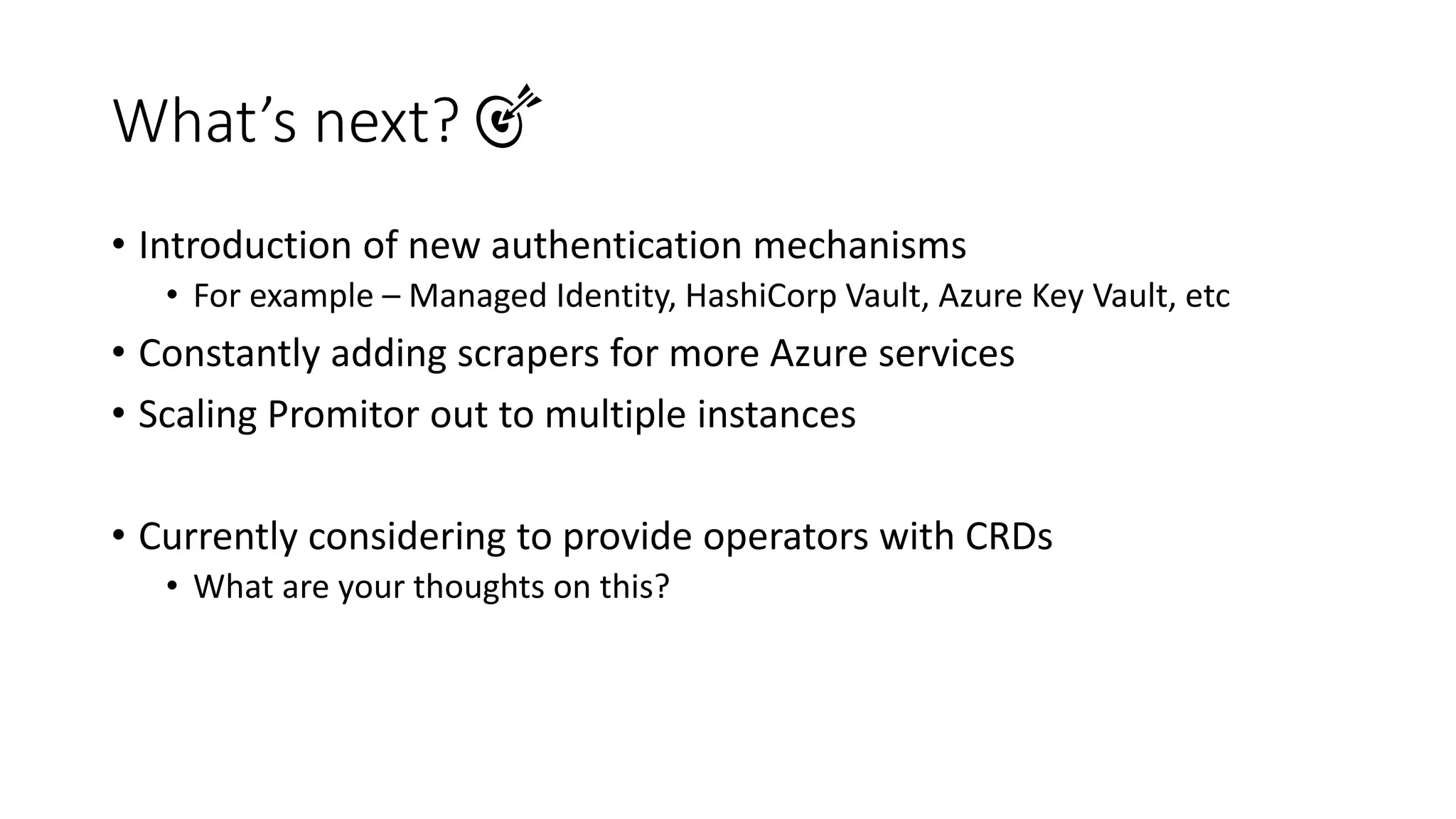
What’s next? 🎯
• Introduction of new authentication mechanisms
• For example – Managed Identity, HashiCorp Vault, Azure Key Vault, etc
• Constantly adding scrapers for more Azure services
• Scaling Promitor out to multiple instances
• Currently considering to provide operators with CRDs
• What are your thoughts on this?

Introduction to Promitor

  • 1.
    Promitor Scraping metrics at-scalewith automatic resource discovery
  • 2.
    • Azure Architect,R&D Manager at Codit • Microsoft Azure MVP, GitHub Star & CNCF Ambassador • Member of Azure UG (AZUG) • Maintainer of KEDA, Promitor, Kubernetes Event Grid Bridge, … • Lives in Belgium near Bruges • blog.tomkerkhove.be @TomKerkhov e tomkerkhove
  • 3.
    Autoscaling Infrastructure Shipment Deployment Customer Deployment Order Deployment Warehouse Deployment Horizontal Pod Autoscaler (HPA) HorizontalPod Autoscaler (HPA) Horizontal Pod Autoscaler (HPA) Horizontal Pod Autoscaler (HPA) Kubernetes External Metrics AWS CloudWatch Metric Adapter Prometheus Metric Adapter Azure Monitor Metric Adapter
  • 4.
    What is Promitor?☁ • An Azure Monitor scraper that brings Azure Monitor metrics where you need them. • Currently we support metric systems such as Atlassian Statuspage, Prometheus and StatsD • Geneva can be supported, if I can have a way to test it (thanks Matan!) • Scrape any Azure resource on any Azure cloud, across various subscription & resource groups • Easy to declare metrics to scrape via metrics-as-code • Easy to install through Helm • Support for Linux & Windows
  • 5.
    How does itwork? ⚙ Scraper Agent Azure Monitor Query declared metrics for declared resources
  • 6.
    How does itwork? ⚙ 1. Declare what metrics you are interested in, and for what Azure resources version: v1 azureMetadata: tenantId: c8819874-9e56-4e3f-b1a8-1c0325138f27 subscriptionId: 0f9d7fea-99e8-4768-8672-06a28514f77e resourceGroupName: promitor-landscape metrics: - name: promitor_demo_frontdoor_backend_health description: "Average percentage of memory usage on an Azure App Plan" resourceType: FrontDoor azureMetricConfiguration: metricName: BackendHealthPercentage aggregation: type: Average resources: - name: promitor-landscape
  • 7.
    How does itwork? ⚙ 2. Choose the metric sink(s) that you want to use 3. Deploy our agent server: httpPort: 88 metricSinks: prometheusScrapingEndpoint: metricUnavailableValue: -1 baseUriPath: /scrape statsd: host: graphite port: 8125 metricPrefix: promitor. atlassianStatuspage: pageId: y79z9b78ybgs systemMetricMapping: - id: nfkgnrwpn545 promitorMetricName: promitor_demo_frontdoor_backend_health
  • 8.
    Declaritive metrics aregreat, until you have hundreds or even thousands of resources.
  • 9.
    Automatically discovering resources🛰 • Declarative metrics are great, until: • You have hundreds or even thousands of resources • You are constantly spinning resources up/down on-the-fly • We’ve recently introduced resource discovery groups, allowing you to discover resources on the fly and what the matching criteria is • This is built on top of Azure Resource Graph, so we can query everything • Scraping metrics is identical, but we’ll reference a group instead of individual resources
  • 10.
    Automatically discovering resources🛰 Scraper Agent Resource Discovery Agent Azure Monitor Azure Resource Graph Query declared metrics for declared and/or discovered resources Query resource based on Azure landscape & criteria Get discovered resources for given discovery group
  • 11.
    Automatically discovering resources🛰 1. Declare criteria for resources in the discovery group: version: v1 azureLandscape: tenantId: c8819874-9e56-4e3f-b1a8-1c0325138f27 subscriptions: - 0329dd2a-59dc-4493-aa54-cb01cb027dc2 - 0f9d7fea-99e8-4768-8672-06a28514f77e cloud: Global resourceDiscoveryGroups: - name: logic-apps-flows type: LogicApp criteria: include: subscriptions: - SUBSCRIPTON-ID-ABC - SUBSCRIPTON-ID-DEF resourceGroups: - promitor-resource-group-1 - promitor-resource-group-2 tags: region: europe regions: - northeurope - westeurope
  • 12.
    Automatically discovering resources🛰 2. Declare metrics to scrape for the resource discovery group: version: v1 azureMetadata: tenantId: c8819874-9e56-4e3f-b1a8-1c0325138f27 subscriptionId: 0f9d7fea-99e8-4768-8672-06a28514f77e resourceGroupName: promitor-landscape metrics: - name: azure_logic_apps_failed_run_discovery description: "Total amount of failed runs for Azure Logic Apps" resourceType: LogicApp azureMetricConfiguration: metricName: RunsFailed aggregation: type: Total resourceDiscoveryGroups: - name: logic-apps-flows
  • 13.
    Automatically discovering resources🛰 3. Configure integration between scraper & resource discovery: server: httpPort: 88 metricSinks: prometheusScrapingEndpoint: metricUnavailableValue: -1 baseUriPath: /scrape statsd: host: graphite port: 8125 metricPrefix: promitor. metricsConfiguration: absolutePath: /config/metrics-declaration.yaml resourceDiscovery: host: promitor.agents.resourcediscovery port: 88
  • 14.
    Scraping metrics and exploringthem in Prometheus & Graphite Demo
  • 15.
    Supported Scrapers ☁ •Azure API Management • Azure Application Gateway • Azure App Plan • Azure Cache for Redis • Azure Container Instances • Azure Container Registry • Azure Cosmos DB • Azure Database for PostgreSQL • Azure Event Hubs • Azure Express Route Circuit • Azure Front Door • Azure Function App • Azure IoT Hub • Azure IoT Hub Device Provisioning Service (DPS) • Azure Key Vault • Azure Kubernetes Service • Azure Logic Apps • Azure Network Gateway • Azure Network Interface • Azure Service Bus Namespace • Azure SQL Database • Azure SQL Elastic Pool • Azure SQL Managed Instance • Azure SQL Server • Azure Storage (Account) • Azure Storage (Blob) • Azure Storage (Files) • Azure Storage (Queue) • Azure Synapse (Apache Spark pool) • Azure Synapse (SQL pool) • Azure Synapse (Workspace) • Azure Virtual Machine • Azure Virtual Machine Scale Set (VMSS) • Azure Web App Missing an Azure service? We are working on it, but you can still use our Generic scraper!
  • 16.
    By The Numbers📊 Community • 140 GitHub Stars • 35+ contributors Adoption • 3.5M downloads in last ~ 2 months
  • 17.
    What’s next? 🎯 •Introduction of new authentication mechanisms • For example – Managed Identity, HashiCorp Vault, Azure Key Vault, etc • Constantly adding scrapers for more Azure services • Scaling Promitor out to multiple instances • Currently considering to provide operators with CRDs • What are your thoughts on this?