Introduction To Project Management
By Ahmed M. Farid
Outcomes:
- Basic Understanding of Project Management
- Designing a Professional Time-Plan
- How to Use Microsoft Project
What's a project?
● Collaborative work towards a goal.
● Involves:
– Research
– Planning
– Design
– Implementation
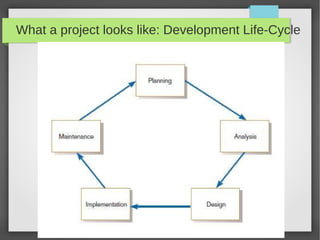
What a project looks like: Development Life-Cycle
Project Management
● Discipline of planning, motivating, and controlling resources within a project.
● Projects are managed in four phases:
● Initiation:
Selection of team members, managing customer relations, setting up
management/communications procedures, and determining development methodology.
● Planning:
Project Baseline Plan (Will be explained shortly)
● Execution
Implementation of the baseline plan.
● Closedown
Delivering project outcomes and closing the contract.
Project Baseline Plan
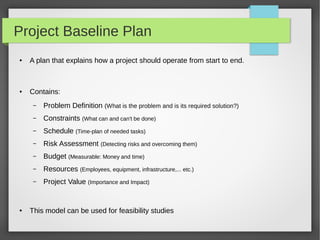
● A plan that explains how a project should operate from start to end.
● Contains:
– Problem Definition (What is the problem and is its required solution?)
– Constraints (What can and can't be done)
– Schedule (Time-plan of needed tasks)
– Risk Assessment (Detecting risks and overcoming them)
– Budget (Measurable: Money and time)
– Resources (Employees, equipment, infrastructure,... etc.)
– Project Value (Importance and Impact)
● This model can be used for feasibility studies
Does project management theoretically end after
planning?
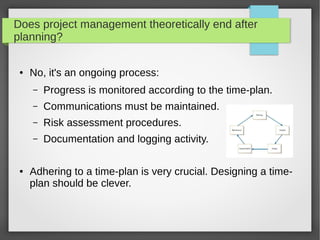
● No, it's an ongoing process:
– Progress is monitored according to the time-plan.
– Communications must be maintained.
– Risk assessment procedures.
– Documentation and logging activity.
● Adhering to a time-plan is very crucial. Designing a time-
plan should be clever.
Time-Plan
● A plan that indicates the timings and allocated resources
of project tasks.
● To better understand its mechanics, how about an
example scenario?
– We are an engineering firm with an idea to implement
a smart street trafficking system. What should we do?
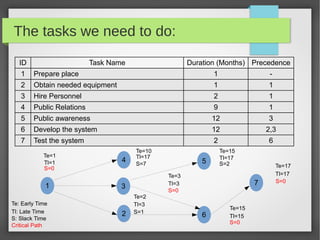
The tasks we need to do:
ID Task Name Duration (Months) Precedence
1 Prepare place 1 -
2 Obtain needed equipment 1 1
3 Hire Personnel 2 1
4 Public Relations 9 1
5 Public awareness 12 3
6 Develop the system 12 2,3
7 Test the system 2 6
1
4
3
2
5
6
7
Te=1
Te: Early Time
Tl: Late Time
Critical Path
Te=10
Te=3
Te=2
Te=15
Te=15
Te=17
Tl=17
Tl=15
Tl=17
Tl=3
Tl=3
Tl=17
Tl=1
S=0
S=0
S=0
S=0
S=7
S=1
S=2
S: Slack Time
Diagraming Methods
● What we saw is a network diagram
– It shows sequence
– Progress is not clear
● There is another method: Gantt Chart
– More commonly used
– Shows progress better
● We will see how it looks like in MS Project now.
Let's pose a question...What is a good manager?
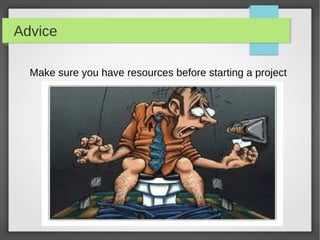
Advice
Make sure you have resources before starting a project
T hank you for your time!
Download the references:
http://goo.gl/IjXKM
Connect Online:
Email: amw.farid@gmail.com
Website: ahmedmfarid.blogspot.com
LinkedIn: eg.linkedin.com/in/amwfarid/

Introduction to Project Management

  • 1.
    Introduction To ProjectManagement By Ahmed M. Farid Outcomes: - Basic Understanding of Project Management - Designing a Professional Time-Plan - How to Use Microsoft Project
  • 2.
    What's a project? ●Collaborative work towards a goal. ● Involves: – Research – Planning – Design – Implementation
  • 3.
    What a projectlooks like: Development Life-Cycle
  • 4.
    Project Management ● Disciplineof planning, motivating, and controlling resources within a project. ● Projects are managed in four phases: ● Initiation: Selection of team members, managing customer relations, setting up management/communications procedures, and determining development methodology. ● Planning: Project Baseline Plan (Will be explained shortly) ● Execution Implementation of the baseline plan. ● Closedown Delivering project outcomes and closing the contract.
  • 5.
    Project Baseline Plan ●A plan that explains how a project should operate from start to end. ● Contains: – Problem Definition (What is the problem and is its required solution?) – Constraints (What can and can't be done) – Schedule (Time-plan of needed tasks) – Risk Assessment (Detecting risks and overcoming them) – Budget (Measurable: Money and time) – Resources (Employees, equipment, infrastructure,... etc.) – Project Value (Importance and Impact) ● This model can be used for feasibility studies
  • 6.
    Does project managementtheoretically end after planning? ● No, it's an ongoing process: – Progress is monitored according to the time-plan. – Communications must be maintained. – Risk assessment procedures. – Documentation and logging activity. ● Adhering to a time-plan is very crucial. Designing a time- plan should be clever.
  • 7.
    Time-Plan ● A planthat indicates the timings and allocated resources of project tasks. ● To better understand its mechanics, how about an example scenario? – We are an engineering firm with an idea to implement a smart street trafficking system. What should we do?
  • 8.
    The tasks weneed to do: ID Task Name Duration (Months) Precedence 1 Prepare place 1 - 2 Obtain needed equipment 1 1 3 Hire Personnel 2 1 4 Public Relations 9 1 5 Public awareness 12 3 6 Develop the system 12 2,3 7 Test the system 2 6 1 4 3 2 5 6 7 Te=1 Te: Early Time Tl: Late Time Critical Path Te=10 Te=3 Te=2 Te=15 Te=15 Te=17 Tl=17 Tl=15 Tl=17 Tl=3 Tl=3 Tl=17 Tl=1 S=0 S=0 S=0 S=0 S=7 S=1 S=2 S: Slack Time
  • 9.
    Diagraming Methods ● Whatwe saw is a network diagram – It shows sequence – Progress is not clear ● There is another method: Gantt Chart – More commonly used – Shows progress better ● We will see how it looks like in MS Project now.
  • 10.
    Let's pose aquestion...What is a good manager?
  • 11.
    Advice Make sure youhave resources before starting a project
  • 12.
    T hank youfor your time! Download the references: http://goo.gl/IjXKM Connect Online: Email: amw.farid@gmail.com Website: ahmedmfarid.blogspot.com LinkedIn: eg.linkedin.com/in/amwfarid/