Project
Management
Facilitated by Joanne Fraser
RiverSystems
Hope to Learn (10 Responses)
 How to manage a project – the basics (4)
(planning, scheduling and monitoring)
 Practical tips for scheduling (2)
 Strategies for getting buy-in
 Communication and leadership
 Methods for assessing progress
 Ways to communicate progress
 Anything
Project Challenges
 Communication (3)
 Planning (3)
 Determining timelines (2)
 Unrealistic expectations in terms of roles and time
estimates (2)
 Time commitment to project while continuing day to day
 Getting others to buy-in
 Keeping track of the details
 Keeping others on track
 Maintaining momentum
 Hand off from implementation to maintenance
 Voicing concerns viewed as negative
Topic Interest
#1 Project Planning
(Breaking down into manageable tasks)
#2 Project Scheduling
(Assigning accurate timelines)
#3 Effective Communication
(Among project stakeholders)
Learning Objectives
• Define projects and project management
• Recognize what is involved in the five
components of the project cycle
• Apply a team approach to project planning
• Develop a project plan
(WBS, Gantt Chart, Communication Plan)
• Examine people issues in project
implementation
Agenda
• Defining Projects and PM
• Project Cycle
• Initiating: Project Charter
• Planning: WBS
Lunch
• Gantt Chart, Communication Plan
• Monitoring
• Strategies for Typical People Issues
Project Definition
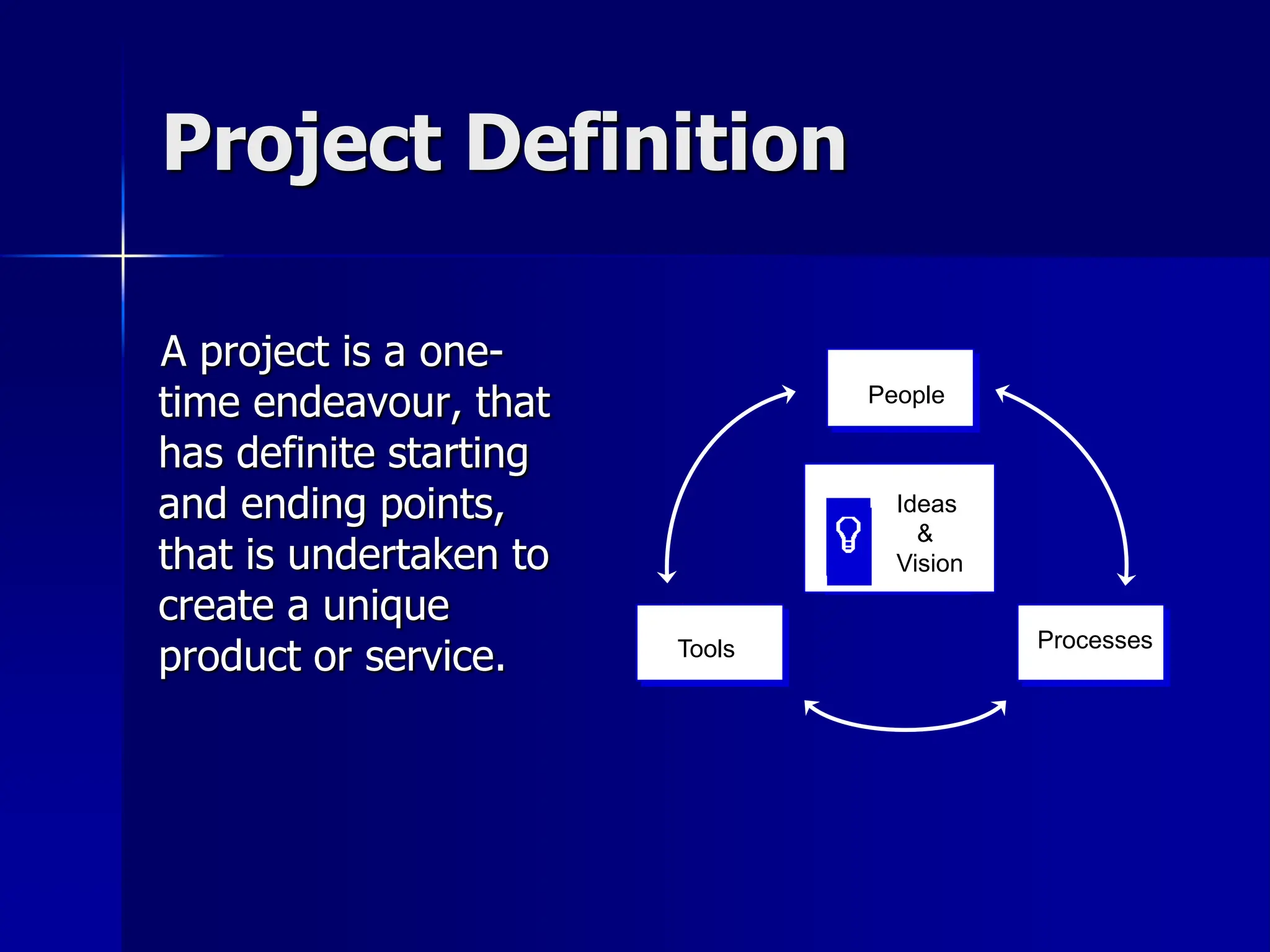
A project is a one-
time endeavour, that
has definite starting
and ending points,
that is undertaken to
create a unique
product or service.
People
Processes
Tools
Ideas
&
Vision
Project vs. Ordinary Work
• Projects differ from ordinary work
• A project is a sequence of tasks, with a beginning
and an end, with specific resources and time
allocated to it
• Projects are temporary and unique
• Ordinary work is day-to-day, ongoing, repetitive
• Project management is the process of combining
systems, techniques and people to complete a
project within established goals of time, budget
and quality
The Project Cycle
Initiating Planning
Managing
(Controlling)
Implementing
(Executing)
Closing
Process Groups
 Initiating recognize the project should begin
and commit to do so
 Planning develop a workable plan to address
business need
 Implementing coordinate people and resources to
(Executing) carry out the plan
 Managing ensure objectives are met by
(Controlling) monitoring, measuring and taking
corrective action
 Closing formalize acceptance and bring to
an orderly end
Table Discussion
 Which part (s) of the project cycle do
you find are the hardest to do?
 What are the challenges?
Initiating
“If you don’t know where you are going,
how will you know when you get there?”
Getting Projects Initiated
 What is the process for defining the
project? Who is involved? Who decides?
 How does everyone that should be
involved get “on board”?
The Project Charter
 Project name
 Start and end dates
 Project Purpose – define in terms of
customer/client expectations
 Key Deliverables
 Project team and key stakeholders
 Critical success factors
Risk Assessment
 Factors
– Resource adequacy
– Schedule
– Past Experience
– Technology
– Size of project
– Geography
– Potential Liability
 Analysis
Likelihood & severity
– Low
– Medium
– High
 Based on analysis,
develop back-up
strategies
Building the Project Team
Use effective meetings
 Establish direction
– Develop a vision
– Strategies for achieving the
vision
 Develop team standards
– Decision-making,
communication, roles and
responsibilities
Planning: Is it a Workable Plan?
– Work Breakdown Structure
– Schedule
– Budget
– Roles/responsibilities clearly defined
– Communications plan
Work Breakdown Structure
Step 1: Brainstorm all of the tasks that need to be done
i.e. WHAT will be done, not how.
Step 2: While tasks are still independent, not in any
order, estimate the time each task will take.
Step 3: Put the tasks in order (imagine that one person
is doing ALL) to get the sequence.
Step 4: Identify tasks that can be done simultaneously.
Group them in columns.
Step 5: Identify the tasks in each of the columns that
take the longest and line them up in a row to
give the critical path.
Team Member Reports On
 What challenges did your team
face in completing this activity?
 What helped?
Successful Projects
 Client is satisfied with end deliverable
(product, service, process or plan)
 Deliverable is given on time
 Project stayed within budget and human
resource allocations
 Team members increased their skills and
knowledge
 Organization has benefited
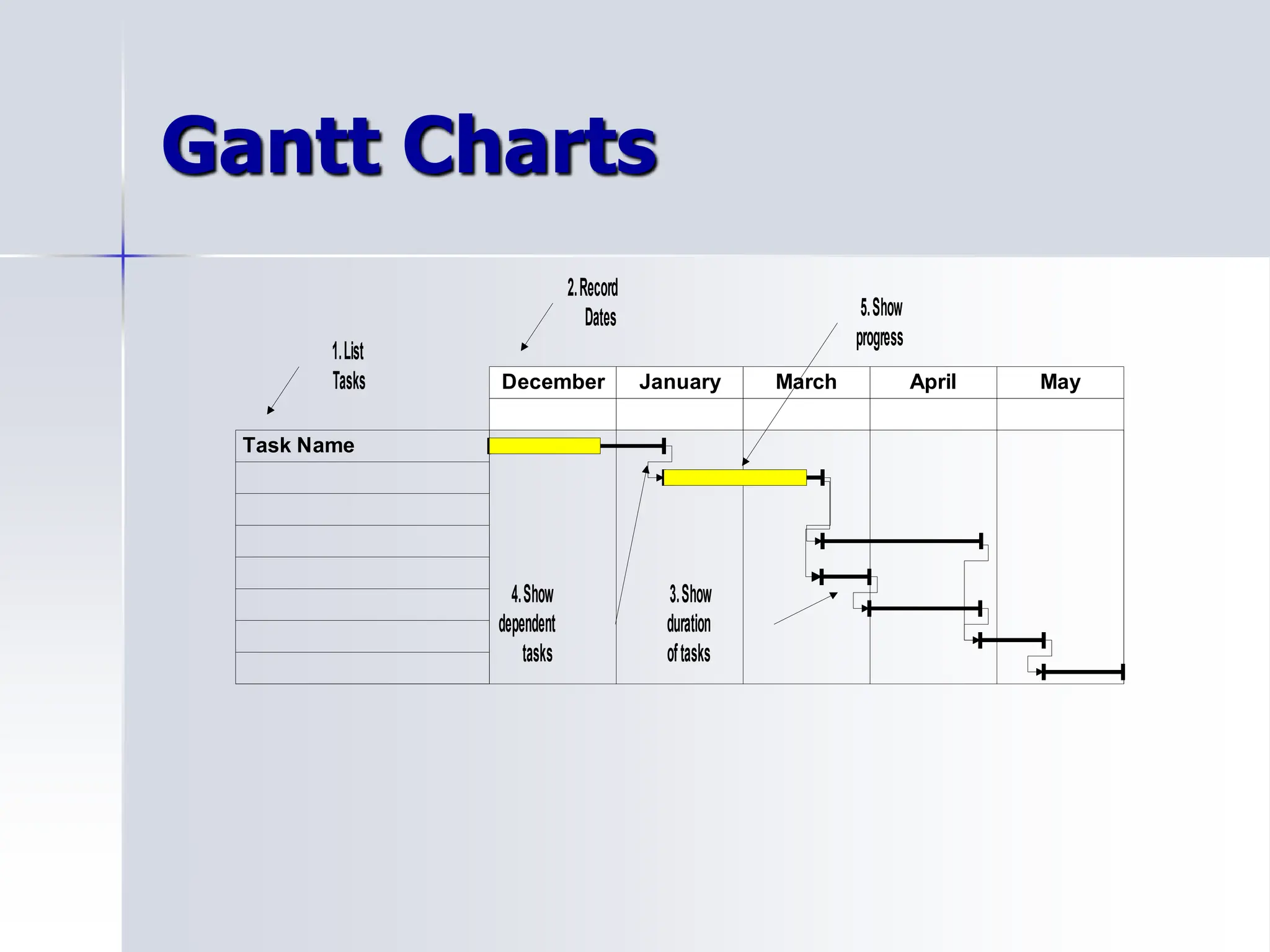
Gantt Charts
December January March April May
Task Name
1.List
Tasks
2.Record
Dates
3.Show
duration
oftasks
4.Show
dependent
tasks
5.Show
progress
Team Meetings
 Review progress of the project
 Team members provide updates on their
task assignments
 Team members report their concerns or
issues with the progress of the project
 Once issues or problems are identified,
schedule a separate resolution meeting
Managing: Monitoring the plan
 What to monitor
– Monitor time
– Monitor quality
– Monitor budget
 Falling behind?
– Add time
– Add resources
– Change the quality
Closing: Is the Project Finished?
– Administrative work: are all reports
complete?
– Project work: is it complete?
– Reflection work: what did we learn?
Closing Checklist
 Project goals met?
 Tasks left to do?
 Trained others?
 Told everyone about the changes?
 Reviewed what worked?
 Celebrated accomplishments?

1548693 (1).ppt

  • 1.
  • 2.
    Hope to Learn(10 Responses)  How to manage a project – the basics (4) (planning, scheduling and monitoring)  Practical tips for scheduling (2)  Strategies for getting buy-in  Communication and leadership  Methods for assessing progress  Ways to communicate progress  Anything
  • 3.
    Project Challenges  Communication(3)  Planning (3)  Determining timelines (2)  Unrealistic expectations in terms of roles and time estimates (2)  Time commitment to project while continuing day to day  Getting others to buy-in  Keeping track of the details  Keeping others on track  Maintaining momentum  Hand off from implementation to maintenance  Voicing concerns viewed as negative
  • 4.
    Topic Interest #1 ProjectPlanning (Breaking down into manageable tasks) #2 Project Scheduling (Assigning accurate timelines) #3 Effective Communication (Among project stakeholders)
  • 5.
    Learning Objectives • Defineprojects and project management • Recognize what is involved in the five components of the project cycle • Apply a team approach to project planning • Develop a project plan (WBS, Gantt Chart, Communication Plan) • Examine people issues in project implementation
  • 6.
    Agenda • Defining Projectsand PM • Project Cycle • Initiating: Project Charter • Planning: WBS Lunch • Gantt Chart, Communication Plan • Monitoring • Strategies for Typical People Issues
  • 7.
    Project Definition A projectis a one- time endeavour, that has definite starting and ending points, that is undertaken to create a unique product or service. People Processes Tools Ideas & Vision
  • 8.
    Project vs. OrdinaryWork • Projects differ from ordinary work • A project is a sequence of tasks, with a beginning and an end, with specific resources and time allocated to it • Projects are temporary and unique • Ordinary work is day-to-day, ongoing, repetitive • Project management is the process of combining systems, techniques and people to complete a project within established goals of time, budget and quality
  • 9.
    The Project Cycle InitiatingPlanning Managing (Controlling) Implementing (Executing) Closing
  • 10.
    Process Groups  Initiatingrecognize the project should begin and commit to do so  Planning develop a workable plan to address business need  Implementing coordinate people and resources to (Executing) carry out the plan  Managing ensure objectives are met by (Controlling) monitoring, measuring and taking corrective action  Closing formalize acceptance and bring to an orderly end
  • 11.
    Table Discussion  Whichpart (s) of the project cycle do you find are the hardest to do?  What are the challenges?
  • 12.
    Initiating “If you don’tknow where you are going, how will you know when you get there?”
  • 13.
    Getting Projects Initiated What is the process for defining the project? Who is involved? Who decides?  How does everyone that should be involved get “on board”?
  • 14.
    The Project Charter Project name  Start and end dates  Project Purpose – define in terms of customer/client expectations  Key Deliverables  Project team and key stakeholders  Critical success factors
  • 15.
    Risk Assessment  Factors –Resource adequacy – Schedule – Past Experience – Technology – Size of project – Geography – Potential Liability  Analysis Likelihood & severity – Low – Medium – High  Based on analysis, develop back-up strategies
  • 16.
    Building the ProjectTeam Use effective meetings  Establish direction – Develop a vision – Strategies for achieving the vision  Develop team standards – Decision-making, communication, roles and responsibilities
  • 17.
    Planning: Is ita Workable Plan? – Work Breakdown Structure – Schedule – Budget – Roles/responsibilities clearly defined – Communications plan
  • 18.
    Work Breakdown Structure Step1: Brainstorm all of the tasks that need to be done i.e. WHAT will be done, not how. Step 2: While tasks are still independent, not in any order, estimate the time each task will take. Step 3: Put the tasks in order (imagine that one person is doing ALL) to get the sequence. Step 4: Identify tasks that can be done simultaneously. Group them in columns. Step 5: Identify the tasks in each of the columns that take the longest and line them up in a row to give the critical path.
  • 19.
    Team Member ReportsOn  What challenges did your team face in completing this activity?  What helped?
  • 20.
    Successful Projects  Clientis satisfied with end deliverable (product, service, process or plan)  Deliverable is given on time  Project stayed within budget and human resource allocations  Team members increased their skills and knowledge  Organization has benefited
  • 21.
    Gantt Charts December JanuaryMarch April May Task Name 1.List Tasks 2.Record Dates 3.Show duration oftasks 4.Show dependent tasks 5.Show progress
  • 22.
    Team Meetings  Reviewprogress of the project  Team members provide updates on their task assignments  Team members report their concerns or issues with the progress of the project  Once issues or problems are identified, schedule a separate resolution meeting
  • 23.
    Managing: Monitoring theplan  What to monitor – Monitor time – Monitor quality – Monitor budget  Falling behind? – Add time – Add resources – Change the quality
  • 24.
    Closing: Is theProject Finished? – Administrative work: are all reports complete? – Project work: is it complete? – Reflection work: what did we learn?
  • 25.
    Closing Checklist  Projectgoals met?  Tasks left to do?  Trained others?  Told everyone about the changes?  Reviewed what worked?  Celebrated accomplishments?