Introduction to Mobile
Application
Development on
Android
Julian Shen
A bird?
A plane?
Not a Super man either
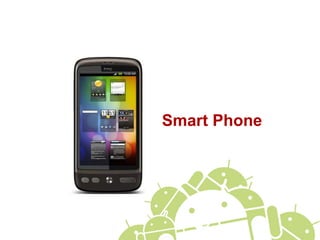
Smart Phone
4
• Make a phone call
• Surfing internet
• Manage your schedule
• .....
A smart phone can
5
Who uses smart
phone?
Everybody could own
oneThanks to Apple and iPhone
So...now you may
know
Why should you
develop a mobile
application?
Make money
What’s your target
users?
Everybody
Knowing your users well
But, there is one more
thing you should know
11
It’s a phone not a PC
• Less memory, less computing power
• Battery is its food
• Internet connection is not always on and stable
• Some operations cost user money
• Lot of hardware combination
• Different screen size
• With/without GPS
• Capacitive/Resistive/No touch screen
• ....
Application design
philosophy
13
What is a good
mobile application?
• Decent user interface
• Better performance
• Consume less power
14
A Good User
Interface
• Should be pretty but not only pretty
• Should be also
• Reasonable
• Predictable
• Responsive
• Easy to operate by fingers
15
What you should
avoid
• Complex and meaningless gestures
• Meaningless animations
• Inconsistent UI behaviors
• Too many operating steps
• Hidden steps
• Long run logic in UI thread
• Block user (Progress dialog is not so good)
• Any assumption
16
Performance
• Always think about the worst case
• IO costs
• Network is slow
• Long run (or busy) process consumes
battery
• Background is good but also evil
You don’t like to see this
Introduction to
Android
20
Android is
• A mobile platform
• A Google’s product
• Linux + Java
• Source is available to public
21
Version History
• 1.0 - Sep 2008
• 1.1 - Feb 2009
• 1.5 Cupcake - April 2009
• 1.6 Donut - Sep 2009
• 2.0/2.1 Eclair - Oct 2009 (2.0), Jan 2010
(2.1)
• 2.2 Froyo - May 2010
• 2.3(?) Gingerbread - 2010(?)
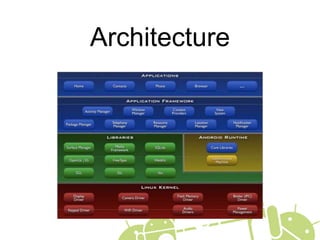
Architecture
23
Application
Fundamentals
• By default, every application runs on its
own process
• Applications could share process
• Each process has its own JVM
• By default, each application has a
unique Linux UID
• It’s possible to share same UID for two
different application
• Every process has its own memory limit
24
Application
Components
• Activities
• Services
• Broadcast receivers
• Content providers
What you need
before developing an
Android application?
JAVA
Eclipse
Android SDK and
ADT
Get it from http://www.android.com
SDK document
Read it online : http://www.android.com
What else you might
be interested?
Android Open Source
Check how to get it from http://source.android.com
32
Why you might need
Android sources?
• Android document sucks
• Trust no one! Truth is in the sources
• Many applications could be taken as
examples
33
Other way to develop
• Adobe AIR
• HTML
First step to Android
35
Create an Android
project
• Specify project name
• Target platform
• Application properties
• Every application with UI starts from
an Activity
View Hierarchy
37
Layout
• Create a new layout
• Add a button
• Assign an ID to this button
• Add on click action to this button
• Loading layout resource
• Accessing button from codes
38
Application
Resources
• Layout
• Drawables
• Strings
• Colors
• Styles
• ...
39
Run and Debug
• Create an AVD
• Run application
• Using DDMS
• Check UI hierarchy from hierarchy
viewer
Traceview
May force be with
you

Introduction to Mobile Application Development on Android