Course Code: CSDLO6013
Course Title: Image and
Video Processing
T.E. CSE (AI&ML)
Prepared by: Mr. R. P. Tivarekar
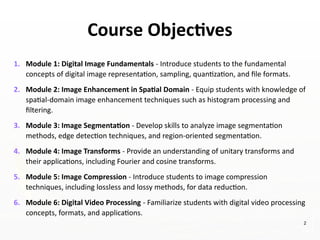
Course Objectives
1. Module 1: Digital Image Fundamentals - Introduce students to the fundamental
concepts of digital image representation, sampling, quantization, and file formats.
2. Module 2: Image Enhancement in Spatial Domain - Equip students with knowledge of
spatial-domain image enhancement techniques such as histogram processing and
filtering.
3. Module 3: Image Segmentation - Develop skills to analyze image segmentation
methods, edge detection techniques, and region-oriented segmentation.
4. Module 4: Image Transforms - Provide an understanding of unitary transforms and
their applications, including Fourier and cosine transforms.
5. Module 5: Image Compression - Introduce students to image compression
techniques, including lossless and lossy methods, for data reduction.
6. Module 6: Digital Video Processing - Familiarize students with digital video processing
concepts, formats, and applications.
2
3
4
5
Prepared by: Mr. R. P. Tivarekar
6
Module 01
Digital Image Fundamentals
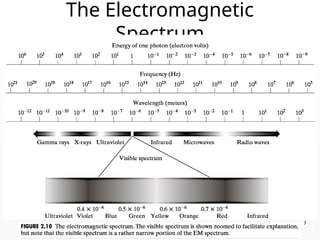
The Electromagnetic
Spectrum
7
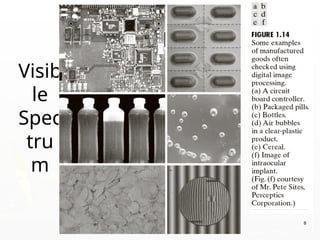
Visib
le
Spec
tru
m
8
9
10
11
What is an Image?
►Image is a source of information according to
information theory
►An image may be defined as a two-dimensional
function f(x,y) where x and y are spatial
coordinates and amplitude of f at any pair of
coordinates (x,y) is called the intensity or Gray
level of the image at that point.
12
Digital Image
► When x,y and the amplitude values of f are all
finite, discrete quantities, we call the image a
Digital Image.
► A digital Image is composed of a finite number of
elements each of which has a particular
location and value
►These elements are referred to as Picture
Elements, Image Elements, Pels or Pixels.
13
Pixel
►In digital imaging, a pixel is the smallest piece of
information in an image.
►Pixels are normally arranged in a regular 2-
dimensional grid, and are often represented using
dots or squares
►The intensity of each pixel is variable; in color
systems, each pixel has typically three or four
components such as red, green, and blue, or cyan,
magenta, yellow, and black
14
Image Representation
►How is an image stored?
►How is an image file structured?
►A digital image is the composition of individual pixels
or picture elements.
►The pixels are arranged in the form of row and
column to form a picture area.
►The number of pixels in an image is a function of the
size of the image and number of pixels per unit
length (e.g., inch) in horizontal as well as vertical
direction.
15
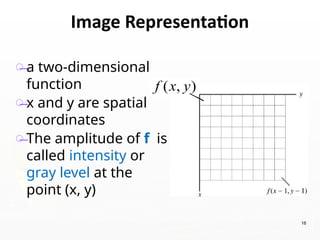
Ěś a two-dimensional
function
Ěś x and y are spatial
coordinates
Ěś The amplitude of f is
called intensity or
gray level at the
point (x, y)
16
Image Representation
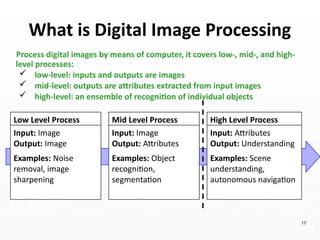
What is Digital Image Processing
Low Level Process
Input: Image
Output: Image
Examples: Noise
removal, image
sharpening
Mid Level Process
Input: Image
Output: Attributes
Examples: Object
recognition,
segmentation
High Level Process
Input: Attributes
Output: Understanding
Examples: Scene
understanding,
autonomous navigation
Process digital images by means of computer, it covers low-, mid-, and high-
level processes:
 low-level: inputs and outputs are images
 mid-level: outputs are attributes extracted from input images
 high-level: an ensemble of recognition of individual objects
17
ELEMENTS OF DIGITAL IMAGE
PROCESSING SYSTEMS
►The basic operations performed in a
digital image processing systems include
1. Acquisition
2. Storage
3. Processing
4. communication and
5. display
18
19
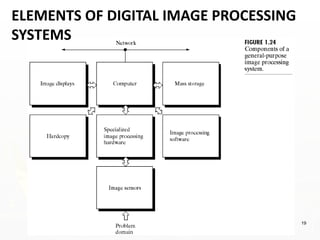
ELEMENTS OF DIGITAL IMAGE PROCESSING
SYSTEMS
20
►The basic components used in a digital
image processing systems include
1. Image Sensors
2. Specialized hardware
3. Computer
4. Software
5. Mass storage
6. Display
7. Hardcopy
8. Networking/
communication elements
ELEMENTS OF DIGITAL IMAGE
PROCESSING SYSTEMS
21
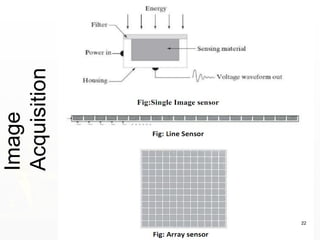
1. Image Sensors: With reference to sensing, primary
element required to acquire digital image is a
physical device that is sensitive to the energy
radiated by the object. Energy radiated by the object
is converted to electrical energy at localized places.
2. Specialized image processing hardware: It consists
of the hardware that performs other primitive
operations such as an arithmetic logic unit, which
performs arithmetic and logical operations in parallel
on images.
22
Image
Acquisition
23
Image Acquisition Process
24
3. Computer: It is a general-purpose computer and can
range from a PC to a supercomputer depending on
the application. In dedicated applications, sometimes
specially designed computer are used to achieve a
required level of performance.
4. Software: It consists of specialized modules that
perform specific tasks a well-designed package also
includes capability for the user to write code, as a
minimum, utilizes the specialized module. More
sophisticated software packages allow the
integration of these modules.
25
5. Mass storage: This capability is a must in image processing
applications. An image needs lot of storage space if the image
is not compressed .Image processing applications falls into
three principal categories of storage.
i) Short term storage for use during processing
ii) Online storage for relatively fast retrieval
iii) Archival storage such as magnetic tapes and disks
6. Image display: Devices designed to present visual content in
the form of images. They are widely used in various
applications, including computers, televisions, mobile devices,
and public presentations. Displays driven by the outputs of
image and graphics displays cards that are an integral part of
computer system.
Types of Image Displays:
LCD (Liquid Crystal Display), LED (Light Emitting Diode) Display,
OLED (Organic Light Emitting Diode), Plasma Display.
26
7. Hardcopy devices: The devices for recording image
includes laser printers, film cameras, heat sensitive
devices inkjet units and digital units such as optical
and CD ROM disk. Films provide the highest
possible resolution, but paper is the obvious
medium of choice for written applications.
8. Networking/Communication: It is almost a default
function in any computer system in use today
because of the large amount of data inherent in
image processing applications. The key
consideration in image transmission bandwidth.
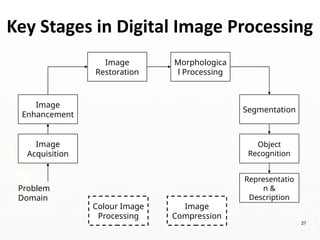
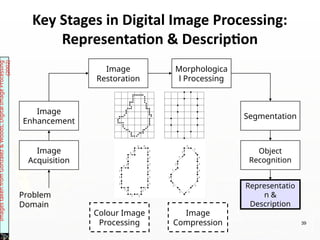
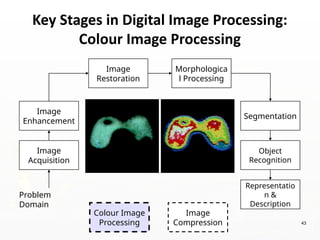
Key Stages in Digital Image Processing
Image
Acquisition
Image
Restoration
Morphologica
l Processing
Segmentation
Representatio
n &
Description
Image
Enhancement
Object
Recognition
Problem
Domain
Colour Image
Processing
Image
Compression
27
Image
Acquisition
Image
Restoration
Morphologica
l Processing
Segmentation
Representatio
n &
Description
Image
Enhancement
Object
Recognition
Problem
Domain
Colour Image
Processing
Image
Compression
Images
taken
from
Gonzalez
&
Woods,
Digital
Image
Processing
(2002)
28
Key Stages in Digital Image Processing:
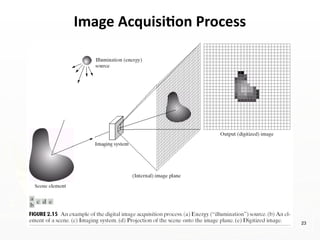
Image Acquisition
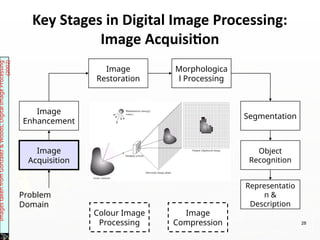
►Acquire images from sensors
►Perform A/D conversion (Sampling and
quantization)
►Output are images
29
Key Stages in Digital Image Processing:
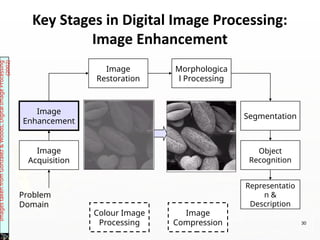
Image Enhancement
Image
Acquisition
Image
Restoration
Morphologica
l Processing
Segmentation
Representatio
n &
Description
Image
Enhancement
Object
Recognition
Problem
Domain
Colour Image
Processing
Image
Compression
Images
taken
from
Gonzalez
&
Woods,
Digital
Image
Processing
(2002)
30
►Manipulating image to be more suitable than
previous.
►It is a subjective process.
►Performed on Spatial and frequency domains.
31
Key Stages in Digital Image Processing:
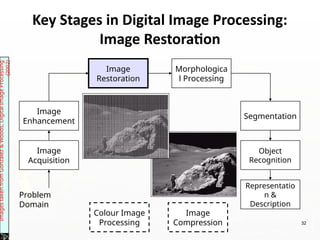
Image Restoration
Image
Acquisition
Image
Restoration
Morphologica
l Processing
Segmentation
Representatio
n &
Description
Image
Enhancement
Object
Recognition
Problem
Domain
Colour Image
Processing
Image
Compression
Images
taken
from
Gonzalez
&
Woods,
Digital
Image
Processing
(2002)
32
►Restore the images from the degradations /
noises.
►It is an objective process.
►Based on mathematical / probabilistic models
33
Keynote: Restoration is about fixing defects, while
enhancement is about improving aesthetics or usability to
make it more visually appealing/informative.
Key Stages in Digital Image Processing:
Morphological Processing
Image
Acquisition
Image
Restoration
Morphologica
l Processing
Segmentation
Representatio
n &
Description
Image
Enhancement
Object
Recognition
Problem
Domain
Colour Image
Processing
Image
Compression
Images
taken
from
Gonzalez
&
Woods,
Digital
Image
Processing
(2002)
34
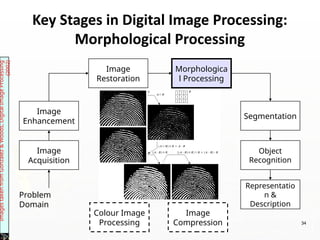
►Technique used in image analysis that focuses
on the structure or shape of objects within an
image to output image attributes.
►It uses set theory concepts and operates based
on the spatial arrangement of pixels.
►Deals with tools to extract image components
useful for representation and description.
►e.g. Shrinking or expanding image boundaries
35
Key Stages in Digital Image Processing:
Segmentation
Image
Acquisition
Image
Restoration
Morphologica
l Processing
Segmentation
Representatio
n &
Description
Image
Enhancement
Object
Recognition
Problem
Domain
Colour Image
Processing
Image
Compression
Images
taken
from
Gonzalez
&
Woods,
Digital
Image
Processing
(2002)
36
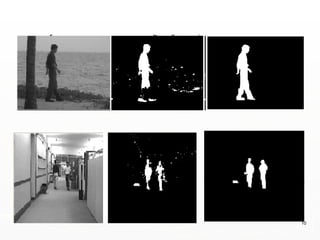
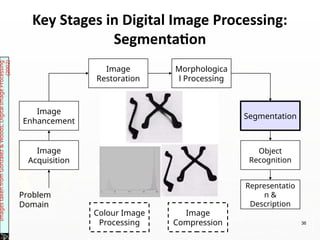
►Partition distinct regions or segments to
simplify or change its representation.
►It separates objects from the background or
partitions an image based on features like
color, texture, or intensity.
37
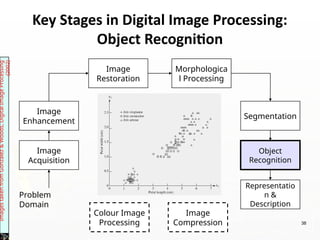
Key Stages in Digital Image Processing:
Object Recognition
Image
Acquisition
Image
Restoration
Morphologica
l Processing
Segmentation
Representatio
n &
Description
Image
Enhancement
Object
Recognition
Problem
Domain
Colour Image
Processing
Image
Compression
Images
taken
from
Gonzalez
&
Woods,
Digital
Image
Processing
(2002)
38
Key Stages in Digital Image Processing:
Representation & Description
Image
Acquisition
Image
Restoration
Morphologica
l Processing
Segmentation
Representatio
n &
Description
Image
Enhancement
Object
Recognition
Problem
Domain
Colour Image
Processing
Image
Compression
Images
taken
from
Gonzalez
&
Woods,
Digital
Image
Processing
(2002)
39
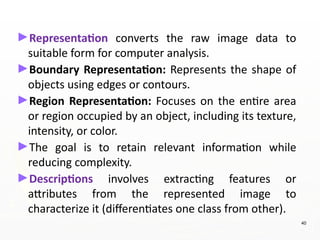
►Representation converts the raw image data to
suitable form for computer analysis.
►Boundary Representation: Represents the shape of
objects using edges or contours.
►Region Representation: Focuses on the entire area
or region occupied by an object, including its texture,
intensity, or color.
►The goal is to retain relevant information while
reducing complexity.
►Descriptions involves extracting features or
attributes from the represented image to
characterize it (differentiates one class from other).
40
Key Stages in Digital Image Processing:
Image Compression
Image
Acquisition
Image
Restoration
Morphologica
l Processing
Segmentation
Representatio
n &
Description
Image
Enhancement
Object
Recognition
Problem
Domain
Colour Image
Processing
Image
Compression 41
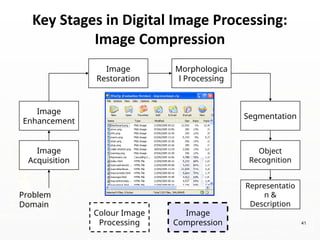
►Reduces the image size suitable for storage,
transmission and manage bandwidth.
42
Key Stages in Digital Image Processing:
Colour Image Processing
Image
Acquisition
Image
Restoration
Morphologica
l Processing
Segmentation
Representatio
n &
Description
Image
Enhancement
Object
Recognition
Problem
Domain
Colour Image
Processing
Image
Compression 43
►Pleasing presentations and more
understandings.
44
45
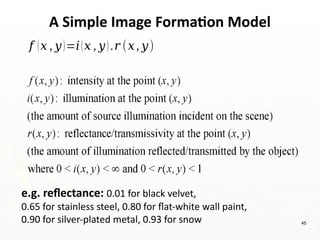
A Simple Image Formation Model
𝑓 (𝑥 , 𝑦)=𝑖(𝑥 , 𝑦).𝑟 (𝑥, 𝑦)
e.g. reflectance: 0.01 for black velvet,
0.65 for stainless steel, 0.80 for flat-white wall paint,
0.90 for silver-plated metal, 0.93 for snow
46
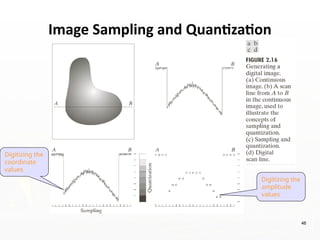
Image Sampling and Quantization
Digitizing the
coordinate
values
Digitizing the
amplitude
values
47
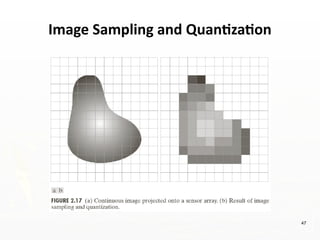
Image Sampling and Quantization
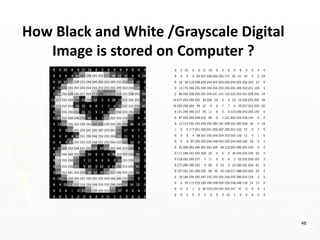
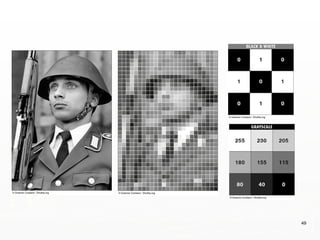
How Black and White /Grayscale Digital
Image is stored on Computer ?
48
49
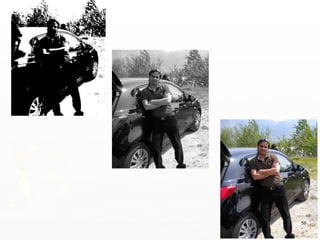
• The resolution of a digital image depends on two parameters
i. No. of samples of the digital image (N)
ii. No. of grey levels (m)
• The more these parameters are increased, the closer the
digitized array approximates the original image. However, the
amount of memory space and the processing requirements
increase drastically as function of these two factors.
• A good image is difficult to define, because image quality not
only is highly subjective, but is also strongly dependent on
the requirements of a given application. The quality of an
image is greatly varied by variation in the above-mentioned
factors.
Spatial Resolution and Tonal Resolution
Spatial Resolution
51
52
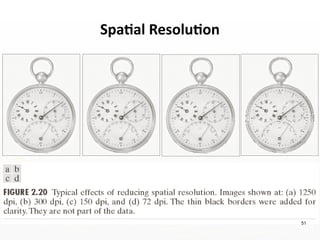
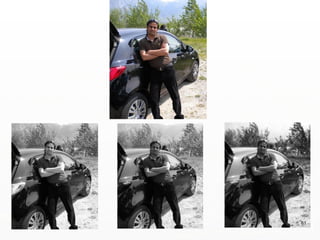
►Spatial resolution can be defined as the smallest discernible detail
in an image. (Digital Image Processing - Gonzalez, Woods). It is
determined by the number of pixels per inch used to represent
image.
►Generally, number of pixels of digital image is changed as a power
of two keeping the display area same to change spatial resolution.
►Spatial resolution is often measured in pixels per unit area (e.g.,
pixels per inch - PPI or dots per inch - DPI or lines per inch - LPI).
►Higher spatial resolution means more pixels, resulting in finer
details.
►If we have to compare the two images, to see which one is clearer
or which has more spatial resolution, we must compare two
images of the same size.
Spatial Resolution
Intensity / Tonal Resolution
53
Intensity / Tonal Resolution
54
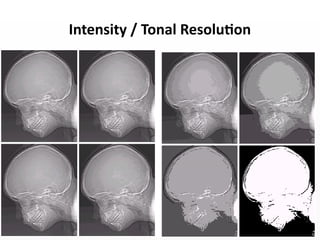
►In Tonal Resolution, the quality of images is varied by
decreasing the number of bits used to represent the no. of gray
levels in an image.
►The effects on image quality produced by varying N (number of
intensity levels) and m (number of bits per pixel) are
subjectively analyzed by the level of detail pertaining to an
image.
►In black-and-white images, levels are seen as shades of gray. In
color images, levels will be seen as specific color hues.
►Generally, tonal resolution for black-and-white picture
information should be at least 8 bits, and tonal resolution for
full color pictures information should be at least 24 bits.
55
Representing Digital Images
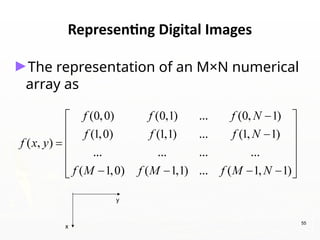
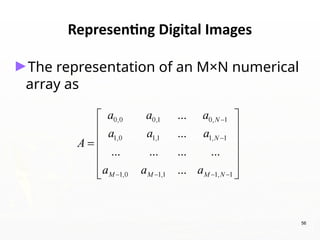
►The representation of an M×N numerical
array as
x
y
56
Representing Digital Images
►The representation of an M×N numerical
array as
57
Representing Digital Images
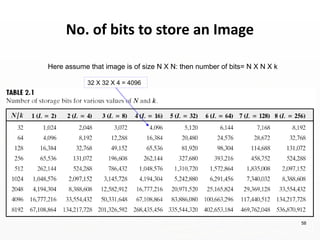
► Discrete intensity interval [0, L-1], L=2k
► The number b of bits required to store a M × N
digitized image
b = M × N × k
No. of bits to store an Image
Here assume that image is of size N X N: then number of bits= N X N X k
32 X 32 X 4 = 4096
58
59
60
61
Connectivity in digital images
62
• Connectivity in digital images refers to the way
pixels are grouped based on their adjacency and
intensity values, determining whether they
belong to the same object or region.
• It plays a vital role in image analysis, particularly
in tasks like segmentation, labeling, and object
detection.
• Two pixels are connected if they are in the same
class (i.e. the same color or the same range of
intensity) and they are neighbors of one another.
63
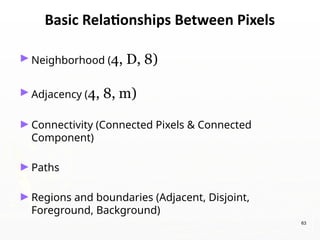
Basic Relationships Between Pixels
►Neighborhood (4, D, 8)
►Adjacency (4, 8, m)
►Connectivity (Connected Pixels & Connected
Component)
►Paths
►Regions and boundaries (Adjacent, Disjoint,
Foreground, Background)
64
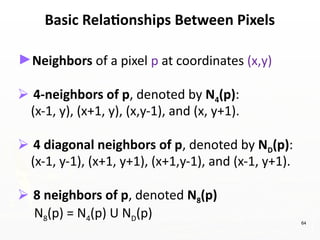
Basic Relationships Between Pixels
►Neighbors of a pixel p at coordinates (x,y)
⮚ 4-neighbors of p, denoted by N4(p):
(x-1, y), (x+1, y), (x,y-1), and (x, y+1).
⮚ 4 diagonal neighbors of p, denoted by ND(p):
(x-1, y-1), (x+1, y+1), (x+1,y-1), and (x-1, y+1).
⮚ 8 neighbors of p, denoted N8(p)
N8(p) = N4(p) U ND(p)
65
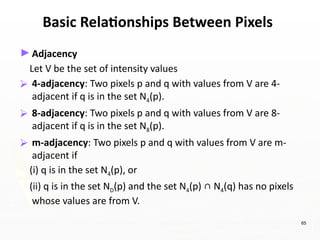
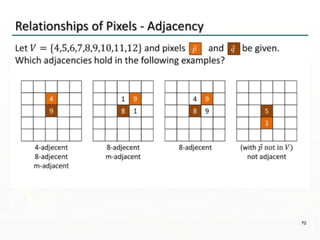
Basic Relationships Between Pixels
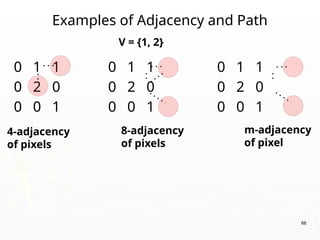
►Adjacency
Let V be the set of intensity values
⮚ 4-adjacency: Two pixels p and q with values from V are 4-
adjacent if q is in the set N4(p).
⮚ 8-adjacency: Two pixels p and q with values from V are 8-
adjacent if q is in the set N8(p).
⮚ m-adjacency: Two pixels p and q with values from V are m-
adjacent if
(i) q is in the set N4(p), or
(ii) q is in the set ND(p) and the set N4(p) ∊ N4(q) has no pixels
whose values are from V.
66
Basic Relationships Between Pixels
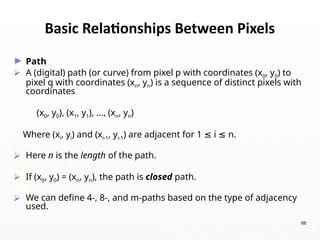
► Path
⮚ A (digital) path (or curve) from pixel p with coordinates (x0, y0) to
pixel q with coordinates (xn, yn) is a sequence of distinct pixels with
coordinates
(x0, y0), (x1, y1), …, (xn, yn)
Where (xi, yi) and (xi-1, yi-1) are adjacent for 1 i n.
≤ ≤
⮚ Here n is the length of the path.
⮚ If (x0, y0) = (xn, yn), the path is closed path.
⮚ We can define 4-, 8-, and m-paths based on the type of adjacency
used.
67
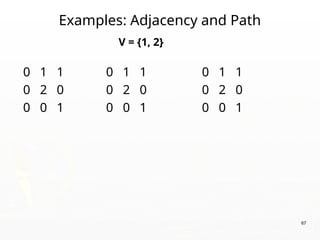
Examples: Adjacency and Path
0 1 1 0 1 1 0 1 1
0 2 0 0 2 0 0 2 0
0 0 1 0 0 1 0 0 1
V = {1, 2}
68
Examples of Adjacency and Path
0 1 1 0 1 1 0 1 1
0 2 0 0 2 0 0 2 0
0 0 1 0 0 1 0 0 1
V = {1, 2}
8-adjacency
of pixels
m-adjacency
of pixel
4-adjacency
of pixels
69
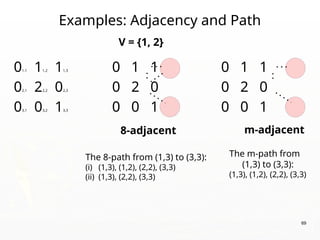
Examples: Adjacency and Path
01,1 11,2 11,3 0 1 1 0 1 1
02,1 22,2 02,3 0 2 0 0 2 0
03,1 03,2 13,3 0 0 1 0 0 1
V = {1, 2}
8-adjacent m-adjacent
The 8-path from (1,3) to (3,3):
(i) (1,3), (1,2), (2,2), (3,3)
(ii) (1,3), (2,2), (3,3)
The m-path from
(1,3) to (3,3):
(1,3), (1,2), (2,2), (3,3)
70
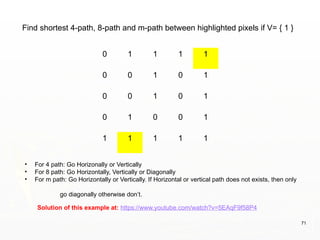
71
0 1 1 1 1
0 0 1 0 1
0 0 1 0 1
0 1 0 0 1
1 1 1 1 1
Solution of this example at: https://www.youtube.com/watch?v=5EAqF9f58P4
Find shortest 4-path, 8-path and m-path between highlighted pixels if V= { 1 }
• For 4 path: Go Horizonally or Vertically
• For 8 path: Go Horizontally, Vertically or Diagonally
• For m path: Go Horizontally or Vertically. If Horizontal or vertical path does not exists, then only
go diagonally otherwise don’t.
72
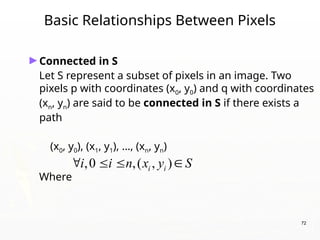
Basic Relationships Between Pixels
►Connected in S
Let S represent a subset of pixels in an image. Two
pixels p with coordinates (x0, y0) and q with coordinates
(xn, yn) are said to be connected in S if there exists a
path
(x0, y0), (x1, y1), …, (xn, yn)
Where
,0 ,( , )
i i
i i n x y S
   
73
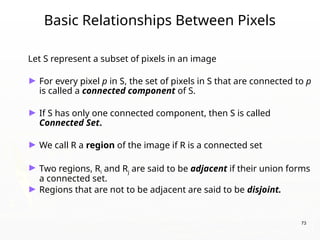
Basic Relationships Between Pixels
Let S represent a subset of pixels in an image
► For every pixel p in S, the set of pixels in S that are connected to p
is called a connected component of S.
► If S has only one connected component, then S is called
Connected Set.
► We call R a region of the image if R is a connected set
► Two regions, Ri and Rj are said to be adjacent if their union forms
a connected set.
► Regions that are not to be adjacent are said to be disjoint.
74
Basic Relationships Between Pixels
► Boundary (or border)
⮚ The boundary of the region R is the set of pixels in the region that
have one or more neighbors that are not in R.
⮚ If R happens to be an entire image, then its boundary is defined as
the set of pixels in the first and last rows and columns of the
image.
► Foreground and background
⮚ An image contains K disjoint regions, Rk, k = 1, 2, …, K. Let Ru
denote the union of all the K regions, and let (Ru)c
denote its
complement.
All the points in Ru is called foreground;
All the points in (Ru)c
is called background.
75
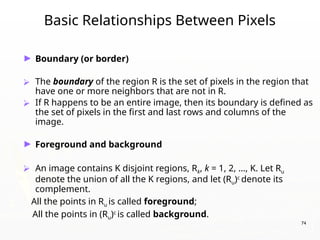
Question 1
►In the following arrangement of pixels, are the two
regions (of 1s) adjacent? (if 8-adjacency is used)
1 1 1
1 0 1
0 1 0
0 0 1
1 1 1
1 1 1
Region 1
Region 2
76
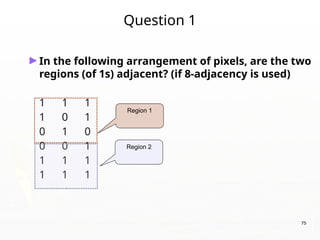
Question 2
►In the following arrangement of pixels, are the two
parts (of 1s) adjacent? (if 4-adjacency is used)
1 1 1
1 0 1
0 1 0
0 0 1
1 1 1
1 1 1
Part 1
Part 2
77
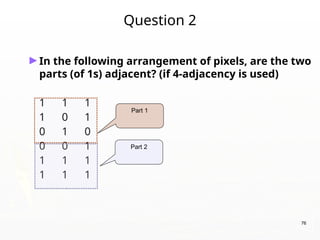
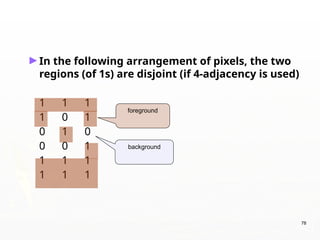
►In the following arrangement of pixels, the two
regions (of 1s) are disjoint (if 4-adjacency is used)
1 1 1
1 0 1
0 1 0
0 0 1
1 1 1
1 1 1
Region 1
Region 2
78
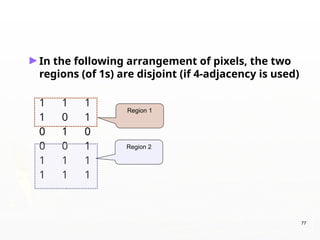
►In the following arrangement of pixels, the two
regions (of 1s) are disjoint (if 4-adjacency is used)
1 1 1
1 0 1
0 1 0
0 0 1
1 1 1
1 1 1
foreground
background
79
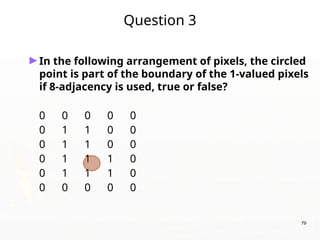
Question 3
►In the following arrangement of pixels, the circled
point is part of the boundary of the 1-valued pixels
if 8-adjacency is used, true or false?
0 0 0 0 0
0 1 1 0 0
0 1 1 0 0
0 1 1 1 0
0 1 1 1 0
0 0 0 0 0
80
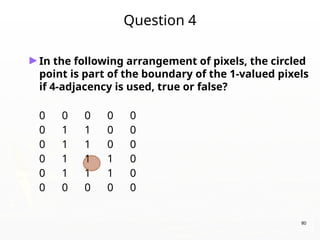
Question 4
►In the following arrangement of pixels, the circled
point is part of the boundary of the 1-valued pixels
if 4-adjacency is used, true or false?
0 0 0 0 0
0 1 1 0 0
0 1 1 0 0
0 1 1 1 0
0 1 1 1 0
0 0 0 0 0
81
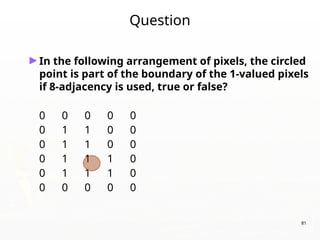
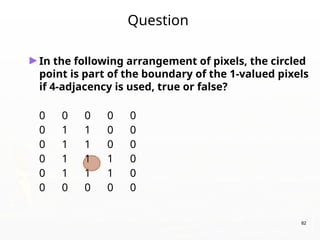
Question
►In the following arrangement of pixels, the circled
point is part of the boundary of the 1-valued pixels
if 8-adjacency is used, true or false?
0 0 0 0 0
0 1 1 0 0
0 1 1 0 0
0 1 1 1 0
0 1 1 1 0
0 0 0 0 0
82
Question
►In the following arrangement of pixels, the circled
point is part of the boundary of the 1-valued pixels
if 4-adjacency is used, true or false?
0 0 0 0 0
0 1 1 0 0
0 1 1 0 0
0 1 1 1 0
0 1 1 1 0
0 0 0 0 0
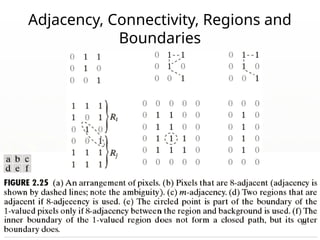
Adjacency, Connectivity, Regions and
Boundaries
83
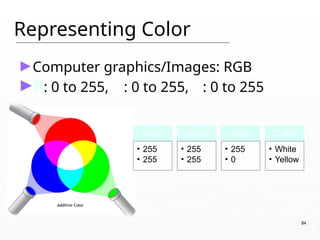
Representing Color
►Computer graphics/Images: RGB
►R: 0 to 255, G: 0 to 255, B: 0 to 255
Red
• 255
• 255
Green
• 255
• 255
Blue
• 255
• 0
Color
• White
• Yellow
84
►Few application discussion slides
numbered from 85-110 (Can be ignored.
Additional information)
85
Document Handling
86
Signature Verification
87
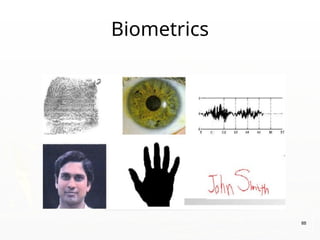
Biometrics
88
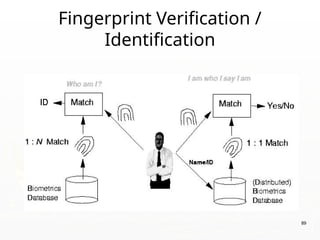
Fingerprint Verification /
Identification
89
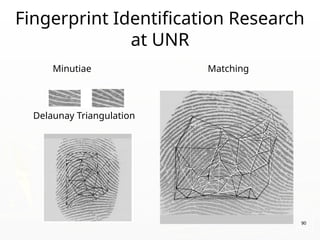
Fingerprint Identification Research
at UNR
Minutiae Matching
Delaunay Triangulation
90
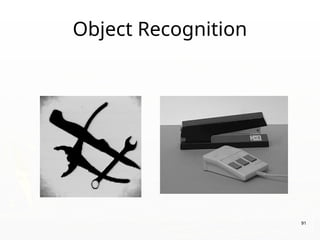
Object Recognition
91
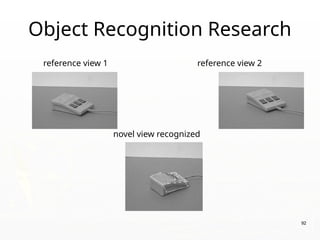
Object Recognition Research
reference view 1 reference view 2
novel view recognized
92
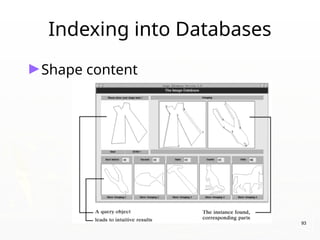
Indexing into Databases
►Shape content
93
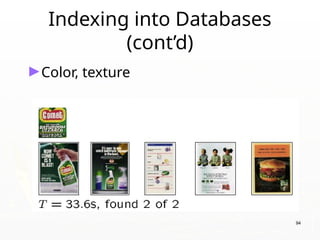
Indexing into Databases
(cont’d)
►Color, texture
94
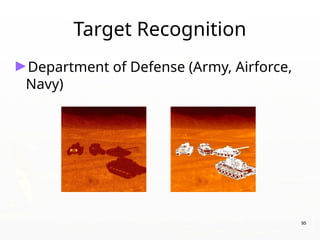
Target Recognition
►Department of Defense (Army, Airforce,
Navy)
95
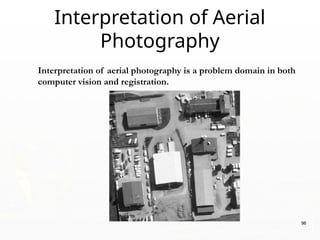
Interpretation of aerial photography is a problem domain in both
computer vision and registration.
Interpretation of Aerial
Photography
96
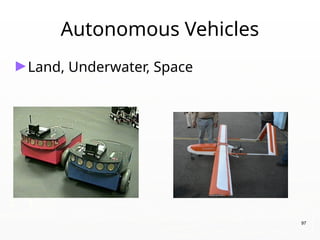
Autonomous Vehicles
►Land, Underwater, Space
97
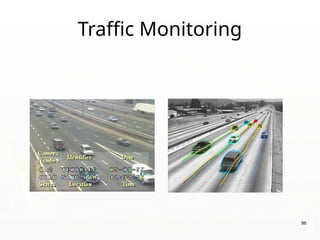
Traffic Monitoring
98
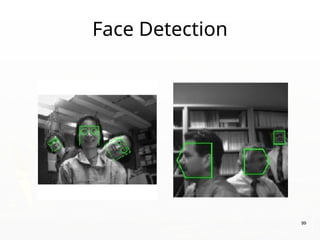
Face Detection
99
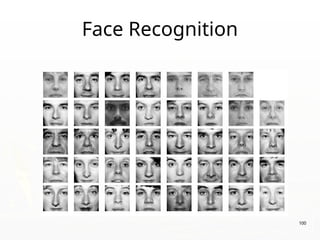
Face Recognition
100
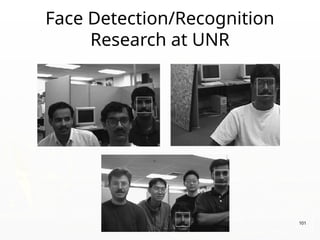
Face Detection/Recognition
Research at UNR
101
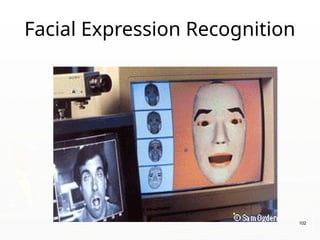
Facial Expression Recognition
102
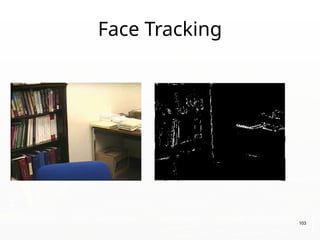
Face Tracking
103
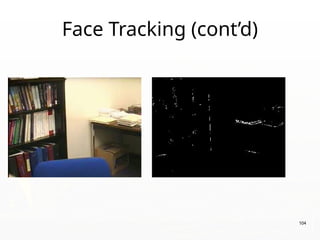
Face Tracking (cont’d)
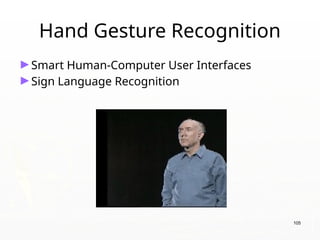
104
Hand Gesture Recognition
►Smart Human-Computer User Interfaces
►Sign Language Recognition
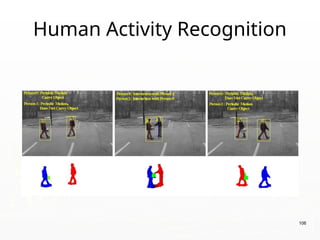
105
Human Activity Recognition
106
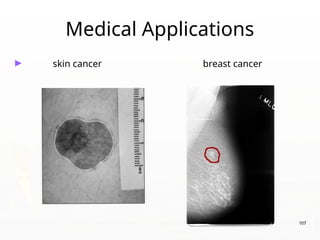
Medical Applications
► skin cancer breast cancer
107
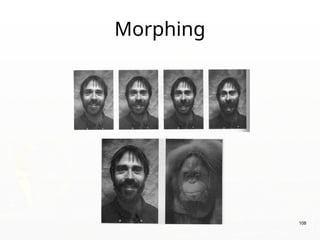
Morphing
108
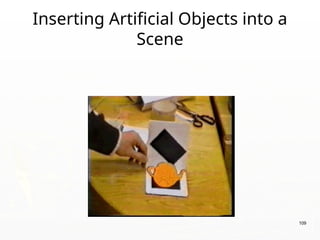
Inserting Artificial Objects into a
Scene
109
Companies In this Field In India
►Sarnoff Corporation
►Kritikal Solutions
►National Instruments
►GE Laboratories
►Ittiam, Bangalore
►Interra Systems, Noida
►Yahoo India (Multimedia Searching)
►nVidia Graphics, Pune (have high requirements)
►Microsoft research
►DRDO labs
►ISRO labs
►… 110

Digital Image Processing fundamentals.pptx

  • 1.
    Course Code: CSDLO6013 CourseTitle: Image and Video Processing T.E. CSE (AI&ML) Prepared by: Mr. R. P. Tivarekar
  • 2.
    Course Objectives 1. Module1: Digital Image Fundamentals - Introduce students to the fundamental concepts of digital image representation, sampling, quantization, and file formats. 2. Module 2: Image Enhancement in Spatial Domain - Equip students with knowledge of spatial-domain image enhancement techniques such as histogram processing and filtering. 3. Module 3: Image Segmentation - Develop skills to analyze image segmentation methods, edge detection techniques, and region-oriented segmentation. 4. Module 4: Image Transforms - Provide an understanding of unitary transforms and their applications, including Fourier and cosine transforms. 5. Module 5: Image Compression - Introduce students to image compression techniques, including lossless and lossy methods, for data reduction. 6. Module 6: Digital Video Processing - Familiarize students with digital video processing concepts, formats, and applications. 2
  • 3.
  • 4.
  • 5.
  • 6.
    Prepared by: Mr.R. P. Tivarekar 6 Module 01 Digital Image Fundamentals
  • 7.
  • 8.
  • 9.
  • 10.
  • 11.
  • 12.
    What is anImage? ►Image is a source of information according to information theory ►An image may be defined as a two-dimensional function f(x,y) where x and y are spatial coordinates and amplitude of f at any pair of coordinates (x,y) is called the intensity or Gray level of the image at that point. 12
  • 13.
    Digital Image ► Whenx,y and the amplitude values of f are all finite, discrete quantities, we call the image a Digital Image. ► A digital Image is composed of a finite number of elements each of which has a particular location and value ►These elements are referred to as Picture Elements, Image Elements, Pels or Pixels. 13
  • 14.
    Pixel ►In digital imaging,a pixel is the smallest piece of information in an image. ►Pixels are normally arranged in a regular 2- dimensional grid, and are often represented using dots or squares ►The intensity of each pixel is variable; in color systems, each pixel has typically three or four components such as red, green, and blue, or cyan, magenta, yellow, and black 14
  • 15.
    Image Representation ►How isan image stored? ►How is an image file structured? ►A digital image is the composition of individual pixels or picture elements. ►The pixels are arranged in the form of row and column to form a picture area. ►The number of pixels in an image is a function of the size of the image and number of pixels per unit length (e.g., inch) in horizontal as well as vertical direction. 15
  • 16.
    Ěś a two-dimensional function Ěśx and y are spatial coordinates Ěś The amplitude of f is called intensity or gray level at the point (x, y) 16 Image Representation
  • 17.
    What is DigitalImage Processing Low Level Process Input: Image Output: Image Examples: Noise removal, image sharpening Mid Level Process Input: Image Output: Attributes Examples: Object recognition, segmentation High Level Process Input: Attributes Output: Understanding Examples: Scene understanding, autonomous navigation Process digital images by means of computer, it covers low-, mid-, and high- level processes:  low-level: inputs and outputs are images  mid-level: outputs are attributes extracted from input images  high-level: an ensemble of recognition of individual objects 17
  • 18.
    ELEMENTS OF DIGITALIMAGE PROCESSING SYSTEMS ►The basic operations performed in a digital image processing systems include 1. Acquisition 2. Storage 3. Processing 4. communication and 5. display 18
  • 19.
    19 ELEMENTS OF DIGITALIMAGE PROCESSING SYSTEMS
  • 20.
    20 ►The basic componentsused in a digital image processing systems include 1. Image Sensors 2. Specialized hardware 3. Computer 4. Software 5. Mass storage 6. Display 7. Hardcopy 8. Networking/ communication elements ELEMENTS OF DIGITAL IMAGE PROCESSING SYSTEMS
  • 21.
    21 1. Image Sensors:With reference to sensing, primary element required to acquire digital image is a physical device that is sensitive to the energy radiated by the object. Energy radiated by the object is converted to electrical energy at localized places. 2. Specialized image processing hardware: It consists of the hardware that performs other primitive operations such as an arithmetic logic unit, which performs arithmetic and logical operations in parallel on images.
  • 22.
  • 23.
  • 24.
    24 3. Computer: Itis a general-purpose computer and can range from a PC to a supercomputer depending on the application. In dedicated applications, sometimes specially designed computer are used to achieve a required level of performance. 4. Software: It consists of specialized modules that perform specific tasks a well-designed package also includes capability for the user to write code, as a minimum, utilizes the specialized module. More sophisticated software packages allow the integration of these modules.
  • 25.
    25 5. Mass storage:This capability is a must in image processing applications. An image needs lot of storage space if the image is not compressed .Image processing applications falls into three principal categories of storage. i) Short term storage for use during processing ii) Online storage for relatively fast retrieval iii) Archival storage such as magnetic tapes and disks 6. Image display: Devices designed to present visual content in the form of images. They are widely used in various applications, including computers, televisions, mobile devices, and public presentations. Displays driven by the outputs of image and graphics displays cards that are an integral part of computer system. Types of Image Displays: LCD (Liquid Crystal Display), LED (Light Emitting Diode) Display, OLED (Organic Light Emitting Diode), Plasma Display.
  • 26.
    26 7. Hardcopy devices:The devices for recording image includes laser printers, film cameras, heat sensitive devices inkjet units and digital units such as optical and CD ROM disk. Films provide the highest possible resolution, but paper is the obvious medium of choice for written applications. 8. Networking/Communication: It is almost a default function in any computer system in use today because of the large amount of data inherent in image processing applications. The key consideration in image transmission bandwidth.
  • 27.
    Key Stages inDigital Image Processing Image Acquisition Image Restoration Morphologica l Processing Segmentation Representatio n & Description Image Enhancement Object Recognition Problem Domain Colour Image Processing Image Compression 27
  • 28.
    Image Acquisition Image Restoration Morphologica l Processing Segmentation Representatio n & Description Image Enhancement Object Recognition Problem Domain ColourImage Processing Image Compression Images taken from Gonzalez & Woods, Digital Image Processing (2002) 28 Key Stages in Digital Image Processing: Image Acquisition
  • 29.
    ►Acquire images fromsensors ►Perform A/D conversion (Sampling and quantization) ►Output are images 29
  • 30.
    Key Stages inDigital Image Processing: Image Enhancement Image Acquisition Image Restoration Morphologica l Processing Segmentation Representatio n & Description Image Enhancement Object Recognition Problem Domain Colour Image Processing Image Compression Images taken from Gonzalez & Woods, Digital Image Processing (2002) 30
  • 31.
    ►Manipulating image tobe more suitable than previous. ►It is a subjective process. ►Performed on Spatial and frequency domains. 31
  • 32.
    Key Stages inDigital Image Processing: Image Restoration Image Acquisition Image Restoration Morphologica l Processing Segmentation Representatio n & Description Image Enhancement Object Recognition Problem Domain Colour Image Processing Image Compression Images taken from Gonzalez & Woods, Digital Image Processing (2002) 32
  • 33.
    ►Restore the imagesfrom the degradations / noises. ►It is an objective process. ►Based on mathematical / probabilistic models 33 Keynote: Restoration is about fixing defects, while enhancement is about improving aesthetics or usability to make it more visually appealing/informative.
  • 34.
    Key Stages inDigital Image Processing: Morphological Processing Image Acquisition Image Restoration Morphologica l Processing Segmentation Representatio n & Description Image Enhancement Object Recognition Problem Domain Colour Image Processing Image Compression Images taken from Gonzalez & Woods, Digital Image Processing (2002) 34
  • 35.
    ►Technique used inimage analysis that focuses on the structure or shape of objects within an image to output image attributes. ►It uses set theory concepts and operates based on the spatial arrangement of pixels. ►Deals with tools to extract image components useful for representation and description. ►e.g. Shrinking or expanding image boundaries 35
  • 36.
    Key Stages inDigital Image Processing: Segmentation Image Acquisition Image Restoration Morphologica l Processing Segmentation Representatio n & Description Image Enhancement Object Recognition Problem Domain Colour Image Processing Image Compression Images taken from Gonzalez & Woods, Digital Image Processing (2002) 36
  • 37.
    ►Partition distinct regionsor segments to simplify or change its representation. ►It separates objects from the background or partitions an image based on features like color, texture, or intensity. 37
  • 38.
    Key Stages inDigital Image Processing: Object Recognition Image Acquisition Image Restoration Morphologica l Processing Segmentation Representatio n & Description Image Enhancement Object Recognition Problem Domain Colour Image Processing Image Compression Images taken from Gonzalez & Woods, Digital Image Processing (2002) 38
  • 39.
    Key Stages inDigital Image Processing: Representation & Description Image Acquisition Image Restoration Morphologica l Processing Segmentation Representatio n & Description Image Enhancement Object Recognition Problem Domain Colour Image Processing Image Compression Images taken from Gonzalez & Woods, Digital Image Processing (2002) 39
  • 40.
    ►Representation converts theraw image data to suitable form for computer analysis. ►Boundary Representation: Represents the shape of objects using edges or contours. ►Region Representation: Focuses on the entire area or region occupied by an object, including its texture, intensity, or color. ►The goal is to retain relevant information while reducing complexity. ►Descriptions involves extracting features or attributes from the represented image to characterize it (differentiates one class from other). 40
  • 41.
    Key Stages inDigital Image Processing: Image Compression Image Acquisition Image Restoration Morphologica l Processing Segmentation Representatio n & Description Image Enhancement Object Recognition Problem Domain Colour Image Processing Image Compression 41
  • 42.
    ►Reduces the imagesize suitable for storage, transmission and manage bandwidth. 42
  • 43.
    Key Stages inDigital Image Processing: Colour Image Processing Image Acquisition Image Restoration Morphologica l Processing Segmentation Representatio n & Description Image Enhancement Object Recognition Problem Domain Colour Image Processing Image Compression 43
  • 44.
    ►Pleasing presentations andmore understandings. 44
  • 45.
    45 A Simple ImageFormation Model 𝑓 (𝑥 , 𝑦)=𝑖(𝑥 , 𝑦).𝑟 (𝑥, 𝑦) e.g. reflectance: 0.01 for black velvet, 0.65 for stainless steel, 0.80 for flat-white wall paint, 0.90 for silver-plated metal, 0.93 for snow
  • 46.
    46 Image Sampling andQuantization Digitizing the coordinate values Digitizing the amplitude values
  • 47.
  • 48.
    How Black andWhite /Grayscale Digital Image is stored on Computer ? 48
  • 49.
  • 50.
    • The resolutionof a digital image depends on two parameters i. No. of samples of the digital image (N) ii. No. of grey levels (m) • The more these parameters are increased, the closer the digitized array approximates the original image. However, the amount of memory space and the processing requirements increase drastically as function of these two factors. • A good image is difficult to define, because image quality not only is highly subjective, but is also strongly dependent on the requirements of a given application. The quality of an image is greatly varied by variation in the above-mentioned factors. Spatial Resolution and Tonal Resolution
  • 51.
  • 52.
    52 ►Spatial resolution canbe defined as the smallest discernible detail in an image. (Digital Image Processing - Gonzalez, Woods). It is determined by the number of pixels per inch used to represent image. ►Generally, number of pixels of digital image is changed as a power of two keeping the display area same to change spatial resolution. ►Spatial resolution is often measured in pixels per unit area (e.g., pixels per inch - PPI or dots per inch - DPI or lines per inch - LPI). ►Higher spatial resolution means more pixels, resulting in finer details. ►If we have to compare the two images, to see which one is clearer or which has more spatial resolution, we must compare two images of the same size. Spatial Resolution
  • 53.
    Intensity / TonalResolution 53
  • 54.
    Intensity / TonalResolution 54 ►In Tonal Resolution, the quality of images is varied by decreasing the number of bits used to represent the no. of gray levels in an image. ►The effects on image quality produced by varying N (number of intensity levels) and m (number of bits per pixel) are subjectively analyzed by the level of detail pertaining to an image. ►In black-and-white images, levels are seen as shades of gray. In color images, levels will be seen as specific color hues. ►Generally, tonal resolution for black-and-white picture information should be at least 8 bits, and tonal resolution for full color pictures information should be at least 24 bits.
  • 55.
    55 Representing Digital Images ►Therepresentation of an M×N numerical array as x y
  • 56.
    56 Representing Digital Images ►Therepresentation of an M×N numerical array as
  • 57.
    57 Representing Digital Images ►Discrete intensity interval [0, L-1], L=2k ► The number b of bits required to store a M × N digitized image b = M × N × k
  • 58.
    No. of bitsto store an Image Here assume that image is of size N X N: then number of bits= N X N X k 32 X 32 X 4 = 4096 58
  • 59.
  • 60.
  • 61.
  • 62.
    Connectivity in digitalimages 62 • Connectivity in digital images refers to the way pixels are grouped based on their adjacency and intensity values, determining whether they belong to the same object or region. • It plays a vital role in image analysis, particularly in tasks like segmentation, labeling, and object detection. • Two pixels are connected if they are in the same class (i.e. the same color or the same range of intensity) and they are neighbors of one another.
  • 63.
    63 Basic Relationships BetweenPixels ►Neighborhood (4, D, 8) ►Adjacency (4, 8, m) ►Connectivity (Connected Pixels & Connected Component) ►Paths ►Regions and boundaries (Adjacent, Disjoint, Foreground, Background)
  • 64.
    64 Basic Relationships BetweenPixels ►Neighbors of a pixel p at coordinates (x,y) ⮚ 4-neighbors of p, denoted by N4(p): (x-1, y), (x+1, y), (x,y-1), and (x, y+1). ⮚ 4 diagonal neighbors of p, denoted by ND(p): (x-1, y-1), (x+1, y+1), (x+1,y-1), and (x-1, y+1). ⮚ 8 neighbors of p, denoted N8(p) N8(p) = N4(p) U ND(p)
  • 65.
    65 Basic Relationships BetweenPixels ►Adjacency Let V be the set of intensity values ⮚ 4-adjacency: Two pixels p and q with values from V are 4- adjacent if q is in the set N4(p). ⮚ 8-adjacency: Two pixels p and q with values from V are 8- adjacent if q is in the set N8(p). ⮚ m-adjacency: Two pixels p and q with values from V are m- adjacent if (i) q is in the set N4(p), or (ii) q is in the set ND(p) and the set N4(p) ∩ N4(q) has no pixels whose values are from V.
  • 66.
    66 Basic Relationships BetweenPixels ► Path ⮚ A (digital) path (or curve) from pixel p with coordinates (x0, y0) to pixel q with coordinates (xn, yn) is a sequence of distinct pixels with coordinates (x0, y0), (x1, y1), …, (xn, yn) Where (xi, yi) and (xi-1, yi-1) are adjacent for 1 i n. ≤ ≤ ⮚ Here n is the length of the path. ⮚ If (x0, y0) = (xn, yn), the path is closed path. ⮚ We can define 4-, 8-, and m-paths based on the type of adjacency used.
  • 67.
    67 Examples: Adjacency andPath 0 1 1 0 1 1 0 1 1 0 2 0 0 2 0 0 2 0 0 0 1 0 0 1 0 0 1 V = {1, 2}
  • 68.
    68 Examples of Adjacencyand Path 0 1 1 0 1 1 0 1 1 0 2 0 0 2 0 0 2 0 0 0 1 0 0 1 0 0 1 V = {1, 2} 8-adjacency of pixels m-adjacency of pixel 4-adjacency of pixels
  • 69.
    69 Examples: Adjacency andPath 01,1 11,2 11,3 0 1 1 0 1 1 02,1 22,2 02,3 0 2 0 0 2 0 03,1 03,2 13,3 0 0 1 0 0 1 V = {1, 2} 8-adjacent m-adjacent The 8-path from (1,3) to (3,3): (i) (1,3), (1,2), (2,2), (3,3) (ii) (1,3), (2,2), (3,3) The m-path from (1,3) to (3,3): (1,3), (1,2), (2,2), (3,3)
  • 70.
  • 71.
    71 0 1 11 1 0 0 1 0 1 0 0 1 0 1 0 1 0 0 1 1 1 1 1 1 Solution of this example at: https://www.youtube.com/watch?v=5EAqF9f58P4 Find shortest 4-path, 8-path and m-path between highlighted pixels if V= { 1 } • For 4 path: Go Horizonally or Vertically • For 8 path: Go Horizontally, Vertically or Diagonally • For m path: Go Horizontally or Vertically. If Horizontal or vertical path does not exists, then only go diagonally otherwise don’t.
  • 72.
    72 Basic Relationships BetweenPixels ►Connected in S Let S represent a subset of pixels in an image. Two pixels p with coordinates (x0, y0) and q with coordinates (xn, yn) are said to be connected in S if there exists a path (x0, y0), (x1, y1), …, (xn, yn) Where ,0 ,( , ) i i i i n x y S    
  • 73.
    73 Basic Relationships BetweenPixels Let S represent a subset of pixels in an image ► For every pixel p in S, the set of pixels in S that are connected to p is called a connected component of S. ► If S has only one connected component, then S is called Connected Set. ► We call R a region of the image if R is a connected set ► Two regions, Ri and Rj are said to be adjacent if their union forms a connected set. ► Regions that are not to be adjacent are said to be disjoint.
  • 74.
    74 Basic Relationships BetweenPixels ► Boundary (or border) ⮚ The boundary of the region R is the set of pixels in the region that have one or more neighbors that are not in R. ⮚ If R happens to be an entire image, then its boundary is defined as the set of pixels in the first and last rows and columns of the image. ► Foreground and background ⮚ An image contains K disjoint regions, Rk, k = 1, 2, …, K. Let Ru denote the union of all the K regions, and let (Ru)c denote its complement. All the points in Ru is called foreground; All the points in (Ru)c is called background.
  • 75.
    75 Question 1 ►In thefollowing arrangement of pixels, are the two regions (of 1s) adjacent? (if 8-adjacency is used) 1 1 1 1 0 1 0 1 0 0 0 1 1 1 1 1 1 1 Region 1 Region 2
  • 76.
    76 Question 2 ►In thefollowing arrangement of pixels, are the two parts (of 1s) adjacent? (if 4-adjacency is used) 1 1 1 1 0 1 0 1 0 0 0 1 1 1 1 1 1 1 Part 1 Part 2
  • 77.
    77 ►In the followingarrangement of pixels, the two regions (of 1s) are disjoint (if 4-adjacency is used) 1 1 1 1 0 1 0 1 0 0 0 1 1 1 1 1 1 1 Region 1 Region 2
  • 78.
    78 ►In the followingarrangement of pixels, the two regions (of 1s) are disjoint (if 4-adjacency is used) 1 1 1 1 0 1 0 1 0 0 0 1 1 1 1 1 1 1 foreground background
  • 79.
    79 Question 3 ►In thefollowing arrangement of pixels, the circled point is part of the boundary of the 1-valued pixels if 8-adjacency is used, true or false? 0 0 0 0 0 0 1 1 0 0 0 1 1 0 0 0 1 1 1 0 0 1 1 1 0 0 0 0 0 0
  • 80.
    80 Question 4 ►In thefollowing arrangement of pixels, the circled point is part of the boundary of the 1-valued pixels if 4-adjacency is used, true or false? 0 0 0 0 0 0 1 1 0 0 0 1 1 0 0 0 1 1 1 0 0 1 1 1 0 0 0 0 0 0
  • 81.
    81 Question ►In the followingarrangement of pixels, the circled point is part of the boundary of the 1-valued pixels if 8-adjacency is used, true or false? 0 0 0 0 0 0 1 1 0 0 0 1 1 0 0 0 1 1 1 0 0 1 1 1 0 0 0 0 0 0
  • 82.
    82 Question ►In the followingarrangement of pixels, the circled point is part of the boundary of the 1-valued pixels if 4-adjacency is used, true or false? 0 0 0 0 0 0 1 1 0 0 0 1 1 0 0 0 1 1 1 0 0 1 1 1 0 0 0 0 0 0
  • 83.
  • 84.
    Representing Color ►Computer graphics/Images:RGB ►R: 0 to 255, G: 0 to 255, B: 0 to 255 Red • 255 • 255 Green • 255 • 255 Blue • 255 • 0 Color • White • Yellow 84
  • 85.
    ►Few application discussionslides numbered from 85-110 (Can be ignored. Additional information) 85
  • 86.
  • 87.
  • 88.
  • 89.
  • 90.
    Fingerprint Identification Research atUNR Minutiae Matching Delaunay Triangulation 90
  • 91.
  • 92.
    Object Recognition Research referenceview 1 reference view 2 novel view recognized 92
  • 93.
  • 94.
  • 95.
    Target Recognition ►Department ofDefense (Army, Airforce, Navy) 95
  • 96.
    Interpretation of aerialphotography is a problem domain in both computer vision and registration. Interpretation of Aerial Photography 96
  • 97.
  • 98.
  • 99.
  • 100.
  • 101.
  • 102.
  • 103.
  • 104.
  • 105.
    Hand Gesture Recognition ►SmartHuman-Computer User Interfaces ►Sign Language Recognition 105
  • 106.
  • 107.
    Medical Applications ► skincancer breast cancer 107
  • 108.
  • 109.
  • 110.
    Companies In thisField In India ►Sarnoff Corporation ►Kritikal Solutions ►National Instruments ►GE Laboratories ►Ittiam, Bangalore ►Interra Systems, Noida ►Yahoo India (Multimedia Searching) ►nVidia Graphics, Pune (have high requirements) ►Microsoft research ►DRDO labs ►ISRO labs ►… 110
Editor's Notes

  • #17 Give the analogy of the character recognition system. Low Level: Cleaning up the image of some text Mid level: Segmenting the text from the background and recognising individual characters High level: Understanding what the text says
  • #59 As opposed to [0..255]