What is Information
Technology?
What is Information Technology

 Fusion of Computer Technology and
  Communication Technology

 Computer Technology
   programmable, multiuse machine that accepts
    data and processes it into usable information
     summaries, totals, or reports

   used to speed up problem solving and increase
    productivity.
What is Information Technology

 Communication Technology

    consists    of   electromagnetic/optical    devices   and
      systems for communicating over long distances

 InfoTech or IT is any technology that helps to produce,
   manipulate, store, communicate, and/or disseminate
   information

 merges    computing     with   high-speed     communication
   links, carrying data, sound, and video
Some examples of IT

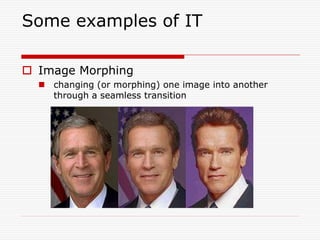
 Image Morphing
   changing (or morphing) one image into another
    through a seamless transition
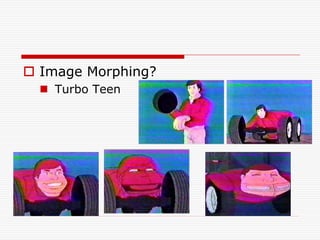
 Image Morphing?
   Turbo Teen
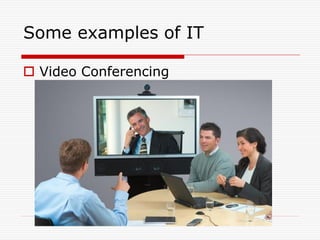
Some examples of IT

 Video Conferencing
Information Systems
 Why Do People Need
  Information?

  Individuals - Entertainment and
   enlightenment

  Businesses - Decision making,
   problem solving and control
Data, Information and Systems
 Data vs. Information

    Data
      A “given,” or fact; a number, a statement, or a
       picture
      Represents something in the real world
      The raw materials in the production of information

    Information
      Data that have meaning within a context
      Data in relationships
      Data after manipulation
The Computer Defined
 A device that computes

 Electronic device

 Converts data into information

 Modern computers are digital

    Two digits combine to make data (1s and 0s)

 Older computers were analog

    A range of values made data
Computers For Individual Use
 Desktop computers
   The most common type of computer
   Sits on the desk or floor
   Performs a variety of tasks
 Workstations
   Specialized computers
   Optimized for science or graphics
   More powerful than a desktop
Computers For Individual Use
 Notebook computers
     Small portable computers
     Weighs between 3 and 8 pounds
     About 8 ½ by 11 inches
     Typically as powerful as a desktop
     Can include a docking station
Computers For Individual Use
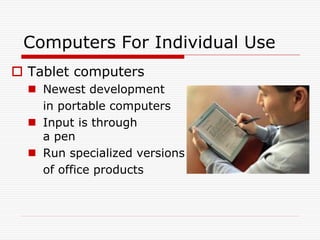
 Tablet computers
   Newest development
    in portable computers
   Input is through
    a pen
   Run specialized versions
    of office products
Contd…
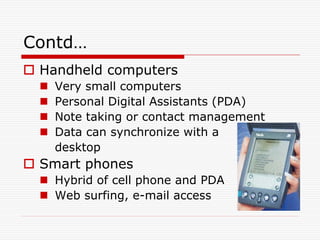
 Handheld computers
     Very small computers
     Personal Digital Assistants (PDA)
     Note taking or contact management
     Data can synchronize with a
      desktop
 Smart phones
   Hybrid of cell phone and PDA
   Web surfing, e-mail access
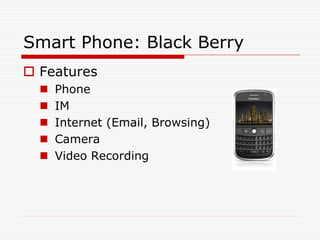
Smart Phone: Black Berry
 Features
     Phone
     IM
     Internet (Email, Browsing)
     Camera
     Video Recording
Computers For Organizations
 Network servers
     Centralized computer
     All other computers connect
     Provides access to network resources
     Multiple servers are called server farms
     Often simply a powerful desktop
Computers For Organizations
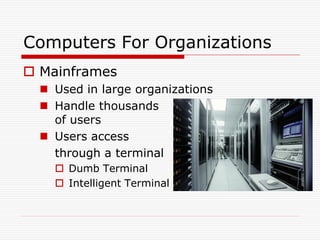
 Mainframes
   Used in large organizations
   Handle thousands
    of users
   Users access
    through a terminal
     Dumb Terminal
     Intelligent Terminal
Computers For Organizations
 Minicomputers
     Called midrange computers
     Power between mainframe and desktop
     Handle hundreds of users
     Used in smaller organizations
     Users access through a terminal
Computers For Organizations
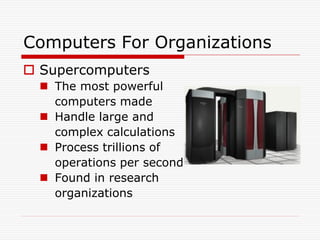
 Supercomputers
   The most powerful
    computers made
   Handle large and
    complex calculations
   Process trillions of
    operations per second
   Found in research
    organizations
Specialized Computers
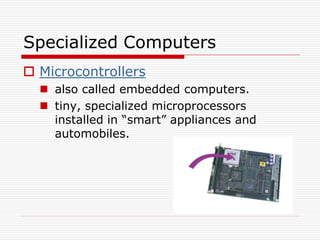
 Microcontrollers
   also called embedded computers.
   tiny, specialized microprocessors
    installed in “smart” appliances and
    automobiles.
Computers Everywhere
 Not just Desktops, Workstations, Tablet
  PCs, Handheld PCs (PDAs), Servers,
  Mainframe computers, Minicomputers
 But also…
     Cell phones
     Alarm Clocks
     Microwave Ovens
     Lighting control in a building
     Washing Machines
Computers In Society
 More impact than any other invention
   Changed work and leisure activities
   Used by all demographic groups
 Computers are important because:
   Provide information to users
   Information is critical to our society
   Managing information is difficult
Assignment 1
 Generate a list of ways the
  computer/IT has impacted the world.
   Include both positive   changes   and
    negative changes.
   think creatively.
 How difficult would it be to live
  without computers?
Communication Defined
 Communication: To transfer data/information from one point
   to another

    Using Wires

       Electrical Signals

       Optical Signals (Light)

    Wirelessly

       ElectroMagnetic Waves

       Acoustic Waves (Sound) ….?

    Using Analog Signals

    Using Digital Signals
Data, Information and Systems

 Data Manipulation

   Example: customer survey
     Reading through data collected from a
      customer survey with questions in various
      categories would be time-consuming and
      not very helpful.
     When manipulated, the surveys may
      provide useful information.
Data, Information and Systems
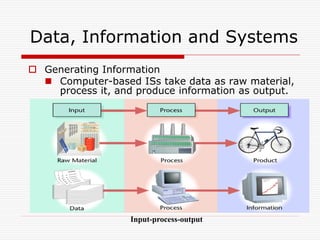
 Generating Information
   Computer-based ISs take data as raw material,
    process it, and produce information as output.


                   Input-process-output
Data, Information and Systems
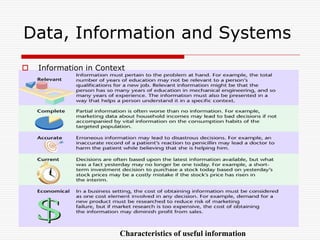
   Information in Context


                        Characteristics of useful information
Data, Information and Systems
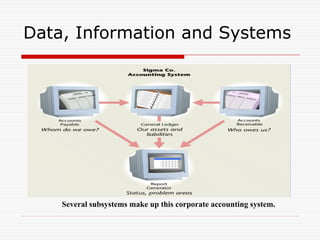
 What Is a System?
   System: A set of components that work together to
    achieve a common goal

    Subsystem: One part of a system where the products
     of more than one system are combined to reach an
     ultimate goal

    Closed system: Stand-alone system that has no
     contact with other systems

    Open system: System that interfaces with other
     systems
Data, Information and Systems


    Several subsystems make up this corporate accounting system.
Data, Information and Systems

  Information and Managers

     Systems thinking

        Creates a framework for problem solving and
         decision making.

        Keeps managers focused on overall goals and
         operations of business.
Data, Information and Systems


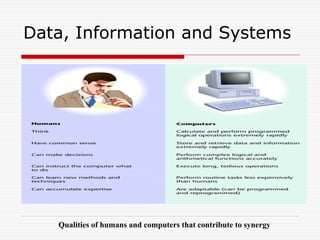
   Qualities of humans and computers that contribute to synergy
What is Processing?
 Conversion of Data into Information
 Data
   The raw facts and figures that are
    processed into information
 Information
   Data that has been summarized       or
    otherwise manipulated for use       in
    decision making
Types of Data

 Numeric
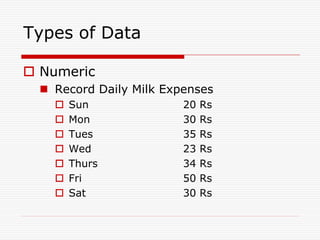
   Record Daily Milk Expenses
       Sun              20   Rs
       Mon              30   Rs
       Tues             35   Rs
       Wed              23   Rs
       Thurs            34   Rs
       Fri              50   Rs
       Sat              30   Rs
Types of Data

 Numeric
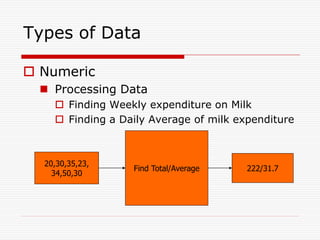
   Processing Data
     Finding Weekly expenditure on Milk
     Finding a Daily Average of milk expenditure


  20,30,35,23,
                  Find Total/Average    222/31.7
    34,50,30
Types of Data

 Text
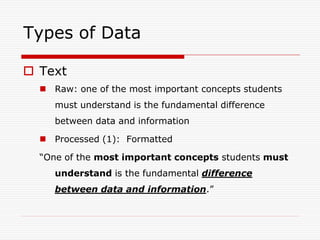
   Raw: one of the most important concepts students
     must understand is the fundamental difference
     between data and information

   Processed (1): Formatted

  “One of the most important concepts students must
     understand is the fundamental difference
     between data and information.”
Contd…
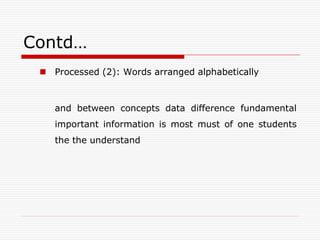
  Processed (2): Words arranged alphabetically


    and between concepts data difference fundamental
    important information is most must of one students
    the the understand
Types of Data

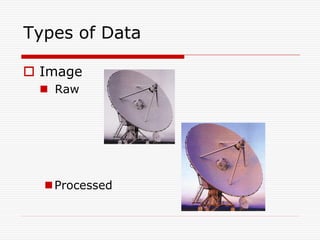
 Image
  Raw


   Processed
Types of Data

 Image
  Other Examples
    Fingerprint Recognition
    Arrangement of your photo albums on PC
Types of Data

 Audio
   Raw: Conversation between people in
    cockpit of aircraft and Flight Controller
    recorded in Black box
   Processed: In case of air crash, the
    recorded audio will be converted to
    digital form, background noise will be
    removed, and the clarity of speech will
    be improved to assist investigators
Types of Data

 Video
   Raw: Old Black and White movies
   Processed: Black and white movie made
    colored

   Raw: Any Video in foreign language
   Processed: Dub it in Urdu
Assignment 2

 Think and name any other form of
  Data.
  Other than numeric, text, image, audio,
    video
 Think and describe in what ways can
  that form of Data be processed.
Related IT terms
 What is a Network?
    communications system connecting two or more
      computers with/without wires

 What does being online mean?
    using a computer or other information device,
      connected through a voice or data network, to access
      information and services from another computer or
      information device
Contd…
 Cyberspace
        encompasses the whole wired and wireless world of
        communications
   The Internet
       the “network of all networks”
 Multimedia
       technology that presents information in more than one
        medium, such as text, still images, moving images, and
        sound
 World Wide Web
       “graphical side of the Internet”
       global network of linked documents on the Internet
Contd…
 The E-word ; E Stands for Electronic
   E-mail

   E-learning

   E-business

   E-commerce

   E-government
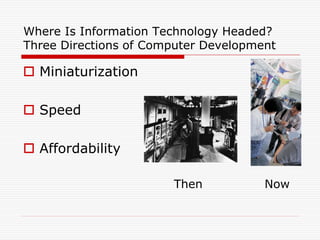
Where Is Information Technology Headed?
Three Directions of Computer Development

 Miniaturization

 Speed

 Affordability

                       Then           Now
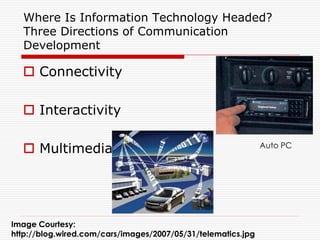
Where Is Information Technology Headed?
  Three Directions of Communication
  Development

   Connectivity

   Interactivity

   Multimedia                                                Auto PC


Image Courtesy:
http://blog.wired.com/cars/images/2007/05/31/telematics.jpg
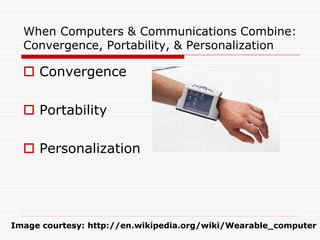
When Computers & Communications Combine:
  Convergence, Portability, & Personalization

   Convergence

   Portability

   Personalization


Image courtesy: http://en.wikipedia.org/wiki/Wearable_computer
Assignment 3
 What should be the next
  Technology?
   What can be the applications of
    that technology?
   Your own ideas/thoughts

Introduction to IT

  • 1.
  • 2.
    What is InformationTechnology  Fusion of Computer Technology and Communication Technology  Computer Technology  programmable, multiuse machine that accepts data and processes it into usable information  summaries, totals, or reports  used to speed up problem solving and increase productivity.
  • 3.
    What is InformationTechnology  Communication Technology  consists of electromagnetic/optical devices and systems for communicating over long distances  InfoTech or IT is any technology that helps to produce, manipulate, store, communicate, and/or disseminate information  merges computing with high-speed communication links, carrying data, sound, and video
  • 4.
    Some examples ofIT  Image Morphing  changing (or morphing) one image into another through a seamless transition
  • 5.
     Image Morphing?  Turbo Teen
  • 6.
    Some examples ofIT  Video Conferencing
  • 7.
    Information Systems  WhyDo People Need Information?  Individuals - Entertainment and enlightenment  Businesses - Decision making, problem solving and control
  • 8.
    Data, Information andSystems  Data vs. Information  Data  A “given,” or fact; a number, a statement, or a picture  Represents something in the real world  The raw materials in the production of information  Information  Data that have meaning within a context  Data in relationships  Data after manipulation
  • 9.
    The Computer Defined A device that computes  Electronic device  Converts data into information  Modern computers are digital  Two digits combine to make data (1s and 0s)  Older computers were analog  A range of values made data
  • 10.
    Computers For IndividualUse  Desktop computers  The most common type of computer  Sits on the desk or floor  Performs a variety of tasks  Workstations  Specialized computers  Optimized for science or graphics  More powerful than a desktop
  • 11.
    Computers For IndividualUse  Notebook computers  Small portable computers  Weighs between 3 and 8 pounds  About 8 ½ by 11 inches  Typically as powerful as a desktop  Can include a docking station
  • 12.
    Computers For IndividualUse  Tablet computers  Newest development in portable computers  Input is through a pen  Run specialized versions of office products
  • 13.
    Contd…  Handheld computers  Very small computers  Personal Digital Assistants (PDA)  Note taking or contact management  Data can synchronize with a desktop  Smart phones  Hybrid of cell phone and PDA  Web surfing, e-mail access
  • 14.
    Smart Phone: BlackBerry  Features  Phone  IM  Internet (Email, Browsing)  Camera  Video Recording
  • 15.
    Computers For Organizations Network servers  Centralized computer  All other computers connect  Provides access to network resources  Multiple servers are called server farms  Often simply a powerful desktop
  • 16.
    Computers For Organizations Mainframes  Used in large organizations  Handle thousands of users  Users access through a terminal  Dumb Terminal  Intelligent Terminal
  • 17.
    Computers For Organizations Minicomputers  Called midrange computers  Power between mainframe and desktop  Handle hundreds of users  Used in smaller organizations  Users access through a terminal
  • 18.
    Computers For Organizations Supercomputers  The most powerful computers made  Handle large and complex calculations  Process trillions of operations per second  Found in research organizations
  • 19.
    Specialized Computers  Microcontrollers  also called embedded computers.  tiny, specialized microprocessors installed in “smart” appliances and automobiles.
  • 20.
    Computers Everywhere  Notjust Desktops, Workstations, Tablet PCs, Handheld PCs (PDAs), Servers, Mainframe computers, Minicomputers  But also…  Cell phones  Alarm Clocks  Microwave Ovens  Lighting control in a building  Washing Machines
  • 21.
    Computers In Society More impact than any other invention  Changed work and leisure activities  Used by all demographic groups  Computers are important because:  Provide information to users  Information is critical to our society  Managing information is difficult
  • 22.
    Assignment 1  Generatea list of ways the computer/IT has impacted the world.  Include both positive changes and negative changes.  think creatively.  How difficult would it be to live without computers?
  • 23.
    Communication Defined  Communication:To transfer data/information from one point to another  Using Wires  Electrical Signals  Optical Signals (Light)  Wirelessly  ElectroMagnetic Waves  Acoustic Waves (Sound) ….?  Using Analog Signals  Using Digital Signals
  • 24.
    Data, Information andSystems  Data Manipulation  Example: customer survey  Reading through data collected from a customer survey with questions in various categories would be time-consuming and not very helpful.  When manipulated, the surveys may provide useful information.
  • 25.
    Data, Information andSystems  Generating Information  Computer-based ISs take data as raw material, process it, and produce information as output. Input-process-output
  • 26.
    Data, Information andSystems  Information in Context Characteristics of useful information
  • 27.
    Data, Information andSystems  What Is a System?  System: A set of components that work together to achieve a common goal  Subsystem: One part of a system where the products of more than one system are combined to reach an ultimate goal  Closed system: Stand-alone system that has no contact with other systems  Open system: System that interfaces with other systems
  • 28.
    Data, Information andSystems Several subsystems make up this corporate accounting system.
  • 29.
    Data, Information andSystems  Information and Managers  Systems thinking  Creates a framework for problem solving and decision making.  Keeps managers focused on overall goals and operations of business.
  • 30.
    Data, Information andSystems Qualities of humans and computers that contribute to synergy
  • 31.
    What is Processing? Conversion of Data into Information  Data  The raw facts and figures that are processed into information  Information  Data that has been summarized or otherwise manipulated for use in decision making
  • 32.
    Types of Data Numeric  Record Daily Milk Expenses  Sun 20 Rs  Mon 30 Rs  Tues 35 Rs  Wed 23 Rs  Thurs 34 Rs  Fri 50 Rs  Sat 30 Rs
  • 33.
    Types of Data Numeric  Processing Data  Finding Weekly expenditure on Milk  Finding a Daily Average of milk expenditure 20,30,35,23, Find Total/Average 222/31.7 34,50,30
  • 34.
    Types of Data Text  Raw: one of the most important concepts students must understand is the fundamental difference between data and information  Processed (1): Formatted “One of the most important concepts students must understand is the fundamental difference between data and information.”
  • 35.
    Contd…  Processed(2): Words arranged alphabetically and between concepts data difference fundamental important information is most must of one students the the understand
  • 36.
    Types of Data Image  Raw  Processed
  • 37.
    Types of Data Image  Other Examples  Fingerprint Recognition  Arrangement of your photo albums on PC
  • 38.
    Types of Data Audio  Raw: Conversation between people in cockpit of aircraft and Flight Controller recorded in Black box  Processed: In case of air crash, the recorded audio will be converted to digital form, background noise will be removed, and the clarity of speech will be improved to assist investigators
  • 39.
    Types of Data Video  Raw: Old Black and White movies  Processed: Black and white movie made colored  Raw: Any Video in foreign language  Processed: Dub it in Urdu
  • 40.
    Assignment 2  Thinkand name any other form of Data. Other than numeric, text, image, audio, video  Think and describe in what ways can that form of Data be processed.
  • 41.
    Related IT terms What is a Network?  communications system connecting two or more computers with/without wires  What does being online mean?  using a computer or other information device, connected through a voice or data network, to access information and services from another computer or information device
  • 42.
    Contd…  Cyberspace  encompasses the whole wired and wireless world of communications  The Internet  the “network of all networks”  Multimedia  technology that presents information in more than one medium, such as text, still images, moving images, and sound  World Wide Web  “graphical side of the Internet”  global network of linked documents on the Internet
  • 43.
    Contd…  The E-word; E Stands for Electronic  E-mail  E-learning  E-business  E-commerce  E-government
  • 44.
    Where Is InformationTechnology Headed? Three Directions of Computer Development  Miniaturization  Speed  Affordability Then Now
  • 45.
    Where Is InformationTechnology Headed? Three Directions of Communication Development  Connectivity  Interactivity  Multimedia Auto PC Image Courtesy: http://blog.wired.com/cars/images/2007/05/31/telematics.jpg
  • 46.
    When Computers &Communications Combine: Convergence, Portability, & Personalization  Convergence  Portability  Personalization Image courtesy: http://en.wikipedia.org/wiki/Wearable_computer
  • 47.
    Assignment 3  Whatshould be the next Technology?  What can be the applications of that technology?  Your own ideas/thoughts