Information Retrieval System
Text books: Information storage and Retrieval Systems
Gerald J. Kowalski, Mark T. Maybury
Prepared by:
Mr. M.MAHESH,ASST PROF.,
Dept. of CSE
Sai Spurthi Institute of Technology.
B.Gangaram,Sathupally
Topics:
 Introduction: Definition
 Objectives,
 Functional Overview
 Relationship to DBMS
 Digital libraries and Data Warehouses.
INTRODUCTION
 What is Information Retrieval
 Information Retrieval(IR) is finding material
(Usually Documents) of an unstructured nature
(Usually Text) that satisfies an
information need from within large collections
(Usually stored on Computers)
INTRODUCTION Contd..
 Basic Terms
 Corpus: A large repository of documents
stored on computers.
 Information need : A topic about which we
want to get the information.
 Relevance: Some of the documents in corpus
that may contain what I want to search.
 Query: Expression of the need.
INTRODUCTION Contd..
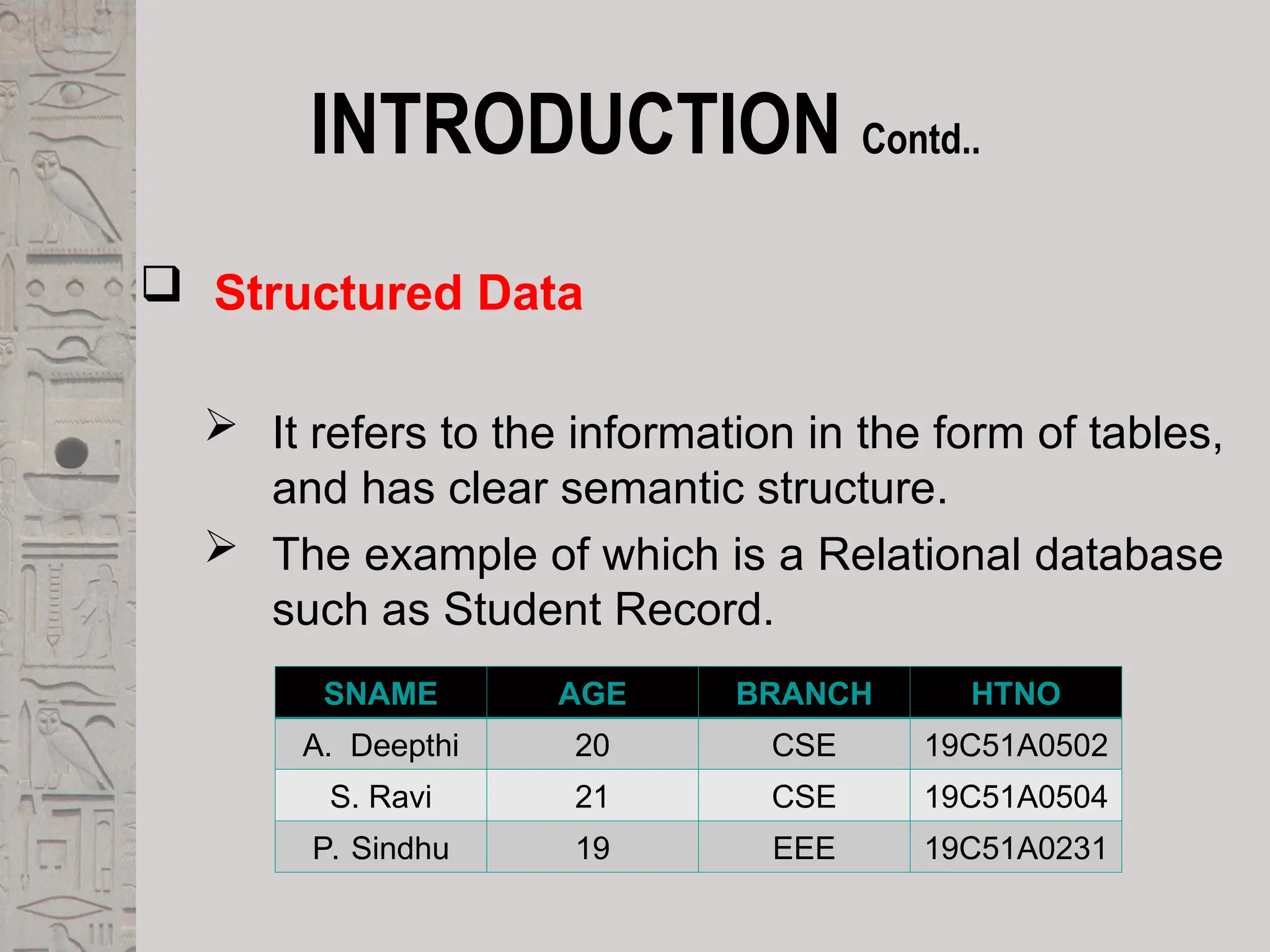
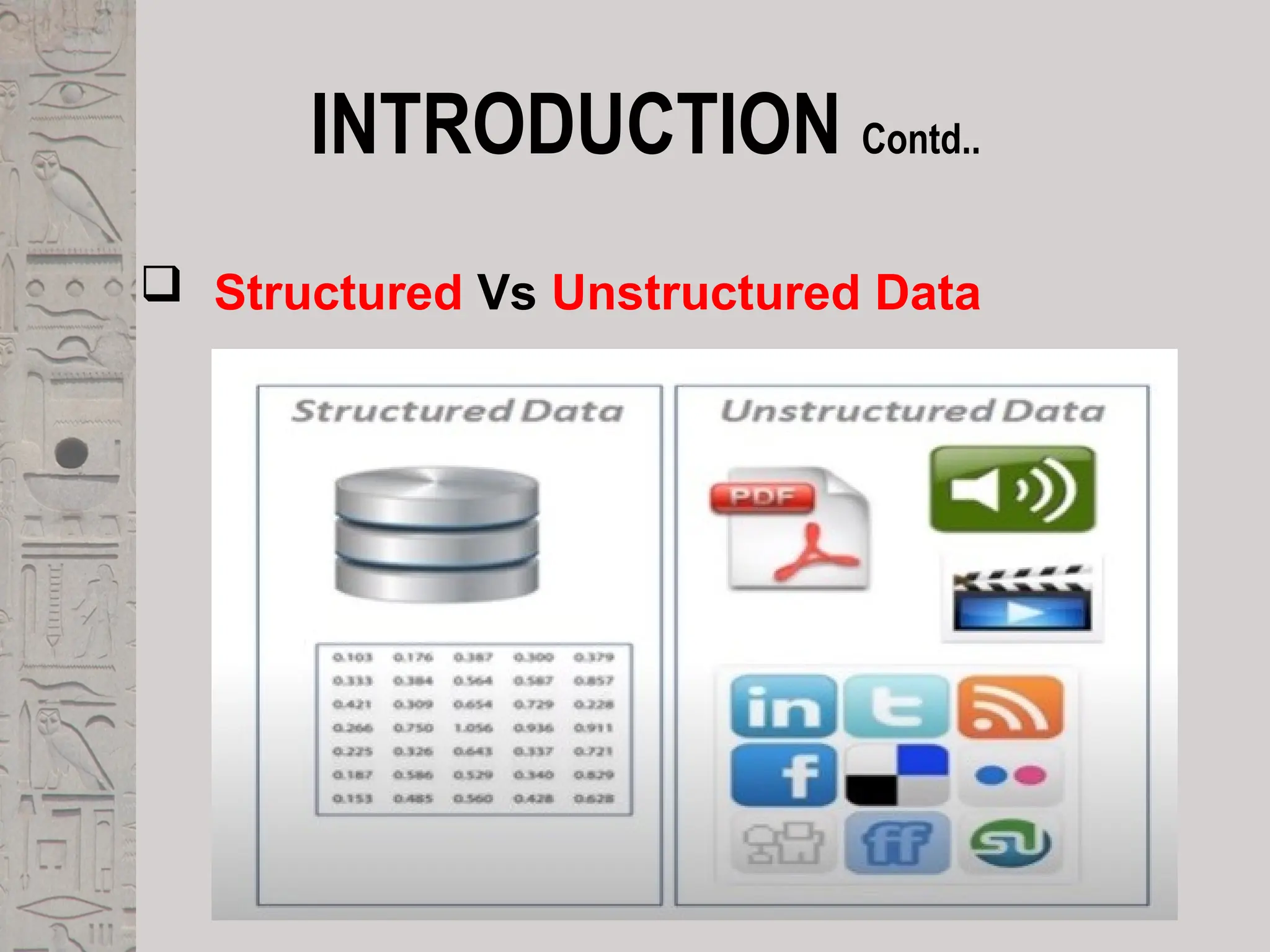
 Structured Data
 It refers to the information in the form of tables,
and has clear semantic structure.
 The example of which is a Relational database
such as Student Record.
SNAME AGE BRANCH HTNO
A. Deepthi 20 CSE 19C51A0502
S. Ravi 21 CSE 19C51A0504
P. Sindhu 19 EEE 19C51A0231
INTRODUCTION Contd..
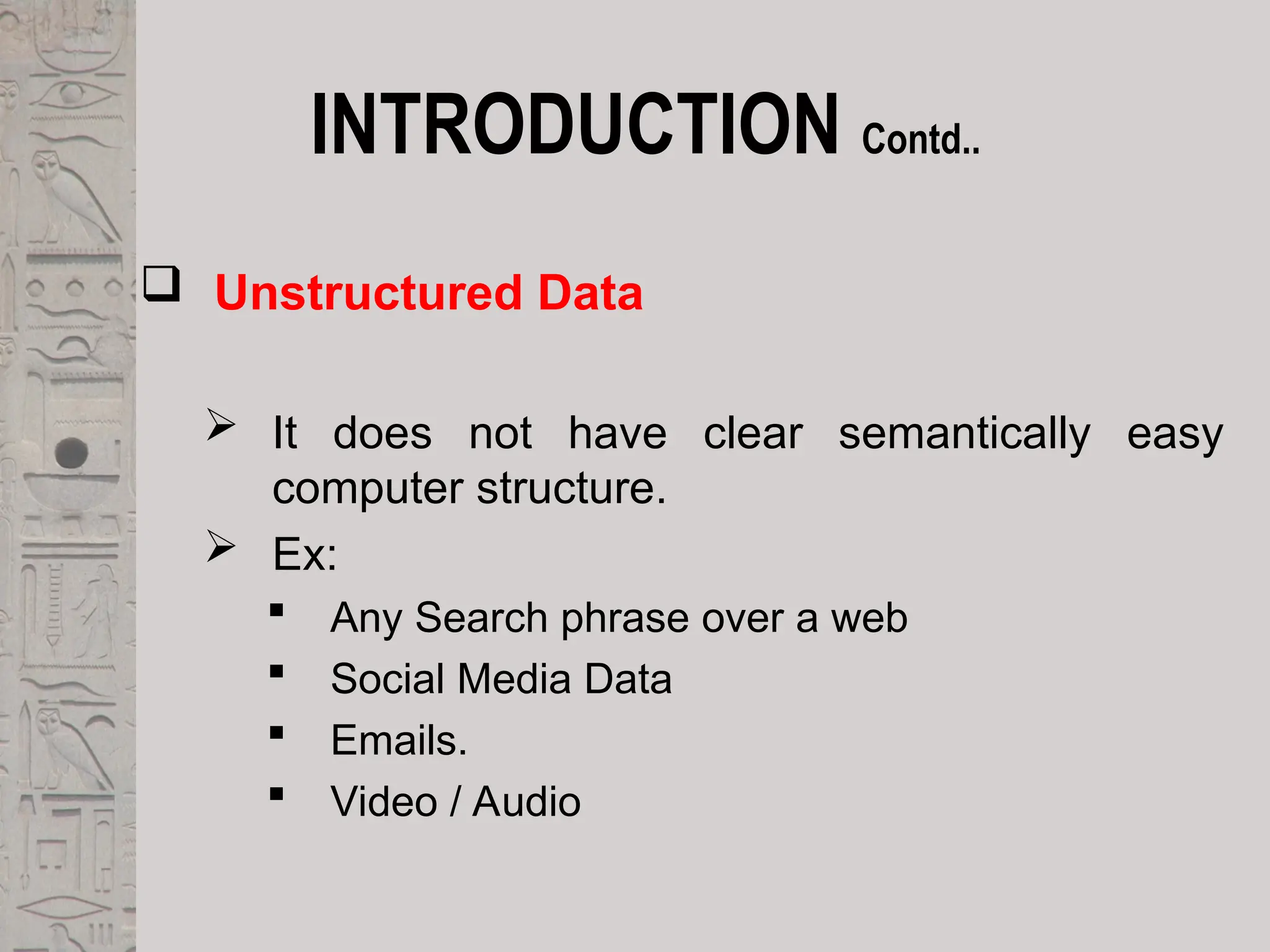
 Unstructured Data
 It does not have clear semantically easy
computer structure.
 Ex:
 Any Search phrase over a web
 Social Media Data
 Emails.
 Video / Audio
INTRODUCTION Contd..
 Structured Vs Unstructured Data
INTRODUCTION Contd..
 Semi Structured Data
 In Reality , almost no data are truly
“unstructured”.
 This is definitely true of all text data ,most text
data has structure ,such as headings
paragraphs and footnotes.
INTRODUCTION Contd..
 Example of IR Problem
 To understand the problem, Consider Data of
playlist in which there are videos on various
topics
 Now Information that I want to retrieve is:
 Which videos in my playlist contains the
terms : “Sai Spurthi but not studio”
INTRODUCTION Contd..
 Traditional Solution
 Use the Concept of Grepping(in UNIX) that
follows the concept of linear scanning through
documents.
 Use some scripting languages.
 But the problem is very time consuming and
repetition is done for each and every query
INTRODUCTION Contd..
 Better Solution
 Preprocess the corpus in advance.
 Organize the information about the occurrence
of different words in a way that speed up query
processing.
 Boolean Retrieval Model in which terms are
combined with the operators AND,OR ,NOT
Definition of IRS
 An Information Retrieval System is a system
that is capable of storage retrieval and
maintenance of information.
 Information may be a text(including numeric
and date data), images, video and other
multimedia objects.
 Information retrieval is the formal study of
efficient and effective ways to extract the right
bit of information from a collection.
 The web is a special case, as we will discuss.
Conti…
 An IRS consists of s/w program that facilitates a
user in finding the info. the user needs.
 The system may use standard computer h/w to
support the search sub function and to convert
non-textual sources to a searchable media.
 The success of an IRS is how well it can
minimize the user overhead for a user to find the
needed info.
 Overhead from user’s perspective is the time
required to find the info. needed, excluding the
time for actually reading the relevant data.
 Thus, search composition, search exec., &
reading non-relevant items are all aspects of IR
overhead.
Objectives
 To minimize the overhead of a user locating needed info
 Two major measures
1. Precision: The ability to retrieve top-ranked documents that
are mostly relevant.
2. Recall: The ability of the search to find all of the relevant
items in the corpus.
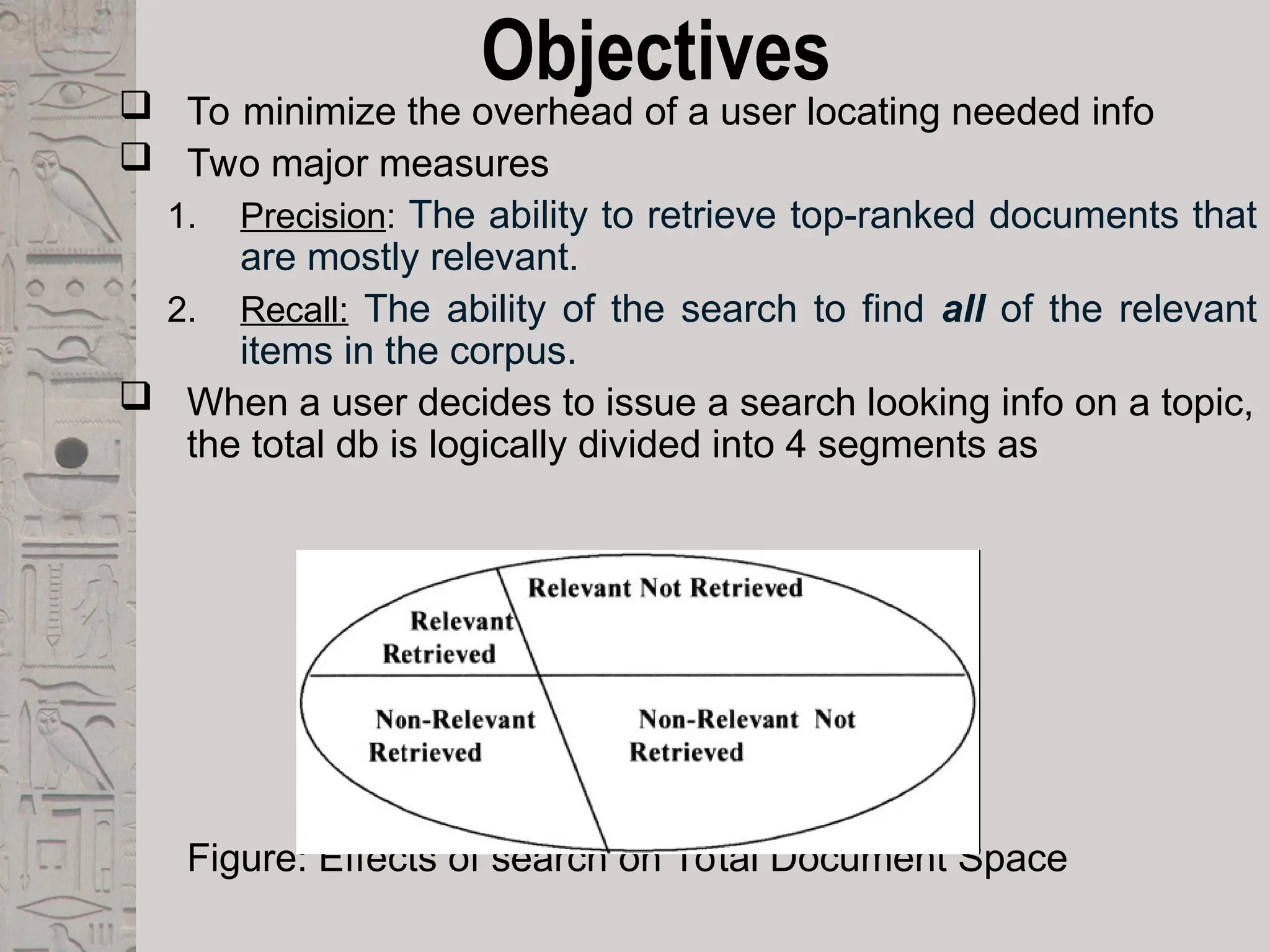
 When a user decides to issue a search looking info on a topic,
the total db is logically divided into 4 segments as
Figure: Effects of search on Total Document Space
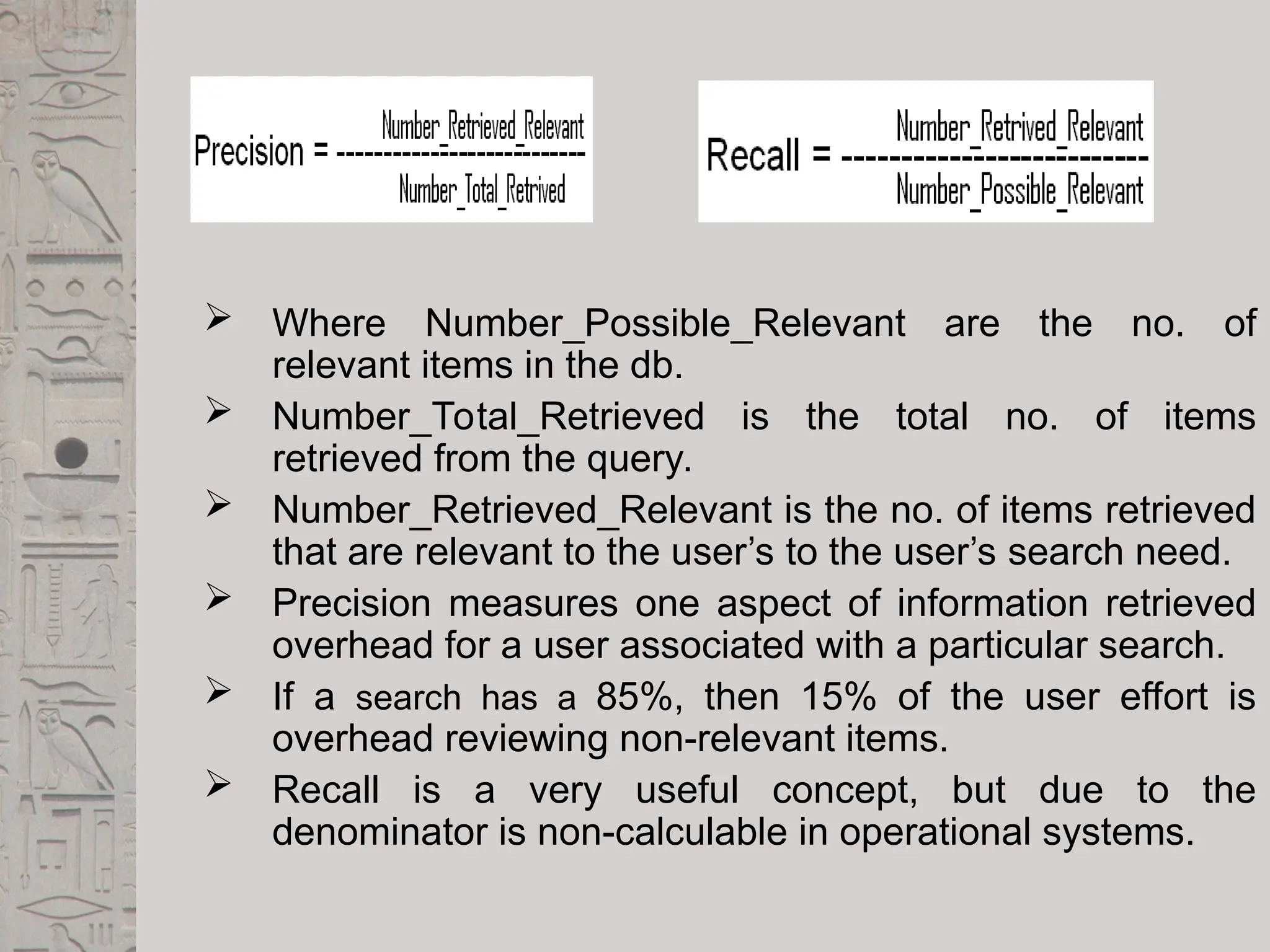
 Where Number_Possible_Relevant are the no. of
relevant items in the db.
 Number_Total_Retrieved is the total no. of items
retrieved from the query.
 Number_Retrieved_Relevant is the no. of items retrieved
that are relevant to the user’s to the user’s search need.
 Precision measures one aspect of information retrieved
overhead for a user associated with a particular search.
 If a search has a 85%, then 15% of the user effort is
overhead reviewing non-relevant items.
 Recall is a very useful concept, but due to the
denominator is non-calculable in operational systems.
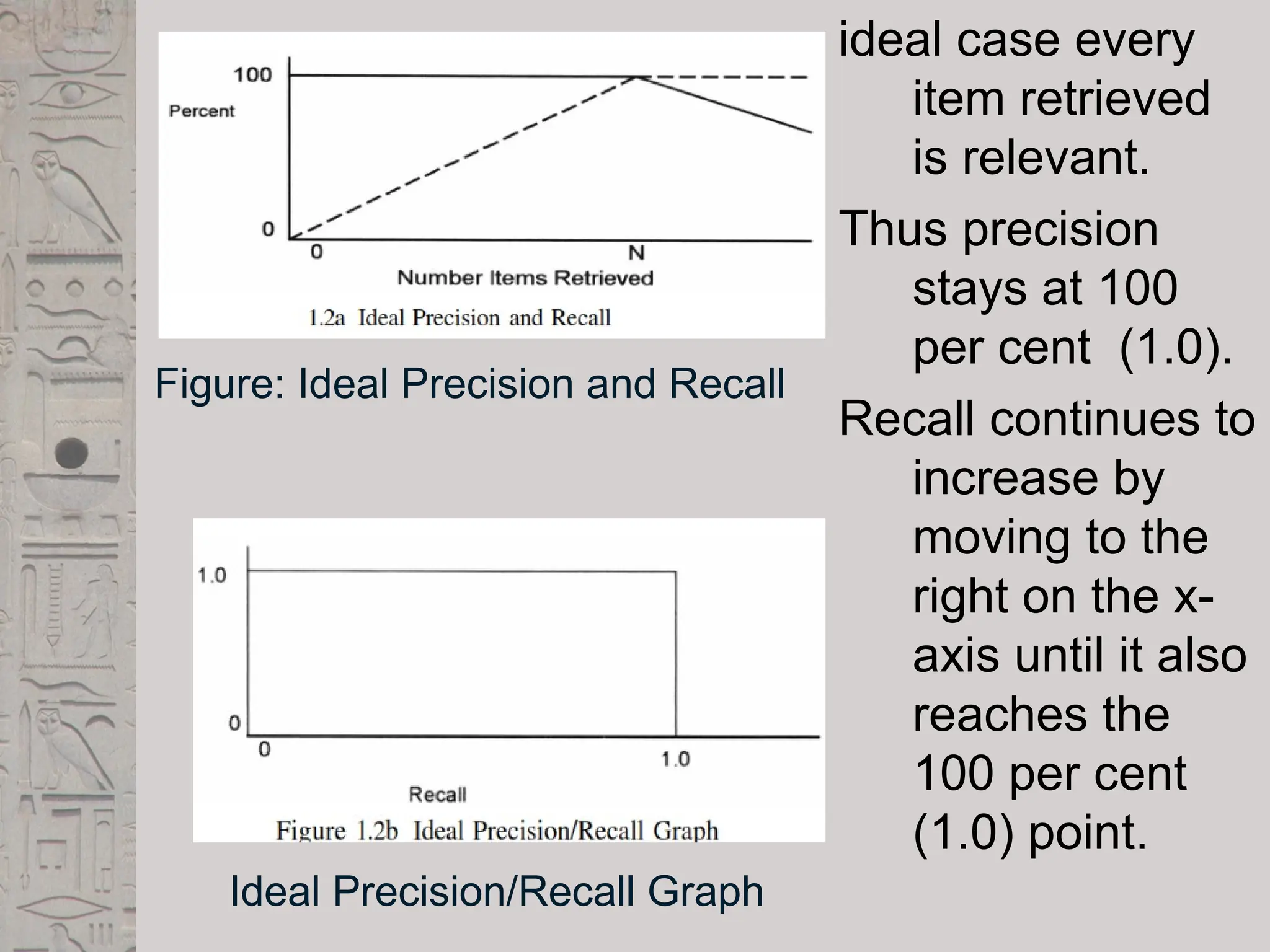
ideal case every
item retrieved
is relevant.
Thus precision
stays at 100
per cent (1.0).
Recall continues to
increase by
moving to the
right on the x-
axis until it also
reaches the
100 per cent
(1.0) point.
Figure: Ideal Precision and Recall
Ideal Precision/Recall Graph
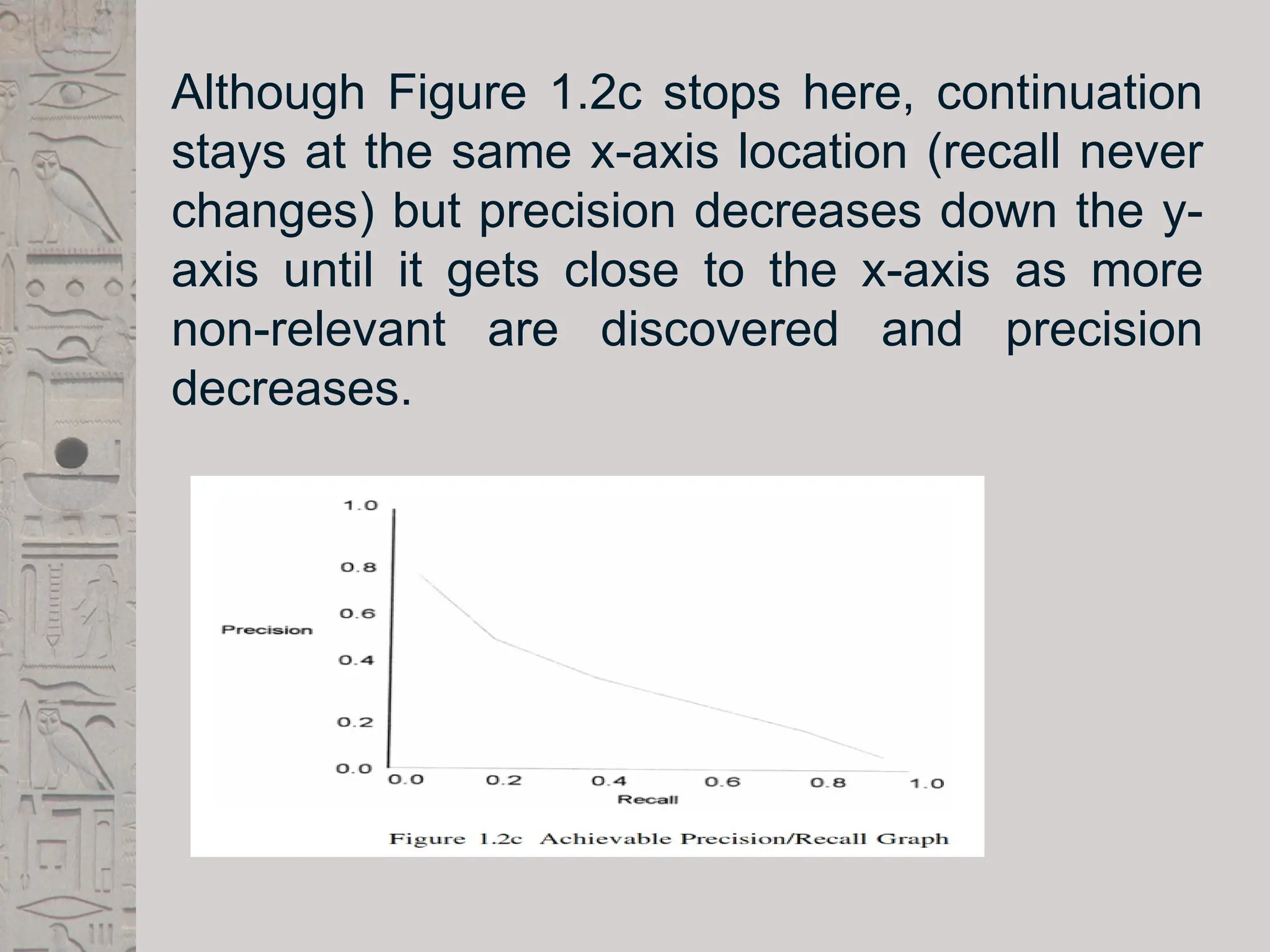
Although Figure 1.2c stops here, continuation
stays at the same x-axis location (recall never
changes) but precision decreases down the y-
axis until it gets close to the x-axis as more
non-relevant are discovered and precision
decreases.
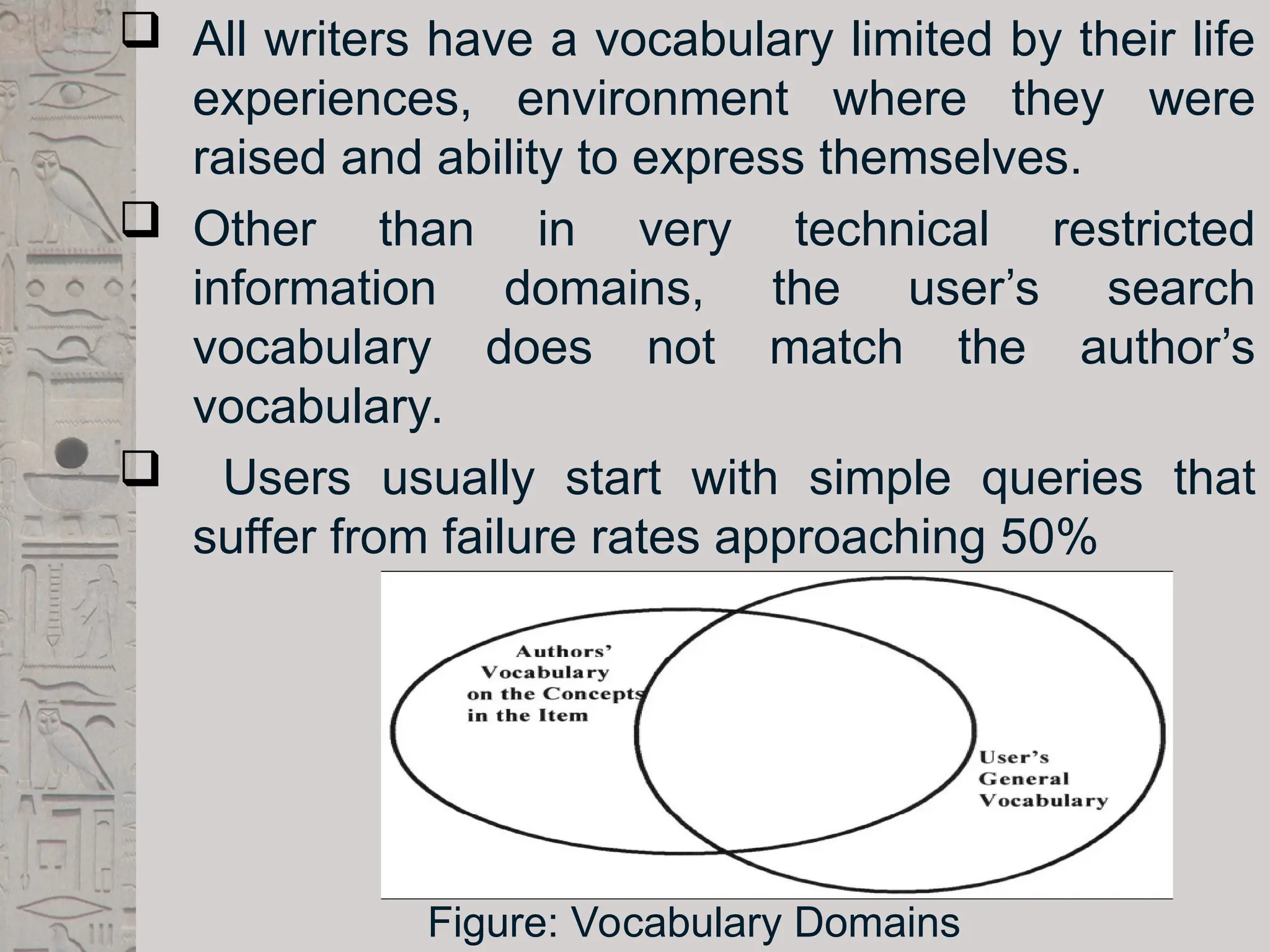
 All writers have a vocabulary limited by their life
experiences, environment where they were
raised and ability to express themselves.
 Other than in very technical restricted
information domains, the user’s search
vocabulary does not match the author’s
vocabulary.
 Users usually start with simple queries that
suffer from failure rates approaching 50%
Figure: Vocabulary Domains
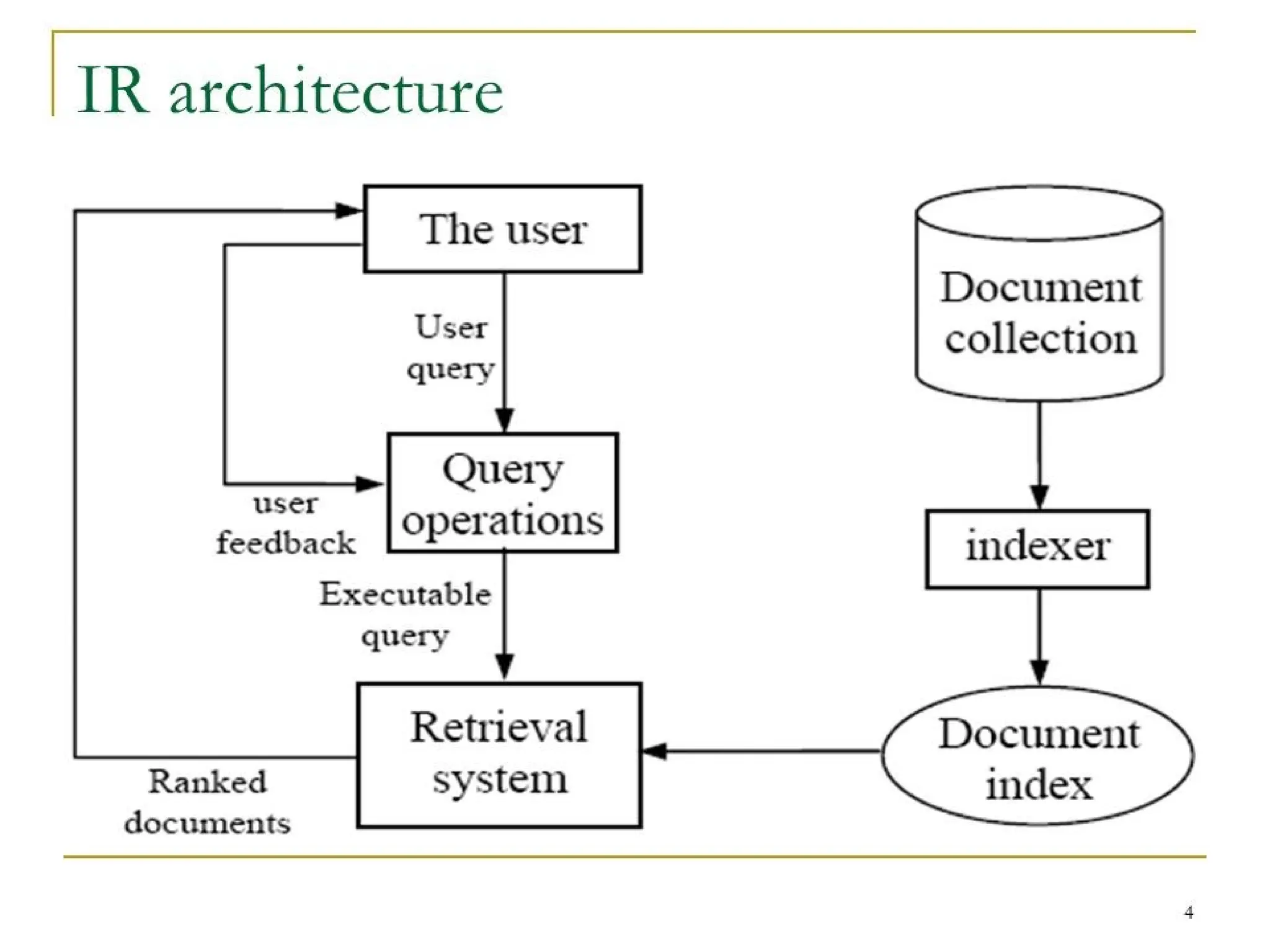
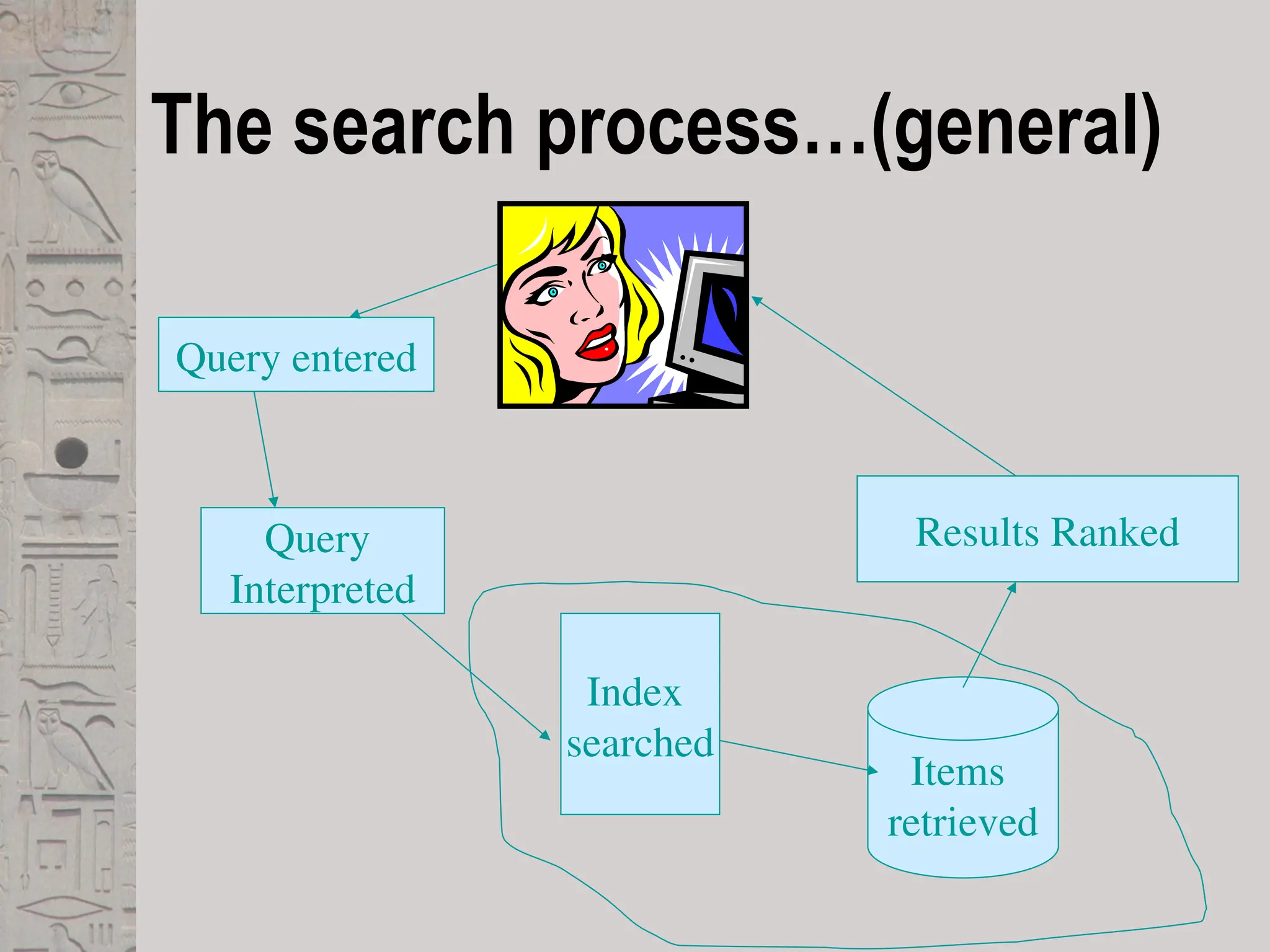
The search process…(general)
Query entered
Query
Interpreted
Items
retrieved
Index
searched
Results Ranked
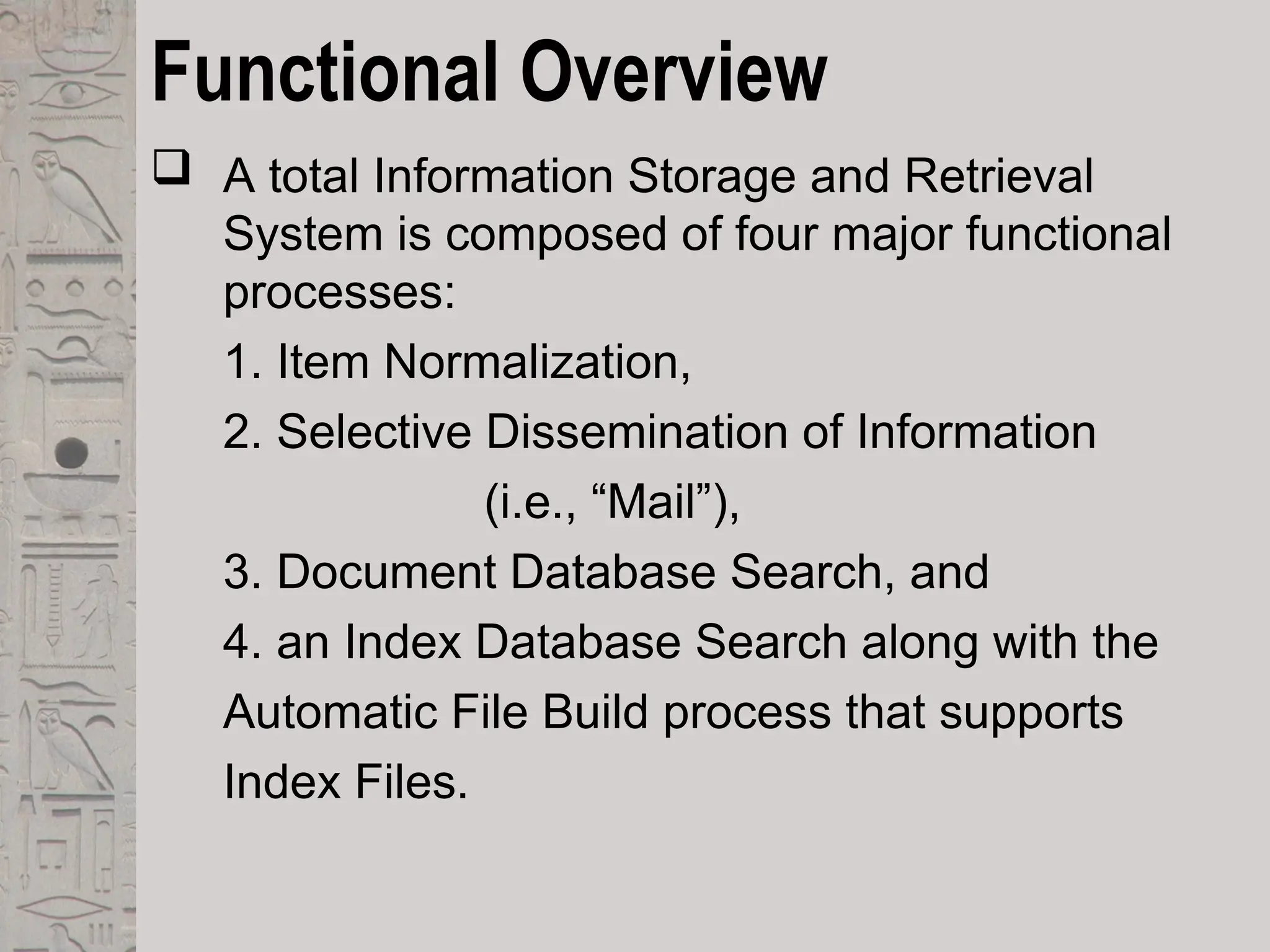
Functional Overview
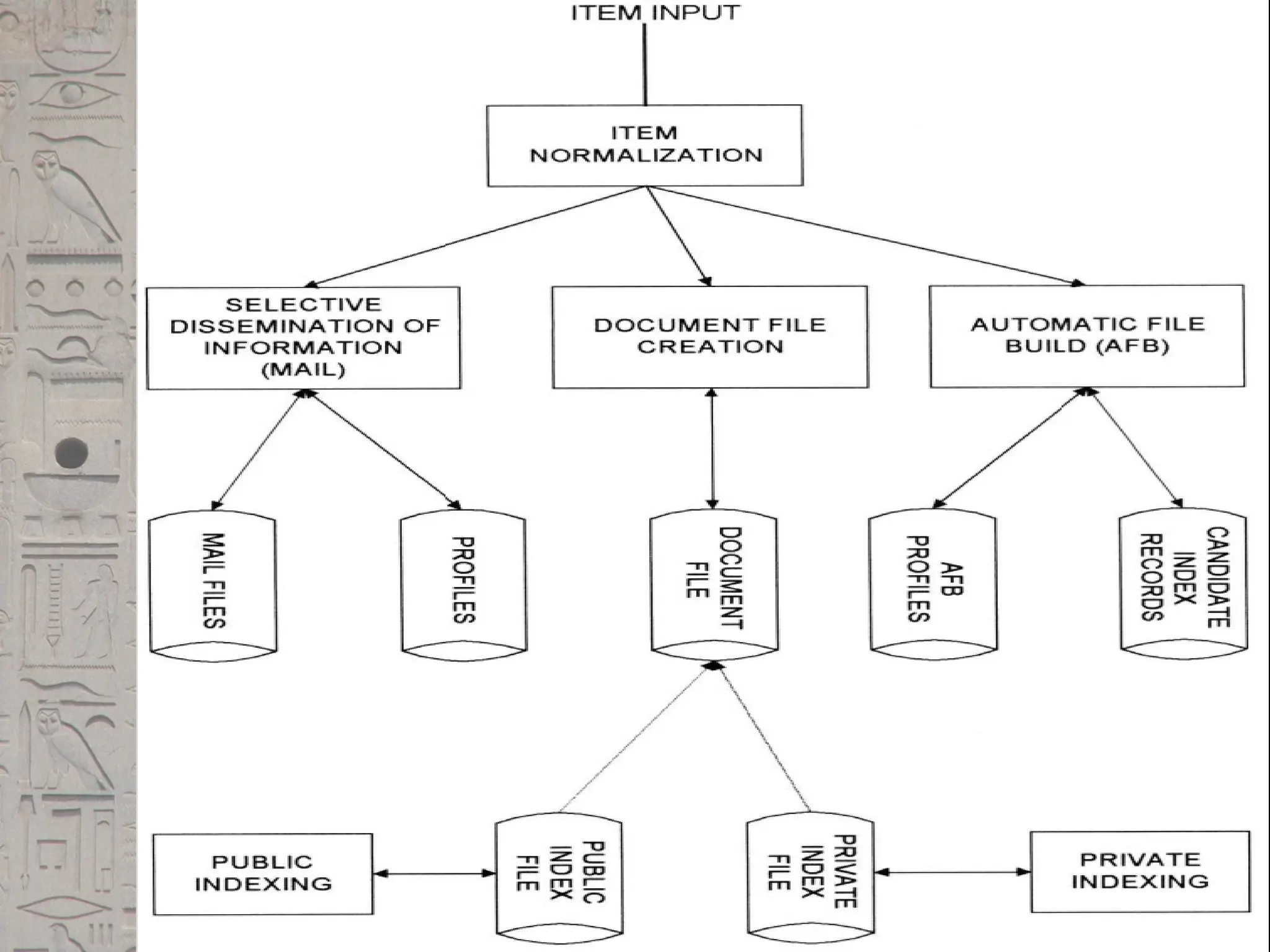
 A total Information Storage and Retrieval
System is composed of four major functional
processes:
1. Item Normalization,
2. Selective Dissemination of Information
(i.e., “Mail”),
3. Document Database Search, and
4. an Index Database Search along with the
Automatic File Build process that supports
Index Files.
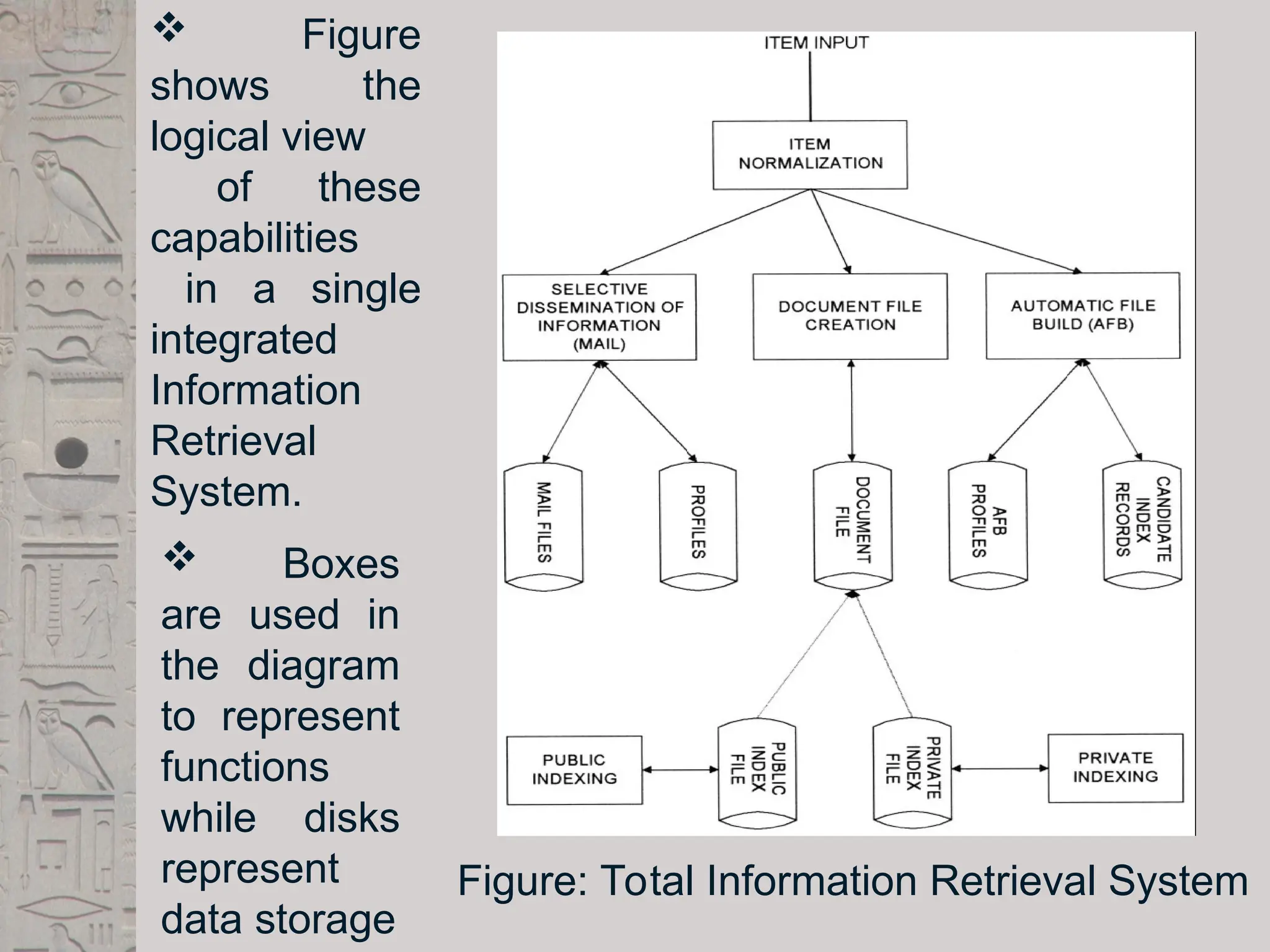
Figure: Total Information Retrieval System
 Figure
shows the
logical view
of these
capabilities
in a single
integrated
Information
Retrieval
System.
 Boxes
are used in
the diagram
to represent
functions
while disks
represent
data storage
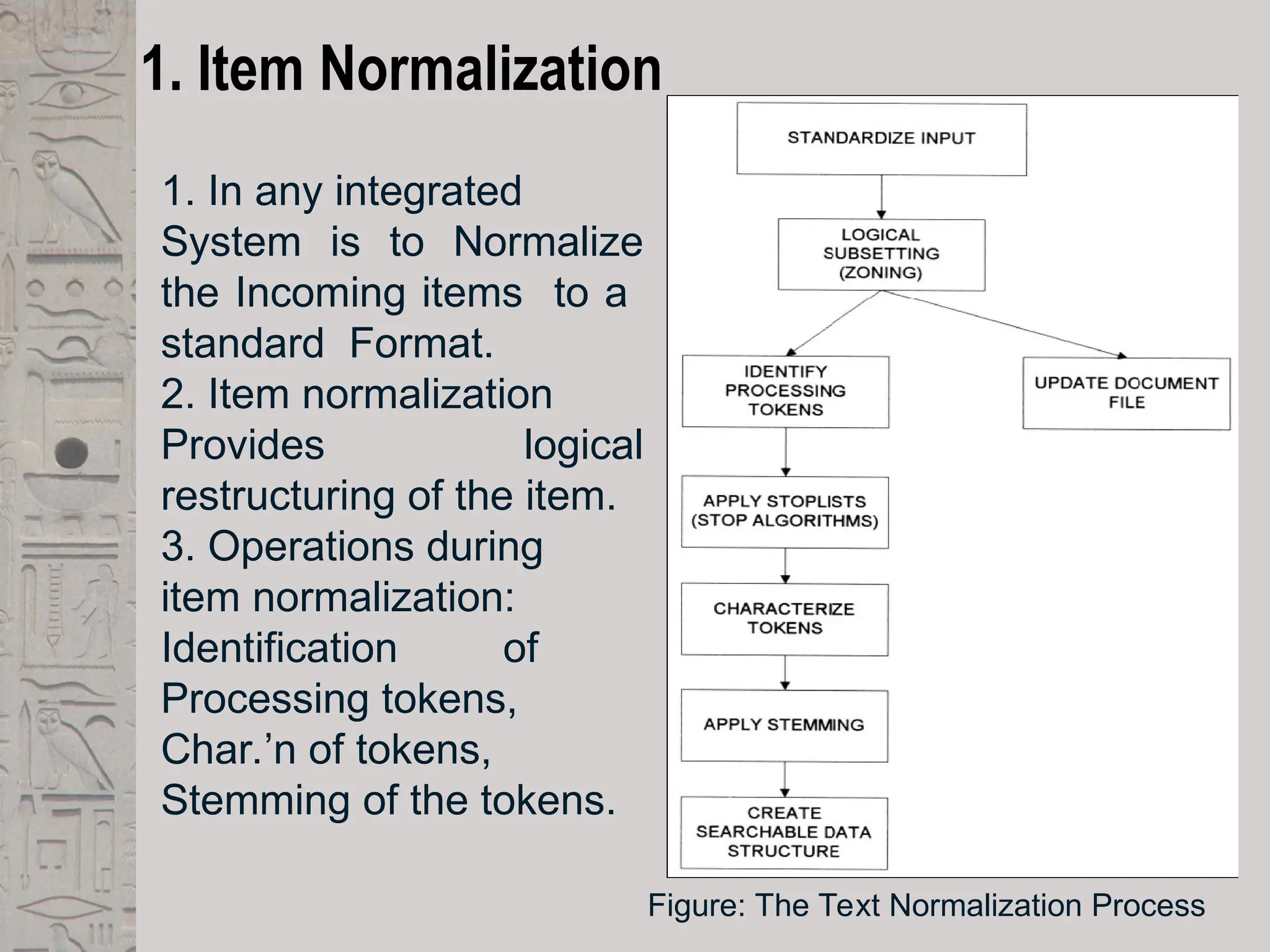
1. Item Normalization
1. In any integrated
System is to Normalize
the Incoming items to a
standard Format.
2. Item normalization
Provides logical
restructuring of the item.
3. Operations during
item normalization:
Identification of
Processing tokens,
Char.’n of tokens,
Stemming of the tokens.
Figure: The Text Normalization Process
2. Selective Dissemination of Information
 The Selective Dissemination of Information (Mail)
Process provides the capability to dynamically compare
newly received items in the information system against
standing statements of interest of users and deliver the
item to those users whose statement of interest
matches the contents of the item.
 The Mail process is composed of the search process,
user statements of interest (Profiles) and user mail files.
 As each item is received, it is processed against every
user’s profile.
 A profile contains a typically broad search statement
along with a list of user mail files that will receive the
document if the search statement in the profile is
satisfied.
2. Selective Dissemination of Information Contd..
 These profiles define all the areas in which a user
is interested versus an ad hoc query which is
frequently focused to answer a specific question.
 When the search statement is satisfied, the item is
placed in the Mail File(s) associated with the
profile..
 Items in Mail files are typically viewed in time of
receipt order and automatically deleted after a
specified time period.
 Both implementers and researchers have treated
the dissemination process as independent from the
rest of the information system.
3. Document Database(DDB) Search
 The DDB Search Process provides the
capability for a query to search against all items
received by the system.
 The DDB Search process is composed of the
search process, user entered queries (typically
ad hoc queries) and the document db which
contains all items that have been received,
processed and stored by the system.
 The DDB can be very large, hundreds of
millions of items or more.
 Typically items in the DDB do not change (i.e.,
are not edited) once received. The value of
much information quickly decreases over time.
4. Index Database Search
 In this process the user can logically store an item in a
file along with additional index terms and descriptive
text the user wants to associate with the item.
 It is also possible to have index records that do not
reference an item, but contain all the substantive
information in the index itself.
 There are two classes of index files: Public and Private
Index files.
 Everyuser can have one or more Private Index files
leading to a very large number of files.
 Each Private Index file references only a small subset of the
total number of items in the DDB.
 Public Index files are maintained by professional library
services personnel and typically index every item in the DDB
 There is a small number of Public Index files. These files
have access lists (i.e., lists of users and their privileges) that
allow anyone to search or retrieve data.
 Private Index files typically have very limited access lists.
 To assist the users in generating indexes, especially the
professional indexers, the system provides a process called
Automatic File Build.
Relationship to DBMS
 There are two major categories of systems available
to process items:
 Information Retrieval Systems and
 Data Base Management Systems (DBMS).
 An Information Retrieval System is software that has
the features and functions required to manipulate
“information” items.
 DBMS that is optimized to handle “structured” data.
 Structured data is well defined data (facts) typically
represented by tables.
 The integration of DBMS’s and Information Retrieval
Systems is very important.
Digital libraries and Data warehouses
 Two systems frequently described in the context of
information retrieval are:
 Digital Libraries and Data Warehouses(DataMarts)
 Libraries have been in existence since the beginning
of writing and have served as a repository and
retrieving information in the media it is created on.
 U.S. Government and private funding for making more
information available in digital form during this time the
terminology evolved from electronic libraries to digital
libraries.
 IRS technology has addressed a small subset of the
issues associated with Digital Libraries.
 The term Data Warehouse to control the proliferation of
digital information ensuring that it is known and recoverable.
 Its goal is to provide to the decision makers the critical
information to answer future direction questions.
 A data warehouse consists(tools) of the data, an information
directory that describes the contents and meaning of the
data being stored, an input function that captures data and
moves it to the data warehouse
 Data warehouses are similar to information storage and
retrieval systems in that they both have a need for search
and retrieval of information.
Introduction to Information retrieval system

  • 1.
    Information Retrieval System Textbooks: Information storage and Retrieval Systems Gerald J. Kowalski, Mark T. Maybury Prepared by: Mr. M.MAHESH,ASST PROF., Dept. of CSE Sai Spurthi Institute of Technology. B.Gangaram,Sathupally
  • 2.
    Topics:  Introduction: Definition Objectives,  Functional Overview  Relationship to DBMS  Digital libraries and Data Warehouses.
  • 3.
    INTRODUCTION  What isInformation Retrieval  Information Retrieval(IR) is finding material (Usually Documents) of an unstructured nature (Usually Text) that satisfies an information need from within large collections (Usually stored on Computers)
  • 4.
    INTRODUCTION Contd..  BasicTerms  Corpus: A large repository of documents stored on computers.  Information need : A topic about which we want to get the information.  Relevance: Some of the documents in corpus that may contain what I want to search.  Query: Expression of the need.
  • 5.
    INTRODUCTION Contd..  StructuredData  It refers to the information in the form of tables, and has clear semantic structure.  The example of which is a Relational database such as Student Record. SNAME AGE BRANCH HTNO A. Deepthi 20 CSE 19C51A0502 S. Ravi 21 CSE 19C51A0504 P. Sindhu 19 EEE 19C51A0231
  • 6.
    INTRODUCTION Contd..  UnstructuredData  It does not have clear semantically easy computer structure.  Ex:  Any Search phrase over a web  Social Media Data  Emails.  Video / Audio
  • 7.
  • 8.
    INTRODUCTION Contd..  SemiStructured Data  In Reality , almost no data are truly “unstructured”.  This is definitely true of all text data ,most text data has structure ,such as headings paragraphs and footnotes.
  • 9.
    INTRODUCTION Contd..  Exampleof IR Problem  To understand the problem, Consider Data of playlist in which there are videos on various topics  Now Information that I want to retrieve is:  Which videos in my playlist contains the terms : “Sai Spurthi but not studio”
  • 10.
    INTRODUCTION Contd..  TraditionalSolution  Use the Concept of Grepping(in UNIX) that follows the concept of linear scanning through documents.  Use some scripting languages.  But the problem is very time consuming and repetition is done for each and every query
  • 11.
    INTRODUCTION Contd..  BetterSolution  Preprocess the corpus in advance.  Organize the information about the occurrence of different words in a way that speed up query processing.  Boolean Retrieval Model in which terms are combined with the operators AND,OR ,NOT
  • 13.
    Definition of IRS An Information Retrieval System is a system that is capable of storage retrieval and maintenance of information.  Information may be a text(including numeric and date data), images, video and other multimedia objects.  Information retrieval is the formal study of efficient and effective ways to extract the right bit of information from a collection.  The web is a special case, as we will discuss.
  • 14.
    Conti…  An IRSconsists of s/w program that facilitates a user in finding the info. the user needs.  The system may use standard computer h/w to support the search sub function and to convert non-textual sources to a searchable media.  The success of an IRS is how well it can minimize the user overhead for a user to find the needed info.  Overhead from user’s perspective is the time required to find the info. needed, excluding the time for actually reading the relevant data.  Thus, search composition, search exec., & reading non-relevant items are all aspects of IR overhead.
  • 15.
    Objectives  To minimizethe overhead of a user locating needed info  Two major measures 1. Precision: The ability to retrieve top-ranked documents that are mostly relevant. 2. Recall: The ability of the search to find all of the relevant items in the corpus.  When a user decides to issue a search looking info on a topic, the total db is logically divided into 4 segments as Figure: Effects of search on Total Document Space
  • 16.
     Where Number_Possible_Relevantare the no. of relevant items in the db.  Number_Total_Retrieved is the total no. of items retrieved from the query.  Number_Retrieved_Relevant is the no. of items retrieved that are relevant to the user’s to the user’s search need.  Precision measures one aspect of information retrieved overhead for a user associated with a particular search.  If a search has a 85%, then 15% of the user effort is overhead reviewing non-relevant items.  Recall is a very useful concept, but due to the denominator is non-calculable in operational systems.
  • 17.
    ideal case every itemretrieved is relevant. Thus precision stays at 100 per cent (1.0). Recall continues to increase by moving to the right on the x- axis until it also reaches the 100 per cent (1.0) point. Figure: Ideal Precision and Recall Ideal Precision/Recall Graph
  • 18.
    Although Figure 1.2cstops here, continuation stays at the same x-axis location (recall never changes) but precision decreases down the y- axis until it gets close to the x-axis as more non-relevant are discovered and precision decreases.
  • 19.
     All writershave a vocabulary limited by their life experiences, environment where they were raised and ability to express themselves.  Other than in very technical restricted information domains, the user’s search vocabulary does not match the author’s vocabulary.  Users usually start with simple queries that suffer from failure rates approaching 50% Figure: Vocabulary Domains
  • 20.
    The search process…(general) Queryentered Query Interpreted Items retrieved Index searched Results Ranked
  • 21.
    Functional Overview  Atotal Information Storage and Retrieval System is composed of four major functional processes: 1. Item Normalization, 2. Selective Dissemination of Information (i.e., “Mail”), 3. Document Database Search, and 4. an Index Database Search along with the Automatic File Build process that supports Index Files.
  • 22.
    Figure: Total InformationRetrieval System  Figure shows the logical view of these capabilities in a single integrated Information Retrieval System.  Boxes are used in the diagram to represent functions while disks represent data storage
  • 23.
    1. Item Normalization 1.In any integrated System is to Normalize the Incoming items to a standard Format. 2. Item normalization Provides logical restructuring of the item. 3. Operations during item normalization: Identification of Processing tokens, Char.’n of tokens, Stemming of the tokens. Figure: The Text Normalization Process
  • 25.
    2. Selective Disseminationof Information  The Selective Dissemination of Information (Mail) Process provides the capability to dynamically compare newly received items in the information system against standing statements of interest of users and deliver the item to those users whose statement of interest matches the contents of the item.  The Mail process is composed of the search process, user statements of interest (Profiles) and user mail files.  As each item is received, it is processed against every user’s profile.  A profile contains a typically broad search statement along with a list of user mail files that will receive the document if the search statement in the profile is satisfied.
  • 26.
    2. Selective Disseminationof Information Contd..  These profiles define all the areas in which a user is interested versus an ad hoc query which is frequently focused to answer a specific question.  When the search statement is satisfied, the item is placed in the Mail File(s) associated with the profile..  Items in Mail files are typically viewed in time of receipt order and automatically deleted after a specified time period.  Both implementers and researchers have treated the dissemination process as independent from the rest of the information system.
  • 27.
    3. Document Database(DDB)Search  The DDB Search Process provides the capability for a query to search against all items received by the system.  The DDB Search process is composed of the search process, user entered queries (typically ad hoc queries) and the document db which contains all items that have been received, processed and stored by the system.  The DDB can be very large, hundreds of millions of items or more.  Typically items in the DDB do not change (i.e., are not edited) once received. The value of much information quickly decreases over time.
  • 28.
    4. Index DatabaseSearch  In this process the user can logically store an item in a file along with additional index terms and descriptive text the user wants to associate with the item.  It is also possible to have index records that do not reference an item, but contain all the substantive information in the index itself.  There are two classes of index files: Public and Private Index files.  Everyuser can have one or more Private Index files leading to a very large number of files.
  • 29.
     Each PrivateIndex file references only a small subset of the total number of items in the DDB.  Public Index files are maintained by professional library services personnel and typically index every item in the DDB  There is a small number of Public Index files. These files have access lists (i.e., lists of users and their privileges) that allow anyone to search or retrieve data.  Private Index files typically have very limited access lists.  To assist the users in generating indexes, especially the professional indexers, the system provides a process called Automatic File Build.
  • 30.
    Relationship to DBMS There are two major categories of systems available to process items:  Information Retrieval Systems and  Data Base Management Systems (DBMS).  An Information Retrieval System is software that has the features and functions required to manipulate “information” items.  DBMS that is optimized to handle “structured” data.  Structured data is well defined data (facts) typically represented by tables.  The integration of DBMS’s and Information Retrieval Systems is very important.
  • 31.
    Digital libraries andData warehouses  Two systems frequently described in the context of information retrieval are:  Digital Libraries and Data Warehouses(DataMarts)  Libraries have been in existence since the beginning of writing and have served as a repository and retrieving information in the media it is created on.  U.S. Government and private funding for making more information available in digital form during this time the terminology evolved from electronic libraries to digital libraries.  IRS technology has addressed a small subset of the issues associated with Digital Libraries.
  • 32.
     The termData Warehouse to control the proliferation of digital information ensuring that it is known and recoverable.  Its goal is to provide to the decision makers the critical information to answer future direction questions.  A data warehouse consists(tools) of the data, an information directory that describes the contents and meaning of the data being stored, an input function that captures data and moves it to the data warehouse  Data warehouses are similar to information storage and retrieval systems in that they both have a need for search and retrieval of information.