Introduction to Ember.js and how we used it
Andrew Grosser
Tech Guy & Entrepreneur
andrew@flowpro.io
@andrewgrosser
Paul Knittel
Front End Junkie
paul@flowpro.io
@xyz_paul
Who are we?
} Startup @ilabaccelerator
“Democratizing business
knowledge”
www.flowpro.io
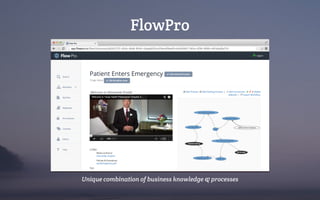
FlowPro
Unique combination of business knowledge & processes
What is Ember.js?
• Javascript framework for “ambitious web applications”
• One page apps
• Similar to Angular.js and Backbone.js
• Based on model-view-controller (MVC)
• Open source, community driven
• Evolved from Sproutcore (Apple iCloud, MobileME)
Why use Ember.js?
SPEED
We built our app in under
a month.
Why use Ember.js?
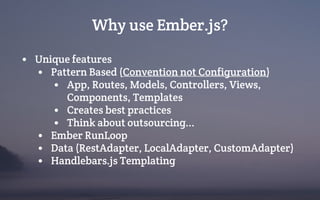
• Unique features
• Pattern Based (Convention not Configuration)
• App, Routes, Models, Controllers, Views,
Components, Templates
• Creates best practices
• Think about outsourcing...
• Ember RunLoop
• Data (RestAdapter, LocalAdapter, CustomAdapter)
• Handlebars.js Templating
Why use Ember.js?
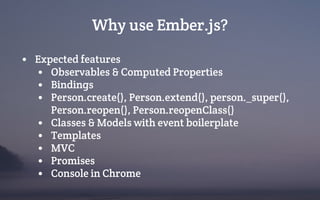
• Expected features
• Observables & Computed Properties
• Bindings
• Person.create(), Person.extend(), person._super(),
Person.reopen(), Person.reopenClass()
• Classes & Models with event boilerplate
• Templates
• MVC
• Promises
• Console in Chrome
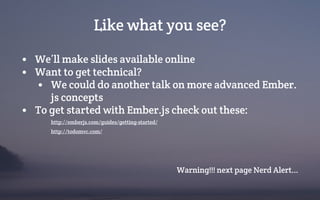
Like what you see?
• We’ll make slides available online
• Want to get technical?
• We could do another talk on more advanced Ember.
js concepts
• To get started with Ember.js check out these:
http://emberjs.com/guides/getting-started/
http://todomvc.com/
Warning!!! next page Nerd Alert...
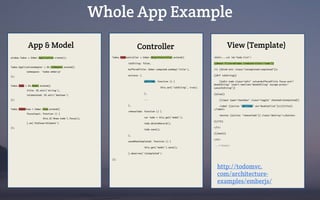
Whole App Example
Todos.TodoController = Ember.ObjectController.extend({
isEditing: false,
bufferedTitle: Ember.computed.oneWay('title'),
actions: {
editTodo: function () {
this.set('isEditing', true);
},
...
},
removeTodo: function () {
var todo = this.get('model');
todo.deleteRecord();
todo.save();
},
saveWhenCompleted: function () {
this.get('model').save();
}.observes('isCompleted')
});
<html>...<ul id="todo-list">
{{#each filteredTodos itemController="todo"}}
<li {{bind-attr class="isCompleted:completed"}}>
{{#if isEditing}}
{{edit-todo class="edit" value=bufferedTitle focus-out="
doneEditing" insert-newline="doneEditing" escape-press="
cancelEditing"}}
{{else}}
{{input type="checkbox" class="toggle" checked=isCompleted}}
<label {{action "editTodo" on="doubleClick"}}>{{title}}
</label>
<button {{action "removeTodo"}} class="destroy"></button>
{{/if}}
</li>
{{/each}}
</ul>
...</html>
App & Model Controller View (Template)
window.Todos = Ember.Application.create();
Todos.ApplicationAdapter = DS.LSAdapter.extend({
namespace: 'todos-emberjs'
});
Todos.Todo = DS.Model.extend({
title: DS.attr('string'),
isCompleted: DS.attr('boolean')
});
Todos.TodosView = Ember.View.extend({
focusInput: function () {
this.$('#new-todo').focus();
}.on('didInsertElement')
});
http://todomvc.
com/architecture-
examples/emberjs/
Some examples how we used Ember
@FlowProApp #WOW #AMAZING
• Ember Data
• Rest Adapter
• Local Storage Adapter (offline PhoneGap app ;)
• Query Params
• Web Components
• Run-Loop
more details on the next slides
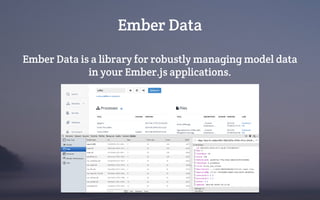
Ember Data
Ember Data is a library for robustly managing model data
in your Ember.js applications.
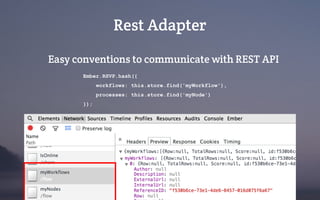
Rest Adapter
Easy conventions to communicate with REST API
Ember.RSVP.hash({
workflows: this.store.find('myWorkflow'),
processes: this.store.find('myNode')
});
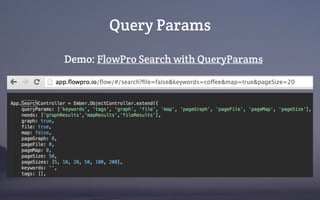
Query Params
Demo: FlowPro Search with QueryParams
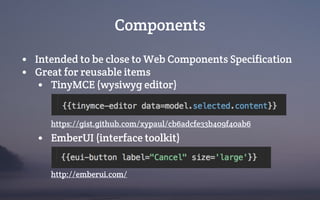
Components
• Intended to be close to Web Components Specification
• Great for reusable items
• TinyMCE (wysiwyg editor)
https://gist.github.com/xypaul/cb6adcfe33b409f40ab6
• EmberUI (interface toolkit)
http://emberui.com/
Run Loop
• Brings asynchronous execution and scheduling to JS
• Based on Backburner.js
• Internally used to
• sync bindings
• actions & events
• dom rendering
• destroying
• Forget callback hell, use Ember Run Loop instead
http://talks.erikbryn.com/backburner.js-and-the-ember-run-loop/
What was %$#!ed - Part 1
• Still in beta
• Only beta build has QueryParams support
• Ember Data in beta since FOREVER
• Constant API changes
• Examples from 3 months probably don’t work anymore
• Handling of Arrays & Objects
• Can’t just use person[]
• Get/set through person.get(‘firstname’)
• Solved using LinqJS
• Community pushback from our one line code
contributions (even with broken features)
What was %$#!ed - Part 2
• Breaking the RunLoop breaks the app
• Debugging is difficult due to hidden catches
• Conventions make it difficult to access low level JS &
DOM
• Ember works best with ember components
• Mixing jQuery can be messy
• Creating modals
• Array observers didn’t always do as they expected.
Deep event propagation didn’t always work.
Our Mission
Democratize all business knowledge
Thank you.
www.flowpro.io

Introduction to Ember.js and how we used it at FlowPro.io

  • 1.
    Introduction to Ember.jsand how we used it
  • 2.
    Andrew Grosser Tech Guy& Entrepreneur andrew@flowpro.io @andrewgrosser Paul Knittel Front End Junkie paul@flowpro.io @xyz_paul Who are we? } Startup @ilabaccelerator “Democratizing business knowledge” www.flowpro.io
  • 3.
    FlowPro Unique combination ofbusiness knowledge & processes
  • 4.
    What is Ember.js? •Javascript framework for “ambitious web applications” • One page apps • Similar to Angular.js and Backbone.js • Based on model-view-controller (MVC) • Open source, community driven • Evolved from Sproutcore (Apple iCloud, MobileME)
  • 5.
    Why use Ember.js? SPEED Webuilt our app in under a month.
  • 6.
    Why use Ember.js? •Unique features • Pattern Based (Convention not Configuration) • App, Routes, Models, Controllers, Views, Components, Templates • Creates best practices • Think about outsourcing... • Ember RunLoop • Data (RestAdapter, LocalAdapter, CustomAdapter) • Handlebars.js Templating
  • 7.
    Why use Ember.js? •Expected features • Observables & Computed Properties • Bindings • Person.create(), Person.extend(), person._super(), Person.reopen(), Person.reopenClass() • Classes & Models with event boilerplate • Templates • MVC • Promises • Console in Chrome
  • 8.
    Like what yousee? • We’ll make slides available online • Want to get technical? • We could do another talk on more advanced Ember. js concepts • To get started with Ember.js check out these: http://emberjs.com/guides/getting-started/ http://todomvc.com/ Warning!!! next page Nerd Alert...
  • 9.
    Whole App Example Todos.TodoController= Ember.ObjectController.extend({ isEditing: false, bufferedTitle: Ember.computed.oneWay('title'), actions: { editTodo: function () { this.set('isEditing', true); }, ... }, removeTodo: function () { var todo = this.get('model'); todo.deleteRecord(); todo.save(); }, saveWhenCompleted: function () { this.get('model').save(); }.observes('isCompleted') }); <html>...<ul id="todo-list"> {{#each filteredTodos itemController="todo"}} <li {{bind-attr class="isCompleted:completed"}}> {{#if isEditing}} {{edit-todo class="edit" value=bufferedTitle focus-out=" doneEditing" insert-newline="doneEditing" escape-press=" cancelEditing"}} {{else}} {{input type="checkbox" class="toggle" checked=isCompleted}} <label {{action "editTodo" on="doubleClick"}}>{{title}} </label> <button {{action "removeTodo"}} class="destroy"></button> {{/if}} </li> {{/each}} </ul> ...</html> App & Model Controller View (Template) window.Todos = Ember.Application.create(); Todos.ApplicationAdapter = DS.LSAdapter.extend({ namespace: 'todos-emberjs' }); Todos.Todo = DS.Model.extend({ title: DS.attr('string'), isCompleted: DS.attr('boolean') }); Todos.TodosView = Ember.View.extend({ focusInput: function () { this.$('#new-todo').focus(); }.on('didInsertElement') }); http://todomvc. com/architecture- examples/emberjs/
  • 10.
    Some examples howwe used Ember @FlowProApp #WOW #AMAZING • Ember Data • Rest Adapter • Local Storage Adapter (offline PhoneGap app ;) • Query Params • Web Components • Run-Loop more details on the next slides
  • 11.
    Ember Data Ember Datais a library for robustly managing model data in your Ember.js applications.
  • 12.
    Rest Adapter Easy conventionsto communicate with REST API Ember.RSVP.hash({ workflows: this.store.find('myWorkflow'), processes: this.store.find('myNode') });
  • 13.
    Query Params Demo: FlowProSearch with QueryParams
  • 14.
    Components • Intended tobe close to Web Components Specification • Great for reusable items • TinyMCE (wysiwyg editor) https://gist.github.com/xypaul/cb6adcfe33b409f40ab6 • EmberUI (interface toolkit) http://emberui.com/
  • 15.
    Run Loop • Bringsasynchronous execution and scheduling to JS • Based on Backburner.js • Internally used to • sync bindings • actions & events • dom rendering • destroying • Forget callback hell, use Ember Run Loop instead http://talks.erikbryn.com/backburner.js-and-the-ember-run-loop/
  • 16.
    What was %$#!ed- Part 1 • Still in beta • Only beta build has QueryParams support • Ember Data in beta since FOREVER • Constant API changes • Examples from 3 months probably don’t work anymore • Handling of Arrays & Objects • Can’t just use person[] • Get/set through person.get(‘firstname’) • Solved using LinqJS • Community pushback from our one line code contributions (even with broken features)
  • 17.
    What was %$#!ed- Part 2 • Breaking the RunLoop breaks the app • Debugging is difficult due to hidden catches • Conventions make it difficult to access low level JS & DOM • Ember works best with ember components • Mixing jQuery can be messy • Creating modals • Array observers didn’t always do as they expected. Deep event propagation didn’t always work.
  • 18.
    Our Mission Democratize allbusiness knowledge Thank you. www.flowpro.io