Introduction to DaVinci


         Platform and Service Leader


     1
1.    DaVinci Designer Framework
2.    WYSIWYG-type Authoring Environment
3.    Drag & Drop UI Layout Configuration
4.    Resource Editor
5.    CSS Level 2-3 Editor
6.    CSS Level 3 Animation Editor
7.    Animation Editor for Professional
8.    N-Screen Editor
9.    Integrated Development Environment (IDE)
10.   DaVinci UI Framework
11.   DaVinci Hybrid Runtime
12.   DaVinci Build Server


                                            2
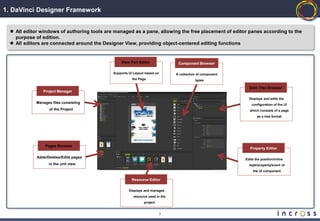
1. DaVinci Designer Framework


   All editor windows of authoring tools are managed as a pane, allowing the free placement of editor panes according to the
    purpose of edition.
   All editors are connected around the Designer View, providing object-centered editing functions


                                                 View Port Editor               Component Browser

                                             Supports UI Layout based on       A collection of component
                                                        the Page                          types

                                                                                                             Dom Tree Browser
                Project Manager
                                                                                                             Displays and edits the
             Manages files consisting
                                                                                                               configuration of the UI
                    of the Project                                                                           which consists of a page
                                                                                                                  as a tree format


                 Pages Browser
                                                                                                              Property Editor

             Adds/Deletes/Edits pages                                                                      Edits the position/inline
                   in the unit view                                                                          style/property/event of
                                                                                                                the UI component

                                                       Resource Editor

                                                      Displays and manages
                                                        resource used in the
                                                               project


                                                                         3
2. WYSIWYG-type Authoring Environment

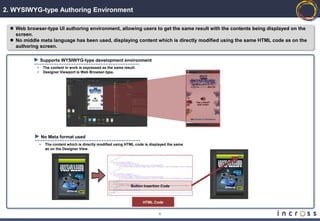
  Web browser-type UI authoring environment, allowing users to get the same result with the contents being displayed on the
   screen.
  No middle meta language has been used, displaying content which is directly modified using the same HTML code as on the
   authoring screen.

                Supports WYSIWYG-type development environment
            •       The content in work is expressed as the same result.
            •       Designer Viewport is Web Browser-type.


                    No Meta format used
                •    The content which is directly modified using HTML code is displayed the same
                     as on the Designer View.


                                                                     Button Insertion Code


                                                                           HTML Code


                                                                                    4
3. Drag & Drop UI Layout Configuration


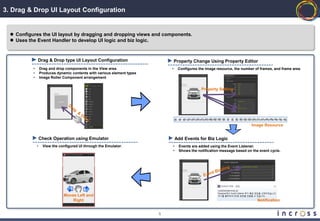
   Configures the UI layout by dragging and dropping views and components.
   Uses the Event Handler to develop UI logic and biz logic.


               Drag & Drop type UI Layout Configuration                           Property Change Using Property Editor
           •       Drag and drop components in the View area.                 •    Configures the image resource, the number of frames, and frame area
           •       Produces dynamic contents with various element types
           •       Image Roller Component arrangement


                                                                                                Property Setting


                                                                                                                            Image Resource


                   Check Operation using Emulator                                 Add Events for Biz Logic
               •    View the configured UI through the Emulator.              •     Events are added using the Event Listener.
                                                                              •     Shows the notification message based on the event cycle.


                                Moves Left and
                                    Right                                                                                      Notification


                                                                          5
4. Resource Editor


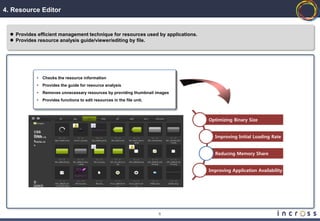
   Provides efficient management technique for resources used by applications.
   Provides resource analysis guide/viewer/editing by file.


             •   Checks the resource information
             •   Provides the guide for resource analysis
             •   Removes unnecessary resources by providing thumbnail images
             •   Provides functions to edit resources in the file unit.


                                                                                  Optimizing Binary Size

           CSS
           Files
           default.cs                                                               Improving Initial Loading Rate
           s
           media.cs
           s


                                                                                    Reducing Memory Share


                                                                                  Improving Application Availability

           총:
           300KB


                                                                          6
5. CSS Level 2-3 Editor


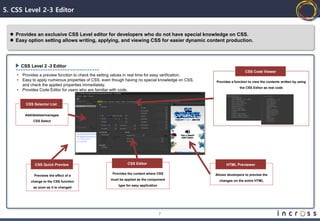
   Provides an exclusive CSS Level editor for developers who do not have special knowledge on CSS.
   Easy option setting allows writing, applying, and viewing CSS for easier dynamic content production.


        CSS Level 2 -3 Editor
                                                                                                                        CSS Code Viewer
    •   Provides a preview function to check the setting values in real time for easy verification.
    •   Easy to apply numerous properties of CSS, even though having no special knowledge on CSS,     Provides a function to view the contents written by using
        and check the applied properties immediately.
                                                                                                                    the CSS Editor as real code
    •   Provides Code Editor for users who are familiar with code.


          CSS Selector List

         Add/deletes/manages
              CSS Select


              CSS Quick Preview                                 CSS Editor                                  HTML Previewer

                                                       Provides the content where CSS                 Allows developers to preview the
              Previews the effect of a
                                                      must be applied as the component                  changes on the entire HTML
            change to the CSS function
                                                           type for easy application
              as soon as it is changed


                                                                                       7
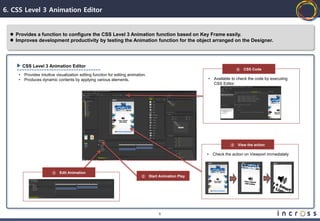
6. CSS Level 3 Animation Editor


   Provides a function to configure the CSS Level 3 Animation function based on Key Frame easily.
   Improves development productivity by testing the Animation function for the object arranged on the Designer.


         CSS Level 3 Animation Editor
                                                                                                                            ④   CSS Code
     •   Provides intuitive visualization editing function for editing animation.
     •   Produces dynamic contents by applying various elements.                                           •   Available to check the code by executing
                                                                                                               CSS Editor


                                                                                                                        ③   View the action

                                                                                                           •   Check the action on Viewport immediately


                         ①   Edit Animation
                                                                              ②     Start Animation Play


                                                                                         8
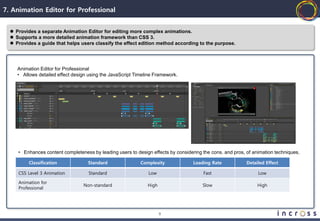
7. Animation Editor for Professional


   Provides a separate Animation Editor for editing more complex animations.
   Supports a more detailed animation framework than CSS 3.
   Provides a guide that helps users classify the effect edition method according to the purpose.


     Animation Editor for Professional
     • Allows detailed effect design using the JavaScript Timeline Framework.


     • Enhances content completeness by leading users to design effects by considering the cons. and pros, of animation techniques.

          Classification            Standard                Complexity             Loading Rate            Detailed Effect

     CSS Level 3 Animation           Standard                  Low                     Fast                     Low

     Animation for
                                  Non-standard                 High                    Slow                     High
     Professional


                                                                      9
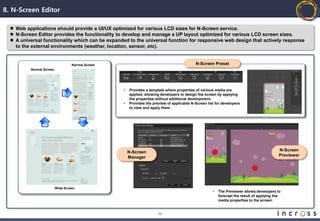
8. N-Screen Editor

   Web applications should provide a UI/UX optimized for various LCD sizes for N-Screen service.
   N-Screen Editor provides the functionality to develop and manage a UP layout optimized for various LCD screen sizes.
   A universal functionality which can be expanded to the universal function for responsive web design that actively response
    to the external environments (weather, location, sensor, etc).


                                   Narrow Screen                                            N-Screen Preset
          Normal Screen


                                                   •   Provides a template where properties of various media are
                                                       applied, allowing developers to design the screen by applying
                                                       the properties without additional development.
                                                   •   Provides the preview of applicable N-Screen list for developers
                                                       to view and apply them.


                                                       N-Screen                                                                             N-Screen
                                                       Manager                                                                              Previewer


                          Wide Screen
                                                                                                      •   The Previewer allows developers to
                                                                                                          forecast the result of applying the
                                                                                                          media properties to the screen.


                                                                       10
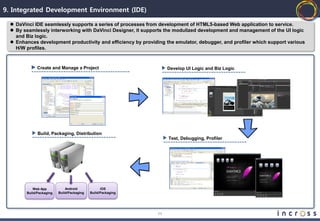
9. Integrated Development Environment (IDE)

   DaVinci IDE seamlessly supports a series of processes from development of HTML5-based Web application to service.
   By seamlessly interworking with DaVinci Designer, it supports the modulized development and management of the UI logic
    and Biz logic.
   Enhances development productivity and efficiency by providing the emulator, debugger, and profiler which support various
    H/W profiles.


              Create and Manage a Project                           Develop UI Logic and Biz Logic


              Build, Packaging, Distribution
                                                                    Test, Debugging, Profiler


            Web App           Android             iOS
        Build/Packaging   Build/Packaging   Build/Packaging


                                                               11
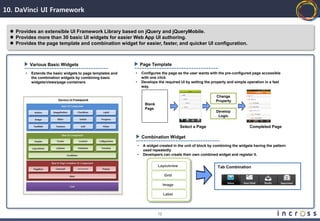
10. DaVinci UI Framework


   Provides an extensible UI Framework Library based on jQuery and jQueryMobile.
   Provides more than 30 basic UI widgets for easier Web App UI authoring.
   Provides the page template and combination widget for easier, faster, and quicker UI configuration.


            Various Basic Widgets                                     Page Template
        •   Extends the basic widgets to page templates and   •       Configures the page as the user wants with the pre-configured page accessible
            the combination widgets by combining basic                with one click.
            widgets/views/page containers                     •       Develops the required UI by setting the property and simple operation in a fast
                                                                      way.

                                                                                                                Change
                                                                                                                Property
                                                                        Blank
                                                                        Page
                                                                                                                Develop
                                                                                                                 Logic

                                                                                             Select a Page                         Completed Page

                                                                      Combination Widget
                                                                  •    A widget created in the unit of block by combining the widgets having the pattern
                                                                       used repeatedly
                                                                  •    Developers can create their own combined widget and register it.


                                                                                Layoutview                       Tab Combination
                                                                                     Grid

                                                                                     Image

                                                                                     Label


                                                                                12
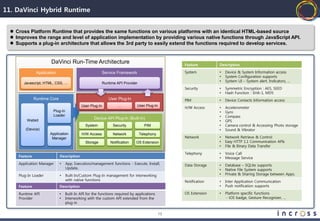
11. DaVinci Hybrid Runtime


   Cross Platform Runtime that provides the same functions on various platforms with an identical HTML-based source
   Improves the range and level of application implementation by providing various native functions through JavaScript API.
   Supports a plug-in architecture that allows the 3rd party to easily extend the functions required to develop services.


                        DaVinci Run-Time Architecture                                              Feature        Description

                Application                               Service Framework                        System         •   Device & System Information access
                                                                                                                  •   System Configuration supports
                                                                                                                  •   System UI – System alert, Indicators, …
       Javascript, HTML, CSS, …                           Runtime API Provider
                                                                                                   Security       •   Symmetric Encryption : AES, SEED
                                                                                                                  •   Hash Function : SHA-1, MD5
               Runtime Core                                  User Plug-In                          PIM            •   Device Contacts Information access
                                            User Plug-In           …           User Plug-In
                                                                                                   H/W Access     •   Accelerometer
                         Plug-In                                                                                  •   Gyro
                         Loader
                                                    Device API Plug-In (Built-In)                                 •   Compass
         Webkit                                                                                                   •   GPS
                                               System           Security           PIM                            •   Camera control & Accessing Photo storage
        (Device)                                                                                                  •   Sound & Vibrator
                       Application           H/W Access         Network          Telephony
                        Manager                                                                    Network        •   Network Retrieve & Control
                                               Storage        Notification    OS Extension                        •   Easy HTTP 1.1 Communication APIs
                                                                                                                  •   File & Binary Data Transfer

                                                                                                   Telephony      •   Voice Call
     Feature                  Description                                                                         •   Message Service
     Application Manager      •    App. Execution/management functions - Execute, Install,         Data Storage   •   Database – SQLite supports
                                   Update,                                                                        •   Native File System supports
     Plug-In Loader           •    Built-In/Custom Plug-In management for interworking                            •   Private & Sharing Storage between Apps.
                                   with native functions                                           Notification   •   Inter Application Communication
     Feature                  Description                                                                         •   Push notification supports

     Runtime API              •    Built-In API for the functions required by applications         OS Extension   •   Platform specific functions
     Provider                 •    Interworking with the custom API extended from the                                 - iOS badge, Gesture Recognizer, …
                                   plug-in


                                                                                              13
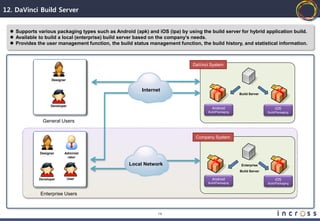
12. DaVinci Build Server


   Supports various packaging types such as Android (apk) and iOS (ipa) by using the build server for hybrid application build.
   Available to build a local (enterprise) build server based on the company’s needs.
   Provides the user management function, the build status management function, the build history, and statistical information.


                                                                               DaVinci System


                     Designer


                                                         Internet
                                                                                                        Build Server


                    Developer
                                                                                        Android                             iOS
                                                                                      Build/Packaging                  Build/Packaging


                General Users


                                                                                Company System


              Designer      Administ
                              rator

                                                    Local Network                                        Enterprise
                                                                                                        Build Server

              Developer         User                                                    Android                             iOS
                                                                                      Build/Packaging                  Build/Packaging


              Enterprise Users


                                                                14
Thank You


    15

Introduction to DaVinci

  • 1.
    Introduction to DaVinci Platform and Service Leader 1
  • 2.
    1. DaVinci Designer Framework 2. WYSIWYG-type Authoring Environment 3. Drag & Drop UI Layout Configuration 4. Resource Editor 5. CSS Level 2-3 Editor 6. CSS Level 3 Animation Editor 7. Animation Editor for Professional 8. N-Screen Editor 9. Integrated Development Environment (IDE) 10. DaVinci UI Framework 11. DaVinci Hybrid Runtime 12. DaVinci Build Server 2
  • 3.
    1. DaVinci DesignerFramework  All editor windows of authoring tools are managed as a pane, allowing the free placement of editor panes according to the purpose of edition.  All editors are connected around the Designer View, providing object-centered editing functions View Port Editor Component Browser Supports UI Layout based on A collection of component the Page types Dom Tree Browser Project Manager Displays and edits the Manages files consisting configuration of the UI of the Project which consists of a page as a tree format Pages Browser Property Editor Adds/Deletes/Edits pages Edits the position/inline in the unit view style/property/event of the UI component Resource Editor Displays and manages resource used in the project 3
  • 4.
    2. WYSIWYG-type AuthoringEnvironment  Web browser-type UI authoring environment, allowing users to get the same result with the contents being displayed on the screen.  No middle meta language has been used, displaying content which is directly modified using the same HTML code as on the authoring screen. Supports WYSIWYG-type development environment • The content in work is expressed as the same result. • Designer Viewport is Web Browser-type. No Meta format used • The content which is directly modified using HTML code is displayed the same as on the Designer View. Button Insertion Code HTML Code 4
  • 5.
    3. Drag &Drop UI Layout Configuration  Configures the UI layout by dragging and dropping views and components.  Uses the Event Handler to develop UI logic and biz logic. Drag & Drop type UI Layout Configuration Property Change Using Property Editor • Drag and drop components in the View area. • Configures the image resource, the number of frames, and frame area • Produces dynamic contents with various element types • Image Roller Component arrangement Property Setting Image Resource Check Operation using Emulator Add Events for Biz Logic • View the configured UI through the Emulator. • Events are added using the Event Listener. • Shows the notification message based on the event cycle. Moves Left and Right Notification 5
  • 6.
    4. Resource Editor  Provides efficient management technique for resources used by applications.  Provides resource analysis guide/viewer/editing by file. • Checks the resource information • Provides the guide for resource analysis • Removes unnecessary resources by providing thumbnail images • Provides functions to edit resources in the file unit. Optimizing Binary Size CSS Files default.cs Improving Initial Loading Rate s media.cs s Reducing Memory Share Improving Application Availability 총: 300KB 6
  • 7.
    5. CSS Level2-3 Editor  Provides an exclusive CSS Level editor for developers who do not have special knowledge on CSS.  Easy option setting allows writing, applying, and viewing CSS for easier dynamic content production. CSS Level 2 -3 Editor CSS Code Viewer • Provides a preview function to check the setting values in real time for easy verification. • Easy to apply numerous properties of CSS, even though having no special knowledge on CSS, Provides a function to view the contents written by using and check the applied properties immediately. the CSS Editor as real code • Provides Code Editor for users who are familiar with code. CSS Selector List Add/deletes/manages CSS Select CSS Quick Preview CSS Editor HTML Previewer Provides the content where CSS Allows developers to preview the Previews the effect of a must be applied as the component changes on the entire HTML change to the CSS function type for easy application as soon as it is changed 7
  • 8.
    6. CSS Level3 Animation Editor  Provides a function to configure the CSS Level 3 Animation function based on Key Frame easily.  Improves development productivity by testing the Animation function for the object arranged on the Designer. CSS Level 3 Animation Editor ④ CSS Code • Provides intuitive visualization editing function for editing animation. • Produces dynamic contents by applying various elements. • Available to check the code by executing CSS Editor ③ View the action • Check the action on Viewport immediately ① Edit Animation ② Start Animation Play 8
  • 9.
    7. Animation Editorfor Professional  Provides a separate Animation Editor for editing more complex animations.  Supports a more detailed animation framework than CSS 3.  Provides a guide that helps users classify the effect edition method according to the purpose. Animation Editor for Professional • Allows detailed effect design using the JavaScript Timeline Framework. • Enhances content completeness by leading users to design effects by considering the cons. and pros, of animation techniques. Classification Standard Complexity Loading Rate Detailed Effect CSS Level 3 Animation Standard Low Fast Low Animation for Non-standard High Slow High Professional 9
  • 10.
    8. N-Screen Editor  Web applications should provide a UI/UX optimized for various LCD sizes for N-Screen service.  N-Screen Editor provides the functionality to develop and manage a UP layout optimized for various LCD screen sizes.  A universal functionality which can be expanded to the universal function for responsive web design that actively response to the external environments (weather, location, sensor, etc). Narrow Screen N-Screen Preset Normal Screen • Provides a template where properties of various media are applied, allowing developers to design the screen by applying the properties without additional development. • Provides the preview of applicable N-Screen list for developers to view and apply them. N-Screen N-Screen Manager Previewer Wide Screen • The Previewer allows developers to forecast the result of applying the media properties to the screen. 10
  • 11.
    9. Integrated DevelopmentEnvironment (IDE)  DaVinci IDE seamlessly supports a series of processes from development of HTML5-based Web application to service.  By seamlessly interworking with DaVinci Designer, it supports the modulized development and management of the UI logic and Biz logic.  Enhances development productivity and efficiency by providing the emulator, debugger, and profiler which support various H/W profiles. Create and Manage a Project Develop UI Logic and Biz Logic Build, Packaging, Distribution Test, Debugging, Profiler Web App Android iOS Build/Packaging Build/Packaging Build/Packaging 11
  • 12.
    10. DaVinci UIFramework  Provides an extensible UI Framework Library based on jQuery and jQueryMobile.  Provides more than 30 basic UI widgets for easier Web App UI authoring.  Provides the page template and combination widget for easier, faster, and quicker UI configuration. Various Basic Widgets Page Template • Extends the basic widgets to page templates and • Configures the page as the user wants with the pre-configured page accessible the combination widgets by combining basic with one click. widgets/views/page containers • Develops the required UI by setting the property and simple operation in a fast way. Change Property Blank Page Develop Logic Select a Page Completed Page Combination Widget • A widget created in the unit of block by combining the widgets having the pattern used repeatedly • Developers can create their own combined widget and register it. Layoutview Tab Combination Grid Image Label 12
  • 13.
    11. DaVinci HybridRuntime  Cross Platform Runtime that provides the same functions on various platforms with an identical HTML-based source  Improves the range and level of application implementation by providing various native functions through JavaScript API.  Supports a plug-in architecture that allows the 3rd party to easily extend the functions required to develop services. DaVinci Run-Time Architecture Feature Description Application Service Framework System • Device & System Information access • System Configuration supports • System UI – System alert, Indicators, … Javascript, HTML, CSS, … Runtime API Provider Security • Symmetric Encryption : AES, SEED • Hash Function : SHA-1, MD5 Runtime Core User Plug-In PIM • Device Contacts Information access User Plug-In … User Plug-In H/W Access • Accelerometer Plug-In • Gyro Loader Device API Plug-In (Built-In) • Compass Webkit • GPS System Security PIM • Camera control & Accessing Photo storage (Device) • Sound & Vibrator Application H/W Access Network Telephony Manager Network • Network Retrieve & Control Storage Notification OS Extension • Easy HTTP 1.1 Communication APIs • File & Binary Data Transfer Telephony • Voice Call Feature Description • Message Service Application Manager • App. Execution/management functions - Execute, Install, Data Storage • Database – SQLite supports Update, • Native File System supports Plug-In Loader • Built-In/Custom Plug-In management for interworking • Private & Sharing Storage between Apps. with native functions Notification • Inter Application Communication Feature Description • Push notification supports Runtime API • Built-In API for the functions required by applications OS Extension • Platform specific functions Provider • Interworking with the custom API extended from the - iOS badge, Gesture Recognizer, … plug-in 13
  • 14.
    12. DaVinci BuildServer  Supports various packaging types such as Android (apk) and iOS (ipa) by using the build server for hybrid application build.  Available to build a local (enterprise) build server based on the company’s needs.  Provides the user management function, the build status management function, the build history, and statistical information. DaVinci System Designer Internet Build Server Developer Android iOS Build/Packaging Build/Packaging General Users Company System Designer Administ rator Local Network Enterprise Build Server Developer User Android iOS Build/Packaging Build/Packaging Enterprise Users 14
  • 15.