INTRODUCTION TO
COMPUTER
RITIKA SHARMA
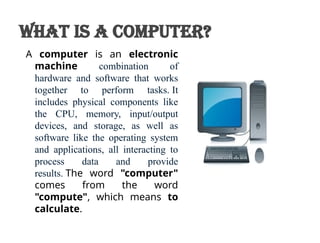
A computer is an electronic
machine combination of
hardware and software that works
together to perform tasks. It
includes physical components like
the CPU, memory, input/output
devices, and storage, as well as
software like the operating system
and applications, all interacting to
process data and provide
results. The word "computer"
comes from the word
"compute", which means to
calculate.
What is a Computer?
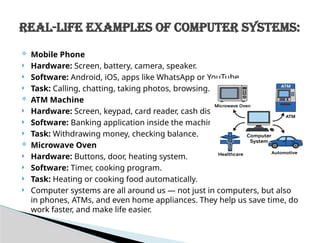
 Mobile Phone
 Hardware: Screen, battery, camera, speaker.
 Software: Android, iOS, apps like WhatsApp or YouTube.
 Task: Calling, chatting, taking photos, browsing.
 ATM Machine
 Hardware: Screen, keypad, card reader, cash dispenser.
 Software: Banking application inside the machine.
 Task: Withdrawing money, checking balance.
 Microwave Oven
 Hardware: Buttons, door, heating system.
 Software: Timer, cooking program.
 Task: Heating or cooking food automatically.
 Computer systems are all around us — not just in computers, but also
in phones, ATMs, and even home appliances. They help us save time, do
work faster, and make life easier.
Real-Life Examples of Computer Systems:
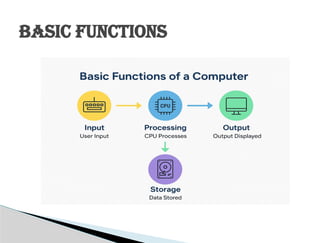
BASIC FUNCTIONS
 1. INPUT
 What it does:
This is the first step where the user gives data and
instructions to the computer.
 How it works:
Input devices are used to enter data into the computer for
processing.
 Examples of input devices:
 Keyboard: for typing text
 Mouse: for selecting or clicking
 Microphone: for voice input
 Scanner: to scan documents or images
 Touchscreen: to give direct touch commands
 2. PROCESSING
 What it does:
The computer takes the input data and processes it using the
CPU (Central Processing Unit).
 How it works:
The CPU performs operations like:
 Calculations (e.g., 2 + 2 = 4)
 Comparisons (e.g., Is A > B?)
 Decisions (e.g., If yes, do this… otherwise, do that)
3. STORAGE
 What it does:
A computer stores data and instructions for current or future
use.
 Types of storage:
 Primary Storage (RAM): Temporary storage used during
processing.
 Secondary Storage (Hard Drive, SSD): Permanent storage
to keep files and programs.
 How it works:
 Before processing, data is loaded into RAM.
 After processing, results can be saved in the hard drive.
4. OUTPUT
 What it does:
After processing, the computer gives the result as output.
 Output devices:
 Monitor/Screen: Displays text and images
 Printer: Gives output in physical form
 Speakers: Gives audio output
 Projector: Displays output on a large screen
 Control
 What it does:
This function is handled by the Control Unit (part of the
CPU), which directs all the other parts of the computer.
 How it works:
 It tells input, processing, memory, and output parts when to
work and how to work.
 Like a traffic police controlling signals and making
everything move in the right direction.
These five functions work together to make a
computer system perform tasks efficiently.
THANK YOU

Introduction to Computers: Basics, Components, and Uses

  • 1.
  • 2.
    A computer isan electronic machine combination of hardware and software that works together to perform tasks. It includes physical components like the CPU, memory, input/output devices, and storage, as well as software like the operating system and applications, all interacting to process data and provide results. The word "computer" comes from the word "compute", which means to calculate. What is a Computer?
  • 3.
     Mobile Phone Hardware: Screen, battery, camera, speaker.  Software: Android, iOS, apps like WhatsApp or YouTube.  Task: Calling, chatting, taking photos, browsing.  ATM Machine  Hardware: Screen, keypad, card reader, cash dispenser.  Software: Banking application inside the machine.  Task: Withdrawing money, checking balance.  Microwave Oven  Hardware: Buttons, door, heating system.  Software: Timer, cooking program.  Task: Heating or cooking food automatically.  Computer systems are all around us — not just in computers, but also in phones, ATMs, and even home appliances. They help us save time, do work faster, and make life easier. Real-Life Examples of Computer Systems:
  • 4.
  • 5.
     1. INPUT What it does: This is the first step where the user gives data and instructions to the computer.  How it works: Input devices are used to enter data into the computer for processing.  Examples of input devices:  Keyboard: for typing text  Mouse: for selecting or clicking  Microphone: for voice input  Scanner: to scan documents or images  Touchscreen: to give direct touch commands
  • 6.
     2. PROCESSING What it does: The computer takes the input data and processes it using the CPU (Central Processing Unit).  How it works: The CPU performs operations like:  Calculations (e.g., 2 + 2 = 4)  Comparisons (e.g., Is A > B?)  Decisions (e.g., If yes, do this… otherwise, do that)
  • 7.
    3. STORAGE  Whatit does: A computer stores data and instructions for current or future use.  Types of storage:  Primary Storage (RAM): Temporary storage used during processing.  Secondary Storage (Hard Drive, SSD): Permanent storage to keep files and programs.  How it works:  Before processing, data is loaded into RAM.  After processing, results can be saved in the hard drive.
  • 8.
    4. OUTPUT  Whatit does: After processing, the computer gives the result as output.  Output devices:  Monitor/Screen: Displays text and images  Printer: Gives output in physical form  Speakers: Gives audio output  Projector: Displays output on a large screen
  • 9.
     Control  Whatit does: This function is handled by the Control Unit (part of the CPU), which directs all the other parts of the computer.  How it works:  It tells input, processing, memory, and output parts when to work and how to work.  Like a traffic police controlling signals and making everything move in the right direction. These five functions work together to make a computer system perform tasks efficiently.
  • 10.