COMPUTER NETWORKS
EE3318
INTRODUCTION
BOOK RESOURCE
Please refer this book for the module
• Author : ANDREW S. TANENBAUM and DAVID J. WETHERALL
• Title : COMPUTER NETWORKS
• Publisher : PRENTICE HALL
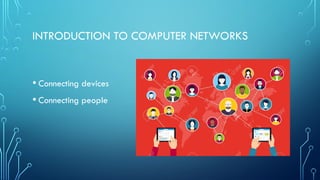
INTRODUCTION TO COMPUTER NETWORKS
• Connecting devices
• Connecting people
CONNECTED
• Each new development has improved and enhanced our ability to
connect and communicate with others.
• In today’s world, with networking we are connected like never
before.
• Peoples ideas shared, Discoveries known, News shared, and even
can connect with friends world wide to play games
TECHNOLOGY
EXPANSION
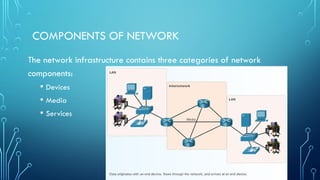
COMPONENTS OF NETWORK
The network infrastructure contains three categories of network
components:
• Devices
• Media
• Services
END DEVICES
• These devices are either the source or destination of a message
transmitted over the network.
• In order to distinguish end device from another, each end device
on a network is identified by an address. When a device initiates
communication, it uses the address of the destination device to
specify where the message should be sent
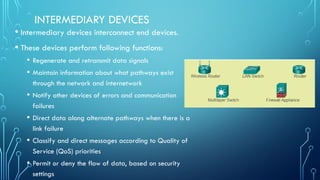
INTERMEDIARY DEVICES
• Intermediary devices interconnect end devices.
• These devices perform following functions:
• Regenerate and retransmit data signals
• Maintain information about what pathways exist
through the network and internetwork
• Notify other devices of errors and communication
failures
• Direct data along alternate pathways when there is a
link failure
• Classify and direct messages according to Quality of
Service (QoS) priorities
• Permit or deny the flow of data, based on security
settings
MEDIA
• The medium provides
the channel over which
the message travels
from source to
destination.
SIGNAL ENCODING
• On metallic wires, the data is encoded into electrical impulses that
match message signal.
• Fiber optic transmissions rely on pulses of light that match message
signal, within either infrared or visible light ranges.
• In wireless transmission, patterns of electromagnetic waves that
match message signal.
CHOOSING A MEDIA
• The network media
can be choose
according to these
criteria
SERVICES
NETWORK REPRESENTATIONS
IMPORTANT TERMS TO REMEMBER ARE:
• Network Interface Card - A NIC, or LAN adapter, provides the
physical connection to the network at the PC or other host device.
The media connecting the PC to the networking device plugs
directly into the NIC.
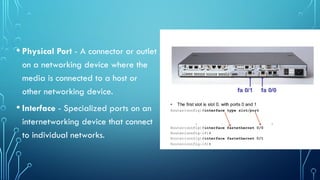
• Physical Port - A connector or outlet
on a networking device where the
media is connected to a host or
other networking device.
• Interface - Specialized ports on an
internetworking device that connect
to individual networks.
TOPOLOGY DIAGRAMS
• It provides a visual map of how the network is connected. There
are two types of topology diagrams
• Logical topology
• Physical topology
PHYSICAL TOPOLOGY DIAGRAMS -
• Identify the physical location
of intermediary devices,
configured ports, and cable
installation
LOGICAL TOPOLOGY DIAGRAMS
• Identify devices,
ports, and IP
addressing scheme
REFERENCES
• CCNA Routing and Switching: Introduction to Networks

Introduction to Computer Networks presentation slides

  • 1.
  • 2.
    BOOK RESOURCE Please referthis book for the module • Author : ANDREW S. TANENBAUM and DAVID J. WETHERALL • Title : COMPUTER NETWORKS • Publisher : PRENTICE HALL
  • 3.
    INTRODUCTION TO COMPUTERNETWORKS • Connecting devices • Connecting people
  • 6.
    CONNECTED • Each newdevelopment has improved and enhanced our ability to connect and communicate with others. • In today’s world, with networking we are connected like never before. • Peoples ideas shared, Discoveries known, News shared, and even can connect with friends world wide to play games
  • 7.
  • 8.
    COMPONENTS OF NETWORK Thenetwork infrastructure contains three categories of network components: • Devices • Media • Services
  • 9.
    END DEVICES • Thesedevices are either the source or destination of a message transmitted over the network. • In order to distinguish end device from another, each end device on a network is identified by an address. When a device initiates communication, it uses the address of the destination device to specify where the message should be sent
  • 10.
    INTERMEDIARY DEVICES • Intermediarydevices interconnect end devices. • These devices perform following functions: • Regenerate and retransmit data signals • Maintain information about what pathways exist through the network and internetwork • Notify other devices of errors and communication failures • Direct data along alternate pathways when there is a link failure • Classify and direct messages according to Quality of Service (QoS) priorities • Permit or deny the flow of data, based on security settings
  • 11.
    MEDIA • The mediumprovides the channel over which the message travels from source to destination.
  • 12.
    SIGNAL ENCODING • Onmetallic wires, the data is encoded into electrical impulses that match message signal. • Fiber optic transmissions rely on pulses of light that match message signal, within either infrared or visible light ranges. • In wireless transmission, patterns of electromagnetic waves that match message signal.
  • 13.
    CHOOSING A MEDIA •The network media can be choose according to these criteria
  • 14.
  • 15.
  • 16.
    IMPORTANT TERMS TOREMEMBER ARE: • Network Interface Card - A NIC, or LAN adapter, provides the physical connection to the network at the PC or other host device. The media connecting the PC to the networking device plugs directly into the NIC.
  • 17.
    • Physical Port- A connector or outlet on a networking device where the media is connected to a host or other networking device. • Interface - Specialized ports on an internetworking device that connect to individual networks.
  • 18.
    TOPOLOGY DIAGRAMS • Itprovides a visual map of how the network is connected. There are two types of topology diagrams • Logical topology • Physical topology
  • 19.
    PHYSICAL TOPOLOGY DIAGRAMS- • Identify the physical location of intermediary devices, configured ports, and cable installation
  • 20.
    LOGICAL TOPOLOGY DIAGRAMS •Identify devices, ports, and IP addressing scheme
  • 23.
    REFERENCES • CCNA Routingand Switching: Introduction to Networks