Computer Networks and Data
Communications
Course Code: 3114
Instructor: Atuheire Izaara Ambrose
Credit: 4.0
When: Thursday 11:00 – 12:30 pm
Venue: Post Graduate Room1
• EXPECTATIONS?
My Expectations
• Attend all lectures
• Implement assigned projects
• Do coursework and be involved in class
discussions
• Implement one final project
Prerequisites
• Computer Skills / knowledge on Internet
• Course site: https://lms.must.ac.ug/
• You will be able to access all the Lecture
presentations and electronic textbooks through the
LMS.
• Enrolment key is
3114
Software's to use
• Packet Tracer 6 or 7.2
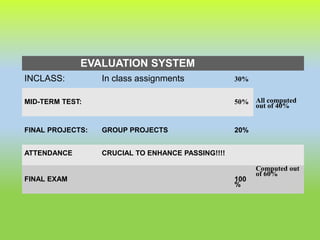
EVALUATION SYSTEM
INCLASS: In class assignments 30%
All computed
out of 40%
MID-TERM TEST: 50%
FINAL PROJECTS: GROUP PROJECTS 20%
ATTENDANCE CRUCIAL TO ENHANCE PASSING!!!!
FINAL EXAM 100
%
Computed out
of 60%
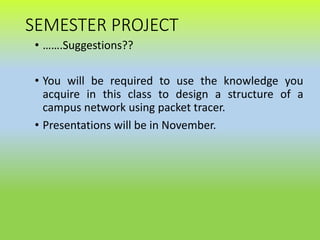
SEMESTER PROJECT
• …….Suggestions??
• You will be required to use the knowledge you
acquire in this class to design a structure of a
campus network using packet tracer.
• Presentations will be in November.
Tentative Course Content
Lecture 1: Overview of the Course and Network
Fundamentals: 2 Hour
Lecture 2: OSI Model& TCP/IP Model : 2 Hour
Lecture 3: Physical Media (Copper, Fiber Optic and Wireless)
: 2 Hour
Lab 1: Intro to Packet Tracer
Lecture 4: UTP & Fiber Cabling: 2 Hour
Lecture 5: LAN Technologies (Ethernet, Fast Ethernet,
Gigabit Ethernet, Wireless LAN) : 2 Hour
Lab 2: Demo and Practice of UTP Cabling: 2 Hour
Lecture 6: LAN Technologies (contd.) : 2 Hour
Course Content
Course Content
Lecture 7: WAN Technologies (Dialup, Leased Line, ISDN,
ADSL, Cable Modem, VSAT) : 2 Hour
Lab 3: Demo and Practice of Ethernet & Wireless LAN Setup :
2 Hour
Lecture 8: WAN Technologies (contd.) : 2 Hour
Lecture 9: Internet Protocol (IP) and IP Addressing: 2 Hour
Lab 4: Demo and Practice of Setting up Subnets and IP
Address Assignment : 2 Hour
Lecture 10: Routing, VLAN, TCP and UDP: 2 Hour
Lecture 11: SNMP, Natting, Firewall and VPN: 2 Hour
Lecture 12: Internet and Internet Applications (DNS, Email,
Web..): 2 Hour
Course Content
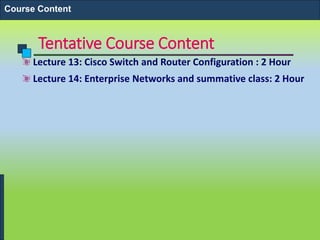
Tentative Course Content
Lecture 13: Cisco Switch and Router Configuration : 2 Hour
Lecture 14: Enterprise Networks and summative class: 2 Hour
Course Content
Tentative Course Content
Lecture 17: Mail Server, Proxy Server & Firewall Setup on
Linux : 2 Hour
Lab 8: Demo and Practice of Mail Server , Proxy Server and
Firewall Setup : 2 Hour
Course Content
References / Books
Andrew S. Tanenbaum, Computer Network, Prentice-Hall
Doughlas E. Comer, Computer Networks and Internet
http://www.cisco.com/public/support/tac/documentation.
html
Books
INTRODUCTION TO COMPUTER
NETWORKS
Introduction to Computer Networks
Computer Networks
Computer network connects
two or more autonomous
computers.
The computers can be
geographically located
anywhere.
Introduction to Computer Networks
LAN, MAN & WAN
Network in small geographical Area (Room, Building or a
Campus) is called LAN (Local Area Network)
Network in a City is call MAN (Metropolitan Area Network)
Network spread geographically (Country or across Globe) is
called WAN (Wide Area Network)
Introduction to Computer Networks
Applications of Networks
Resource Sharing
Hardware (computing resources, disks, printers)
Software (application software)
Information Sharing
Easy accessibility from anywhere (files, databases)
Search Capability (WWW)
Communication
Email
Message broadcast
Remote computing
Distributed processing (GRID Computing)
Introduction to Computer Networks
1.17
Network Criteria
• Performance
• Depends on Network Elements
• Measured in terms of Delay and Throughput
• Reliability
• Failure rate of network components
• Measured in terms of availability/robustness
• Security
• Data protection against corruption/loss of data due
to:
• Errors
• Malicious users
1.18
Physical Structures
• Type of Connection
• Point to Point - single transmitter and
receiver
• Multipoint - multiple recipients of
single transmission
• Physical Topology
• Connection of devices
• Type of transmission - unicast,
mulitcast, broadcast
1.19
Figure 1.3 Types of connections: point-to-point and multipoint
Network Topology
The network topology
defines the way in which
computers, printers, and
other devices are
connected. A network
topology describes the
layout of the wire and
devices as well as the
paths used by data
transmissions.
Introduction to Computer Networks
Bus Topology
Commonly referred to as a
linear bus, all the devices
on a bus topology are
connected by one single
cable.
Introduction to Computer Networks
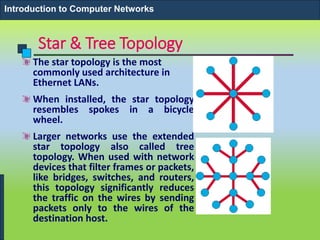
Star & Tree Topology
The star topology is the most
commonly used architecture in
Ethernet LANs.
When installed, the star topology
resembles spokes in a bicycle
wheel.
Larger networks use the extended
star topology also called tree
topology. When used with network
devices that filter frames or packets,
like bridges, switches, and routers,
this topology significantly reduces
the traffic on the wires by sending
packets only to the wires of the
destination host.
Introduction to Computer Networks
Ring Topology
A frame travels around the ring,
stopping at each node. If a node wants
to transmit data, it adds the data as
well as the destination address to the
frame.
The frame then continues around the
ring until it finds the destination node,
which takes the data out of the frame.
Single ring – All the devices on the
network share a single cable
Dual ring – The dual ring topology
allows data to be sent in both
directions.
Introduction to Computer Networks
Mesh Topology
The mesh topology
connects all devices
(nodes) to each other for
redundancy and fault
tolerance.
It is used in WANs to
interconnect LANs and for
mission critical networks
like those used by banks
and financial institutions.
Implementing the mesh
topology is expensive and
difficult.
Introduction to Computer Networks
Network Components
Physical Media
Interconnecting Devices
Computers
Networking Software
Applications
Introduction to Computer Networks
Networking Media
Networking media can be
defined simply as the
means by which signals
(data) are sent from one
computer to another
(either by cable or wireless
means).
Introduction to Computer Networks
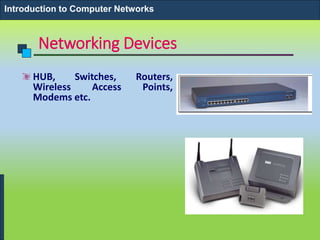
Networking Devices
HUB, Switches, Routers,
Wireless Access Points,
Modems etc.
Introduction to Computer Networks
Computers: Clients and Servers
In a client/server network
arrangement, network
services are located in a
dedicated computer whose
only function is to respond
to the requests of clients.
The server contains the
file, print, application,
security, and other services
in a central computer that
is continuously available to
respond to client requests.
Introduction to Computer Networks
Networking Protocol: TCP/IP
Introduction to Computer Networks
Applications
E-mail
Searchable Data (Web Sites)
E-Commerce
News Groups
Internet Telephony (VoIP)
Video Conferencing
Chat Groups
Instant Messengers
Internet Radio
Introduction to Computer Networks
Assignment to be done Next week
• Study the OSI and TCP models and their relevance in
the Networking process. Make hand written
summative notes on your findings.
• To be handed in ….

networking

  • 1.
    Computer Networks andData Communications Course Code: 3114 Instructor: Atuheire Izaara Ambrose Credit: 4.0 When: Thursday 11:00 – 12:30 pm Venue: Post Graduate Room1
  • 2.
  • 3.
    My Expectations • Attendall lectures • Implement assigned projects • Do coursework and be involved in class discussions • Implement one final project
  • 4.
    Prerequisites • Computer Skills/ knowledge on Internet • Course site: https://lms.must.ac.ug/ • You will be able to access all the Lecture presentations and electronic textbooks through the LMS. • Enrolment key is 3114
  • 5.
    Software's to use •Packet Tracer 6 or 7.2
  • 6.
    EVALUATION SYSTEM INCLASS: Inclass assignments 30% All computed out of 40% MID-TERM TEST: 50% FINAL PROJECTS: GROUP PROJECTS 20% ATTENDANCE CRUCIAL TO ENHANCE PASSING!!!! FINAL EXAM 100 % Computed out of 60%
  • 7.
    SEMESTER PROJECT • …….Suggestions?? •You will be required to use the knowledge you acquire in this class to design a structure of a campus network using packet tracer. • Presentations will be in November.
  • 8.
    Tentative Course Content Lecture1: Overview of the Course and Network Fundamentals: 2 Hour Lecture 2: OSI Model& TCP/IP Model : 2 Hour Lecture 3: Physical Media (Copper, Fiber Optic and Wireless) : 2 Hour Lab 1: Intro to Packet Tracer Lecture 4: UTP & Fiber Cabling: 2 Hour Lecture 5: LAN Technologies (Ethernet, Fast Ethernet, Gigabit Ethernet, Wireless LAN) : 2 Hour Lab 2: Demo and Practice of UTP Cabling: 2 Hour Lecture 6: LAN Technologies (contd.) : 2 Hour Course Content
  • 9.
    Course Content Lecture 7:WAN Technologies (Dialup, Leased Line, ISDN, ADSL, Cable Modem, VSAT) : 2 Hour Lab 3: Demo and Practice of Ethernet & Wireless LAN Setup : 2 Hour Lecture 8: WAN Technologies (contd.) : 2 Hour Lecture 9: Internet Protocol (IP) and IP Addressing: 2 Hour Lab 4: Demo and Practice of Setting up Subnets and IP Address Assignment : 2 Hour Lecture 10: Routing, VLAN, TCP and UDP: 2 Hour Lecture 11: SNMP, Natting, Firewall and VPN: 2 Hour Lecture 12: Internet and Internet Applications (DNS, Email, Web..): 2 Hour Course Content
  • 10.
    Tentative Course Content Lecture13: Cisco Switch and Router Configuration : 2 Hour Lecture 14: Enterprise Networks and summative class: 2 Hour Course Content
  • 11.
    Tentative Course Content Lecture17: Mail Server, Proxy Server & Firewall Setup on Linux : 2 Hour Lab 8: Demo and Practice of Mail Server , Proxy Server and Firewall Setup : 2 Hour Course Content
  • 12.
    References / Books AndrewS. Tanenbaum, Computer Network, Prentice-Hall Doughlas E. Comer, Computer Networks and Internet http://www.cisco.com/public/support/tac/documentation. html Books
  • 13.
  • 14.
    Computer Networks Computer networkconnects two or more autonomous computers. The computers can be geographically located anywhere. Introduction to Computer Networks
  • 15.
    LAN, MAN &WAN Network in small geographical Area (Room, Building or a Campus) is called LAN (Local Area Network) Network in a City is call MAN (Metropolitan Area Network) Network spread geographically (Country or across Globe) is called WAN (Wide Area Network) Introduction to Computer Networks
  • 16.
    Applications of Networks ResourceSharing Hardware (computing resources, disks, printers) Software (application software) Information Sharing Easy accessibility from anywhere (files, databases) Search Capability (WWW) Communication Email Message broadcast Remote computing Distributed processing (GRID Computing) Introduction to Computer Networks
  • 17.
    1.17 Network Criteria • Performance •Depends on Network Elements • Measured in terms of Delay and Throughput • Reliability • Failure rate of network components • Measured in terms of availability/robustness • Security • Data protection against corruption/loss of data due to: • Errors • Malicious users
  • 18.
    1.18 Physical Structures • Typeof Connection • Point to Point - single transmitter and receiver • Multipoint - multiple recipients of single transmission • Physical Topology • Connection of devices • Type of transmission - unicast, mulitcast, broadcast
  • 19.
    1.19 Figure 1.3 Typesof connections: point-to-point and multipoint
  • 20.
    Network Topology The networktopology defines the way in which computers, printers, and other devices are connected. A network topology describes the layout of the wire and devices as well as the paths used by data transmissions. Introduction to Computer Networks
  • 21.
    Bus Topology Commonly referredto as a linear bus, all the devices on a bus topology are connected by one single cable. Introduction to Computer Networks
  • 22.
    Star & TreeTopology The star topology is the most commonly used architecture in Ethernet LANs. When installed, the star topology resembles spokes in a bicycle wheel. Larger networks use the extended star topology also called tree topology. When used with network devices that filter frames or packets, like bridges, switches, and routers, this topology significantly reduces the traffic on the wires by sending packets only to the wires of the destination host. Introduction to Computer Networks
  • 23.
    Ring Topology A frametravels around the ring, stopping at each node. If a node wants to transmit data, it adds the data as well as the destination address to the frame. The frame then continues around the ring until it finds the destination node, which takes the data out of the frame. Single ring – All the devices on the network share a single cable Dual ring – The dual ring topology allows data to be sent in both directions. Introduction to Computer Networks
  • 24.
    Mesh Topology The meshtopology connects all devices (nodes) to each other for redundancy and fault tolerance. It is used in WANs to interconnect LANs and for mission critical networks like those used by banks and financial institutions. Implementing the mesh topology is expensive and difficult. Introduction to Computer Networks
  • 25.
    Network Components Physical Media InterconnectingDevices Computers Networking Software Applications Introduction to Computer Networks
  • 26.
    Networking Media Networking mediacan be defined simply as the means by which signals (data) are sent from one computer to another (either by cable or wireless means). Introduction to Computer Networks
  • 27.
    Networking Devices HUB, Switches,Routers, Wireless Access Points, Modems etc. Introduction to Computer Networks
  • 28.
    Computers: Clients andServers In a client/server network arrangement, network services are located in a dedicated computer whose only function is to respond to the requests of clients. The server contains the file, print, application, security, and other services in a central computer that is continuously available to respond to client requests. Introduction to Computer Networks
  • 29.
  • 30.
    Applications E-mail Searchable Data (WebSites) E-Commerce News Groups Internet Telephony (VoIP) Video Conferencing Chat Groups Instant Messengers Internet Radio Introduction to Computer Networks
  • 31.
    Assignment to bedone Next week • Study the OSI and TCP models and their relevance in the Networking process. Make hand written summative notes on your findings. • To be handed in ….