Introduction to ComputerHardware
• A computer is an electronic device, operating
under the control of instructions stored in its
own memory that can accept data (input),
process the data according to specified rules,
produce information (output), and store the
information for future use.
3.
Characteristics of aComputer
High Speed
• Computer is a very fast device.
• It is capable of performing calculation of very large
amount of data.
• The computer has units of speed in microsecond,
nanosecond, and even the
picosecond.
• It can perform millions of calculations in a few seconds
as compared to man who will
• spend many months to perform the same task.
4.
• Accuracy
• Inaddition to being very fast, computers are
very accurate.
• The calculations are 100% error free.
• Computers perform all jobs with 100%
accuracy provided that the input is correct.
5.
Storage Capability
• Memoryis a very important characteristic of
computers.
• A computer has much more storage capacity
than human beings.
• It can store large amount of data.
• It can store any type of data such as images,
videos, text, audio, etc.
6.
Diligence
• Unlike humanbeings, a computer is free from
monotony, tiredness, and lack of
concentration.
• It can work continuously without any error
and boredom.
• It can perform repeated tasks with the same
speed and accuracy.
7.
Versatility
• A computeris a very versatile machine.
• A computer is very flexible in performing the jobs
to be done.
• This machine can be used to solve the problems
related to various fields.
• At one instance, it may be solving a complex
scientific problem and the very next
moment it may be playing a card game.
8.
Reliability
• A computeris a reliable machine.
• Modern electronic components have long
lives.
• Computers are designed to make
maintenance easy.
9.
Automation
• Computer isan automatic machine.
• Automation is the ability to perform a given
task automatically. Once the computer
receives a program i.e., the program is
stored in the computer memory, then the
program and instruction can control the
program execution without human interaction.
10.
Reduction in PaperWork and Cost
• The use of computers for data processing in an
organization leads to reduction in paper
work and results in speeding up the process.
• As data in electronic files can be retrieved as and
when required, the problem of
maintenance of large number of paper files gets reduced.
• Though the initial investment for installing a computer is
high, it substantially reduces
the cost of each of its transaction.
11.
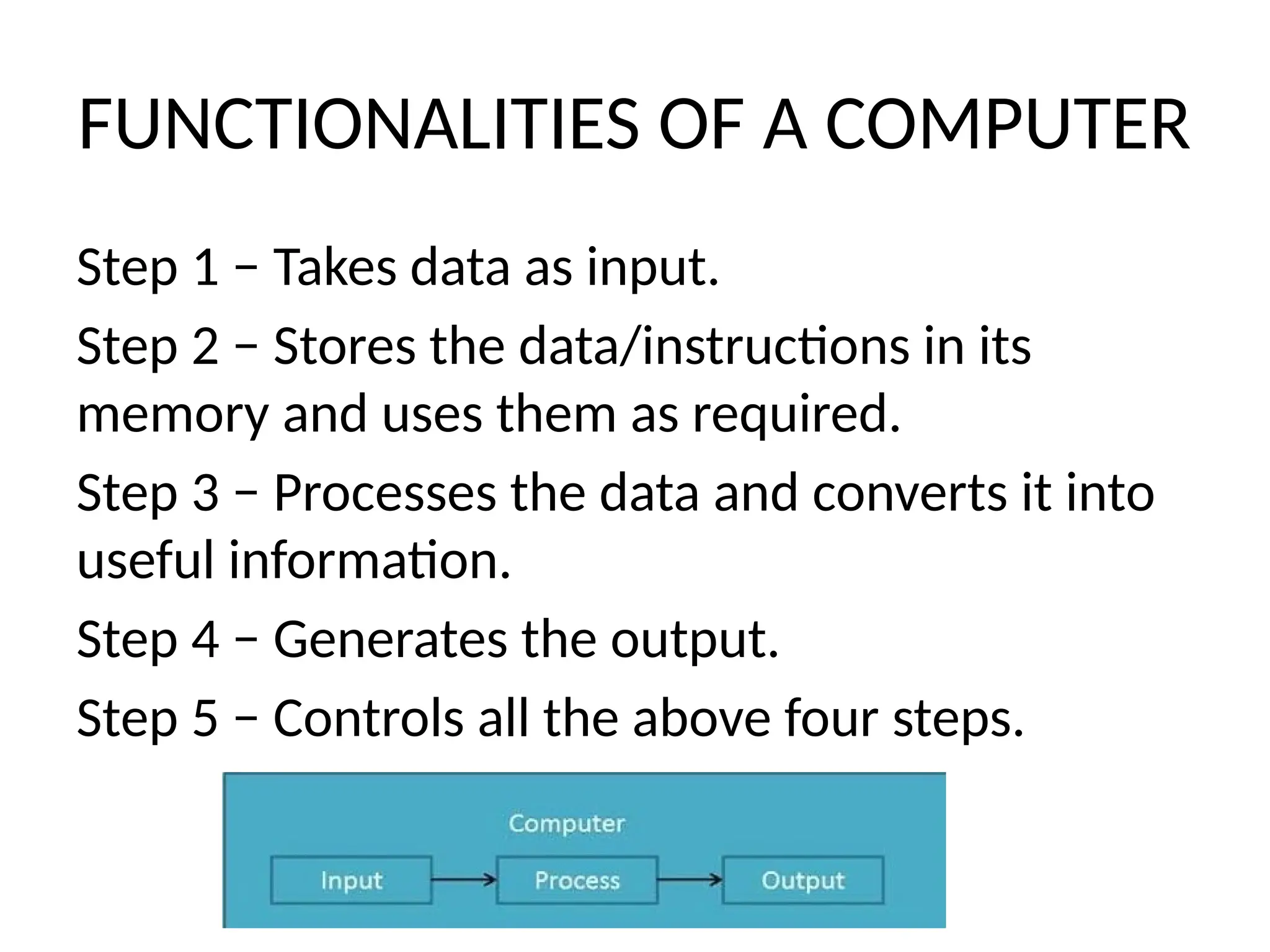
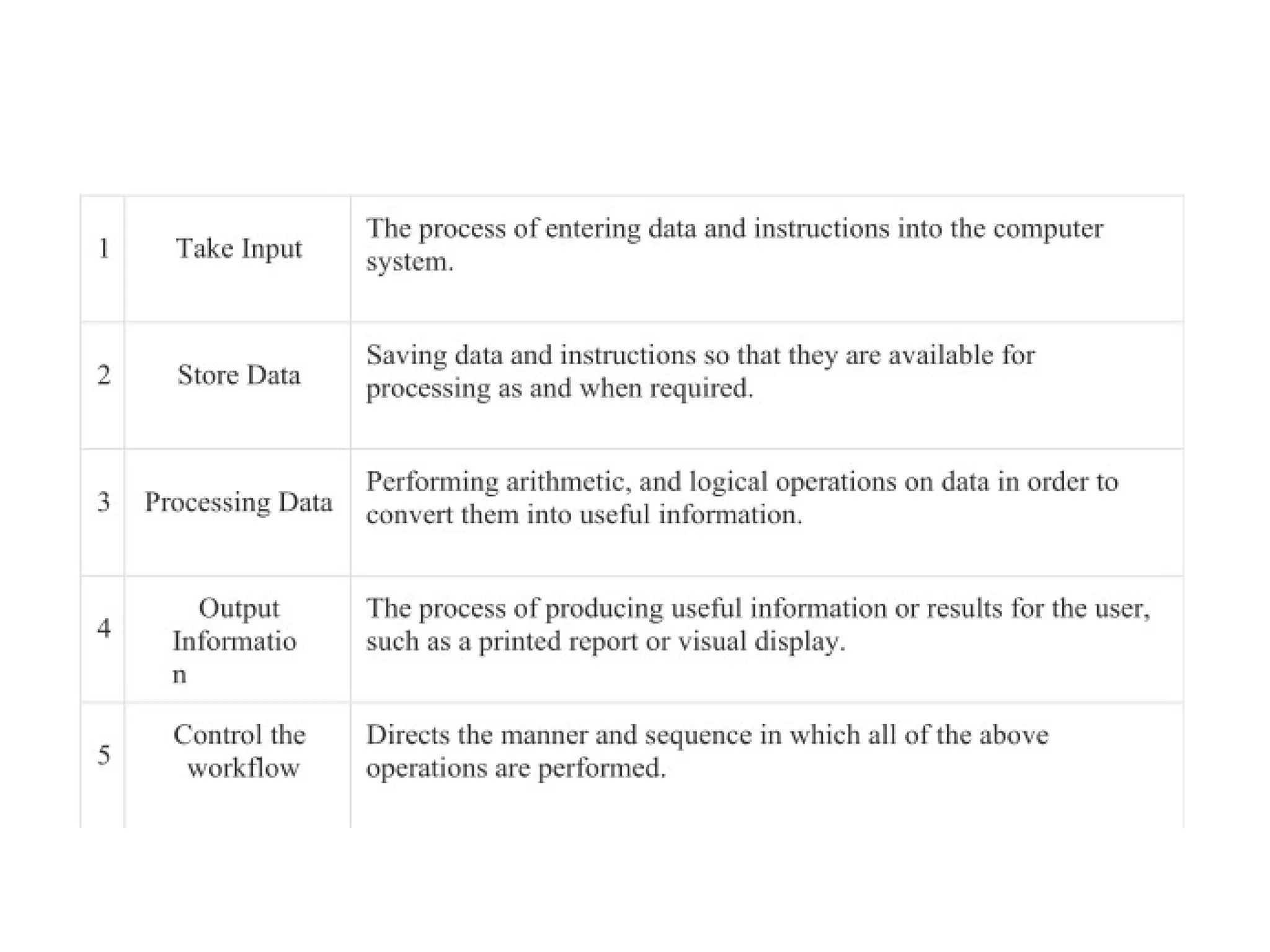
FUNCTIONALITIES OF ACOMPUTER
Step 1 − Takes data as input.
Step 2 − Stores the data/instructions in its
memory and uses them as required.
Step 3 − Processes the data and converts it into
useful information.
Step 4 − Generates the output.
Step 5 − Controls all the above four steps.
12.
Applications of Computers
Acomputer has high speed of calculation, diligence, accuracy,
reliability, or versatility
which has made it an integrated part in all business organizations.
Computer is used in business organizations for −
• Payroll calculations
• Budgeting
• Sales analysis
• Financial forecasting
• Managing employee database
• Maintenance of stocks,
etc.
13.
Banking
Today, banking isalmost totally dependent on computers.
Banks provide the following facilities −
• Online accounting facility, which includes checking
current balance, making deposits
and overdrafts, checking interest charges, shares, and
trustee records.
• ATM machines which are completely automated are
making it even easier for
customers to deal with banks.
14.
Insurance
Insurance companies arekeeping all records up-to-date with the help of
computers. Insurance
companies, finance houses, and stock broking firms are widely using
computers for their
concerns.
Insurance companies are maintaining a database of all clients with
information showing −
• Procedure to continue with policies
• Starting date of the policies
• Next due installment of a policy
• Maturity date
• Interests due
• Survival benefits
• Bonus
15.
Education
The computer helpsin providing a lot of facilities in the education
system.
• The computer provides a tool in the education system known as
CBE (Computer
Based Education).
• CBE involves control, delivery, and evaluation of learning.
• Computer education is rapidly increasing the graph of number of
computer students.
• There are a number of methods in which educational institutions
can use a computer
to educate the students.
• It is used to prepare a database about performance of a student
and analysis is carried
out on this basis.
16.
In marketing, usesof the computer are following
• Advertising − With computers, advertising
professionals create art and graphics, write
and revise copy, and print and disseminate ads with the
goal of selling more products.
• Home Shopping − Home shopping has been made
possible through the use of computerized catalogues
that provide access to
product information and permit direct entry of orders to
be filled by the customers.
17.
Healthcare
Computers have becomean important part in hospitals, labs, and
dispensaries. They are being used in hospitals to keep the record
of
patients and medicines. It is also used in scanning and diagnosing
different diseases. ECG, EEG, ultrasounds and CT scans, etc. are
also done by computerized machines.
Following are some major fields of health care in which computers
are used.
• Diagnostic System − Computers are used to collect data and
identify the cause of illness.
• Lab-diagnostic System − All tests can be done and the reports
are prepared by computer.
• Patient Monitoring System − These are used to check the
patient's signs for abnormality such as in Cardiac Arrest, ECG, etc.
• Pharma Information System − Computer is used to check drug
labels, expiry dates, harmful side effects, etc.
18.
• Surgery −Nowadays, computers are also used in performing surgery.
Engineering Design
Computers are widely used for Engineering purpose.
One of the major areas is CAD (Computer Aided Design) that provides
creation and modification of images. Some of the fields are −
• Structural Engineering − Requires stress and strain analysis for design of
ships, buildings, budgets, airplanes, etc.
• Industrial Engineering − Computers deal with design, implementation,
and improvement of integrated systems of people,
materials, and equipment.
• Architectural Engineering − Computers help in planning towns, designing
buildings, determining a range of buildings on a site
using both 2D and 3D drawings.
19.
Military
Computers are largelyused in defence. Modern tanks,
missiles, weapons, etc. Military also employs computerized
control systems.
Some military areas where a computer has been used are −
• Missile Control
• Military Communication
• Military Operation and Planning
• Smart Weapons Communication
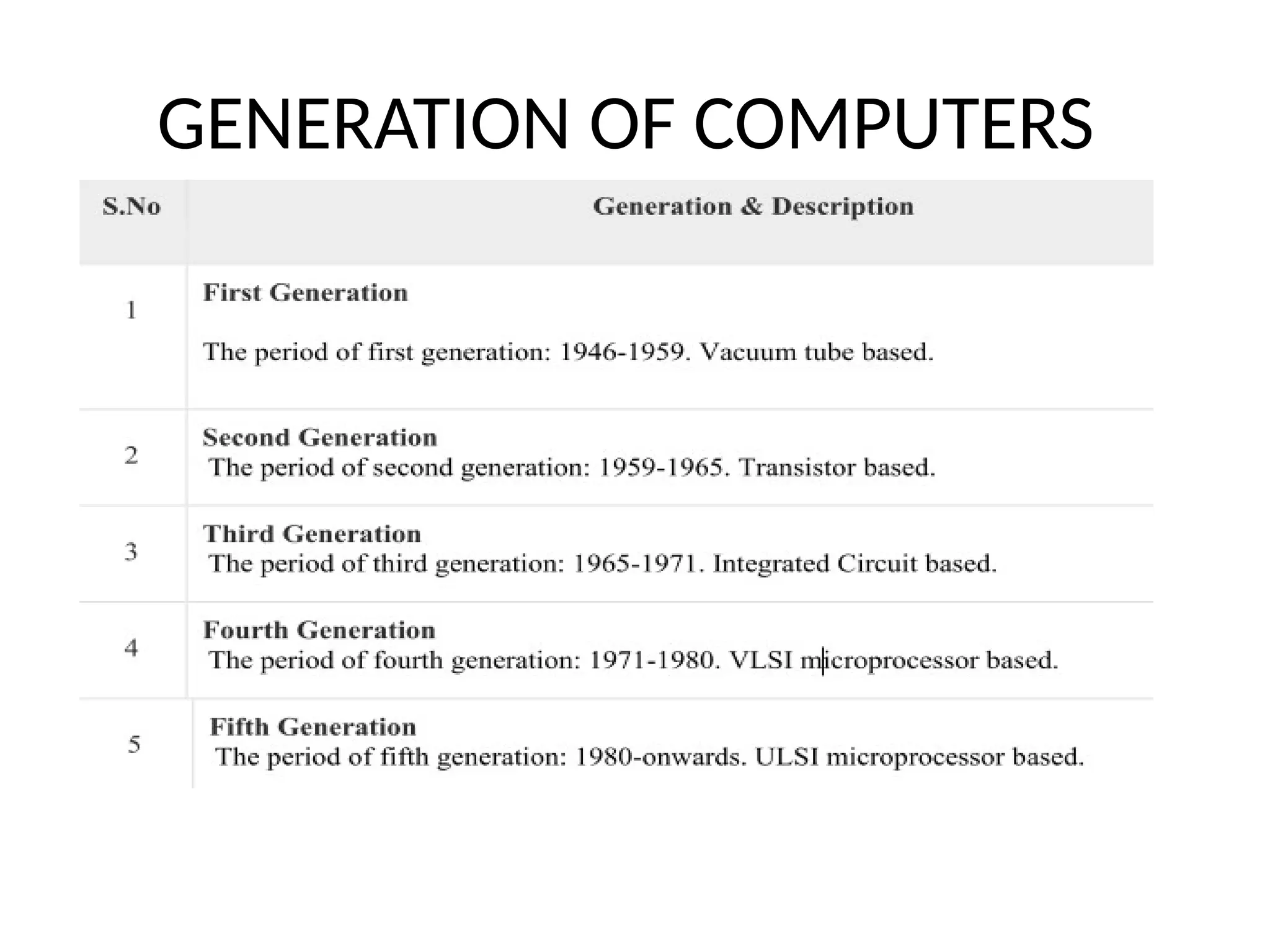
First Generation Computers:The period of first generation was from 1946-1959.
The computers of first generation used vacuum tubes
as the basic components for memory and circuitry for CPU (Central Processing
Unit). These tubes, like electric bulbs, produced a lot of
heat and the installations used to fuse frequently. Therefore, they were very
expensive and only large organizations were able to afford
it. In this generation, mainly batch processing operating system was used. Punch
cards, paper tape, and magnetic tape was used as input
and output devices. The computers in this generation used machine code as the
programming language. The main features of the first
generation are: Vacuum tube technology, Unreliable, Supported machine
language only, Very costly, Generated a lot of heat, Slow input
and output devices, Huge size, Need of AC, 15 Non-portable, Consumed a lot of
electricity.
22.
Second Generation Computers:The period of second generation was from
1959-1965. In this generation, transistors were used that
were cheaper, consumed less power, more compact in size, more reliable and
faster than the first generation machines made of vacuum
tubes. In this generation, magnetic cores were used as the primary memory
and magnetic tape and magnetic disks as secondary storage
devices. In this generation, assembly language and high- level
programming languages like FORTRAN, COBOL were used. The computers
used batch processing and multiprogramming operating system. The main
features of second generation are: Use of
transistors, Reliable in comparison to first generation computers, Smaller size
as compared to first generation computers, Generated less
heat as compared to first generation computers, Consumed less electricity as
compared to first generation computers, Faster than first
generation computers, Still very costly, AC required, Supported machine and
assembly languages.
23.
Third Generation Computers:The period of third generation was from
1965-1971. The computers of third generation used Integrated
Circuits (ICs) in place of transistors. A single IC has many transistors,
resistors, and capacitors along with the associated circuitry. The
IC was invented by Jack Kilby. This development made computers smaller
in size, reliable, and efficient. In this generation remote
processing, time-sharing, multi-programming operating system were
used. High-level languages (FORTRAN-II TO IV, COBOL,
PASCAL PL/1, BASIC, ALGOL-68 etc.) were used during this generation. The
main features of third generation are: IC used, More
reliable in comparison to previous two generations, Smaller size,
Generated less heat, Faster, Lesser maintenance, Costly, AC required,
Consumed lesser electricity, Supported high-level language.
24.
Fourth Generation Computers:The period of fourth generation was from
1971-1980. Computers of fourth generation used Very Large
Scale Integrated (VLSI) circuits. VLSI circuits having about 5000 transistors
and 18 other circuit elements with their associated circuits
on a single chip made it possible to have microcomputers of fourth
generation. Fourth generation computers became more powerful,
compact, reliable, and affordable. As a result, it gave rise to Personal
Computer (PC) revolution. In this generation, time sharing, real
time networks, distributed operating system were used. All the high-
level languages like C, C++, DBASE etc., were used in this
generation. The main features of fourth generation are: VLSI technology
used, Very cheap, portable and reliable, Use of PCs, Very small
size, Pipeline processing, No AC required, Concept of internet was
introduced, and Great developments in the fields of networks,
Computers became easily available.
25.
Fifth Generation Computers:The period of fifth generation is 1980-till
date. In the fifth generation, VLSI technology became ULSI
(Ultra Large Scale Integration) technology, resulting in the
production of microprocessor chips having ten million electronic
components. This generation is based on parallel processing hardware
and AI (Artificial Intelligence) software. AI is an emerging branch
in computer science, which interprets the means and method of
making computers think like human beings. All the high-level languages
like C and C++, Java, .Net etc., are used in this generation. AI includes:
Robotics, Neural Networks, Game Playing and Development
of expert systems to make decisions in real-life situations, Natural
language understanding and generation


![Unit -5 IOT[1]design challenges in IOT. pptx](https://cdn.slidesharecdn.com/ss_thumbnails/unit-5iot1-251208031821-0cb92c82-thumbnail.jpg?width=640&height=640&fit=bounds)


