DIGITAL COMPUTER FUNDAMENTALS
UNIT - I
What is Compuer :
• Computer is an electronic device that is designed to work with Information. The
term computer is derived from the Latin term ‘computare’, this means
to calculate or programmable machine.
• Computer can not do anything without a Program. It represents the decimal
numbers through a string of binary digits. The Word 'Computer' usually refers to the
Central Processing unit plus Internal Memory.
• Charles Babbage is called the "Grand Father" of the computer. The First mechanical
computer designed by Charles Babbage was called Analytical Engine. It uses read-
only memory in the form of punch cards.
• Computer is an advanced electronic device that takes raw data as input from the user
and processes these data under the control of set of instructions (called program) and
gives the result (output) and saves output for the future use. It can process both
numerical and non-numerical (arithmetic and logical) calculations.
Digital Computer Definition
• The basic components of a modern digital computer are: Input
Device, Output Device, Central Processor Unit (CPU), mass storage
device and memory. A Typical modern computer uses LSI Chips.
• Four Functions about computer are:
accepts data Input
processes data Processing
produces outputOutput
stores results Storage
Input (Data):
• Input is the raw information entered into a computer from the input devices. It
is the collection of letters, numbers, images etc.
Process:
• Process is the operation of data as per given instruction. It is totally internal
process of the computer system.
Output:
• Output is the processed data given by computer after data processing. Output is
also called as Result. We can save these results in the storage devices for the
future use.
Computer - Applications
Business
• A computer has high speed of calculation, diligence, accuracy,
reliability, or versatility which made it an integrated part in all
business organisations.
• Computer is used in business organisations for:
• Payroll calculations
• Budgeting
• Sales analysis
• Financial forecasting
• Managing employees database
• Maintenance of stocks etc.
Banking
• Today banking is almost totally dependent on computer.
• Banks provide following facilities:
• Banks provide online accounting facility, which includes current balances,
deposits, overdrafts, interest charges, shares, and trustee records.
• ATM machines are making
it even easier for customers
to deal with banks.
Insurance
• Insurance companies are keeping all records up-to-date with the help of
computers. The insurance companies, finance houses and stock
broking firms are widely using computers for their concerns.
• Insurance companies are maintaining a database of all clients with
information showing
• procedure to continue with policies
• starting date of the policies
• next due installment of a policy
• maturity date
• interests due
• survival benefits
Education
• The computer has provided a lot of facilities in the education system.
• The computer provides a tool in the education system known as CBE
(Computer Based Education).
• CBE involves control, delivery, and evaluation of learning.
• The computer education is rapidly increasing the graph of number of computer
students.
• There are number of methods in which educational institutions can use
computer to educate the students.
• It is used to prepare a database
about performance of a student
and analysis is carried out
on this basis.
Marketing
• In marketing, uses of computer are following:
• Advertising - With computers, advertising professionals create art
and graphics, write and revise copy, and print and disseminate ads
with the goal of selling more products.
• At Home Shopping - Home shopping has been made possible
through use of computerized catalogues that provide
access to product information
and permit direct entry of
orders to be filled by the customers.
Health Care
• Computers have become important part in hospitals, labs, and dispensaries.
The computers are being used in hospitals to keep the record of patients
and medicines. It is also used in scanning and diagnosing different diseases.
ECG, EEG, Ultrasounds and CT Scans etc., are also done by computerised
machines.
• Some major fields of health care in which computers are used are:
• Diagnostic System - Computers are used to collect data and identify cause
of illness.
• Lab-diagnostic System - All tests can be done and reports are prepared by
computer.
• Patient Monitoring System - These are used to check patient's signs for
abnormality such as in Cardiac Arrest, ECG etc.
• Pharma Information System - Computer checks Drug-Labels, Expiry
dates, harmful drug’s side effects etc.
• Surgery : Nowadays, computers are also used in
performing surgery.
Engineering Design
• Computers are widely used in Engineering purpose.
• One of major areas is CAD (Computer aided design). That provides
creation and modification of images. Some fields are:
• Structural Engineering - Requires stress and strain analysis for design of
Ships, Buildings, Budgets, Airplanes etc.
• Industrial Engineering - Computers deal with design, implementation and
improvement of integrated systems of people, materials and equipments.
• Architectural Engineering - Computers help in planning towns, designing
buildings, determining a range of buildings on a site using both 2D and 3D
drawings.
Government
• Computers play an important role in government. Some major fields
in this category are:
• Budgets
• Sales tax department
• Income tax department
• Male/Female ratio
• Computerization of voters lists
• Computerization of driving licensing system
• Computerization of PAN card
• Weather forecasting
Basic components of Digital Computer System
All types of computers follow the same basic logical structure and perform the
following five basic operations for converting raw input data into information
useful to their users.
S.No. Operation Description
1 Take Input The process of entering data and instructions into the computer system.
2 Store Data Saving data and instructions so that they are available for processing as and when required.
3 Processing Data
Performing arithmetic, and logical operations on data in order to convert them into useful
information.
4
Output
Information
The process of producing useful information or results for the user, such as a printed report or
visual display.
5
Control the Directs the manner and sequence in which all of the above operations are performed.
Input Unit
This unit contains devices with the help of which we enter data into the computer. This unit
creates a link between the user and the computer. The input devices translate the
information into a form understandable by the computer.
CPU (Central Processing Unit)
CPU is considered as the brain of the computer. CPU performs all types of data processing
operations. It stores data, intermediate results, and instructions (program). It controls the
operation of all parts of the computer.
CPU itself has the following three components −
● ALU (Arithmetic Logic Unit)
● Memory Unit
● Control Unit
Output Unit
The output unit consists of devices with the help of which we get the information from the
computer. This unit is a link between the computer and the users. Output devices translate
the computer's output into a form understandable by the users.
Central Processing Unit (CPU) consists of the following
features −
● CPU is considered as the brain of the computer.
● CPU performs all types of data processing operations.
● It stores data, intermediate results, and instructions
(program).
● It controls the operation of all parts of the computer.
Memory Storage Unit
This unit can store instructions, data, and intermediate results. This unit
supplies information to other units of the computer when needed. It is also
known as internal storage unit or the main memory or the primary storage or
Random Access Memory (RAM).
Its size affects speed, power, and capability. Primary memory and secondary
memory are two types of memories in the computer. Functions of the memory
unit are −
● It stores all the data and the instructions required for processing.
● It stores intermediate results of processing.
● It stores the final results of processing before these results are released to
an output device.
● All inputs and outputs are transmitted through the main memory.
Control Unit
This unit controls the operations of all parts of the computer but does
not carry out any actual data processing operations.
Functions of this unit are −
● It is responsible for controlling the transfer of data and
instructions among other units of a computer.
● It manages and coordinates all the units of the computer.
● It obtains the instructions from the memory, interprets
them, and directs the operation of the computer.
● It communicates with Input/Output devices for transfer of
data or results from storage.
● It does not process or store data.
ALU (Arithmetic Logic Unit)
This unit consists of two subsections namely,
● Arithmetic Section
● Logic Section
Arithmetic Section
Function of arithmetic section is to perform arithmetic operations like
addition, subtraction, multiplication, and division. All complex operations
are done by making repetitive use of the above operations.
Logic Section
Function of logic section is to perform logic operations such as comparing,
selecting, matching, and merging of data.
Types of Programming Languages
There are two types of programming languages, which can be
categorized into the following way
1. Low level language
Machine language (1GL)
Assembly language (2GL)
2. High level language
Procedural-Oriented language (3GL)
Problem-Oriented language (4GL)
Natural language (5GL)
1. Low level language
This language is the most understandable language used by computer to
perform its operations. It can be further categorized into:
Machine Language (1GL)
Machine language consists of strings of binary numbers (i.e. 0s and 1s) and
it is the only one language, the processor directly understands. Machine
language has an Merits of very fast execution speed and efficient use of
primary memory.
Merits:
¨ It is directly understood by the processor so has faster execution time
since the programs written in this language need not to be translated.
¨ It doesn’t need larger memory.
Demerits:
¨ It is very difficult to program using 1GL since all the instructions are
to be represented by 0s and 1s.
¨ Use of this language makes programming time consuming.
It is difficult to find error and to debug.
¨ It can be used by experts only.
Assembly Language
Assembly language is also known as low-level language because to design
a program programmer requires detailed knowledge of hardware specification. This
language uses mnemonics code (symbolic operation code like ‘ADD’ for addition) in
place of 0s and 1s. The program is converted into machine code by assembler. The
resulting program is referred to as an object code.
Merits:
¨ It is makes programming easier than 1GL since it uses mnemonics code for
programming. Eg: ADD for addition, SUB for subtraction, DIV for division, etc.
¨ It makes programming process faster.
¨ Error can be identified much easily compared to 1GL.
¨ It is easier to debug than machine language.
Demerits:
Programs written in this language is not directly understandable by computer
so translators should be used.
¨ It is hardware dependent language so programmers are forced to think in
terms of computer’s architecture rather than to the problem being solved.
¨ Being machine dependent language, programs written in this language are
very less or not protable.
¨ Programmers must know its mnemonics codes to perform any task.
2. High level language
Instructions of this language closely resembles to human language or
English like words. It uses mathematical notations to perform the task. The
high level language is easier to learn. It requires less time to write and is
easier to maintain the errors. The high level language is converted into
machine language by one of the two different languages translator
programs; interpreter or compiler.
Procedural-Oriented language (3GL)
Procedural Programming is a methodology for modeling the problem being solved,
by determining the steps and the order of those steps that must be followed in order
to reach a desired outcome or specific program state. These languages are designed
to express the logic and the procedure of a problem to be solved. It includes
languages such as Pascal, COBOL, C, FORTAN, etc.
Merits:
¨ Because of their flexibility, procedural languages are able to solve a variety of
problems.
¨ Programmer does not need to think in term of computer architecture which
makes them focused on the problem.
¨ Programs written in this language are portable.
Demerits:
¨ It is easier but needs higher processor and larger memory.
¨ It needs to be translated therefore its execution time is more.
Problem-Oriented language (4GL)
It allows the users to specify what the output should be, without
describing all the details of how the data should be manupulated to produce
the result. This is one step ahead from 3GL. These are result oriented and
include database query language.
Eg: Visual Basic, C#, PHP, etc.
The objectives of 4GL are to:
Ø Increase the speed of developing programs.
Ø Minimize user’s effort to botain information from computer.
Ø Reduce errors while writing programs.
Merits:
¨ Programmer need not to think about the procedure of the program. So,
programming is much easier.
Demerits:
¨ It is easier but needs higher processor and larger memory.
¨ It needs to be translated therefore its execution time is more.
Natural language (5GL)
Natural language are stil in developing stage where we could write
statrments that would look like normal sentences.
Merits:
¨ Easy to program.
¨ Since, the program uses normal sentences, they are easy to understand.
¨ The programs designed using 5GL will have artificial intelligence (AI).
¨ The programs would be much more interactive and interesting.
Demerits:
¨ It is slower than previous generation language as it should be completely
translated into binary code which is a tedious task.
¨ Highly advanced and expensive electronic devices are required to run
programs developed in 5GL. Therefore, it is an expensive approach.
These are the different types of programming languages with their merits and
demerits.
Memory
• Bits: 8 bits = 1 byte
• Bytes: 1024 bytes = 1 KB (1 to 3 digits)
• Kilobytes: 1024 KB = 1 MB (4 to 6 digits)
• Megabytes: 1024 MB = 1 GB (7 to 9 digits)
• Gigabytes: 1024 GB = 1 TB (10 to 12 digits)
• Terabytes: 1024 TB = 1 PB (13 to 15 digits)
• Petabytes: 1024 PB = 1 EB (16 to 18 digits)
• Exabytes: 1024 EB = 1 ZB (19 to 21 digits)
• Zettabytes: 1024 ZB = 1 YB (22 to 24 digits)
• Yottabytes: more than enough... (25 to 27 digits )
Number systems
A Number system defines a set of values used to represent the quantity.
It has different types of number sysems.
• Convert decimal numbers to binary.
• Convert binary numbers to decimal.
• Convert decimal numbers to Octal.
• Convert Octal number to decimal numbers.
• Convert decimal numbers to hexadecimal.
• Convert hexadecimal numbers.
• Convert binary numbers to Octal.
• Convert binary numbers to hexadecimal.
• Convert Octal number to binary.
• Convert hexadecimal Numbers to binary.
Bits and Bytes
• A binary digit is a single numeral in a binary
number.
• Each 1 and 0 in the number below is a binary
digit: – 1 0 0 1 0 1 0 1
• The term “binary digit” is commonly called a
“bit.”
• The total number of digits used in a number
system is called its base or radix. its grouped
together is called a “byte.”
Decimal Number System
• The prefix “deci-” stands for 10
• The decimal number system is a Base 10
number system:
1. There are 10 symbols that represent
quantities:
2. 0, 1, 2, 3, 4, 5, 6, 7, 8, 9
3. Each place value in a decimal number is
a power of 10.
Background Information
• Any number to the 0 (zero) power is 1.
40 = 1 160 = 1 1,4820 = 1.
• Any number to the 1st power is the number
itself.
101 = 10 491 = 49 8271 = 827
Binary Numbers
• The prefix “bi-” stands for 2
• The binary number system is a Base 2 number
system:
* There are 2 symbols that represent
quantities: 0, 1
* Each place value in a binary number is
a power of 2.
1) Binary Number System
A Binary number system has only two digits, which are 0 and 1. Every
number (value) is represented with 0 and 1 in this number system. The
base of binary number system is 2, because it has only two digits. Though
DECIMAL (No 3) is more frequently used in Number representation,
BINARY is the number system form which the system/machine accepts.
2) Octal number system
Octal number system has only eight (8) digits from 0 to 7. Every number
(value) is represented with 0,1,2,3,4,5,6 and 7 in this number system. The
base of octal number system is 8, because it has only 8 digits.
3) Decimal number system
Decimal number system has only ten (10) digits from 0 to 9. Every number
(value) is represented with 0,1,2,3,4,5,6, 7,8 and 9 in this number system.
The base of decimal number system is 10, because it has only 10 digits.
4) Hexadecimal number system
A Hexadecimal number system has sixteen (16) alphanumeric values from 0 to 9
and A to F. Every number (value) represents with 0, 1, 2, 3, 4, 5, 6, 7, 8, 9, A, B,
C, D, E and F in this number system. The base of hexadecimal number system is
16, because it has 16 alphanumeric values. Here, we have 0 to 9, representing 0
– 9 but from 10, we have A is 10, B is 11, C is 12, D is 13, E is 14 and F is 15.
Number system Base Used digits Example
Binary 2 0,1 (11110000)2
Octal 8 0,1,2,3,4,5,6,7 (360)8
Decimal 10 0,1,2,3,4,5,6,7,8,9 (240)10
Hexadecimal 16 0,1,2,3,4,5,6,7,8,9, A,B,C,D,E,F (F0)16
Convert decimal numbers to binary
• 16
2 16
2 8 - 0 (LSB)
2 4 - 0
2 2 - 0
1 (MSB)
Ans:
1610 = 10002
Convert binary numbers to decimal
• A binary number can be converted into a
decimal number by adding the products of
each bit and its weight.
• METHOD : 1
• (101)
1012 = 1 x 22 + 0 x 21 + 1 x 20
= 4 + 0 + 1
= 5
Ans:
1012
= 510
Binary Fractions
METHOD : 2
(1101.0111 )2
1101.0111 = (1×23) + (1×22) + (0×21) + (1×20) + (0×2-1) + (1×2-2) + (1×2-3) + (1×2-4)
= 8 + 4 + 0 + 1 + 0 + 1/4 + 1/8 + 1/16
= 8 + 4 + 0 + 1 + 0 + 0.25 + 0.125 + 0.0625
Ans:
(1101.0111 )2 = 13.437510
Octal Number System
• The prefix “Oct -” stands for 8
• The Octal number system is a Base 8 number
system:
1. There are 8 symbols that represent
quantities:
2. 0, 1, 2, 3, 4, 5, 6, 7
3. Each place value in a decimal number is
a power of 8.
Convert decimal numbers to Octal
• To convert a decimal number to octal, we have to divide
the decimal number by 8 repeatedly and collect the
remainders from top to bottom.
• 6810 * 98.510
8 68 8 98
8 8 - 4 (LSB) 8 12 - 2 (LSB)
1 - 0 (MSB) 1 - 4 (MSB)
Ans:
6810 = 1048 .5 x 8 = 4.0
ie., (0.5)10 = (0.4) 8
Ans:
98.510= (104.4) 8
Convert Octal numbers to decimal
number
• (75)8 * (45.6)8
75 45.6
5 x 8
0
= 5 6 x 8
-1
= 0.75
7 x 8
1
= 56 5 x 8
0
= 5
4 x 8
1
= 32
61 37.75
Ans:
(75)8 = (61)10 (45.6)8 = (37.75)10
Hexa decimal Number System
• The prefix “Hexa -” stands for 16
• The Hexa number system is a Base 16 number
system:
1. There are 16 symbols that represent
quantities:
2. 0, 1, 2, 3, 4, 5, 6, 7, 8, 9, A, B, C, D, E, F
3. Each place value in a decimal number is
a power of 16.
Convert decimal numbers to
hexadecimal
• To convert a decimal number to octal, we have
to divide the decimal number by 8 repeatedly
and collect the remainders from top to
bottom.
• (213)10 * (98.625) 10
16 213 16 98
13 - 5 6 - 2
ie.,13 => D .625x16 = 10.000
Ans: ie., 10 => A
(213) 10 = (D5)H (98.625) 10 = (62.A)H
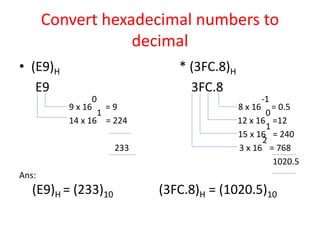
Convert hexadecimal numbers to
decimal
• (E9)H * (3FC.8)H
E9 3FC.8
9 x 16
0
= 9 8 x 16
-1
= 0.5
14 x 16
1
= 224 12 x 16
0
=12
15 x 16
1
= 240
233 3 x 16
2
= 768
1020.5
Ans:
(E9)H = (233)10 (3FC.8)H = (1020.5)10
Convert binary numbers to Octal
• 110.1012
110.1012
(6 . 5)8 = (6.5) 8
• 10111.12
010 111 . 1002
(2 7 . 4) 8 = (27.4) 8
Convert binary numbers to
hexadecimal
• (1010.1101) 2 * (110.101)2
1010.1101 0110.1010
A . D 6 . A
Ans:
(1010.1101) 2=(A.D)H (110.101)2 =(6.A)H
Convert Octal number to binary
• (27)8 * (45.5)8
2 7 4 5 . 5
Ans: (010 111) 2 (100 101 . 101) 2
• (135) 8
1 3 5
Ans: (001 011 101) 2
Convert hexadecimal Numbers to
binary
• (25)H * (3A.7)H
2 5 3 A . 7
Ans: (0010 0101) 2 (0011 1010 . 0111) 2
• (CD.E8) H
C D . E 8
Ans: (1100 1101 . 1110 1000)2

UNIT-I(DCF)DIGITAL COMPUTER FUNDAMENTALS.pptx

  • 1.
  • 2.
  • 3.
    What is Compuer: • Computer is an electronic device that is designed to work with Information. The term computer is derived from the Latin term ‘computare’, this means to calculate or programmable machine. • Computer can not do anything without a Program. It represents the decimal numbers through a string of binary digits. The Word 'Computer' usually refers to the Central Processing unit plus Internal Memory. • Charles Babbage is called the "Grand Father" of the computer. The First mechanical computer designed by Charles Babbage was called Analytical Engine. It uses read- only memory in the form of punch cards. • Computer is an advanced electronic device that takes raw data as input from the user and processes these data under the control of set of instructions (called program) and gives the result (output) and saves output for the future use. It can process both numerical and non-numerical (arithmetic and logical) calculations.
  • 4.
    Digital Computer Definition •The basic components of a modern digital computer are: Input Device, Output Device, Central Processor Unit (CPU), mass storage device and memory. A Typical modern computer uses LSI Chips. • Four Functions about computer are: accepts data Input processes data Processing produces outputOutput stores results Storage
  • 6.
    Input (Data): • Inputis the raw information entered into a computer from the input devices. It is the collection of letters, numbers, images etc. Process: • Process is the operation of data as per given instruction. It is totally internal process of the computer system. Output: • Output is the processed data given by computer after data processing. Output is also called as Result. We can save these results in the storage devices for the future use.
  • 7.
    Computer - Applications Business •A computer has high speed of calculation, diligence, accuracy, reliability, or versatility which made it an integrated part in all business organisations. • Computer is used in business organisations for: • Payroll calculations • Budgeting • Sales analysis • Financial forecasting • Managing employees database • Maintenance of stocks etc.
  • 8.
    Banking • Today bankingis almost totally dependent on computer. • Banks provide following facilities: • Banks provide online accounting facility, which includes current balances, deposits, overdrafts, interest charges, shares, and trustee records. • ATM machines are making it even easier for customers to deal with banks.
  • 9.
    Insurance • Insurance companiesare keeping all records up-to-date with the help of computers. The insurance companies, finance houses and stock broking firms are widely using computers for their concerns. • Insurance companies are maintaining a database of all clients with information showing • procedure to continue with policies • starting date of the policies • next due installment of a policy • maturity date • interests due • survival benefits
  • 10.
    Education • The computerhas provided a lot of facilities in the education system. • The computer provides a tool in the education system known as CBE (Computer Based Education). • CBE involves control, delivery, and evaluation of learning. • The computer education is rapidly increasing the graph of number of computer students. • There are number of methods in which educational institutions can use computer to educate the students. • It is used to prepare a database about performance of a student and analysis is carried out on this basis.
  • 11.
    Marketing • In marketing,uses of computer are following: • Advertising - With computers, advertising professionals create art and graphics, write and revise copy, and print and disseminate ads with the goal of selling more products. • At Home Shopping - Home shopping has been made possible through use of computerized catalogues that provide access to product information and permit direct entry of orders to be filled by the customers.
  • 12.
    Health Care • Computershave become important part in hospitals, labs, and dispensaries. The computers are being used in hospitals to keep the record of patients and medicines. It is also used in scanning and diagnosing different diseases. ECG, EEG, Ultrasounds and CT Scans etc., are also done by computerised machines. • Some major fields of health care in which computers are used are: • Diagnostic System - Computers are used to collect data and identify cause of illness. • Lab-diagnostic System - All tests can be done and reports are prepared by computer. • Patient Monitoring System - These are used to check patient's signs for abnormality such as in Cardiac Arrest, ECG etc. • Pharma Information System - Computer checks Drug-Labels, Expiry dates, harmful drug’s side effects etc. • Surgery : Nowadays, computers are also used in performing surgery.
  • 13.
    Engineering Design • Computersare widely used in Engineering purpose. • One of major areas is CAD (Computer aided design). That provides creation and modification of images. Some fields are: • Structural Engineering - Requires stress and strain analysis for design of Ships, Buildings, Budgets, Airplanes etc. • Industrial Engineering - Computers deal with design, implementation and improvement of integrated systems of people, materials and equipments. • Architectural Engineering - Computers help in planning towns, designing buildings, determining a range of buildings on a site using both 2D and 3D drawings.
  • 14.
    Government • Computers playan important role in government. Some major fields in this category are: • Budgets • Sales tax department • Income tax department • Male/Female ratio • Computerization of voters lists • Computerization of driving licensing system • Computerization of PAN card • Weather forecasting
  • 27.
    Basic components ofDigital Computer System All types of computers follow the same basic logical structure and perform the following five basic operations for converting raw input data into information useful to their users. S.No. Operation Description 1 Take Input The process of entering data and instructions into the computer system. 2 Store Data Saving data and instructions so that they are available for processing as and when required. 3 Processing Data Performing arithmetic, and logical operations on data in order to convert them into useful information. 4 Output Information The process of producing useful information or results for the user, such as a printed report or visual display. 5 Control the Directs the manner and sequence in which all of the above operations are performed.
  • 29.
    Input Unit This unitcontains devices with the help of which we enter data into the computer. This unit creates a link between the user and the computer. The input devices translate the information into a form understandable by the computer. CPU (Central Processing Unit) CPU is considered as the brain of the computer. CPU performs all types of data processing operations. It stores data, intermediate results, and instructions (program). It controls the operation of all parts of the computer. CPU itself has the following three components − ● ALU (Arithmetic Logic Unit) ● Memory Unit ● Control Unit Output Unit The output unit consists of devices with the help of which we get the information from the computer. This unit is a link between the computer and the users. Output devices translate the computer's output into a form understandable by the users.
  • 30.
    Central Processing Unit(CPU) consists of the following features − ● CPU is considered as the brain of the computer. ● CPU performs all types of data processing operations. ● It stores data, intermediate results, and instructions (program). ● It controls the operation of all parts of the computer.
  • 31.
    Memory Storage Unit Thisunit can store instructions, data, and intermediate results. This unit supplies information to other units of the computer when needed. It is also known as internal storage unit or the main memory or the primary storage or Random Access Memory (RAM). Its size affects speed, power, and capability. Primary memory and secondary memory are two types of memories in the computer. Functions of the memory unit are − ● It stores all the data and the instructions required for processing. ● It stores intermediate results of processing. ● It stores the final results of processing before these results are released to an output device. ● All inputs and outputs are transmitted through the main memory.
  • 32.
    Control Unit This unitcontrols the operations of all parts of the computer but does not carry out any actual data processing operations. Functions of this unit are − ● It is responsible for controlling the transfer of data and instructions among other units of a computer. ● It manages and coordinates all the units of the computer. ● It obtains the instructions from the memory, interprets them, and directs the operation of the computer. ● It communicates with Input/Output devices for transfer of data or results from storage. ● It does not process or store data.
  • 33.
    ALU (Arithmetic LogicUnit) This unit consists of two subsections namely, ● Arithmetic Section ● Logic Section Arithmetic Section Function of arithmetic section is to perform arithmetic operations like addition, subtraction, multiplication, and division. All complex operations are done by making repetitive use of the above operations. Logic Section Function of logic section is to perform logic operations such as comparing, selecting, matching, and merging of data.
  • 34.
    Types of ProgrammingLanguages There are two types of programming languages, which can be categorized into the following way 1. Low level language Machine language (1GL) Assembly language (2GL) 2. High level language Procedural-Oriented language (3GL) Problem-Oriented language (4GL) Natural language (5GL)
  • 35.
    1. Low levellanguage This language is the most understandable language used by computer to perform its operations. It can be further categorized into: Machine Language (1GL) Machine language consists of strings of binary numbers (i.e. 0s and 1s) and it is the only one language, the processor directly understands. Machine language has an Merits of very fast execution speed and efficient use of primary memory. Merits: ¨ It is directly understood by the processor so has faster execution time since the programs written in this language need not to be translated. ¨ It doesn’t need larger memory. Demerits: ¨ It is very difficult to program using 1GL since all the instructions are to be represented by 0s and 1s. ¨ Use of this language makes programming time consuming. It is difficult to find error and to debug. ¨ It can be used by experts only.
  • 36.
    Assembly Language Assembly languageis also known as low-level language because to design a program programmer requires detailed knowledge of hardware specification. This language uses mnemonics code (symbolic operation code like ‘ADD’ for addition) in place of 0s and 1s. The program is converted into machine code by assembler. The resulting program is referred to as an object code. Merits: ¨ It is makes programming easier than 1GL since it uses mnemonics code for programming. Eg: ADD for addition, SUB for subtraction, DIV for division, etc. ¨ It makes programming process faster. ¨ Error can be identified much easily compared to 1GL. ¨ It is easier to debug than machine language.
  • 37.
    Demerits: Programs written inthis language is not directly understandable by computer so translators should be used. ¨ It is hardware dependent language so programmers are forced to think in terms of computer’s architecture rather than to the problem being solved. ¨ Being machine dependent language, programs written in this language are very less or not protable. ¨ Programmers must know its mnemonics codes to perform any task.
  • 38.
    2. High levellanguage Instructions of this language closely resembles to human language or English like words. It uses mathematical notations to perform the task. The high level language is easier to learn. It requires less time to write and is easier to maintain the errors. The high level language is converted into machine language by one of the two different languages translator programs; interpreter or compiler.
  • 39.
    Procedural-Oriented language (3GL) ProceduralProgramming is a methodology for modeling the problem being solved, by determining the steps and the order of those steps that must be followed in order to reach a desired outcome or specific program state. These languages are designed to express the logic and the procedure of a problem to be solved. It includes languages such as Pascal, COBOL, C, FORTAN, etc. Merits: ¨ Because of their flexibility, procedural languages are able to solve a variety of problems. ¨ Programmer does not need to think in term of computer architecture which makes them focused on the problem. ¨ Programs written in this language are portable. Demerits: ¨ It is easier but needs higher processor and larger memory. ¨ It needs to be translated therefore its execution time is more.
  • 40.
    Problem-Oriented language (4GL) Itallows the users to specify what the output should be, without describing all the details of how the data should be manupulated to produce the result. This is one step ahead from 3GL. These are result oriented and include database query language. Eg: Visual Basic, C#, PHP, etc. The objectives of 4GL are to: Ø Increase the speed of developing programs. Ø Minimize user’s effort to botain information from computer. Ø Reduce errors while writing programs. Merits: ¨ Programmer need not to think about the procedure of the program. So, programming is much easier. Demerits: ¨ It is easier but needs higher processor and larger memory. ¨ It needs to be translated therefore its execution time is more.
  • 41.
    Natural language (5GL) Naturallanguage are stil in developing stage where we could write statrments that would look like normal sentences. Merits: ¨ Easy to program. ¨ Since, the program uses normal sentences, they are easy to understand. ¨ The programs designed using 5GL will have artificial intelligence (AI). ¨ The programs would be much more interactive and interesting. Demerits: ¨ It is slower than previous generation language as it should be completely translated into binary code which is a tedious task. ¨ Highly advanced and expensive electronic devices are required to run programs developed in 5GL. Therefore, it is an expensive approach. These are the different types of programming languages with their merits and demerits.
  • 42.
    Memory • Bits: 8bits = 1 byte • Bytes: 1024 bytes = 1 KB (1 to 3 digits) • Kilobytes: 1024 KB = 1 MB (4 to 6 digits) • Megabytes: 1024 MB = 1 GB (7 to 9 digits) • Gigabytes: 1024 GB = 1 TB (10 to 12 digits) • Terabytes: 1024 TB = 1 PB (13 to 15 digits) • Petabytes: 1024 PB = 1 EB (16 to 18 digits) • Exabytes: 1024 EB = 1 ZB (19 to 21 digits) • Zettabytes: 1024 ZB = 1 YB (22 to 24 digits) • Yottabytes: more than enough... (25 to 27 digits )
  • 43.
    Number systems A Numbersystem defines a set of values used to represent the quantity. It has different types of number sysems. • Convert decimal numbers to binary. • Convert binary numbers to decimal. • Convert decimal numbers to Octal. • Convert Octal number to decimal numbers. • Convert decimal numbers to hexadecimal. • Convert hexadecimal numbers. • Convert binary numbers to Octal. • Convert binary numbers to hexadecimal. • Convert Octal number to binary. • Convert hexadecimal Numbers to binary.
  • 51.
    Bits and Bytes •A binary digit is a single numeral in a binary number. • Each 1 and 0 in the number below is a binary digit: – 1 0 0 1 0 1 0 1 • The term “binary digit” is commonly called a “bit.” • The total number of digits used in a number system is called its base or radix. its grouped together is called a “byte.”
  • 52.
    Decimal Number System •The prefix “deci-” stands for 10 • The decimal number system is a Base 10 number system: 1. There are 10 symbols that represent quantities: 2. 0, 1, 2, 3, 4, 5, 6, 7, 8, 9 3. Each place value in a decimal number is a power of 10.
  • 53.
    Background Information • Anynumber to the 0 (zero) power is 1. 40 = 1 160 = 1 1,4820 = 1. • Any number to the 1st power is the number itself. 101 = 10 491 = 49 8271 = 827
  • 54.
    Binary Numbers • Theprefix “bi-” stands for 2 • The binary number system is a Base 2 number system: * There are 2 symbols that represent quantities: 0, 1 * Each place value in a binary number is a power of 2.
  • 55.
    1) Binary NumberSystem A Binary number system has only two digits, which are 0 and 1. Every number (value) is represented with 0 and 1 in this number system. The base of binary number system is 2, because it has only two digits. Though DECIMAL (No 3) is more frequently used in Number representation, BINARY is the number system form which the system/machine accepts. 2) Octal number system Octal number system has only eight (8) digits from 0 to 7. Every number (value) is represented with 0,1,2,3,4,5,6 and 7 in this number system. The base of octal number system is 8, because it has only 8 digits.
  • 56.
    3) Decimal numbersystem Decimal number system has only ten (10) digits from 0 to 9. Every number (value) is represented with 0,1,2,3,4,5,6, 7,8 and 9 in this number system. The base of decimal number system is 10, because it has only 10 digits. 4) Hexadecimal number system A Hexadecimal number system has sixteen (16) alphanumeric values from 0 to 9 and A to F. Every number (value) represents with 0, 1, 2, 3, 4, 5, 6, 7, 8, 9, A, B, C, D, E and F in this number system. The base of hexadecimal number system is 16, because it has 16 alphanumeric values. Here, we have 0 to 9, representing 0 – 9 but from 10, we have A is 10, B is 11, C is 12, D is 13, E is 14 and F is 15.
  • 57.
    Number system BaseUsed digits Example Binary 2 0,1 (11110000)2 Octal 8 0,1,2,3,4,5,6,7 (360)8 Decimal 10 0,1,2,3,4,5,6,7,8,9 (240)10 Hexadecimal 16 0,1,2,3,4,5,6,7,8,9, A,B,C,D,E,F (F0)16
  • 58.
    Convert decimal numbersto binary • 16 2 16 2 8 - 0 (LSB) 2 4 - 0 2 2 - 0 1 (MSB) Ans: 1610 = 10002
  • 59.
    Convert binary numbersto decimal • A binary number can be converted into a decimal number by adding the products of each bit and its weight. • METHOD : 1 • (101) 1012 = 1 x 22 + 0 x 21 + 1 x 20 = 4 + 0 + 1 = 5 Ans: 1012 = 510
  • 60.
  • 61.
    METHOD : 2 (1101.0111)2 1101.0111 = (1×23) + (1×22) + (0×21) + (1×20) + (0×2-1) + (1×2-2) + (1×2-3) + (1×2-4) = 8 + 4 + 0 + 1 + 0 + 1/4 + 1/8 + 1/16 = 8 + 4 + 0 + 1 + 0 + 0.25 + 0.125 + 0.0625 Ans: (1101.0111 )2 = 13.437510
  • 63.
    Octal Number System •The prefix “Oct -” stands for 8 • The Octal number system is a Base 8 number system: 1. There are 8 symbols that represent quantities: 2. 0, 1, 2, 3, 4, 5, 6, 7 3. Each place value in a decimal number is a power of 8.
  • 64.
    Convert decimal numbersto Octal • To convert a decimal number to octal, we have to divide the decimal number by 8 repeatedly and collect the remainders from top to bottom. • 6810 * 98.510 8 68 8 98 8 8 - 4 (LSB) 8 12 - 2 (LSB) 1 - 0 (MSB) 1 - 4 (MSB) Ans: 6810 = 1048 .5 x 8 = 4.0 ie., (0.5)10 = (0.4) 8 Ans: 98.510= (104.4) 8
  • 65.
    Convert Octal numbersto decimal number • (75)8 * (45.6)8 75 45.6 5 x 8 0 = 5 6 x 8 -1 = 0.75 7 x 8 1 = 56 5 x 8 0 = 5 4 x 8 1 = 32 61 37.75 Ans: (75)8 = (61)10 (45.6)8 = (37.75)10
  • 66.
    Hexa decimal NumberSystem • The prefix “Hexa -” stands for 16 • The Hexa number system is a Base 16 number system: 1. There are 16 symbols that represent quantities: 2. 0, 1, 2, 3, 4, 5, 6, 7, 8, 9, A, B, C, D, E, F 3. Each place value in a decimal number is a power of 16.
  • 68.
    Convert decimal numbersto hexadecimal • To convert a decimal number to octal, we have to divide the decimal number by 8 repeatedly and collect the remainders from top to bottom. • (213)10 * (98.625) 10 16 213 16 98 13 - 5 6 - 2 ie.,13 => D .625x16 = 10.000 Ans: ie., 10 => A (213) 10 = (D5)H (98.625) 10 = (62.A)H
  • 69.
    Convert hexadecimal numbersto decimal • (E9)H * (3FC.8)H E9 3FC.8 9 x 16 0 = 9 8 x 16 -1 = 0.5 14 x 16 1 = 224 12 x 16 0 =12 15 x 16 1 = 240 233 3 x 16 2 = 768 1020.5 Ans: (E9)H = (233)10 (3FC.8)H = (1020.5)10
  • 70.
    Convert binary numbersto Octal • 110.1012 110.1012 (6 . 5)8 = (6.5) 8 • 10111.12 010 111 . 1002 (2 7 . 4) 8 = (27.4) 8
  • 71.
    Convert binary numbersto hexadecimal • (1010.1101) 2 * (110.101)2 1010.1101 0110.1010 A . D 6 . A Ans: (1010.1101) 2=(A.D)H (110.101)2 =(6.A)H
  • 72.
    Convert Octal numberto binary • (27)8 * (45.5)8 2 7 4 5 . 5 Ans: (010 111) 2 (100 101 . 101) 2 • (135) 8 1 3 5 Ans: (001 011 101) 2
  • 73.
    Convert hexadecimal Numbersto binary • (25)H * (3A.7)H 2 5 3 A . 7 Ans: (0010 0101) 2 (0011 1010 . 0111) 2 • (CD.E8) H C D . E 8 Ans: (1100 1101 . 1110 1000)2