INTRODUCTION
• In 1960‘sdefinition of an operating system is software that controls the hardware.
―
However, today, due to microcode we need a better definition.The operating system is
viewed as the programs that make the hardware useable.
• In brief, an operating system is the set of programs that controls a computer. An
Operating system is software that creates a relation between the User, Software and
Hardware.
• All the computers need basic software known as an Operating System (OS) to function.
The OS acts as an interface between the User, Application Programs, Hardware and the
System Peripherals.The OS is the first software to be loaded when a computer starts up.
The entire application programs are loaded after the OS
3.
TYPES OF OPERATINGSYSTEM
• Single User: If the single user Operating System is loaded in computer‘s
memory; the computer would be able to handle one user at a time. Ex: MS-DOS,
MS-Win 95-98,Win-ME
• Multi user: If the multi-user Operating System is loaded in computer‘s memory;
the computer would be able to handle more than one user at a time. Ex: UNIX,
Linux, XENIX
• Network: If the network Operating System is loaded in computer‘s memory; the
computer would be able to handle more than one computer at time. Ex: Novel
Netware,Win-NT,Win-2000-2003
4.
HISTORY OF UNIX
•Imagine computers as big as houses, even stadiums. While the sizes of those computers posed substantial problems, there was one thing that made this even worse:
every computer had a different operating system. Software was always customized to serve a specific purpose, and software for one given system didn‘t run on
another system.
• Being able to work with one system didn‘t automatically mean that you could work with another. It was difficult, both for the users and the system administrators.
• Technologically the world was not quite that advanced, so they had to live with the size for another decade. In 1969, a team of developers in the Bell Labs
laboratories started working on a solution for the software problem, to address these compatibility issues.
• They developed a new operating system, which was
• Simple and elegant.
• Written in the C programming language instead of in assembly code.
• Able to recycle code.
5.
HISTORY OF UNIX
•The Bell Labs developers named their project ―UNIX. The code recycling features were very important. Until then, all commercially
‖
available computer systems were written in a code specifically developed for one system.
• UNIX on the other hand needed only a small piece of that special code, which is now commonly named the kernel. This kernel is the only
piece of code that needs to be adapted for every specific system and forms the base of the UNIX system.
• The operating system and all other functions were built around this kernel and written in a higher programming language, C.
• Using this new technique, it was much easier to develop an operating system that could run on many different types of hardware.
• UNIX was initially found only in very large environments with mainframes and minicomputers (note that a PC is a ―micro computer). But
‖
smaller computers were being developed, and by the end of the 80s, many people had home computers.
• Linus Torvalds, a young man studying computer science at the University of Helsinki, used the Minix, and when he felt too constrained by
its limitation, he started to code his own UNIX look like operating system.
6.
HISTORY OF UNIX
•In those days plug-and-play wasn‘t invented yet, but so many people were interested in having a UNIX
system of their own, that this was only a small obstacle. New drivers became available for all kinds of new
hardware, at a continuously rising speed.
• Almost as soon as a new piece of hardware became available, someone bought it and submitted it to the
Linux test, as the system was gradually being called, releasing more free code for an ever-wider range of
hardware.
• These coders didn‘t stop at their PCs; every piece of hardware they could find was useful for Linux. Two
years after Linus‘ post, there were 12000 Linux users.
• Linux is a full UNIX clone, fit for use on workstations as well as on middle range and high-end servers.
Today, a lot of the important players in the hardware and software market each have their team of Linux
developers; at your local dealers you can even buy preinstalled Linux systems with official support.
7.
WHAT IS UNIX?
•UNIX is an operating system which was first developed in the 1960s, and has been
under constant development ever since.
• It is a stable, multi-user, multi-tasking system for servers, desktops and laptops.
• UNIX systems also have a graphical user interface (GUI) similar to Microsoft Windows
which provides an easy to use environment.
• Knowledge of UNIX is required for operations which aren't covered by a graphical
program, or for when there is no windows interface available, for example, in a telnet
session
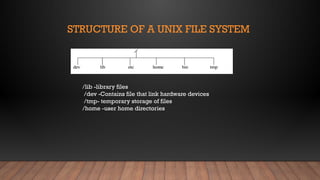
STRUCTURE OF AUNIX FILE SYSTEM
/lib -library files
/dev -Contains file that link hardware devices
/tmp- temporary storage of files
/home -user home directories
10.
FILE AND DIRECTORYRELATED COMMANDS
1. pwd -This command prints the current working directory
pwd: Print the present working directory
Syntax: pwd [OPTION]
Example: Print ‘dir1‘ if a current working directory is dir1
$ pwd
2. ls -This command displays the list of files in the current working directory.
$ls –l Lists the files in the long format
$ls –t Lists in the order of last modification time
$ls –d Lists directory instead of contents
$ls -u Lists in order of last access time
11.
• 3. cd-This command is used to change from the working directory to any other directory specified.
$cd directoryname
Cd: Change directory
Syntax: cd [OPTION] directory
Example: Change working directory to dir1
$ cd dir1
• 4.cd.. This command is used to come out of the current working directory.
• $cd.
12.
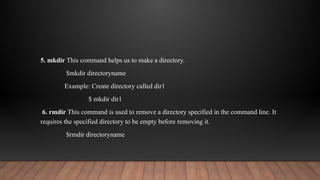
5. mkdir Thiscommand helps us to make a directory.
$mkdir directoryname
Example: Create directory called dir1
$ mkdir dir1
6. rmdir This command is used to remove a directory specified in the command line. It
requires the specified directory to be empty before removing it.
$rmdir directoryname
13.
7. cat Thiscommand helps us to list the contents of a file we specify.
• cat [option][file]
• cat > filename – This is used to create a new file.
• cat >>filename – This is used to append the contents of the file
8. cp -This command helps us to create duplicate copies of ordinary files.
$cp source destination
14.
9. mv -Thiscommand is used to move files.
$mv source destination
10. rm This command is used to delete one or more files from the directory.
$rm [option] filename
$rm –i Asks the user if he wants to delete the file mentioned.
$rm –r Recursively delete the entire contents of the directory as well as the
directory itself.
15.
PROCESS AND STATUSINFORMATION
COMMANDS
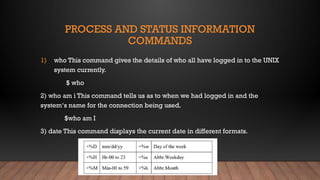
1) who This command gives the details of who all have logged in to the UNIX
system currently.
$ who
2) who am i This command tells us as to when we had logged in and the
system‘s name for the connection being used.
$who am I
3) date This command displays the current date in different formats.
16.
4) echo -Thiscommand will display the text typed from the keyboard. $echo
Eg : $echo Have a nice day
O/p : Have a nice day

![FILE AND DIRECTORY RELATED COMMANDS
1. pwd -This command prints the current working directory
pwd: Print the present working directory
Syntax: pwd [OPTION]
Example: Print ‘dir1‘ if a current working directory is dir1
$ pwd
2. ls -This command displays the list of files in the current working directory.
$ls –l Lists the files in the long format
$ls –t Lists in the order of last modification time
$ls –d Lists directory instead of contents
$ls -u Lists in order of last access time](https://image.slidesharecdn.com/shellprograming-251214072720-70f16211/85/Shell-Programing-in-liinux-programming-pptx-10-320.jpg)
![• 3. cd -This command is used to change from the working directory to any other directory specified.
$cd directoryname
Cd: Change directory
Syntax: cd [OPTION] directory
Example: Change working directory to dir1
$ cd dir1
• 4.cd.. This command is used to come out of the current working directory.
• $cd.](https://image.slidesharecdn.com/shellprograming-251214072720-70f16211/85/Shell-Programing-in-liinux-programming-pptx-11-320.jpg)
![7. cat This command helps us to list the contents of a file we specify.
• cat [option][file]
• cat > filename – This is used to create a new file.
• cat >>filename – This is used to append the contents of the file
8. cp -This command helps us to create duplicate copies of ordinary files.
$cp source destination](https://image.slidesharecdn.com/shellprograming-251214072720-70f16211/85/Shell-Programing-in-liinux-programming-pptx-13-320.jpg)
![9. mv -This command is used to move files.
$mv source destination
10. rm This command is used to delete one or more files from the directory.
$rm [option] filename
$rm –i Asks the user if he wants to delete the file mentioned.
$rm –r Recursively delete the entire contents of the directory as well as the
directory itself.](https://image.slidesharecdn.com/shellprograming-251214072720-70f16211/85/Shell-Programing-in-liinux-programming-pptx-14-320.jpg)


![Unit -5 IOT[1]design challenges in IOT. pptx](https://cdn.slidesharecdn.com/ss_thumbnails/unit-5iot1-251208031821-0cb92c82-thumbnail.jpg?width=640&height=640&fit=bounds)


