© Copyright IBM Corporation 2016. Technical University/Symposia materials may not be reproduced in whole or in part without the prior written permission of IBM.
EDITION 2016B:
Small z/OS enhancements over the past several releases
Marna WALLE, mwalle@us.ibm.com
Member of the IBM Academy of Technology
z/OS System Installation
IBM z Systems, Poughkeepsie NY USA
© 2016 IBM Corporation2
Trademarks
The following are trademarks of the International Business Machines Corporation in the United States, other countries, or both.
The following are trademarks or registered trademarks of other companies.
* All other products may be trademarks or registered trademarks of their respective companies.
Notes:
Performance is in Internal Throughput Rate (ITR) ratio based on measurements and projections using standard IBM benchmarks in a controlled environment. The actual throughput that any user will
experience will vary depending upon considerations such as the amount of multiprogramming in the user's job stream, the I/O configuration, the storage configuration, and the workload processed.
Therefore, no assurance can be given that an individual user will achieve throughput improvements equivalent to the performance ratios stated here.
IBM hardware products are manufactured from new parts, or new and serviceable used parts. Regardless, our warranty terms apply.
All customer examples cited or described in this presentation are presented as illustrations of the manner in which some customers have used IBM products and the results they may have achieved. Actual
environmental costs and performance characteristics will vary depending on individual customer configurations and conditions.
This publication was produced in the United States. IBM may not offer the products, services or features discussed in this document in other countries, and the information may be subject to change without
notice. Consult your local IBM business contact for information on the product or services available in your area.
All statements regarding IBM's future direction and intent are subject to change or withdrawal without notice, and represent goals and objectives only.
Information about non-IBM products is obtained from the manufacturers of those products or their published announcements. IBM has not tested those products and cannot confirm the performance,
compatibility, or any other claims related to non-IBM products. Questions on the capabilities of non-IBM products should be addressed to the suppliers of those products.
Prices subject to change without notice. Contact your IBM representative or Business Partner for the most current pricing in your geography.
Adobe, the Adobe logo, PostScript, and the PostScript logo are either registered trademarks or trademarks of Adobe Systems Incorporated in the United States, and/or other countries.
Cell Broadband Engine is a trademark of Sony Computer Entertainment, Inc. in the United States, other countries, or both and is used under license therefrom.
Java and all Java-based trademarks are trademarks of Sun Microsystems, Inc. in the United States, other countries, or both.
Microsoft, Windows, Windows NT, and the Windows logo are trademarks of Microsoft Corporation in the United States, other countries, or both.
Intel, Intel logo, Intel Inside, Intel Inside logo, Intel Centrino, Intel Centrino logo, Celeron, Intel Xeon, Intel SpeedStep, Itanium, and Pentium are trademarks or registered trademarks of Intel
Corporation or its subsidiaries in the United States and other countries.
UNIX is a registered trademark of The Open Group in the United States and other countries.
Linux is a registered trademark of Linus Torvalds in the United States, other countries, or both.
ITIL is a registered trademark, and a registered community trademark of the Office of Government Commerce, and is registered in the U.S. Patent and Trademark Office.
IT Infrastructure Library is a registered trademark of the Central Computer and Telecommunications Agency, which is now part of the Office of Government Commerce.
For a complete list of IBM Trademarks, see www.ibm.com/legal/copytrade.shtml:
*, AS/400®, e business(logo)®, DBE, ESCO, eServer, FICON, IBM®, IBM (logo)®, iSeries®, MVS, OS/390®, pSeries®, RS/6000®, S/30, VM/ESA®, VSE/ESA,
WebSphere®, xSeries®, z/OS®, zSeries®, z/VM®, System i, System i5, System p, System p5, System x, System z, System z9®, BladeCenter®
Not all common law marks used by IBM are listed on this page. Failure of a mark to appear does not mean that IBM does not use the mark nor does it mean that the product is not
actively marketed or is not significant within its relevant market.
Those trademarks followed by ® are registered trademarks of IBM in the United States; all others are trademarks or common law marks of IBM in the United States.
Notice Regarding Specialty Engines (e.g., zIIPs, zAAPs and IFLs):
Any information contained in this document regarding Specialty Engines ("SEs") and SE eligible workloads provides only general descriptions of the
types and portions of workloads that are eligible for execution on Specialty Engines (e.g., zIIPs, zAAPs, and IFLs). IBM authorizes customers to use
IBM SE only to execute the processing of Eligible Workloads of specific Programs expressly authorized by IBM as specified in the “Authorized Use
Table for IBM Machines” provided at www.ibm.com/systems/support/machine_warranties/machine_code/aut.html (“AUT”).
No other workload processing is authorized for execution on an SE.
IBM offers SEs at a lower price than General Processors/Central Processors because customers are authorized to use SEs only to process certain
types and/or amounts of workloads as specified by IBM in the AUT.
© 2016 IBM Corporation3
• z/OS V2.2:
•ISPF: z/OS UNIX Mounted File Systems
• z/OS V2.1:
BCP: Modifying and checking on VLF
CommServer: ftp mvsput and mvsget
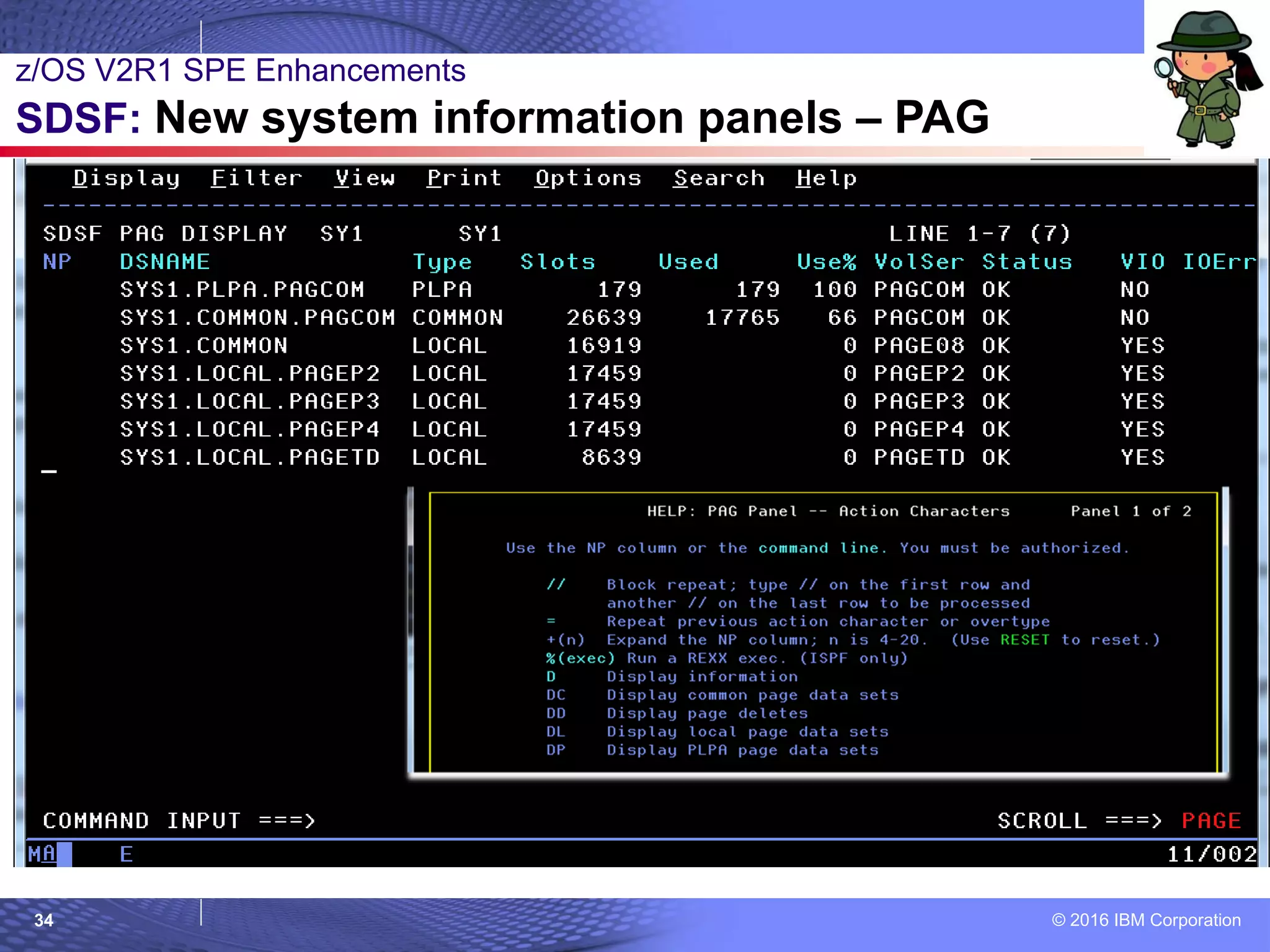
SDSF: New system information panels
BCP: SETSMF without PROMPT at IPL
• z/OS V1.13:
JES2: Job step transfers
• Older than the hills:
•z/OS UNIX: bpxmtext
•SMP/E: FIXCAT Explorer
•BCP: Tape Library Load Balancing
•Communications Server: REXX ftp client API
z/OS Little Enhancements - Edition 2016B
© 2016 IBM Corporation4
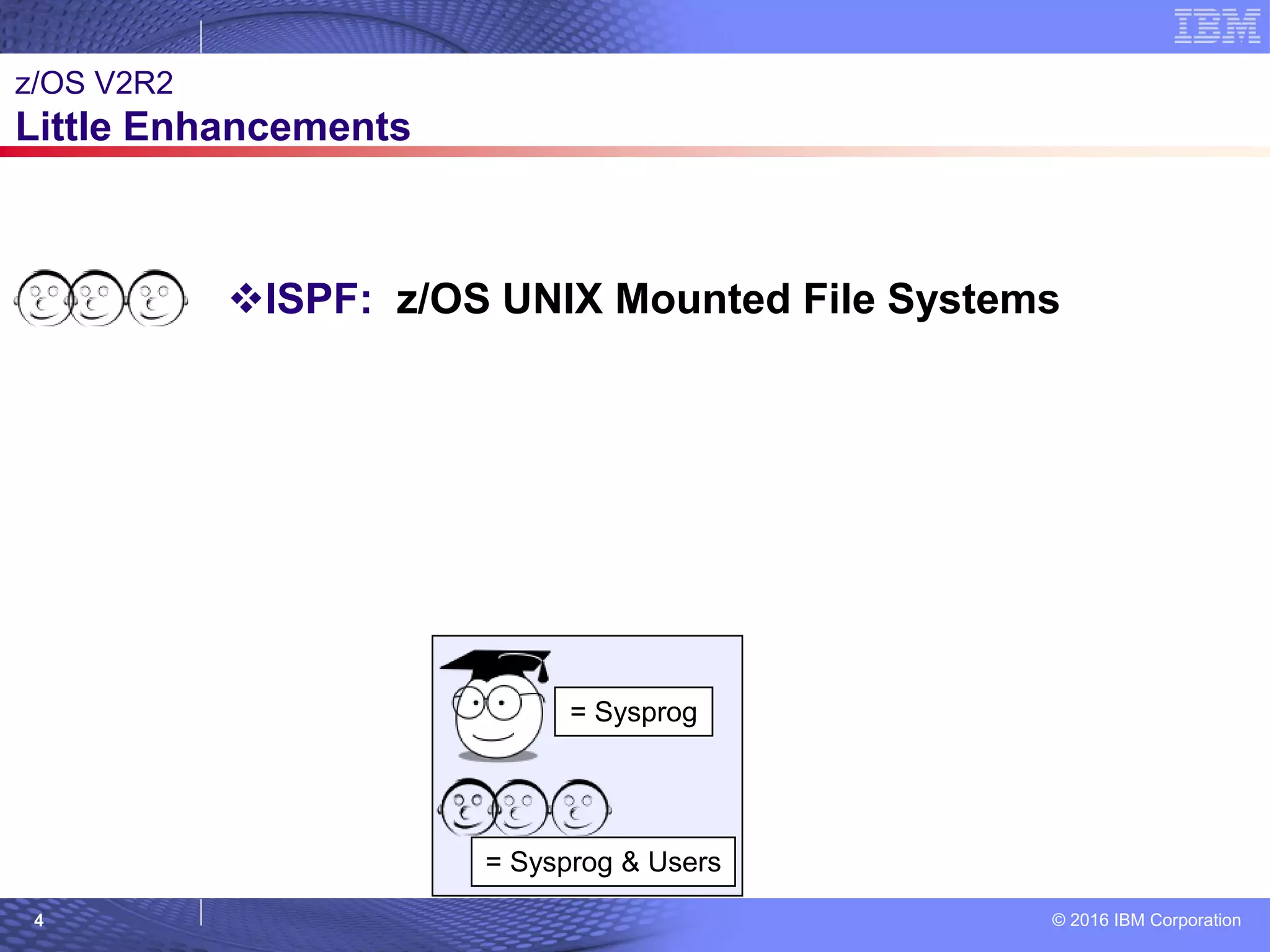
= Sysprog
= Sysprog & Users © 2007 IBM Corporation
z/OS V2R2
Little Enhancements
ISPF: z/OS UNIX Mounted File Systems
© 2016 IBM Corporation5
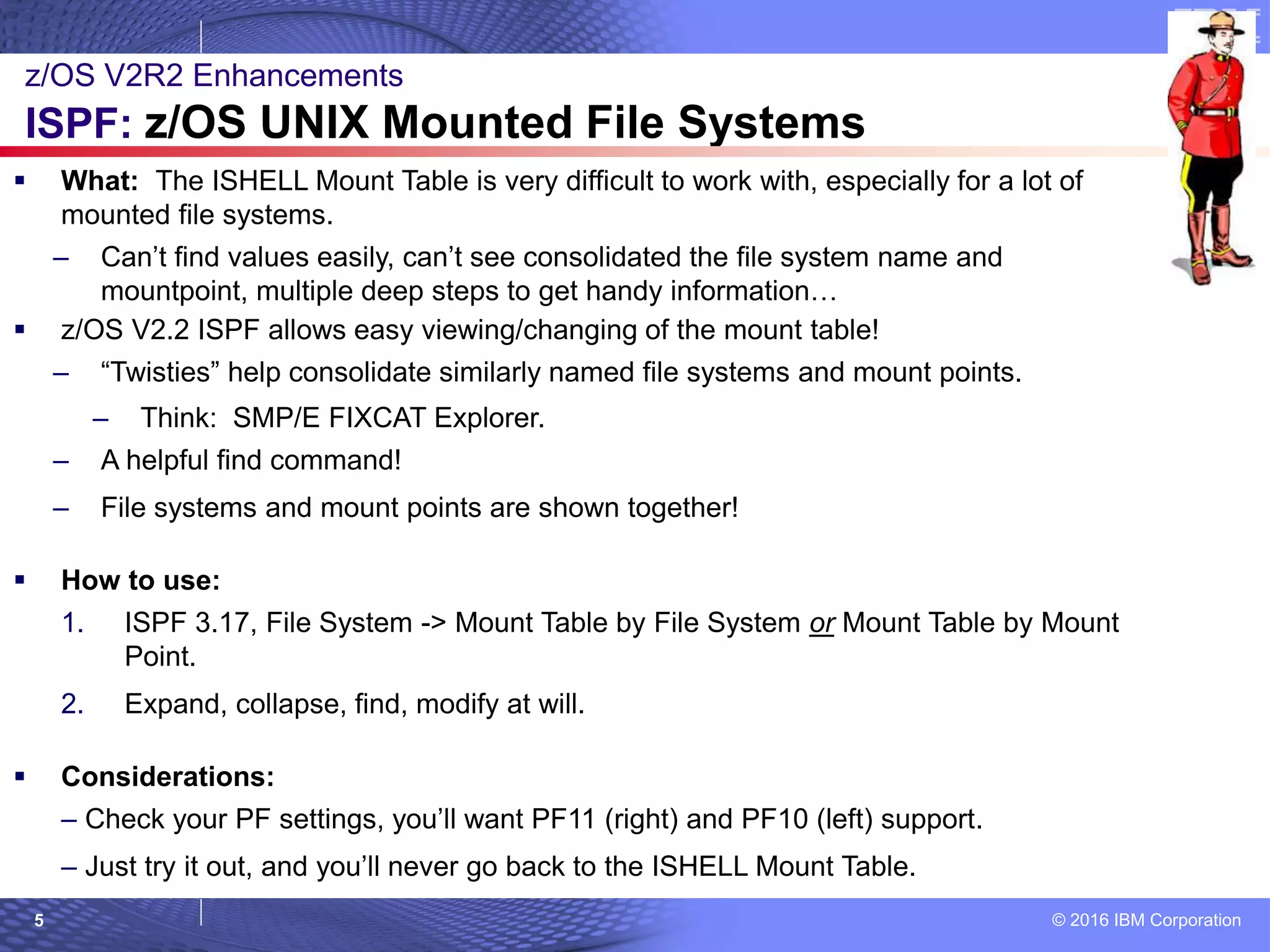
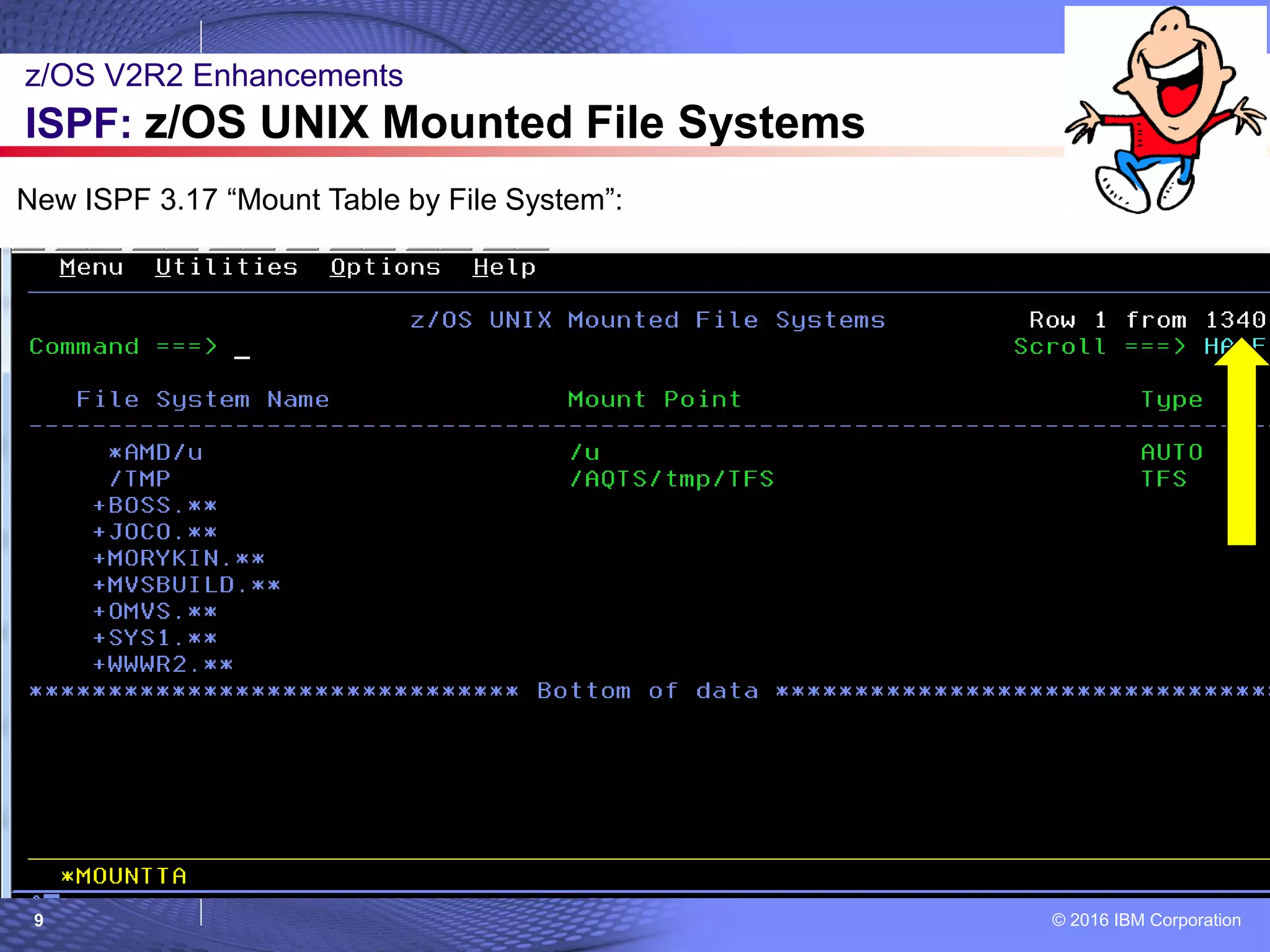
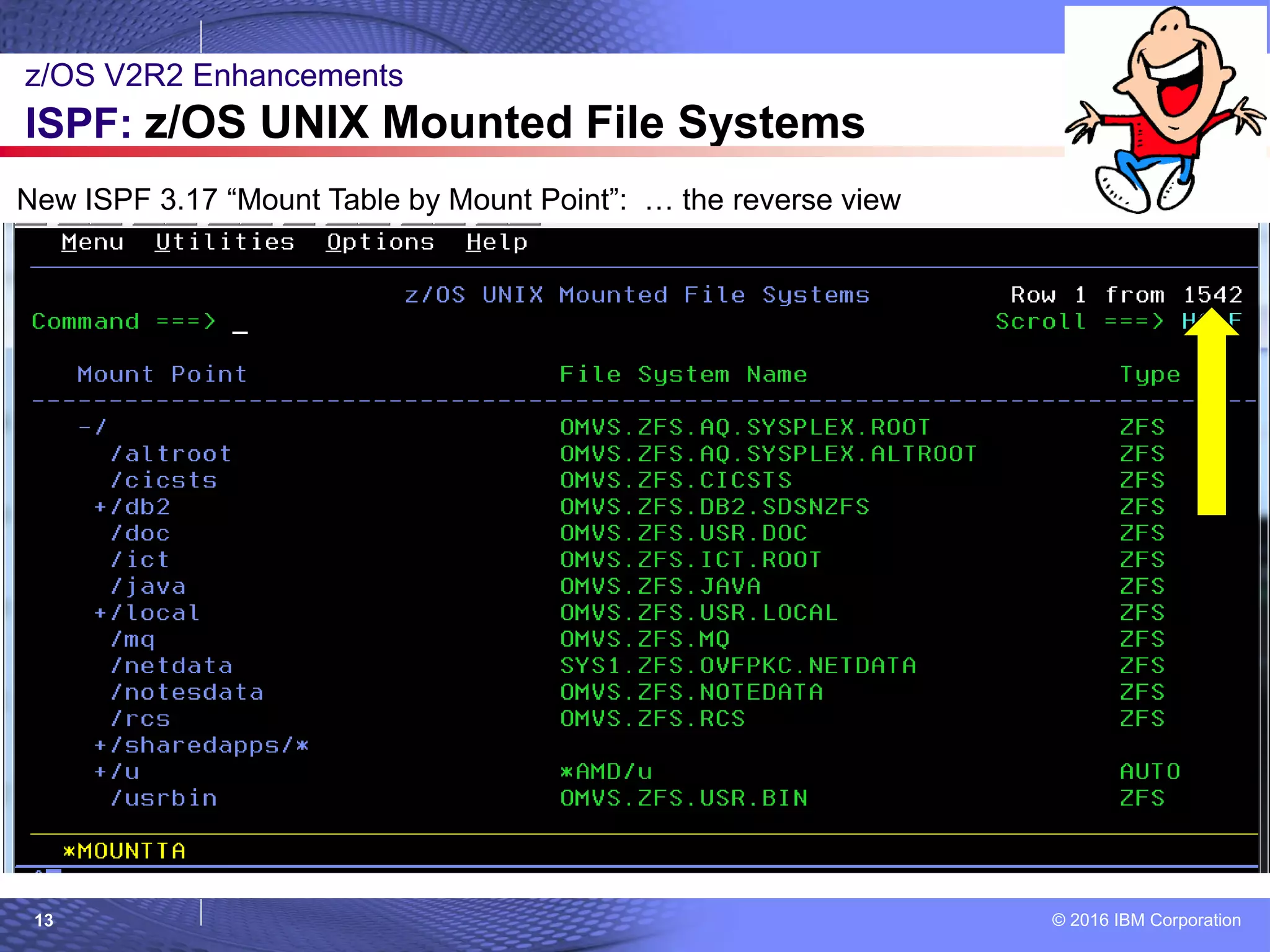
 What: The ISHELL Mount Table is very difficult to work with, especially for a lot of
mounted file systems.
– Can’t find values easily, can’t see consolidated the file system name and
mountpoint, multiple deep steps to get handy information…
 z/OS V2.2 ISPF allows easy viewing/changing of the mount table!
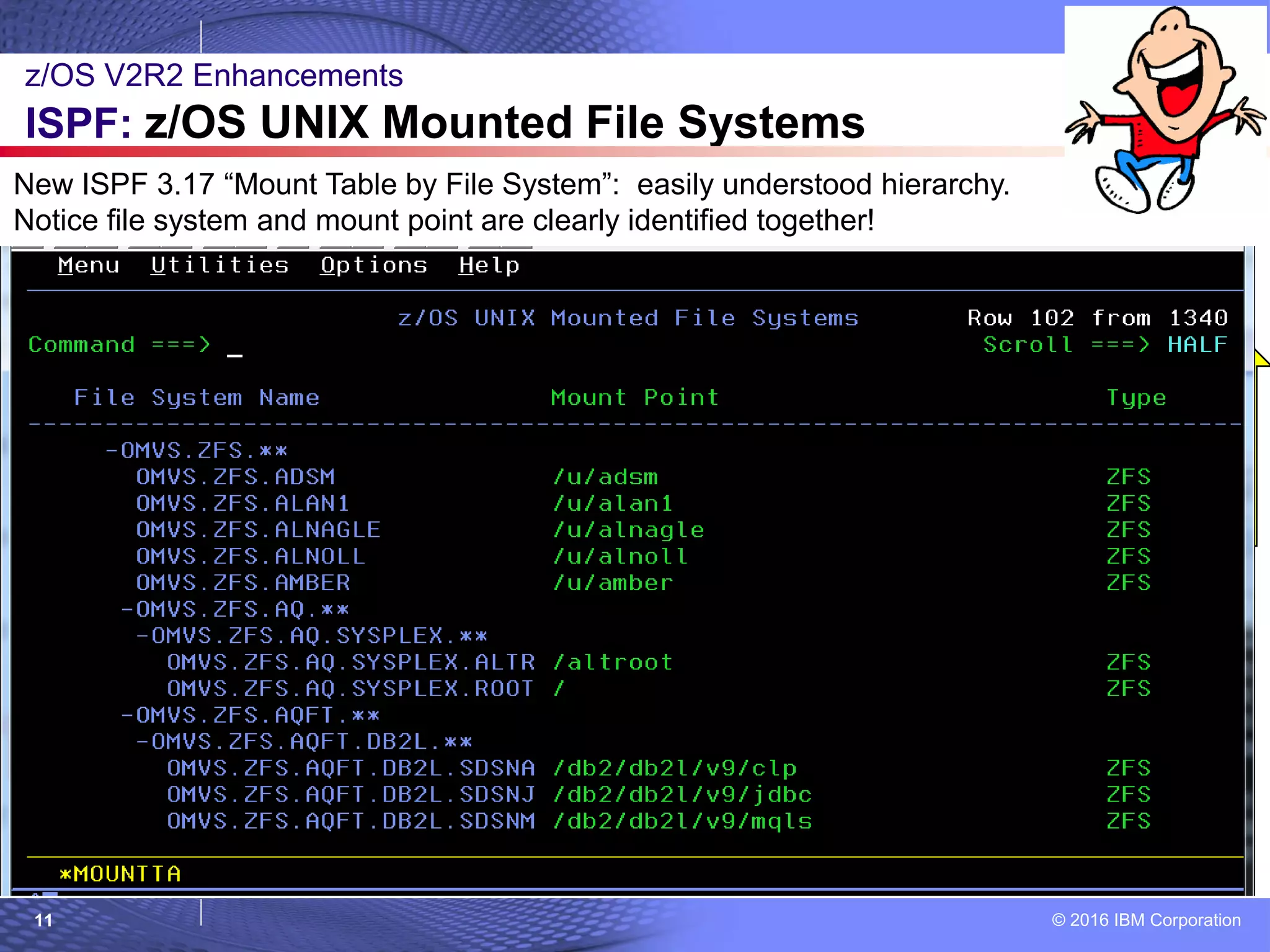
– “Twisties” help consolidate similarly named file systems and mount points.
– Think: SMP/E FIXCAT Explorer.
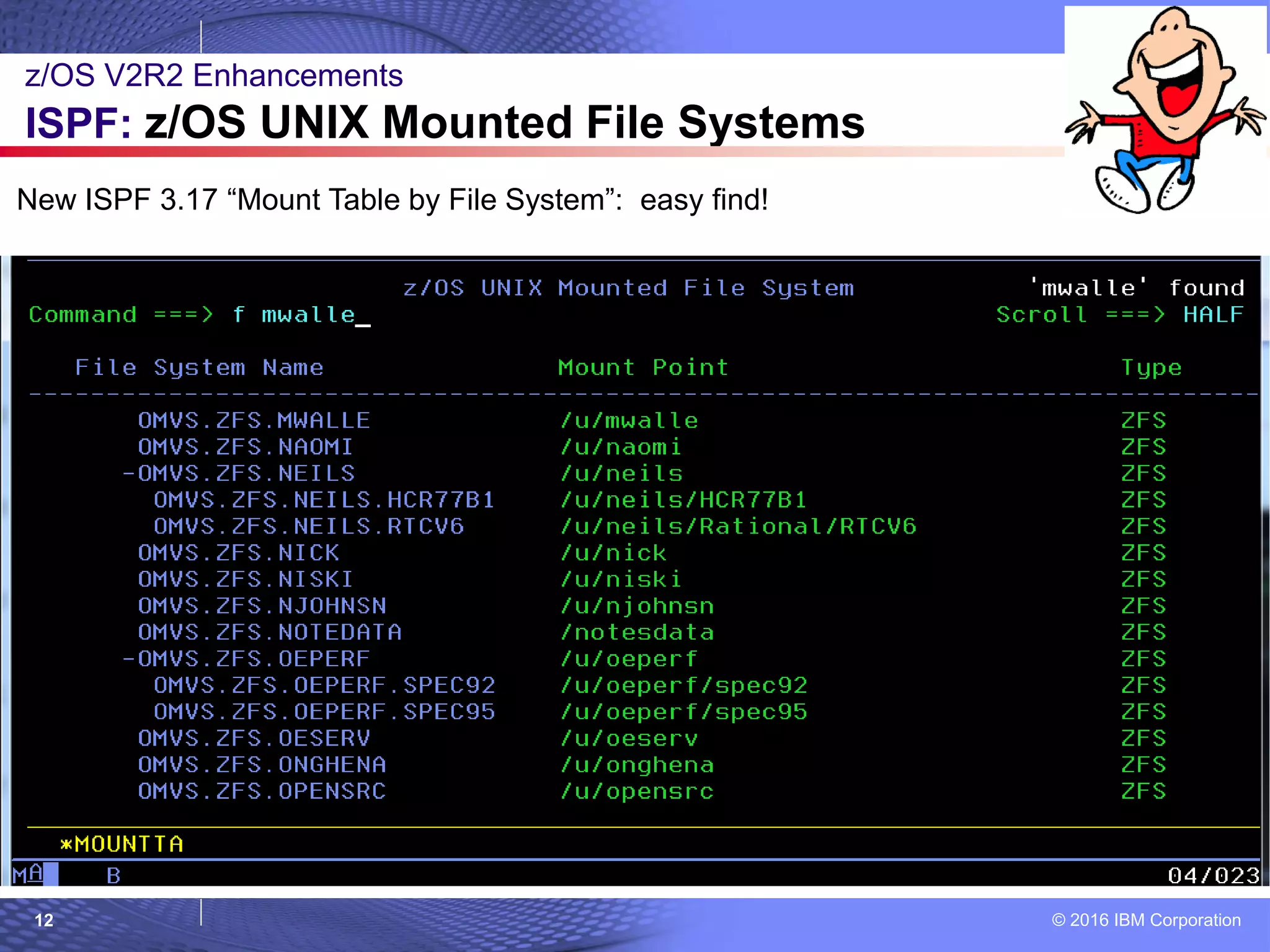
– A helpful find command!
– File systems and mount points are shown together!
 How to use:
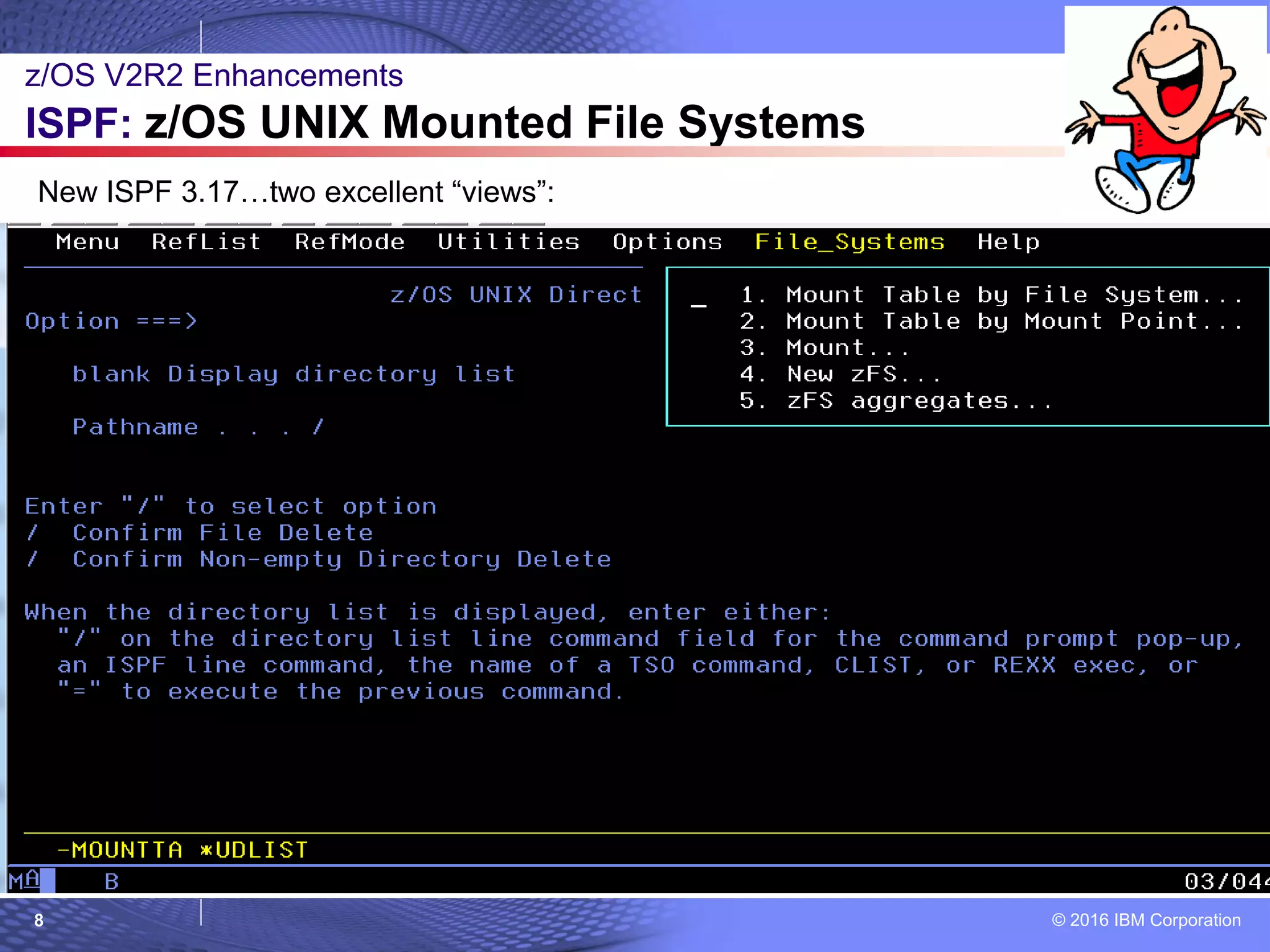
1. ISPF 3.17, File System -> Mount Table by File System or Mount Table by Mount
Point.
2. Expand, collapse, find, modify at will.
 Considerations:
– Check your PF settings, you’ll want PF11 (right) and PF10 (left) support.
– Just try it out, and you’ll never go back to the ISHELL Mount Table.
z/OS V2R2 Enhancements
ISPF: z/OS UNIX Mounted File Systems
© 2016 IBM Corporation6
z/OS V2R2 Enhancements
ISPF: z/OS UNIX Mounted File Systems
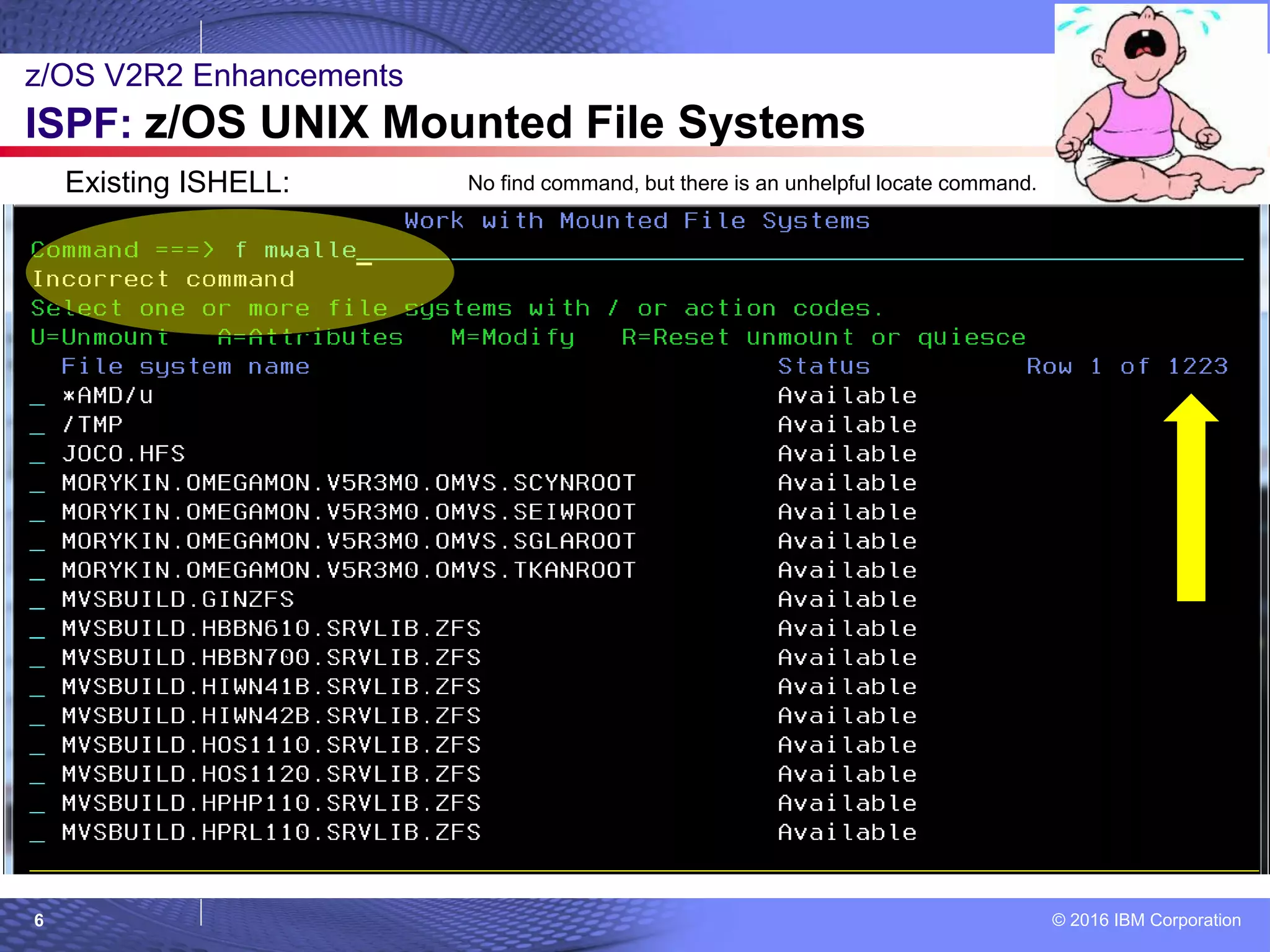
Existing ISHELL: No find command, but there is an unhelpful locate command.
© 2016 IBM Corporation7
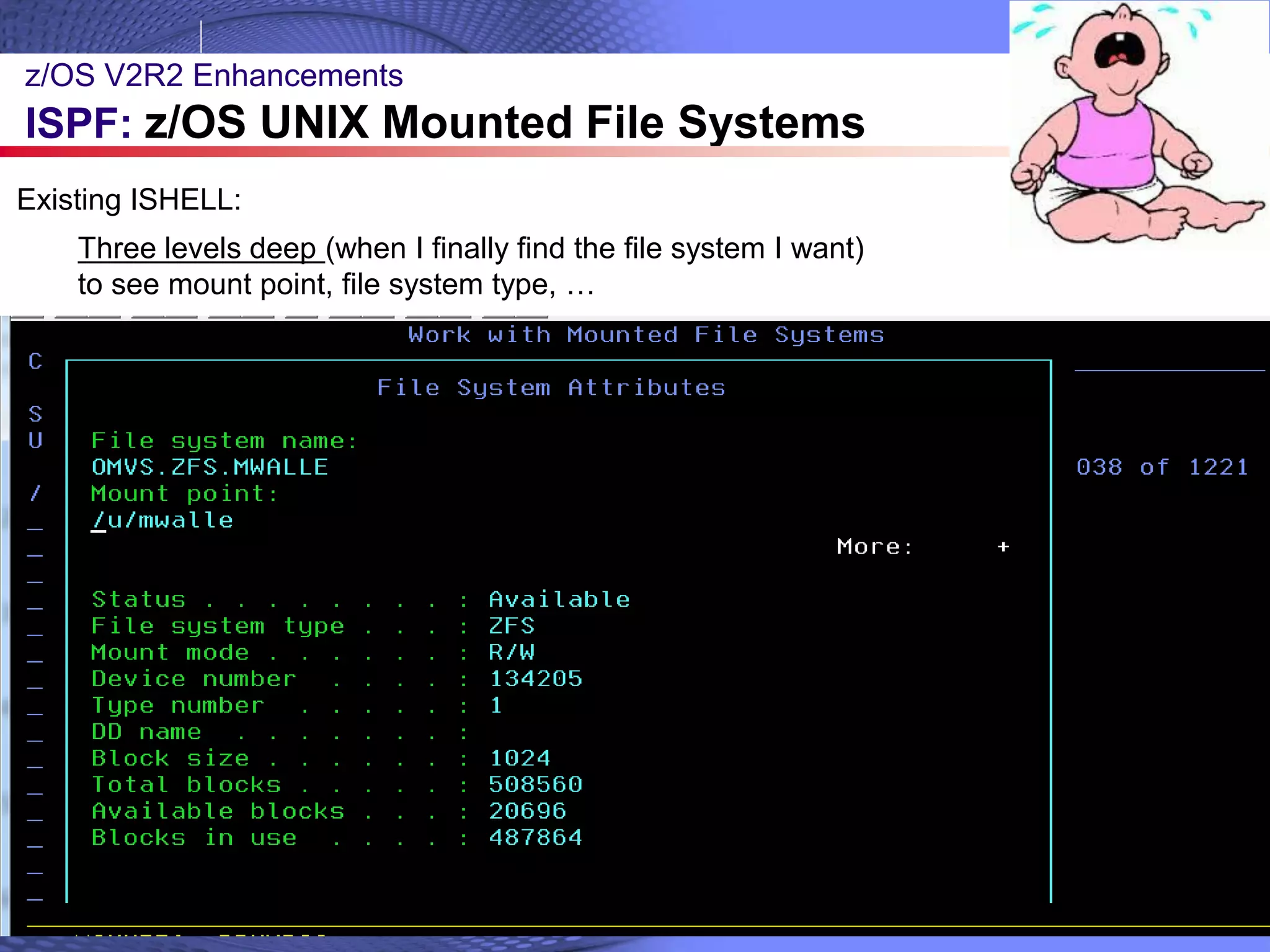
Three levels deep (when I finally find the file system I want)
to see mount point, file system type, …
Existing ISHELL:
z/OS V2R2 Enhancements
ISPF: z/OS UNIX Mounted File Systems
© 2016 IBM Corporation8
New ISPF 3.17…two excellent “views”:
z/OS V2R2 Enhancements
ISPF: z/OS UNIX Mounted File Systems
© 2016 IBM Corporation9
New ISPF 3.17 “Mount Table by File System”:
z/OS V2R2 Enhancements
ISPF: z/OS UNIX Mounted File Systems
© 2016 IBM Corporation10
z/OS V2R2 Enhancements
ISPF: z/OS UNIX Mounted File Systems
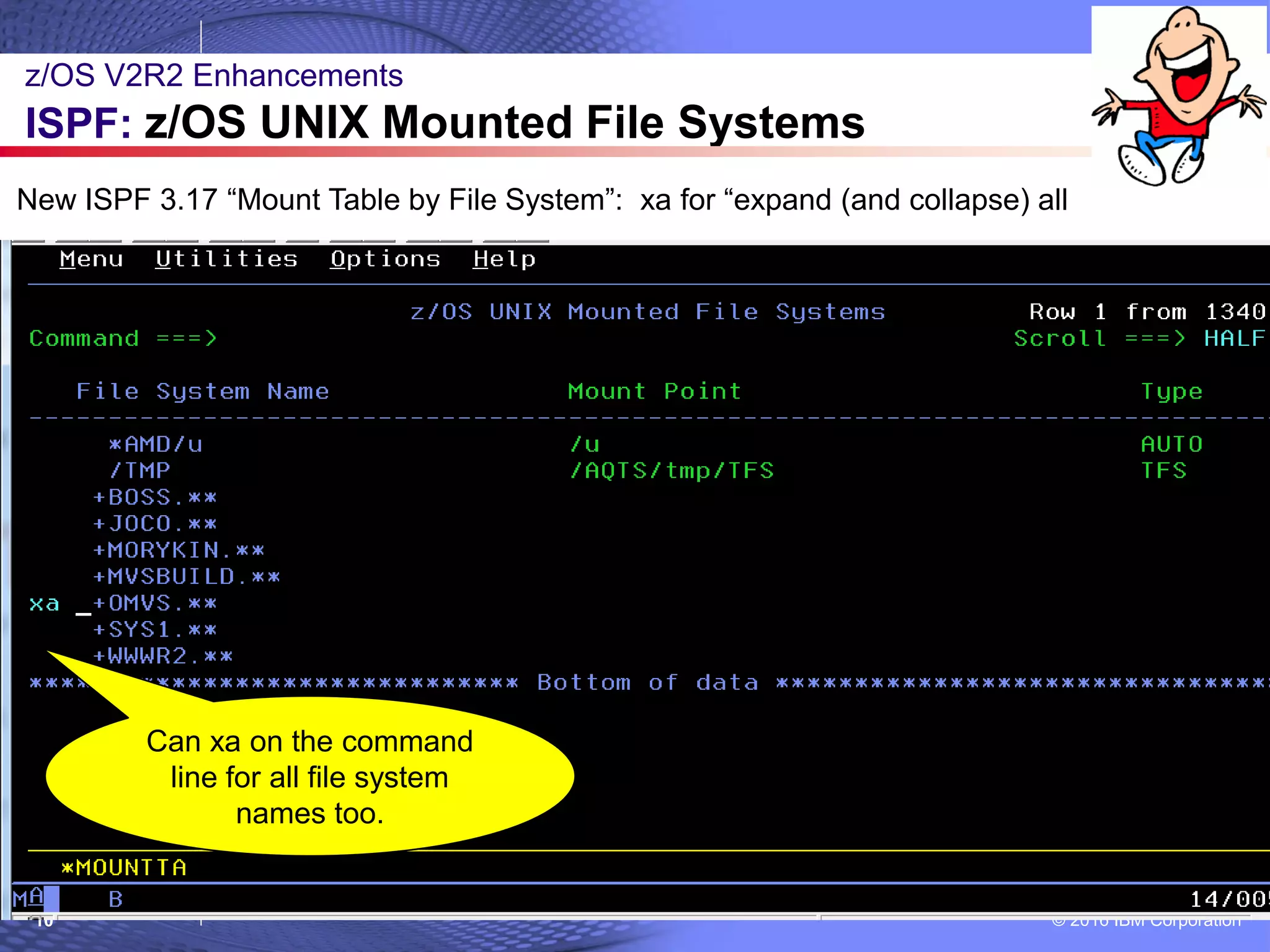
New ISPF 3.17 “Mount Table by File System”: xa for “expand (and collapse) all
Can xa on the command
line for all file system
names too.
© 2016 IBM Corporation11
z/OS V2R2 Enhancements
ISPF: z/OS UNIX Mounted File Systems
New ISPF 3.17 “Mount Table by File System”: easily understood hierarchy.
Notice file system and mount point are clearly identified together!
© 2016 IBM Corporation12
z/OS V2R2 Enhancements
ISPF: z/OS UNIX Mounted File Systems
New ISPF 3.17 “Mount Table by File System”: easy find!
© 2016 IBM Corporation13
New ISPF 3.17 “Mount Table by Mount Point”: … the reverse view
z/OS V2R2 Enhancements
ISPF: z/OS UNIX Mounted File Systems
© 2016 IBM Corporation14
z/OS V2R2 Enhancements
ISPF: z/OS UNIX Mounted File Systems
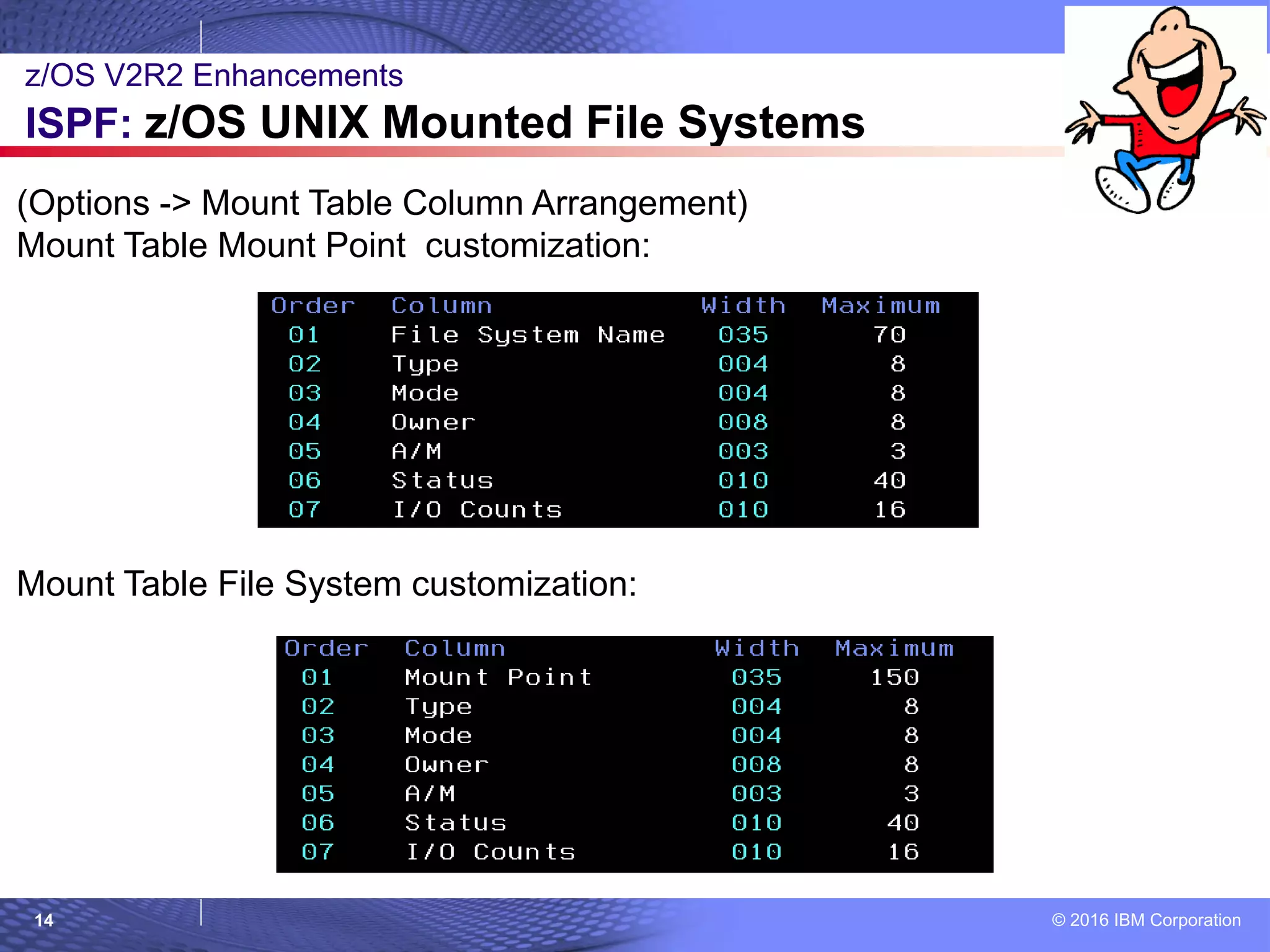
(Options -> Mount Table Column Arrangement)
Mount Table Mount Point customization:
Mount Table File System customization:
© 2016 IBM Corporation15
© 2007 IBM Corporation
z/OS V2R1
Little Enhancements
= Sysprog
= Sysprog & Users
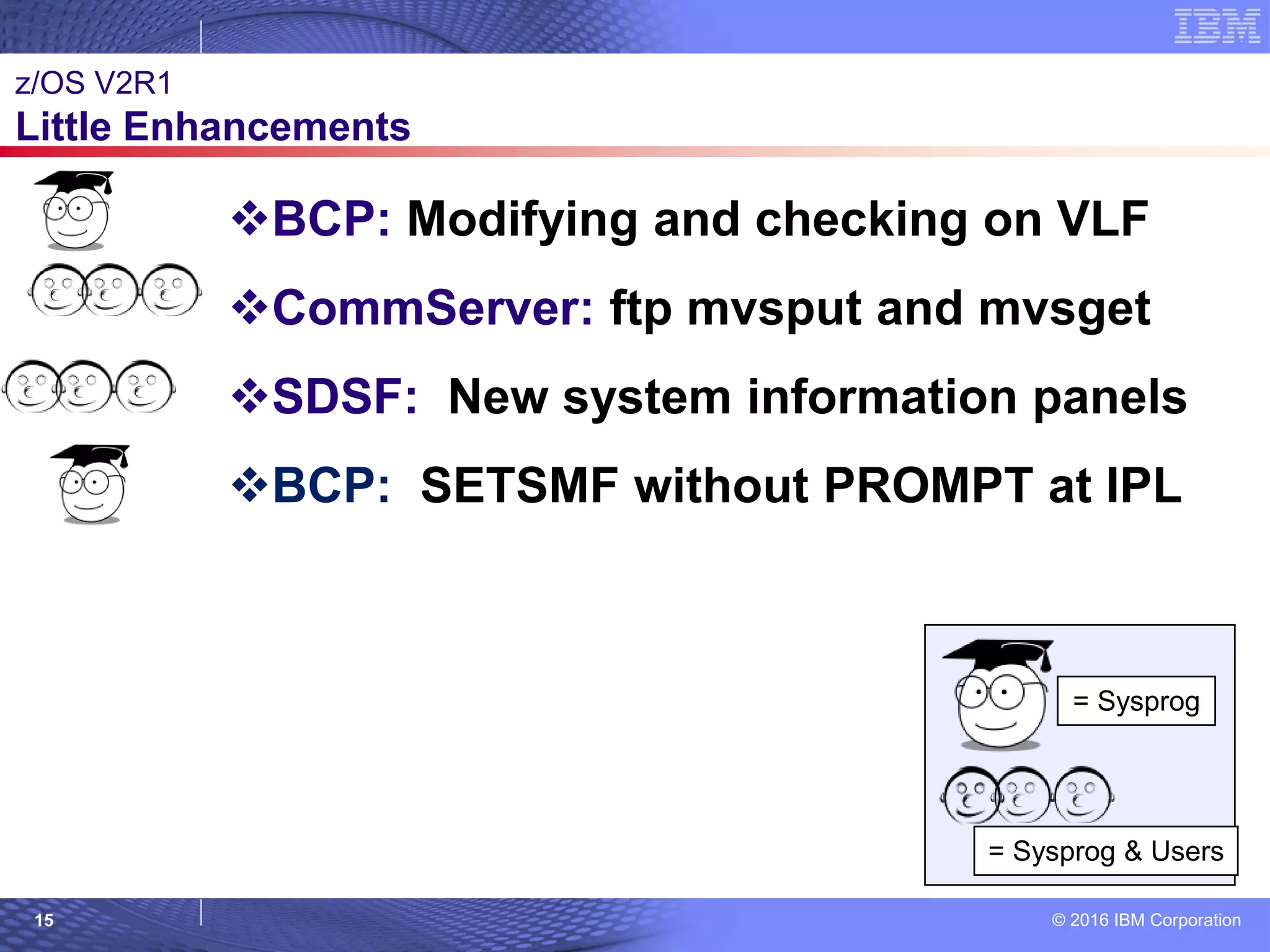
BCP: Modifying and checking on VLF
CommServer: ftp mvsput and mvsget
SDSF: New system information panels
BCP: SETSMF without PROMPT at IPL
© 2016 IBM Corporation16
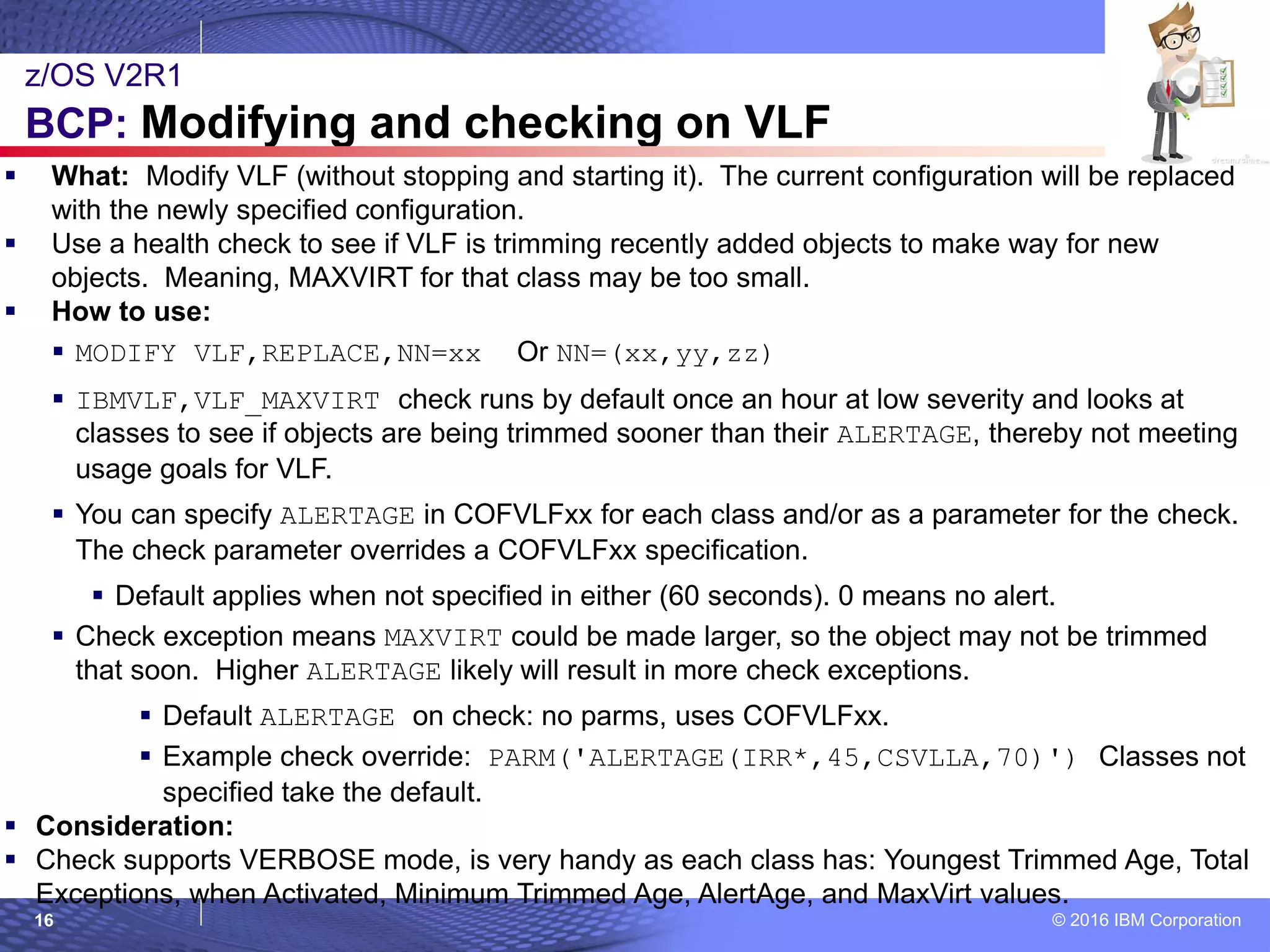
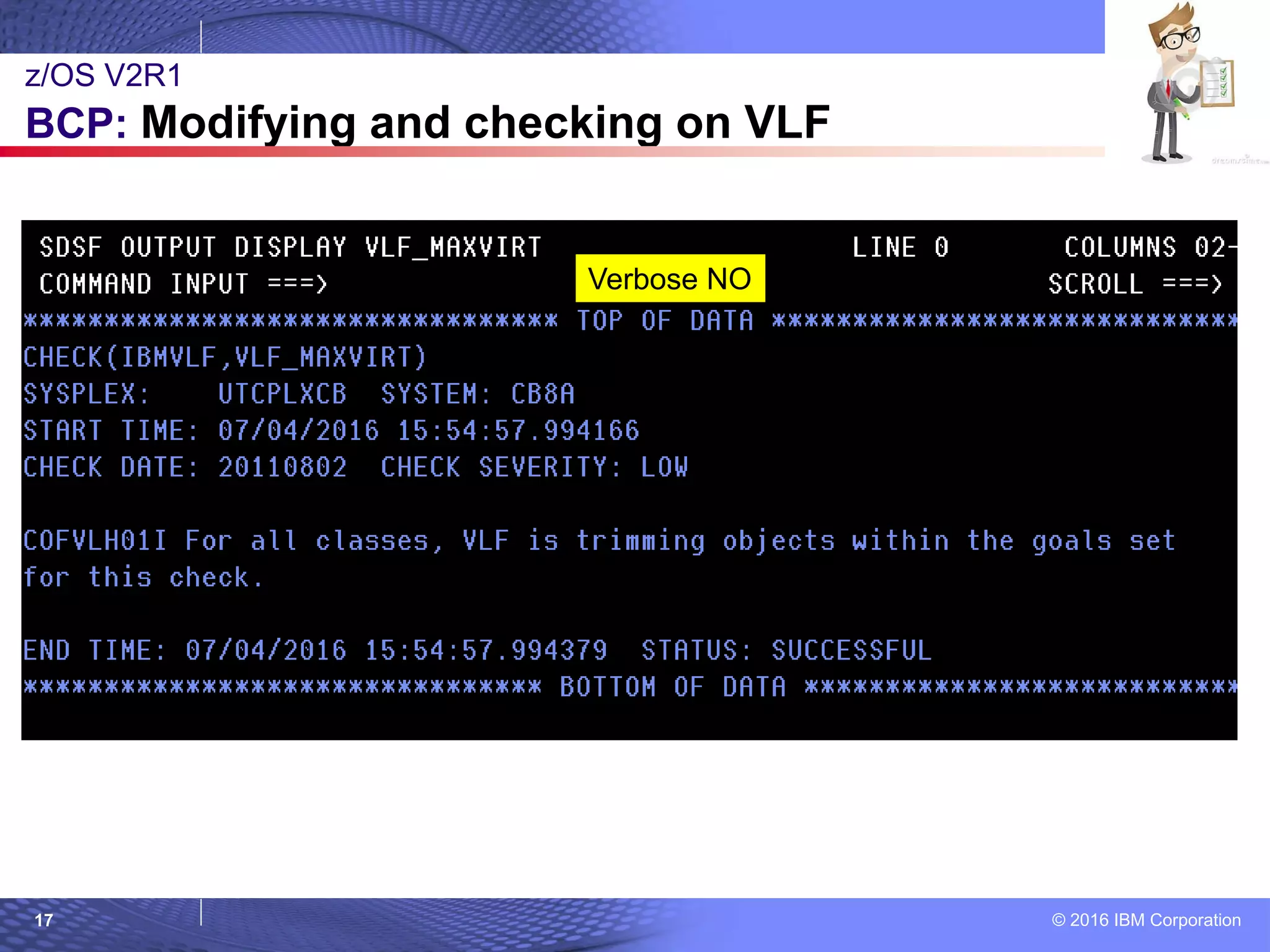
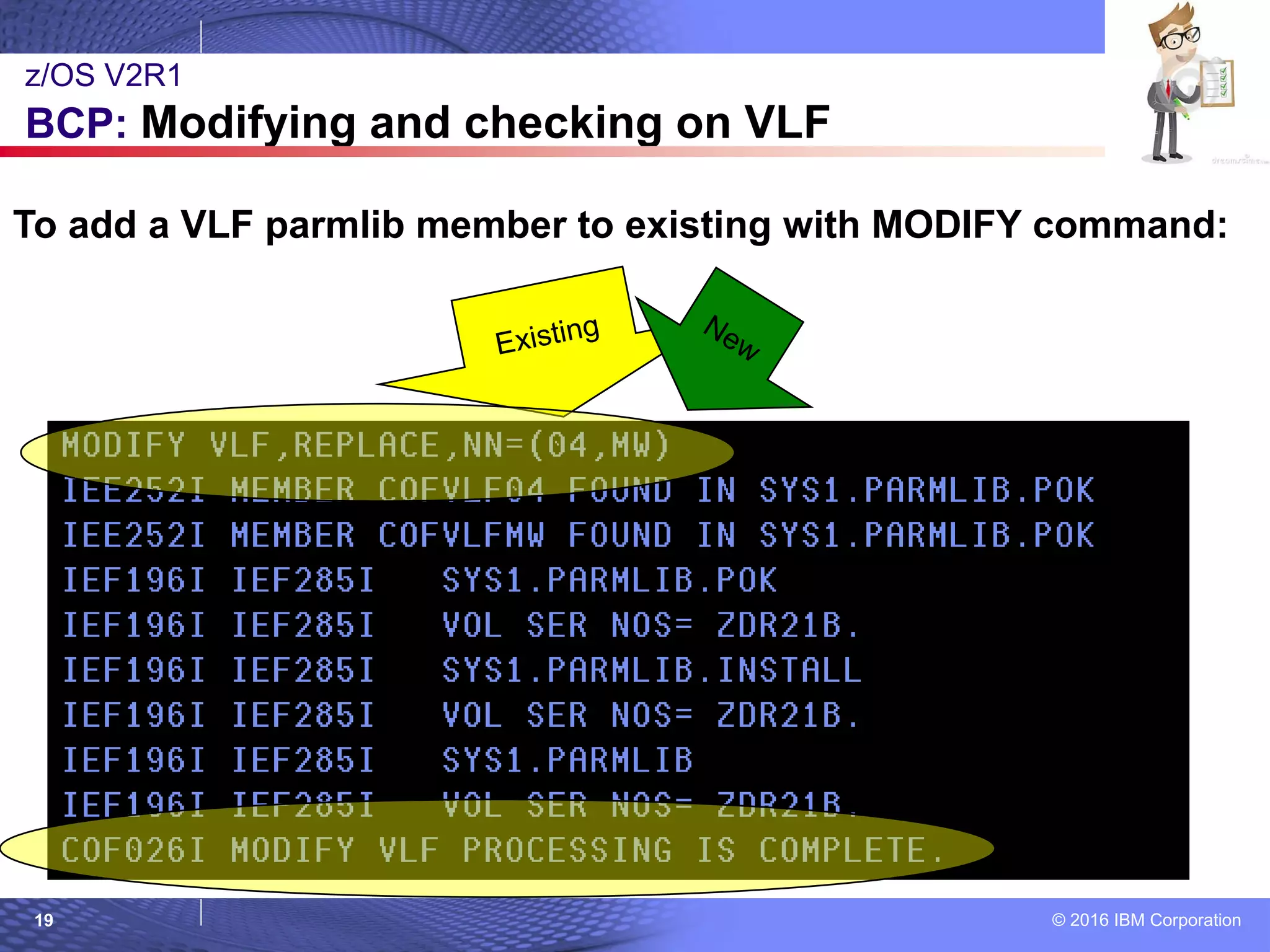
 What: Modify VLF (without stopping and starting it). The current configuration will be replaced
with the newly specified configuration.
 Use a health check to see if VLF is trimming recently added objects to make way for new
objects. Meaning, MAXVIRT for that class may be too small.
 How to use:
 MODIFY VLF,REPLACE,NN=xx Or NN=(xx,yy,zz)
 IBMVLF,VLF_MAXVIRT check runs by default once an hour at low severity and looks at
classes to see if objects are being trimmed sooner than their ALERTAGE, thereby not meeting
usage goals for VLF.
 You can specify ALERTAGE in COFVLFxx for each class and/or as a parameter for the check.
The check parameter overrides a COFVLFxx specification.
 Default applies when not specified in either (60 seconds). 0 means no alert.
 Check exception means MAXVIRT could be made larger, so the object may not be trimmed
that soon. Higher ALERTAGE likely will result in more check exceptions.
 Default ALERTAGE on check: no parms, uses COFVLFxx.
 Example check override: PARM('ALERTAGE(IRR*,45,CSVLLA,70)') Classes not
specified take the default.
 Consideration:
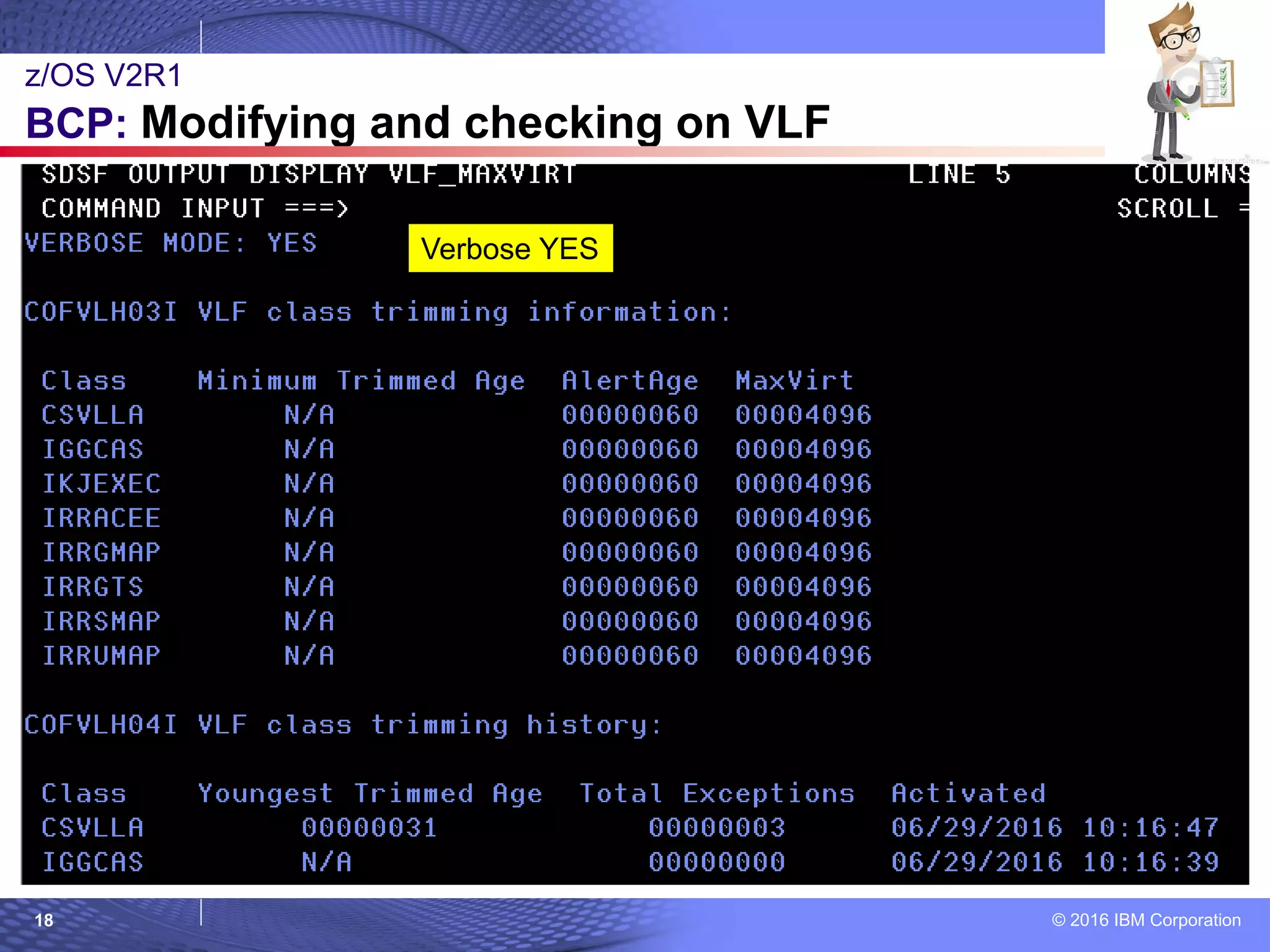
 Check supports VERBOSE mode, is very handy as each class has: Youngest Trimmed Age, Total
Exceptions, when Activated, Minimum Trimmed Age, AlertAge, and MaxVirt values.
z/OS V2R1
BCP: Modifying and checking on VLF
© 2016 IBM Corporation17
z/OS V2R1
BCP: Modifying and checking on VLF
Verbose NO
© 2016 IBM Corporation18
z/OS V2R1
BCP: Modifying and checking on VLF
Verbose YES
© 2016 IBM Corporation19
z/OS V2R1
BCP: Modifying and checking on VLF
To add a VLF parmlib member to existing with MODIFY command:
© 2016 IBM Corporation20
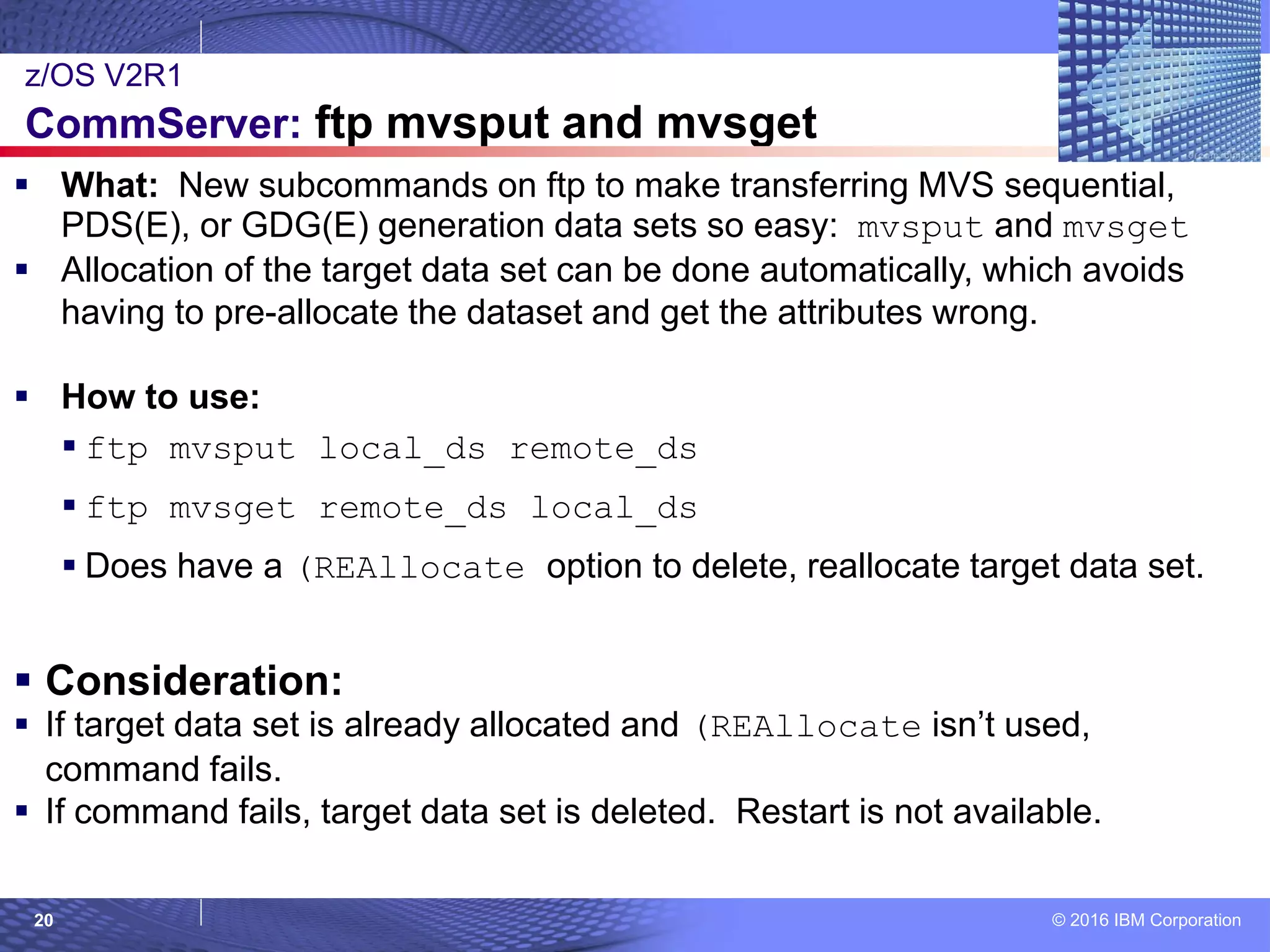
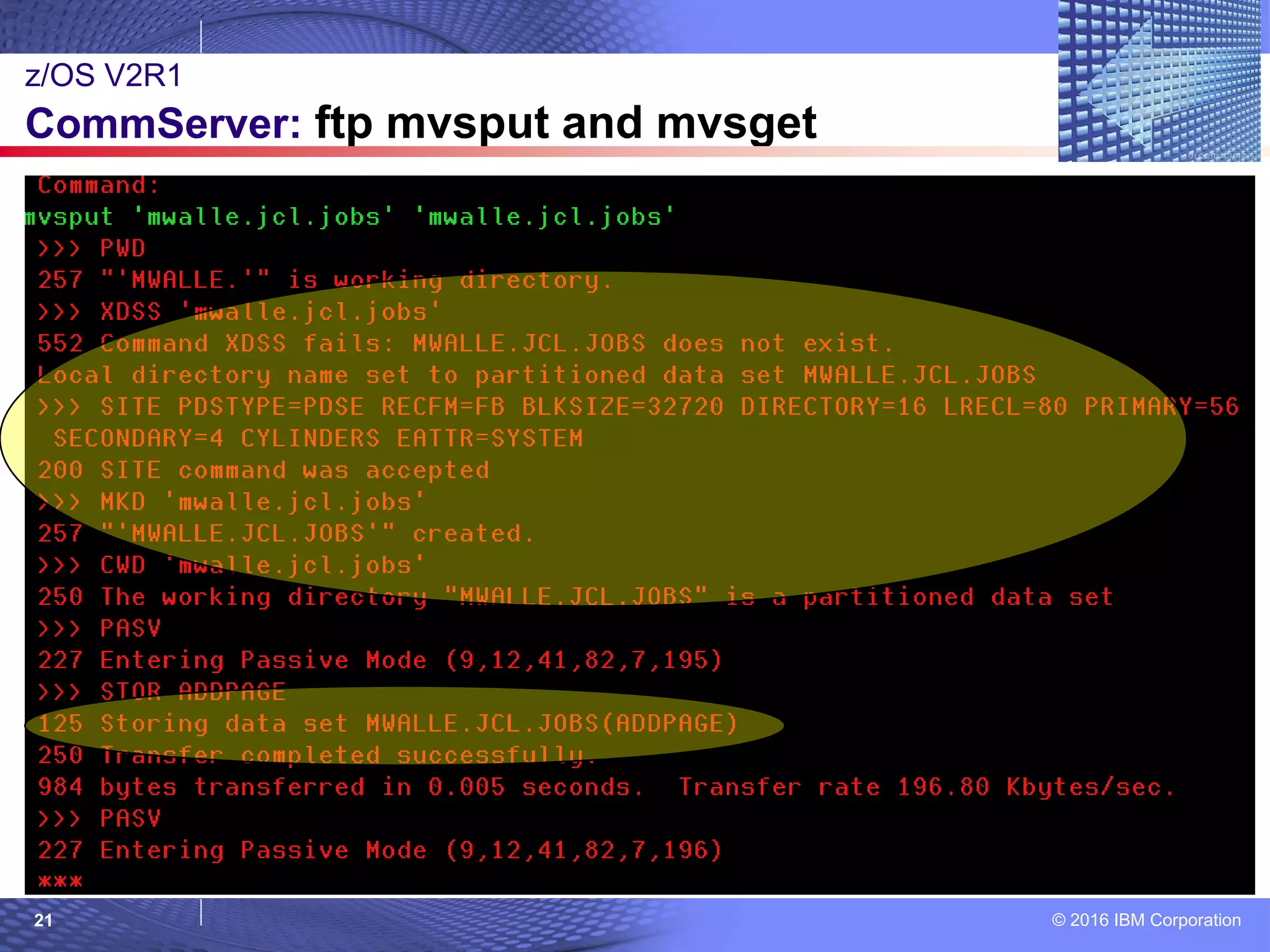
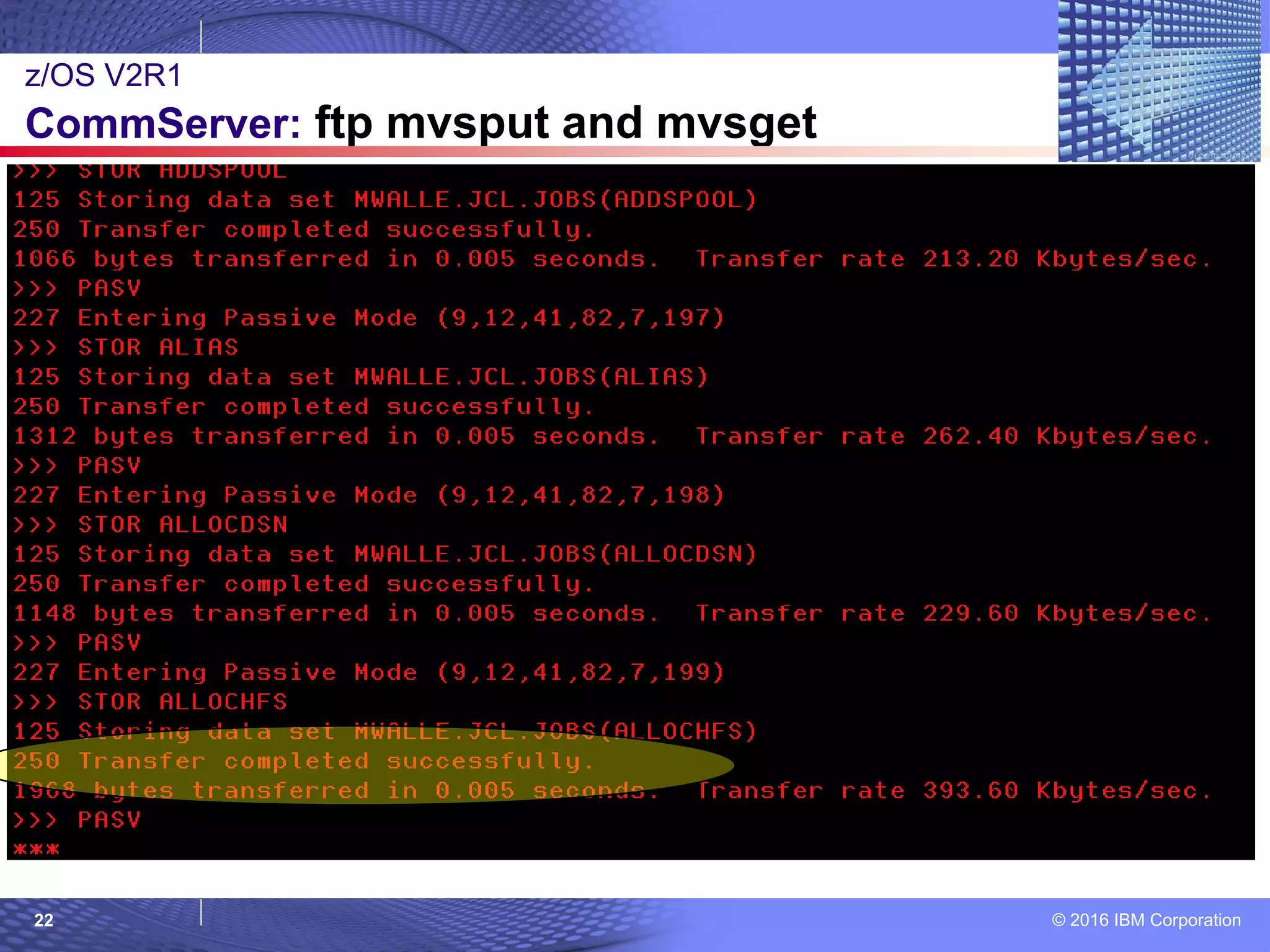
 What: New subcommands on ftp to make transferring MVS sequential,
PDS(E), or GDG(E) generation data sets so easy: mvsput and mvsget
 Allocation of the target data set can be done automatically, which avoids
having to pre-allocate the dataset and get the attributes wrong.
 How to use:
 ftp mvsput local_ds remote_ds
 ftp mvsget remote_ds local_ds
 Does have a (REAllocate option to delete, reallocate target data set.
 Consideration:
 If target data set is already allocated and (REAllocate isn’t used,
command fails.
 If command fails, target data set is deleted. Restart is not available.
z/OS V2R1
CommServer: ftp mvsput and mvsget
© 2016 IBM Corporation21
z/OS V2R1
CommServer: ftp mvsput and mvsget
© 2016 IBM Corporation22
z/OS V2R1
CommServer: ftp mvsput and mvsget
© 2016 IBM Corporation23
z/OS V2R1
CommServer: ftp mvsput and mvsget
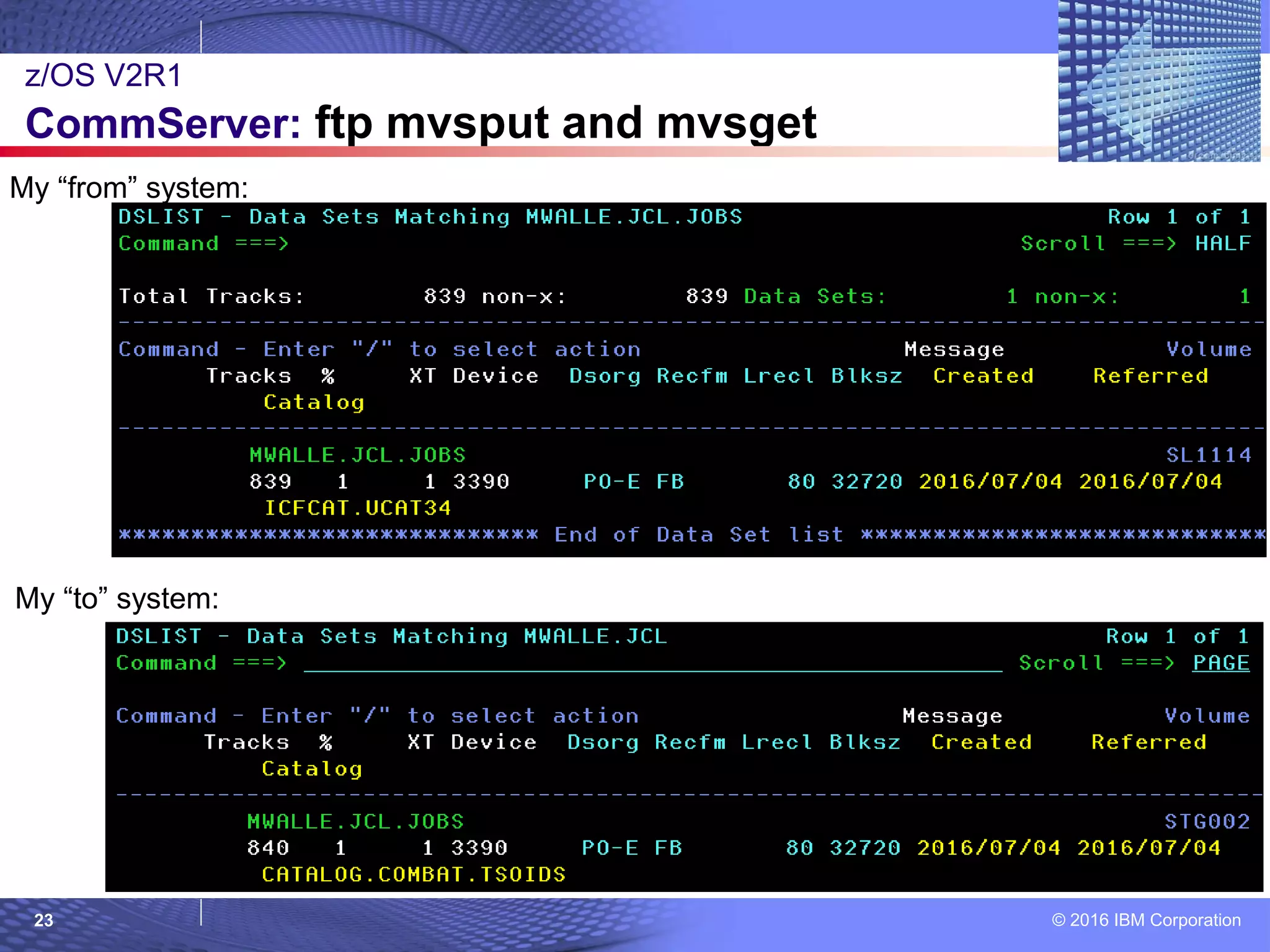
My “from” system:
My “to” system:
© 2016 IBM Corporation24
z/OS V2R1
CommServer: ftp mvsput and mvsget
With a GDG(E) must give absolute generation, and base must have been pre-defined :
© 2016 IBM Corporation25
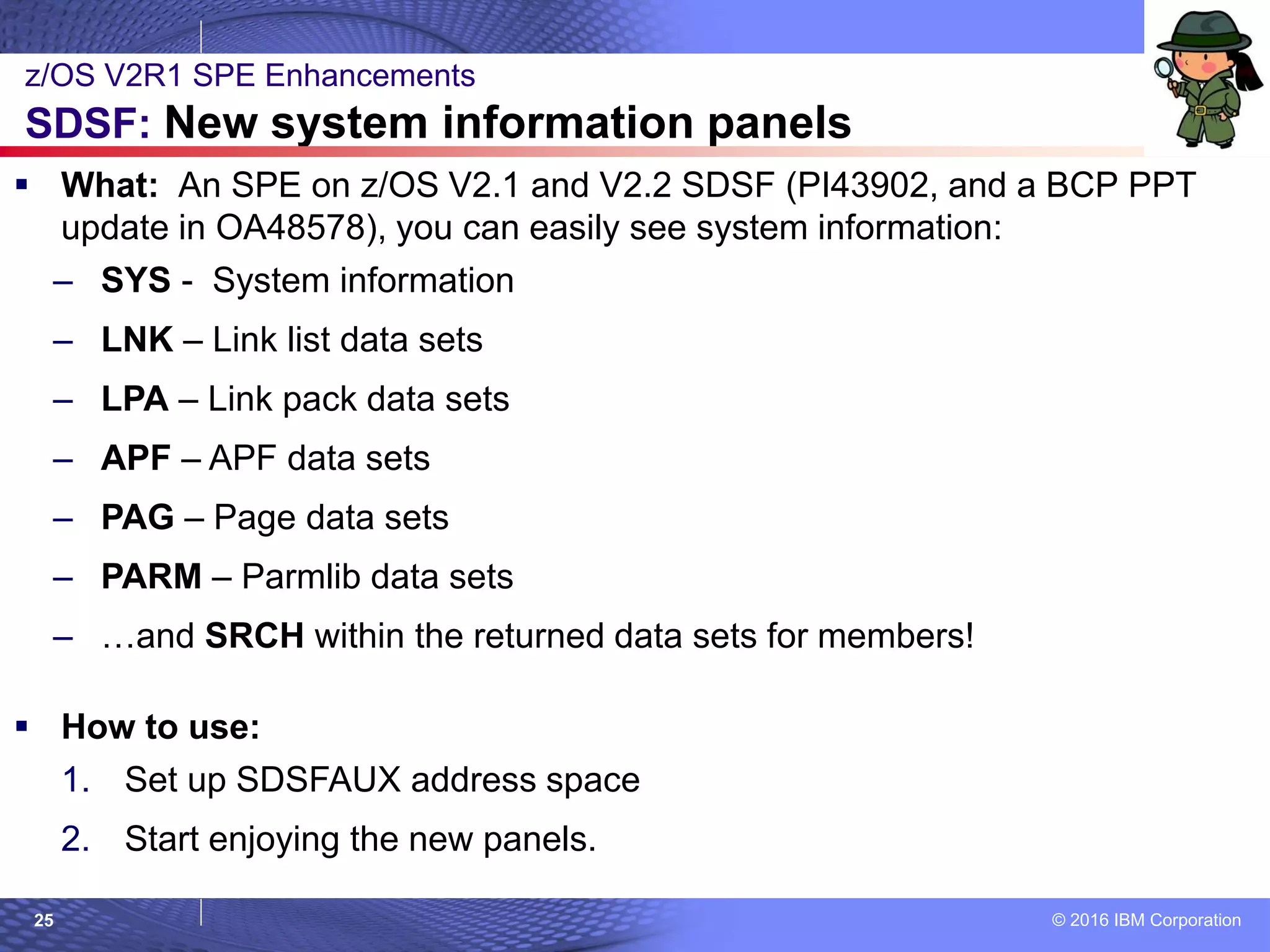
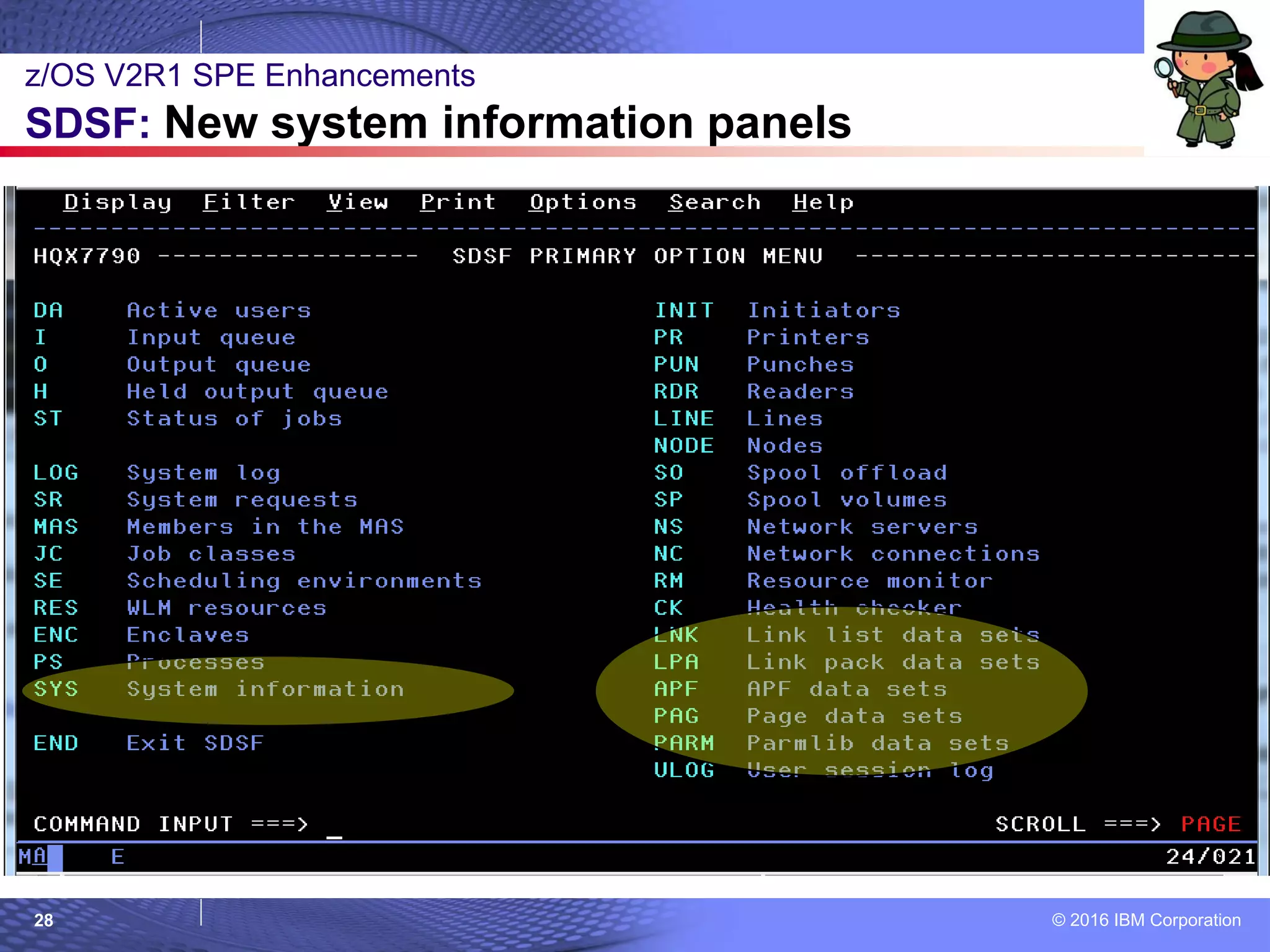
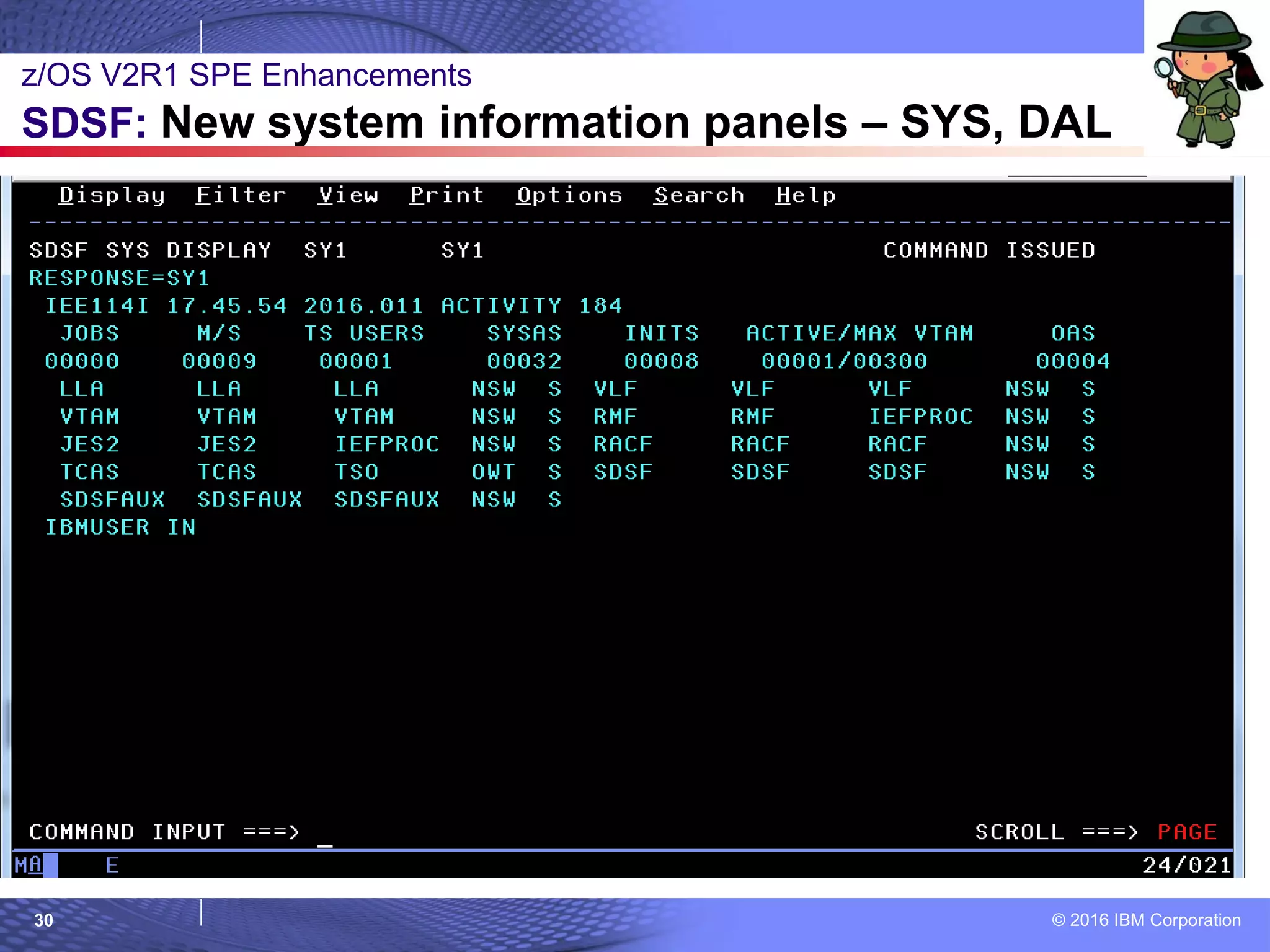
 What: An SPE on z/OS V2.1 and V2.2 SDSF (PI43902, and a BCP PPT
update in OA48578), you can easily see system information:
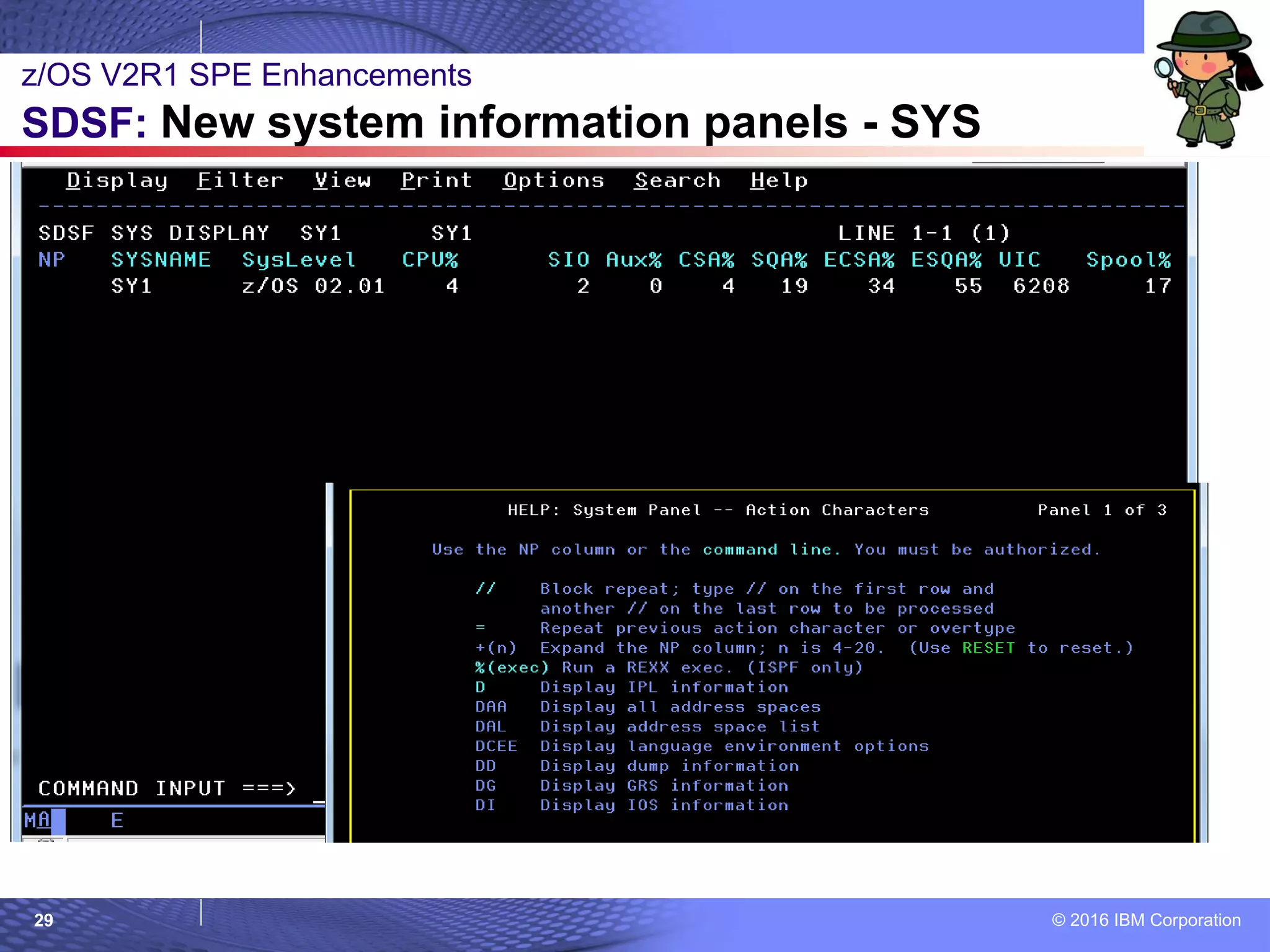
– SYS - System information
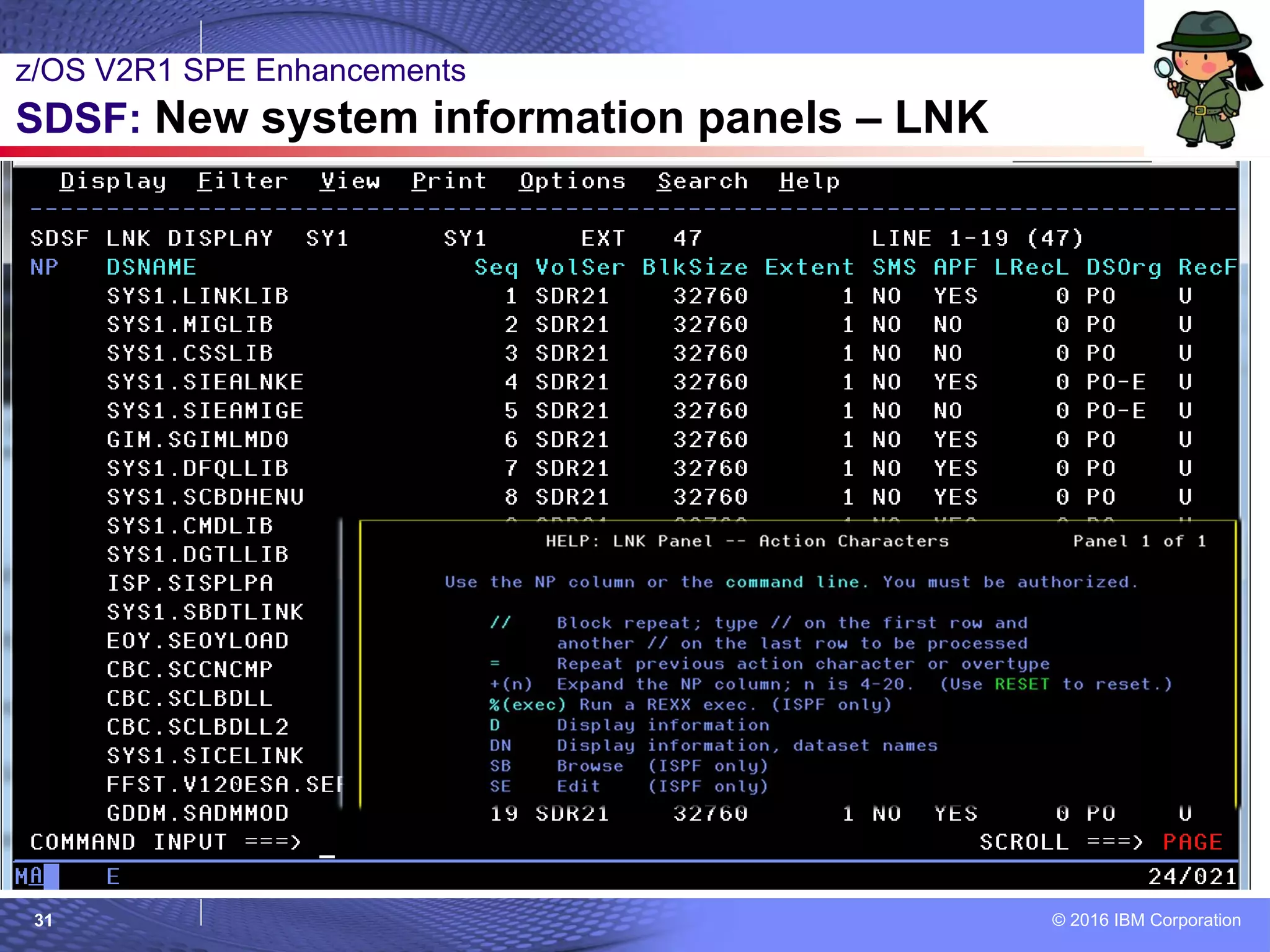
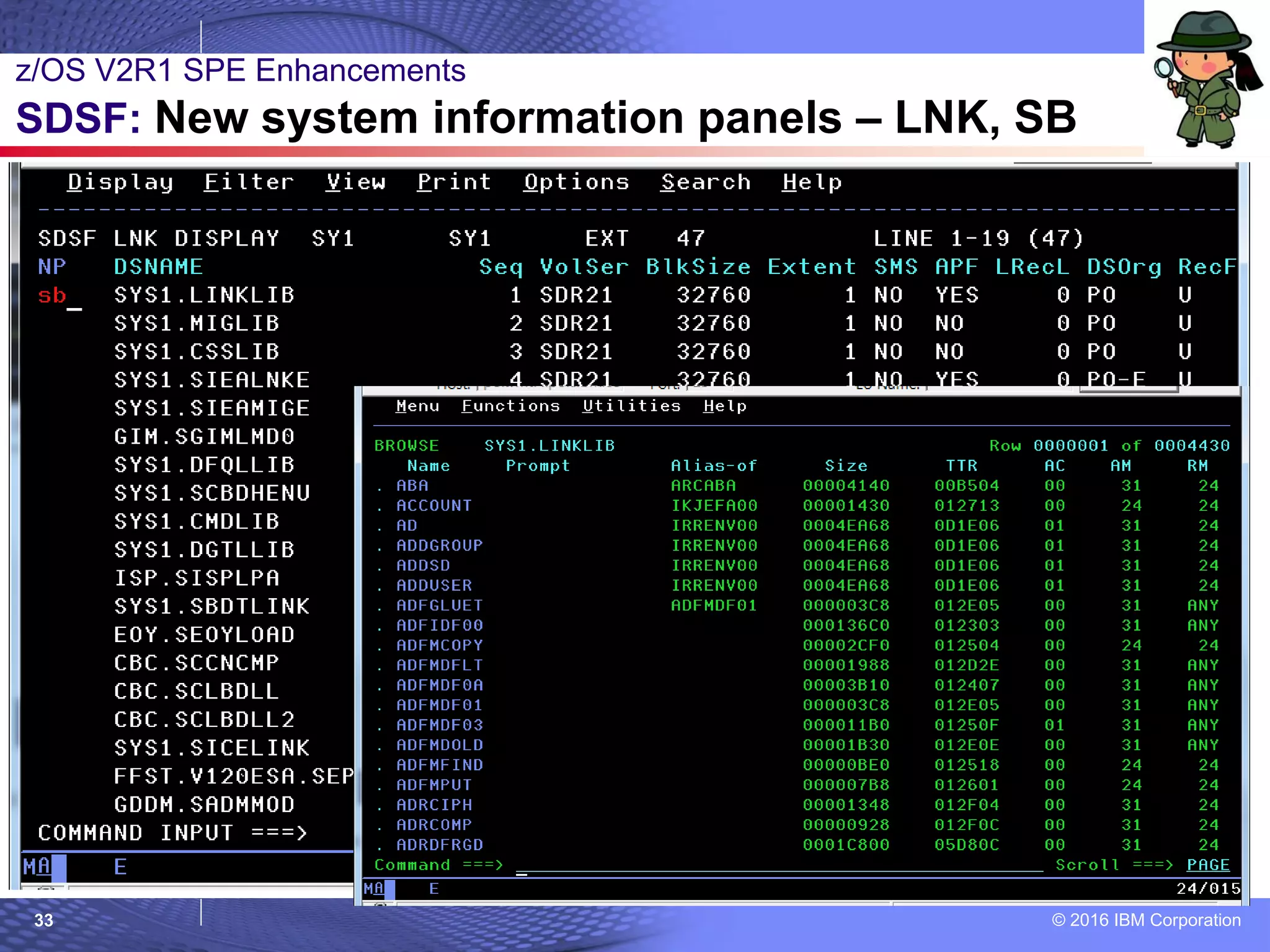
– LNK – Link list data sets
– LPA – Link pack data sets
– APF – APF data sets
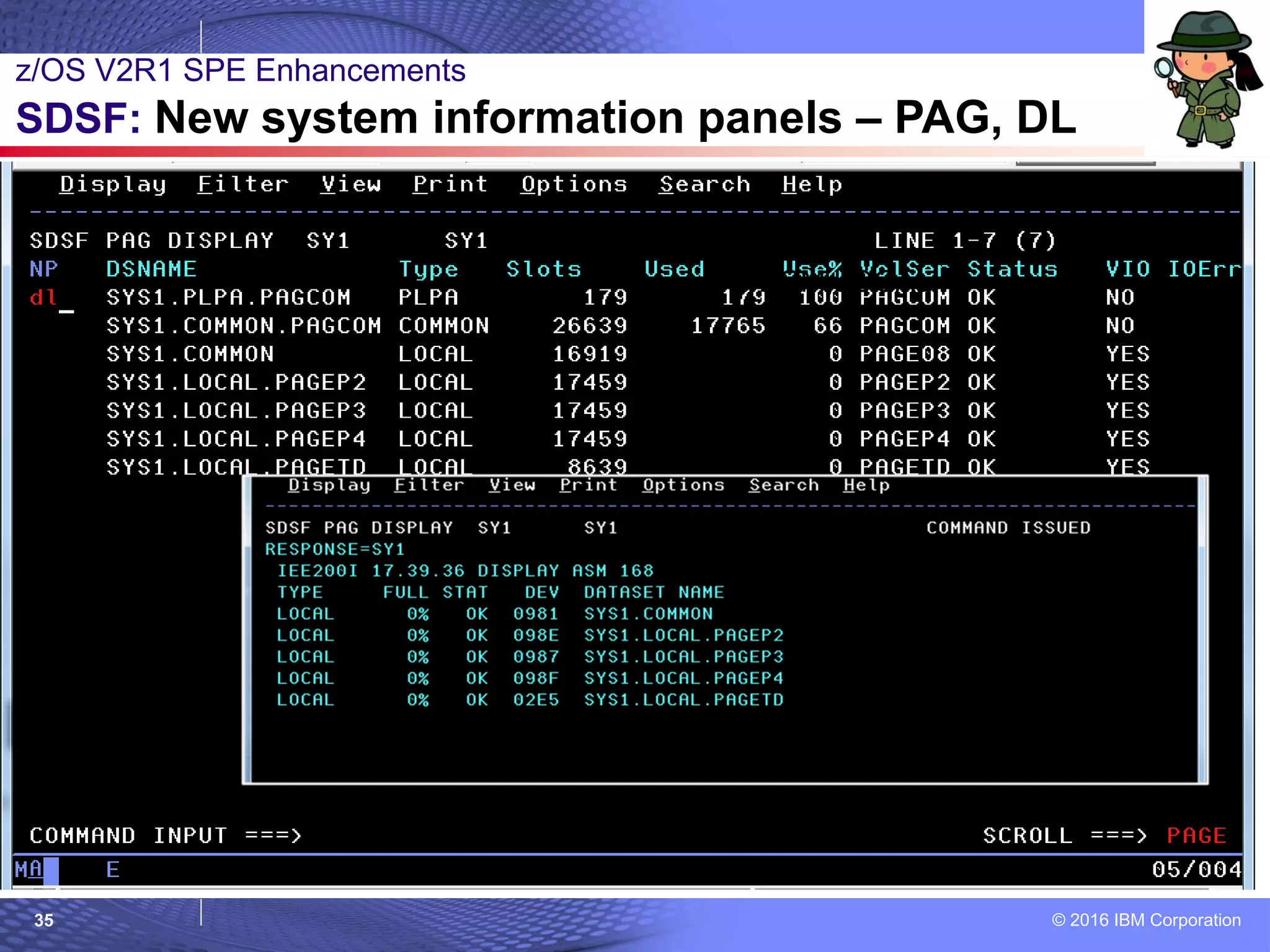
– PAG – Page data sets
– PARM – Parmlib data sets
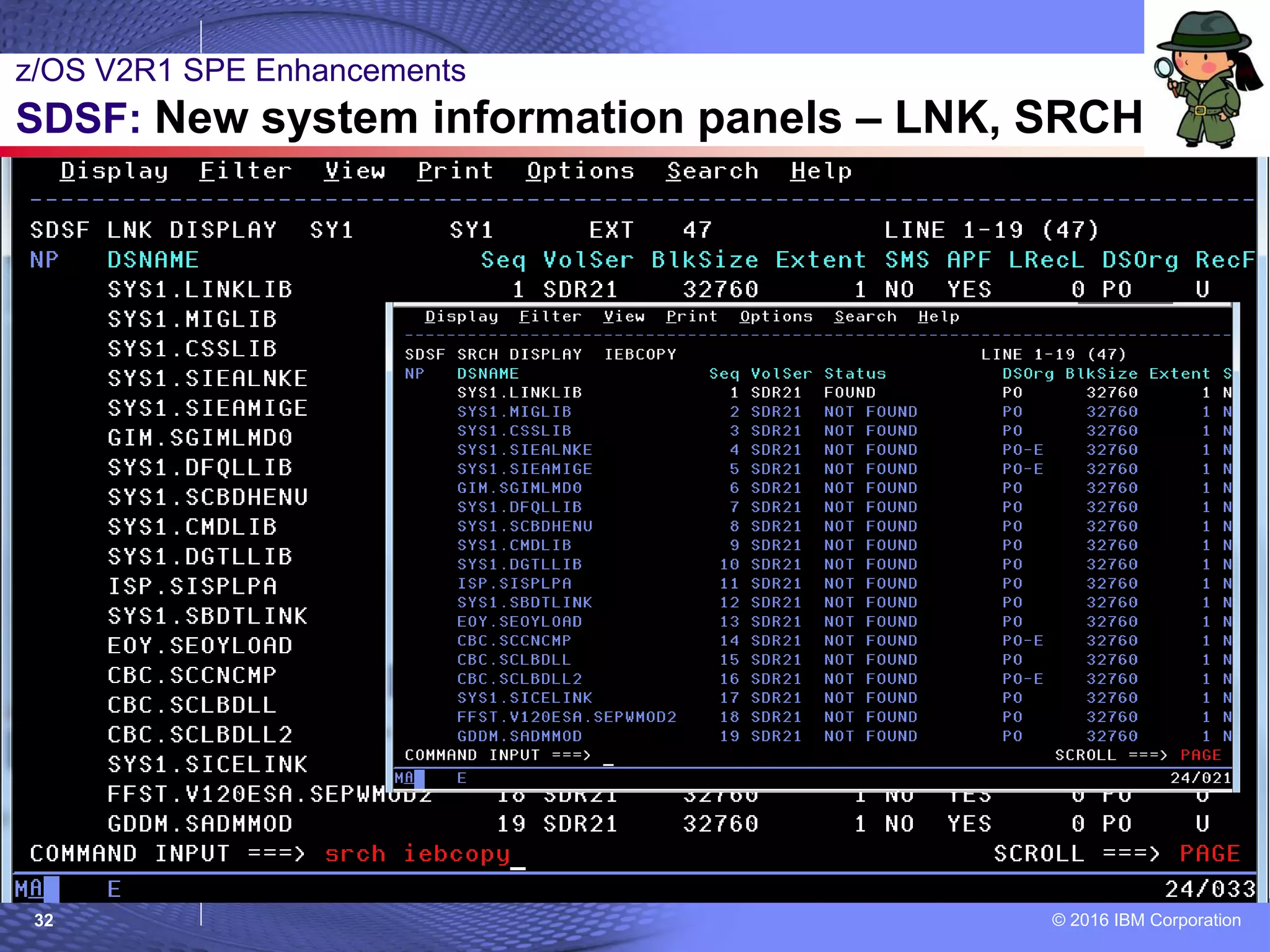
– …and SRCH within the returned data sets for members!
 How to use:
1. Set up SDSFAUX address space
2. Start enjoying the new panels.
z/OS V2R1 SPE Enhancements
SDSF: New system information panels
© 2016 IBM Corporation26
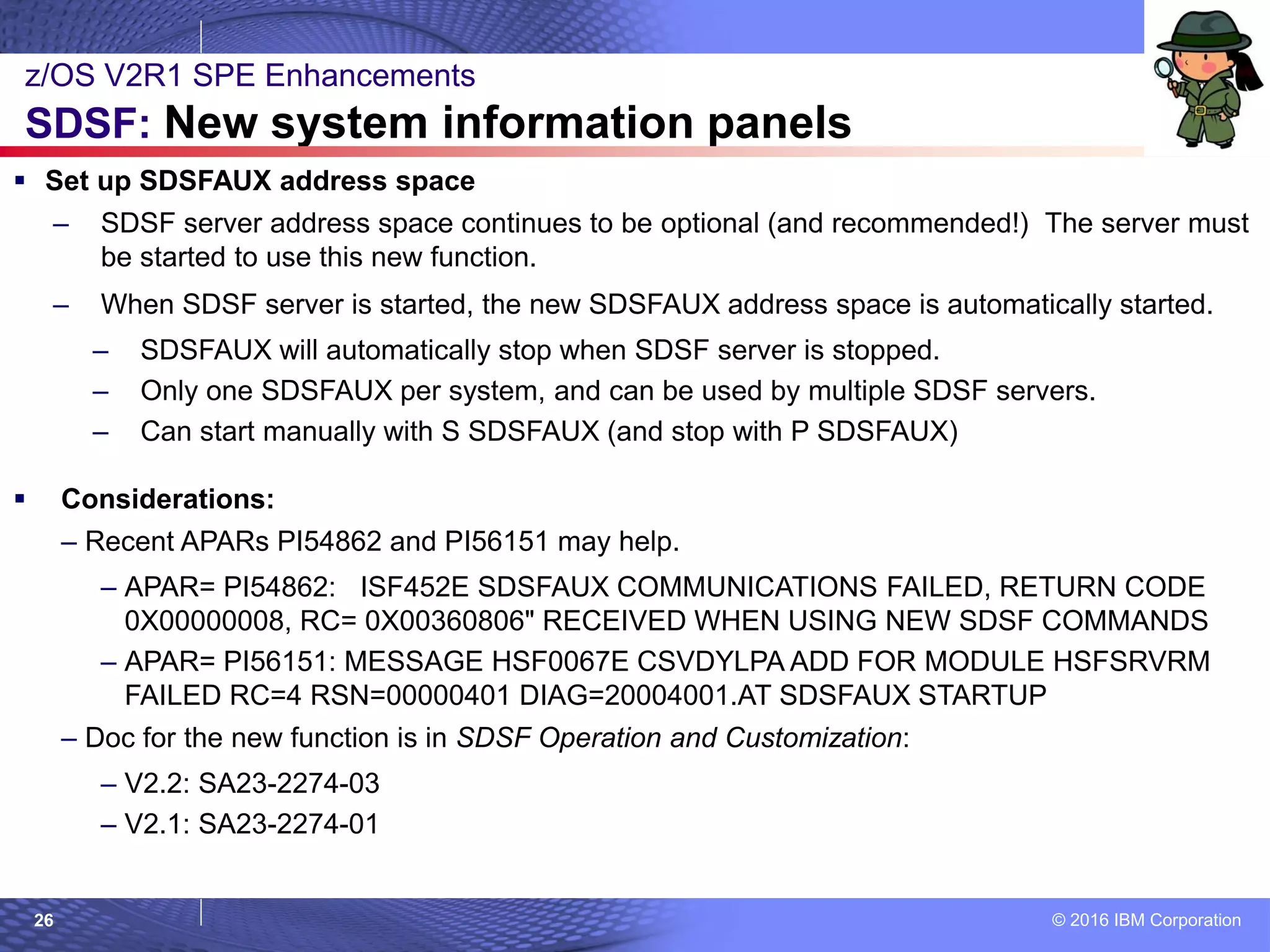
 Set up SDSFAUX address space
– SDSF server address space continues to be optional (and recommended!) The server must
be started to use this new function.
– When SDSF server is started, the new SDSFAUX address space is automatically started.
– SDSFAUX will automatically stop when SDSF server is stopped.
– Only one SDSFAUX per system, and can be used by multiple SDSF servers.
– Can start manually with S SDSFAUX (and stop with P SDSFAUX)
 Considerations:
– Recent APARs PI54862 and PI56151 may help.
– APAR= PI54862: ISF452E SDSFAUX COMMUNICATIONS FAILED, RETURN CODE
0X00000008, RC= 0X00360806" RECEIVED WHEN USING NEW SDSF COMMANDS
– APAR= PI56151: MESSAGE HSF0067E CSVDYLPA ADD FOR MODULE HSFSRVRM
FAILED RC=4 RSN=00000401 DIAG=20004001.AT SDSFAUX STARTUP
– Doc for the new function is in SDSF Operation and Customization:
– V2.2: SA23-2274-03
– V2.1: SA23-2274-01
z/OS V2R1 SPE Enhancements
SDSF: New system information panels
© 2016 IBM Corporation27
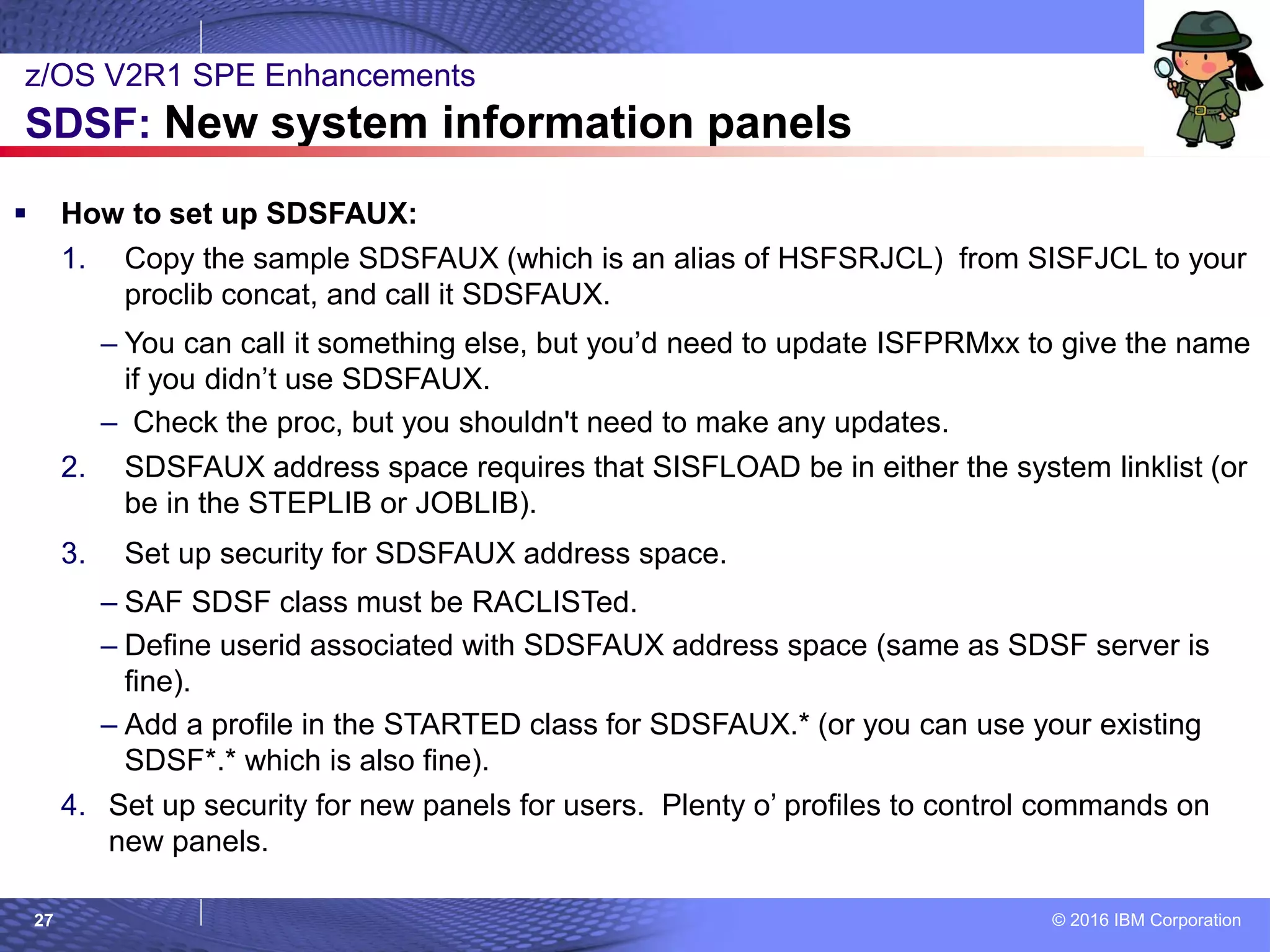
 How to set up SDSFAUX:
1. Copy the sample SDSFAUX (which is an alias of HSFSRJCL) from SISFJCL to your
proclib concat, and call it SDSFAUX.
– You can call it something else, but you’d need to update ISFPRMxx to give the name
if you didn’t use SDSFAUX.
– Check the proc, but you shouldn't need to make any updates.
2. SDSFAUX address space requires that SISFLOAD be in either the system linklist (or
be in the STEPLIB or JOBLIB).
3. Set up security for SDSFAUX address space.
– SAF SDSF class must be RACLISTed.
– Define userid associated with SDSFAUX address space (same as SDSF server is
fine).
– Add a profile in the STARTED class for SDSFAUX.* (or you can use your existing
SDSF*.* which is also fine).
4. Set up security for new panels for users. Plenty o’ profiles to control commands on
new panels.
z/OS V2R1 SPE Enhancements
SDSF: New system information panels
© 2016 IBM Corporation28
z/OS V2R1 SPE Enhancements
SDSF: New system information panels
© 2016 IBM Corporation29
z/OS V2R1 SPE Enhancements
SDSF: New system information panels - SYS
© 2016 IBM Corporation30
z/OS V2R1 SPE Enhancements
SDSF: New system information panels – SYS, DAL
© 2016 IBM Corporation31
z/OS V2R1 SPE Enhancements
SDSF: New system information panels – LNK
© 2016 IBM Corporation32
z/OS V2R1 SPE Enhancements
SDSF: New system information panels – LNK, SRCH
© 2016 IBM Corporation33
z/OS V2R1 SPE Enhancements
SDSF: New system information panels – LNK, SB
© 2016 IBM Corporation34
z/OS V2R1 SPE Enhancements
SDSF: New system information panels – PAG
© 2016 IBM Corporation35
= D ASM,LOCAL
z/OS V2R1 SPE Enhancements
SDSF: New system information panels – PAG, DL
© 2016 IBM Corporation36
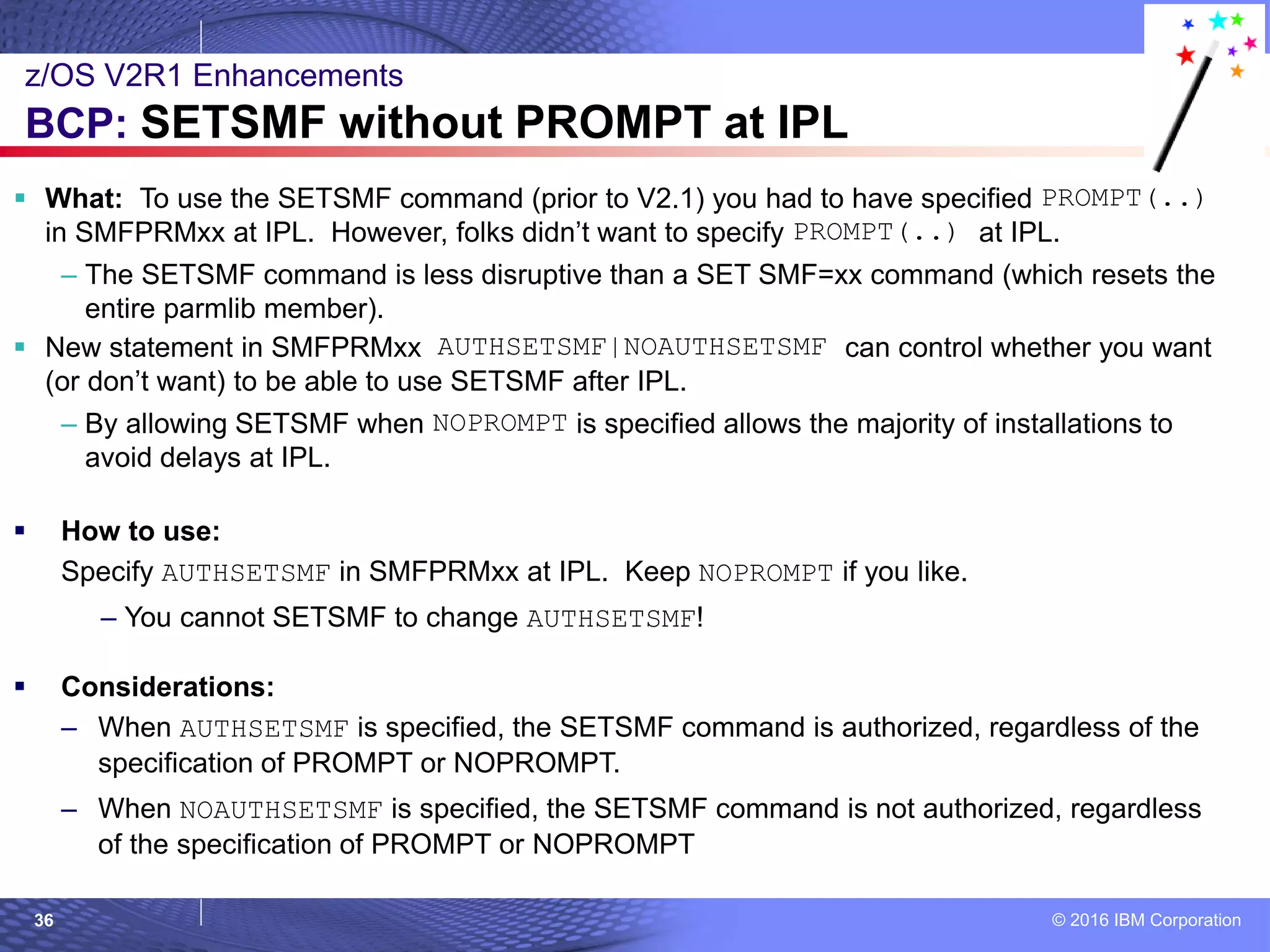
 What: To use the SETSMF command (prior to V2.1) you had to have specified PROMPT(..)
in SMFPRMxx at IPL. However, folks didn’t want to specify PROMPT(..) at IPL.
– The SETSMF command is less disruptive than a SET SMF=xx command (which resets the
entire parmlib member).
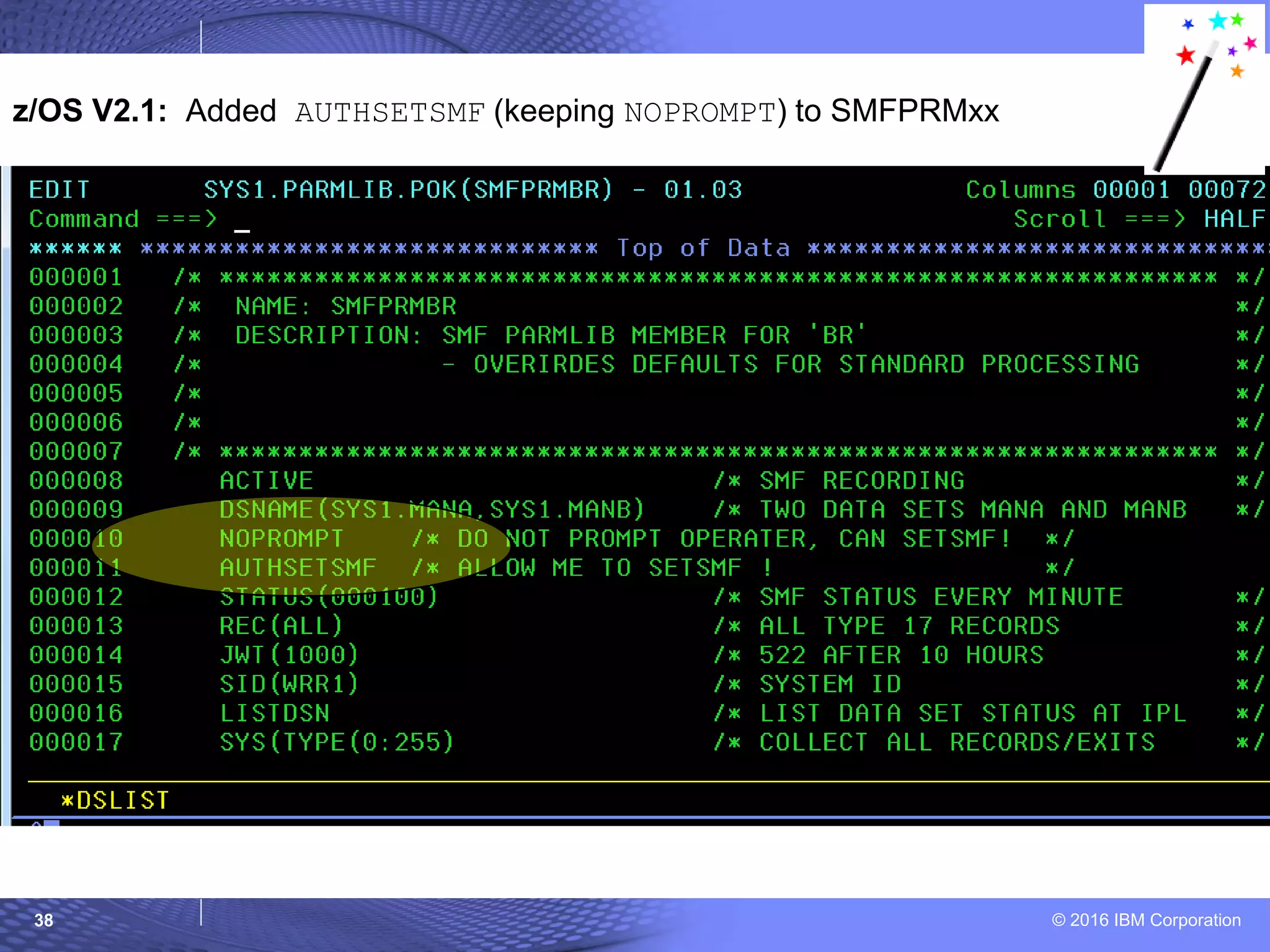
 New statement in SMFPRMxx AUTHSETSMF|NOAUTHSETSMF can control whether you want
(or don’t want) to be able to use SETSMF after IPL.
– By allowing SETSMF when NOPROMPT is specified allows the majority of installations to
avoid delays at IPL.
 How to use:
Specify AUTHSETSMF in SMFPRMxx at IPL. Keep NOPROMPT if you like.
– You cannot SETSMF to change AUTHSETSMF!
 Considerations:
– When AUTHSETSMF is specified, the SETSMF command is authorized, regardless of the
specification of PROMPT or NOPROMPT.
– When NOAUTHSETSMF is specified, the SETSMF command is not authorized, regardless
of the specification of PROMPT or NOPROMPT
z/OS V2R1 Enhancements
BCP: SETSMF without PROMPT at IPL
© 2016 IBM Corporation37
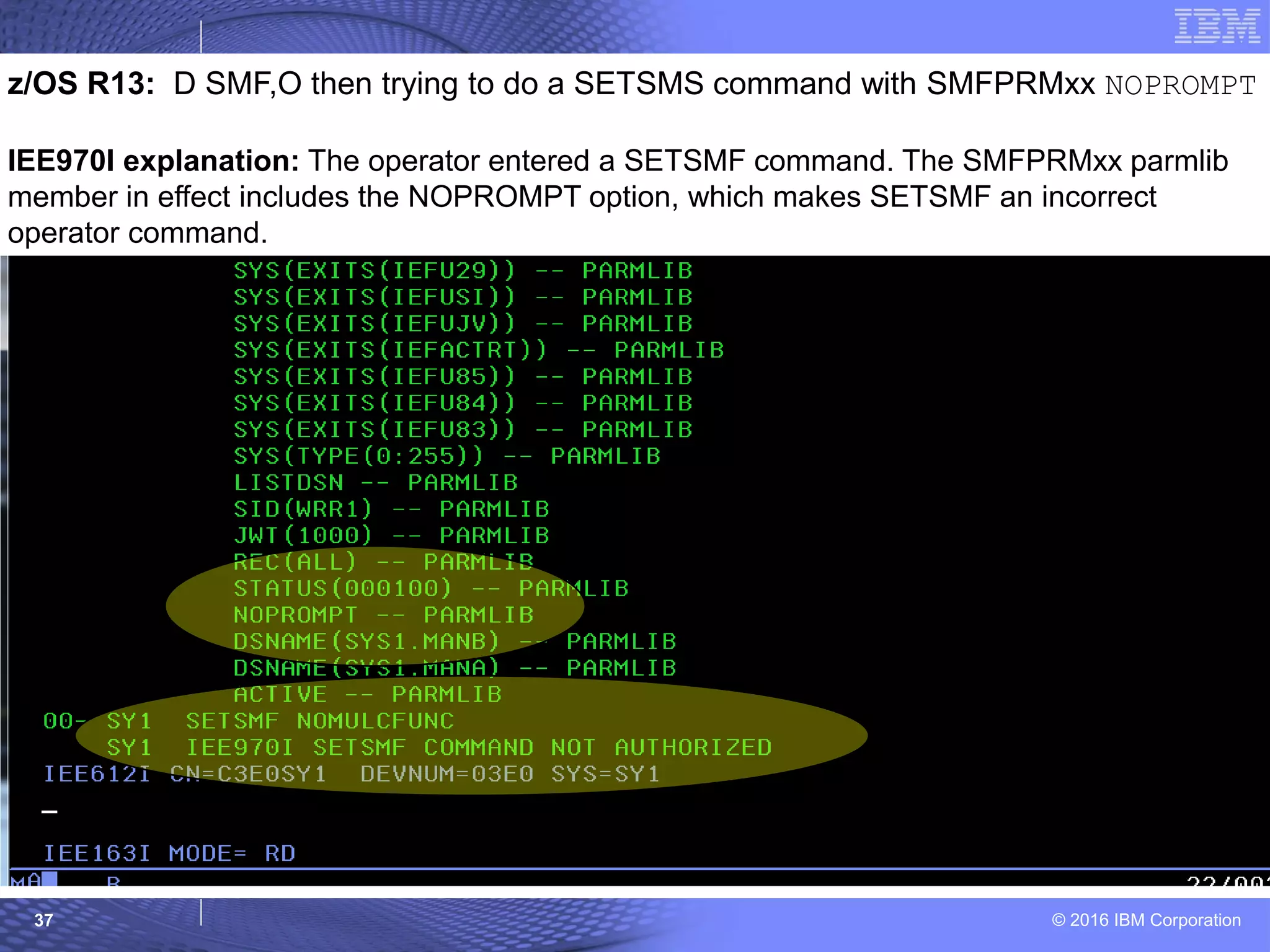
z/OS R13: D SMF,O then trying to do a SETSMS command with SMFPRMxx NOPROMPT
IEE970I explanation: The operator entered a SETSMF command. The SMFPRMxx parmlib
member in effect includes the NOPROMPT option, which makes SETSMF an incorrect
operator command.
© 2016 IBM Corporation38
z/OS V2.1: Added AUTHSETSMF (keeping NOPROMPT) to SMFPRMxx
© 2016 IBM Corporation39
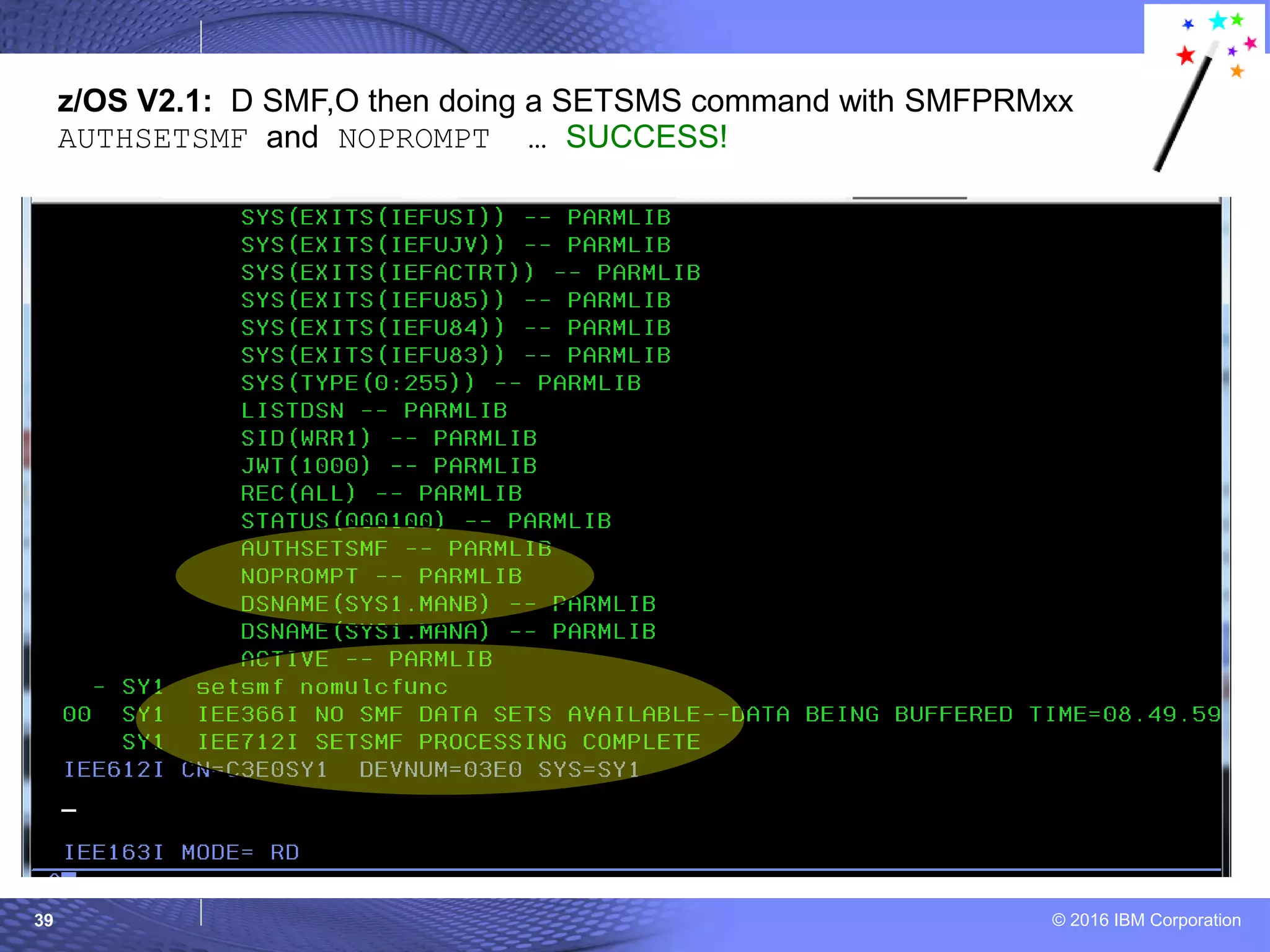
z/OS V2.1: D SMF,O then doing a SETSMS command with SMFPRMxx
AUTHSETSMF and NOPROMPT … SUCCESS!
© 2016 IBM Corporation40
© 2007 IBM Corporation
z/OS R13
Little Enhancements
JES2: JES2 job step transfers
= Sysprog
= Sysprog & Users
© 2016 IBM Corporation41
z/OS R13 Enhancements
JES2: Job step transfers
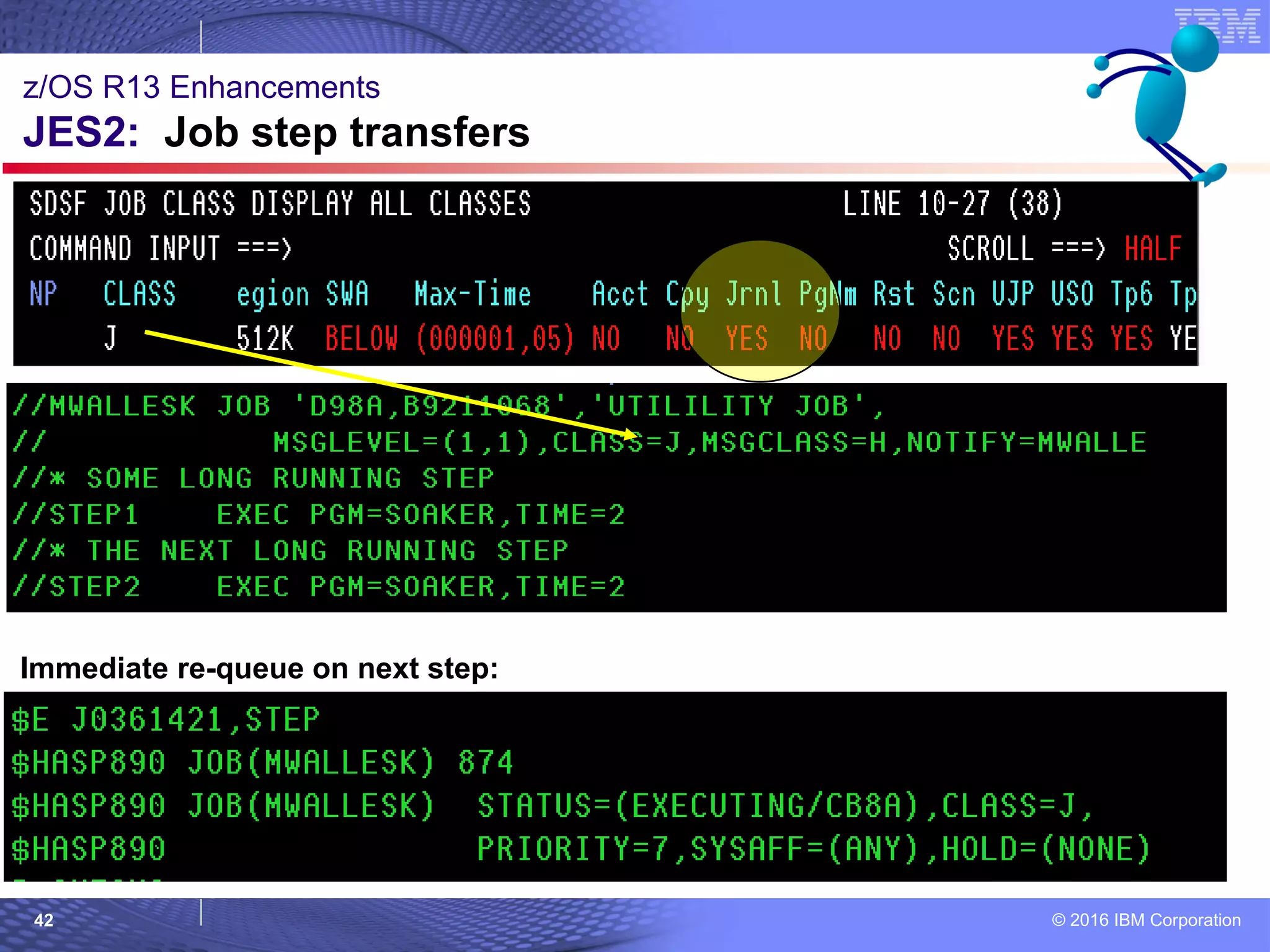
What:
 When trying to shutdown a system, there might a long running job (with
multiple steps) which has not completed. It might be holding you up from
shutting down the system.
 You can have the job end execution at the end of the current step, so that
it can be restarted elsewhere on the next step (requeued for execution).
How to use:
– $E Jxxx STEP[,HOLD]
– If you don’t use the optional HOLD, the job will be back waiting to
execute, and will resume if the class or initiators are not drained.
Considerations:
 Job must be restartable (JOURNAL=YES on JOBCLASS)
 Full cross member support. To move the job, it must not be eligible to
run on original system (alter the affinity, drain job class, service class, or
member).
 Has no effect of the job is executing its final step.
© 2016 IBM Corporation42
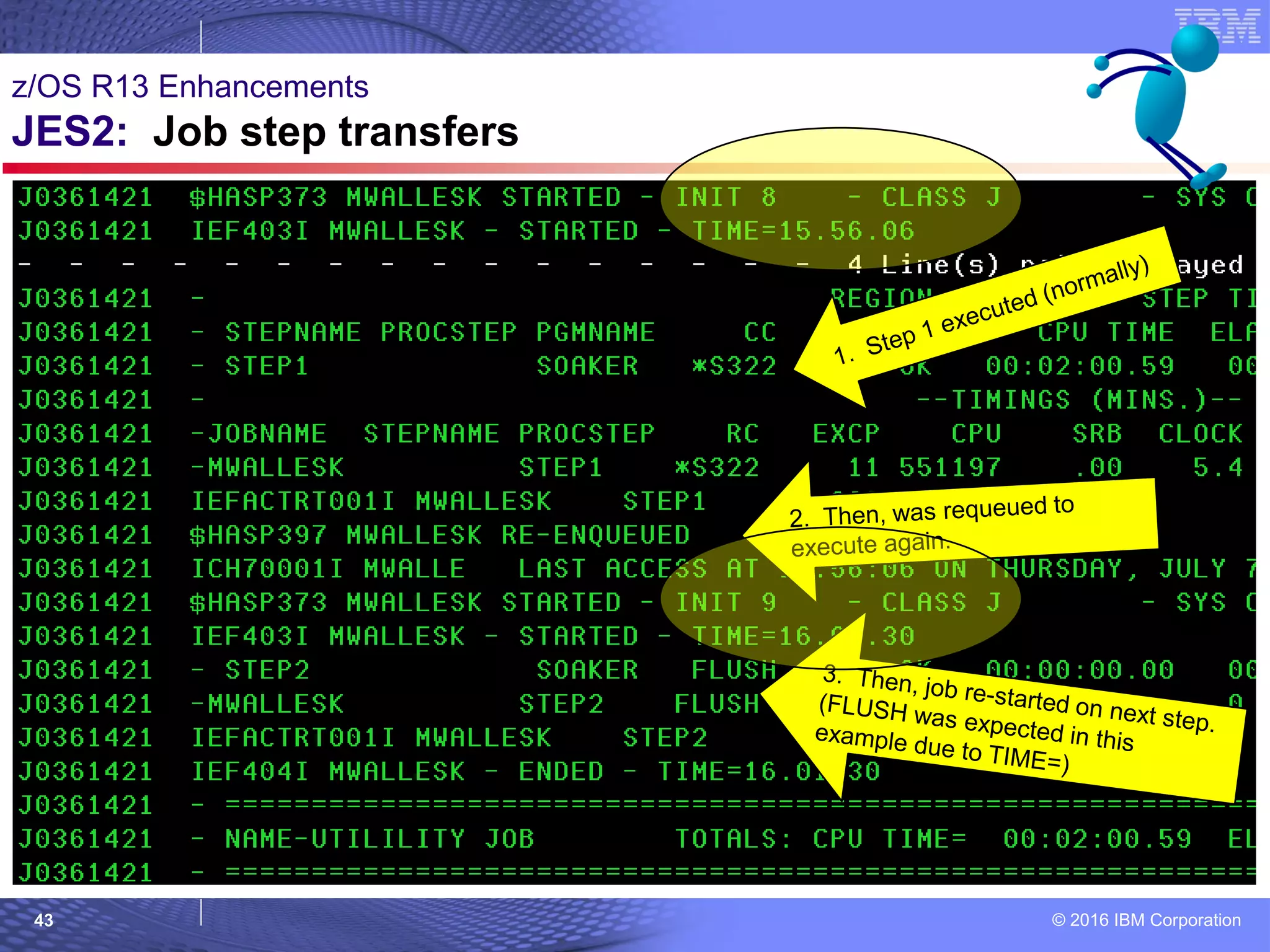
z/OS R13 Enhancements
JES2: Job step transfers
Immediate re-queue on next step:
© 2016 IBM Corporation43
z/OS R13 Enhancements
JES2: Job step transfers
© 2016 IBM Corporation44
z/OS R13 Enhancements
JES2: Job step transfers
Re-queue to HOLD on next step:
© 2016 IBM Corporation45
© 2007 IBM Corporation
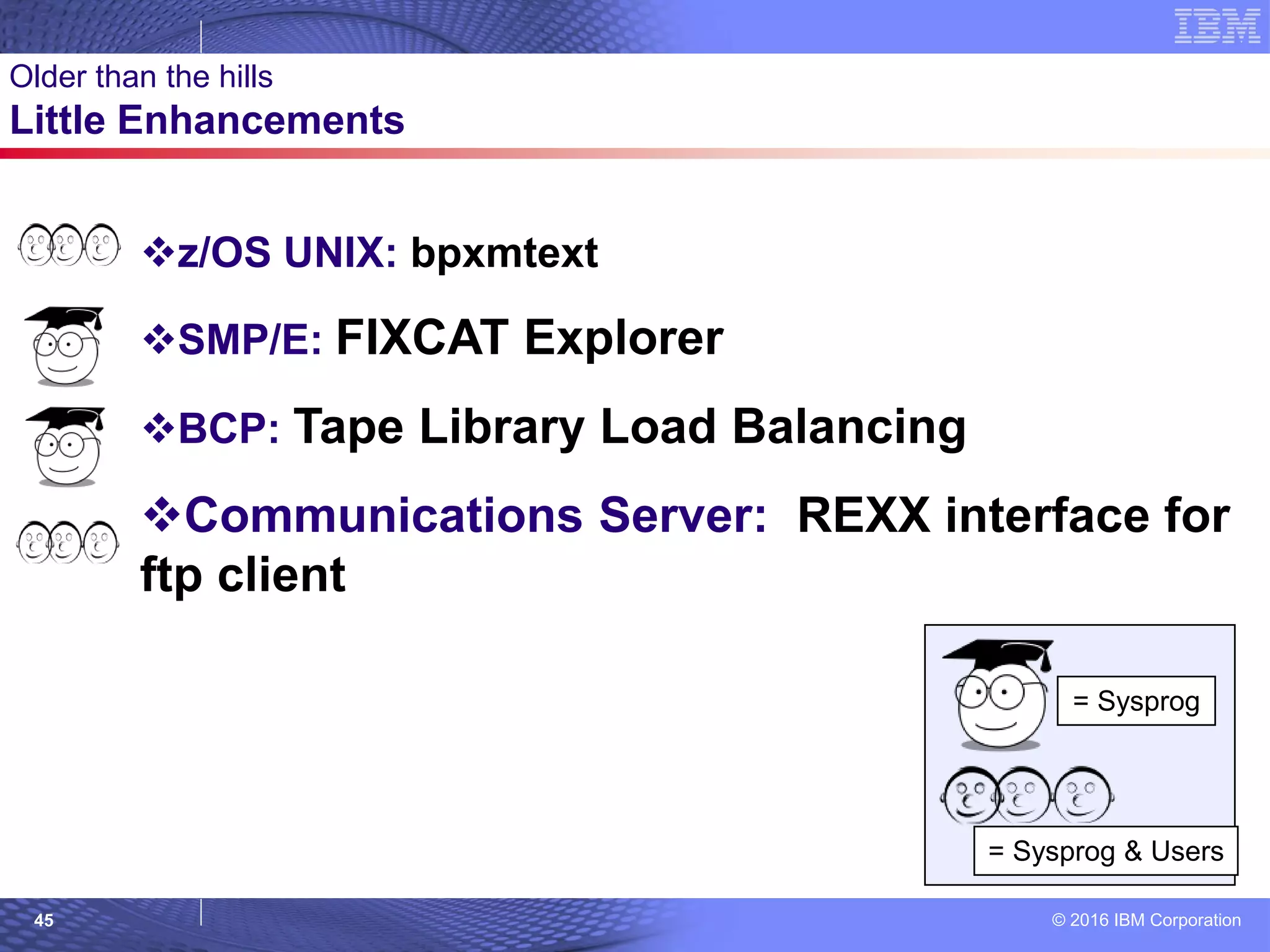
Older than the hills
Little Enhancements
z/OS UNIX: bpxmtext
SMP/E: FIXCAT Explorer
BCP: Tape Library Load Balancing
Communications Server: REXX interface for
ftp client
= Sysprog
= Sysprog & Users
© 2016 IBM Corporation46
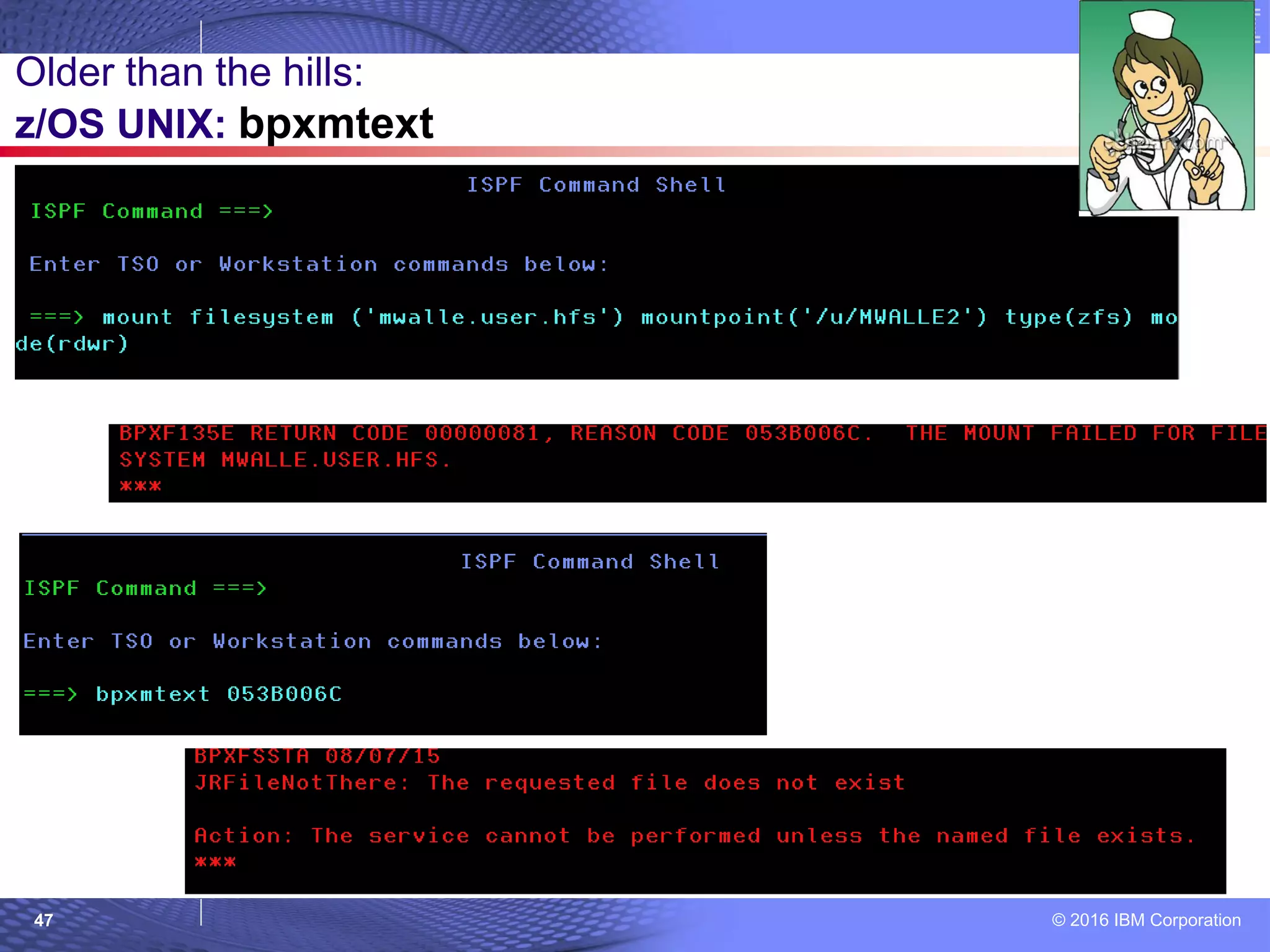
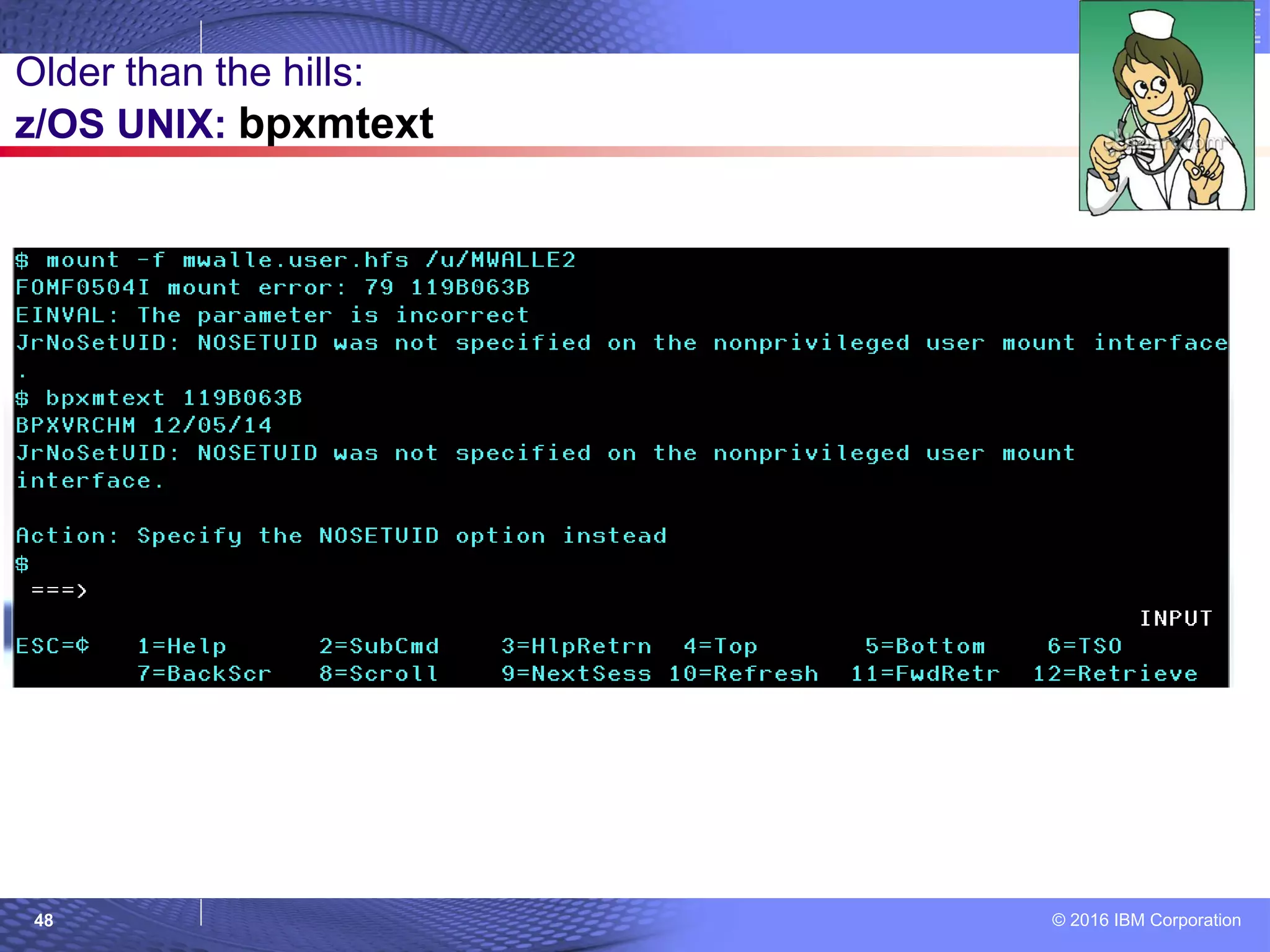
What: Will tell you the description and action text for a
reason code for the following functions:
 z/OS UNIX System Services, TCP/IP, zFS, TFS, C/C++
Runtime Library, and NFS (as of V2.2!)
Can run from TSO or the shell, and even through System
REXX as an MVS system command.
How to use: The FIXCAT Explorer is found deep in the
SMP/E panels:
 bpxmtext [-d] reason_code | error_number
Example==> bpxmtext 058800B0
Considerations: Doesn’t work for HFS.
Older than the hills:
z/OS UNIX: bpxmtext
© 2016 IBM Corporation47
Older than the hills:
z/OS UNIX: bpxmtext
© 2016 IBM Corporation48
Older than the hills:
z/OS UNIX: bpxmtext
© 2016 IBM Corporation49
Older than the hills:
z/OS UNIX: bpxmtext
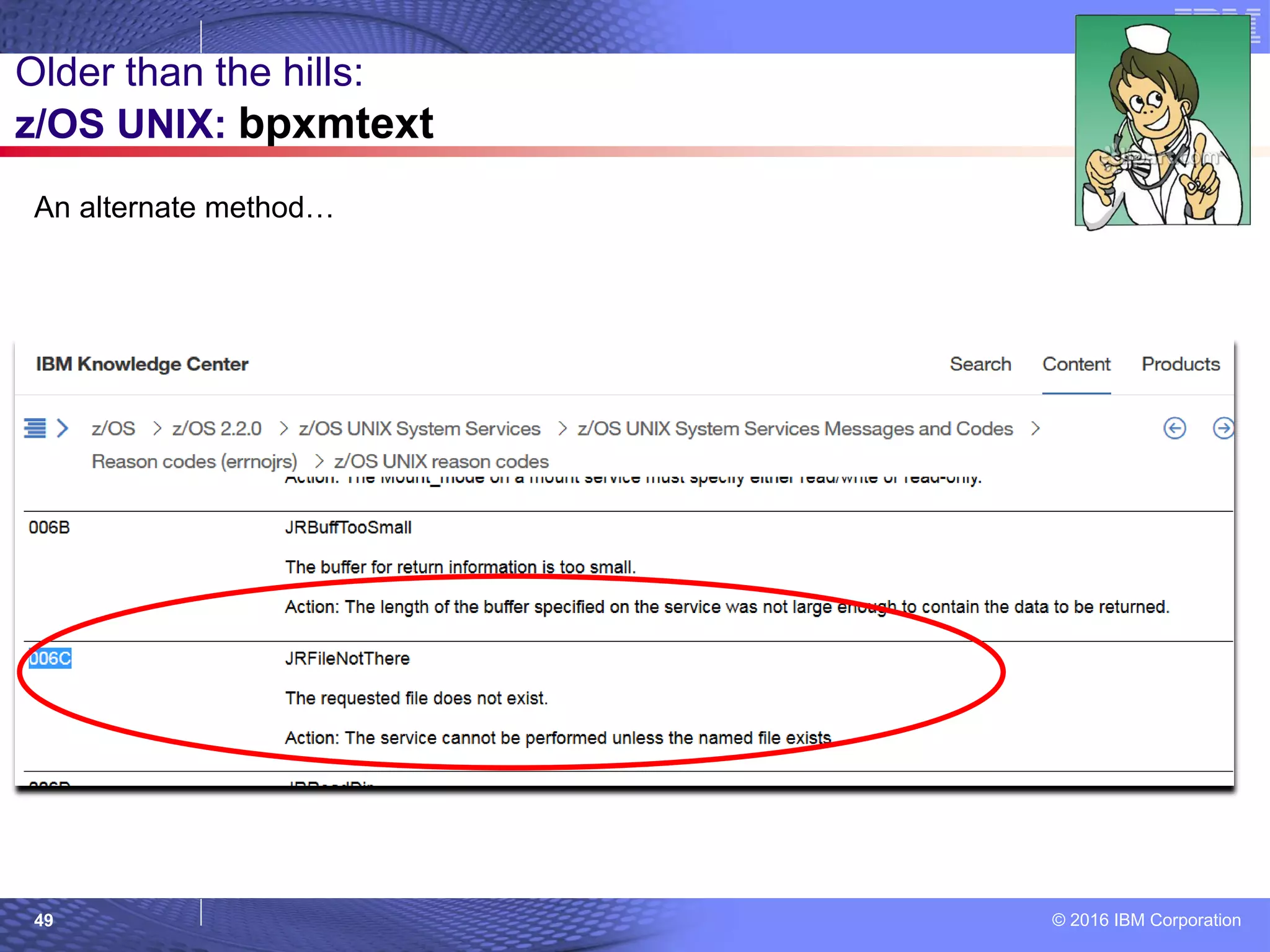
An alternate method…
© 2016 IBM Corporation50
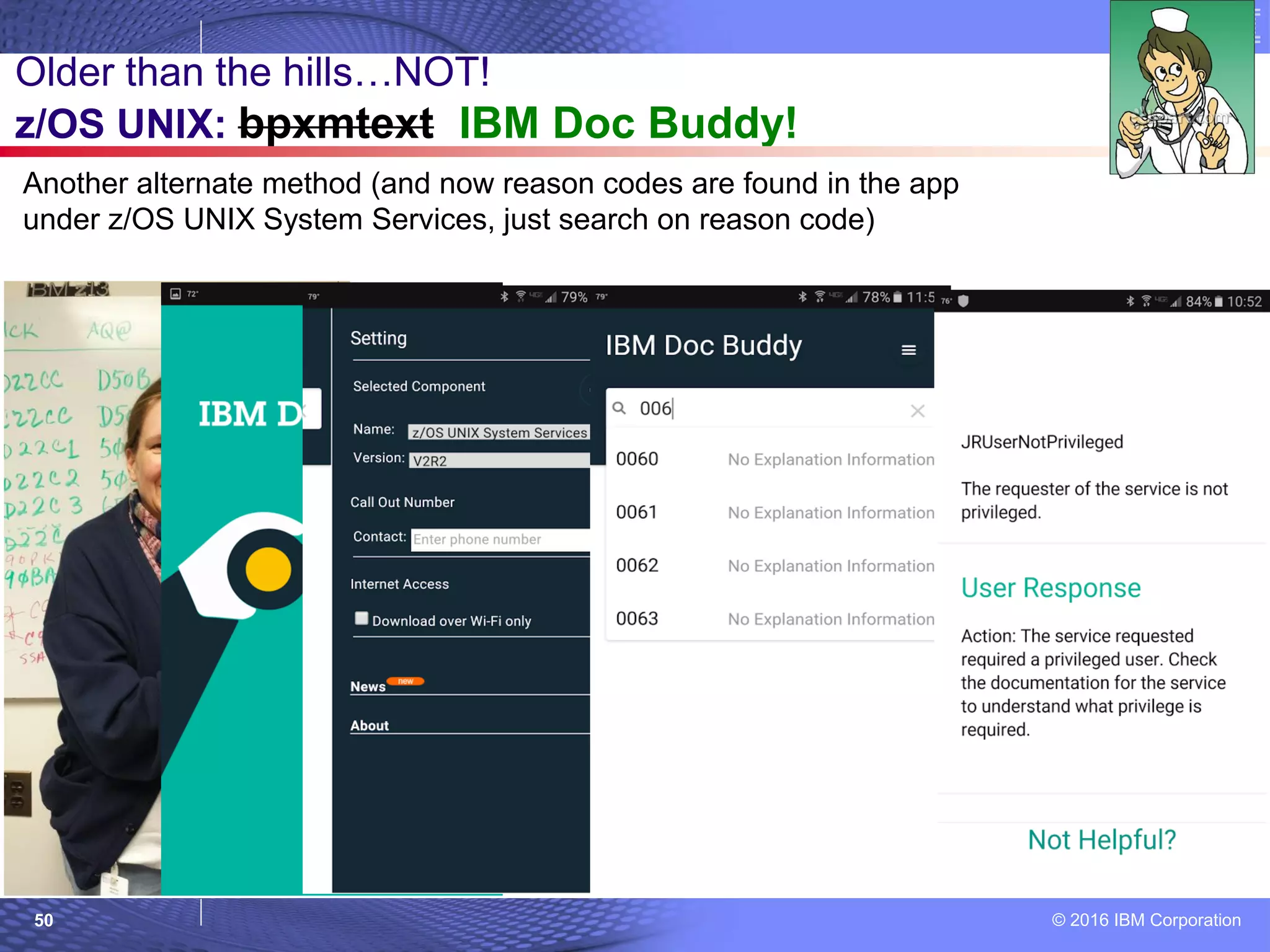
Older than the hills…NOT!
z/OS UNIX: bpxmtext IBM Doc Buddy!
Another alternate method (and now reason codes are found in the app
under z/OS UNIX System Services, just search on reason code)
© 2016 IBM Corporation51
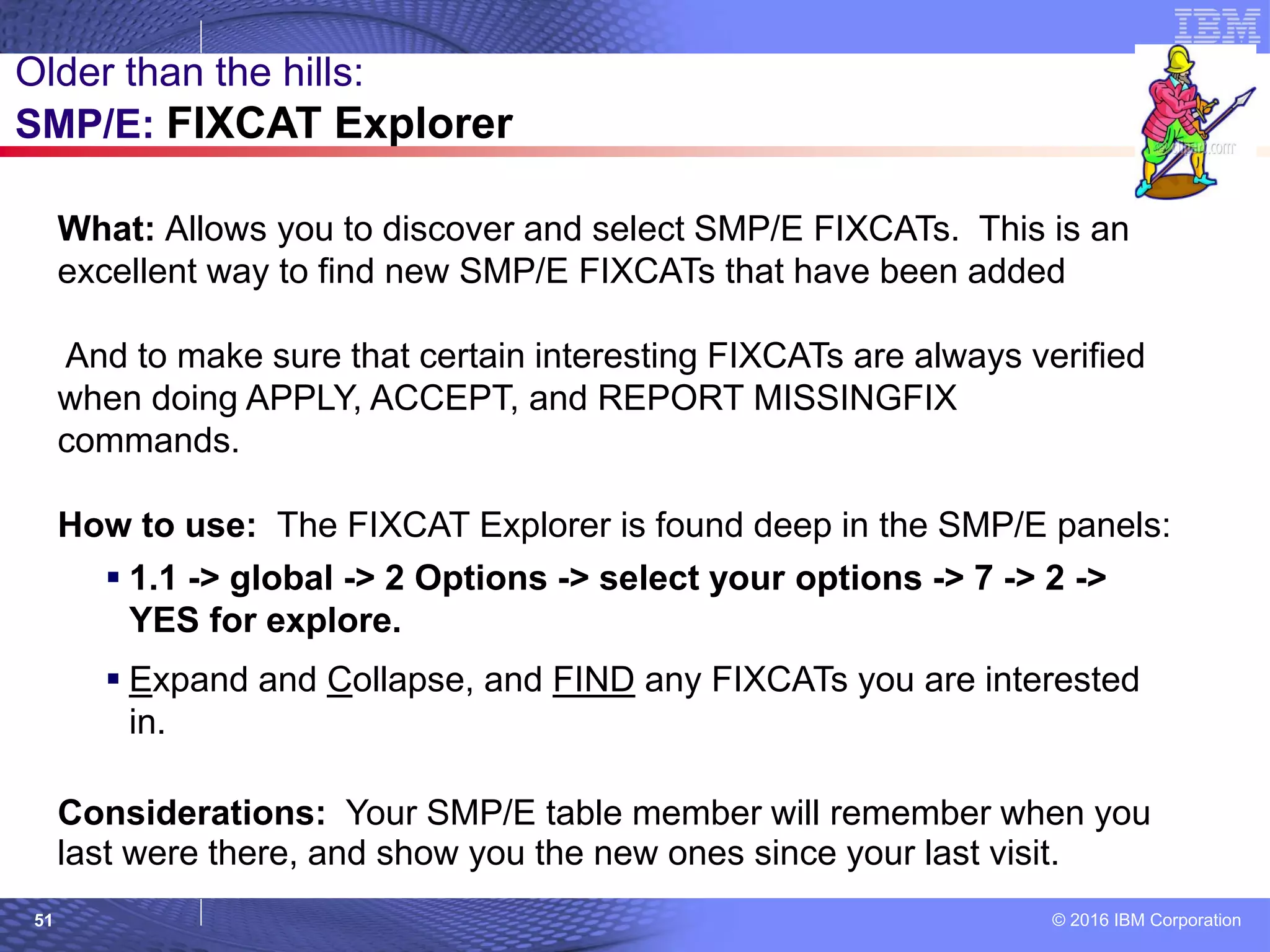
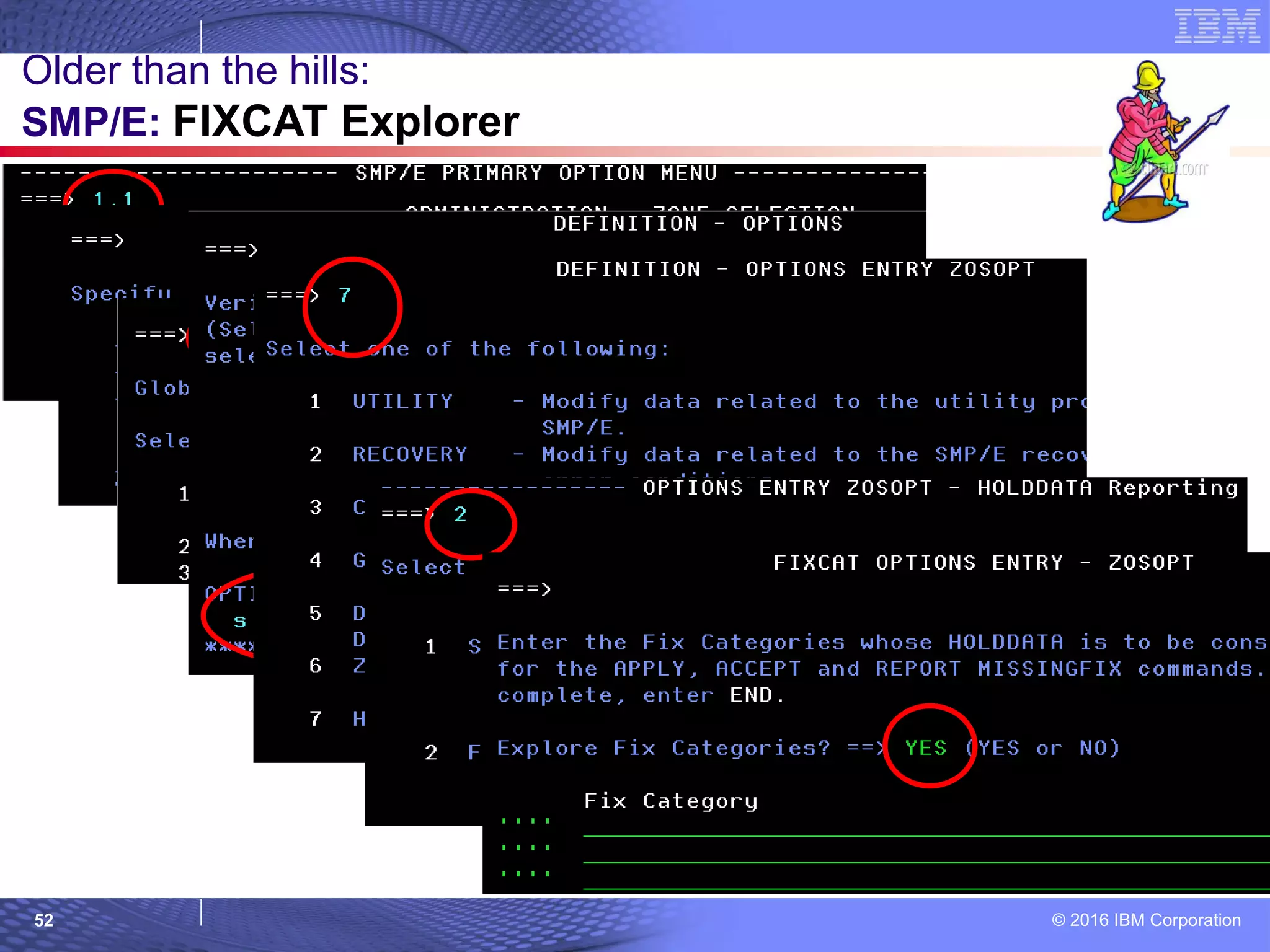
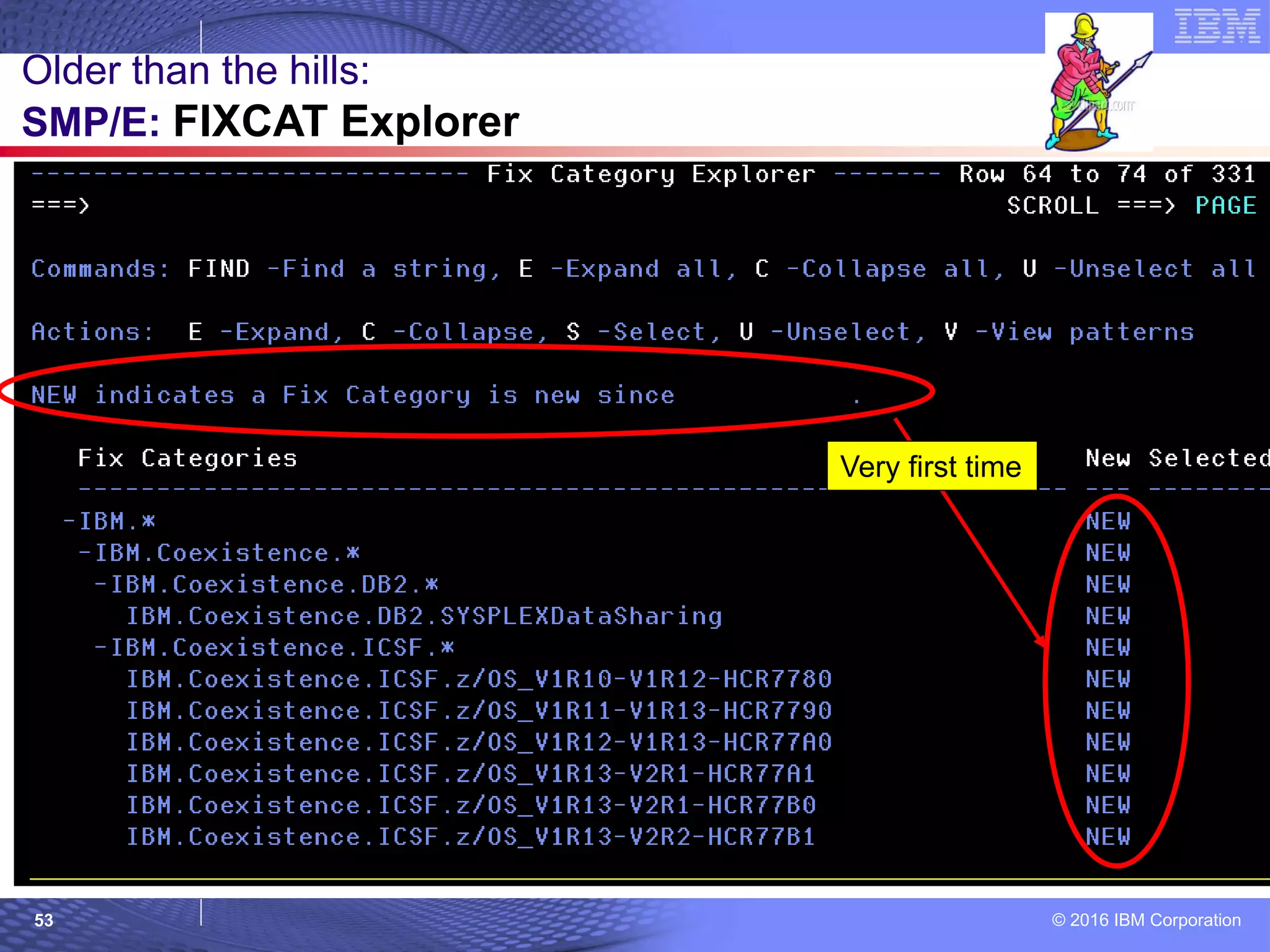
What: Allows you to discover and select SMP/E FIXCATs. This is an
excellent way to find new SMP/E FIXCATs that have been added
And to make sure that certain interesting FIXCATs are always verified
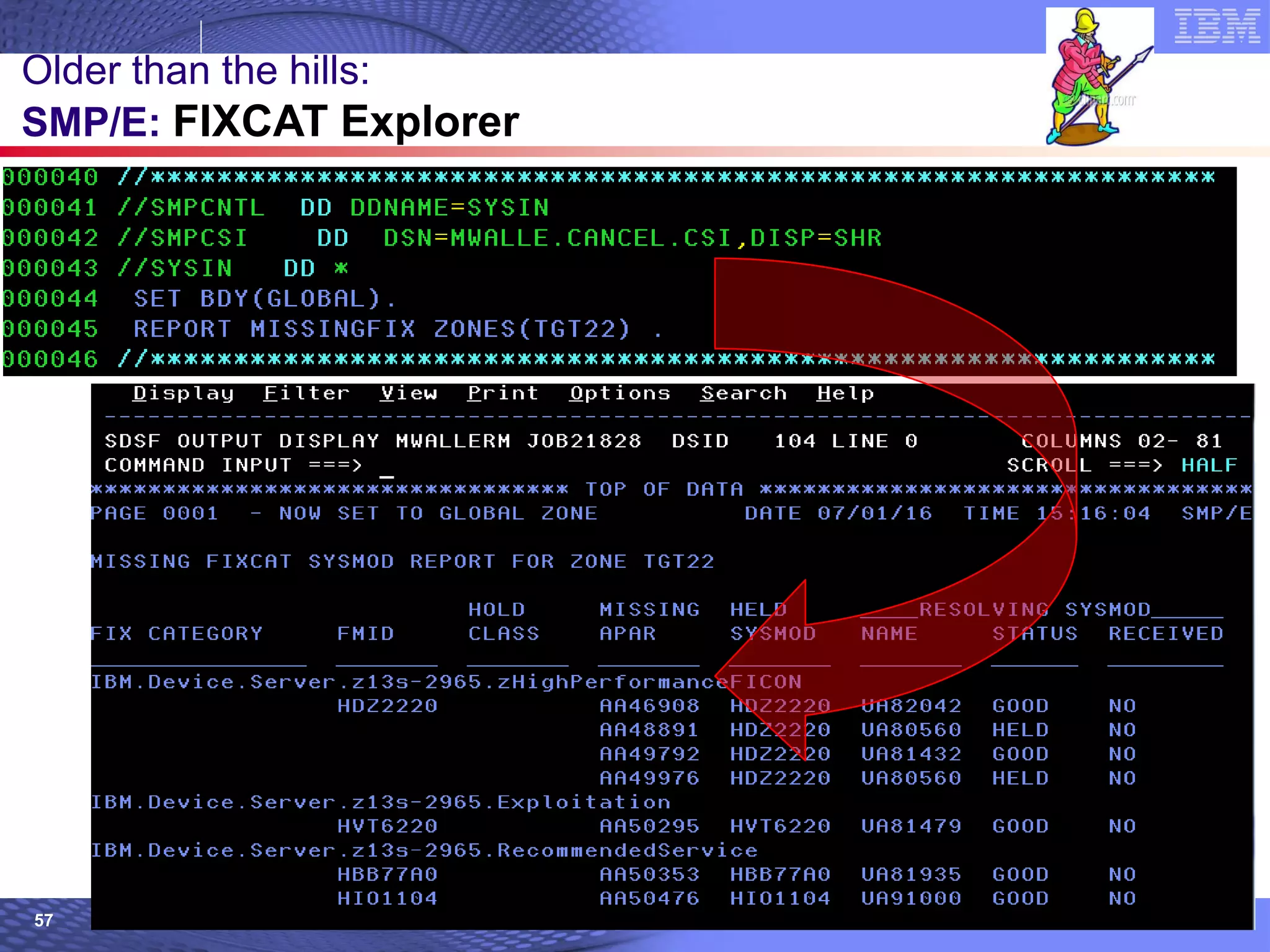
when doing APPLY, ACCEPT, and REPORT MISSINGFIX
commands.
How to use: The FIXCAT Explorer is found deep in the SMP/E panels:
 1.1 -> global -> 2 Options -> select your options -> 7 -> 2 ->
YES for explore.
 Expand and Collapse, and FIND any FIXCATs you are interested
in.
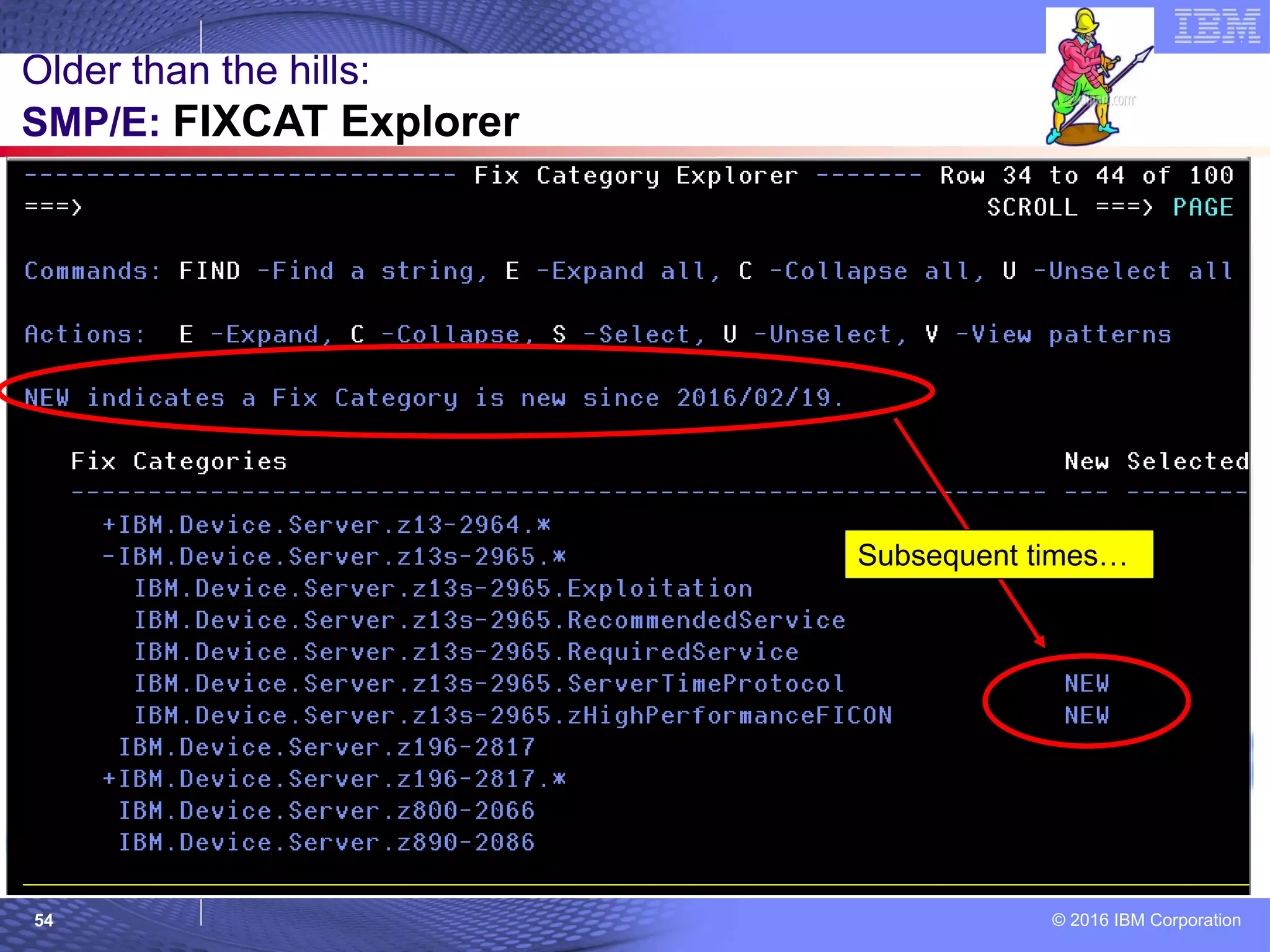
Considerations: Your SMP/E table member will remember when you
last were there, and show you the new ones since your last visit.
Older than the hills:
SMP/E: FIXCAT Explorer
© 2016 IBM Corporation52
Older than the hills:
SMP/E: FIXCAT Explorer
© 2016 IBM Corporation53
Older than the hills:
SMP/E: FIXCAT Explorer
Very first time
© 2016 IBM Corporation54
Older than the hills:
SMP/E: FIXCAT Explorer
Subsequent times…
© 2016 IBM Corporation55
Older than the hills:
SMP/E: FIXCAT Explorer
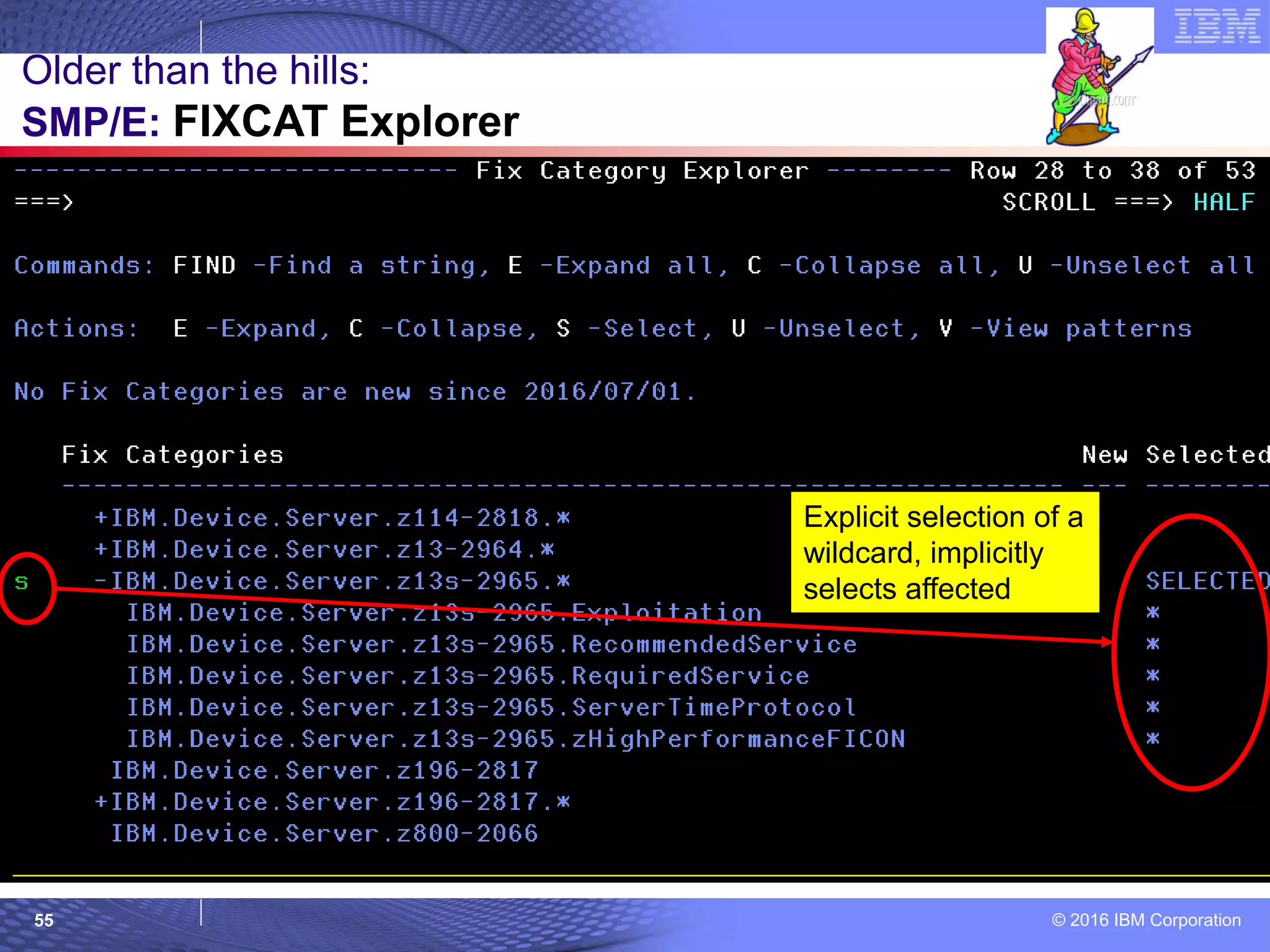
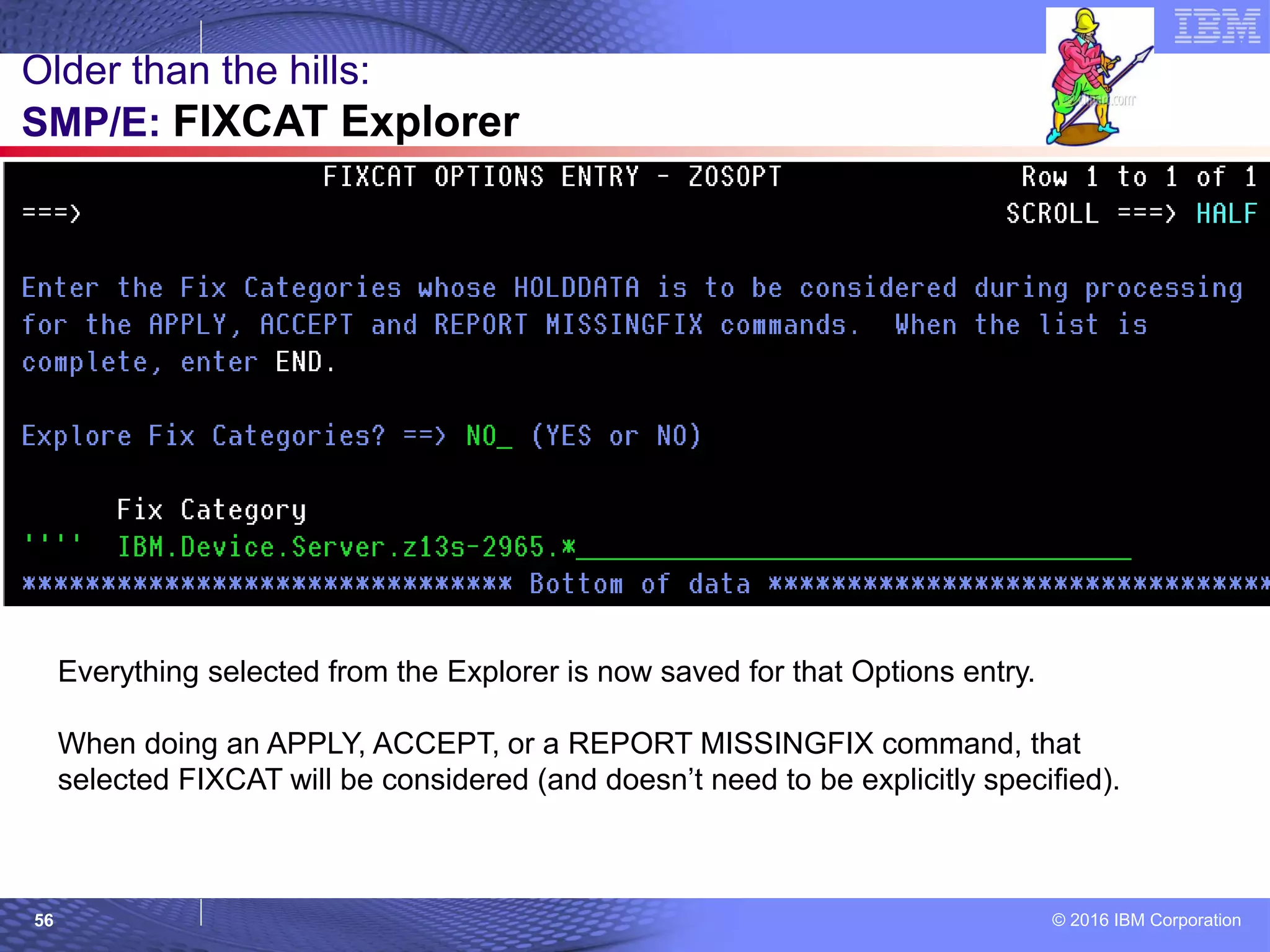
Explicit selection of a
wildcard, implicitly
selects affected
© 2016 IBM Corporation56
Older than the hills:
SMP/E: FIXCAT Explorer
Everything selected from the Explorer is now saved for that Options entry.
When doing an APPLY, ACCEPT, or a REPORT MISSINGFIX command, that
selected FIXCAT will be considered (and doesn’t need to be explicitly specified).
© 2016 IBM Corporation57
Older than the hills:
SMP/E: FIXCAT Explorer
© 2016 IBM Corporation58
Older than the hills (z/OS R11, back to R9):
BCP: Tape Library Load Balancing
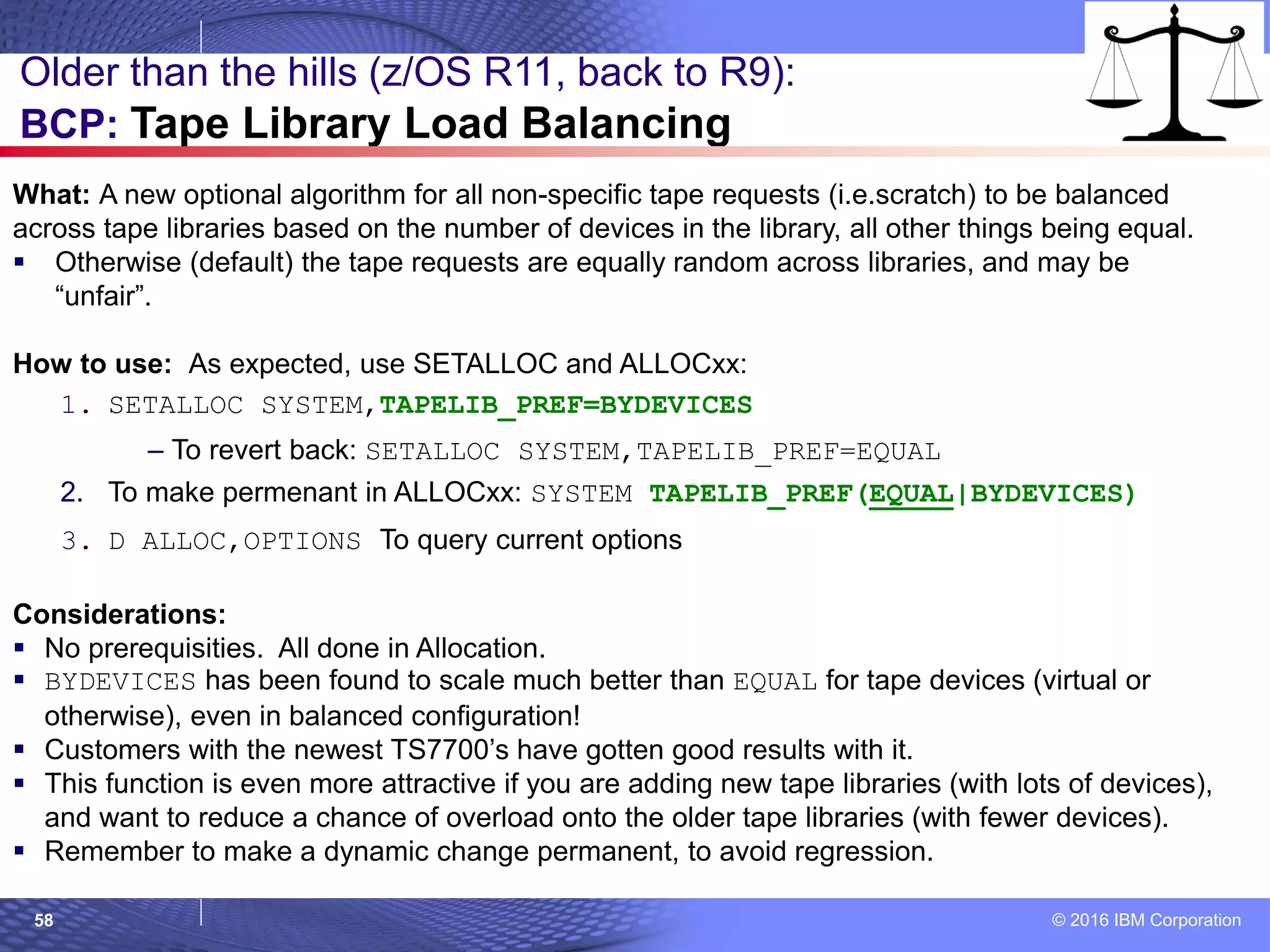
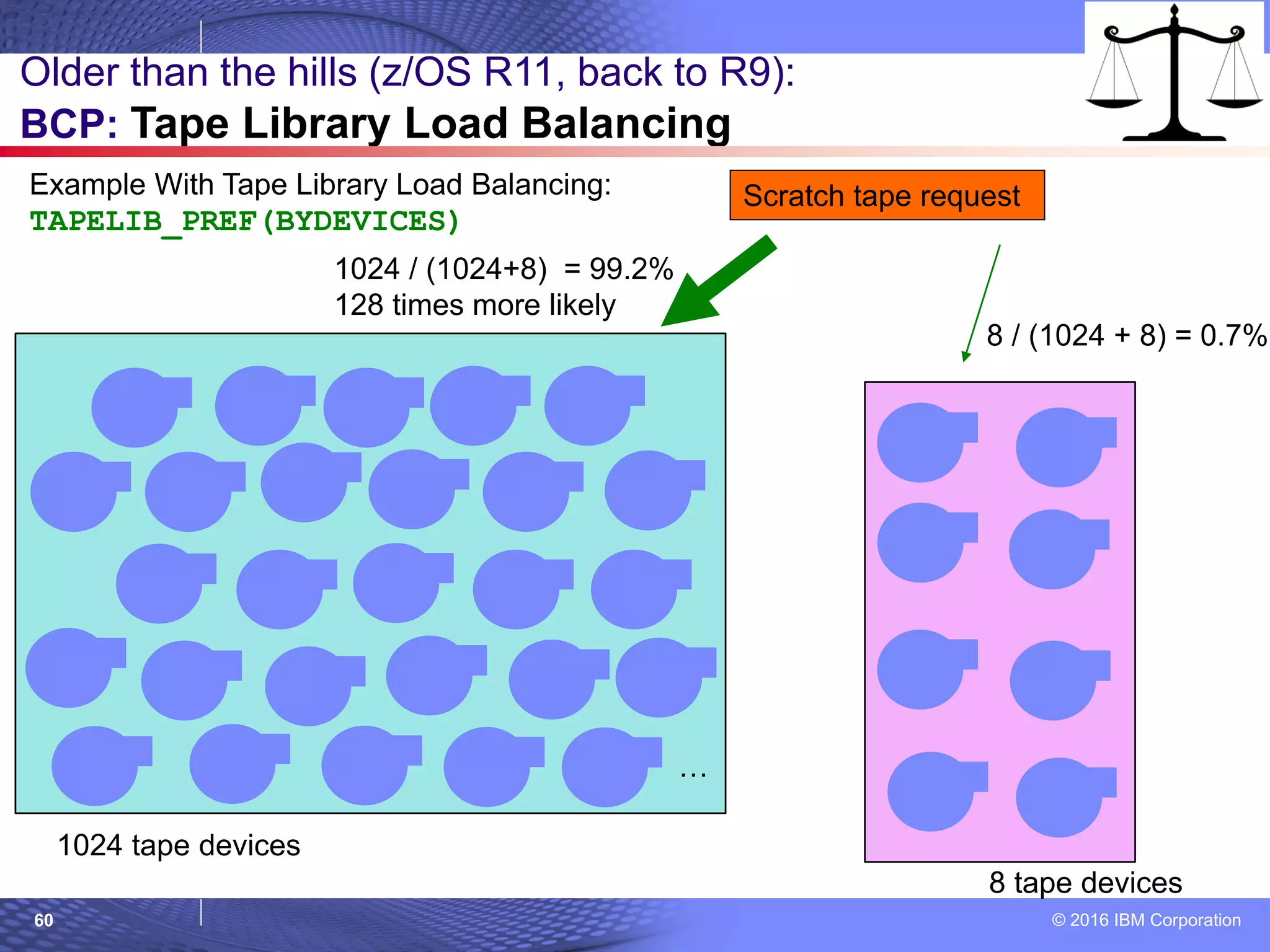
What: A new optional algorithm for all non-specific tape requests (i.e.scratch) to be balanced
across tape libraries based on the number of devices in the library, all other things being equal.
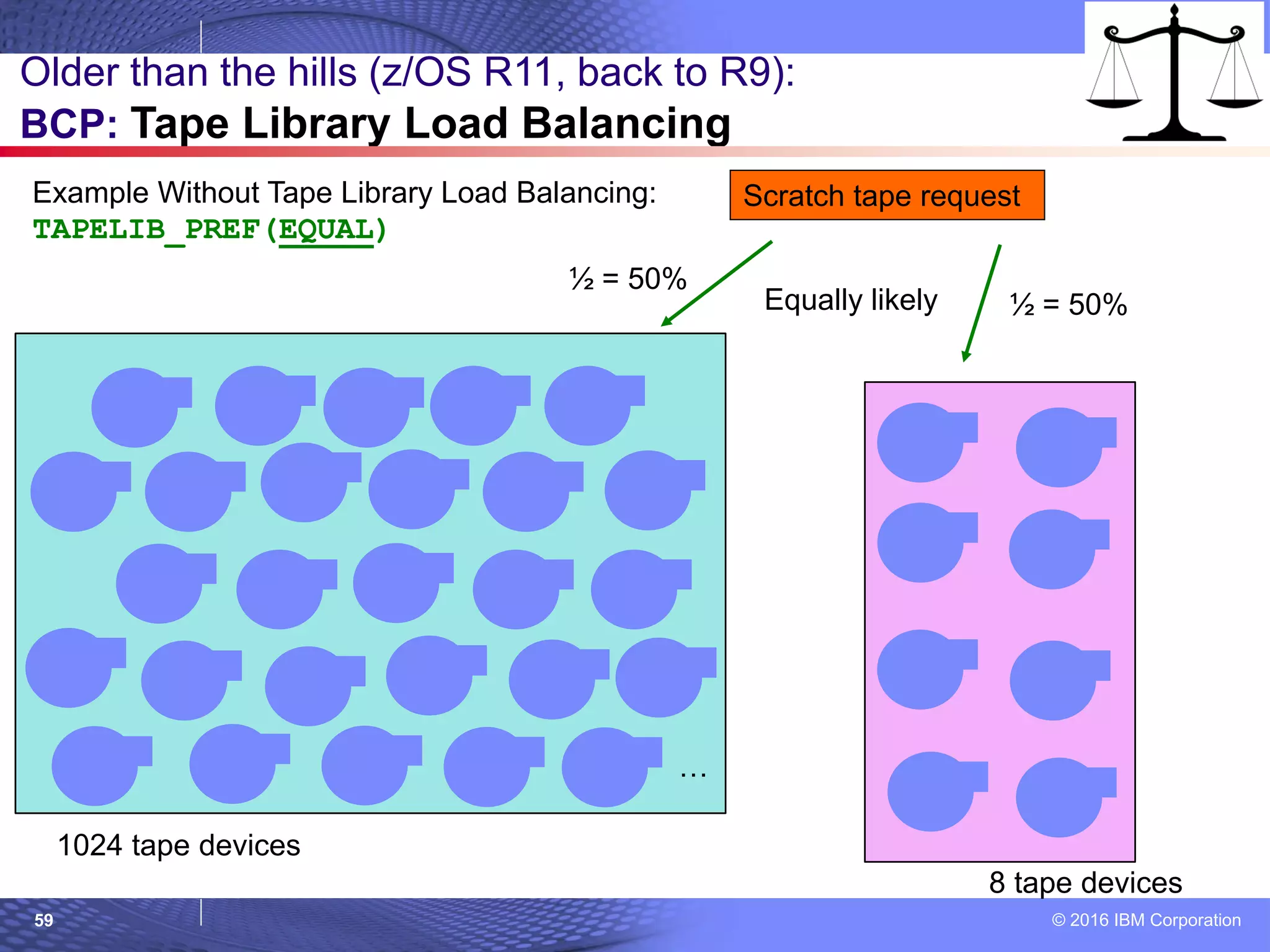
 Otherwise (default) the tape requests are equally random across libraries, and may be
“unfair”.
How to use: As expected, use SETALLOC and ALLOCxx:
1. SETALLOC SYSTEM,TAPELIB_PREF=BYDEVICES
– To revert back: SETALLOC SYSTEM,TAPELIB_PREF=EQUAL
2. To make permenant in ALLOCxx: SYSTEM TAPELIB_PREF(EQUAL|BYDEVICES)
3. D ALLOC,OPTIONS To query current options
Considerations:
 No prerequisities. All done in Allocation.
 BYDEVICES has been found to scale much better than EQUAL for tape devices (virtual or
otherwise), even in balanced configuration!
 Customers with the newest TS7700’s have gotten good results with it.
 This function is even more attractive if you are adding new tape libraries (with lots of devices),
and want to reduce a chance of overload onto the older tape libraries (with fewer devices).
 Remember to make a dynamic change permanent, to avoid regression.
© 2016 IBM Corporation59
Older than the hills (z/OS R11, back to R9):
BCP: Tape Library Load Balancing
Example Without Tape Library Load Balancing:
TAPELIB_PREF(EQUAL)
…
1024 tape devices
8 tape devices
Scratch tape request
½ = 50%
½ = 50%Equally likely
© 2016 IBM Corporation60
Older than the hills (z/OS R11, back to R9):
BCP: Tape Library Load Balancing
Example With Tape Library Load Balancing:
TAPELIB_PREF(BYDEVICES)
…
1024 tape devices
8 tape devices
Scratch tape request
1024 / (1024+8) = 99.2%
128 times more likely
8 / (1024 + 8) = 0.7%
© 2016 IBM Corporation61
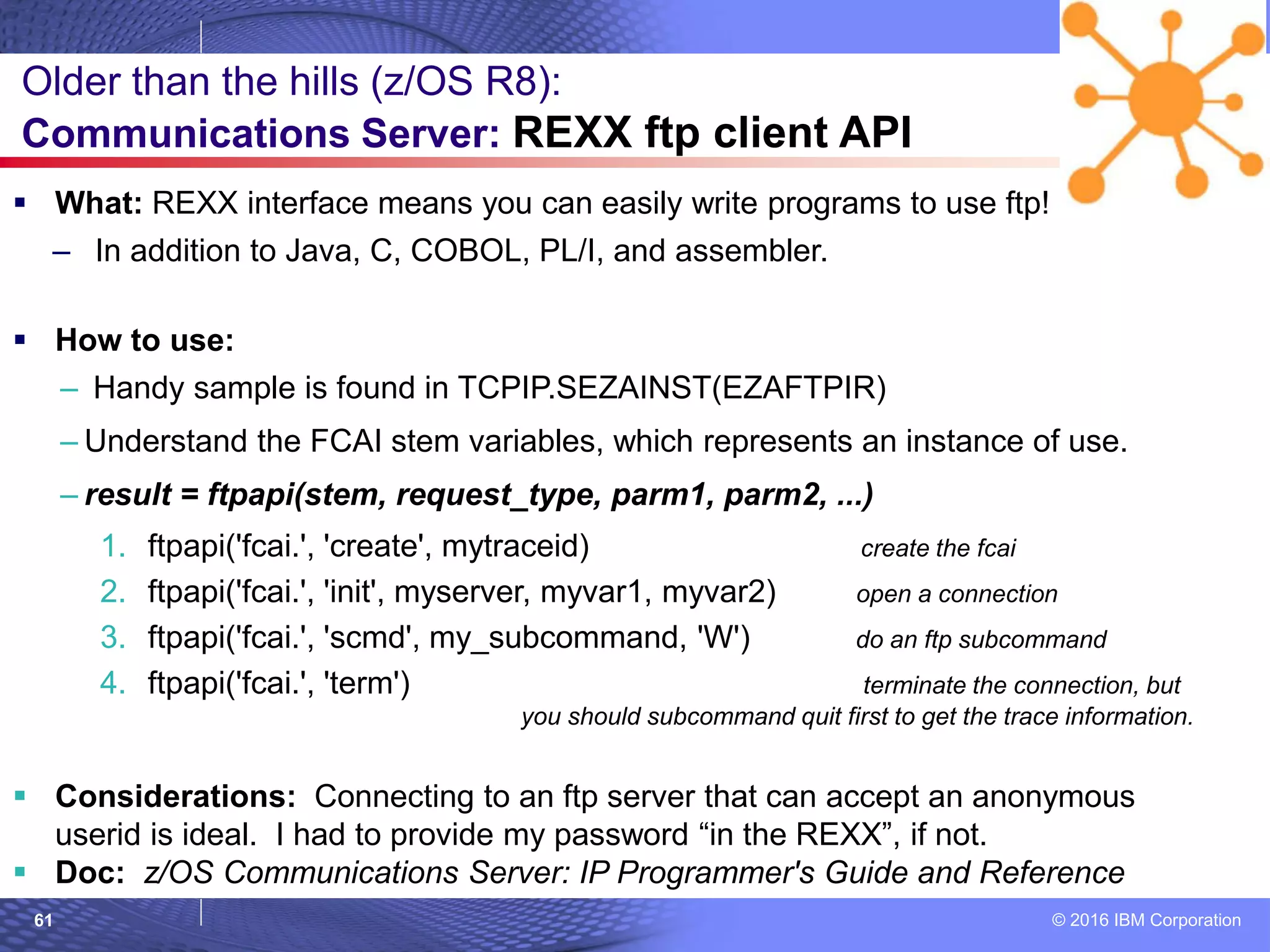
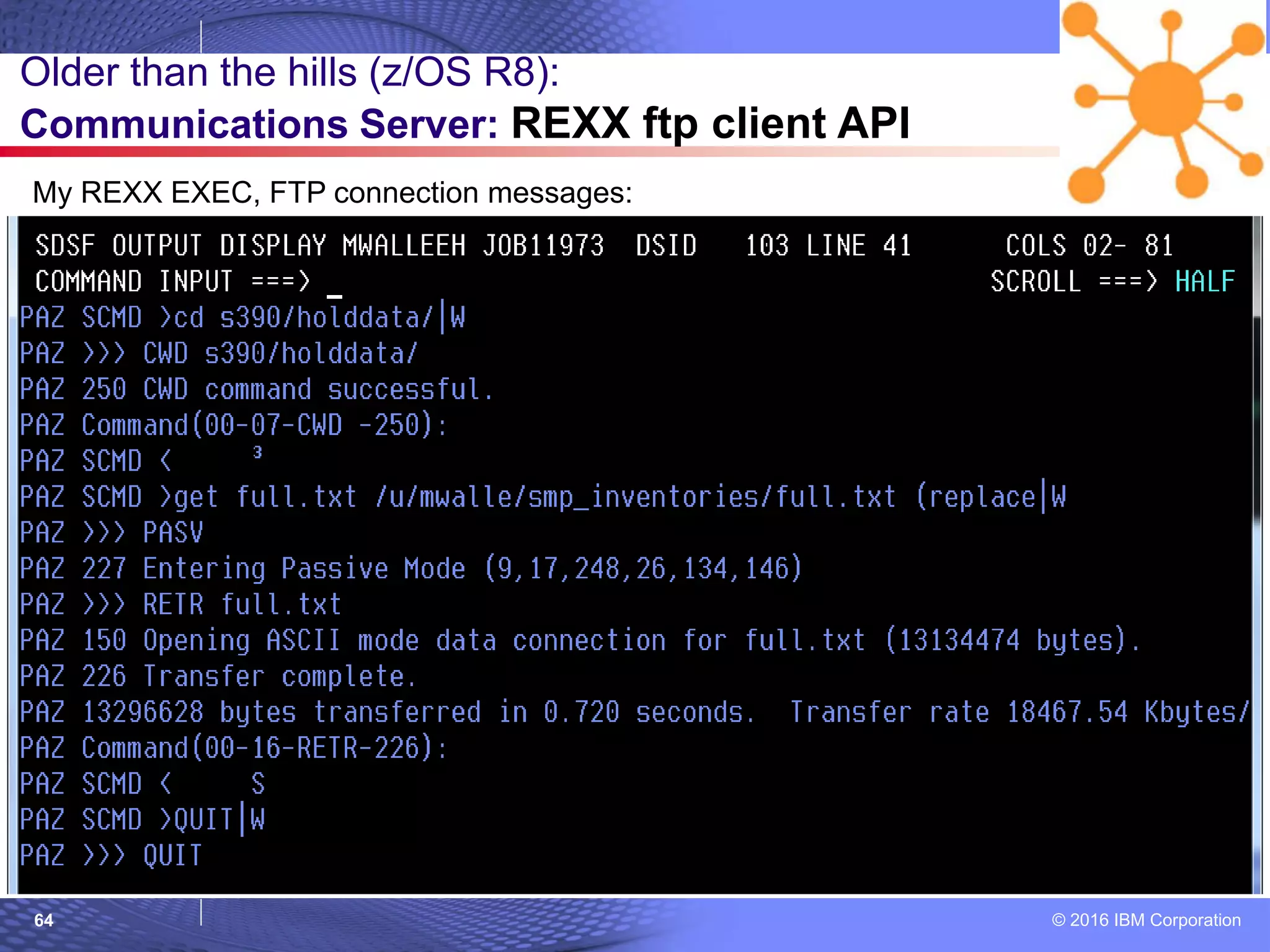
 What: REXX interface means you can easily write programs to use ftp!
– In addition to Java, C, COBOL, PL/I, and assembler.
 How to use:
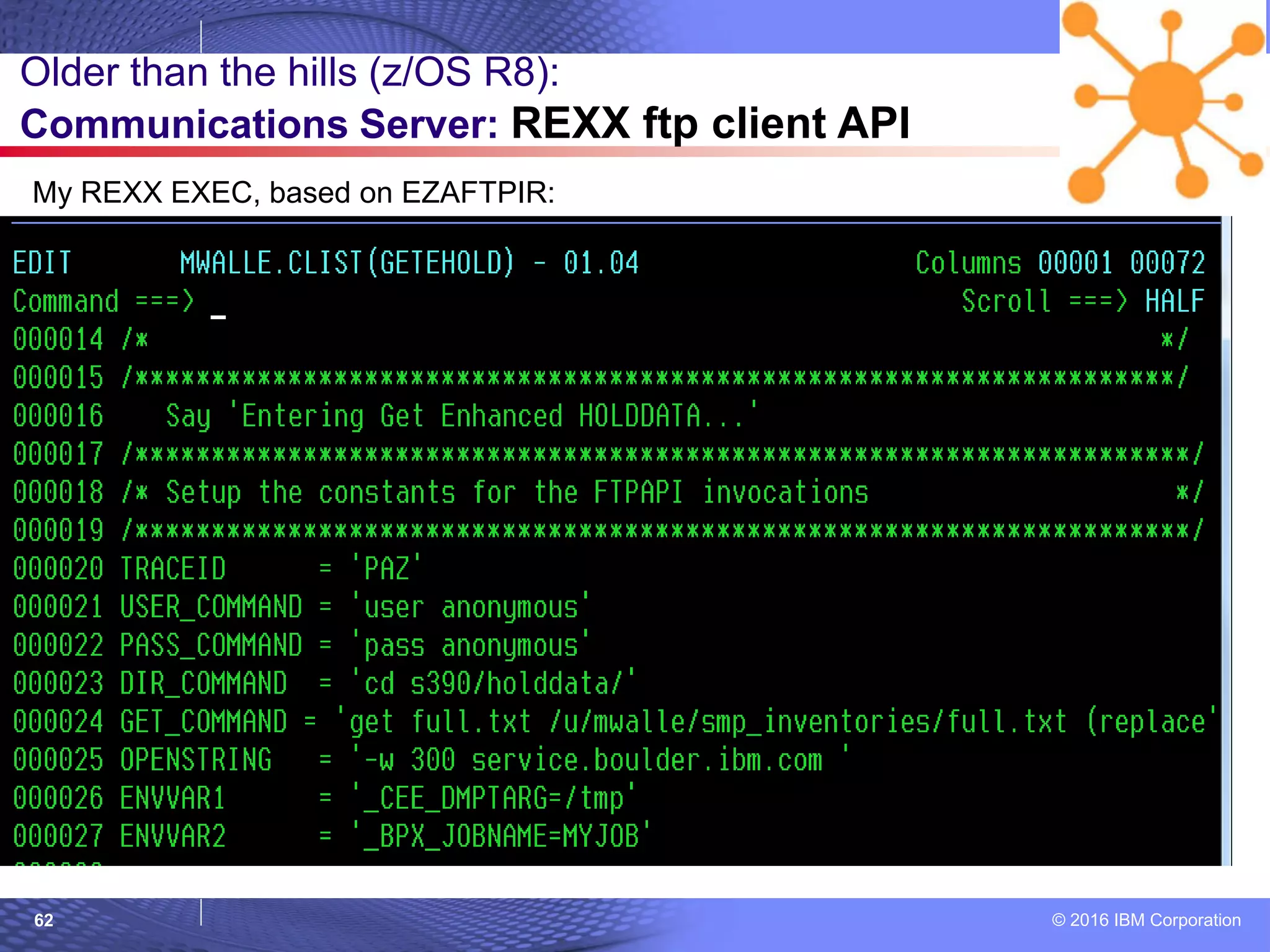
– Handy sample is found in TCPIP.SEZAINST(EZAFTPIR)
– Understand the FCAI stem variables, which represents an instance of use.
– result = ftpapi(stem, request_type, parm1, parm2, ...)
1. ftpapi('fcai.', 'create', mytraceid) create the fcai
2. ftpapi('fcai.', 'init', myserver, myvar1, myvar2) open a connection
3. ftpapi('fcai.', 'scmd', my_subcommand, 'W') do an ftp subcommand
4. ftpapi('fcai.', 'term') terminate the connection, but
you should subcommand quit first to get the trace information.
 Considerations: Connecting to an ftp server that can accept an anonymous
userid is ideal. I had to provide my password “in the REXX”, if not.
 Doc: z/OS Communications Server: IP Programmer's Guide and Reference
Older than the hills (z/OS R8):
Communications Server: REXX ftp client API
© 2016 IBM Corporation62
Older than the hills (z/OS R8):
Communications Server: REXX ftp client API
My REXX EXEC, based on EZAFTPIR:
© 2016 IBM Corporation63
Older than the hills (z/OS R8):
Communications Server: REXX ftp client API
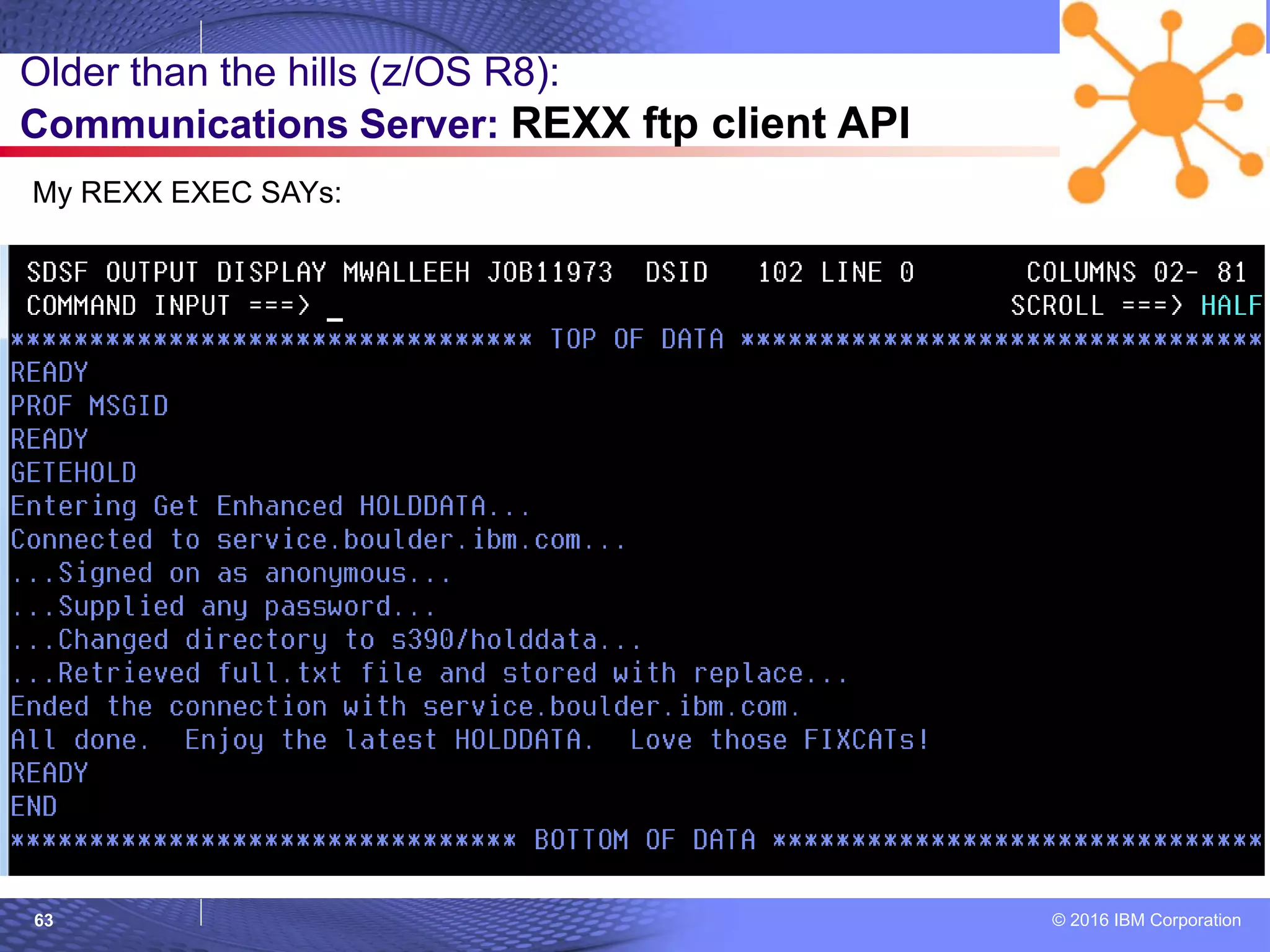
My REXX EXEC SAYs:
© 2016 IBM Corporation64
Older than the hills (z/OS R8):
Communications Server: REXX ftp client API
My REXX EXEC, FTP connection messages:
© 2016 IBM Corporation65
© 2007 IBM Corporation
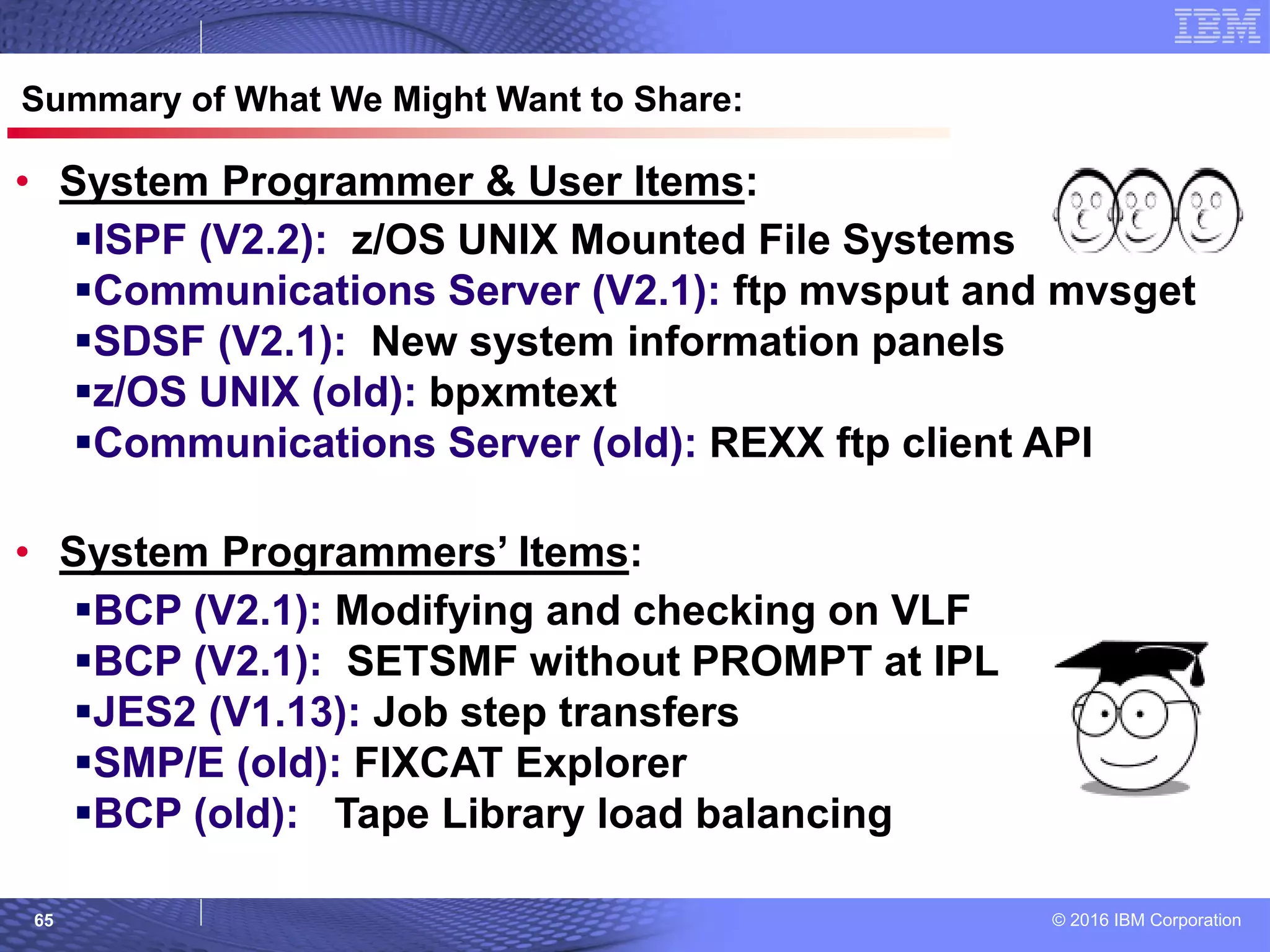
Summary of What We Might Want to Share:
• System Programmer & User Items:
ISPF (V2.2): z/OS UNIX Mounted File Systems
Communications Server (V2.1): ftp mvsput and mvsget
SDSF (V2.1): New system information panels
z/OS UNIX (old): bpxmtext
Communications Server (old): REXX ftp client API
• System Programmers’ Items:
BCP (V2.1): Modifying and checking on VLF
BCP (V2.1): SETSMF without PROMPT at IPL
JES2 (V1.13): Job step transfers
SMP/E (old): FIXCAT Explorer
BCP (old): Tape Library load balancing
© 2016 IBM Corporation66
© 2007 IBM Corporation
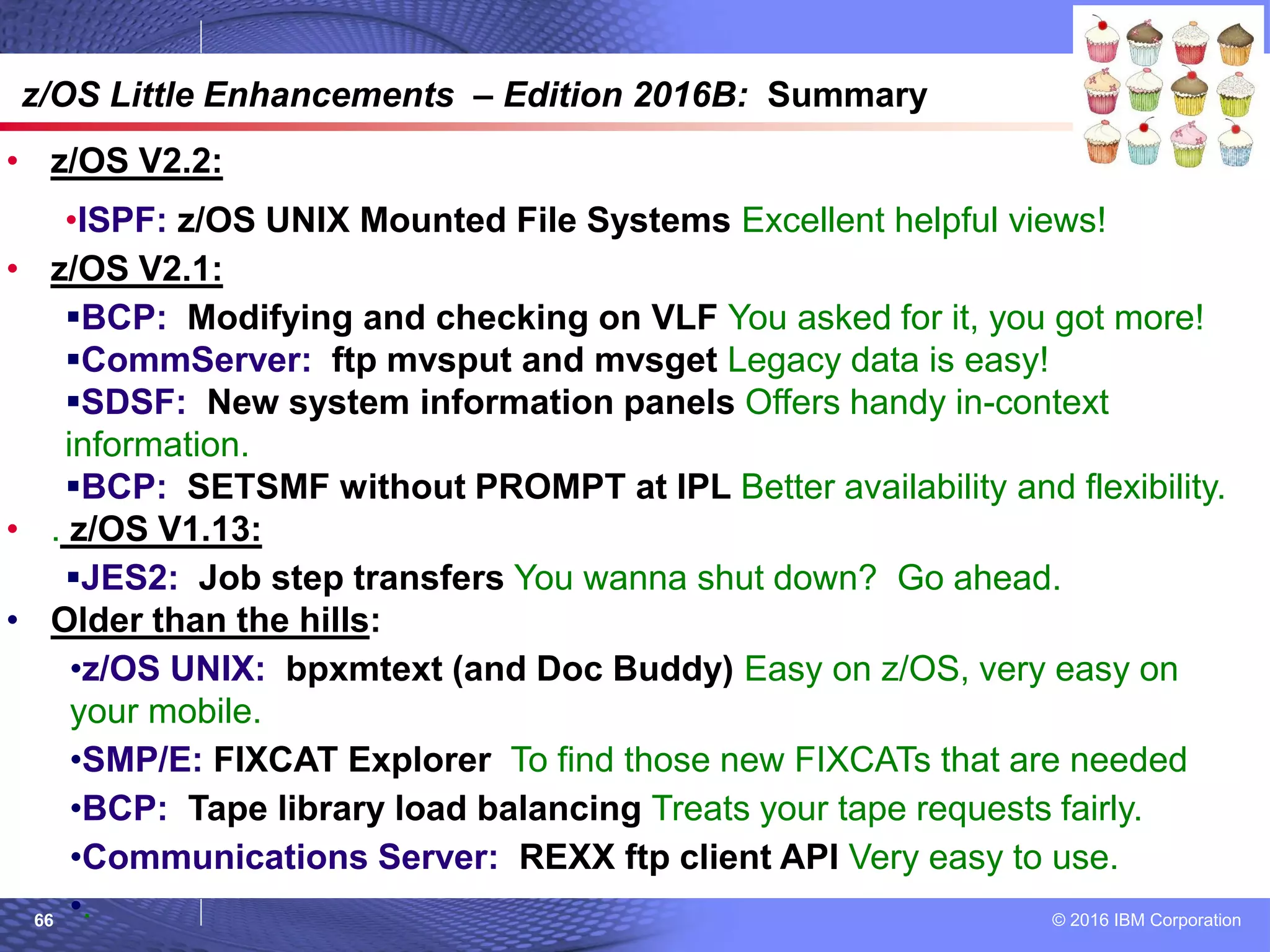
z/OS Little Enhancements – Edition 2016B: Summary
• z/OS V2.2:
•ISPF: z/OS UNIX Mounted File Systems Excellent helpful views!
• z/OS V2.1:
BCP: Modifying and checking on VLF You asked for it, you got more!
CommServer: ftp mvsput and mvsget Legacy data is easy!
SDSF: New system information panels Offers handy in-context
information.
BCP: SETSMF without PROMPT at IPL Better availability and flexibility.
• . z/OS V1.13:
JES2: Job step transfers You wanna shut down? Go ahead.
• Older than the hills:
•z/OS UNIX: bpxmtext (and Doc Buddy) Easy on z/OS, very easy on
your mobile.
•SMP/E: FIXCAT Explorer To find those new FIXCATs that are needed
•BCP: Tape library load balancing Treats your tape requests fairly.
•Communications Server: REXX ftp client API Very easy to use.
•.

Small enhancements - Edition 2016B

  • 1.
    © Copyright IBMCorporation 2016. Technical University/Symposia materials may not be reproduced in whole or in part without the prior written permission of IBM. EDITION 2016B: Small z/OS enhancements over the past several releases Marna WALLE, mwalle@us.ibm.com Member of the IBM Academy of Technology z/OS System Installation IBM z Systems, Poughkeepsie NY USA
  • 2.
    © 2016 IBMCorporation2 Trademarks The following are trademarks of the International Business Machines Corporation in the United States, other countries, or both. The following are trademarks or registered trademarks of other companies. * All other products may be trademarks or registered trademarks of their respective companies. Notes: Performance is in Internal Throughput Rate (ITR) ratio based on measurements and projections using standard IBM benchmarks in a controlled environment. The actual throughput that any user will experience will vary depending upon considerations such as the amount of multiprogramming in the user's job stream, the I/O configuration, the storage configuration, and the workload processed. Therefore, no assurance can be given that an individual user will achieve throughput improvements equivalent to the performance ratios stated here. IBM hardware products are manufactured from new parts, or new and serviceable used parts. Regardless, our warranty terms apply. All customer examples cited or described in this presentation are presented as illustrations of the manner in which some customers have used IBM products and the results they may have achieved. Actual environmental costs and performance characteristics will vary depending on individual customer configurations and conditions. This publication was produced in the United States. IBM may not offer the products, services or features discussed in this document in other countries, and the information may be subject to change without notice. Consult your local IBM business contact for information on the product or services available in your area. All statements regarding IBM's future direction and intent are subject to change or withdrawal without notice, and represent goals and objectives only. Information about non-IBM products is obtained from the manufacturers of those products or their published announcements. IBM has not tested those products and cannot confirm the performance, compatibility, or any other claims related to non-IBM products. Questions on the capabilities of non-IBM products should be addressed to the suppliers of those products. Prices subject to change without notice. Contact your IBM representative or Business Partner for the most current pricing in your geography. Adobe, the Adobe logo, PostScript, and the PostScript logo are either registered trademarks or trademarks of Adobe Systems Incorporated in the United States, and/or other countries. Cell Broadband Engine is a trademark of Sony Computer Entertainment, Inc. in the United States, other countries, or both and is used under license therefrom. Java and all Java-based trademarks are trademarks of Sun Microsystems, Inc. in the United States, other countries, or both. Microsoft, Windows, Windows NT, and the Windows logo are trademarks of Microsoft Corporation in the United States, other countries, or both. Intel, Intel logo, Intel Inside, Intel Inside logo, Intel Centrino, Intel Centrino logo, Celeron, Intel Xeon, Intel SpeedStep, Itanium, and Pentium are trademarks or registered trademarks of Intel Corporation or its subsidiaries in the United States and other countries. UNIX is a registered trademark of The Open Group in the United States and other countries. Linux is a registered trademark of Linus Torvalds in the United States, other countries, or both. ITIL is a registered trademark, and a registered community trademark of the Office of Government Commerce, and is registered in the U.S. Patent and Trademark Office. IT Infrastructure Library is a registered trademark of the Central Computer and Telecommunications Agency, which is now part of the Office of Government Commerce. For a complete list of IBM Trademarks, see www.ibm.com/legal/copytrade.shtml: *, AS/400®, e business(logo)®, DBE, ESCO, eServer, FICON, IBM®, IBM (logo)®, iSeries®, MVS, OS/390®, pSeries®, RS/6000®, S/30, VM/ESA®, VSE/ESA, WebSphere®, xSeries®, z/OS®, zSeries®, z/VM®, System i, System i5, System p, System p5, System x, System z, System z9®, BladeCenter® Not all common law marks used by IBM are listed on this page. Failure of a mark to appear does not mean that IBM does not use the mark nor does it mean that the product is not actively marketed or is not significant within its relevant market. Those trademarks followed by ® are registered trademarks of IBM in the United States; all others are trademarks or common law marks of IBM in the United States. Notice Regarding Specialty Engines (e.g., zIIPs, zAAPs and IFLs): Any information contained in this document regarding Specialty Engines ("SEs") and SE eligible workloads provides only general descriptions of the types and portions of workloads that are eligible for execution on Specialty Engines (e.g., zIIPs, zAAPs, and IFLs). IBM authorizes customers to use IBM SE only to execute the processing of Eligible Workloads of specific Programs expressly authorized by IBM as specified in the “Authorized Use Table for IBM Machines” provided at www.ibm.com/systems/support/machine_warranties/machine_code/aut.html (“AUT”). No other workload processing is authorized for execution on an SE. IBM offers SEs at a lower price than General Processors/Central Processors because customers are authorized to use SEs only to process certain types and/or amounts of workloads as specified by IBM in the AUT.
  • 3.
    © 2016 IBMCorporation3 • z/OS V2.2: •ISPF: z/OS UNIX Mounted File Systems • z/OS V2.1: BCP: Modifying and checking on VLF CommServer: ftp mvsput and mvsget SDSF: New system information panels BCP: SETSMF without PROMPT at IPL • z/OS V1.13: JES2: Job step transfers • Older than the hills: •z/OS UNIX: bpxmtext •SMP/E: FIXCAT Explorer •BCP: Tape Library Load Balancing •Communications Server: REXX ftp client API z/OS Little Enhancements - Edition 2016B
  • 4.
    © 2016 IBMCorporation4 = Sysprog = Sysprog & Users © 2007 IBM Corporation z/OS V2R2 Little Enhancements ISPF: z/OS UNIX Mounted File Systems
  • 5.
    © 2016 IBMCorporation5  What: The ISHELL Mount Table is very difficult to work with, especially for a lot of mounted file systems. – Can’t find values easily, can’t see consolidated the file system name and mountpoint, multiple deep steps to get handy information…  z/OS V2.2 ISPF allows easy viewing/changing of the mount table! – “Twisties” help consolidate similarly named file systems and mount points. – Think: SMP/E FIXCAT Explorer. – A helpful find command! – File systems and mount points are shown together!  How to use: 1. ISPF 3.17, File System -> Mount Table by File System or Mount Table by Mount Point. 2. Expand, collapse, find, modify at will.  Considerations: – Check your PF settings, you’ll want PF11 (right) and PF10 (left) support. – Just try it out, and you’ll never go back to the ISHELL Mount Table. z/OS V2R2 Enhancements ISPF: z/OS UNIX Mounted File Systems
  • 6.
    © 2016 IBMCorporation6 z/OS V2R2 Enhancements ISPF: z/OS UNIX Mounted File Systems Existing ISHELL: No find command, but there is an unhelpful locate command.
  • 7.
    © 2016 IBMCorporation7 Three levels deep (when I finally find the file system I want) to see mount point, file system type, … Existing ISHELL: z/OS V2R2 Enhancements ISPF: z/OS UNIX Mounted File Systems
  • 8.
    © 2016 IBMCorporation8 New ISPF 3.17…two excellent “views”: z/OS V2R2 Enhancements ISPF: z/OS UNIX Mounted File Systems
  • 9.
    © 2016 IBMCorporation9 New ISPF 3.17 “Mount Table by File System”: z/OS V2R2 Enhancements ISPF: z/OS UNIX Mounted File Systems
  • 10.
    © 2016 IBMCorporation10 z/OS V2R2 Enhancements ISPF: z/OS UNIX Mounted File Systems New ISPF 3.17 “Mount Table by File System”: xa for “expand (and collapse) all Can xa on the command line for all file system names too.
  • 11.
    © 2016 IBMCorporation11 z/OS V2R2 Enhancements ISPF: z/OS UNIX Mounted File Systems New ISPF 3.17 “Mount Table by File System”: easily understood hierarchy. Notice file system and mount point are clearly identified together!
  • 12.
    © 2016 IBMCorporation12 z/OS V2R2 Enhancements ISPF: z/OS UNIX Mounted File Systems New ISPF 3.17 “Mount Table by File System”: easy find!
  • 13.
    © 2016 IBMCorporation13 New ISPF 3.17 “Mount Table by Mount Point”: … the reverse view z/OS V2R2 Enhancements ISPF: z/OS UNIX Mounted File Systems
  • 14.
    © 2016 IBMCorporation14 z/OS V2R2 Enhancements ISPF: z/OS UNIX Mounted File Systems (Options -> Mount Table Column Arrangement) Mount Table Mount Point customization: Mount Table File System customization:
  • 15.
    © 2016 IBMCorporation15 © 2007 IBM Corporation z/OS V2R1 Little Enhancements = Sysprog = Sysprog & Users BCP: Modifying and checking on VLF CommServer: ftp mvsput and mvsget SDSF: New system information panels BCP: SETSMF without PROMPT at IPL
  • 16.
    © 2016 IBMCorporation16  What: Modify VLF (without stopping and starting it). The current configuration will be replaced with the newly specified configuration.  Use a health check to see if VLF is trimming recently added objects to make way for new objects. Meaning, MAXVIRT for that class may be too small.  How to use:  MODIFY VLF,REPLACE,NN=xx Or NN=(xx,yy,zz)  IBMVLF,VLF_MAXVIRT check runs by default once an hour at low severity and looks at classes to see if objects are being trimmed sooner than their ALERTAGE, thereby not meeting usage goals for VLF.  You can specify ALERTAGE in COFVLFxx for each class and/or as a parameter for the check. The check parameter overrides a COFVLFxx specification.  Default applies when not specified in either (60 seconds). 0 means no alert.  Check exception means MAXVIRT could be made larger, so the object may not be trimmed that soon. Higher ALERTAGE likely will result in more check exceptions.  Default ALERTAGE on check: no parms, uses COFVLFxx.  Example check override: PARM('ALERTAGE(IRR*,45,CSVLLA,70)') Classes not specified take the default.  Consideration:  Check supports VERBOSE mode, is very handy as each class has: Youngest Trimmed Age, Total Exceptions, when Activated, Minimum Trimmed Age, AlertAge, and MaxVirt values. z/OS V2R1 BCP: Modifying and checking on VLF
  • 17.
    © 2016 IBMCorporation17 z/OS V2R1 BCP: Modifying and checking on VLF Verbose NO
  • 18.
    © 2016 IBMCorporation18 z/OS V2R1 BCP: Modifying and checking on VLF Verbose YES
  • 19.
    © 2016 IBMCorporation19 z/OS V2R1 BCP: Modifying and checking on VLF To add a VLF parmlib member to existing with MODIFY command:
  • 20.
    © 2016 IBMCorporation20  What: New subcommands on ftp to make transferring MVS sequential, PDS(E), or GDG(E) generation data sets so easy: mvsput and mvsget  Allocation of the target data set can be done automatically, which avoids having to pre-allocate the dataset and get the attributes wrong.  How to use:  ftp mvsput local_ds remote_ds  ftp mvsget remote_ds local_ds  Does have a (REAllocate option to delete, reallocate target data set.  Consideration:  If target data set is already allocated and (REAllocate isn’t used, command fails.  If command fails, target data set is deleted. Restart is not available. z/OS V2R1 CommServer: ftp mvsput and mvsget
  • 21.
    © 2016 IBMCorporation21 z/OS V2R1 CommServer: ftp mvsput and mvsget
  • 22.
    © 2016 IBMCorporation22 z/OS V2R1 CommServer: ftp mvsput and mvsget
  • 23.
    © 2016 IBMCorporation23 z/OS V2R1 CommServer: ftp mvsput and mvsget My “from” system: My “to” system:
  • 24.
    © 2016 IBMCorporation24 z/OS V2R1 CommServer: ftp mvsput and mvsget With a GDG(E) must give absolute generation, and base must have been pre-defined :
  • 25.
    © 2016 IBMCorporation25  What: An SPE on z/OS V2.1 and V2.2 SDSF (PI43902, and a BCP PPT update in OA48578), you can easily see system information: – SYS - System information – LNK – Link list data sets – LPA – Link pack data sets – APF – APF data sets – PAG – Page data sets – PARM – Parmlib data sets – …and SRCH within the returned data sets for members!  How to use: 1. Set up SDSFAUX address space 2. Start enjoying the new panels. z/OS V2R1 SPE Enhancements SDSF: New system information panels
  • 26.
    © 2016 IBMCorporation26  Set up SDSFAUX address space – SDSF server address space continues to be optional (and recommended!) The server must be started to use this new function. – When SDSF server is started, the new SDSFAUX address space is automatically started. – SDSFAUX will automatically stop when SDSF server is stopped. – Only one SDSFAUX per system, and can be used by multiple SDSF servers. – Can start manually with S SDSFAUX (and stop with P SDSFAUX)  Considerations: – Recent APARs PI54862 and PI56151 may help. – APAR= PI54862: ISF452E SDSFAUX COMMUNICATIONS FAILED, RETURN CODE 0X00000008, RC= 0X00360806" RECEIVED WHEN USING NEW SDSF COMMANDS – APAR= PI56151: MESSAGE HSF0067E CSVDYLPA ADD FOR MODULE HSFSRVRM FAILED RC=4 RSN=00000401 DIAG=20004001.AT SDSFAUX STARTUP – Doc for the new function is in SDSF Operation and Customization: – V2.2: SA23-2274-03 – V2.1: SA23-2274-01 z/OS V2R1 SPE Enhancements SDSF: New system information panels
  • 27.
    © 2016 IBMCorporation27  How to set up SDSFAUX: 1. Copy the sample SDSFAUX (which is an alias of HSFSRJCL) from SISFJCL to your proclib concat, and call it SDSFAUX. – You can call it something else, but you’d need to update ISFPRMxx to give the name if you didn’t use SDSFAUX. – Check the proc, but you shouldn't need to make any updates. 2. SDSFAUX address space requires that SISFLOAD be in either the system linklist (or be in the STEPLIB or JOBLIB). 3. Set up security for SDSFAUX address space. – SAF SDSF class must be RACLISTed. – Define userid associated with SDSFAUX address space (same as SDSF server is fine). – Add a profile in the STARTED class for SDSFAUX.* (or you can use your existing SDSF*.* which is also fine). 4. Set up security for new panels for users. Plenty o’ profiles to control commands on new panels. z/OS V2R1 SPE Enhancements SDSF: New system information panels
  • 28.
    © 2016 IBMCorporation28 z/OS V2R1 SPE Enhancements SDSF: New system information panels
  • 29.
    © 2016 IBMCorporation29 z/OS V2R1 SPE Enhancements SDSF: New system information panels - SYS
  • 30.
    © 2016 IBMCorporation30 z/OS V2R1 SPE Enhancements SDSF: New system information panels – SYS, DAL
  • 31.
    © 2016 IBMCorporation31 z/OS V2R1 SPE Enhancements SDSF: New system information panels – LNK
  • 32.
    © 2016 IBMCorporation32 z/OS V2R1 SPE Enhancements SDSF: New system information panels – LNK, SRCH
  • 33.
    © 2016 IBMCorporation33 z/OS V2R1 SPE Enhancements SDSF: New system information panels – LNK, SB
  • 34.
    © 2016 IBMCorporation34 z/OS V2R1 SPE Enhancements SDSF: New system information panels – PAG
  • 35.
    © 2016 IBMCorporation35 = D ASM,LOCAL z/OS V2R1 SPE Enhancements SDSF: New system information panels – PAG, DL
  • 36.
    © 2016 IBMCorporation36  What: To use the SETSMF command (prior to V2.1) you had to have specified PROMPT(..) in SMFPRMxx at IPL. However, folks didn’t want to specify PROMPT(..) at IPL. – The SETSMF command is less disruptive than a SET SMF=xx command (which resets the entire parmlib member).  New statement in SMFPRMxx AUTHSETSMF|NOAUTHSETSMF can control whether you want (or don’t want) to be able to use SETSMF after IPL. – By allowing SETSMF when NOPROMPT is specified allows the majority of installations to avoid delays at IPL.  How to use: Specify AUTHSETSMF in SMFPRMxx at IPL. Keep NOPROMPT if you like. – You cannot SETSMF to change AUTHSETSMF!  Considerations: – When AUTHSETSMF is specified, the SETSMF command is authorized, regardless of the specification of PROMPT or NOPROMPT. – When NOAUTHSETSMF is specified, the SETSMF command is not authorized, regardless of the specification of PROMPT or NOPROMPT z/OS V2R1 Enhancements BCP: SETSMF without PROMPT at IPL
  • 37.
    © 2016 IBMCorporation37 z/OS R13: D SMF,O then trying to do a SETSMS command with SMFPRMxx NOPROMPT IEE970I explanation: The operator entered a SETSMF command. The SMFPRMxx parmlib member in effect includes the NOPROMPT option, which makes SETSMF an incorrect operator command.
  • 38.
    © 2016 IBMCorporation38 z/OS V2.1: Added AUTHSETSMF (keeping NOPROMPT) to SMFPRMxx
  • 39.
    © 2016 IBMCorporation39 z/OS V2.1: D SMF,O then doing a SETSMS command with SMFPRMxx AUTHSETSMF and NOPROMPT … SUCCESS!
  • 40.
    © 2016 IBMCorporation40 © 2007 IBM Corporation z/OS R13 Little Enhancements JES2: JES2 job step transfers = Sysprog = Sysprog & Users
  • 41.
    © 2016 IBMCorporation41 z/OS R13 Enhancements JES2: Job step transfers What:  When trying to shutdown a system, there might a long running job (with multiple steps) which has not completed. It might be holding you up from shutting down the system.  You can have the job end execution at the end of the current step, so that it can be restarted elsewhere on the next step (requeued for execution). How to use: – $E Jxxx STEP[,HOLD] – If you don’t use the optional HOLD, the job will be back waiting to execute, and will resume if the class or initiators are not drained. Considerations:  Job must be restartable (JOURNAL=YES on JOBCLASS)  Full cross member support. To move the job, it must not be eligible to run on original system (alter the affinity, drain job class, service class, or member).  Has no effect of the job is executing its final step.
  • 42.
    © 2016 IBMCorporation42 z/OS R13 Enhancements JES2: Job step transfers Immediate re-queue on next step:
  • 43.
    © 2016 IBMCorporation43 z/OS R13 Enhancements JES2: Job step transfers
  • 44.
    © 2016 IBMCorporation44 z/OS R13 Enhancements JES2: Job step transfers Re-queue to HOLD on next step:
  • 45.
    © 2016 IBMCorporation45 © 2007 IBM Corporation Older than the hills Little Enhancements z/OS UNIX: bpxmtext SMP/E: FIXCAT Explorer BCP: Tape Library Load Balancing Communications Server: REXX interface for ftp client = Sysprog = Sysprog & Users
  • 46.
    © 2016 IBMCorporation46 What: Will tell you the description and action text for a reason code for the following functions:  z/OS UNIX System Services, TCP/IP, zFS, TFS, C/C++ Runtime Library, and NFS (as of V2.2!) Can run from TSO or the shell, and even through System REXX as an MVS system command. How to use: The FIXCAT Explorer is found deep in the SMP/E panels:  bpxmtext [-d] reason_code | error_number Example==> bpxmtext 058800B0 Considerations: Doesn’t work for HFS. Older than the hills: z/OS UNIX: bpxmtext
  • 47.
    © 2016 IBMCorporation47 Older than the hills: z/OS UNIX: bpxmtext
  • 48.
    © 2016 IBMCorporation48 Older than the hills: z/OS UNIX: bpxmtext
  • 49.
    © 2016 IBMCorporation49 Older than the hills: z/OS UNIX: bpxmtext An alternate method…
  • 50.
    © 2016 IBMCorporation50 Older than the hills…NOT! z/OS UNIX: bpxmtext IBM Doc Buddy! Another alternate method (and now reason codes are found in the app under z/OS UNIX System Services, just search on reason code)
  • 51.
    © 2016 IBMCorporation51 What: Allows you to discover and select SMP/E FIXCATs. This is an excellent way to find new SMP/E FIXCATs that have been added And to make sure that certain interesting FIXCATs are always verified when doing APPLY, ACCEPT, and REPORT MISSINGFIX commands. How to use: The FIXCAT Explorer is found deep in the SMP/E panels:  1.1 -> global -> 2 Options -> select your options -> 7 -> 2 -> YES for explore.  Expand and Collapse, and FIND any FIXCATs you are interested in. Considerations: Your SMP/E table member will remember when you last were there, and show you the new ones since your last visit. Older than the hills: SMP/E: FIXCAT Explorer
  • 52.
    © 2016 IBMCorporation52 Older than the hills: SMP/E: FIXCAT Explorer
  • 53.
    © 2016 IBMCorporation53 Older than the hills: SMP/E: FIXCAT Explorer Very first time
  • 54.
    © 2016 IBMCorporation54 Older than the hills: SMP/E: FIXCAT Explorer Subsequent times…
  • 55.
    © 2016 IBMCorporation55 Older than the hills: SMP/E: FIXCAT Explorer Explicit selection of a wildcard, implicitly selects affected
  • 56.
    © 2016 IBMCorporation56 Older than the hills: SMP/E: FIXCAT Explorer Everything selected from the Explorer is now saved for that Options entry. When doing an APPLY, ACCEPT, or a REPORT MISSINGFIX command, that selected FIXCAT will be considered (and doesn’t need to be explicitly specified).
  • 57.
    © 2016 IBMCorporation57 Older than the hills: SMP/E: FIXCAT Explorer
  • 58.
    © 2016 IBMCorporation58 Older than the hills (z/OS R11, back to R9): BCP: Tape Library Load Balancing What: A new optional algorithm for all non-specific tape requests (i.e.scratch) to be balanced across tape libraries based on the number of devices in the library, all other things being equal.  Otherwise (default) the tape requests are equally random across libraries, and may be “unfair”. How to use: As expected, use SETALLOC and ALLOCxx: 1. SETALLOC SYSTEM,TAPELIB_PREF=BYDEVICES – To revert back: SETALLOC SYSTEM,TAPELIB_PREF=EQUAL 2. To make permenant in ALLOCxx: SYSTEM TAPELIB_PREF(EQUAL|BYDEVICES) 3. D ALLOC,OPTIONS To query current options Considerations:  No prerequisities. All done in Allocation.  BYDEVICES has been found to scale much better than EQUAL for tape devices (virtual or otherwise), even in balanced configuration!  Customers with the newest TS7700’s have gotten good results with it.  This function is even more attractive if you are adding new tape libraries (with lots of devices), and want to reduce a chance of overload onto the older tape libraries (with fewer devices).  Remember to make a dynamic change permanent, to avoid regression.
  • 59.
    © 2016 IBMCorporation59 Older than the hills (z/OS R11, back to R9): BCP: Tape Library Load Balancing Example Without Tape Library Load Balancing: TAPELIB_PREF(EQUAL) … 1024 tape devices 8 tape devices Scratch tape request ½ = 50% ½ = 50%Equally likely
  • 60.
    © 2016 IBMCorporation60 Older than the hills (z/OS R11, back to R9): BCP: Tape Library Load Balancing Example With Tape Library Load Balancing: TAPELIB_PREF(BYDEVICES) … 1024 tape devices 8 tape devices Scratch tape request 1024 / (1024+8) = 99.2% 128 times more likely 8 / (1024 + 8) = 0.7%
  • 61.
    © 2016 IBMCorporation61  What: REXX interface means you can easily write programs to use ftp! – In addition to Java, C, COBOL, PL/I, and assembler.  How to use: – Handy sample is found in TCPIP.SEZAINST(EZAFTPIR) – Understand the FCAI stem variables, which represents an instance of use. – result = ftpapi(stem, request_type, parm1, parm2, ...) 1. ftpapi('fcai.', 'create', mytraceid) create the fcai 2. ftpapi('fcai.', 'init', myserver, myvar1, myvar2) open a connection 3. ftpapi('fcai.', 'scmd', my_subcommand, 'W') do an ftp subcommand 4. ftpapi('fcai.', 'term') terminate the connection, but you should subcommand quit first to get the trace information.  Considerations: Connecting to an ftp server that can accept an anonymous userid is ideal. I had to provide my password “in the REXX”, if not.  Doc: z/OS Communications Server: IP Programmer's Guide and Reference Older than the hills (z/OS R8): Communications Server: REXX ftp client API
  • 62.
    © 2016 IBMCorporation62 Older than the hills (z/OS R8): Communications Server: REXX ftp client API My REXX EXEC, based on EZAFTPIR:
  • 63.
    © 2016 IBMCorporation63 Older than the hills (z/OS R8): Communications Server: REXX ftp client API My REXX EXEC SAYs:
  • 64.
    © 2016 IBMCorporation64 Older than the hills (z/OS R8): Communications Server: REXX ftp client API My REXX EXEC, FTP connection messages:
  • 65.
    © 2016 IBMCorporation65 © 2007 IBM Corporation Summary of What We Might Want to Share: • System Programmer & User Items: ISPF (V2.2): z/OS UNIX Mounted File Systems Communications Server (V2.1): ftp mvsput and mvsget SDSF (V2.1): New system information panels z/OS UNIX (old): bpxmtext Communications Server (old): REXX ftp client API • System Programmers’ Items: BCP (V2.1): Modifying and checking on VLF BCP (V2.1): SETSMF without PROMPT at IPL JES2 (V1.13): Job step transfers SMP/E (old): FIXCAT Explorer BCP (old): Tape Library load balancing
  • 66.
    © 2016 IBMCorporation66 © 2007 IBM Corporation z/OS Little Enhancements – Edition 2016B: Summary • z/OS V2.2: •ISPF: z/OS UNIX Mounted File Systems Excellent helpful views! • z/OS V2.1: BCP: Modifying and checking on VLF You asked for it, you got more! CommServer: ftp mvsput and mvsget Legacy data is easy! SDSF: New system information panels Offers handy in-context information. BCP: SETSMF without PROMPT at IPL Better availability and flexibility. • . z/OS V1.13: JES2: Job step transfers You wanna shut down? Go ahead. • Older than the hills: •z/OS UNIX: bpxmtext (and Doc Buddy) Easy on z/OS, very easy on your mobile. •SMP/E: FIXCAT Explorer To find those new FIXCATs that are needed •BCP: Tape library load balancing Treats your tape requests fairly. •Communications Server: REXX ftp client API Very easy to use. •.