







Prediction IO
2016/06/01 (Wed.) @ Exma-Square Meeting
WeiYuan(@v123582)
Outline § the future of Picklete
§ Recommendation
§ PredcitonIO
§ how to start ?
§ how to use ?
2
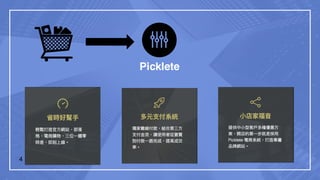
the future of Picklete
4
Picklete
5
Picklete
Recommendation
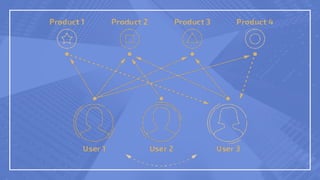
Recommendation § Personalized recommendation
§ Collaborative filtering
7
PredcitonIO
ML as a
ServicesIntegrate everything of ML together nicely and
move from prototyping to production
10
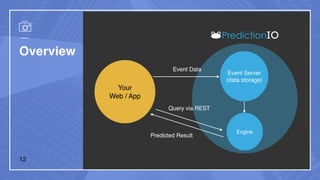
PredcitonIO Open Source
§ open source framework
§ for developers and data
scientists
§ querying via restful API
Machine Learning
§ event collection
§ algorithms deployment
§ evaluation
11
Overview
12
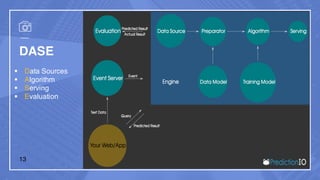
DASE
§ Data Sources
§ Algorithm
§ Serving
§ Evaluation
13
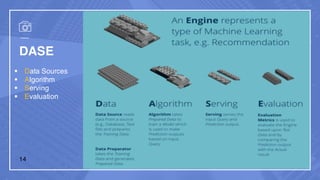
DASE
§ Data Sources
§ Algorithm
§ Serving
§ Evaluation
14
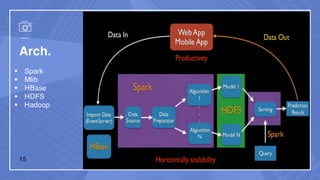
Arch.
§ Spark
§ Mlib
§ HBase
§ HDFS
§ Hadoop
15
how to start ?
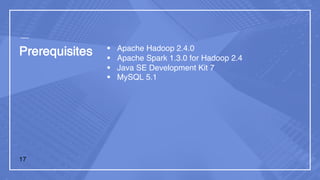
Prerequisites § Apache Hadoop 2.4.0
§ Apache Spark 1.3.0 for Hadoop 2.4
§ Java SE Development Kit 7
§ MySQL 5.1
17
Installation
§ Quick Install
§ status
1
2
$ bash -c "$(curl -s https://install.prediction.io/install.sh)"
$ PATH=$PATH:/home/yourname/PredictionIO/bin; export PATH
1
2
3
4
5
$ pio status
### Return:
…
[INFO] [Console$] Your system is all ready to go.18
how to use ?
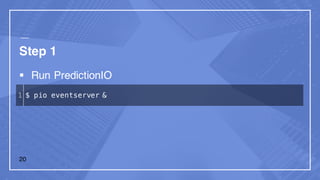
Step 1
§ Run PredictionIO
1 $ pio eventserver &
20
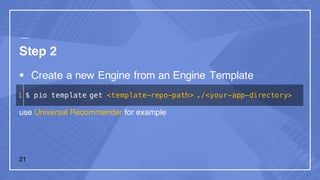
Step 2
§ Create a new Engine from an Engine Template
use Universal Recommender for example
1 $ pio template get <template-repo-path> ./<your-app-directory>
21
Step 3
§ Generate an App ID and Access Key
1
2
3
4
5
6
7
$ cd MyRecommendation
$ pio app new MyRecommendation
### Return:
…
[INFO] [App$] ID: 1
[INFO] [App$] Access Key: ...
22
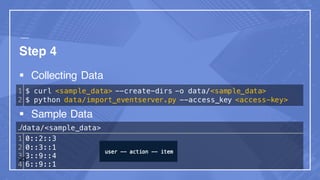
Step 4
§ Collecting Data
§ Sample Data
1
2
$ curl <sample_data> --create-dirs -o data/<sample_data>
$ python data/import_eventserver.py --access_key <access-key>
./data/<sample_data>
1
2
3
4
0::2::3
0::3::1
3::9::4
6::9::1
23
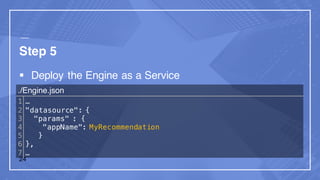
Step 5
§ Deploy the Engine as a Service
./Engine.json
1
2
3
4
5
6
7
…
"datasource": {
"params" : {
"appName": MyRecommendation
}
},
…
24
Step 5
§ Bulid and Training the Predictive Model
1
2
3
4
5
6
7
8
9
$ pio build
### Return:
…
[INFO] [Console$] Your engine is ready for training.
$ pio train
### Return:
…
[INFO] [CoreWorkflow$] Training completed successfully.25
Step 5
§ Bulid and Training the Predictive Model
1
2
3
4
5
$ pio deploy
### Return:
…
[INFO] [HttpListener] Bound to /0.0.0.0:8000 [INFO]
[MasterActor] Bind successful. Ready to serve.
26
Step 6
§ Use the Engine
1
2
3
4
5
6
7
8
9
$ curl -d '{ "user": "1", "num": 2 }'
/ http://localhost:8000/queries.json
### Return:
{ "itemScores”: [
{ "item":"22", "score":4.072304374729956},
{ "item":"62", "score":4.058482414005789},
]
}27
Thanks for listening.
2016/06/01 (Wed.) @ Exma-Square
WeiYuan(@v123582)
v123582.github.io

Introduce to PredictionIO

  • 1.
    Prediction IO 2016/06/01 (Wed.)@ Exma-Square Meeting WeiYuan(@v123582)
  • 2.
    Outline § thefuture of Picklete § Recommendation § PredcitonIO § how to start ? § how to use ? 2
  • 3.
    the future ofPicklete
  • 4.
  • 5.
  • 6.
  • 7.
    Recommendation § Personalizedrecommendation § Collaborative filtering 7
  • 9.
  • 10.
    ML as a ServicesIntegrateeverything of ML together nicely and move from prototyping to production 10
  • 11.
    PredcitonIO Open Source §open source framework § for developers and data scientists § querying via restful API Machine Learning § event collection § algorithms deployment § evaluation 11
  • 12.
  • 13.
    DASE § Data Sources §Algorithm § Serving § Evaluation 13
  • 14.
    DASE § Data Sources §Algorithm § Serving § Evaluation 14
  • 15.
    Arch. § Spark § Mlib §HBase § HDFS § Hadoop 15
  • 16.
  • 17.
    Prerequisites § ApacheHadoop 2.4.0 § Apache Spark 1.3.0 for Hadoop 2.4 § Java SE Development Kit 7 § MySQL 5.1 17
  • 18.
    Installation § Quick Install §status 1 2 $ bash -c "$(curl -s https://install.prediction.io/install.sh)" $ PATH=$PATH:/home/yourname/PredictionIO/bin; export PATH 1 2 3 4 5 $ pio status ### Return: … [INFO] [Console$] Your system is all ready to go.18
  • 19.
  • 20.
    Step 1 § RunPredictionIO 1 $ pio eventserver & 20
  • 21.
    Step 2 § Createa new Engine from an Engine Template use Universal Recommender for example 1 $ pio template get <template-repo-path> ./<your-app-directory> 21
  • 22.
    Step 3 § Generatean App ID and Access Key 1 2 3 4 5 6 7 $ cd MyRecommendation $ pio app new MyRecommendation ### Return: … [INFO] [App$] ID: 1 [INFO] [App$] Access Key: ... 22
  • 23.
    Step 4 § CollectingData § Sample Data 1 2 $ curl <sample_data> --create-dirs -o data/<sample_data> $ python data/import_eventserver.py --access_key <access-key> ./data/<sample_data> 1 2 3 4 0::2::3 0::3::1 3::9::4 6::9::1 23
  • 24.
    Step 5 § Deploythe Engine as a Service ./Engine.json 1 2 3 4 5 6 7 … "datasource": { "params" : { "appName": MyRecommendation } }, … 24
  • 25.
    Step 5 § Bulidand Training the Predictive Model 1 2 3 4 5 6 7 8 9 $ pio build ### Return: … [INFO] [Console$] Your engine is ready for training. $ pio train ### Return: … [INFO] [CoreWorkflow$] Training completed successfully.25
  • 26.
    Step 5 § Bulidand Training the Predictive Model 1 2 3 4 5 $ pio deploy ### Return: … [INFO] [HttpListener] Bound to /0.0.0.0:8000 [INFO] [MasterActor] Bind successful. Ready to serve. 26
  • 27.
    Step 6 § Usethe Engine 1 2 3 4 5 6 7 8 9 $ curl -d '{ "user": "1", "num": 2 }' / http://localhost:8000/queries.json ### Return: { "itemScores”: [ { "item":"22", "score":4.072304374729956}, { "item":"62", "score":4.058482414005789}, ] }27
  • 28.
    Thanks for listening. 2016/06/01(Wed.) @ Exma-Square WeiYuan(@v123582) v123582.github.io