More power to API clients
with GraphQL
Yann Simon - @simon_yann
Who am I
• Yann Simon, backend developer at commercetools
• in the last years, worked with REST APIs:
• for micro-services
• public APIs
Let’s build a
REST API
Let’s build an
e-commerce API
Let’s build an
e-commerce API
surprise surprise
GET /products/45
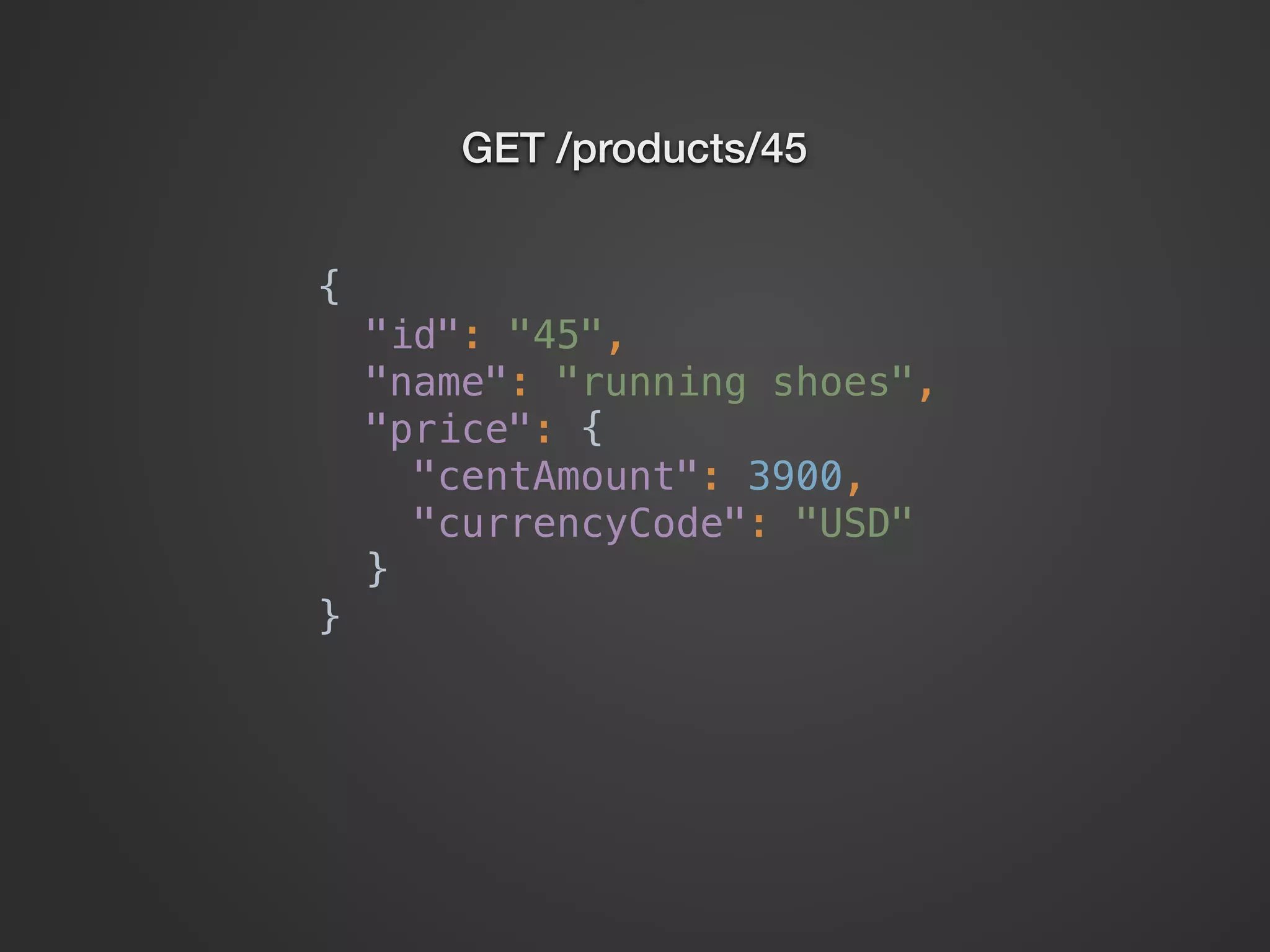
GET /products/45
{

"id": "45",

"name": "running shoes",

"price": {

"centAmount": 3900,

"currencyCode": "USD"

}

}
GET /products/45
GET /products/45
{

"id": "45",

"name": "running shoes",

"masterVariant": {

"description": "white color",

"price": {

"centAmount": 3900,

"currencyCode": "USD"

}

}

}
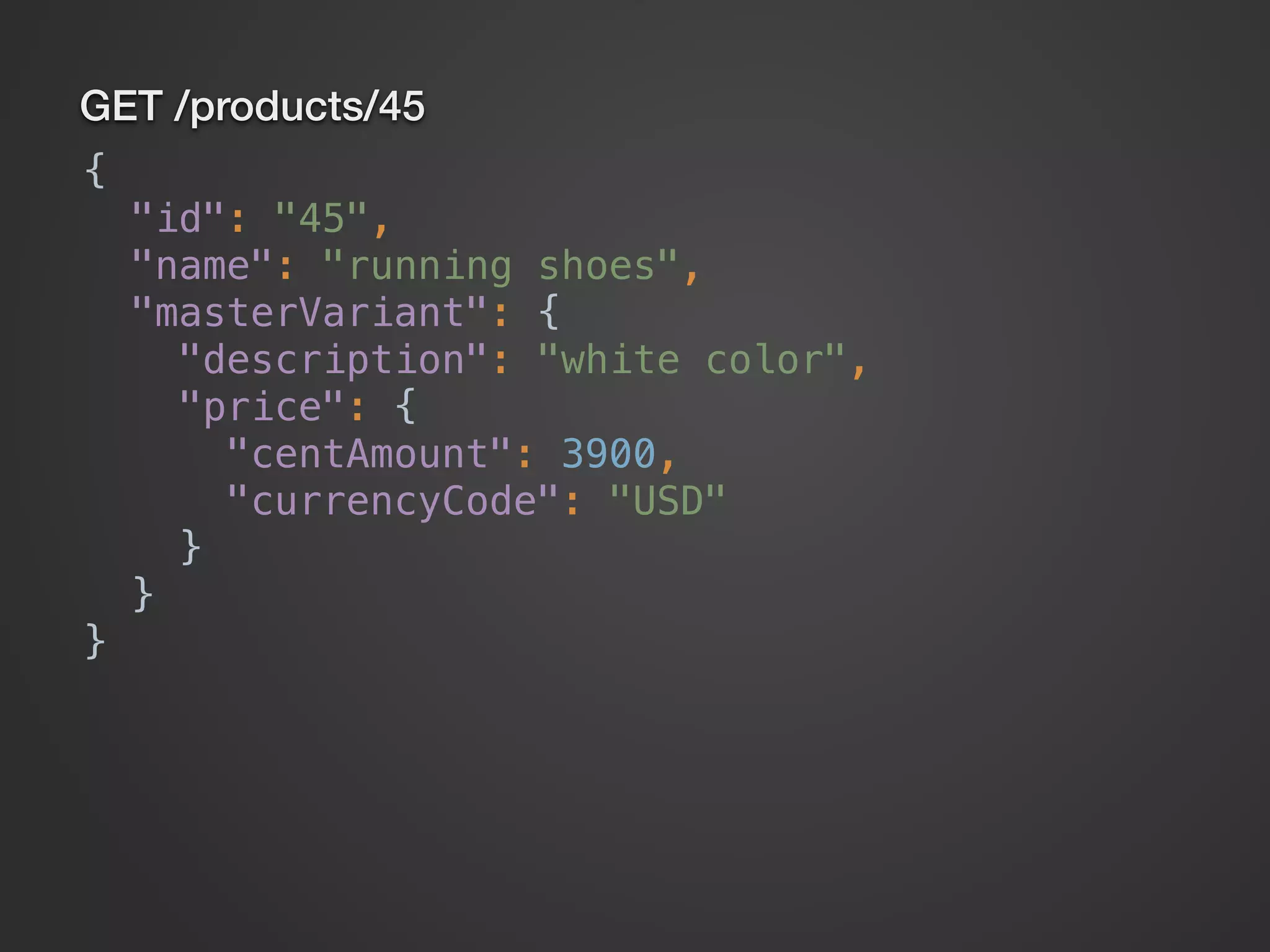
GET /products/45
GET /products/45
{

"id": "45",

"name": "running shoes",

"masterVariant": {

"description": "white color",

"price": {

"centAmount": 3900,

"currencyCode": "USD"

}

},

"variants": [

{

"description": "black color",

"price": {

"centAmount": 3600,

"currencyCode": "USD"

}

},

{

"description": "red color",

"price": {

"centAmount": 3500,

"currencyCode": "USD"

}

}

]

}
GET /products/45
{

"id": "45",

"name": "running shoes",

"masterVariant": {

"description": "white color",

"price": {

"centAmount": 3900,

"currencyCode": "USD"

}

},

"variants": [

{

"description": "black color",

"price": {

"centAmount": 3600,

"currencyCode": "USD"

}

},

{

"description": "red color",

"price": {

"centAmount": 3500,

"currencyCode": "USD"

}

}

]

}
OR?
GET /products/45
GET /products/45
{

"id": "45",

"name": "running shoes",

"masterVariant": {

"id": "3",

"description": "white color",

"price": {

"centAmount": 3900,

"currencyCode": "USD"

}

},

"variantIds": [ "23", "18" ]

}
GET /products/45
{

"id": "45",

"name": "running shoes",

"masterVariant": {

"id": "3",

"description": "white color",

"price": {

"centAmount": 3900,

"currencyCode": "USD"

}

},

"variantIds": [ "23", "18" ]

}
GET /products/45/variants/23
GET /products/45
{

"id": "45",

"name": "running shoes",

"masterVariant": {

"id": "3",

"description": "white color",

"price": {

"centAmount": 3900,

"currencyCode": "USD"

}

},

"variantIds": [ "23", "18" ]

}
GET /products/45/variants/23
{

"id": "23",

"description": "black color",

"price": {

"centAmount": 3600,

"currencyCode": "USD"

}

}
GET /products/45
{

"id": "45",

"name": "running shoes",

"masterVariant": {

"id": "3",

"description": "white color",

"price": {

"centAmount": 3900,

"currencyCode": "USD"

}

},

"variantIds": [ "23", "18" ]

}
GET /products/45/variants/23
GET /products/45/variants/18
{

"id": "23",

"description": "black color",

"price": {

"centAmount": 3600,

"currencyCode": "USD"

}

}
GET /products/45
{

"id": "45",

"name": "running shoes",

"masterVariant": {

"id": "3",

"description": "white color",

"price": {

"centAmount": 3900,

"currencyCode": "USD"

}

},

"variantIds": [ "23", "18" ]

}
GET /products/45/variants/23
GET /products/45/variants/18
{

"id": "23",

"description": "black color",

"price": {

"centAmount": 3600,

"currencyCode": "USD"

}

}
{

"id": "18",

"description": "red color",

"price": {

"centAmount": 3500,

"currencyCode": "USD"

}

}
More data, maybe unused
or
more requests?
Let’s build this API
with GraphQL
Demo
With GraphQL
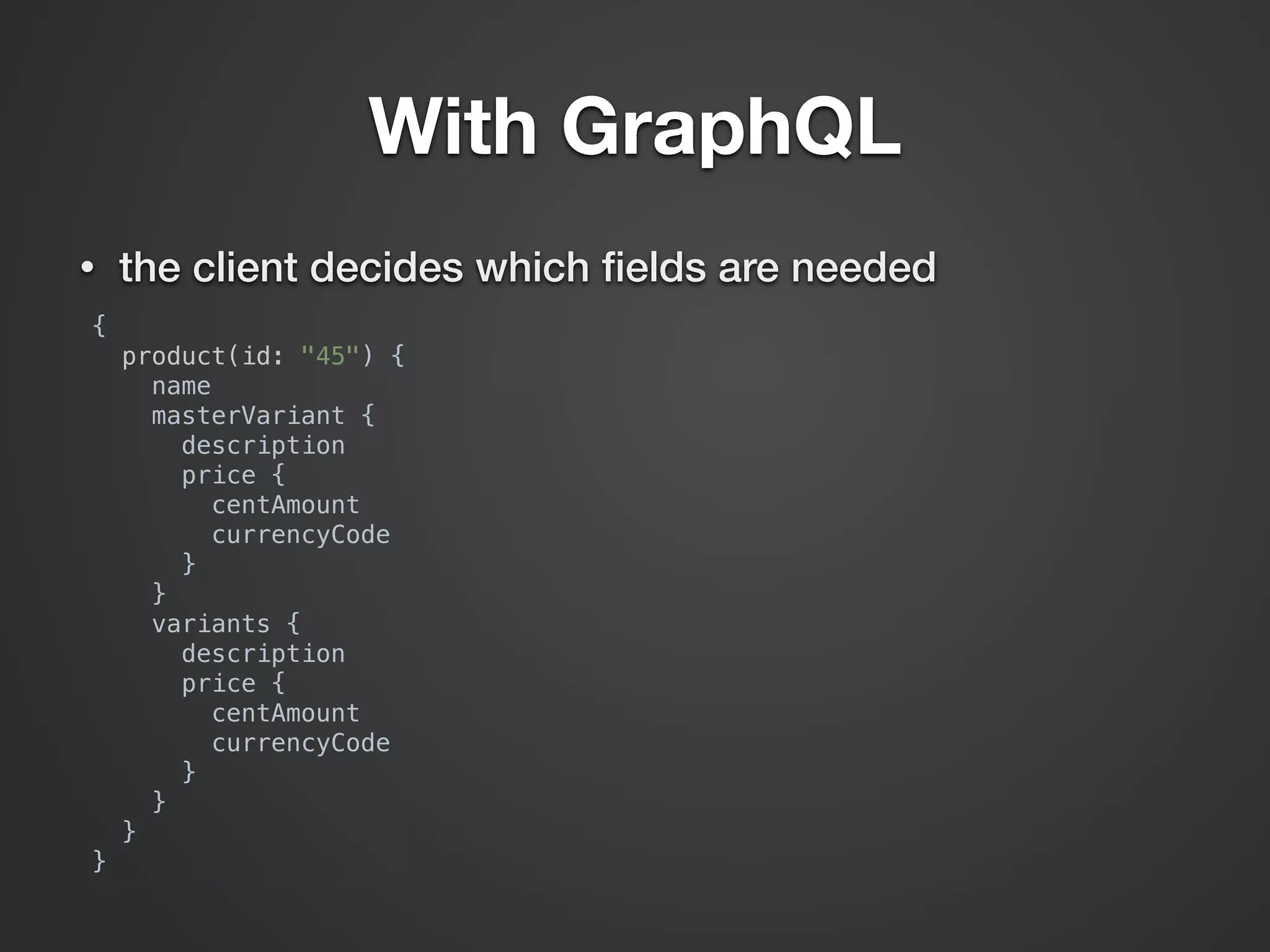
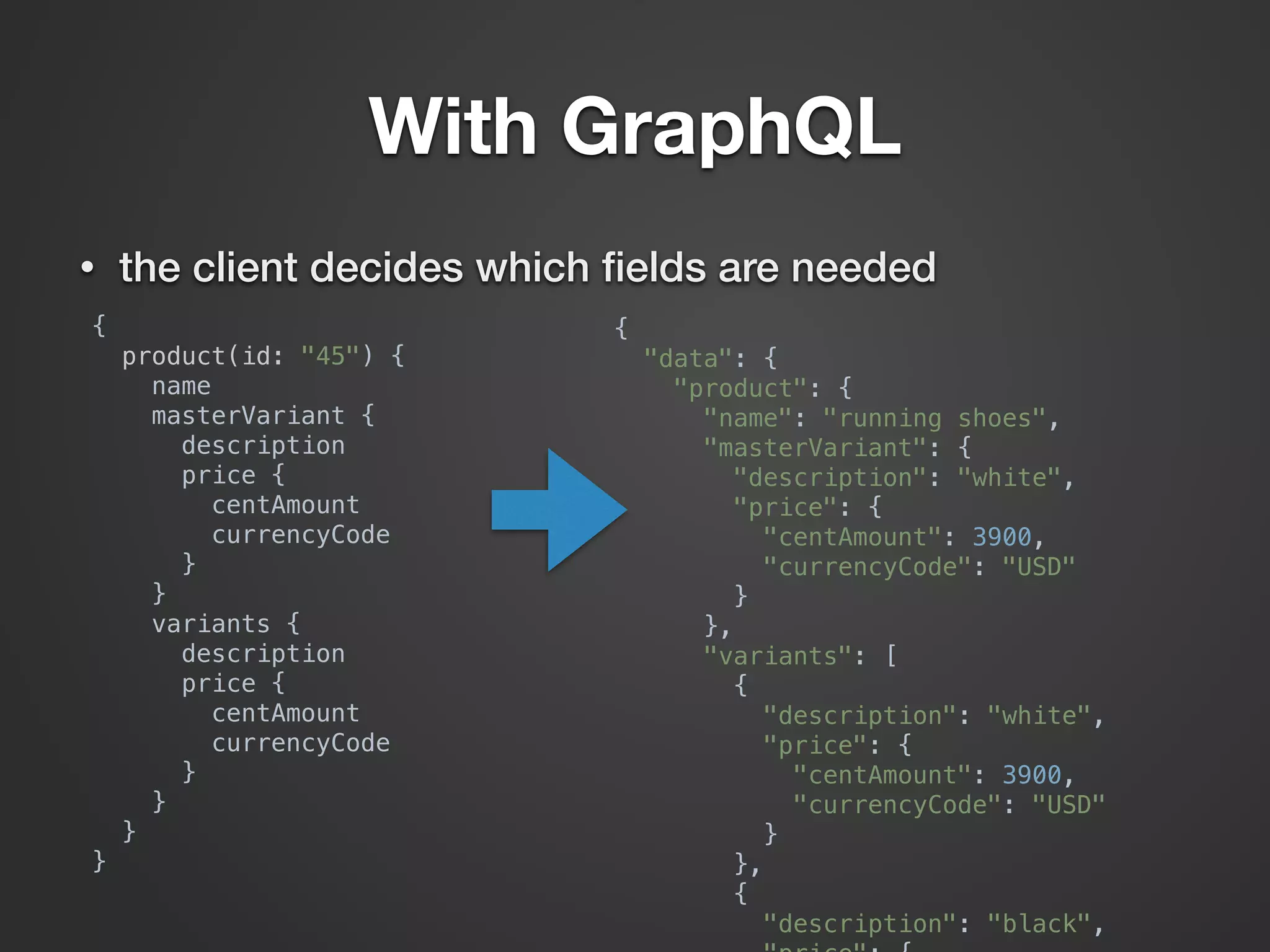
• the client decides which fields are needed
With GraphQL
• the client decides which fields are needed
{

product(id: "45") {

name

masterVariant {

description

price {

centAmount

currencyCode

}

}

variants {

description

price {

centAmount

currencyCode

}

}

}

}
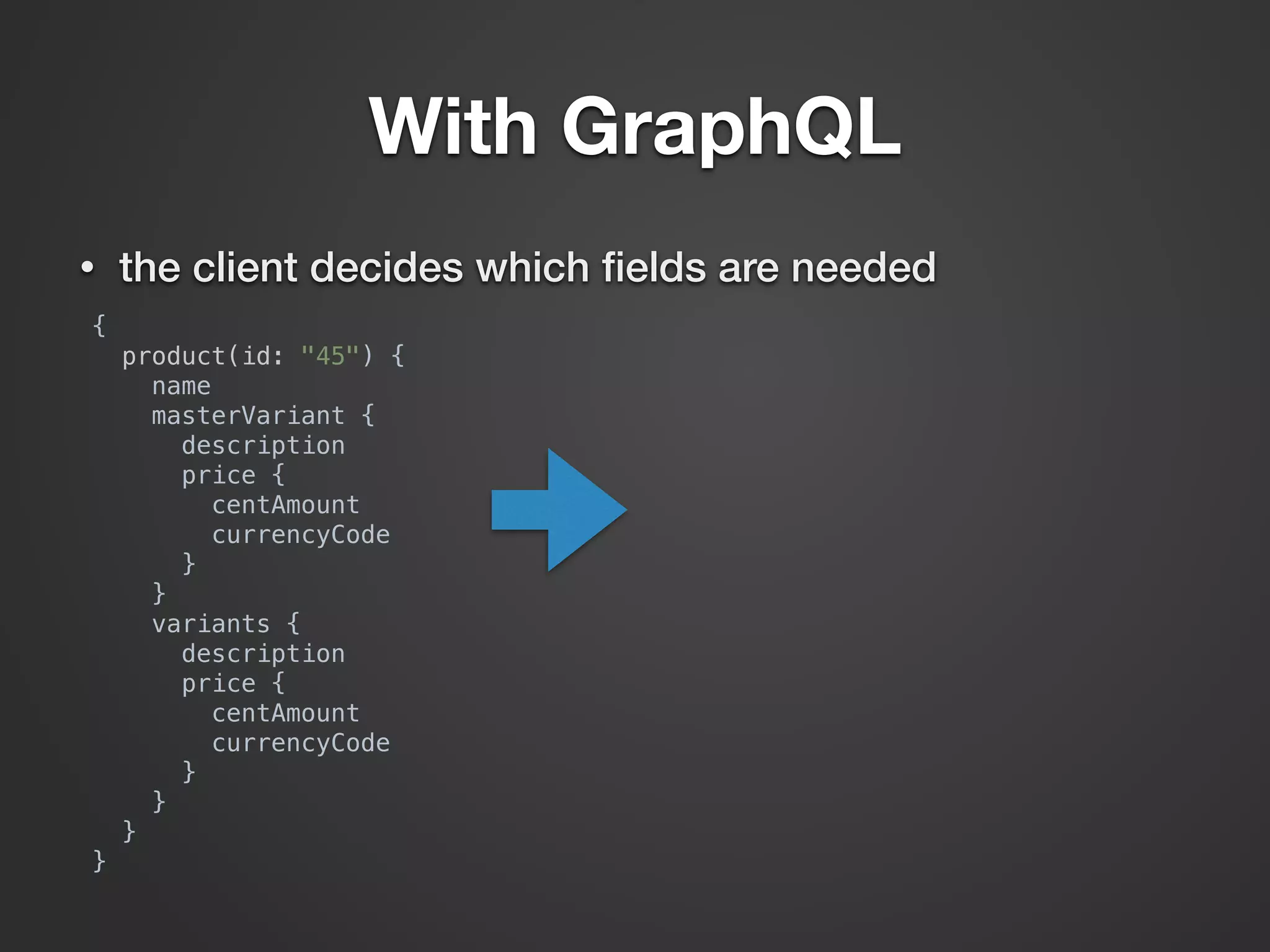
With GraphQL
• the client decides which fields are needed
{

product(id: "45") {

name

masterVariant {

description

price {

centAmount

currencyCode

}

}

variants {

description

price {

centAmount

currencyCode

}

}

}

}
With GraphQL
• the client decides which fields are needed
{

product(id: "45") {

name

masterVariant {

description

price {

centAmount

currencyCode

}

}

variants {

description

price {

centAmount

currencyCode

}

}

}

}
{

"data": {

"product": {

"name": "running shoes",

"masterVariant": {

"description": "white",

"price": {

"centAmount": 3900,

"currencyCode": "USD"

}

},

"variants": [

{

"description": "white",

"price": {

"centAmount": 3900,

"currencyCode": "USD"

}

},

{

"description": "black",

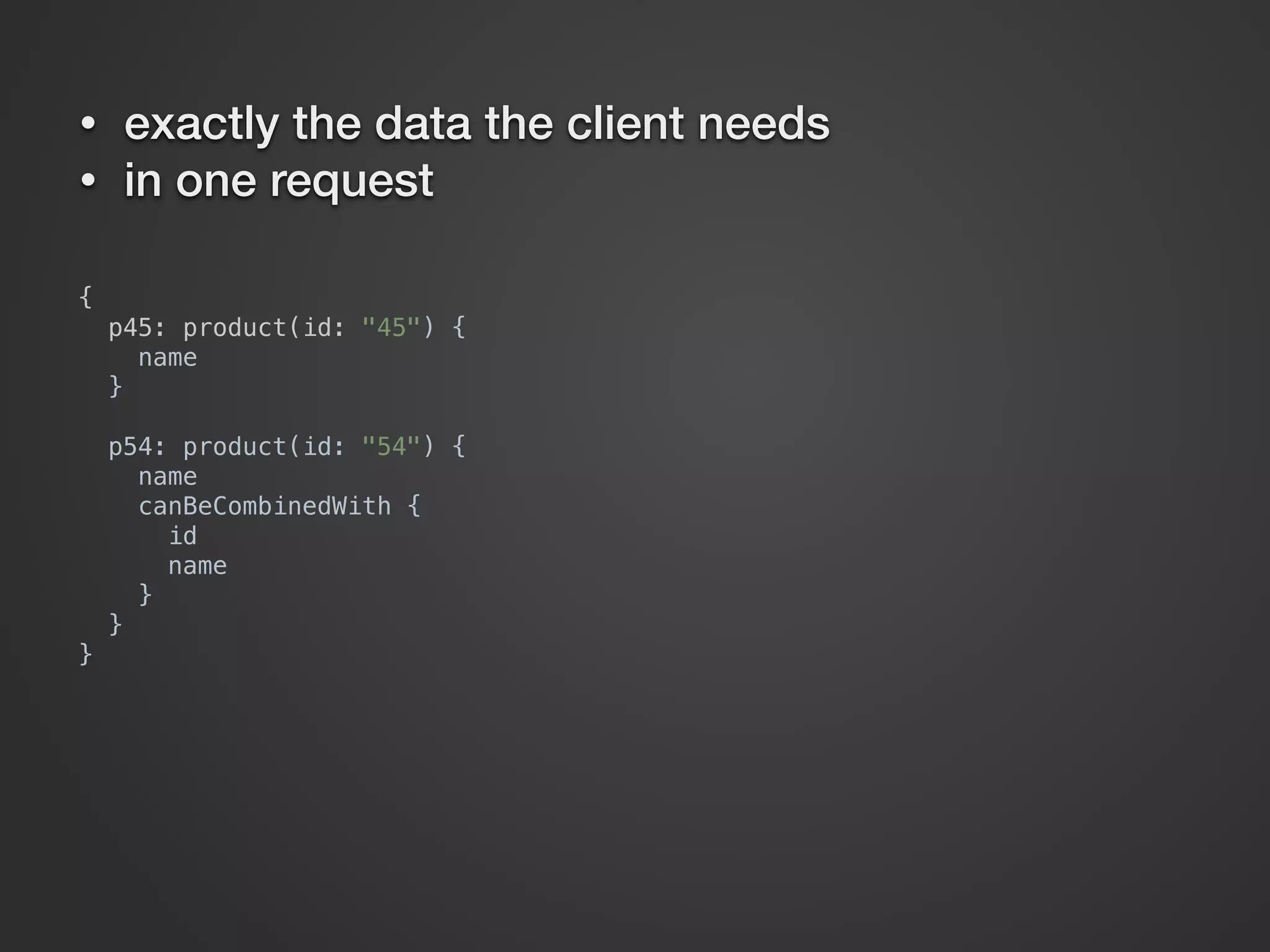
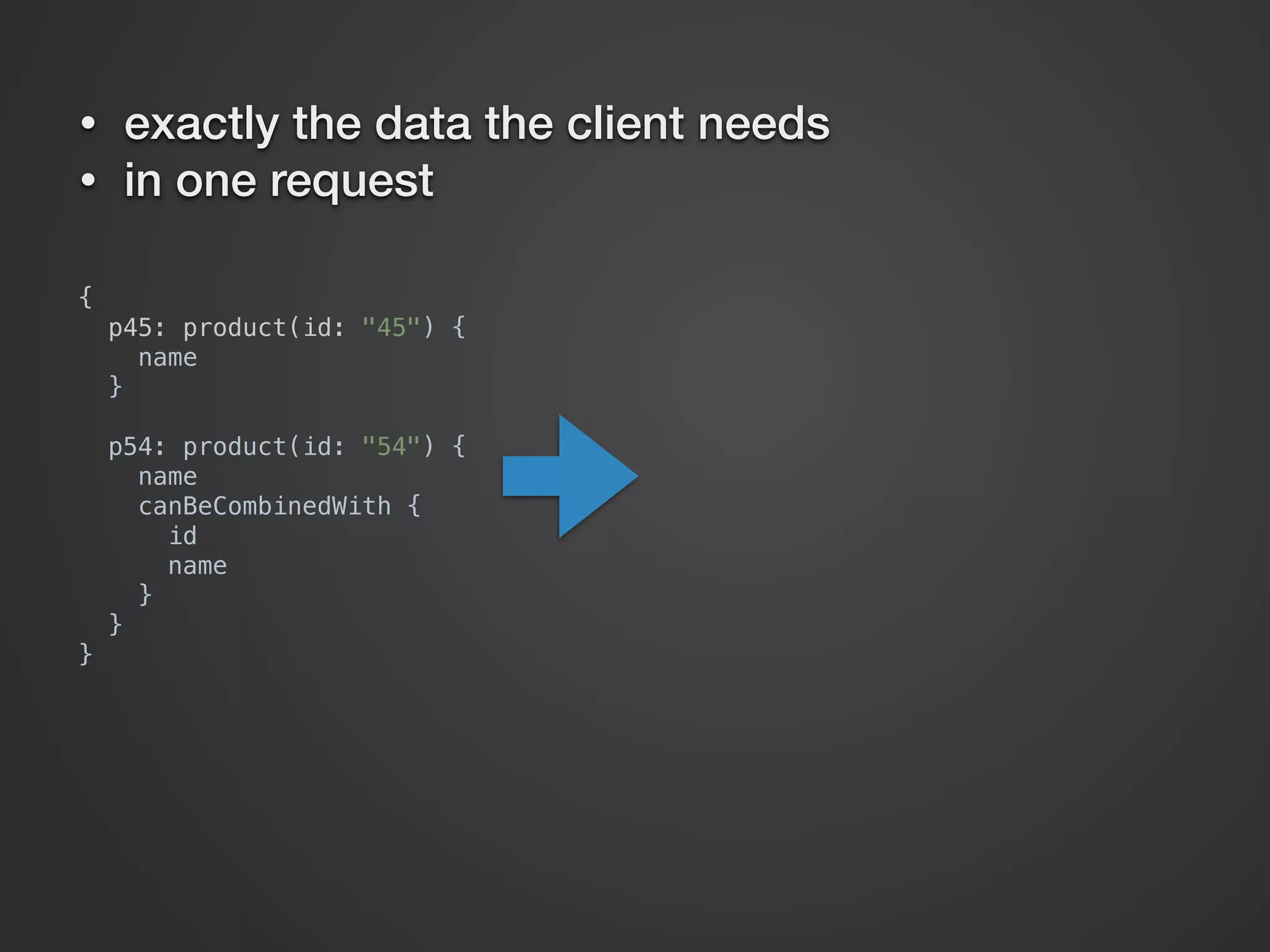
• exactly the data the client needs
• in one request
{

p45: product(id: "45") {

name

}


p54: product(id: "54") {

name

canBeCombinedWith {

id

name

}

}

}
• exactly the data the client needs
• in one request
{

p45: product(id: "45") {

name

}


p54: product(id: "54") {

name

canBeCombinedWith {

id

name

}

}

}
• exactly the data the client needs
• in one request
{

p45: product(id: "45") {

name

}


p54: product(id: "54") {

name

canBeCombinedWith {

id

name

}

}

}
{

"data": {

"p45": {

"name": "running shoes"

},

"p54": {

"name": "basketball shirt",

"canBeCombinedWith": [

{

"id": "46",

"name": "basketball shoes"

},

{

"id": "58",

"name": "basketball T-shirt"

}

]

}

}

}
• exactly the data the client needs
• in one request
{

p45: product(id: "45") {

name

}


p54: product(id: "54") {

name

canBeCombinedWith {

id

name

}

}

}
{

"data": {

"p45": {

"name": "running shoes"

},

"p54": {

"name": "basketball shirt",

"canBeCombinedWith": [

{

"id": "46",

"name": "basketball shoes"

},

{

"id": "58",

"name": "basketball T-shirt"

}

]

}

}

}
• exactly the data the client needs
• in one request
m
obile
friendly
With GraphQL
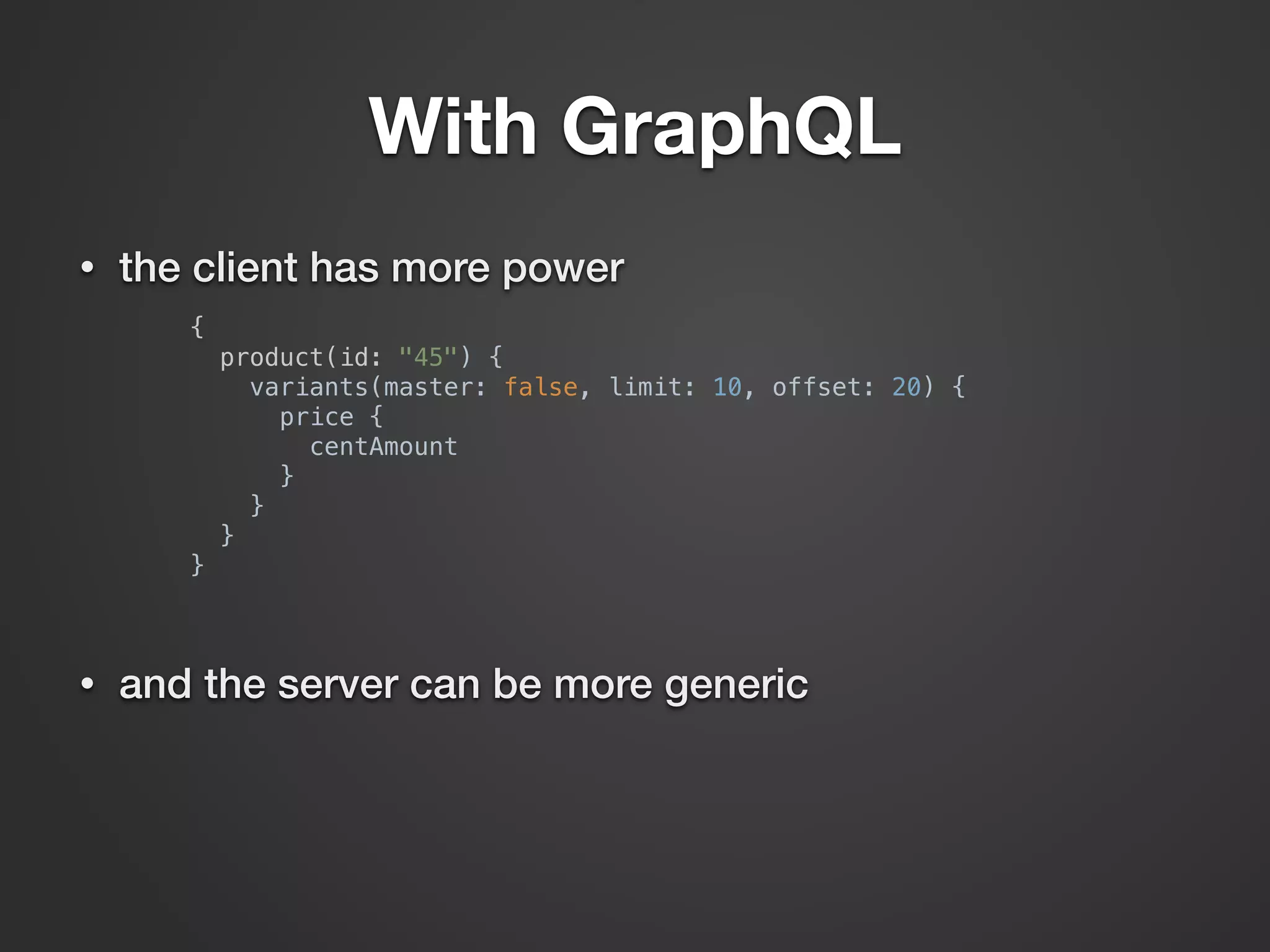
• the client has more power
{

product(id: "45") {

variants(master: false, limit: 10, offset: 20) {

price {

centAmount

}

}

}

}

• and the server can be more generic
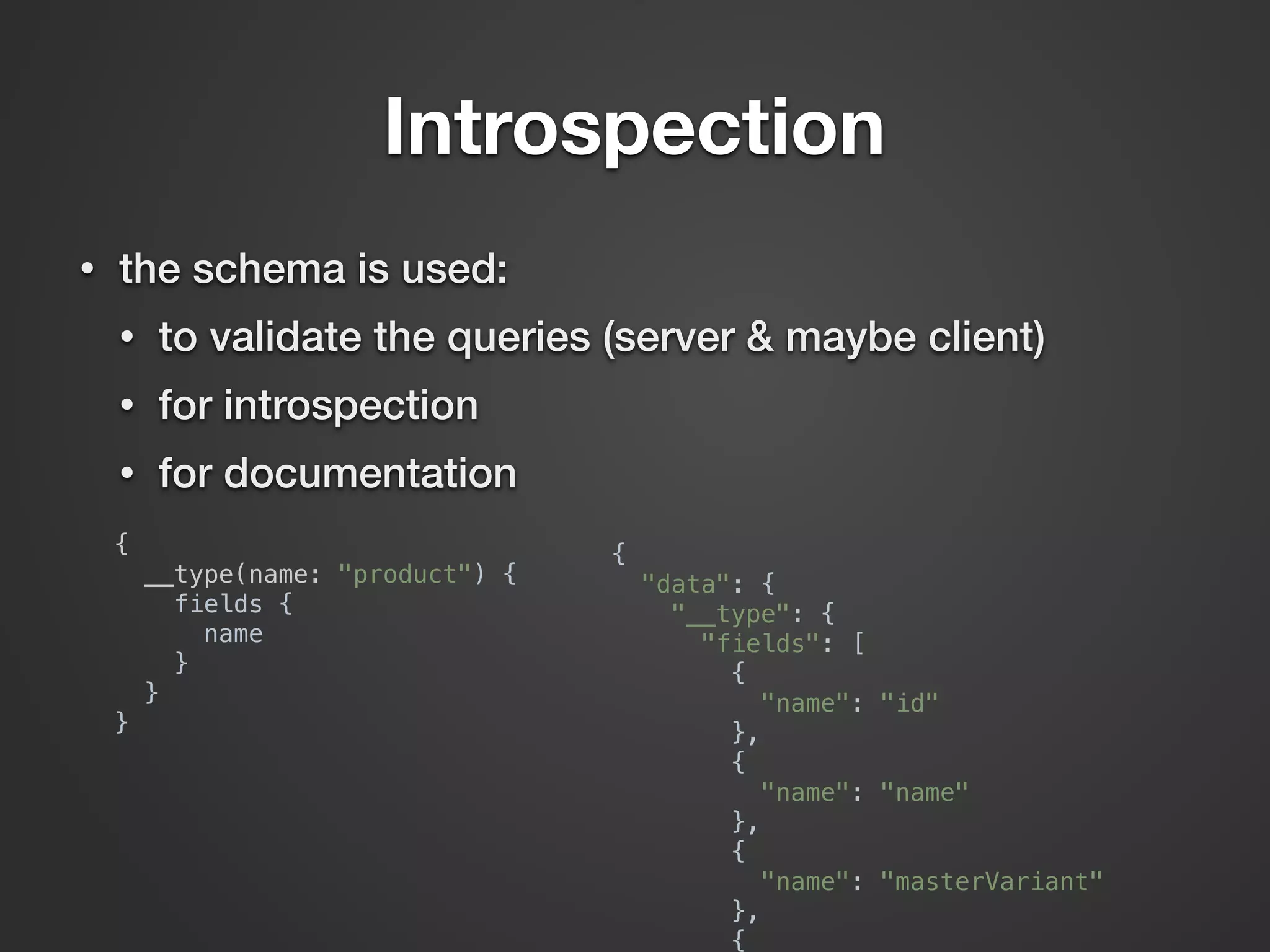
Introspection
{

__type(name: "product") {

fields {

name

}

}

}

{

"data": {

"__type": {

"fields": [

{

"name": "id"

},

{

"name": "name"

},

{

"name": "masterVariant"

},

{

• the schema is used:
• to validate the queries (server & maybe client)
• for introspection
• for documentation
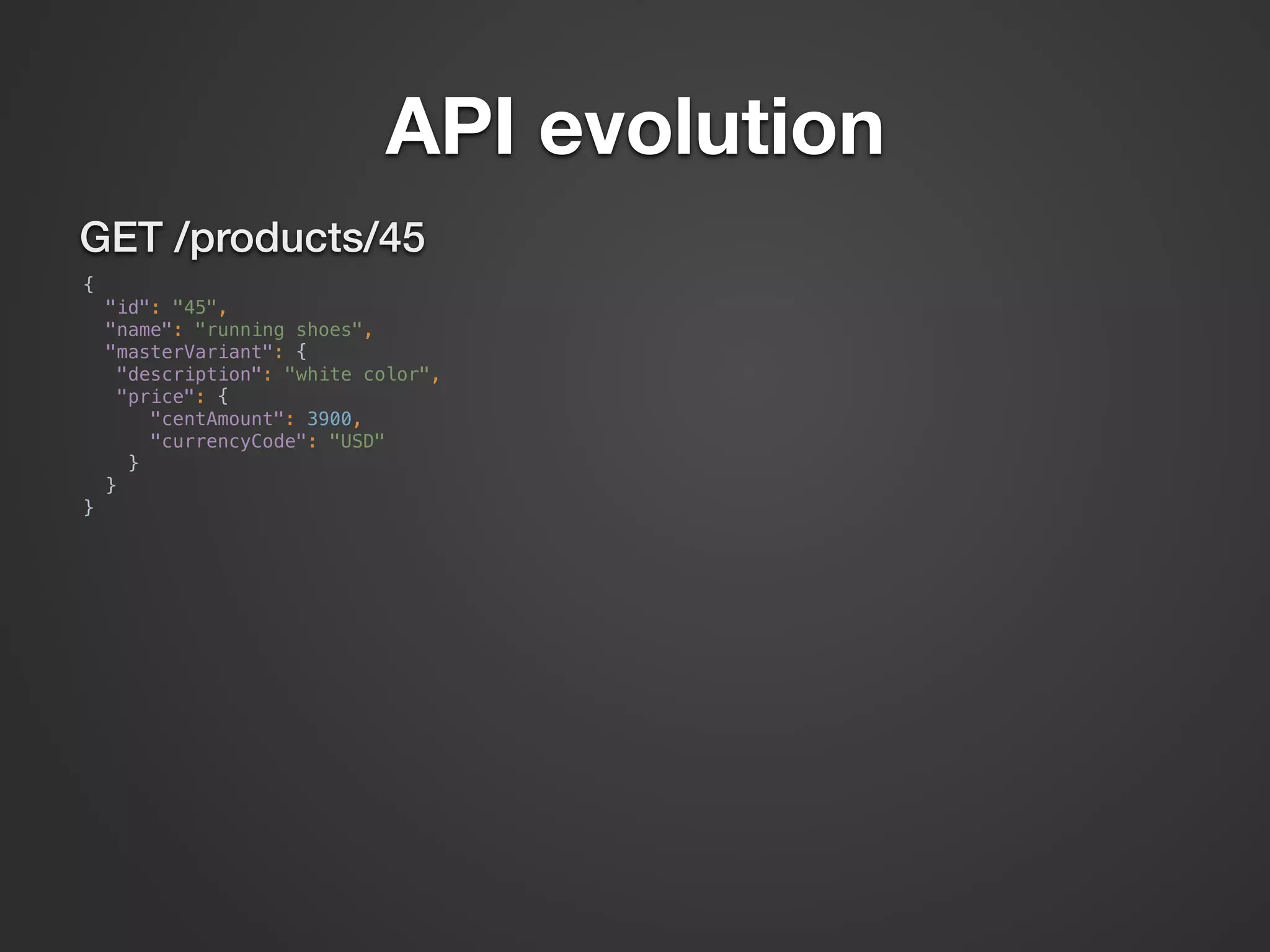
API evolution
GET /products/45
{

"id": "45",

"name": "running shoes",

"masterVariant": {

"description": "white color",

"price": {

"centAmount": 3900,

"currencyCode": "USD"

}

}

}
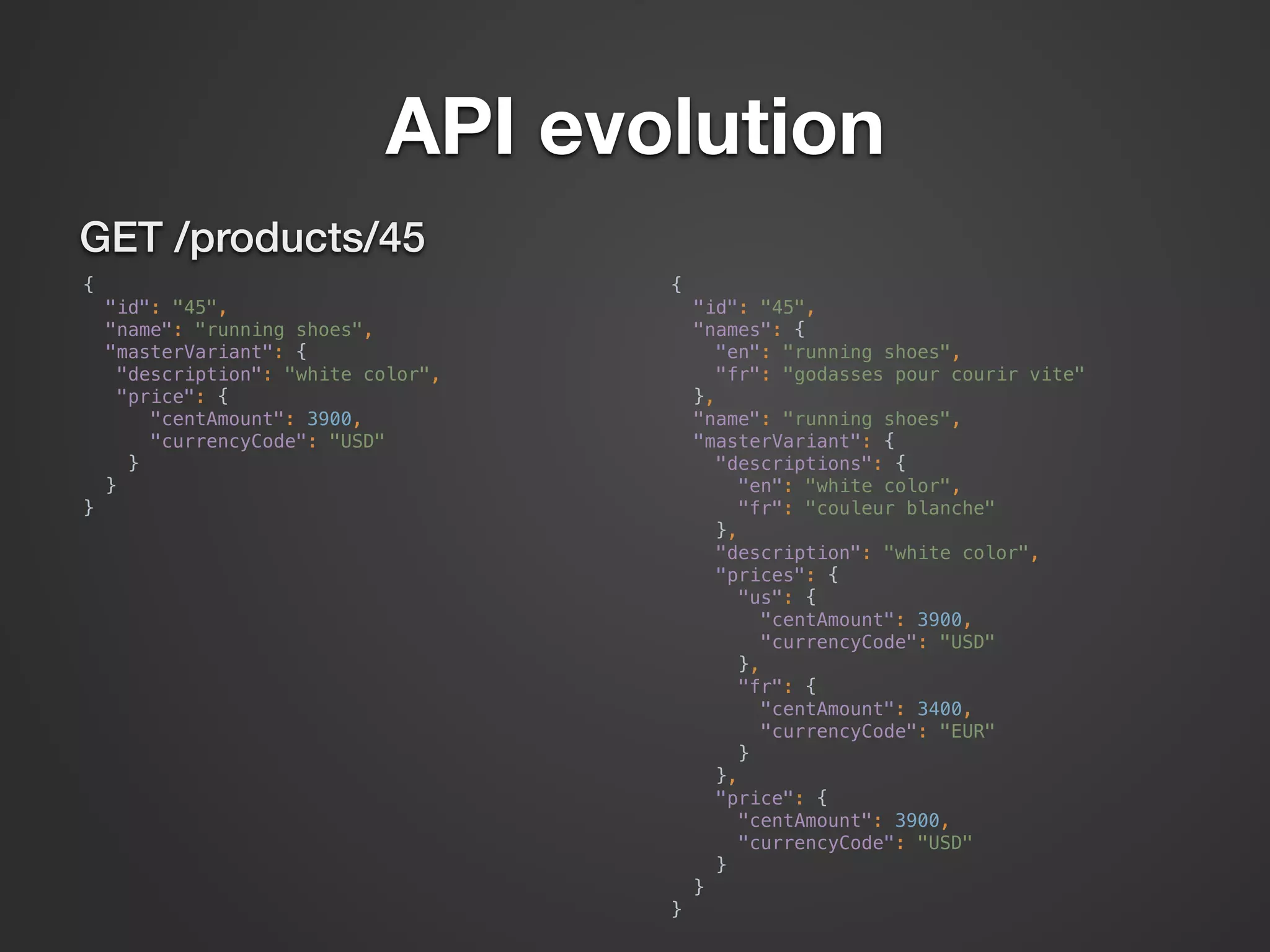
API evolution
GET /products/45
{

"id": "45",

"name": "running shoes",

"masterVariant": {

"description": "white color",

"price": {

"centAmount": 3900,

"currencyCode": "USD"

}

}

}
{

"id": "45",

"names": {

"en": "running shoes",

"fr": "godasses pour courir vite"

},

"name": "running shoes",

"masterVariant": {

"descriptions": {

"en": "white color",

"fr": "couleur blanche"

},

"description": "white color",

"prices": {

"us": {

"centAmount": 3900,

"currencyCode": "USD"

},

"fr": {

"centAmount": 3400,

"currencyCode": "EUR"

}

},

"price": {

"centAmount": 3900,

"currencyCode": "USD"

}

}

}
Can we remove a
deprecated field?
Let’s modify our
GraphQL based API
Demo
With GraphQL
• a field can be deprecated
• still valid for a query
• not in the schema anymore
• the server can track if a field is used
• the field can be removed when not used anymore
REST vs GraphQL?
• REST is here to stay
• simple
• widely used
• GraphQL
• different approach
• solve some limits of REST
ecosystem
• used in Facebook’s native apps in production since 2012
• open source in July 2015
• specification
• backend agnostic
• implementation in different languages
• nodejs, java, scala, ruby, php and many more
• front-end frameworks based on GraphQL like relay
So you want to try it?
• https://learngraphql.com/
• create an account on https://admin.sphere.io/
• you can create a project with sample data
• try GraphQL with this account on https://
impex.sphere.io/graphiql
Thanks for your attention
Yann Simon - @simon_yann

Introduction to GraphQL at API days

  • 1.
    More power toAPI clients with GraphQL Yann Simon - @simon_yann
  • 2.
    Who am I •Yann Simon, backend developer at commercetools • in the last years, worked with REST APIs: • for micro-services • public APIs
  • 3.
  • 4.
  • 5.
    Let’s build an e-commerceAPI surprise surprise
  • 6.
  • 7.
    GET /products/45 {
 "id": "45",
 "name":"running shoes",
 "price": {
 "centAmount": 3900,
 "currencyCode": "USD"
 }
 }
  • 8.
  • 9.
    GET /products/45 {
 "id": "45",
 "name":"running shoes",
 "masterVariant": {
 "description": "white color",
 "price": {
 "centAmount": 3900,
 "currencyCode": "USD"
 }
 }
 }
  • 10.
  • 11.
    GET /products/45 {
 "id": "45",
 "name":"running shoes",
 "masterVariant": {
 "description": "white color",
 "price": {
 "centAmount": 3900,
 "currencyCode": "USD"
 }
 },
 "variants": [
 {
 "description": "black color",
 "price": {
 "centAmount": 3600,
 "currencyCode": "USD"
 }
 },
 {
 "description": "red color",
 "price": {
 "centAmount": 3500,
 "currencyCode": "USD"
 }
 }
 ]
 }
  • 12.
    GET /products/45 {
 "id": "45",
 "name":"running shoes",
 "masterVariant": {
 "description": "white color",
 "price": {
 "centAmount": 3900,
 "currencyCode": "USD"
 }
 },
 "variants": [
 {
 "description": "black color",
 "price": {
 "centAmount": 3600,
 "currencyCode": "USD"
 }
 },
 {
 "description": "red color",
 "price": {
 "centAmount": 3500,
 "currencyCode": "USD"
 }
 }
 ]
 } OR?
  • 13.
  • 14.
    GET /products/45 {
 "id": "45",
 "name":"running shoes",
 "masterVariant": {
 "id": "3",
 "description": "white color",
 "price": {
 "centAmount": 3900,
 "currencyCode": "USD"
 }
 },
 "variantIds": [ "23", "18" ]
 }
  • 15.
    GET /products/45 {
 "id": "45",
 "name":"running shoes",
 "masterVariant": {
 "id": "3",
 "description": "white color",
 "price": {
 "centAmount": 3900,
 "currencyCode": "USD"
 }
 },
 "variantIds": [ "23", "18" ]
 } GET /products/45/variants/23
  • 16.
    GET /products/45 {
 "id": "45",
 "name":"running shoes",
 "masterVariant": {
 "id": "3",
 "description": "white color",
 "price": {
 "centAmount": 3900,
 "currencyCode": "USD"
 }
 },
 "variantIds": [ "23", "18" ]
 } GET /products/45/variants/23 {
 "id": "23",
 "description": "black color",
 "price": {
 "centAmount": 3600,
 "currencyCode": "USD"
 }
 }
  • 17.
    GET /products/45 {
 "id": "45",
 "name":"running shoes",
 "masterVariant": {
 "id": "3",
 "description": "white color",
 "price": {
 "centAmount": 3900,
 "currencyCode": "USD"
 }
 },
 "variantIds": [ "23", "18" ]
 } GET /products/45/variants/23 GET /products/45/variants/18 {
 "id": "23",
 "description": "black color",
 "price": {
 "centAmount": 3600,
 "currencyCode": "USD"
 }
 }
  • 18.
    GET /products/45 {
 "id": "45",
 "name":"running shoes",
 "masterVariant": {
 "id": "3",
 "description": "white color",
 "price": {
 "centAmount": 3900,
 "currencyCode": "USD"
 }
 },
 "variantIds": [ "23", "18" ]
 } GET /products/45/variants/23 GET /products/45/variants/18 {
 "id": "23",
 "description": "black color",
 "price": {
 "centAmount": 3600,
 "currencyCode": "USD"
 }
 } {
 "id": "18",
 "description": "red color",
 "price": {
 "centAmount": 3500,
 "currencyCode": "USD"
 }
 }
  • 19.
    More data, maybeunused or more requests?
  • 20.
    Let’s build thisAPI with GraphQL Demo
  • 21.
    With GraphQL • theclient decides which fields are needed
  • 22.
    With GraphQL • theclient decides which fields are needed {
 product(id: "45") {
 name
 masterVariant {
 description
 price {
 centAmount
 currencyCode
 }
 }
 variants {
 description
 price {
 centAmount
 currencyCode
 }
 }
 }
 }
  • 23.
    With GraphQL • theclient decides which fields are needed {
 product(id: "45") {
 name
 masterVariant {
 description
 price {
 centAmount
 currencyCode
 }
 }
 variants {
 description
 price {
 centAmount
 currencyCode
 }
 }
 }
 }
  • 24.
    With GraphQL • theclient decides which fields are needed {
 product(id: "45") {
 name
 masterVariant {
 description
 price {
 centAmount
 currencyCode
 }
 }
 variants {
 description
 price {
 centAmount
 currencyCode
 }
 }
 }
 } {
 "data": {
 "product": {
 "name": "running shoes",
 "masterVariant": {
 "description": "white",
 "price": {
 "centAmount": 3900,
 "currencyCode": "USD"
 }
 },
 "variants": [
 {
 "description": "white",
 "price": {
 "centAmount": 3900,
 "currencyCode": "USD"
 }
 },
 {
 "description": "black",

  • 25.
    • exactly thedata the client needs • in one request
  • 26.
    {
 p45: product(id: "45"){
 name
 }
 
 p54: product(id: "54") {
 name
 canBeCombinedWith {
 id
 name
 }
 }
 } • exactly the data the client needs • in one request
  • 27.
    {
 p45: product(id: "45"){
 name
 }
 
 p54: product(id: "54") {
 name
 canBeCombinedWith {
 id
 name
 }
 }
 } • exactly the data the client needs • in one request
  • 28.
    {
 p45: product(id: "45"){
 name
 }
 
 p54: product(id: "54") {
 name
 canBeCombinedWith {
 id
 name
 }
 }
 } {
 "data": {
 "p45": {
 "name": "running shoes"
 },
 "p54": {
 "name": "basketball shirt",
 "canBeCombinedWith": [
 {
 "id": "46",
 "name": "basketball shoes"
 },
 {
 "id": "58",
 "name": "basketball T-shirt"
 }
 ]
 }
 }
 } • exactly the data the client needs • in one request
  • 29.
    {
 p45: product(id: "45"){
 name
 }
 
 p54: product(id: "54") {
 name
 canBeCombinedWith {
 id
 name
 }
 }
 } {
 "data": {
 "p45": {
 "name": "running shoes"
 },
 "p54": {
 "name": "basketball shirt",
 "canBeCombinedWith": [
 {
 "id": "46",
 "name": "basketball shoes"
 },
 {
 "id": "58",
 "name": "basketball T-shirt"
 }
 ]
 }
 }
 } • exactly the data the client needs • in one request m obile friendly
  • 30.
    With GraphQL • theclient has more power {
 product(id: "45") {
 variants(master: false, limit: 10, offset: 20) {
 price {
 centAmount
 }
 }
 }
 }
 • and the server can be more generic
  • 31.
    Introspection {
 __type(name: "product") {
 fields{
 name
 }
 }
 }
 {
 "data": {
 "__type": {
 "fields": [
 {
 "name": "id"
 },
 {
 "name": "name"
 },
 {
 "name": "masterVariant"
 },
 {
 • the schema is used: • to validate the queries (server & maybe client) • for introspection • for documentation
  • 32.
    API evolution GET /products/45 {
 "id":"45",
 "name": "running shoes",
 "masterVariant": {
 "description": "white color",
 "price": {
 "centAmount": 3900,
 "currencyCode": "USD"
 }
 }
 }
  • 33.
    API evolution GET /products/45 {
 "id":"45",
 "name": "running shoes",
 "masterVariant": {
 "description": "white color",
 "price": {
 "centAmount": 3900,
 "currencyCode": "USD"
 }
 }
 } {
 "id": "45",
 "names": {
 "en": "running shoes",
 "fr": "godasses pour courir vite"
 },
 "name": "running shoes",
 "masterVariant": {
 "descriptions": {
 "en": "white color",
 "fr": "couleur blanche"
 },
 "description": "white color",
 "prices": {
 "us": {
 "centAmount": 3900,
 "currencyCode": "USD"
 },
 "fr": {
 "centAmount": 3400,
 "currencyCode": "EUR"
 }
 },
 "price": {
 "centAmount": 3900,
 "currencyCode": "USD"
 }
 }
 }
  • 34.
    Can we removea deprecated field?
  • 35.
  • 36.
    With GraphQL • afield can be deprecated • still valid for a query • not in the schema anymore • the server can track if a field is used • the field can be removed when not used anymore
  • 37.
    REST vs GraphQL? •REST is here to stay • simple • widely used • GraphQL • different approach • solve some limits of REST
  • 38.
    ecosystem • used inFacebook’s native apps in production since 2012 • open source in July 2015 • specification • backend agnostic • implementation in different languages • nodejs, java, scala, ruby, php and many more • front-end frameworks based on GraphQL like relay
  • 39.
    So you wantto try it? • https://learngraphql.com/ • create an account on https://admin.sphere.io/ • you can create a project with sample data • try GraphQL with this account on https:// impex.sphere.io/graphiql
  • 40.
    Thanks for yourattention Yann Simon - @simon_yann