


Introducing Bastion
Hosts for Oracle Cloud
Infrastructure
MAAZ KHAN
About Me
◦ Oracle Apps DBA with 9 years of experience.
◦ Oracle ACE.
◦ Oracle Cloud, Oracle E-business Suite, Oracle
Database Administration.
◦ Oracle Community Contributor – OTN, MOSC,
Cloud Customer Connect.
◦ Blogger -
3 membership tiers
Connect: @oracleace
Facebook.com/oracleaces
oracle-ace_ww@oracle.com
500+ technical experts
helping peers globally
The Oracle ACE Program recognizes and
rewards community members for their
technical contributions in the Oracle community
Nominate
yourself or someone you know:
acenomination.oracle.com
For more details on Oracle ACE Program:
bit.ly/OracleACEProgram
Agenda
◦ What is a Bastion Host?
◦ Bastion in OCI
◦ How are they configured on Oracle Cloud?
◦ When do we use them?
◦ Securing Bastion host
◦ Best Practices and alternatives
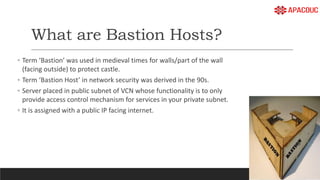
What are Bastion Hosts?
◦ Term ‘Bastion’ was used in medieval times for walls/part of the wall
(facing outside) to protect castle.
◦ Term ‘Bastion Host’ in network security was derived in the 90s.
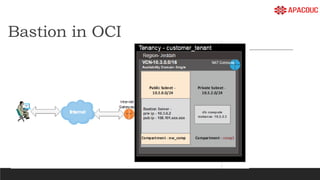
◦ Server placed in public subnet of VCN whose functionality is to only
provide access control mechanism for services in your private subnet.
◦ It is assigned with a public IP facing internet.
Bastion in OCI
◦
How are they configured on Oracle
Cloud?
◦
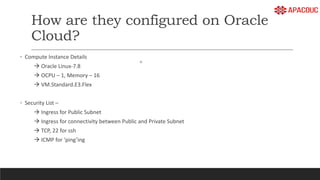
◦ Compute Instance Details
 Oracle Linux-7.8
 OCPU – 1, Memory – 16
 VM.Standard.E3.Flex
◦ Security List –
 Ingress for Public Subnet
 Ingress for connectivity between Public and Private Subnet
 TCP, 22 for ssh
 ICMP for ‘ping’ing
5 important terminologies
◦ Ssh Tunneling –
encrypted tunnel created through a SSH protocol connection.
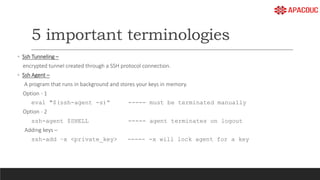
◦ Ssh Agent –
A program that runs in background and stores your keys in memory.
Option - 1
eval "$(ssh-agent -s)“ ----- must be terminated manually
Option - 2
ssh-agent $SHELL ----- agent terminates on logout
Adding keys –
ssh-add –x <private_key> ----- -x will lock agent for a key
Contd…
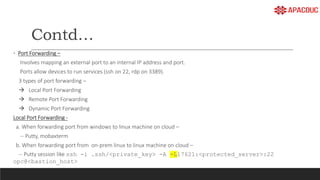
◦ Port Forwarding –
Involves mapping an external port to an internal IP address and port.
Ports allow devices to run services (ssh on 22, rdp on 3389).
3 types of port forwarding –
 Local Port Forwarding
 Remote Port Forwarding
 Dynamic Port Forwarding
Local Port Forwarding -
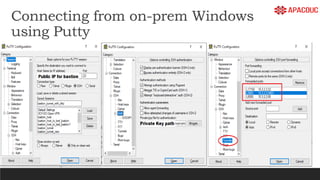
a. When forwarding port from windows to linux machine on cloud –
-- Putty, mobaxterm
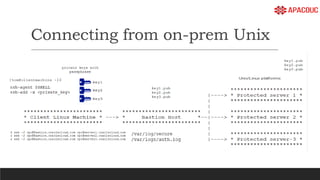
b. When forwarding port from on-prem linux to linux machine on cloud –
-- Putty session like ssh -i .ssh/<private_key> -A -L17621:<protected_server>:22
opc@<bastion_host>
Contd…
◦ IP Forwarding –
This allows forwarding IP packets from one server (Bastion host) to respective servers on Linux or windows in your private
private subnet.
# sysctl net.ipv4.ip_forward
net.ipv4.ip_forward = 1
Connecting from on-prem Unix
Connecting from on-prem Windows
using Putty
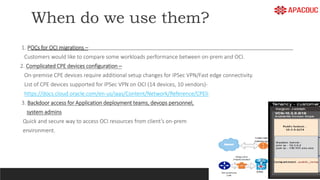
When do we use them?
1. POCs for OCI migrations –
Customers would like to compare some workloads performance between on-prem and OCI.
2. Complicated CPE devices configuration –
On-premise CPE devices require additional setup changes for IPSec VPN/Fast edge connectivity.
List of CPE devices supported for IPSec VPN on OCI (14 devices, 10 vendors)-
https://docs.cloud.oracle.com/en-us/iaas/Content/Network/Reference/CPElist.htm
3. Backdoor access for Application deployment teams, devops personnel,
system admins
Quick and secure way to access OCI resources from client’s on-prem
environment.
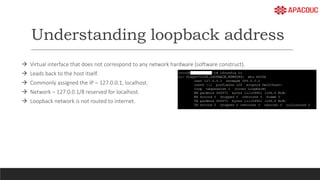
Understanding loopback address
 Virtual interface that does not correspond to any network hardware (software construct).
 Leads back to the host itself.
 Commonly assigned the IP – 127.0.0.1, localhost.
 Network – 127.0.0.1/8 reserved for localhost.
 Loopback network is not routed to internet.
Contd…
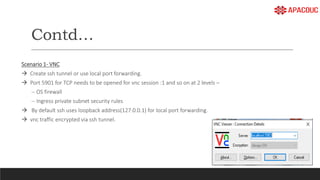
Scenario 1- VNC
 Create ssh tunnel or use local port forwarding.
 Port 5901 for TCP needs to be opened for vnc session :1 and so on at 2 levels –
-- OS firewall
-- Ingress private subnet security rules
 By default ssh uses loopback address(127.0.0.1) for local port forwarding.
 vnc traffic encrypted via ssh tunnel.
Contd…
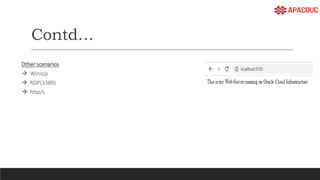
Other scenarios
 Winscp
 RDP(3389)
 http/s
Securing Bastion Hosts
1. Ingress Rule for Public Subnet
Security list for public subnet to accept connections only from On-prem CPE Public IP.
2. Protocol and Ports
1. TCP/22 -- ssh connectivity
2. ICMP type 8 -- ping
3. Disable irrelevant user ids at OS
You can get list of users from /etc/passwd file and users can be set to /sbin/nologin like as follows -
demouser:x:1000:1000:demouser:/home/demouser:/sbin/nologin
Contd..
4. Packages installed -
Remove irrelevant packages. Keep bastion host as 'lite' as possible by avoiding unnecessary packages being installed as
this will result in services running and eventually leading to attackers trying to hack into the system.
5. SSH session and Log Management.
Track each user with a separate key pair.
Make sure logs are shipped to object storage at regular intervals.
Custom script on bastion host to track sessions with scriptreplay.
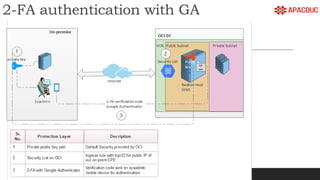
6. Enabling 2-factor authentication for bastion server
Implementing 2-factor authentication for Bastion server on OCI with Google Authenticator.
7. Disclaimer Banner for ssh logins.
Warn those malicious users or unauthorized users.
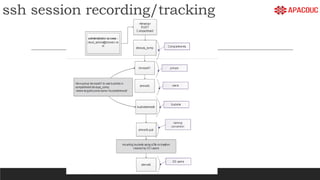
ssh session recording/tracking
Approach – Session
recording/tracking
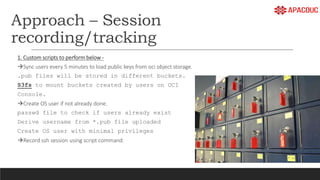
1. Custom scripts to perform below -
Sync users every 5 minutes to load public keys from oci object storage.
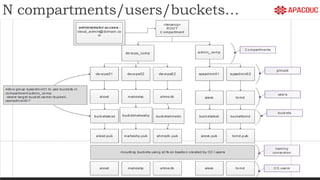
.pub files will be stored in different buckets.
S3fs to mount buckets created by users on OCI
Console.
Create OS user if not already done.
passwd file to check if users already exist
Derive username from *.pub file uploaded
Create OS user with minimal privileges
Record ssh session using script command.
Approach..contd..
2. Manual creation of access control to private servers
Prepared a list of users and mapped them to set of protected servers they are eligible to access.
Manually shipped users’ public keys for 2nd hop.
3. Intentionally disable IP forwarding
This was to avoid using proxy jump option.
Users will connect in 2 hops (ssh user ->bastion, ssh bastion ->destination server)
4. User  Bastion (automated), Bastion Protected Server (manual)
Tedious task if you have many users and many protected servers/bastion servers.
5. Logs to be shipped to object storage for long term retention
Cron job should suffice.
House-keeping to make sure logs mount point has enough space on bastion.
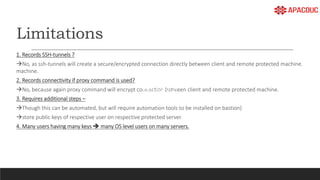
Limitations
1. Records SSH-tunnels ?
No, as ssh-tunnels will create a secure/encrypted connection directly between client and remote protected machine.
machine.
2. Records connectivity if proxy command is used?
No, because again proxy command will encrypt connection between client and remote protected machine.
3. Requires additional steps –
Though this can be automated, but will require automation tools to be installed on bastion)
store public keys of respective user on respective protected server.
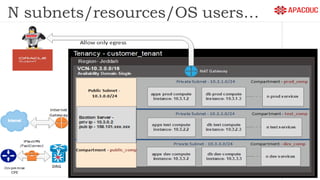
4. Many users having many keys  many OS level users on many servers.
N compartments/users/buckets…
N subnets/resources/OS users…
◦
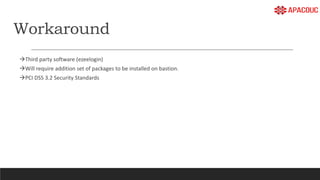
Workaround
Third party software (ezeelogin)
Will require addition set of packages to be installed on bastion.
PCI DSS 3.2 Security Standards
2-FA authentication with GA
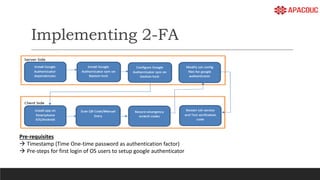
Implementing 2-FA
Pre-requisites
 Timestamp (Time One-time password as authentication factor)
 Pre-steps for first login of OS users to setup google authenticator
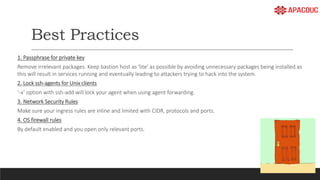
Best Practices
1. Passphrase for private key
Remove irrelevant packages. Keep bastion host as 'lite' as possible by avoiding unnecessary packages being installed as
this will result in services running and eventually leading to attackers trying to hack into the system.
2. Lock ssh-agents for Unix clients
‘-x’ option with ssh-add will lock your agent when using agent forwarding.
3. Network Security Rules
Make sure your ingress rules are inline and limited with CIDR, protocols and ports.
4. OS firewall rules
By default enabled and you open only relevant ports.
Contd..
5. Bastion hardening -
Remove irrelevant packages
Limit OS user access
Access control and logging.
2-factor auth.
Avoid ‘sudo’ing, but make sure your logs are shipped to object storage.
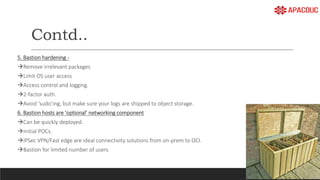
6. Bastion hosts are ‘optional’ networking component
Can be quickly deployed.
Initial POCs.
IPSec VPN/Fast edge are ideal connectivity solutions from on-prem to OCI.
Bastion for limited number of users
Contd..
7. Avoid using ‘-g’ option when creating tunnels
Local forwarding tunnels with ‘-g’ will allow all network interfaces for port binding.
8. loopback address for redirecting services (ssh uses this by default)
Loopback address is local to its host. One machine’s loopback address can’t contact the loopback address of another.
Alternatives
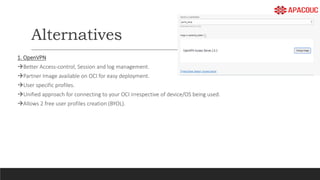
1. OpenVPN
Better Access-control, Session and log management.
Partner Image available on OCI for easy deployment.
User specific profiles.
Unified approach for connecting to your OCI irrespective of device/OS being used.
Allows 2 free user profiles creation (BYOL).
Questions?
Comments?
References
https://www.oracle.com/a/ocom/docs/bastion-hosts.pdf
https://www.ateam-oracle.com/ssh-tunnel-to-a-private-vm-using-a-bastion-host-in-oci
https://docstore.mik.ua/orelly/networking_2ndEd/ssh/ch09_02.htm#ch09-17854.html
Thank You
Maaz Khan
https://maazdba.blogspot.com/
linkedin.com/in/04maazkhan

Introducing bastion hosts for oracle cloud infrastructure v1.0

  • 1.
    Introducing Bastion Hosts forOracle Cloud Infrastructure MAAZ KHAN
  • 2.
    About Me ◦ OracleApps DBA with 9 years of experience. ◦ Oracle ACE. ◦ Oracle Cloud, Oracle E-business Suite, Oracle Database Administration. ◦ Oracle Community Contributor – OTN, MOSC, Cloud Customer Connect. ◦ Blogger -
  • 3.
    3 membership tiers Connect:@oracleace Facebook.com/oracleaces oracle-ace_ww@oracle.com 500+ technical experts helping peers globally The Oracle ACE Program recognizes and rewards community members for their technical contributions in the Oracle community Nominate yourself or someone you know: acenomination.oracle.com For more details on Oracle ACE Program: bit.ly/OracleACEProgram
  • 4.
    Agenda ◦ What isa Bastion Host? ◦ Bastion in OCI ◦ How are they configured on Oracle Cloud? ◦ When do we use them? ◦ Securing Bastion host ◦ Best Practices and alternatives
  • 5.
    What are BastionHosts? ◦ Term ‘Bastion’ was used in medieval times for walls/part of the wall (facing outside) to protect castle. ◦ Term ‘Bastion Host’ in network security was derived in the 90s. ◦ Server placed in public subnet of VCN whose functionality is to only provide access control mechanism for services in your private subnet. ◦ It is assigned with a public IP facing internet.
  • 6.
  • 7.
    How are theyconfigured on Oracle Cloud? ◦ ◦ Compute Instance Details  Oracle Linux-7.8  OCPU – 1, Memory – 16  VM.Standard.E3.Flex ◦ Security List –  Ingress for Public Subnet  Ingress for connectivity between Public and Private Subnet  TCP, 22 for ssh  ICMP for ‘ping’ing
  • 8.
    5 important terminologies ◦Ssh Tunneling – encrypted tunnel created through a SSH protocol connection. ◦ Ssh Agent – A program that runs in background and stores your keys in memory. Option - 1 eval "$(ssh-agent -s)“ ----- must be terminated manually Option - 2 ssh-agent $SHELL ----- agent terminates on logout Adding keys – ssh-add –x <private_key> ----- -x will lock agent for a key
  • 9.
    Contd… ◦ Port Forwarding– Involves mapping an external port to an internal IP address and port. Ports allow devices to run services (ssh on 22, rdp on 3389). 3 types of port forwarding –  Local Port Forwarding  Remote Port Forwarding  Dynamic Port Forwarding Local Port Forwarding - a. When forwarding port from windows to linux machine on cloud – -- Putty, mobaxterm b. When forwarding port from on-prem linux to linux machine on cloud – -- Putty session like ssh -i .ssh/<private_key> -A -L17621:<protected_server>:22 opc@<bastion_host>
  • 10.
    Contd… ◦ IP Forwarding– This allows forwarding IP packets from one server (Bastion host) to respective servers on Linux or windows in your private private subnet. # sysctl net.ipv4.ip_forward net.ipv4.ip_forward = 1
  • 11.
  • 12.
    Connecting from on-premWindows using Putty
  • 13.
    When do weuse them? 1. POCs for OCI migrations – Customers would like to compare some workloads performance between on-prem and OCI. 2. Complicated CPE devices configuration – On-premise CPE devices require additional setup changes for IPSec VPN/Fast edge connectivity. List of CPE devices supported for IPSec VPN on OCI (14 devices, 10 vendors)- https://docs.cloud.oracle.com/en-us/iaas/Content/Network/Reference/CPElist.htm 3. Backdoor access for Application deployment teams, devops personnel, system admins Quick and secure way to access OCI resources from client’s on-prem environment.
  • 14.
    Understanding loopback address Virtual interface that does not correspond to any network hardware (software construct).  Leads back to the host itself.  Commonly assigned the IP – 127.0.0.1, localhost.  Network – 127.0.0.1/8 reserved for localhost.  Loopback network is not routed to internet.
  • 15.
    Contd… Scenario 1- VNC Create ssh tunnel or use local port forwarding.  Port 5901 for TCP needs to be opened for vnc session :1 and so on at 2 levels – -- OS firewall -- Ingress private subnet security rules  By default ssh uses loopback address(127.0.0.1) for local port forwarding.  vnc traffic encrypted via ssh tunnel.
  • 16.
  • 17.
    Securing Bastion Hosts 1.Ingress Rule for Public Subnet Security list for public subnet to accept connections only from On-prem CPE Public IP. 2. Protocol and Ports 1. TCP/22 -- ssh connectivity 2. ICMP type 8 -- ping 3. Disable irrelevant user ids at OS You can get list of users from /etc/passwd file and users can be set to /sbin/nologin like as follows - demouser:x:1000:1000:demouser:/home/demouser:/sbin/nologin
  • 18.
    Contd.. 4. Packages installed- Remove irrelevant packages. Keep bastion host as 'lite' as possible by avoiding unnecessary packages being installed as this will result in services running and eventually leading to attackers trying to hack into the system. 5. SSH session and Log Management. Track each user with a separate key pair. Make sure logs are shipped to object storage at regular intervals. Custom script on bastion host to track sessions with scriptreplay. 6. Enabling 2-factor authentication for bastion server Implementing 2-factor authentication for Bastion server on OCI with Google Authenticator. 7. Disclaimer Banner for ssh logins. Warn those malicious users or unauthorized users.
  • 19.
  • 20.
    Approach – Session recording/tracking 1.Custom scripts to perform below - Sync users every 5 minutes to load public keys from oci object storage. .pub files will be stored in different buckets. S3fs to mount buckets created by users on OCI Console. Create OS user if not already done. passwd file to check if users already exist Derive username from *.pub file uploaded Create OS user with minimal privileges Record ssh session using script command.
  • 21.
    Approach..contd.. 2. Manual creationof access control to private servers Prepared a list of users and mapped them to set of protected servers they are eligible to access. Manually shipped users’ public keys for 2nd hop. 3. Intentionally disable IP forwarding This was to avoid using proxy jump option. Users will connect in 2 hops (ssh user ->bastion, ssh bastion ->destination server) 4. User  Bastion (automated), Bastion Protected Server (manual) Tedious task if you have many users and many protected servers/bastion servers. 5. Logs to be shipped to object storage for long term retention Cron job should suffice. House-keeping to make sure logs mount point has enough space on bastion.
  • 22.
    Limitations 1. Records SSH-tunnels? No, as ssh-tunnels will create a secure/encrypted connection directly between client and remote protected machine. machine. 2. Records connectivity if proxy command is used? No, because again proxy command will encrypt connection between client and remote protected machine. 3. Requires additional steps – Though this can be automated, but will require automation tools to be installed on bastion) store public keys of respective user on respective protected server. 4. Many users having many keys  many OS level users on many servers.
  • 23.
  • 24.
  • 25.
    Workaround Third party software(ezeelogin) Will require addition set of packages to be installed on bastion. PCI DSS 3.2 Security Standards
  • 26.
  • 27.
    Implementing 2-FA Pre-requisites  Timestamp(Time One-time password as authentication factor)  Pre-steps for first login of OS users to setup google authenticator
  • 28.
    Best Practices 1. Passphrasefor private key Remove irrelevant packages. Keep bastion host as 'lite' as possible by avoiding unnecessary packages being installed as this will result in services running and eventually leading to attackers trying to hack into the system. 2. Lock ssh-agents for Unix clients ‘-x’ option with ssh-add will lock your agent when using agent forwarding. 3. Network Security Rules Make sure your ingress rules are inline and limited with CIDR, protocols and ports. 4. OS firewall rules By default enabled and you open only relevant ports.
  • 29.
    Contd.. 5. Bastion hardening- Remove irrelevant packages Limit OS user access Access control and logging. 2-factor auth. Avoid ‘sudo’ing, but make sure your logs are shipped to object storage. 6. Bastion hosts are ‘optional’ networking component Can be quickly deployed. Initial POCs. IPSec VPN/Fast edge are ideal connectivity solutions from on-prem to OCI. Bastion for limited number of users
  • 30.
    Contd.. 7. Avoid using‘-g’ option when creating tunnels Local forwarding tunnels with ‘-g’ will allow all network interfaces for port binding. 8. loopback address for redirecting services (ssh uses this by default) Loopback address is local to its host. One machine’s loopback address can’t contact the loopback address of another.
  • 31.
    Alternatives 1. OpenVPN Better Access-control,Session and log management. Partner Image available on OCI for easy deployment. User specific profiles. Unified approach for connecting to your OCI irrespective of device/OS being used. Allows 2 free user profiles creation (BYOL).
  • 32.
  • 33.
  • 34.