First steps with
Kubernetes
About the author
● Vinícius Frantz Kroth
● Microservices and DevOps Enthusiast
● Backend Developer
● Medium :
https://medium.com/@vinicius.kroth
● Github : https://github.com/ViniFKroth
Presentation Summary
● Why to use kubernetes? (Main motivations and benefits)
● How does it works? (Architecture and main concepts)
● Real life use scenarios
Taking a step back, what are containers?
In a nutshell, containers are a Lightweight, Reliable and Quick
packaging for a software and all his dependencies. Moving easily
from one computer system to another.
Taking a step back, why even use containers?
● Immutable infrastructure.
● Easy Reproducibility.
● Isolation, all configurations and installations of a container are
bounded to his own limits, not affecting the host.
● Good option for multi-cloud approaches.
● Baking, and deployment processes and way faster than regular
VM's.
Summing up, containers are simple, efficient and
easy to scale. But what happens when your
containers start to pile up?
That's when Kubernetes comes in to play!
What K8S brings to the table
● Declarative configurations via YML files
● Load Balancing
● Autoscaling
● Health checking
● Service Discovery
And the list goes on ...
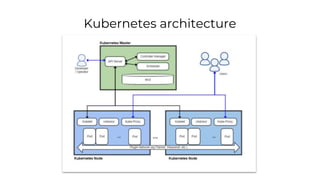
Kubernetes architecture
Kubernetes master
● Composed by 3 processes (kube-apiserver, kube-
controller-manager and kube-scheduler)
● Maintains the desired state for the K8S cluster.
● Replicable for HA purposes.
● May use ETCD, a K/V storage, containing all the cluster's
data.
● Serve as a "gateway" for the communication between the
cluster and the outside world.
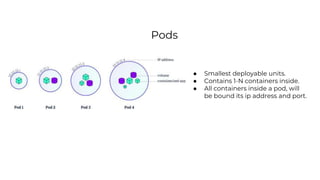
Pods
● Smallest deployable units.
● Contains 1-N containers inside.
● All containers inside a pod, will
be bound its ip address and port.
Services
● An abstraction of the application running inside the pod.
● Defines the access rules for the pod.
● Assist on the pods communication.
● Service types: Load balancing, Discover services, Publishing
Services...
Volumes
● An abstraction for the persistent storage of containers
information.
● Can be used to share information and files between the
containers.
● Provides the data for the container's eventual re-creation.
Replica Sets
● Maintains a steady set of replica Pods running.
● Creates/deletes pods to match a defined criteria.
● It's most usually managed in a upper-level by a
Deployment.
Deployment
● Provides declarative updates for pods and replica sets.
● Creates/deletes replica sets.
Worker nodes
● AKA minions.
● The grouping of one or several pods, services, replica sets,
etc...
● Physical machine, or VM, depending on the cluster.
● Runs a container runtime (Docker, cri-o…)
● Always contains both kubelet and kuby-proxy.
Kubelet
● Agents that runs in every
worker node.
● Makes sure that
containers are running
healthy inside a pod.
● Controls the lifecycle of a
container (from birth to
death)
● Network proxy running
inside every node
● Supports TCP/UDP for
forwarding messages.
Kube-proxy
Some real life use cases
● Reddit: 7 K8S's clusters, 30% of engineers working on K8S's, over 20
deploys a day.
● Tinder: Almost 50,000 running containers, 1,000 nodes, and 15,000
pods.
● AirBnb: Over 250 services deployed on a cluster, with over 1000
engineers working on it.
● Ebay, IBM, Pokemon Go, Spotify...
Recommended readings
● Official Documentation:
https://kubernetes.io/docs/
● Big picture explanation: https://itnext.io/murder-on-the-kubernetes-express-
the-life-and-death-of-a-docker-container-d7aec13f8188
● Use cases: https://dzone.com/articles/how-big-companies-are-using-
kubernetes
● Kubernetes 101: https://medium.com/@diego_pacheco/kubernetes-101-
bd07bc95f3e6
● Case studies: https://kubernetes.io/case-
studies/
Any questions?

First steps with kubernetes

  • 1.
  • 2.
    About the author ●Vinícius Frantz Kroth ● Microservices and DevOps Enthusiast ● Backend Developer ● Medium : https://medium.com/@vinicius.kroth ● Github : https://github.com/ViniFKroth
  • 3.
    Presentation Summary ● Whyto use kubernetes? (Main motivations and benefits) ● How does it works? (Architecture and main concepts) ● Real life use scenarios
  • 4.
    Taking a stepback, what are containers? In a nutshell, containers are a Lightweight, Reliable and Quick packaging for a software and all his dependencies. Moving easily from one computer system to another.
  • 5.
    Taking a stepback, why even use containers? ● Immutable infrastructure. ● Easy Reproducibility. ● Isolation, all configurations and installations of a container are bounded to his own limits, not affecting the host. ● Good option for multi-cloud approaches. ● Baking, and deployment processes and way faster than regular VM's.
  • 6.
    Summing up, containersare simple, efficient and easy to scale. But what happens when your containers start to pile up? That's when Kubernetes comes in to play!
  • 7.
    What K8S bringsto the table ● Declarative configurations via YML files ● Load Balancing ● Autoscaling ● Health checking ● Service Discovery And the list goes on ...
  • 8.
  • 9.
    Kubernetes master ● Composedby 3 processes (kube-apiserver, kube- controller-manager and kube-scheduler) ● Maintains the desired state for the K8S cluster. ● Replicable for HA purposes. ● May use ETCD, a K/V storage, containing all the cluster's data. ● Serve as a "gateway" for the communication between the cluster and the outside world.
  • 10.
    Pods ● Smallest deployableunits. ● Contains 1-N containers inside. ● All containers inside a pod, will be bound its ip address and port.
  • 11.
    Services ● An abstractionof the application running inside the pod. ● Defines the access rules for the pod. ● Assist on the pods communication. ● Service types: Load balancing, Discover services, Publishing Services...
  • 12.
    Volumes ● An abstractionfor the persistent storage of containers information. ● Can be used to share information and files between the containers. ● Provides the data for the container's eventual re-creation.
  • 13.
    Replica Sets ● Maintainsa steady set of replica Pods running. ● Creates/deletes pods to match a defined criteria. ● It's most usually managed in a upper-level by a Deployment.
  • 14.
    Deployment ● Provides declarativeupdates for pods and replica sets. ● Creates/deletes replica sets.
  • 15.
    Worker nodes ● AKAminions. ● The grouping of one or several pods, services, replica sets, etc... ● Physical machine, or VM, depending on the cluster. ● Runs a container runtime (Docker, cri-o…) ● Always contains both kubelet and kuby-proxy.
  • 16.
    Kubelet ● Agents thatruns in every worker node. ● Makes sure that containers are running healthy inside a pod. ● Controls the lifecycle of a container (from birth to death) ● Network proxy running inside every node ● Supports TCP/UDP for forwarding messages. Kube-proxy
  • 17.
    Some real lifeuse cases ● Reddit: 7 K8S's clusters, 30% of engineers working on K8S's, over 20 deploys a day. ● Tinder: Almost 50,000 running containers, 1,000 nodes, and 15,000 pods. ● AirBnb: Over 250 services deployed on a cluster, with over 1000 engineers working on it. ● Ebay, IBM, Pokemon Go, Spotify...
  • 18.
    Recommended readings ● OfficialDocumentation: https://kubernetes.io/docs/ ● Big picture explanation: https://itnext.io/murder-on-the-kubernetes-express- the-life-and-death-of-a-docker-container-d7aec13f8188 ● Use cases: https://dzone.com/articles/how-big-companies-are-using- kubernetes ● Kubernetes 101: https://medium.com/@diego_pacheco/kubernetes-101- bd07bc95f3e6 ● Case studies: https://kubernetes.io/case- studies/
  • 19.