Introduction to Force.com Canvas Apps
Jay Hurst, Salesforce.com, Product Manager – Force.com Canvas
@extraidea
Chris Jolley, Salesforce.com, Lead Developer – Force.com Canvas
@jolley
Safe Harbor
       Safe harbor statement under the Private Securities Litigation Reform Act of 1995:

       This presentation may contain forward-looking statements that involve risks, uncertainties, and assumptions. If any such
       uncertainties materialize or if any of the assumptions proves incorrect, the results of salesforce.com, inc. could differ materially
       from the results expressed or implied by the forward-looking statements we make. All statements other than statements of
       historical fact could be deemed forward-looking, including any projections of product or service availability, subscriber growth,
       earnings, revenues, or other financial items and any statements regarding strategies or plans of management for future
       operations, statements of belief, any statements concerning new, planned, or upgraded services or technology developments
       and customer contracts or use of our services.

       The risks and uncertainties referred to above include – but are not limited to – risks associated with developing and delivering
       new functionality for our service, new products and services, our new business model, our past operating losses, possible
       fluctuations in our operating results and rate of growth, interruptions or delays in our Web hosting, breach of our security
       measures, the outcome of intellectual property and other litigation, risks associated with possible mergers and acquisitions, the
       immature market in which we operate, our relatively limited operating history, our ability to expand, retain, and motivate our
       employees and manage our growth, new releases of our service and successful customer deployment, our limited history
       reselling non-salesforce.com products, and utilization and selling to larger enterprise customers. Further information on potential
       factors that could affect the financial results of salesforce.com, inc. is included in our annual report on Form 10-Q for the most
       recent fiscal quarter ended July 31, 2012. This documents and others containing important disclosures are available on the SEC
       Filings section of the Investor Information section of our Web site.

       Any unreleased services or features referenced in this or other presentations, press releases or public statements are not
       currently available and may not be delivered on time or at all. Customers who purchase our services should make the purchase
       decisions based upon features that are currently available. Salesforce.com, inc. assumes no obligation and does not intend to
       update these forward-looking statements.

Join the conversation: #forcewebinar
Speakers

                              Jay Hurst             Chris Jolley             Ian Sweeney
                          Product Manager –   Lead Developer – Force.com   Taulia VP of Product,
                          Force.com Canvas,            Canvas,                   @rudnua
                              @extraidea               @jolley                    @taulia


Join the conversation: #forcewebinar
Follow Developer Force for the latest news

                         @forcedotcom / #forcewebinar

                         Developer Force – Force.com Community


                         +Developer Force – Force.com Community


                         Developer Force

                         Developer Force group
Join the conversation: #forcewebinar
Agenda

         §  Overview of Force.com Canvas
         §  Demonstrate creating and using a Force.com Canvas App
         §  Demos of how Partners have used Force.com Canvas
         §  Q&A
                 § Ask Questions in the GoToWebinar Question Panel
         §  Next Steps


Join the conversation: #forcewebinar
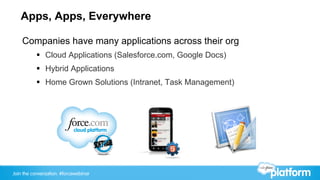
Apps, Apps, Everywhere

    Companies have many applications across their org
           §  Cloud Applications (Salesforce.com, Google Docs)
           §  Hybrid Applications
           §  Home Grown Solutions (Intranet, Task Management)


Join the conversation: #forcewebinar
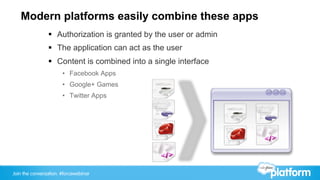
Modern platforms easily combine these apps
                §  Authorization is granted by the user or admin
                §  The application can act as the user
                §  Content is combined into a single interface
                       •  Facebook Apps
                       •  Google+ Games
                       •  Twitter Apps


Join the conversation: #forcewebinar
Introducing Force.com Canvas

       New PILOT platform service to allow for external
       applications to be easily and securely integrated into
       Salesforce from their native environment with little re-design.
           §  Services Include
                 •  JavaScript SDK
                 •  Simplified Authentication (Signed Request or OAuth)
                 •  Context Services
                 •  Cross Domain API Calls
                 •  App Registration and Management


Join the conversation: #forcewebinar
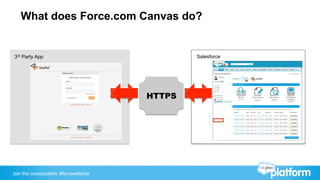
What does Force.com Canvas do?


3rd Party App                                  Salesforce


                                       SDK
                                       HTTPS


Join the conversation: #forcewebinar
Technologies used in Force.com Canvas

           §  JavaScript SDK
                 §  Allows connections from 3rdy Party back into salesforce via the browser

           §  Signed Request
                 §  POST data sent to the 3rd Party App
                        –  Contains Context Information
                               »  User Info
                               »  Org Info
                               »  Environment Info
                               »  Authentication Info
                        –  Standard JSON format
                        –  Methods for Verifying the content are detailed in the Quick Start code


Join the conversation: #forcewebinar
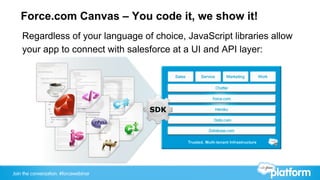
Force.com Canvas – You code it, we show it!
    Regardless of your language of choice, JavaScript libraries allow
    your app to connect with salesforce at a UI and API layer:


Join the conversation: #forcewebinar
Force.com Canvas In Action

    Canvas App Walkthrough:
           §  Create a Canvas App
           §  Demo the app in the Canvas App Previewer and Chatter Tab
           §  Show the Canvas App interact with Chatter
           §  Publish the Canvas App for other orgs
           §  Install the Canvas App in another org and show it running
           §  Show that changes to the code are instantly available


Join the conversation: #forcewebinar
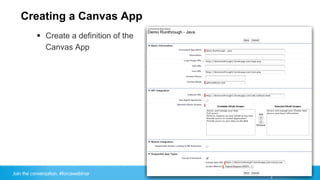
Creating a Canvas App
           §  Create a definition of the
               Canvas App


Join the conversation: #forcewebinar
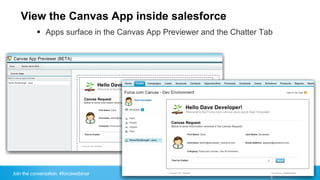
View the Canvas App inside salesforce
           §  Apps surface in the Canvas App Previewer and the Chatter Tab


Join the conversation: #forcewebinar
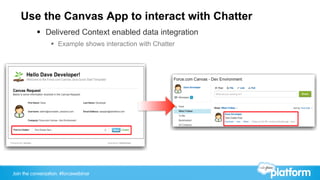
Use the Canvas App to interact with Chatter
           §  Delivered Context enabled data integration
                 §  Example shows interaction with Chatter


Join the conversation: #forcewebinar
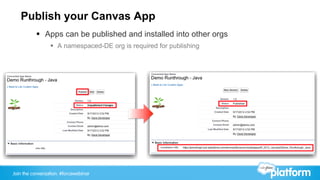
Publish your Canvas App
          §  Apps can be published and installed into other orgs
                 §  A namespaced-DE org is required for publishing


Join the conversation: #forcewebinar
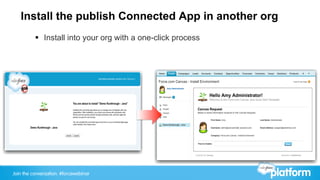
Install the publish Connected App in another org
          §  Install into your org with a one-click process


Join the conversation: #forcewebinar
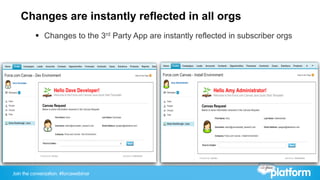
Changes are instantly reflected in all orgs
          §  Changes to the 3rd Party App are instantly reflected in subscriber orgs


Join the conversation: #forcewebinar
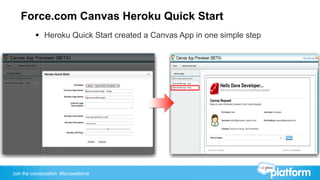
Force.com Canvas Heroku Quick Start
          §  Heroku Quick Start created a Canvas App in one simple step


Join the conversation: #forcewebinar
Force.com Canvas in the real world

           §  How are existing customers/partners using Force.com Canvas?


Join the conversation: #forcewebinar
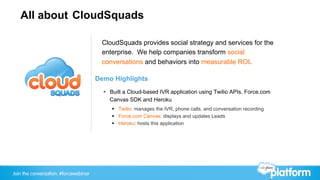
All about CloudSquads

                                        CloudSquads provides social strategy and services for the
                                        enterprise. We help companies transform social
                                        conversations and behaviors into measurable ROI.

                                       Demo Highlights
                                         §  Built a Cloud-based IVR application using Twilio APIs, Force.com
                                             Canvas SDK and Heroku
                                            §  Twilio: manages the IVR, phone calls, and conversation recording
                                            §  Force.com Canvas: displays and updates Leads
                                            §  Heroku: hosts this application


Join the conversation: #forcewebinar
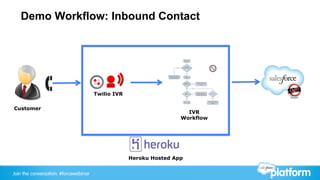
Demo Workflow: Inbound Contact


                                       Twilio IVR

Customer
                                                                      IVR
                                                                    Workflow


                                                    Heroku Hosted App


Join the conversation: #forcewebinar
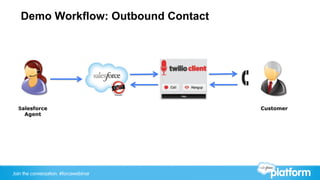
Demo Workflow: Outbound Contact


  Salesforce                           Customer
    Agent


Join the conversation: #forcewebinar
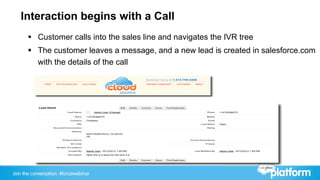
Interaction begins with a Call
       §  Customer calls into the sales line and navigates the IVR tree
       §  The customer leaves a message, and a new lead is created in salesforce.com
           with the details of the call


Join the conversation: #forcewebinar
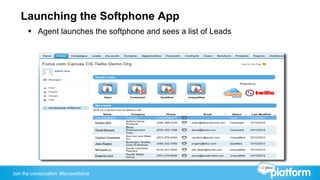
Launching the Softphone App
       §  Agent launches the softphone and sees a list of Leads


Join the conversation: #forcewebinar
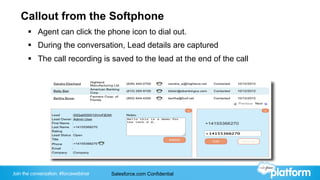
Callout from the Softphone
       §  Agent can click the phone icon to dial out.
       §  During the conversation, Lead details are captured
       §  The call recording is saved to the lead at the end of the call


Join the conversation: #forcewebinar   Salesforce.com Confidential
Demo


Join the conversation: #forcewebinar
Ian Sweeney
                                       Taulia
                                       Vice President of Product
                                       @rudnua
                                       @taulia


Join the conversation: #forcewebinar
All about Taulia
                                       Taulia Optimizes the Financial Supply Chain.
                                       With Taulia’s Dynamic Payment Platform:

                                         §  Buyers Save Millions on their Spend
                                         §  Suppliers Get Paid Faster
                                         §  Everyone Streamlines Processes
                                         §  Better Communication, More Harmony


                                       Invoicing and Payments, without Friction or Waste.
                                       That’s Taulia.


Join the conversation: #forcewebinar
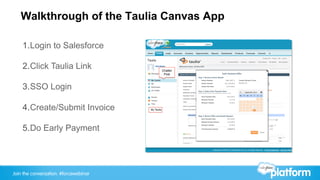
Walkthrough of the Taulia Canvas App

    1. Login to Salesforce

    2. Click Taulia Link                           Chatter
                                                    Post


    3. SSO Login

    4. Create/Submit Invoice           My Taulia


    5. Do Early Payment


Join the conversation: #forcewebinar
Demo


Join the conversation: #forcewebinar
Taulia’s Experience with Force.com Canvas

        §  Sufficient Sample Code and Documentation that Makes
            the Integration Very Easy
        §  Implemented
               §  Force.com Canvas
               §  Chatter REST API
        §  Integration & Testing Took < 1 Day


Join the conversation: #forcewebinar
Force.com Canvas wrapped in a little bow

    In today’s session we have:
           §  Walked through an initial Sample Canvas Application
                 •  Saw the basics behind the Force.com Canvas
                 •  Walked through an initial sample Canvas Application

           §  Discovered how current Partners have begun using the Force.com
               Canvas


Join the conversation: #forcewebinar
Where to now?
       Force.com Canvas Resources can be found at
             §  Force.com Canvas Developer Site - http://bit.ly/forcecanvas
             §  Force.com Canvas Developer Guide - http://bit.ly/canvasdeveloperguide
             §  Dreamforce Workshop Guide - http://bit.ly/canvasworkshop
             §  Blogs - http://bit.ly/canvasblogs
             §  Discussion Board - http://bit.ly/canvasdiscussionboards
       Contact Us:
             §  Email or tweet Jay – jhurst@salesforce.com/@extraidea
             §  Tweet @forcedorcom with #forcewebinar


Join the conversation: #forcewebinar
Survey
           Your feedback is crucial to the success of our webinar programs.
                                        Thank you!


                           http://bit.ly/canvassurvey


Join the conversation: #forcewebinar
Q&A

                              Jay Hurst             Chris Jolley             Ian Sweeney
                          Product Manager –   Lead Developer – Force.com   Taulia VP of Product,
                          Force.com Canvas,            Canvas,                   @rudnua
                              @extraidea               @jolley                    @taulia


Join the conversation: #forcewebinar
Thank You!


Join the conversation: #forcewebinar

Intro to Force.com Canvas: Running External Apps within the Salesforce UI Webinar

  • 1.
    Introduction to Force.comCanvas Apps Jay Hurst, Salesforce.com, Product Manager – Force.com Canvas @extraidea Chris Jolley, Salesforce.com, Lead Developer – Force.com Canvas @jolley
  • 2.
    Safe Harbor Safe harbor statement under the Private Securities Litigation Reform Act of 1995: This presentation may contain forward-looking statements that involve risks, uncertainties, and assumptions. If any such uncertainties materialize or if any of the assumptions proves incorrect, the results of salesforce.com, inc. could differ materially from the results expressed or implied by the forward-looking statements we make. All statements other than statements of historical fact could be deemed forward-looking, including any projections of product or service availability, subscriber growth, earnings, revenues, or other financial items and any statements regarding strategies or plans of management for future operations, statements of belief, any statements concerning new, planned, or upgraded services or technology developments and customer contracts or use of our services. The risks and uncertainties referred to above include – but are not limited to – risks associated with developing and delivering new functionality for our service, new products and services, our new business model, our past operating losses, possible fluctuations in our operating results and rate of growth, interruptions or delays in our Web hosting, breach of our security measures, the outcome of intellectual property and other litigation, risks associated with possible mergers and acquisitions, the immature market in which we operate, our relatively limited operating history, our ability to expand, retain, and motivate our employees and manage our growth, new releases of our service and successful customer deployment, our limited history reselling non-salesforce.com products, and utilization and selling to larger enterprise customers. Further information on potential factors that could affect the financial results of salesforce.com, inc. is included in our annual report on Form 10-Q for the most recent fiscal quarter ended July 31, 2012. This documents and others containing important disclosures are available on the SEC Filings section of the Investor Information section of our Web site. Any unreleased services or features referenced in this or other presentations, press releases or public statements are not currently available and may not be delivered on time or at all. Customers who purchase our services should make the purchase decisions based upon features that are currently available. Salesforce.com, inc. assumes no obligation and does not intend to update these forward-looking statements. Join the conversation: #forcewebinar
  • 3.
    Speakers Jay Hurst Chris Jolley Ian Sweeney Product Manager – Lead Developer – Force.com Taulia VP of Product, Force.com Canvas, Canvas, @rudnua @extraidea @jolley @taulia Join the conversation: #forcewebinar
  • 4.
    Follow Developer Forcefor the latest news @forcedotcom / #forcewebinar Developer Force – Force.com Community +Developer Force – Force.com Community Developer Force Developer Force group Join the conversation: #forcewebinar
  • 5.
    Agenda §  Overview of Force.com Canvas §  Demonstrate creating and using a Force.com Canvas App §  Demos of how Partners have used Force.com Canvas §  Q&A § Ask Questions in the GoToWebinar Question Panel §  Next Steps Join the conversation: #forcewebinar
  • 6.
    Apps, Apps, Everywhere Companies have many applications across their org §  Cloud Applications (Salesforce.com, Google Docs) §  Hybrid Applications §  Home Grown Solutions (Intranet, Task Management) Join the conversation: #forcewebinar
  • 7.
    Modern platforms easilycombine these apps §  Authorization is granted by the user or admin §  The application can act as the user §  Content is combined into a single interface •  Facebook Apps •  Google+ Games •  Twitter Apps Join the conversation: #forcewebinar
  • 8.
    Introducing Force.com Canvas New PILOT platform service to allow for external applications to be easily and securely integrated into Salesforce from their native environment with little re-design. §  Services Include •  JavaScript SDK •  Simplified Authentication (Signed Request or OAuth) •  Context Services •  Cross Domain API Calls •  App Registration and Management Join the conversation: #forcewebinar
  • 9.
    What does Force.comCanvas do? 3rd Party App Salesforce SDK HTTPS Join the conversation: #forcewebinar
  • 10.
    Technologies used inForce.com Canvas §  JavaScript SDK §  Allows connections from 3rdy Party back into salesforce via the browser §  Signed Request §  POST data sent to the 3rd Party App –  Contains Context Information »  User Info »  Org Info »  Environment Info »  Authentication Info –  Standard JSON format –  Methods for Verifying the content are detailed in the Quick Start code Join the conversation: #forcewebinar
  • 11.
    Force.com Canvas –You code it, we show it! Regardless of your language of choice, JavaScript libraries allow your app to connect with salesforce at a UI and API layer: Join the conversation: #forcewebinar
  • 12.
    Force.com Canvas InAction Canvas App Walkthrough: §  Create a Canvas App §  Demo the app in the Canvas App Previewer and Chatter Tab §  Show the Canvas App interact with Chatter §  Publish the Canvas App for other orgs §  Install the Canvas App in another org and show it running §  Show that changes to the code are instantly available Join the conversation: #forcewebinar
  • 13.
    Creating a CanvasApp §  Create a definition of the Canvas App Join the conversation: #forcewebinar
  • 14.
    View the CanvasApp inside salesforce §  Apps surface in the Canvas App Previewer and the Chatter Tab Join the conversation: #forcewebinar
  • 15.
    Use the CanvasApp to interact with Chatter §  Delivered Context enabled data integration §  Example shows interaction with Chatter Join the conversation: #forcewebinar
  • 16.
    Publish your CanvasApp §  Apps can be published and installed into other orgs §  A namespaced-DE org is required for publishing Join the conversation: #forcewebinar
  • 17.
    Install the publishConnected App in another org §  Install into your org with a one-click process Join the conversation: #forcewebinar
  • 18.
    Changes are instantlyreflected in all orgs §  Changes to the 3rd Party App are instantly reflected in subscriber orgs Join the conversation: #forcewebinar
  • 19.
    Force.com Canvas HerokuQuick Start §  Heroku Quick Start created a Canvas App in one simple step Join the conversation: #forcewebinar
  • 20.
    Force.com Canvas inthe real world §  How are existing customers/partners using Force.com Canvas? Join the conversation: #forcewebinar
  • 21.
    All about CloudSquads CloudSquads provides social strategy and services for the enterprise. We help companies transform social conversations and behaviors into measurable ROI. Demo Highlights §  Built a Cloud-based IVR application using Twilio APIs, Force.com Canvas SDK and Heroku §  Twilio: manages the IVR, phone calls, and conversation recording §  Force.com Canvas: displays and updates Leads §  Heroku: hosts this application Join the conversation: #forcewebinar
  • 22.
    Demo Workflow: InboundContact Twilio IVR Customer IVR Workflow Heroku Hosted App Join the conversation: #forcewebinar
  • 23.
    Demo Workflow: OutboundContact Salesforce Customer Agent Join the conversation: #forcewebinar
  • 24.
    Interaction begins witha Call §  Customer calls into the sales line and navigates the IVR tree §  The customer leaves a message, and a new lead is created in salesforce.com with the details of the call Join the conversation: #forcewebinar
  • 25.
    Launching the SoftphoneApp §  Agent launches the softphone and sees a list of Leads Join the conversation: #forcewebinar
  • 26.
    Callout from theSoftphone §  Agent can click the phone icon to dial out. §  During the conversation, Lead details are captured §  The call recording is saved to the lead at the end of the call Join the conversation: #forcewebinar Salesforce.com Confidential
  • 27.
  • 28.
    Ian Sweeney Taulia Vice President of Product @rudnua @taulia Join the conversation: #forcewebinar
  • 29.
    All about Taulia Taulia Optimizes the Financial Supply Chain. With Taulia’s Dynamic Payment Platform: §  Buyers Save Millions on their Spend §  Suppliers Get Paid Faster §  Everyone Streamlines Processes §  Better Communication, More Harmony Invoicing and Payments, without Friction or Waste. That’s Taulia. Join the conversation: #forcewebinar
  • 30.
    Walkthrough of theTaulia Canvas App 1. Login to Salesforce 2. Click Taulia Link Chatter Post 3. SSO Login 4. Create/Submit Invoice My Taulia 5. Do Early Payment Join the conversation: #forcewebinar
  • 31.
  • 32.
    Taulia’s Experience withForce.com Canvas §  Sufficient Sample Code and Documentation that Makes the Integration Very Easy §  Implemented §  Force.com Canvas §  Chatter REST API §  Integration & Testing Took < 1 Day Join the conversation: #forcewebinar
  • 33.
    Force.com Canvas wrappedin a little bow In today’s session we have: §  Walked through an initial Sample Canvas Application •  Saw the basics behind the Force.com Canvas •  Walked through an initial sample Canvas Application §  Discovered how current Partners have begun using the Force.com Canvas Join the conversation: #forcewebinar
  • 34.
    Where to now? Force.com Canvas Resources can be found at §  Force.com Canvas Developer Site - http://bit.ly/forcecanvas §  Force.com Canvas Developer Guide - http://bit.ly/canvasdeveloperguide §  Dreamforce Workshop Guide - http://bit.ly/canvasworkshop §  Blogs - http://bit.ly/canvasblogs §  Discussion Board - http://bit.ly/canvasdiscussionboards Contact Us: §  Email or tweet Jay – jhurst@salesforce.com/@extraidea §  Tweet @forcedorcom with #forcewebinar Join the conversation: #forcewebinar
  • 35.
    Survey Your feedback is crucial to the success of our webinar programs. Thank you! http://bit.ly/canvassurvey Join the conversation: #forcewebinar
  • 36.
    Q&A Jay Hurst Chris Jolley Ian Sweeney Product Manager – Lead Developer – Force.com Taulia VP of Product, Force.com Canvas, Canvas, @rudnua @extraidea @jolley @taulia Join the conversation: #forcewebinar
  • 37.
    Thank You! Join theconversation: #forcewebinar